In DMVPN Phase 2 Basic Configuration, the spokes transitioned to mGRE. NHRP built a direct dynamic tunnel between Chicago and Miami.
However, LAN-to-LAN traffic still bypasses that tunnel.Starting Point
This baseline inherits the EIGRP design from DMVPN Phase 1 EIGRP Routing.
Split horizon is disabled on the hub, and the hub advertises a single default route to all spokes.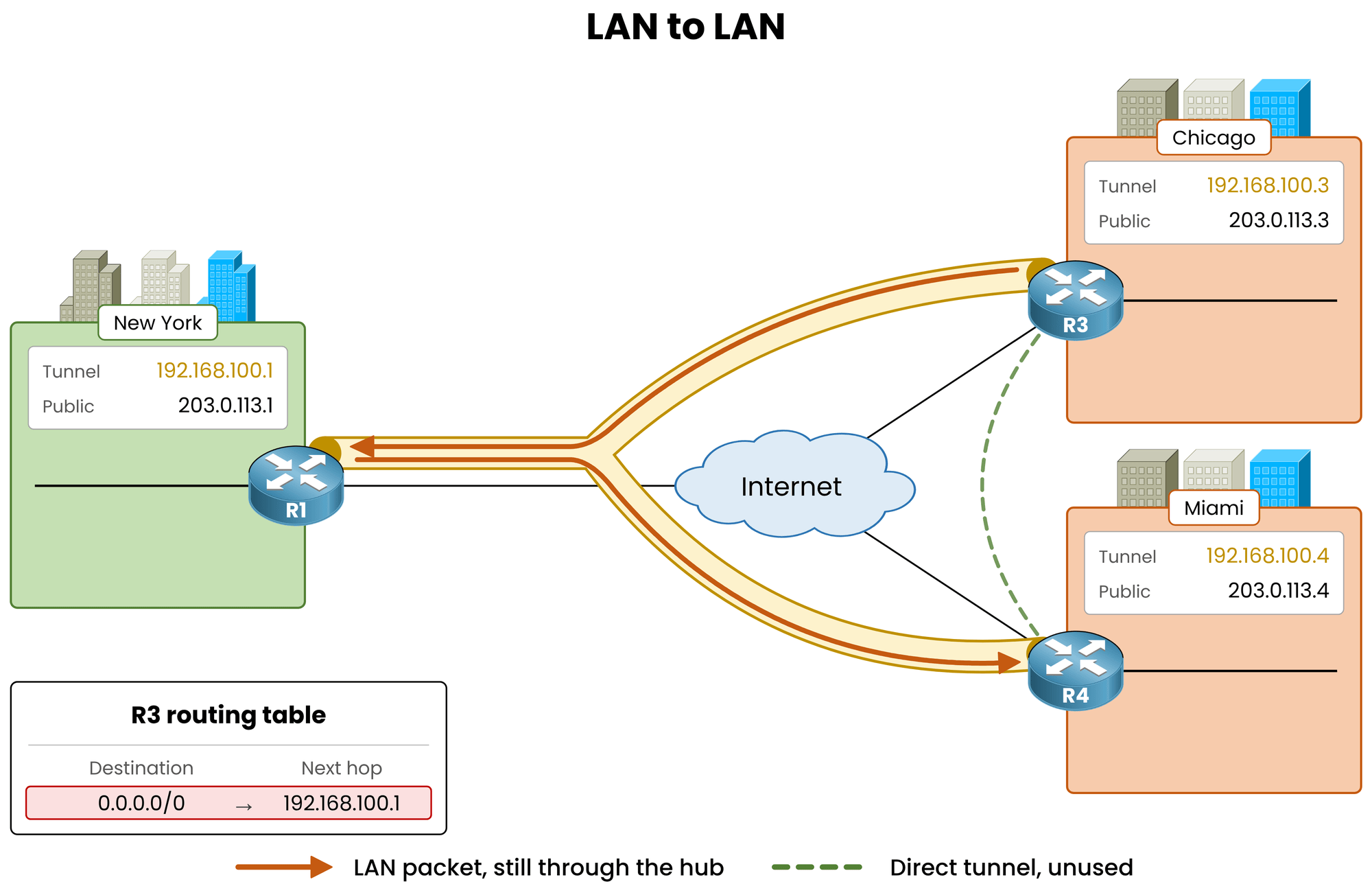
Figure 1 – Starting point: single default route forces all LAN traffic through the hub
Chicago reaches every remote LAN through that default route.
Consequently, all LAN packets continue to hairpin through New York.What EIGRP Must Deliver
To build a direct spoke-to-spoke tunnel, Chicago needs specific routing entries.
Its routing table must list every remote LAN explicitly, with the target spoke set as the next hop.Parameter
Phase 1 Design
Phase 2 Design
Route Population
Single default route
Individual route per remote LAN
Next Hop Address
The hub (
192.168.100.1)The remote spoke owning the LAN
Table 1 – Routing design comparison between Phase 1 and Phase 2
Achieving this requires two quick configuration changes on the hub. The spokes require no changes at all.
Answer the question below
Click on Complete to continue
The default route summarizes all internal destinations and forces the hub as the next hop.
To expose specific remote LANs, remove the default summary address fromTunnel0on the hub:R1# conf t R1(config)# interface tunnel0 R1(config-if)# no ip summary-address eigrp 100 0.0.0.0 0.0.0.0 %DUAL-5-NBRCHANGE: EIGRP-IPv4 100: Neighbor 192.168.100.3 (Tunnel0) is resync: summary configured %DUAL-5-NBRCHANGE: EIGRP-IPv4 100: Neighbor 192.168.100.4 (Tunnel0) is resync: summary configured R1(config-if)# endBoth neighbor adjacencies resynchronize cleanly without dropping.
Answer the question below
Do the EIGRP adjacencies go down when the summary is removed?
Verify the Spoke Routing Table
Inspect the EIGRP routing table on Chicago:
R3# show ip route eigrp
! Output omitted for brevity
      10.0.0.0/8 is variably subnetted, 4 subnets, 2 masks
D        10.10.10.0/24 [90/26880256] via 192.168.100.1, 00:00:06, Tunnel0
D        10.40.40.0/24 [90/28160256] via 192.168.100.1, 00:00:06, Tunnel0
Explicit subnets for New York (
10.10.10.0/24) and Miami (10.40.40.0/24) now replace the default route.
Chicago receives Miami's LAN because Phase 1 already disabled split horizon on the hub.However, the next hop for
10.40.40.0/24remains192.168.100.1(the hub). LAN traffic still hairpins through New York.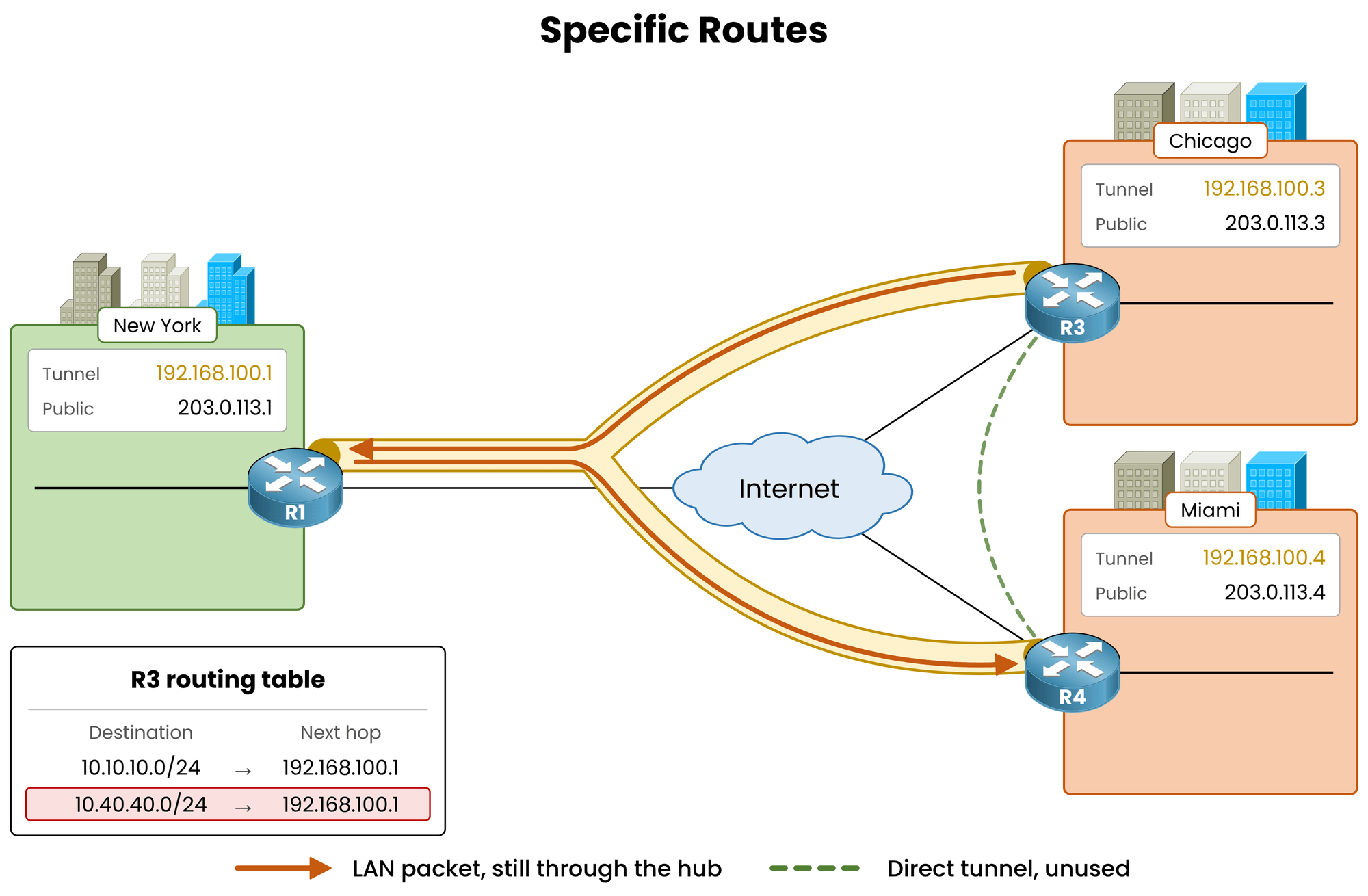
Figure 2 – Specific routes present, but next hop still points to the hub
Answer the question below
After the summary is removed, what is the next hop of 10.40.40.0/24 on R3?
Miami advertises
10.40.40.0/24with its own tunnel IP (192.168.100.4) as the next hop.
Chicago receives the route with192.168.100.1instead. The hub overwrote it.The Hub Rewrites the Next Hop
By default, distance-vector protocols like EIGRP rewrite the next hop to their own IP when re-advertising a route out of an interface (
next-hop-self).In Phase 1, this behavior was fine. Spokes had point-to-point tunnels and could only talk to the hub.
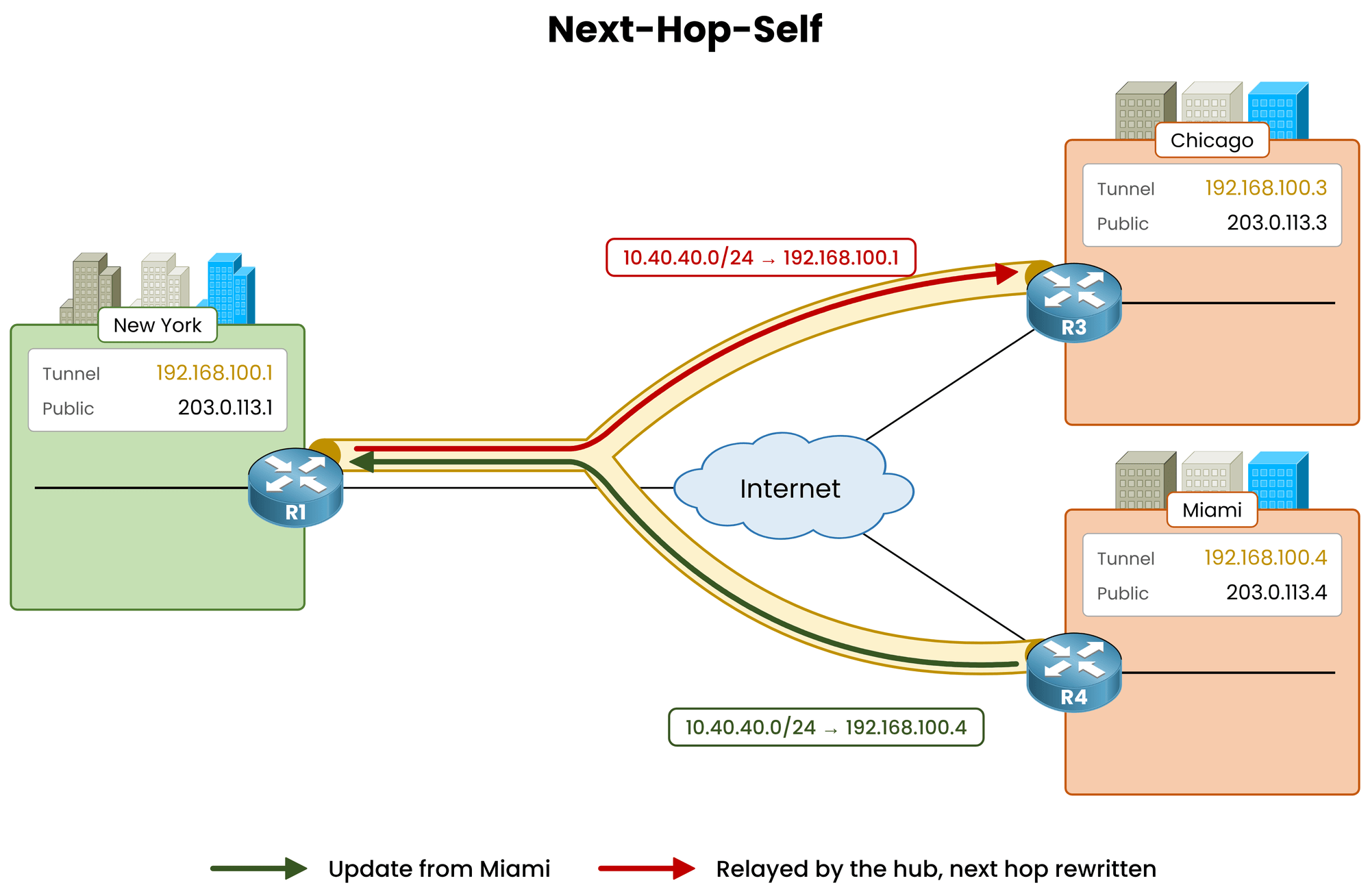
Figure 3 – Next-hop-self active: the hub inserts its own tunnel IP as the next hop
In Phase 2, every spoke runs mGRE in the same tunnel subnet and can communicate directly with the other spokes.
The hub must pass the route along without modifying Miami's original next hop.Answer the question below
Which tunnel IP does Miami advertise as the next hop for 10.40.40.0/24?
Disable Next-Hop-Self
Disable
next-hop-selfon the hub'sTunnel0interface:R1# conf t R1(config)# interface tunnel0 R1(config-if)# no ip next-hop-self eigrp 100 %DUAL-5-NBRCHANGE: EIGRP-IPv4 100: Neighbor 192.168.100.3 (Tunnel0) is down: next_hop_self value changed %DUAL-5-NBRCHANGE: EIGRP-IPv4 100: Neighbor 192.168.100.4 (Tunnel0) is down: next_hop_self value changed %DUAL-5-NBRCHANGE: EIGRP-IPv4 100: Neighbor 192.168.100.3 (Tunnel0) is up: new adjacency %DUAL-5-NBRCHANGE: EIGRP-IPv4 100: Neighbor 192.168.100.4 (Tunnel0) is up: new adjacency R1(config-if)# endChanging next-hop behavior causes all EIGRP adjacencies on
Tunnel0to reset.
The neighbor sessions recover in under one second without data loss.From this point forward, the hub relays EIGRP updates to Chicago while preserving Miami's original next-hop IP.
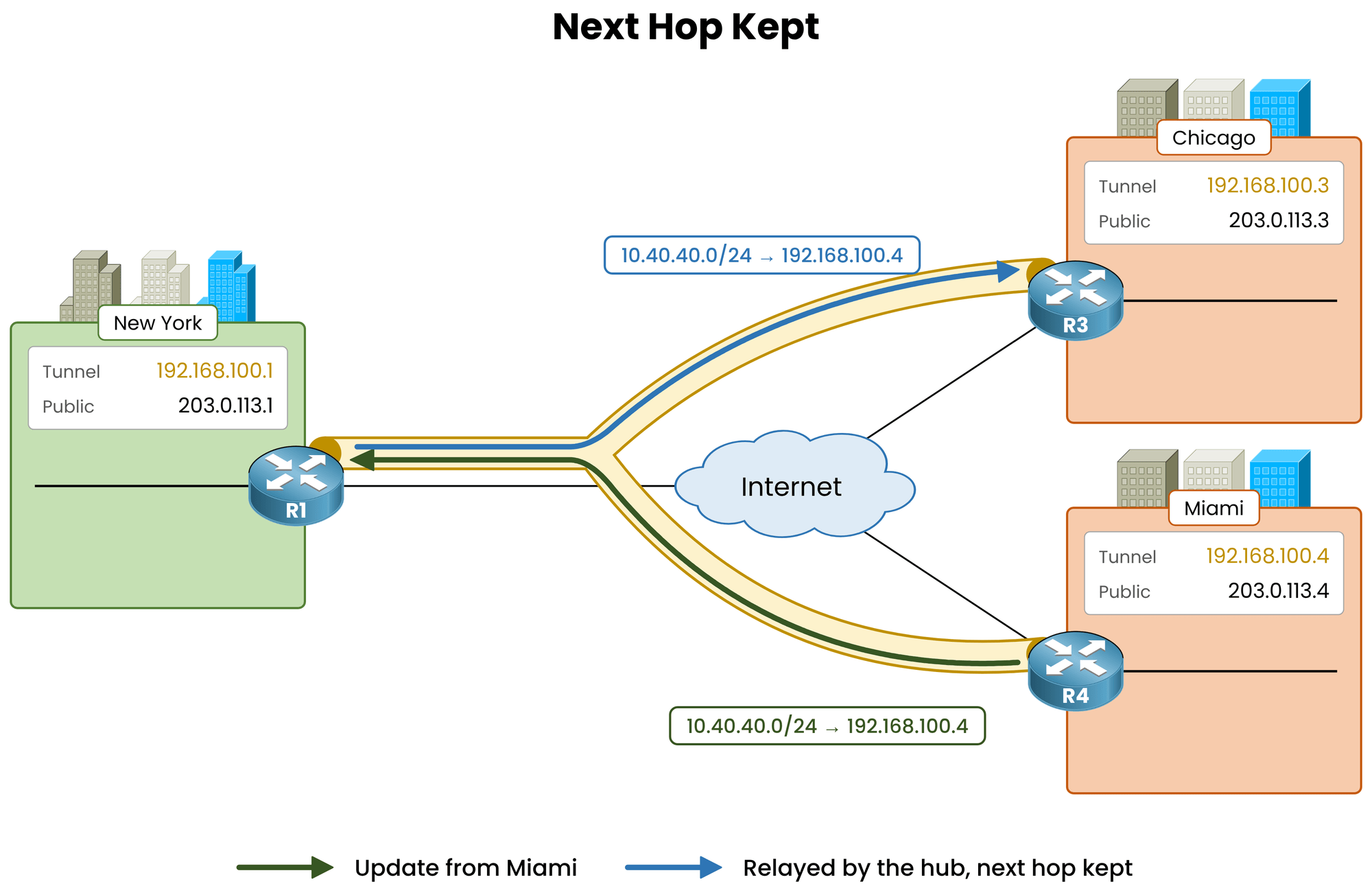
Figure 4 – Next-hop-self disabled: the hub preserves Miami's tunnel IP as the next hop
Re-check the routing table on Chicago:
R3# show ip route eigrp
! Output omitted for brevity
      10.0.0.0/8 is variably subnetted, 4 subnets, 2 masks
D        10.10.10.0/24 [90/26880256] via 192.168.100.1, 00:02:11, Tunnel0
D        10.40.40.0/24 [90/28160256] via 192.168.100.4, 00:00:04, Tunnel0
The next hop for
10.40.40.0/24now points directly to Miami (192.168.100.4).Traffic for New York (
10.10.10.0/24) still uses192.168.100.1because the hub owns that LAN.
Note: disabling
next-hop-selfdoes not change the EIGRP metric. The composite metric still calculates the path cost through the hub, but actual packet forwarding switches to the direct spoke-to-spoke tunnel.Answer the question below
Which EIGRP feature must be disabled on the hub's Tunnel0 in Phase 2?
With the next hop aligned in the routing table, verify that data plane traffic follows the direct tunnel.
Trace from LAN to LAN
Send a ping first, then a traceroute, from Chicago's LAN (
10.30.30.1) to Miami's LAN (10.40.40.1):R3# ping 10.40.40.1 source 10.30.30.1 Type escape sequence to abort. Sending 5, 100-byte ICMP Echos to 10.40.40.1, timeout is 2 seconds: Packet sent with a source address of 10.30.30.1 !!!!! Success rate is 100 percent (5/5), round-trip min/avg/max = 52/62/104 ms R3# traceroute 10.40.40.1 source 10.30.30.1 Type escape sequence to abort. Tracing the route to 10.40.40.1 VRF info: (vrf in name/id, vrf out name/id) 1 192.168.100.4 52 msec * 52 msecThe traceroute confirms a single direct hop to Miami (
192.168.100.4). The asterisk on the second probe results from Cisco IOS ICMP rate limiting. Average latency drops from 104 ms during initial resolution to 52 ms on the direct tunnel.NHRP maps the next hop
192.168.100.4to Miami's public NBMA address (203.0.113.4).
If the cache entry expires, the next data packet triggers a new resolution request automatically.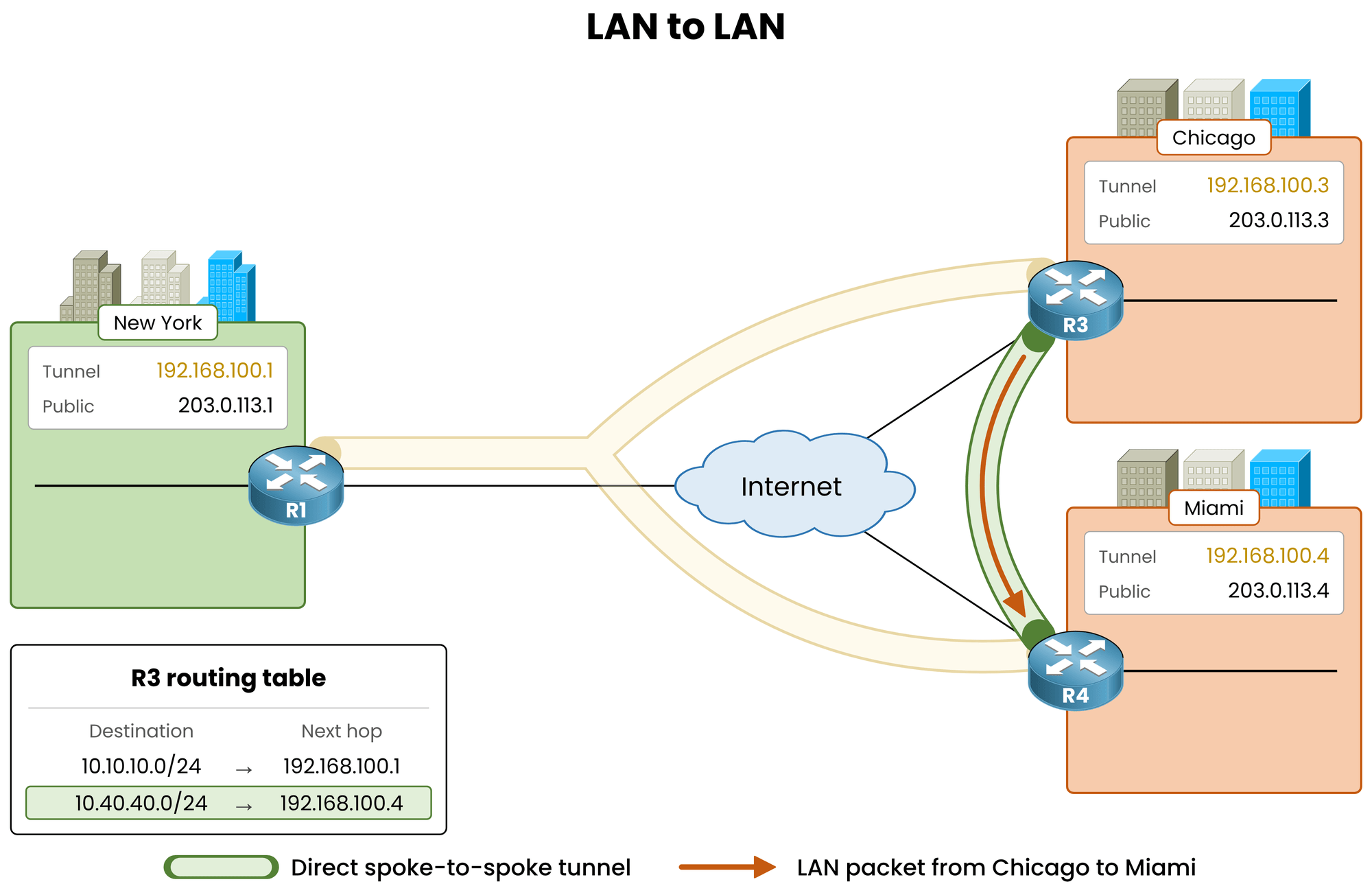
Figure 5 – Phase 2: LAN-to-LAN traffic flows over the dynamic spoke-to-spoke tunnel
Answer the question below
How many hops does the traceroute from the Chicago LAN to the Miami LAN show now?
Verify the Return Path on Miami
The hub applies these EIGRP settings to all neighbors on
Tunnel0. Check Miami to confirm symmetric routing:R4# show ip route eigrp ! Output omitted for brevity 10.0.0.0/8 is variably subnetted, 4 subnets, 2 masks D 10.10.10.0/24 [90/26880256] via 192.168.100.1, 00:02:20, Tunnel0 D 10.30.30.0/24 [90/28160256] via 192.168.100.3, 00:00:13, Tunnel0Miami reaches Chicago's LAN (
10.30.30.0/24) via192.168.100.3. The return path is direct as well.Answer the question below
On R4, what is the next hop of 10.30.30.0/24?
Direct spoke-to-spoke LAN communication comes with a clear trade-off: every spoke must store an explicit route for every remote subnet, along with the originating spoke's next-hop IP.
Parameter
DMVPN Phase 1
DMVPN Phase 2
Spoke Route Population
Single default route
Specific route per remote LAN
Routes per Spoke (300 Sites)
1 route
299 specific routes
Hub Summarization
Enabled (
0.0.0.0/0or10.0.0.0/8)Disabled
LAN-to-LAN Transport
Hairpins through the hub
Direct spoke-to-spoke
Table 2 – Comparison of Phase 1 and Phase 2 routing behaviors
Answer the question below
With 300 sites, how many routes does each Phase 2 spoke hold?
Why Summarization Breaks Phase 2
In Phase 2, if the hub advertises a summary route, it sets itself as the next hop.
Spokes then forward all packets to the hub's IP. Traffic hairpins through New York, and no spoke-to-spoke tunnel is built.To preserve direct tunnels while restoring route summarization and small routing tables on spokes, DMVPN introduces Phase 3 using NHRP Redirect and NHRP Shortcut. That is covered in DMVPN Phase 3 Basic Configuration.
Key Takeaway
On a DMVPN Phase 2 hub running EIGRP, configure
Tunnel0with:no ip split-horizon eigrp <as>no ip next-hop-self eigrp <as>No route summarization toward the spokes.
Answer the question below
Can a Phase 2 hub send only a default route and keep LAN traffic direct between spokes?