Your overlay is operational: one mGRE tunnel on the hub, point-to-point tunnels on the spokes, and both spokes registered.
The hub can reach each spoke's tunnel IP, but Chicago cannot reach the Miami LAN.Starting Point
This lesson adds EIGRP to the overlay and resolves the two limitations of running a distance-vector protocol over a multipoint interface.
Here is the addressing layout for this lesson: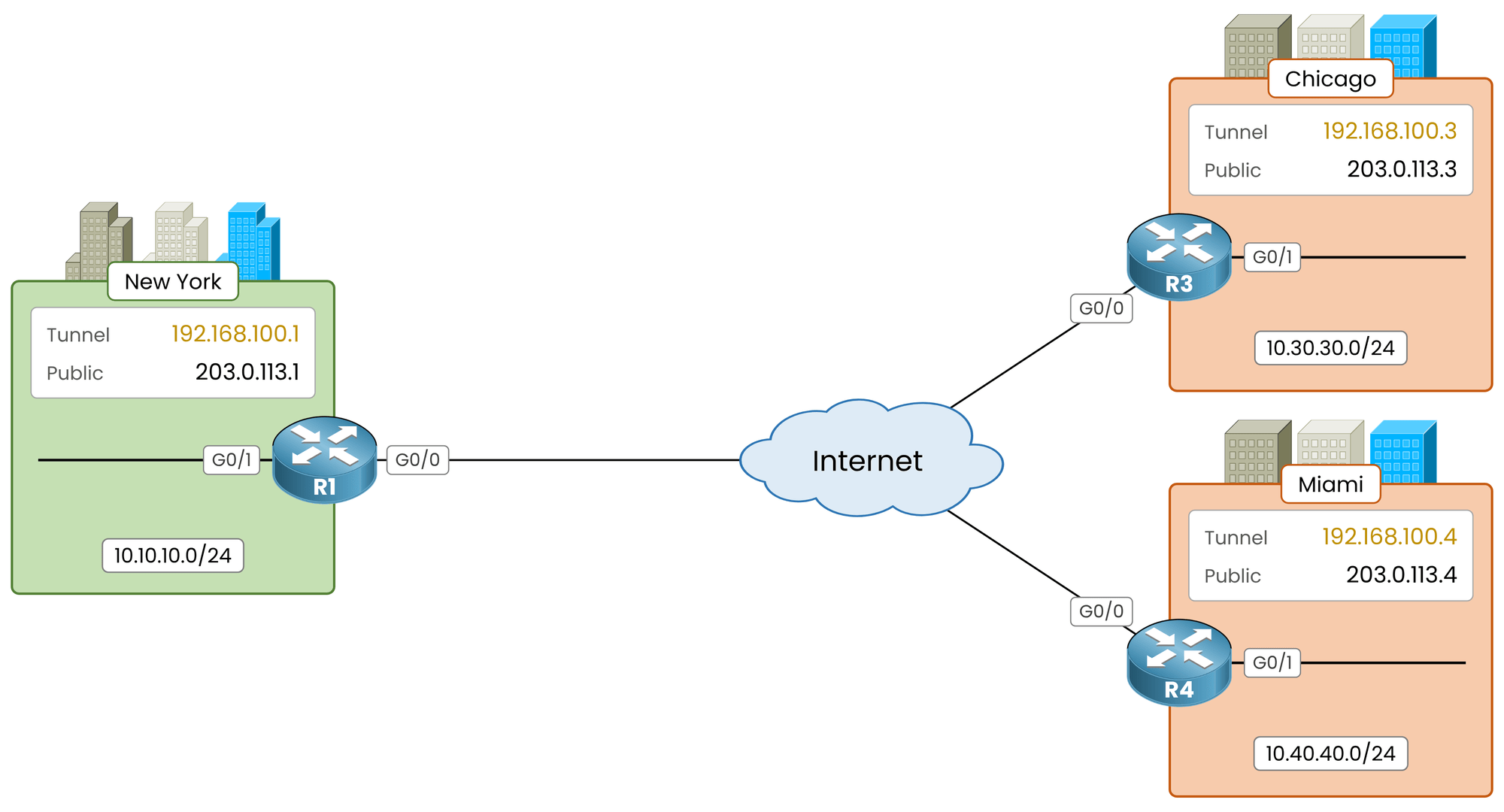
Figure 1 – The lab topology
Router
Tunnel IP
LAN
R1, New York
192.168.100.1
10.10.10.0/24
R3, Chicago
192.168.100.3
10.30.30.0/24
R4, Miami
192.168.100.4
10.40.40.0/24
Table 1 – Overlay and LAN addresses
Verify the Overlay
Confirm that both spokes are registered before configuring routing:
R1# show dmvpn
Legend: Attrb --> S - Static, D - Dynamic, I - Incomplete
        N - NATed, L - Local, X - No Socket
        T1 - Route Installed, T2 - Nexthop-override
        C - CTS Capable
        # Ent --> Number of NHRP entries with same NBMA peer
        NHS Status: E --> Expecting Replies, R --> Responding, W --> Waiting
        UpDn Time --> Up or Down Time for a Tunnel
==========================================================================

Interface: Tunnel0, IPv4 NHRP Details
Type:Hub, NHRP Peers:2,

  # Ent  Peer NBMA Addr Peer Tunnel Add State  UpDn Tm Attrb
 ----- --------------- --------------- ----- -------- -----
     1 203.0.113.3       192.168.100.3    UP 00:00:29     D
     1 203.0.113.4       192.168.100.4    UP 00:00:09     D
Both peers must show
UPand dynamic (D).
EIGRP cannot establish adjacencies over a broken overlay.
Answer the question below
How many NHRP peers must the hub show before you start EIGRP?
Enable EIGRP 100 on all three routers, covering both the tunnel subnet and each local LAN.
The tunnel network forms the adjacencies; the LAN statements advertise the local networks.EIGRP on the Hub and Spokes
Configure the hub (R1):
R1# conf t
R1(config)# router eigrp 100
R1(config-router)# network 192.168.100.0 0.0.0.255
R1(config-router)# network 10.10.10.0 0.0.0.255
R1(config-router)# end
Configure both spokes:
R3# conf t R3(config)# router eigrp 100 R3(config-router)# network 192.168.100.0 0.0.0.255 %DUAL-5-NBRCHANGE: EIGRP-IPv4 100: Neighbor 192.168.100.1 (Tunnel0) is up: new adjacency R3(config-router)# network 10.30.30.0 0.0.0.255 R3(config-router)# endR4# conf t R4(config)# router eigrp 100 R4(config-router)# network 192.168.100.0 0.0.0.255 %DUAL-5-NBRCHANGE: EIGRP-IPv4 100: Neighbor 192.168.100.1 (Tunnel0) is up: new adjacency R4(config-router)# network 10.40.40.0 0.0.0.255 R4(config-router)# endEach spoke prints an adjacency message with
192.168.100.1onTunnel0.
The NHRP multicast mapping forwards their hello packets to the hub: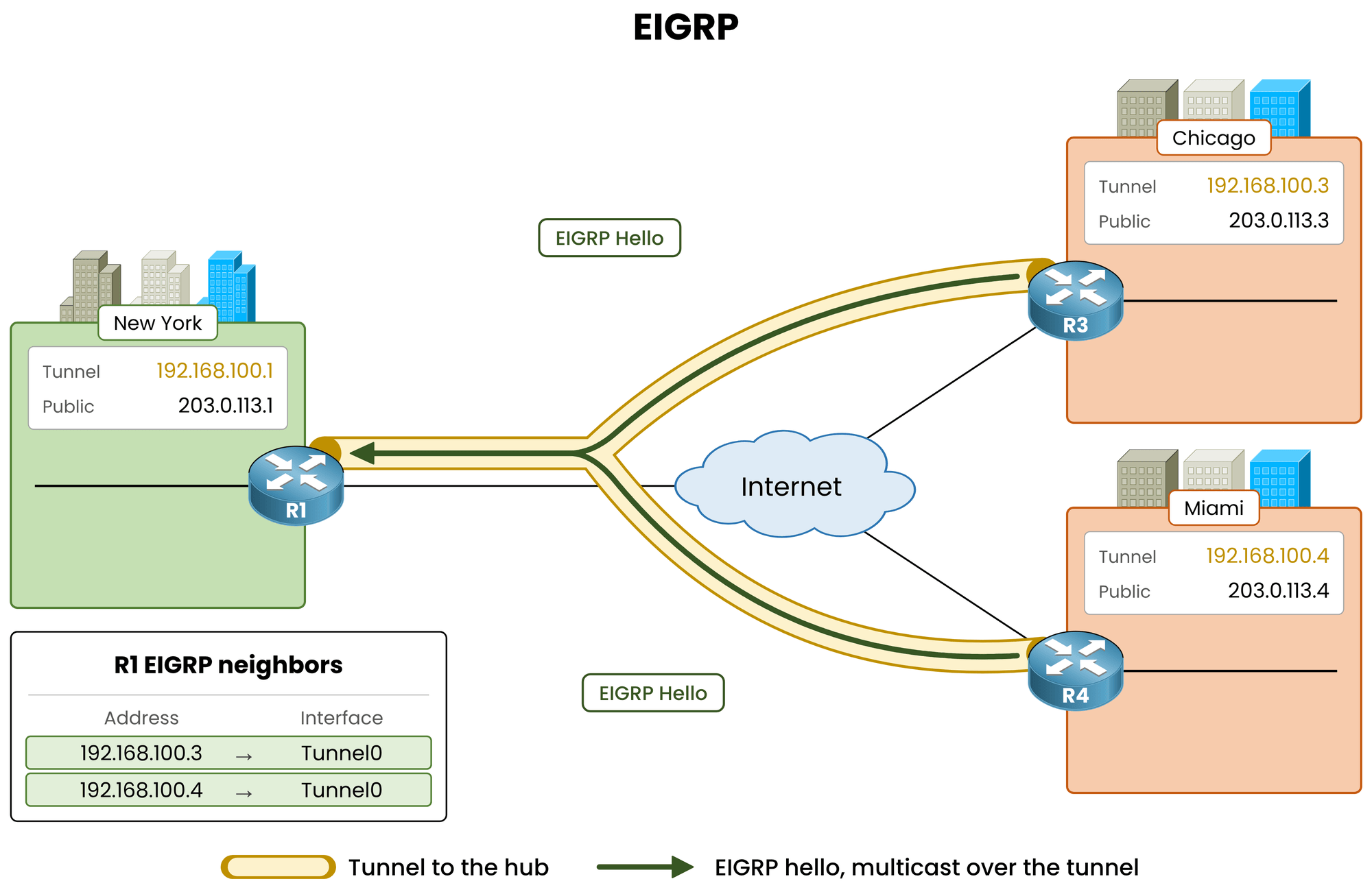
Figure 2 – Two spokes, two neighbors, one Tunnel0
Verify the adjacencies on the hub:
R1# show ip eigrp neighbors
EIGRP-IPv4 Neighbors for AS(100)
H   Address                 Interface              Hold Uptime   SRTT   RTO  Q  Seq
                                                   (sec)         (ms)       Cnt Num
0   192.168.100.3           Tunnel0                13   00:00:13  5      100  0  1
1   192.168.100.4           Tunnel0                10   00:00:10  5      100  0  1
The hub shows two neighbors on
Tunnel0: one single interface, one adjacency per spoke.Answer the question below
On which interface does the hub see both EIGRP neighbors?
Adjacencies are up. Check if Chicago (R3) knows about Miami's LAN (
10.40.40.0/24).Verify the Routing Table
Inspect the routing table on R3:
R3# show ip route
! Output omitted for brevity
      10.0.0.0/8 is variably subnetted, 3 subnets, 2 masks
D        10.10.10.0/24 [90/26880256] via 192.168.100.1, 00:00:14, Tunnel0
C        10.30.30.0/24 is directly connected, GigabitEthernet0/1
L        10.30.30.1/32 is directly connected, GigabitEthernet0/1
      192.168.100.0/24 is variably subnetted, 2 subnets, 2 masks
C        192.168.100.0/24 is directly connected, Tunnel0
L        192.168.100.3/32 is directly connected, Tunnel0
Chicago learned the New York LAN (
10.10.10.0/24), but 10.40.40.0/24 is missing.
Miami advertised it to the hub, but the hub dropped it.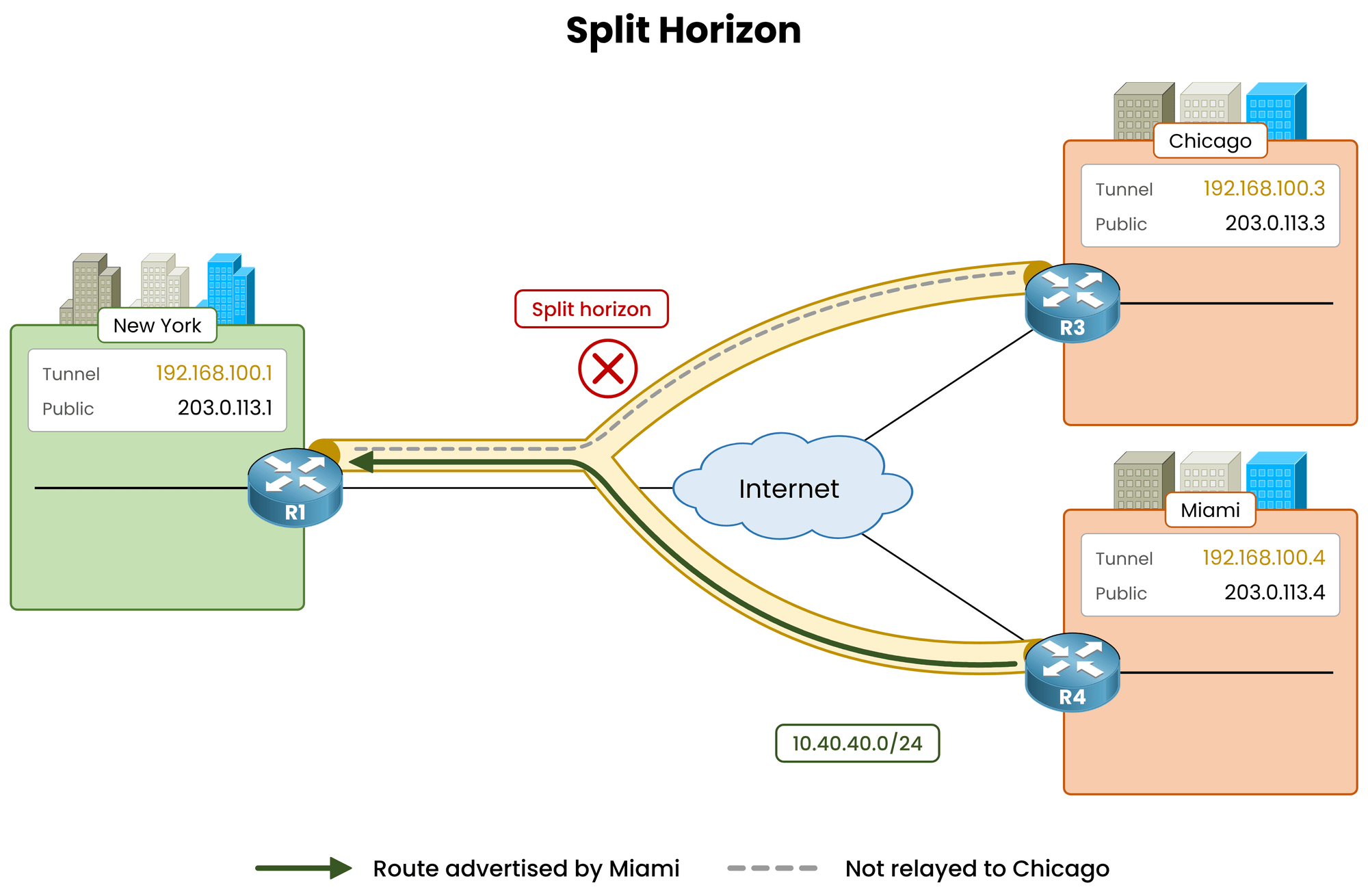
Figure 3 – Split horizon stops the route at the hub
By default, EIGRP split horizon prevents a router from advertising a route back out of the interface where it was learned.
The hub received Miami's route onTunnel0and cannot re-advertise it out ofTunnel0to Chicago.Disable Split Horizon on the Hub
Disable split horizon on the hub's tunnel interface:
R1# conf t
R1(config)# interface tunnel0
R1(config-if)# no ip split-horizon eigrp 100
%DUAL-5-NBRCHANGE: EIGRP-IPv4 100: Neighbor 192.168.100.3 (Tunnel0) is resync: split horizon changed
%DUAL-5-NBRCHANGE: EIGRP-IPv4 100: Neighbor 192.168.100.4 (Tunnel0) is resync: split horizon changed
R1(config-if)# end
Both neighbors resync, nothing goes down. Re-check the routing table on Chicago:
R3# show ip route
! Output omitted for brevity
      10.0.0.0/8 is variably subnetted, 4 subnets, 2 masks
D        10.10.10.0/24 [90/26880256] via 192.168.100.1, 00:00:25, Tunnel0
C        10.30.30.0/24 is directly connected, GigabitEthernet0/1
L        10.30.30.1/32 is directly connected, GigabitEthernet0/1
D        10.40.40.0/24 [90/28160256] via 192.168.100.1, 00:00:09, Tunnel0
Miami's LAN is now present. The next hop is
192.168.100.1, the hub.Key Takeaway: on a DMVPN Phase 1 hub, EIGRP requires
no ip split-horizon eigrp <as>onTunnel0.
Without this command, spokes only learn the hub's local routes.Answer the question below
On which interface of R1 did you disable EIGRP split horizon?
Answer the question below
Before split horizon was disabled on R1, which LAN was missing on Miami?
The Miami route on Chicago points to
192.168.100.1(the hub), not to R4's IP.
When the hub relays an EIGRP route, it overwrites the next hop with its own tunnel IP.In Phase 1, this behavior is expected: spoke tunnels are point-to-point and can only reach the hub.
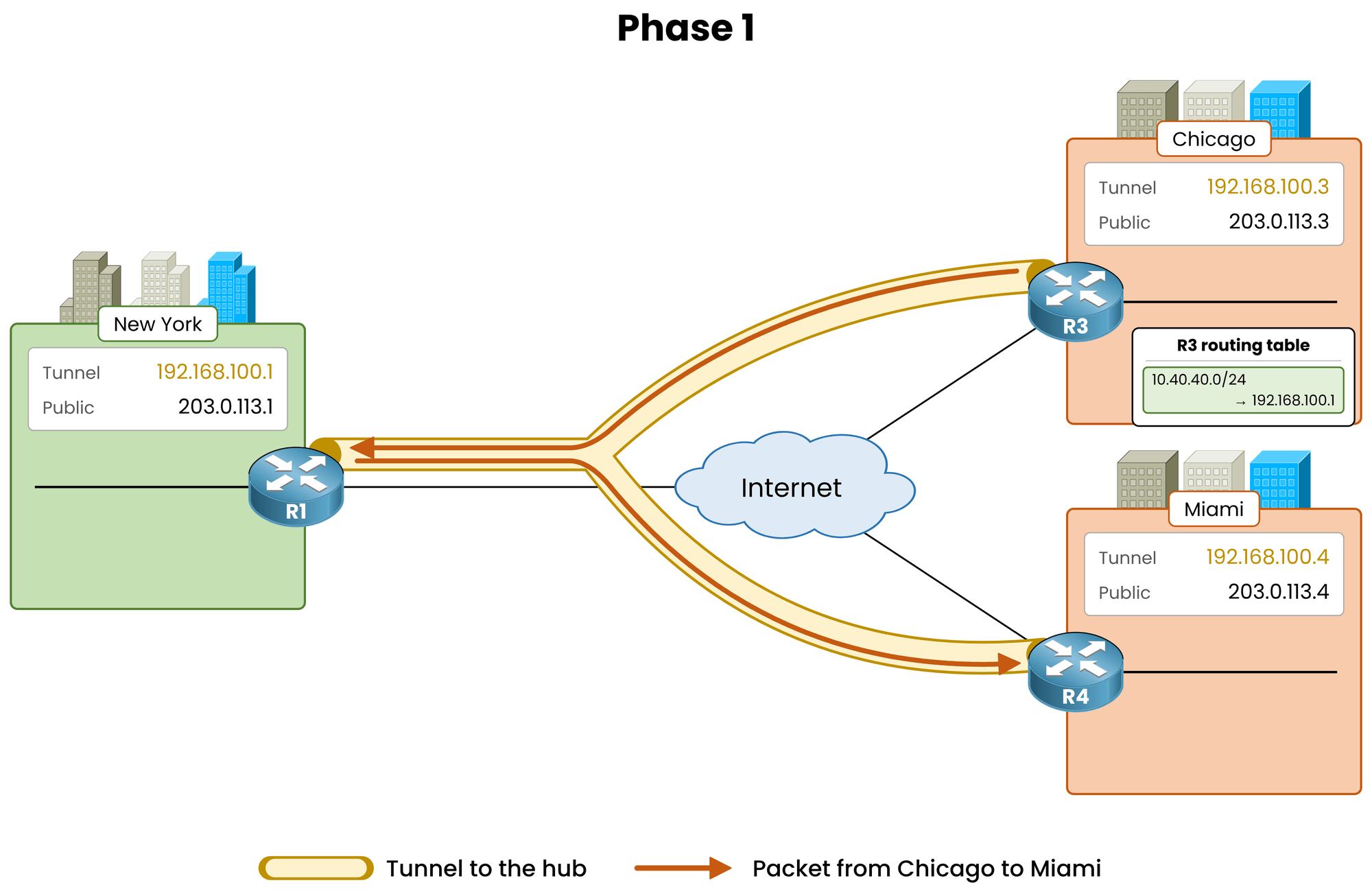
Figure 4 – Phase 1: all traffic traverses the hub
Verify the Path
Trace the path from Chicago to Miami:
R3# traceroute 10.40.40.1
Type escape sequence to abort.
Tracing the route to 10.40.40.1
VRF info: (vrf in name/id, vrf out name/id)
  1 192.168.100.1 11 msec 12 msec 11 msec
  2 192.168.100.4 23 msec 24 msec 23 msec
The first hop is the hub, followed by Miami. Note that Miami answers from 192.168.100.4, not from the 10.40.40.1 you traced to: a router sources an ICMP error from the interface the probe arrived on, and the probe arrived on Tunnel0.
Traffic takes two tunnel hops between spokes that could communicate directly.
This detour is the primary limitation Phase 2 and Phase 3 resolve.Answer the question below
In the traceroute from Chicago to Miami, which address is the first hop?
Every packet between spokes traverses the hub, meaning spokes do not need to store individual routes for every remote branch.
A single default route pointing to the hub achieves the same outcome while keeping routing tables compact.Summarize on the Hub
Advertise
0.0.0.0/0out ofTunnel0: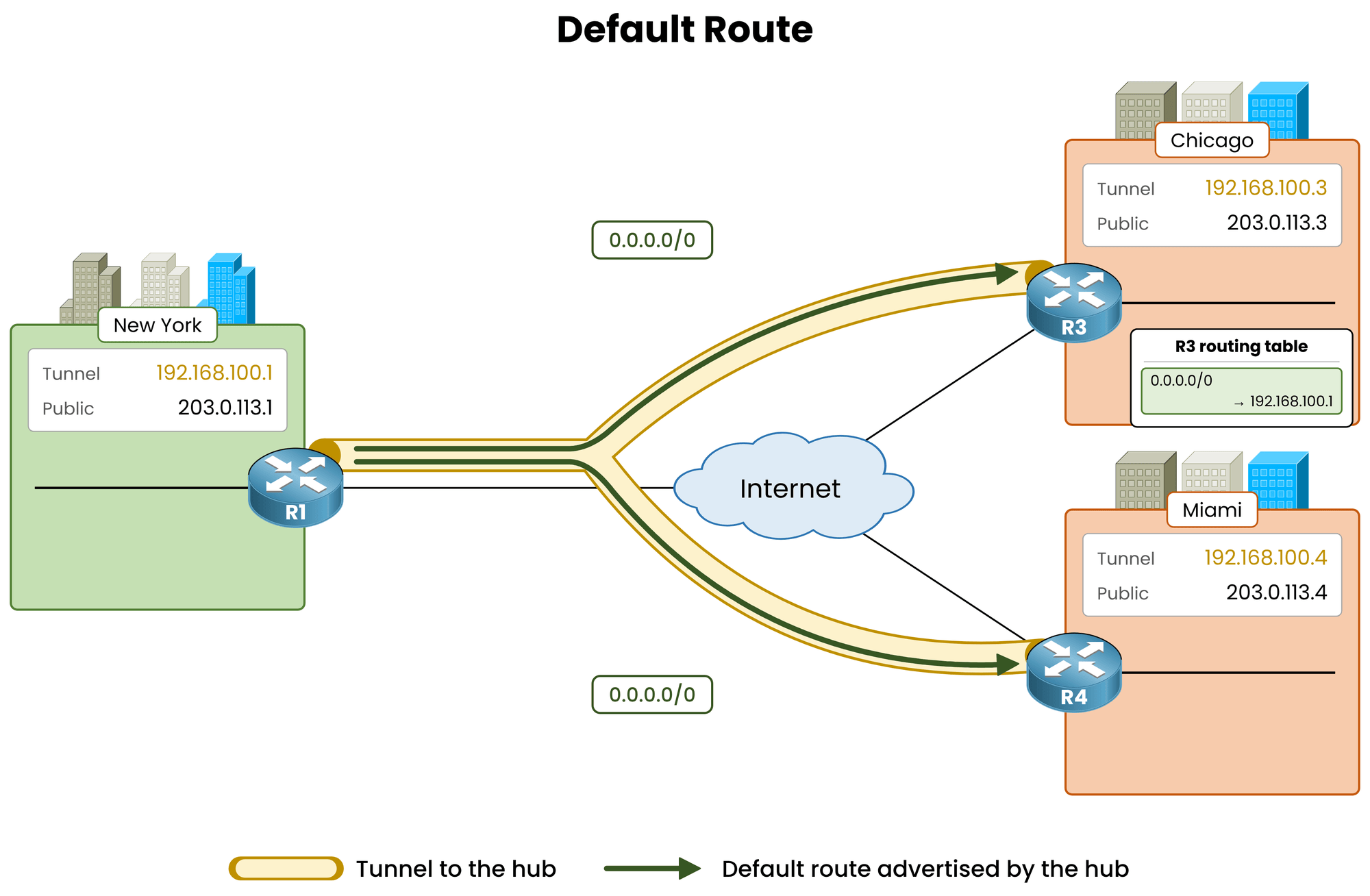
Figure 5 – One default route for every spoke
R1# conf t
R1(config)# interface tunnel0
R1(config-if)# ip summary-address eigrp 100 0.0.0.0 0.0.0.0
%DUAL-5-NBRCHANGE: EIGRP-IPv4 100: Neighbor 192.168.100.3 (Tunnel0) is resync: summary configured
%DUAL-5-NBRCHANGE: EIGRP-IPv4 100: Neighbor 192.168.100.4 (Tunnel0) is resync: summary configured
R1(config-if)# end
Both neighbors resynchronize their adjacencies.
The hub now suppresses specific internal routes and sends a single summary prefix (0.0.0.0/0) out ofTunnel0.Production Design Note: this lesson summarizes to
0.0.0.0/0because Phase 1 sends all spoke traffic through the hub anyway. In production, when spokes have Direct Internet Access (DIA), summarize the corporate private ranges instead (for example10.0.0.0/8), so local Internet traffic is not redirected to the hub.Verify the Spoke Routing Table
Check the routing table on Chicago:
R3# show ip route eigrp
! Output omitted for brevity

Gateway of last resort is 192.168.100.1 to network 0.0.0.0

D*    0.0.0.0/0 [90/26880256] via 192.168.100.1, 00:00:21, Tunnel0
The spoke now maintains one EIGRP route covering both New York and Miami.
In a network with 300 sites, each spoke receives a single route entry instead of 299 specific prefixes.Verify end-to-end connectivity from Chicago's LAN to Miami's LAN:
R3# ping 10.40.40.1 source 10.30.30.1
Type escape sequence to abort.
Sending 5, 100-byte ICMP Echos to 10.40.40.1, timeout is 2 seconds:
Packet sent with a source address of 10.30.30.1
!!!!!
Success rate is 100 percent (5/5), round-trip min/avg/max = 22/23/25 ms
Traffic flows from LAN to LAN through the hub using a single default route on the spoke.
Key Takeaway: on a Phase 1 hub, configure
ip summary-address eigrp <as> 0.0.0.0 0.0.0.0onTunnel0.
This reduces spoke routing table overhead to one entry and simplifies overlay scaling.Answer the question below
After the summary, how many EIGRP routes does a spoke hold?