In DMVPN Phase 2 EIGRP Routing, LAN traffic between Chicago and Miami finally took the direct spoke-to-spoke tunnel.
That result has a cost: every spoke must learn every remote LAN, with the remote spoke set as the next hop.Starting Point
Here is the EIGRP baseline on the hub's
Tunnel0interface:no ip split-horizon eigrp 100no ip next-hop-self eigrp 100No summary route toward the spokes.
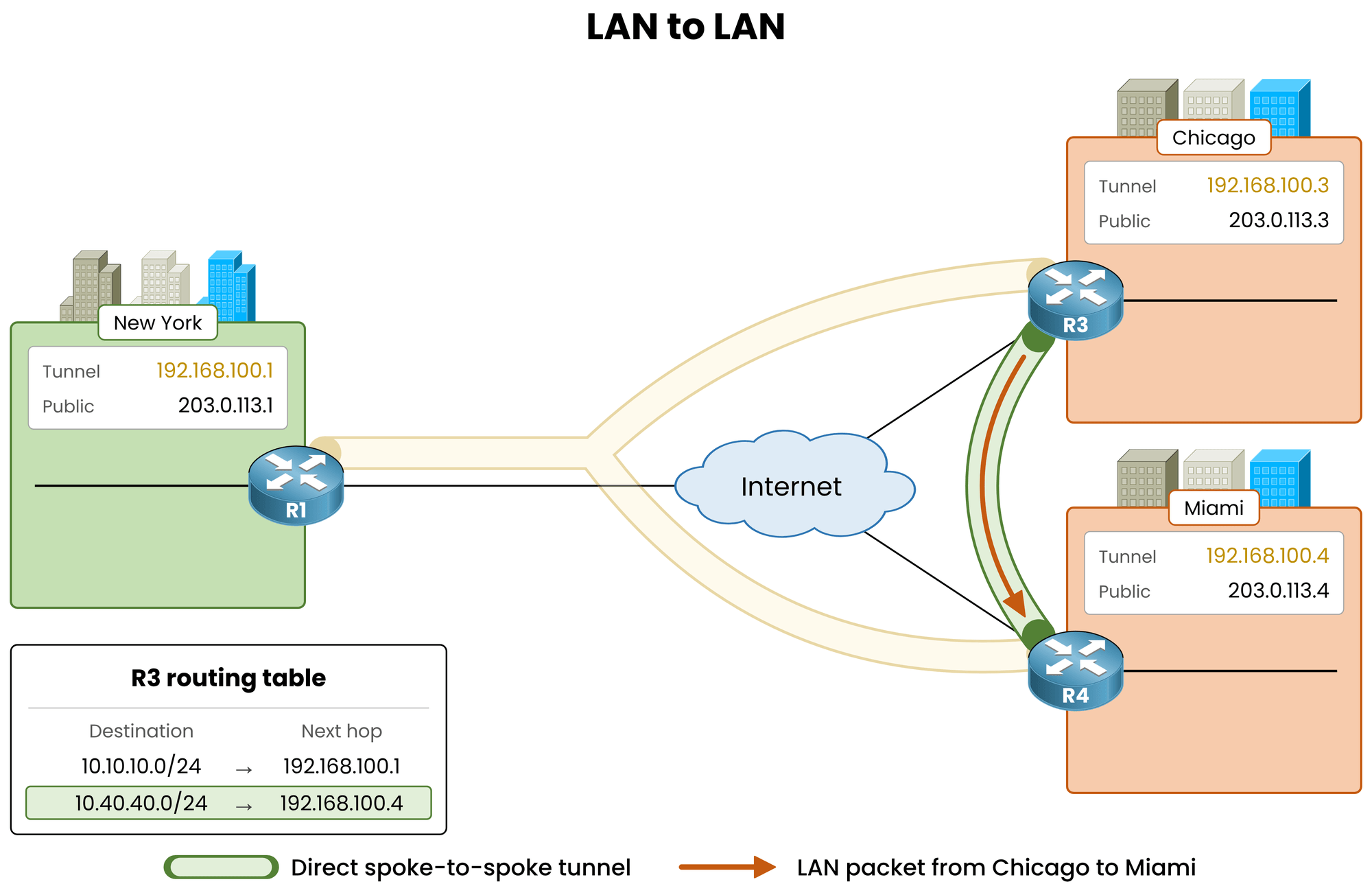
Figure 1 – Starting point: direct LAN traffic, one route per remote LAN
This design works only because Chicago's routing table explicitly names Miami (
192.168.100.4) as the next hop.
Phase 2 depends entirely on the routing protocol to deliver the correct next hop.What Phase 3 Changes
Phase 3 removes that dependency. The routing table can point back to the hub, and NHRP corrects the path dynamically.
It requires two commands:
ip nhrp redirecton the hub: informs a spoke when its traffic hairpins through the hub to reach another spoke.ip nhrp shortcuton each spoke: enables the spoke to act on that message and send subsequent packets directly.
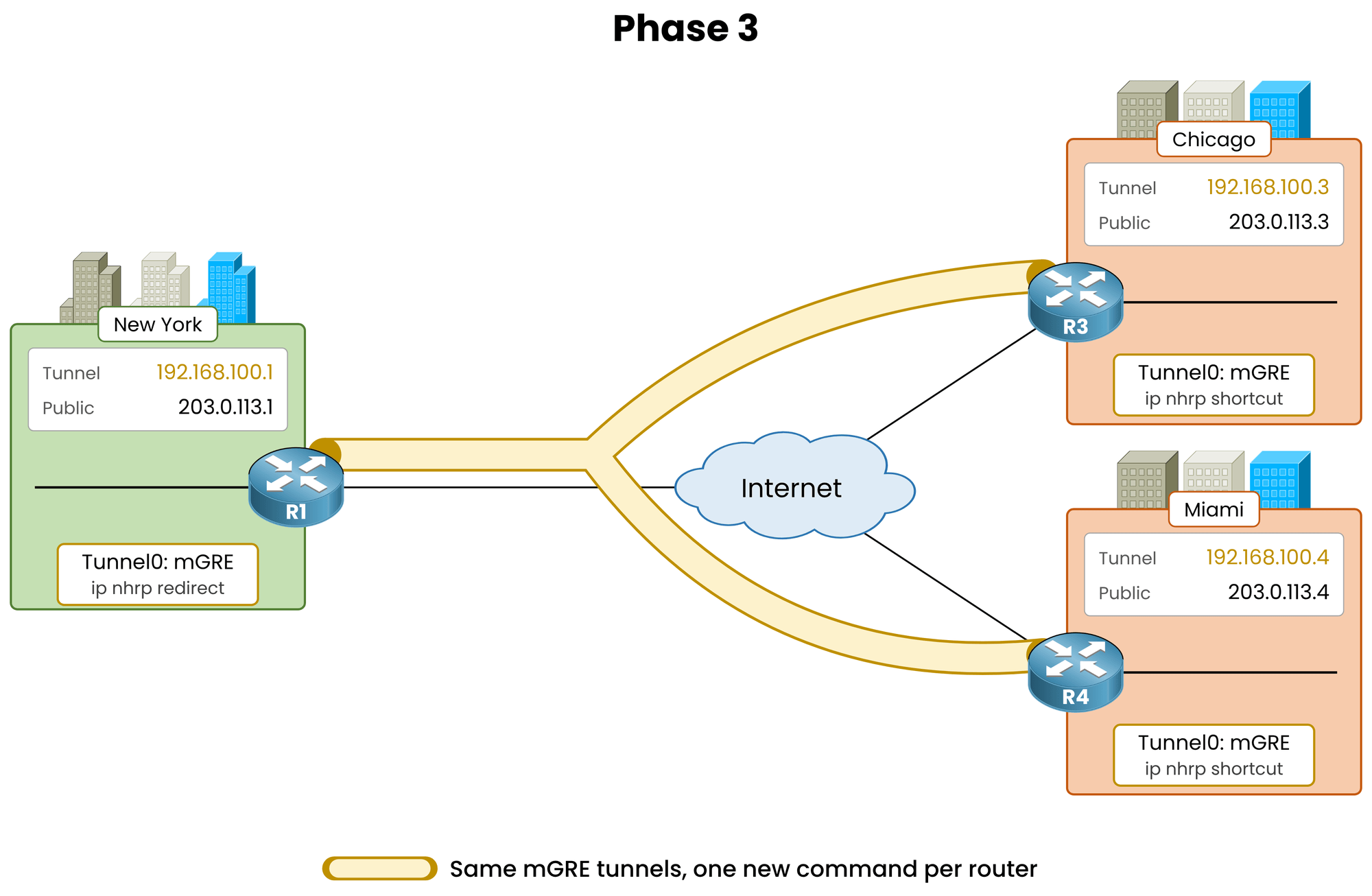
Figure 2 – Phase 3: one command on the hub, one on each spoke
Answer the question below
Click on Complete to continue
To watch Phase 3 at work, first undo the Phase 2 fix.
Re-enablenext-hop-selfon the hub so that Chicago routes to Miami through New York again.This is also the core idea of Phase 3: the hub no longer needs to preserve the original next hop.
Restore Next-Hop-Self
On the hub, re-enable
next-hop-selfonTunnel0:R1# conf t R1(config)# interface tunnel0 R1(config-if)# ip next-hop-self eigrp 100 %DUAL-5-NBRCHANGE: EIGRP-IPv4 100: Neighbor 192.168.100.4 (Tunnel0) is down: next_hop_self value changed %DUAL-5-NBRCHANGE: EIGRP-IPv4 100: Neighbor 192.168.100.3 (Tunnel0) is down: next_hop_self value changed R1(config-if)# end %DUAL-5-NBRCHANGE: EIGRP-IPv4 100: Neighbor 192.168.100.3 (Tunnel0) is up: new adjacency %DUAL-5-NBRCHANGE: EIGRP-IPv4 100: Neighbor 192.168.100.4 (Tunnel0) is up: new adjacencyBoth adjacencies reset and recover immediately, matching the behavior observed when removing the command in Phase 2.
Answer the question below
Do the EIGRP adjacencies on Tunnel0 reset when you change next-hop-self?
Verify Traffic Through the Hub
Check the route to Miami's LAN on Chicago, then trace the path:
R3# show ip route eigrp
Codes: L - local, C - connected, S - static, R - RIP, M - mobile, B - BGP
       D - EIGRP, EX - EIGRP external, O - OSPF, IA - OSPF inter area
       N1 - OSPF NSSA external type 1, N2 - OSPF NSSA external type 2
       E1 - OSPF external type 1, E2 - OSPF external type 2
       i - IS-IS, su - IS-IS summary, L1 - IS-IS level-1, L2 - IS-IS level-2
       ia - IS-IS inter area, * - candidate default, U - per-user static route
       o - ODR, P - periodic downloaded static route, H - NHRP, l - LISP
       a - application route
       + - replicated route, % - next hop override, p - overrides from PfR

Gateway of last resort is not set

      10.0.0.0/8 is variably subnetted, 4 subnets, 2 masks
D        10.10.10.0/24 [90/26880256] via 192.168.100.1, 00:01:07, Tunnel0
D        10.40.40.0/24 [90/28160256] via 192.168.100.1, 00:01:07, Tunnel0

R3# traceroute 10.40.40.1 source 10.30.30.1
Type escape sequence to abort.
Tracing the route to 10.40.40.1
VRF info: (vrf in name/id, vrf out name/id)
  1 192.168.100.1 52 msec 52 msec 52 msec
  2 192.168.100.4 104 msec *  104 msec
The next hop for
10.40.40.0/24points to the hub again (192.168.100.1).The traceroute shows two hops: New York, then Miami. The 104 ms round trip doubles the 52 ms direct path measured in Phase 2.
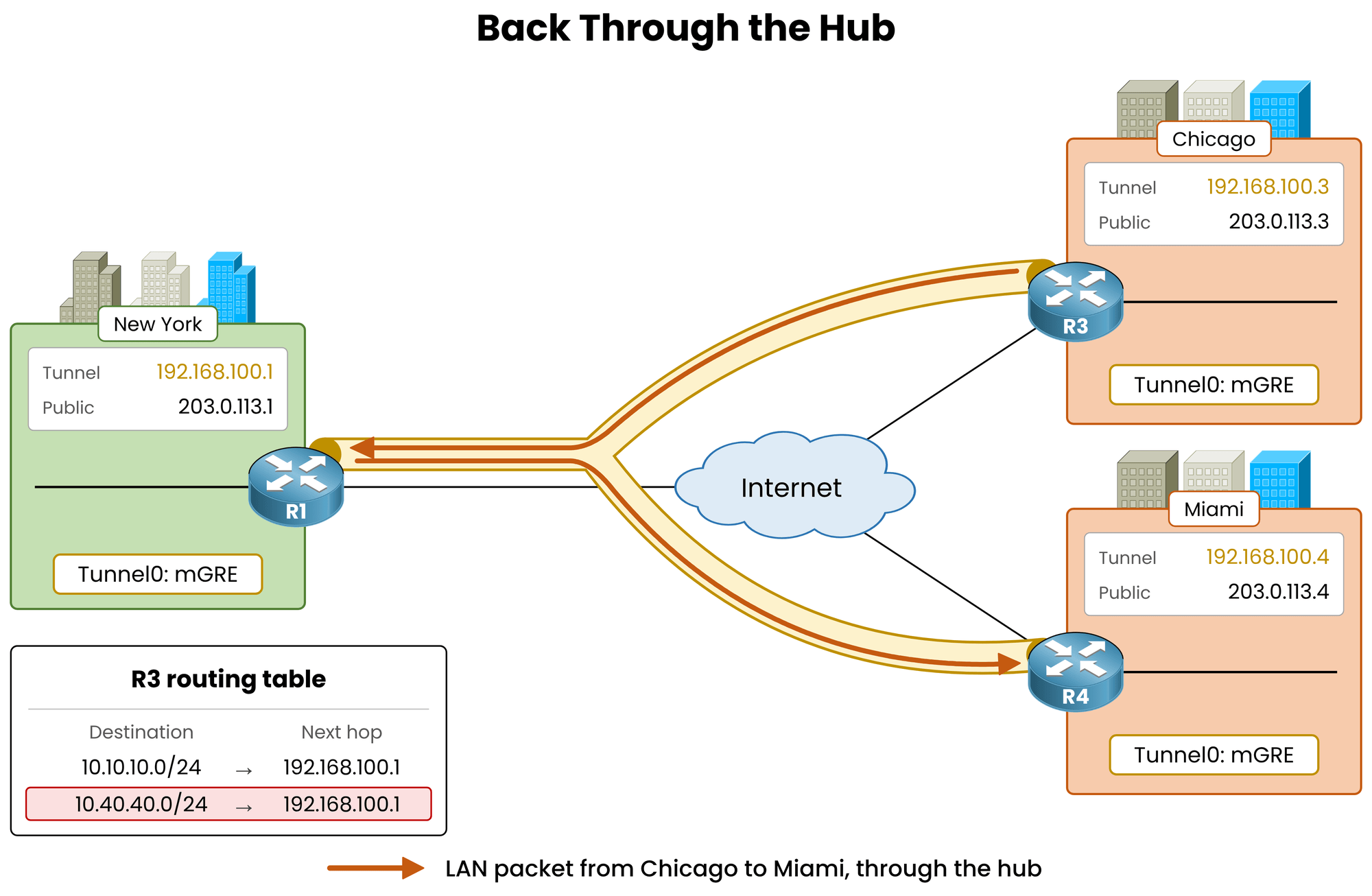
Figure 3 – Next-hop-self restored: LAN traffic goes through the hub again
Answer the question below
After restoring next-hop-self, what is the next hop of 10.40.40.0/24 on R3?
Now enable Phase 3. The EIGRP configuration stays exactly as it is.
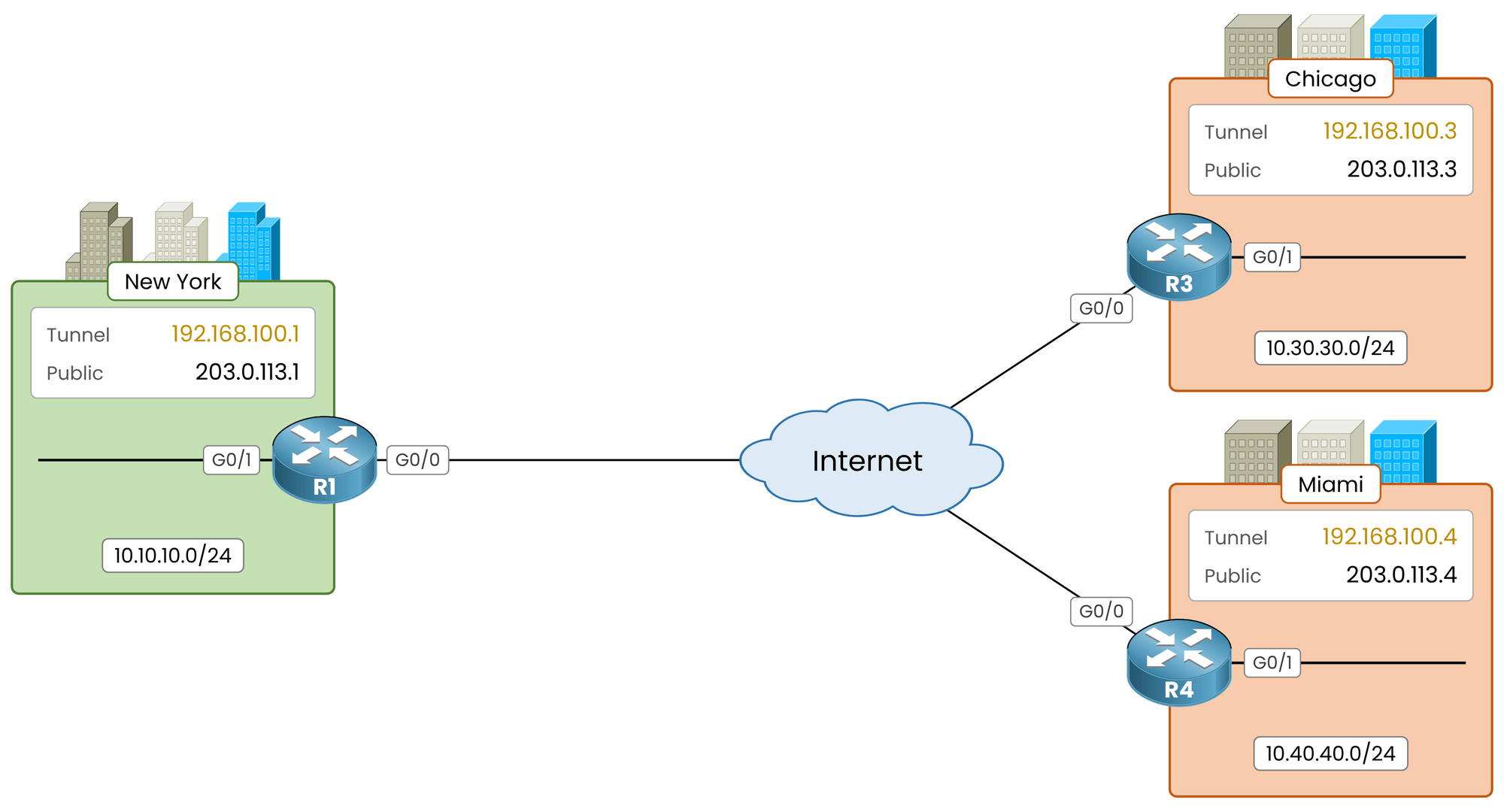
Figure 4 – Topology: the New York hub and the Chicago and Miami spokes
On the Hub
Only the hub can detect the hairpin condition: a packet enters
Tunnel0and leaves throughTunnel0.
Enable NHRP redirect on the hub's tunnel interface:R1# conf t R1(config)# interface tunnel0 R1(config-if)# ip nhrp redirect R1(config-if)# endNo NHRP message is generated immediately. The command changes how the hub reacts when the next packet hairpins.
Answer the question below
On which router do you configure ip nhrp redirect?
On the Spokes
On a spoke,
ip nhrp shortcutis disabled by default.
Without it, the spoke ignores redirect messages sent by the hub.Enable
ip nhrp shortcuton Chicago:R3# conf t R3(config)# interface tunnel0 R3(config-if)# ip nhrp shortcut R3(config-if)# endApply the same command on Miami:
R4# conf t
R4(config)# interface tunnel0
R4(config-if)# ip nhrp shortcut
R4(config-if)# end
Answer the question below
Which keyword completes ip nhrp ________ on the spokes in Phase 3?
Nothing happens until a packet hairpins through the hub.
First Packet Through the Hub
Do not send a ping first. Trace the path immediately to observe the initial packet traversing New York.
R3# traceroute 10.40.40.1 source 10.30.30.1
Type escape sequence to abort.
Tracing the route to 10.40.40.1
VRF info: (vrf in name/id, vrf out name/id)
  1 192.168.100.1 52 msec 52 msec 52 msec
  2 192.168.100.4 104 msec *  78 msec
The initial traceroute traverses New York:
Probes with a TTL of 1 expire on the hub and trigger no redirection.
Probes with a TTL of 2 enter and exit the hub on
Tunnel0, triggering the redirect.
Answer the question below
Which TTL do the probes that trigger the redirect carry, 1 or 2?
The Hub Sends a Redirect
When a packet enters and leaves through the same tunnel, the hub forwards it to Miami and sends an NHRP Redirect to Chicago.
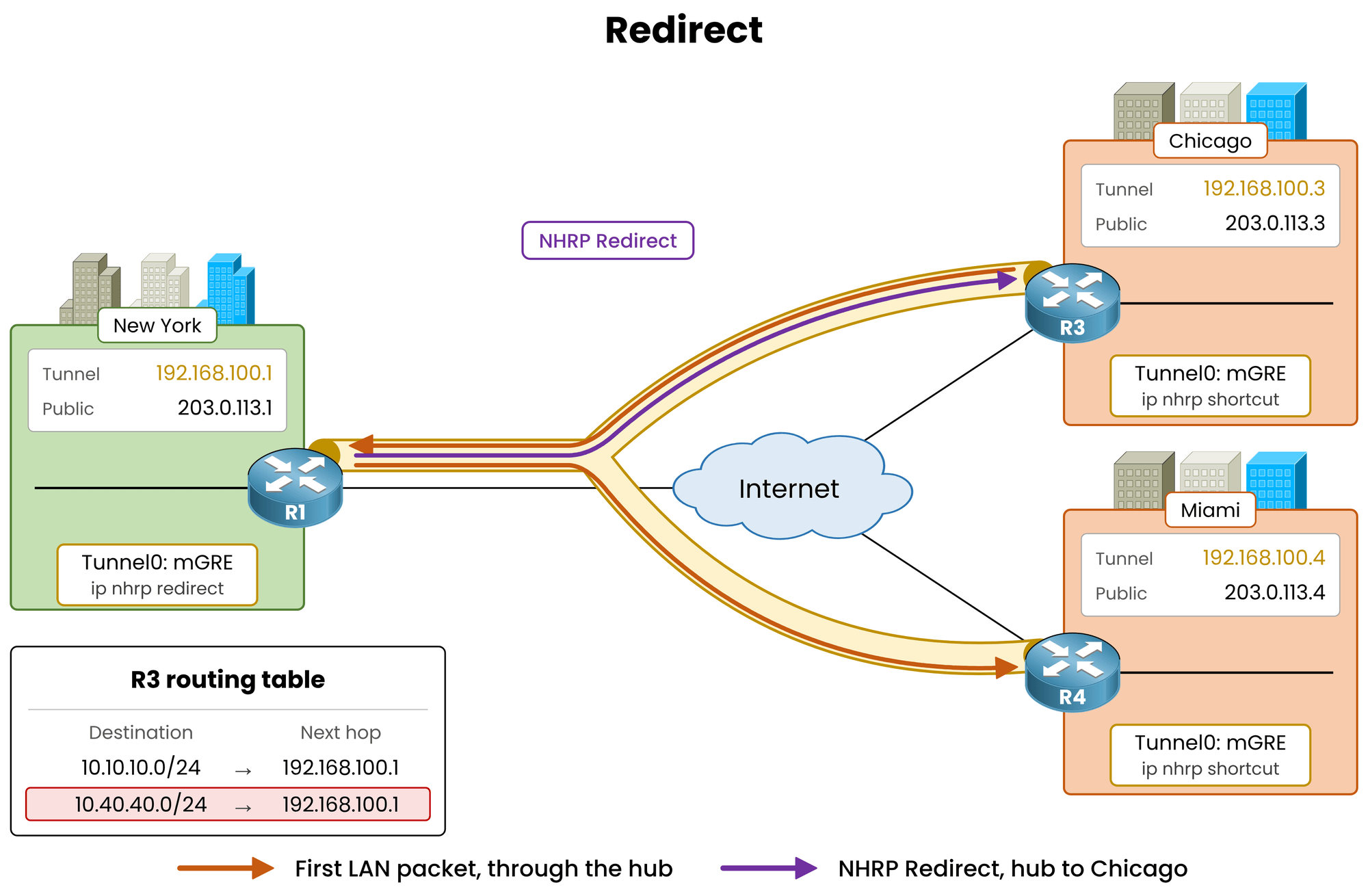
Figure 5 – The hub forwards the first packet and redirects Chicago
Cisco IOS counts these messages as Traffic Indications.
Inspect the NHRP counters on the hub:
R1# show ip nhrp traffic
Tunnel0: Max-send limit:10000Pkts/10Sec, Usage:0%
   Sent: Total 11
         3 Resolution Request  0 Resolution Reply  0 Registration Request
         6 Registration Reply  0 Purge Request  0 Purge Reply
         0 Error Indication  2 Traffic Indication  0 Redirect Suppress
   Rcvd: Total 9
         3 Resolution Request  0 Resolution Reply  6 Registration Request
         0 Registration Reply  0 Purge Request  0 Purge Reply
         0 Error Indication  0 Traffic Indication  0 Redirect Suppress
The hub sent two Traffic Indications:
One to Chicago for outbound traffic to Miami.
One to Miami because Miami's replies to Chicago also hairpin through the hub.
Miami processes its redirect and builds its shortcut first. The last TTL 2 probe still travels out through the hub, but Miami returns its reply directly. This drops the latency of the final probe from 104 ms to 78 ms on hop 2.
Answer the question below
What does IOS call the NHRP Redirect message in its counters?
The Spoke Resolves the Remote LAN
With
ip nhrp shortcutactive, Chicago processes the redirect and sends an NHRP Resolution Request for10.40.40.1along the routed path.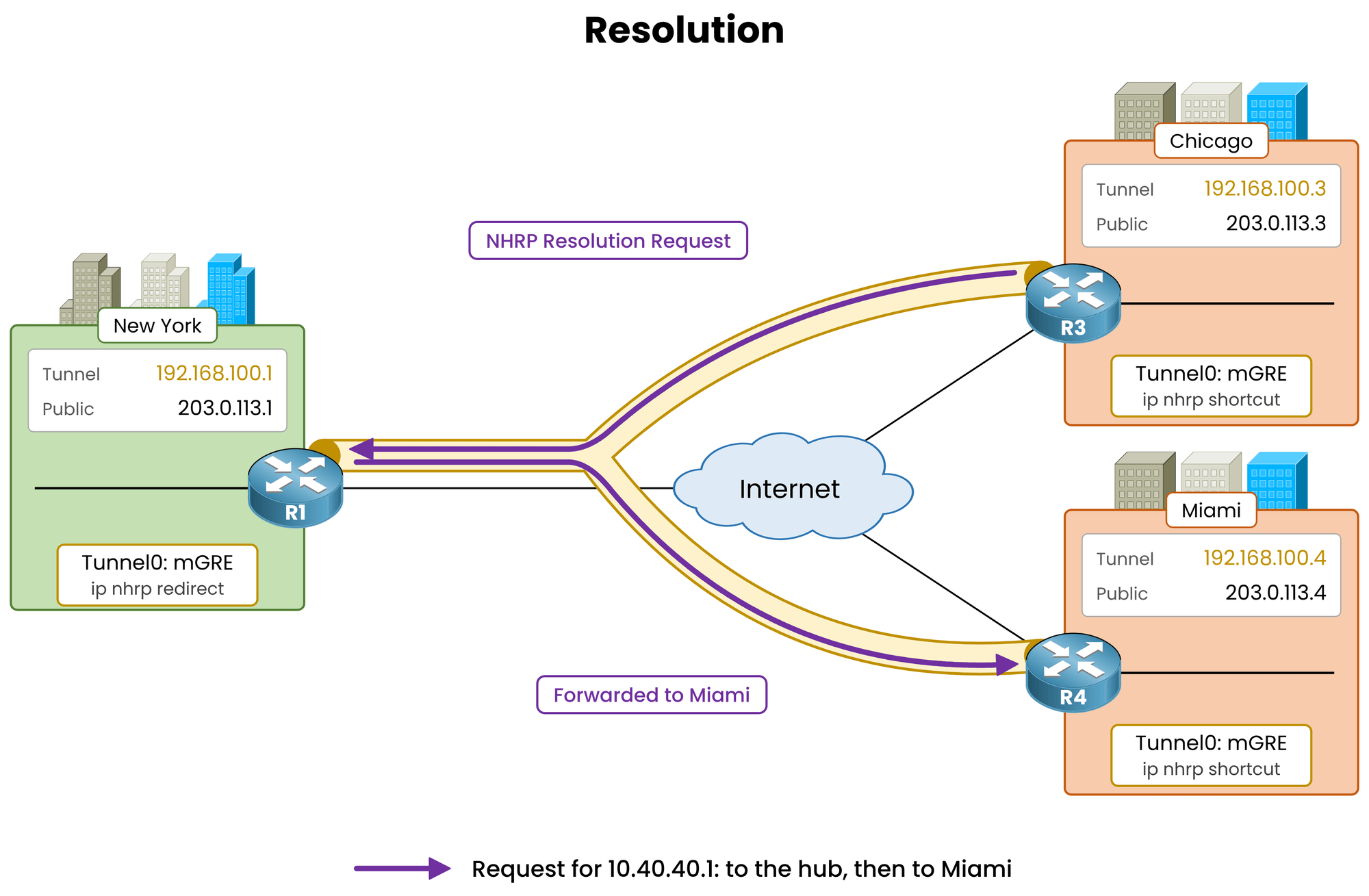
Figure 6 – Chicago asks how to reach 10.40.40.1
Miami responds directly to Chicago with the entire LAN prefix (
10.40.40.0/24) mapped to its public address (203.0.113.4).
Miami looks up10.40.40.1in its own routing table and returns the prefix of its connected LAN route.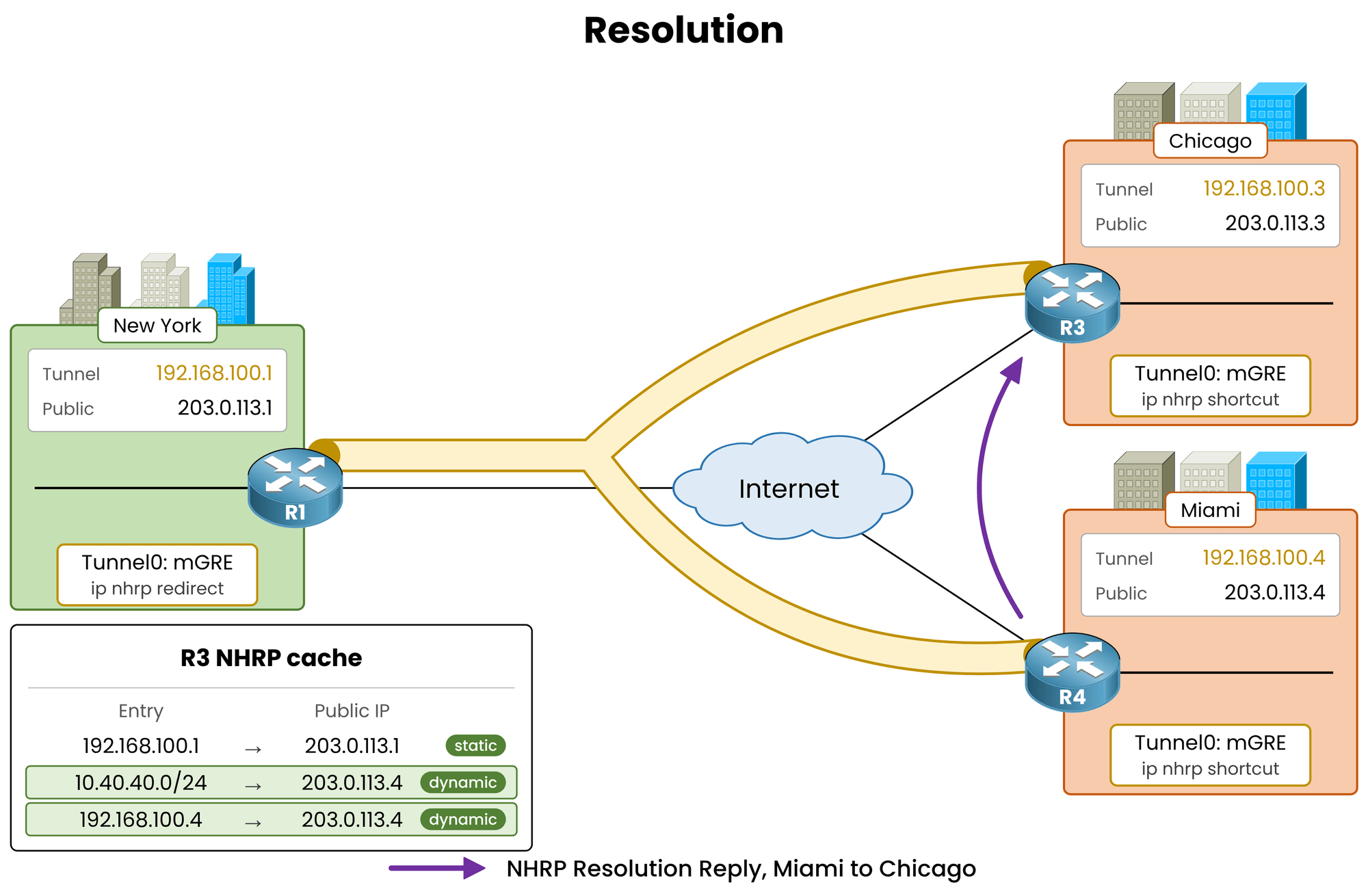
Figure 7 – Miami answers with its LAN prefix
In Phase 3, the spoke learns the whole destination subnet in addition to the remote spoke's tunnel IP.
Answer the question below
In Phase 3, what does Miami return in its Resolution Reply, its tunnel IP or its LAN prefix?
Next Packets Go Direct
Trace the path again and verify with a ping:
R3# traceroute 10.40.40.1 source 10.30.30.1
Type escape sequence to abort.
Tracing the route to 10.40.40.1
VRF info: (vrf in name/id, vrf out name/id)
  1 192.168.100.4 52 msec *  52 msec

R3# ping 10.40.40.1 source 10.30.30.1
Type escape sequence to abort.
Sending 5, 100-byte ICMP Echos to 10.40.40.1, timeout is 2 seconds:
Packet sent with a source address of 10.30.30.1
!!!!!
Success rate is 100 percent (5/5), round-trip min/avg/max = 52/52/52 ms
Traffic now uses the direct spoke-to-spoke tunnel at 52 ms.
The asterisk on the second traceroute probe is caused by standard Cisco IOS ICMP rate limiting.
Answer the question below
How many hops does the second traceroute show?
The traffic flows directly, yet EIGRP still points to the hub.
Look at what NHRP modified on Chicago.Verify the Routing Table
Inspect the EIGRP routes on Chicago:
R3# show ip route eigrp
Codes: L - local, C - connected, S - static, R - RIP, M - mobile, B - BGP
       D - EIGRP, EX - EIGRP external, O - OSPF, IA - OSPF inter area
       N1 - OSPF NSSA external type 1, N2 - OSPF NSSA external type 2
       E1 - OSPF external type 1, E2 - OSPF external type 2
       i - IS-IS, su - IS-IS summary, L1 - IS-IS level-1, L2 - IS-IS level-2
       ia - IS-IS inter area, * - candidate default, U - per-user static route
       o - ODR, P - periodic downloaded static route, H - NHRP, l - LISP
       a - application route
       + - replicated route, % - next hop override, p - overrides from PfR

Gateway of last resort is not set

      10.0.0.0/8 is variably subnetted, 4 subnets, 2 masks
D        10.10.10.0/24 [90/26880256] via 192.168.100.1, 00:04:15, Tunnel0
D   %    10.40.40.0/24 [90/28160256] via 192.168.100.1, 00:04:15, Tunnel0
The EIGRP route for
10.40.40.0/24still points to the hub (192.168.100.1).The
%symbol indicates a next-hop override. NHRP keeps the EIGRP entry in the routing table but overrides the next hop during packet forwarding.
Answer the question below
Which route code marks a next-hop override?
Verify the CEF Table
Cisco Express Forwarding (CEF) performs the actual packet forwarding.
Check the CEF entry for Miami's LAN:R3# show ip cef 10.40.40.1 10.40.40.0/24 nexthop 192.168.100.4 Tunnel0The routing table lists the hub (
192.168.100.1).CEF resolves directly to Miami (
192.168.100.4).
Packets follow the CEF table and take the dynamic tunnel.
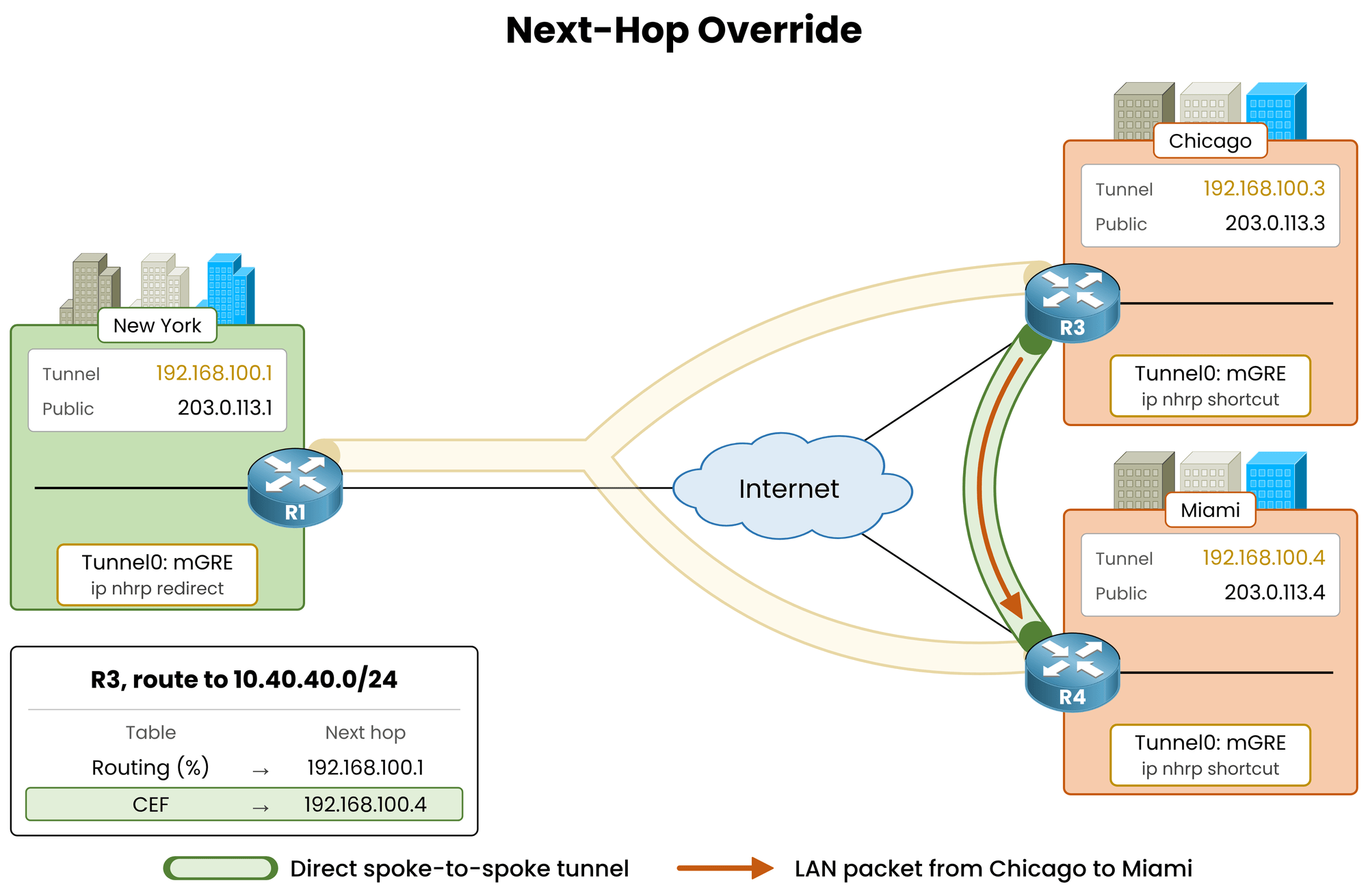
Figure 8 – The route still names the hub, CEF forwards to Miami
Answer the question below
Which next hop does CEF use to forward packets to 10.40.40.1?
Verify the NHRP Cache
Inspect the NHRP mapping table on Chicago:
R3# show ip nhrp
10.30.30.0/24 via 192.168.100.3
   Tunnel0 created 00:01:38, expire 00:08:21
   Type: dynamic, Flags: router unique local
   NBMA address: 203.0.113.3
    (no-socket)
10.40.40.0/24 via 192.168.100.4
   Tunnel0 created 00:01:33, expire 00:08:26
   Type: dynamic, Flags: router used rib nho
   NBMA address: 203.0.113.4
192.168.100.1/32 via 192.168.100.1
   Tunnel0 created 00:08:30, never expire
   Type: static, Flags: used
   NBMA address: 203.0.113.1
192.168.100.4/32 via 192.168.100.4
   Tunnel0 created 00:01:38, expire 00:08:26
   Type: dynamic, Flags: router nhop rib
   NBMA address: 203.0.113.4
Chicago holds an entry for the entire destination subnet (
10.40.40.0/24) in addition to the entry for Miami's tunnel IP (192.168.100.4/32).The
nhoflag confirms a next-hop override.Active traffic refreshes the 600-second holdtime. When traffic stops, the entry expires, the
%flag disappears, and initial packets revert to the hub.
Answer the question below
Which flag in show ip nhrp shows that an entry overrides a next hop?
Verify the DMVPN Table
Check the DMVPN peer table on Chicago:
R3# show dmvpn
Legend: Attrb --> S - Static, D - Dynamic, I - Incomplete
        N - NATed, L - Local, X - No Socket
        T1 - Route Installed, T2 - Nexthop-override
        C - CTS Capable, I2 - Temporary
        # Ent --> Number of NHRP entries with same NBMA peer
        NHS Status: E --> Expecting Replies, R --> Responding, W --> Waiting
        UpDn Time --> Up or Down Time for a Tunnel
==========================================================================

Interface: Tunnel0, IPv4 NHRP Details
Type:Spoke, NHRP Peers:2,

 # Ent  Peer NBMA Addr Peer Tunnel Add State  UpDn Tm Attrb
 ----- --------------- --------------- ----- -------- -----
     2 203.0.113.4       192.168.100.4    UP 00:01:36   DT2
       203.0.113.4       192.168.100.4    UP 00:01:41   DT1
     1 203.0.113.1       192.168.100.1    UP 00:08:32     S
Miami displays two NHRP entries (
# Ent 2):DT2: Next-hop override for the LAN prefix
10.40.40.0/24.DT1: Route installed for the tunnel IP
192.168.100.4/32.
The Resolution Reply delivers both the LAN prefix and Miami's tunnel IP mapping.
Because an EIGRP route already exists for10.40.40.0/24, NHRP overrides its next hop (DT2).No existing route matches
192.168.100.4/32exactly, so NHRP installs a new route for the tunnel IP (DT1).Answer the question below
Which show dmvpn attribute marks a next-hop override?
Key Takeaway
Phase 2 and Phase 3 both achieve direct spoke-to-spoke forwarding, but they use fundamentally different control plane mechanisms:
Element
DMVPN Phase 2
DMVPN Phase 3
Hub Next-Hop Setting
no ip next-hop-self eigrp 100Default (
next-hop-self)Spoke Route to 10.40.40.0/24
via 192.168.100.4% via 192.168.100.1Path Discovery
Routing protocol
NHRP Redirect / Shortcut
Forwarding Path
Direct after NHRP resolution
Direct after the redirect
Table 1 – DMVPN Phase 2 vs. Phase 3 operational comparison
Phase 3 eliminates the requirement for the hub to preserve the original next hop.
Because direct paths no longer depend on the next hop the hub advertises, it can safely advertise summary routes to the spokes.Next Step: DMVPN Phase 3 requires only
ip nhrp redirecton the hub andip nhrp shortcuton all spokes.
In the next lesson, DMVPN Phase 3 EIGRP Routing, you will replace all individual spoke routes with a single default route from the hub.Answer the question below
With Phase 3, must the hub disable next-hop-self to keep LAN traffic direct?
Play both scenarios to compare the traffic without and with Phase 3, then capture your flag.
Answer the question below
Enter the flag you got from completing the challenge.