In this lesson, we'll explore Dynamic ARP Inspection configuration through a simple and realistic scenario.
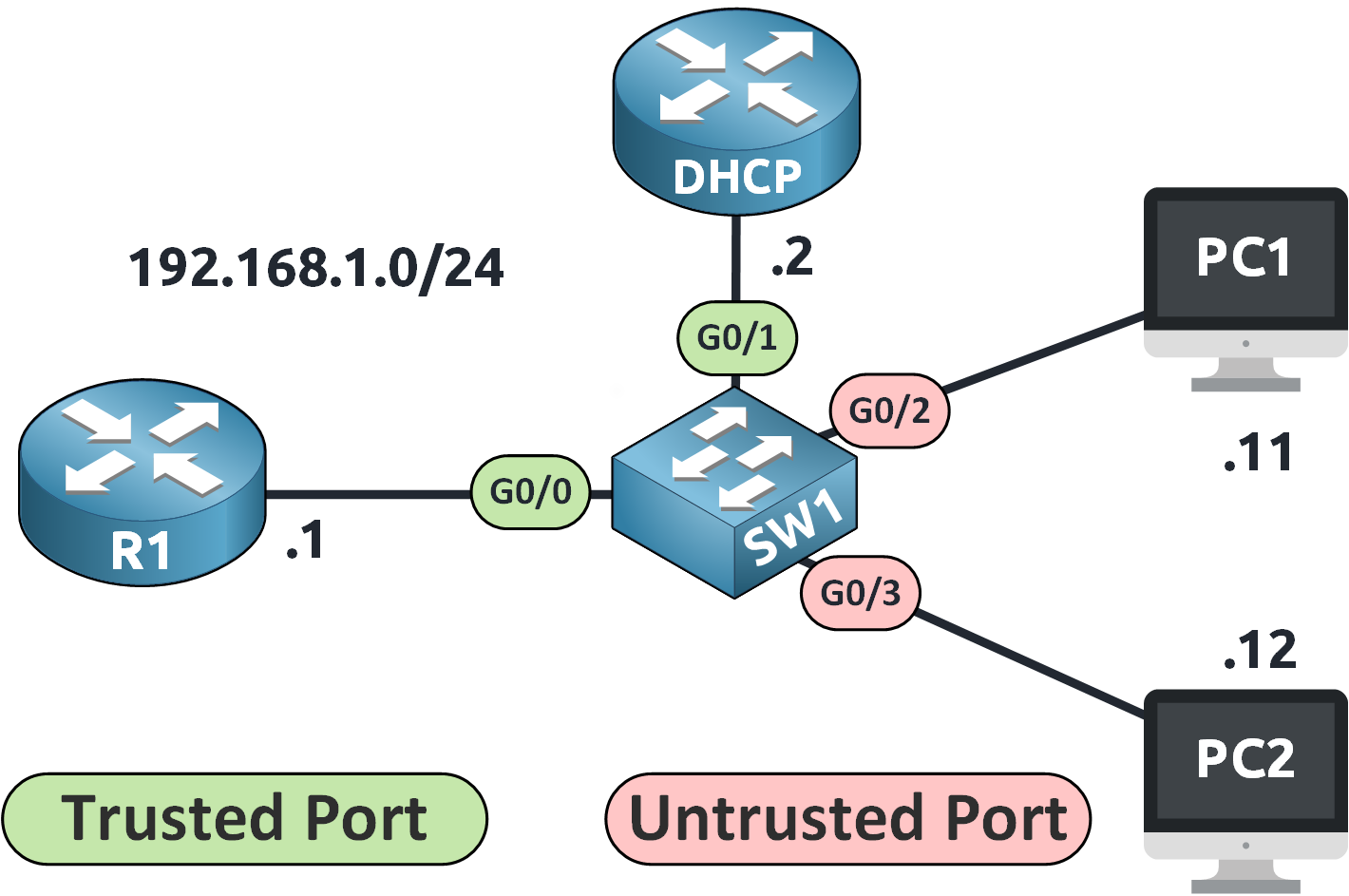
Figure 1 – Network Topology for DAI Configuration
We are working on switch SW1 with the following network:
DHCP Server connected to G0/1
Router (R1) connected to G0/0
PC1 connected to G0/2
PC2 connected to G0/3
All devices are on VLAN 1 in the 192.168.1.0/24 subnet.
Step 1: Check the DHCP Server Configuration
Before anything else, the DHCP server must assign IP addresses.
DHCP# show run | s dhcp
ip dhcp excluded-address 192.168.1.1 192.168.1.10
ip dhcp pool VLAN1
 network 192.168.1.0 255.255.255.0
 default-router 192.168.1.1
 dns-server 8.8.8.8
This setup:
Reserves addresses .1 to .10 for static assignment
Assigns dynamic IPs from .11 upward
Sets R1 as the default gateway
Uses Google DNS
Step 2: Enable DHCP Snooping
DAI needs the DHCP Snooping Binding Table, so we must activate DHCP Snooping first.
We enable DHCP Snooping globally and activate it on VLAN 1 (the default VLAN):
SW1# conf t
Enter configuration commands, one per line. End with CNTL/Z.
SW1(config)# ip dhcp snooping
SW1(config)# ip dhcp snooping vlan 1
SW1(config)# no ip dhcp snooping information option
The information option is used when a DHCP relay agent is involved, which is not the case here, so we disable it.
Next, we trust the interface connected to the DHCP server:
SW1(config)# int g0/1
SW1(config-if)# ip dhcp snooping trust
SW1(config-if)# end
Answer the question below
What feature creates the IP-to-MAC entries used by DAI?
Step 3: Verify the DHCP Snooping Binding Table
Use this command to confirm that IP/MAC mappings have been recorded:
SW1# show ip dhcp snooping binding
MacAddress          IpAddress        Lease(sec)  Type           VLAN  Interface
------------------  ---------------  ----------  -------------  ----  ------------
00:50:79:66:68:8C   192.168.1.11     86304       dhcp-snooping   1     G0/2
00:50:79:66:68:8F   192.168.1.12     86366       dhcp-snooping   1     G0/3
Total number of bindings: 2
PC1 and PC2 are now recognized as legitimate DHCP clients. Their IP/MAC pairs will be used for ARP validation.
Answer the question below
What table stores the legitimate IP and MAC bindings?
Step 4: Enable DAI on VLAN 1
DAI only requires one command per VLAN to be activated.
SW1# conf t
Enter configuration commands, one per line. End with CNTL/Z.
SW1(config)# ip arp inspection vlan 1
DAI is now monitoring ARP traffic on VLAN 1. If you have multiple VLANs, repeat this command for each one.
Step 5: Define Trusted Interfaces
By default, all switch ports are untrusted.
We must manually trust ports connected to infrastructure devices:
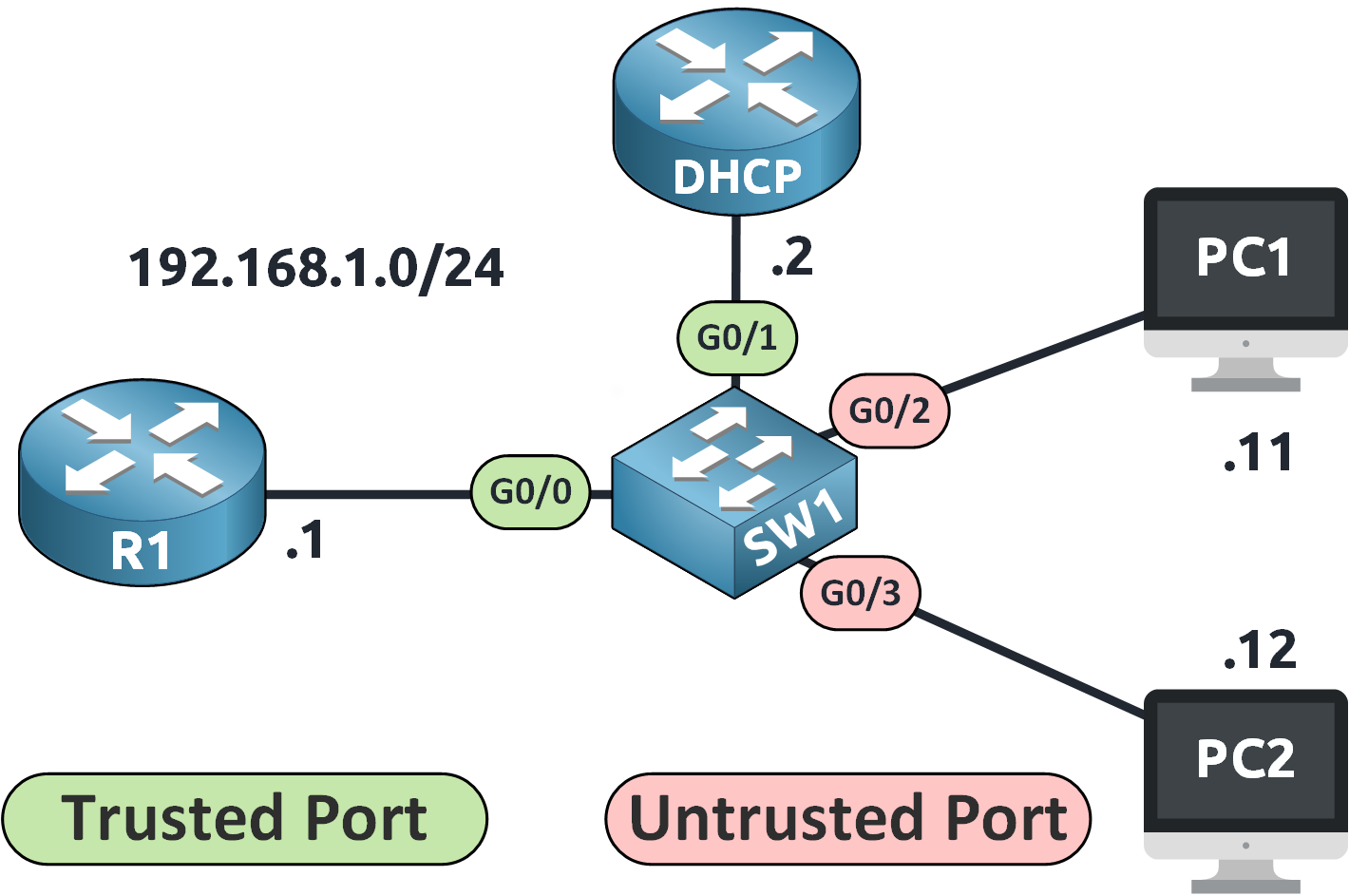
Figure 2 – Network Topology for DAI Configuration
SW1(config)# int g0/0
SW1(config-if)# ip arp inspection trust
SW1(config-if)# exit

SW1(config)# int g0/1
SW1(config-if)# ip arp inspection trust
SW1(config-if)# end
Now, ARP packets on these interfaces will not be inspected.
Answer the question below
Are user-facing switch ports trusted or untrusted for DAI?
Step 6: Verify DAI Status
We can verify that DAI is working correctly using the following command:
SW1# show ip arp inspection interfaces

 Interface        Trust State     Rate (pps)    Burst Interval
 ---------------  -----------     ----------    --------------
 Gi0/0            Trusted               None               N/A
 Gi0/1            Trusted               None               N/A
 Gi0/2            Untrusted               15                 1
 Gi0/3            Untrusted               15                 1
 Gi1/0            Untrusted               15                 1
 Gi1/1            Untrusted               15                 1
 Gi1/2            Untrusted               15                 1
 Gi1/3            Untrusted               15                 1
This confirms:
G0/0 and G0/1 are trusted (router and DHCP server)
G0/2 and G0/3 are untrusted (user-facing ports)
Simulating an ARP Spoofing Attack
Let's now test the effectiveness of DAI by simulating an attack.
In this scenario, PC2 (attacker) tries to impersonate the default gateway 192.168.1.1.
It does so by sending a Gratuitous ARP (GARP) message, falsely claiming that its own MAC address is associated with the IP address of the router.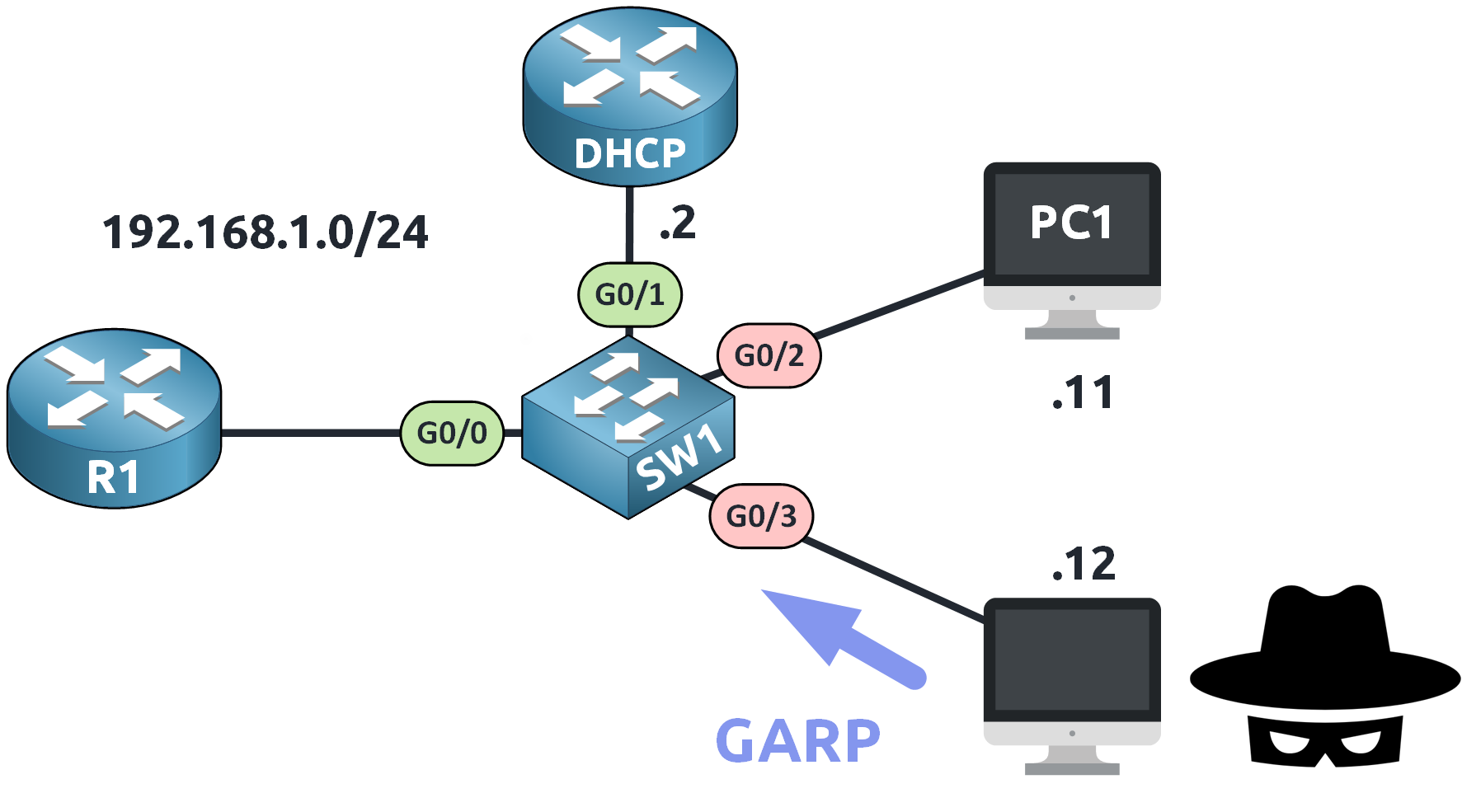
Figure 3 – Simulating an ARP Spoofing Attack
A Gratuitous ARP is an unsolicited ARP message used to announce a device's IP-to-MAC mapping. While legitimate in some contexts (like for IP changes), it can be exploited for spoofing.
On an untrusted port like G0/3, this GARP is intercepted by the switch and analyzed.
Wireshark Capture
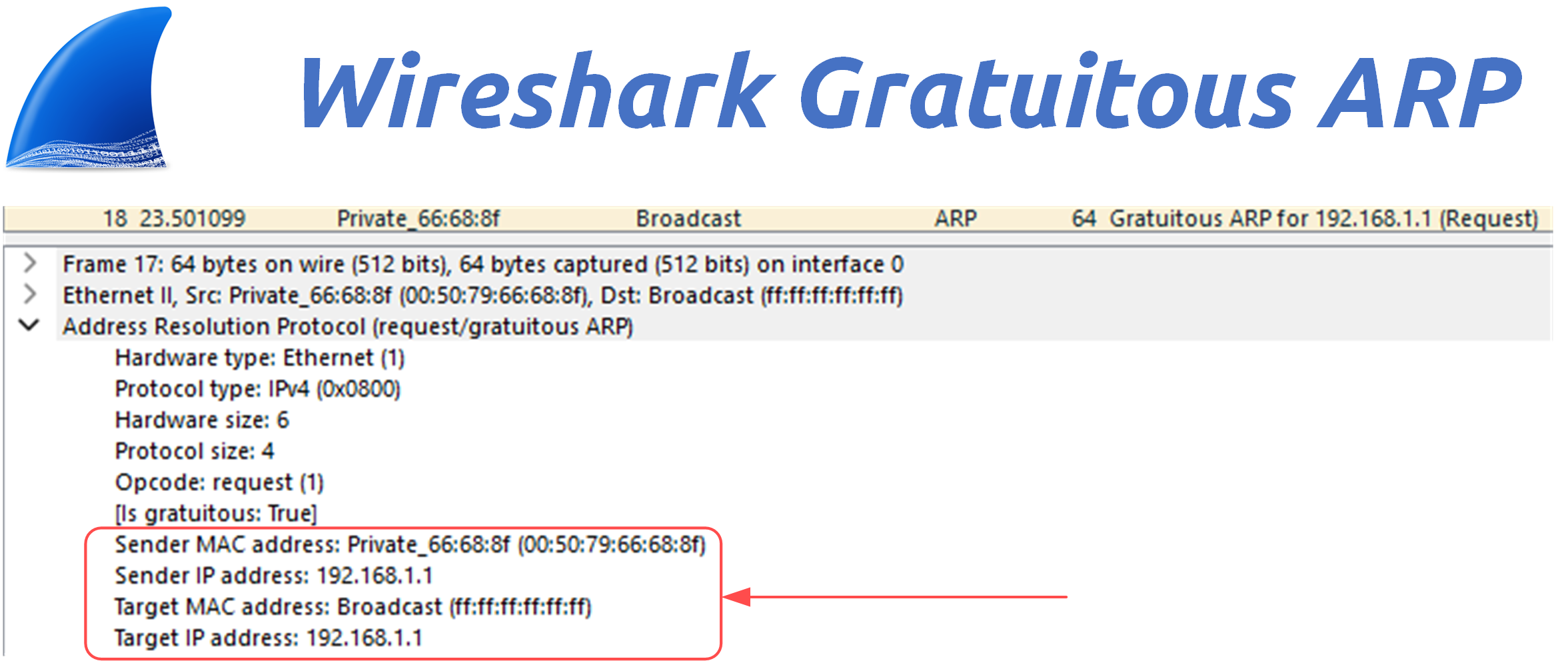
Figure 4 – Wireshark Capture of a Gratuitous ARP (GARP)
A packet capture reveals that the ARP message sent from PC2 claims:
Sender MAC: Attacker's MAC address
Sender IP: 192.168.1.1
Target MAC: Broadcast (ff:ff:ff:ff:ff:ff)
Target IP: 192.168.1.1
This is a clear attempt to poison the ARP tables of other hosts.
DAI Blocks the Attack
Because the DHCP Snooping Binding Table does not contain any entry mapping 192.168.1.1 to the attacker's MAC address, the switch considers this ARP packet invalid.
Here's what appears in the logs:
*Jan 31 16:18:51.531: %SW_DAI-4-DHCP_SNOOPING_DENY: 1 Invalid ARPs (Req) on Gi0/3, vlan 1.([0050.7966.688f/192.168.1.1/ffff.ffff.ffff/192.168.1.1/
16:18:50 UTC Fri Jan 31 2025])

*Jan 31 16:18:52.531: %SW_DAI-4-DHCP_SNOOPING_DENY: 1 Invalid ARPs (Req) on Gi0/3, vlan 1.([0050.7966.688f/192.168.1.1/ffff.ffff.ffff/192.168.1.1/
16:18:51 UTC Fri Jan 31 2025])

*Jan 31 16:18:53.590: %SW_DAI-4-DHCP_SNOOPING_DENY: 1 Invalid ARPs (Req) on Gi0/3, vlan 1.([0050.7966.688f/192.168.1.1/ffff.ffff.ffff/192.168.1.1/
16:18:52 UTC Fri Jan 31 2025])
These messages confirm that the Dynamic ARP Inspection feature is actively monitoring and rejecting invalid ARP packets.
Thanks to DAI, the attacker is blocked from poisoning the ARP table, and the spoofing attempt fails silently, without impacting network users, and the man-in-the-middle attack is prevented.
Answer the question below
Which feature blocks the attacker's fake ARP messages?
Dynamic ARP Inspection (DAI) is effective at blocking ARP spoofing, but what if an attacker floods the switch with a high number of ARP packets?
That's where rate limiting comes in.
Why Rate Limiting Matters
Attackers might try to overwhelm the switch by sending too many ARP packets, consuming CPU resources and potentially destabilizing the device.
To protect against this, Cisco switches apply rate limits to ARP packets on untrusted interfaces.
You can verify the default limits using:
SW1# show ip arp inspection interfaces
 Interface        Trust State     Rate (pps)    Burst Interval
 ---------------  -----------     ----------    --------------
 Gi0/0            Trusted               None               N/A
 Gi0/1            Trusted               None               N/A
 Gi0/2            Untrusted               15                 1
 Gi0/3            Untrusted               15                 1
 Gi1/0            Untrusted               15                 1
 Gi1/1            Untrusted               15                 1
 Gi1/2            Untrusted               15                 1
 Gi1/3            Untrusted               15                 1
By default:
15 ARP packets per second are allowed on untrusted ports
The switch drops ARP packets exceeding this rate
If the threshold is surpassed, the port is disabled (err-disabled state)
Adjusting the Rate Limit
You can raise the limit on a specific interface using:
SW1# conf t
Enter configuration commands, one per line. End with CNTL/Z.
SW1(config)# int g0/3
SW1(config-if)# ip arp inspection limit rate 30 burst interval 3
SW1(config-if)# end
This means:
The switch now allows up to 30 ARP packets per second
The port is disabled only if that rate is exceeded for 3 consecutive seconds
To verify the change:
SW1# show ip arp inspection interfaces

 Interface        Trust State     Rate (pps)    Burst Interval
 ---------------  -----------     ----------    --------------
 Gi0/0            Trusted               None               N/A
 Gi0/1            Trusted               None               N/A
 Gi0/2            Untrusted               15                 1
 Gi0/3            Untrusted               30                 3
 Gi1/0            Untrusted               15                 1
 Gi1/1            Untrusted               15                 1
 Gi1/2            Untrusted               15                 1
 Gi1/3            Untrusted               15                 1
Now, g0/3 is allowed a higher threshold before being disabled.
What Happens If the Limit Is Exceeded?
When the limit is violated, the switch shuts down the interface to stop the flood:
%SW_DAI-4-ERRDISABLE: arp-inspection rate-limit on Gi0/3, putting interface in err-disabled stateAt this point:
The port is disabled
No traffic can pass through it
Manual or automatic recovery is needed
This mechanism ensures that normal users stay protected even during an attack, while giving the administrator time to investigate.
Answer the question below
When the ARP rate limit is exceeded, the port enters which state?
DAI is effective at shutting down interfaces when an ARP attack is detected, but once the threat is gone, the interface must be restored to resume normal operation.
Let's review how to manually and automatically bring an interface out of the err-disabled state.
Manual Recovery
The fastest method to restore a port that was disabled by DAI is to manually reset the interface using:
SW1# conf t
Enter configuration commands, one per line. End with CNTL/Z.
SW1(config)# int g0/3
SW1(config-if)# shutdown
%LINK-5-CHANGED: Interface GigabitEthernet0/3, changed state to administratively down
%LINEPROTO-5-UPDOWN: Line protocol on Interface GigabitEthernet0/3, changed state to down

SW1(config-if)# no shutdown
%LINEPROTO-5-UPDOWN: Line protocol on Interface GigabitEthernet0/3, changed state to down
%LINEPROTO-5-UPDOWN: Line protocol on Interface GigabitEthernet0/3, changed state to up
This sequence:
Shuts down the port
Immediately brings it back online
Clears the err-disabled condition
However, this requires manual intervention each time a port is disabled.
Automatic Recovery
For better automation, Cisco switches allow you to configure auto-recovery from specific err-disable causes.
To view the available causes, use:
SW1(config)# errdisable recovery cause ?
  all                   Enable timer to recover from all error causes
  arp-inspection        Enable timer to recover from arp inspection error
disable state
  bpduguard             Enable timer to recover from BPDU Guard error
  channel-misconfig     Enable timer to recover from channel misconfig error
                        (STP)
  dhcp-rate-limit       Enable timer to recover from dhcp-rate-limit error
  dtp-flap              Enable timer to recover from dtp-flap error
 //output omitted for clarity
To enable auto-recovery specifically for DAI, we select arp-inspection:
SW1(config)# errdisable recovery cause arp-inspectionThis instructs the switch to automatically restore ports disabled due to DAI after a fixed time.
Verifying Auto-Recovery
To check the configuration and current status:
SW1# show errdisable recovery
ErrDisable Reason            Timer Status
-----------------            --------------
arp-inspection               Enabled
bpduguard                    Disabled
channel-misconfig (STP)      Disabled
dhcp-rate-limit              Disabled
dtp-flap                     Disabled
 //output omitted for clarity

Timer interval: 300 seconds

Interfaces that will be enabled at the next timeout:
Here's what this means:
The recovery timer is active for arp-inspection
The default timer is 300 seconds (5 minutes)
Once the timer expires, the interface is re-enabled automatically
Customizing the Recovery Timer
You can shorten the wait time by modifying the interval:
SW1# conf t
Enter configuration commands, one per line. End with CNTL/Z.
SW1(config)# errdisable recovery interval 120
This sets the auto-recovery interval to 120 seconds (2 minutes).
Now, if an ARP attack triggers DAI and shuts down a port, the switch will automatically bring it back up after 2 minutes, without manual input.
Answer the question below
What command restores an interface disabled by DAI?
By default, Dynamic ARP Inspection (DAI) validates ARP messages by checking the source IP and MAC address against the DHCP Snooping Binding Table.
However, for stronger protection, you can enable additional validation checks to catch more advanced spoofing techniques.Why Add Extra Checks?
Basic DAI verification is effective, but attackers can still try to manipulate other fields in the ARP or Ethernet headers.
To defend against these advanced tactics, DAI supports three additional checks using:SW1(config)# ip arp inspection validate ? dst-mac Validate destination MAC address ip Validate IP addresses src-mac Validate source MAC addressLet's review each option.
1. Destination MAC Validation (dst-mac)
This check ensures that:
The destination MAC address in the Ethernet frame
Matches the target MAC address in the ARP payload
If there's a mismatch, the packet is considered malicious and is dropped.
Why it matters:
It helps block attacks where forged ARP replies are sent to unrelated devices to divert traffic.2. IP Validation (ip)
This option prevents devices from sending ARP packets using invalid or reserved IP addresses, such as:
0.0.0.0 → Used temporarily in DHCP discovery
255.255.255.255 → Broadcast
224.0.0.0/4 → Multicast
These should never appear in legitimate ARP messages.
Why it matters:
It blocks nonsensical or malicious IP addresses that could confuse or compromise the network.3. Source MAC Validation (src-mac)
This check ensures that:
The source MAC address in the Ethernet header
Matches the sender MAC address in the ARP payload
If they differ, the packet is forged and is immediately dropped.
Why it matters:
It is especially effective against ARP spoofing attempts, where an attacker tries to impersonate another host.Enabling Validation Checks
To activate DAI's enhanced verification, you must enable the desired checks using the ip arp inspection validate command.
⚠️ Important:
Each time you enter this command, it overwrites the previous configuration.
If you want to enable multiple checks (ip, src-mac, and dst-mac), you must specify them all at once in the same line.Example: Enable all three validation checks
SW1(config)# ip arp inspection validate ip src-mac dst-macThis will activate:
IP address validation
Source MAC address validation
Destination MAC address validation
Verify the Configuration
You can verify that the checks are active using:
SW1# show run | include validate
 ip arp inspection validate ip src-mac dst-mac
Enable Only Specific Checks
You can also choose to enable only selected checks.
For example, to activate only IP and source MAC validation:SW1(config)# ip arp inspection validate ip src-macAnswer the question below
Which keyword enables DAI's additional validation checks?
Dynamic ARP Inspection (DAI) helps protect your network against ARP spoofing. It works by checking if ARP messages come from trusted sources, using the DHCP Snooping table as reference.
Here's what matters the most:
Feature
What it does / Why it matters
DAI Role
Blocks fake ARP replies (spoofing the gateway)
Trusted Ports
No inspection → Used for DHCP server, router uplinks
Untrusted Ports
ARP inspection active → End-user devices go here
DHCP Snooping
Required for DAI to compare IP/MAC info
Rate Limiting
Limits ARP traffic (default: 15 packets/sec) → Prevents flooding
Err-Disabled Recovery
Ports shut down if ARP abuse is detected. Can be restored manually or automatically
Validation Checks
Extra protections: check IPs, source MAC, and destination MAC
Table 1 – Key Components of Dynamic ARP Inspection (DAI)
With the proper Dynamic ARP Inspection configuration, your switch can silently stop spoofing attempts without interrupting legitimate user traffic.
For deeper technical insights, consult the official Cisco documentation.
Answer the question below
What type of attack does Dynamic ARP Inspection protect against?