As a network engineer, you will frequently need to configure network devices using the CLI.
At first glance, this seems convenient: you log in to a device, type a few commands, and the configuration is done.However, in real-world networks, typing commands manually in the CLI can quickly become time-consuming and prone to human errors.
Manual configuration at scale
Imagine you need to configure the same NTP server on multiple routers.
Instead of doing it once, you now need to:open your terminal software
connect to each router using SSH
manually type the same configuration commands

Figure 1 - Manual configuration of network devices
You must repeat this process for every network device that needs the configuration.
This approach is time-consuming and prone to human errors, especially as the number of devices increases.Why automation becomes necessary
By using Ansible, you can apply configuration changes to multiple devices at the same time.
As shown below, the Ansible server connects to network devices using SSH and pushes the required configuration commands automatically.
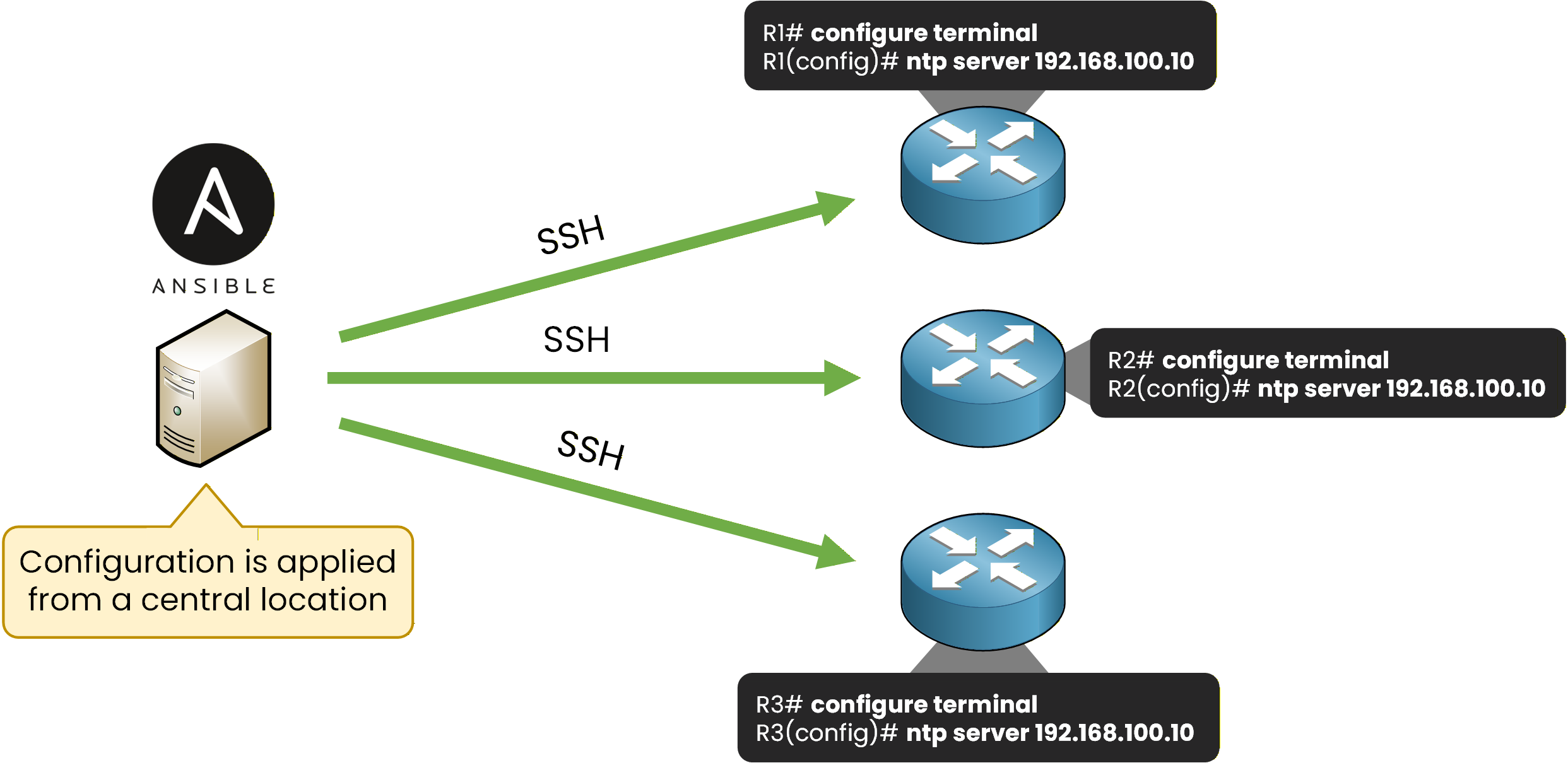
Figure 2 – Centralized network device configuration using Ansible
Using Ansible is especially useful in medium to large networks, where it helps reduce deployment time and minimize human errors.
However, Ansible does not work by magic.
To use it effectively, you need to understand the key concepts behind how Ansible operates.Answer the question below
Which tool can be used to automate and centralize network device configuration?
Ansible uses a push model to apply configuration changes.
This means that the Ansible server, also called the control node, pushes configuration changes directly to the destination devices.These changes are defined in configuration files stored on the Ansible server and are applied by opening SSH connections to the network devices.

Figure 3 - Ansible agentless management using SSH from a central control node.
Push model and agentless architecture
This model is very convenient because network devices are agentless.
Agentless means that no additional software needs to be installed on the network devices for Ansible to work.The only requirement is that the devices are reachable using SSH.
Once SSH access is available, the Ansible server can connect to the devices and push configuration changes automatically.
Why this approach is useful
Using an agentless push model makes Ansible:
easy to deploy
compatible with many network devices
well suited for network automation
This simplicity is one of the main reasons why Ansible is widely used for managing network device configurations.
Answer the question below
What type of model does Ansible use to apply configuration changes to network devices?
Ansible works by using several key elements that work together to apply configuration changes to network devices.
Inventory – Where to apply changes
The inventory defines which devices Ansible will manage.
It is simply a list of network devices, usually identified by IP addresses or hostnames.
Devices can also be grouped based on their role, for example, routers, switches, or firewalls.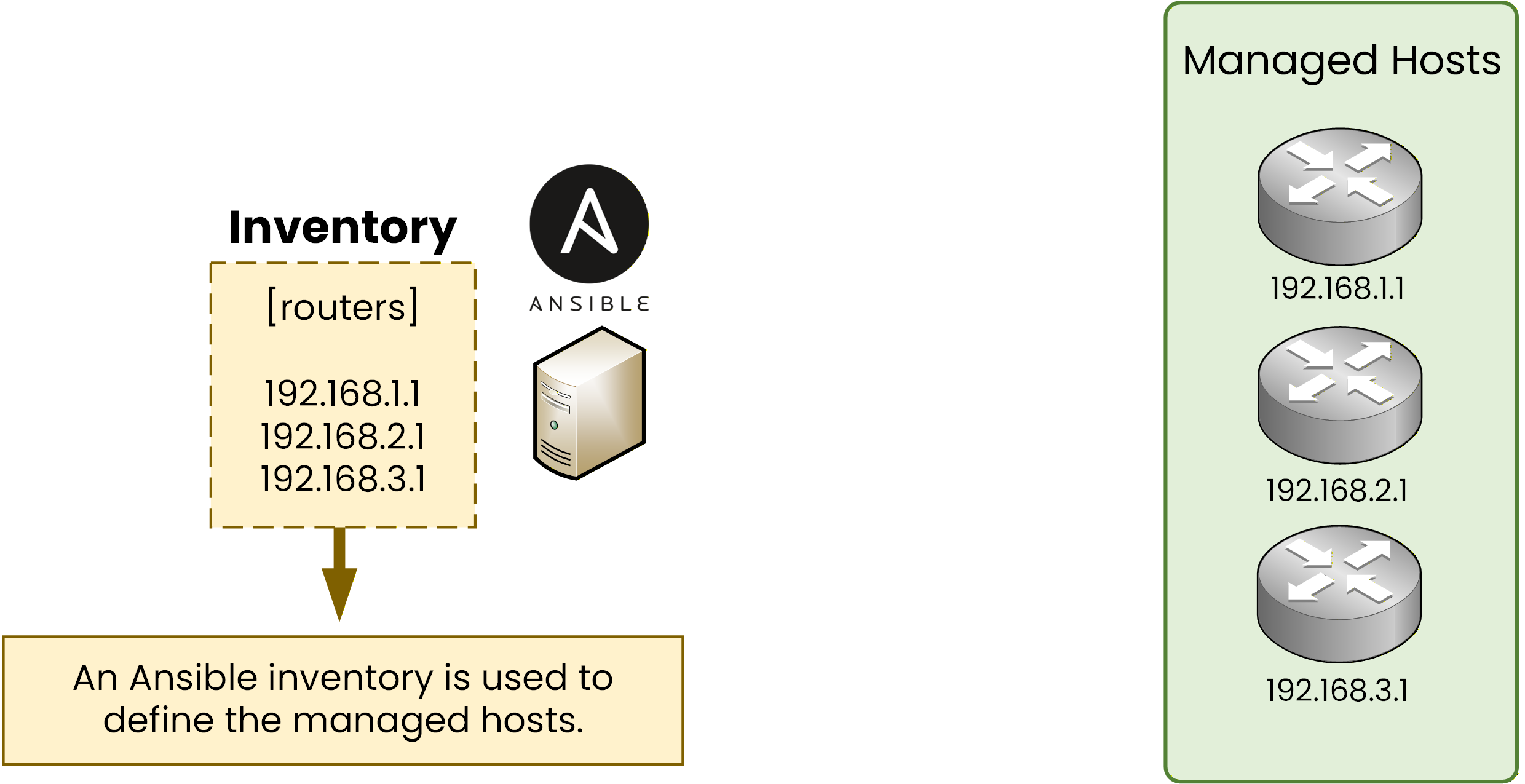
Figure 4 – Ansible inventory defining the managed hosts
In this example, the inventory contains a group called
routerswith three IP addresses.
This inventory tells Ansible which devices the Ansible server will target when applying configuration changes.Playbook – What actions to perform
A playbook defines what Ansible should do on the devices listed in the inventory.
Playbooks are written in YAML files and describe a set of tasks, such as applying configuration commands to network devices.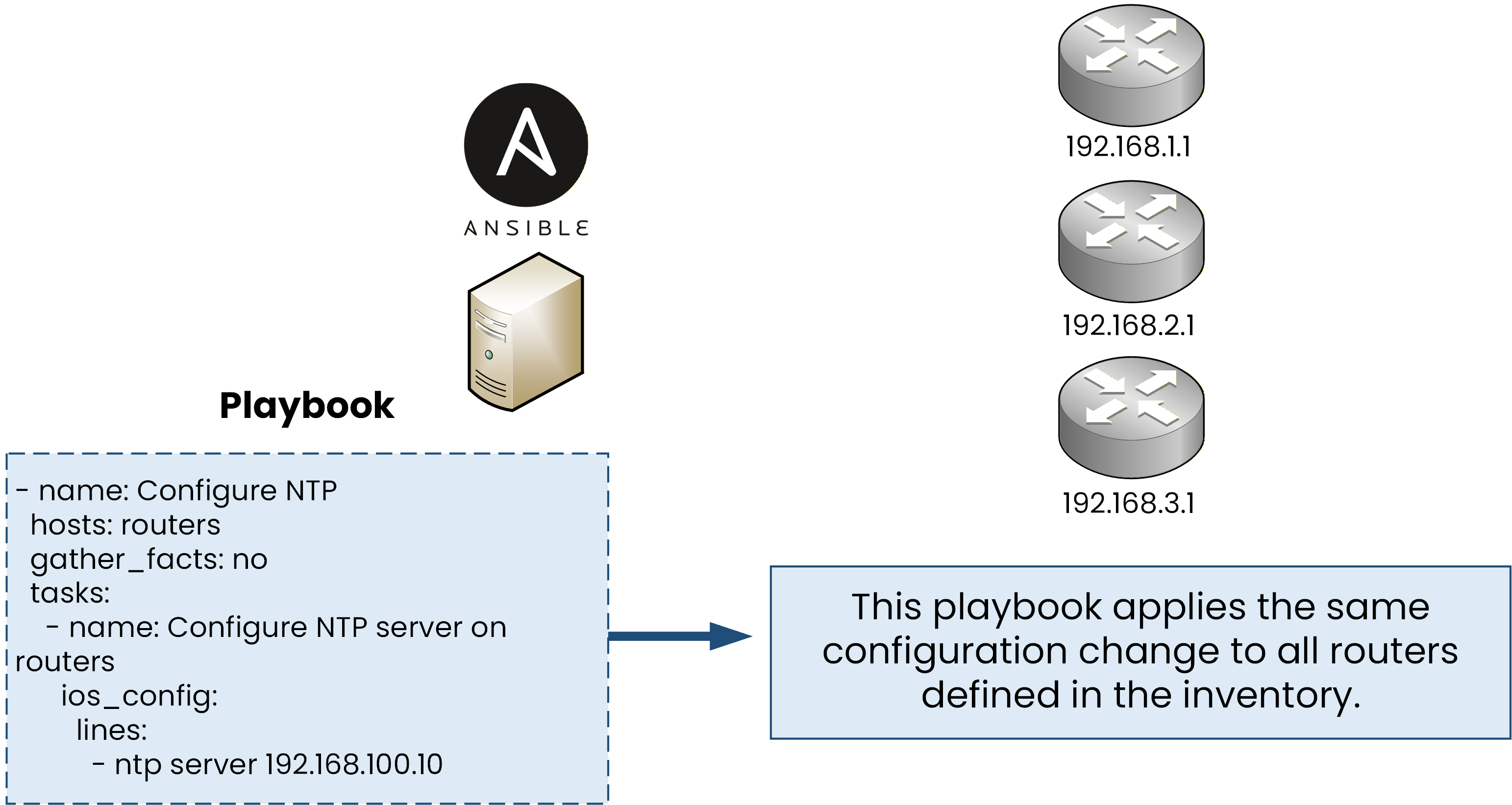
Figure 5 – Ansible Playbook Example
In this example, the playbook applies the same NTP configuration to all routers defined in the inventory.
Instead of configuring each router manually, the playbook ensures that the same configuration change is applied consistently across all devices.Answer the question below
Which Ansible file defines the tasks that should be executed on network devices?
Templates and Variables – How configurations are generated
Templates define the structure of a configuration, without including device-specific values.
Variables store the values that change from one device to another, such as IP addresses, interface names, or time zones.
By combining templates and variables, Ansible can automatically generate complete configuration files.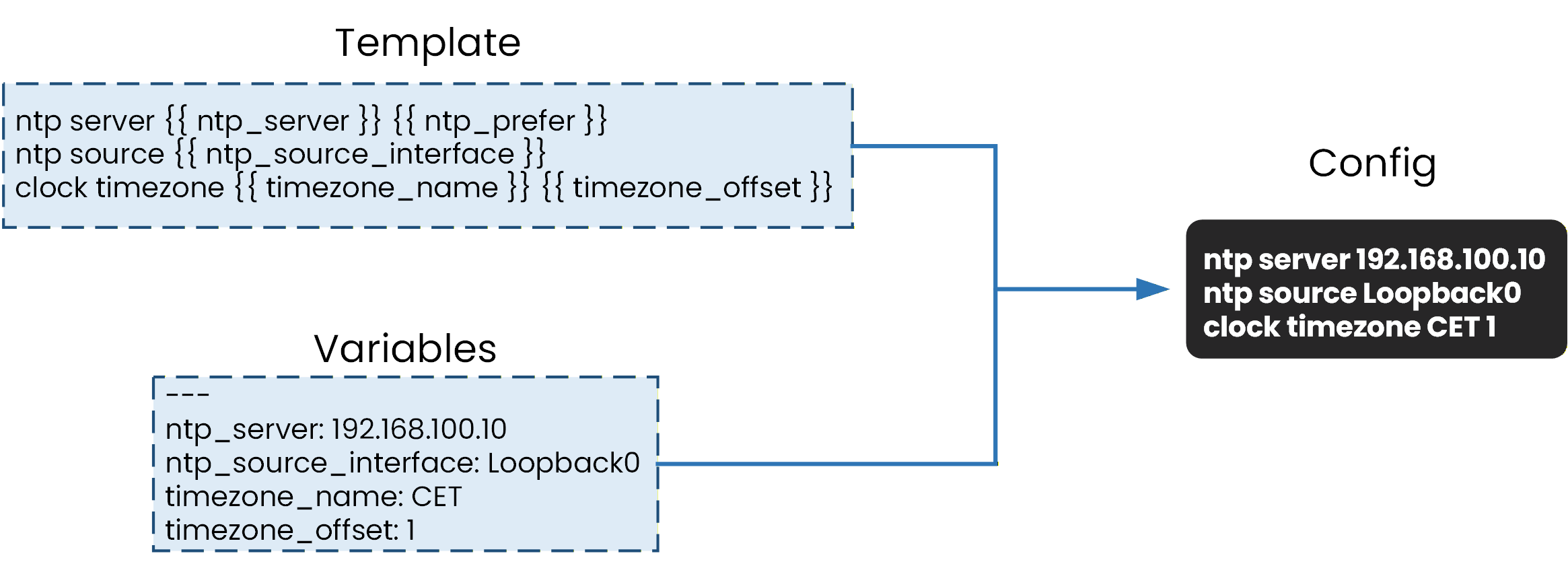
Figure 6 – Template + variables → config
This approach allows the same template file to be reused for multiple devices while only changing the variable values.
As a result, configurations become more consistent, easier to manage, and scalable across large networks.Answer the question below
To generate reusable configurations, Ansible combines variables with ___.
In a network, devices are usually configured according to a standard configuration defined by the company.
This standard helps ensure consistency, security, and easier troubleshooting.However, over time, device configurations can begin to drift away from this standard.
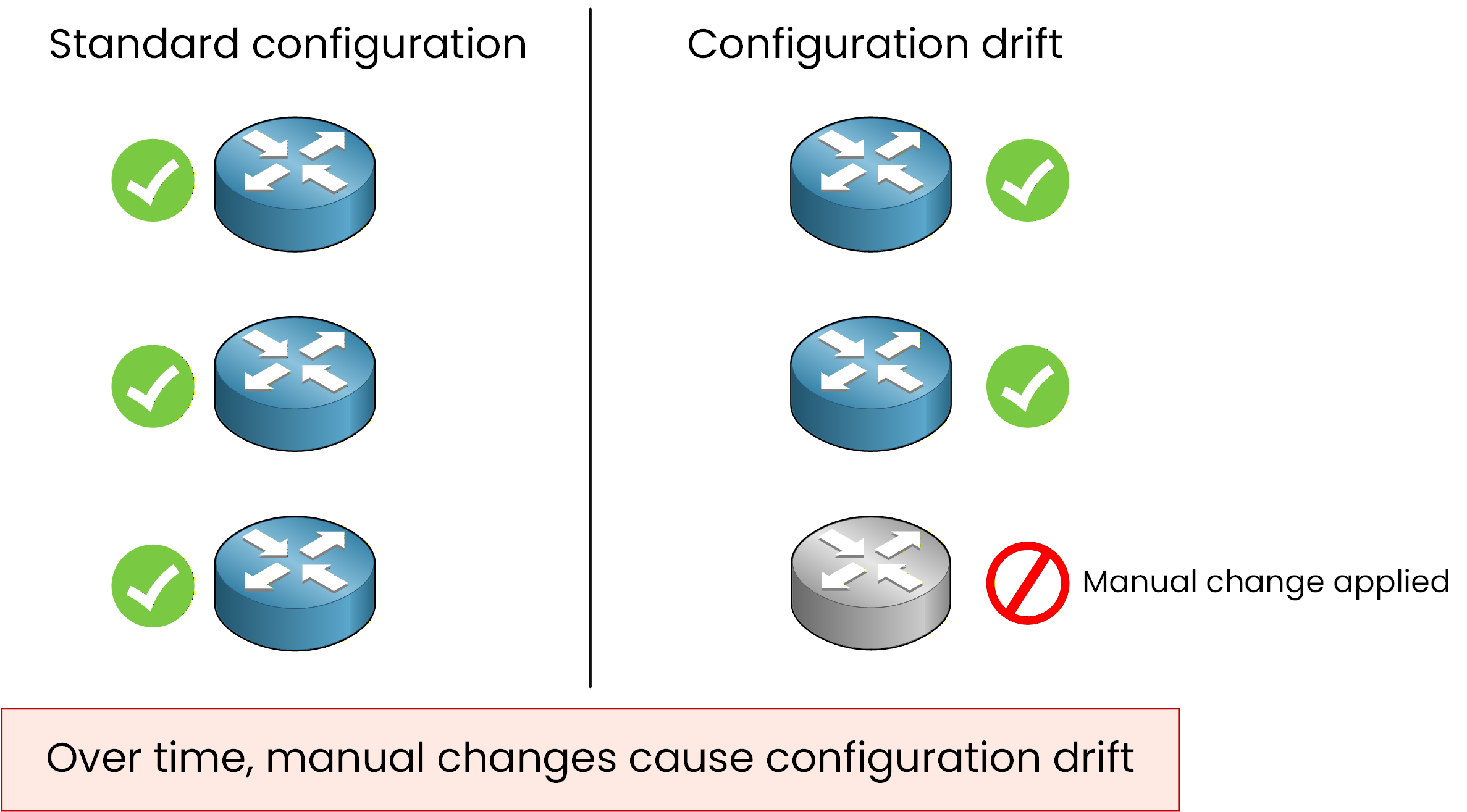
Figure 7 - Configuration drift over time
Configuration drift occurs when manual changes are applied to network devices.
These changes are often made during troubleshooting, testing, or temporary fixes, and are not always documented.As a result:
some devices no longer match the standard configuration
configurations become inconsistent across the network
troubleshooting becomes more complex
Correcting configuration drift
Configuration management tools such as Ansible can help correct configuration drift.
Instead of manually fixing each device one by one, Ansible can be used to reapply the standard configuration from a central location.
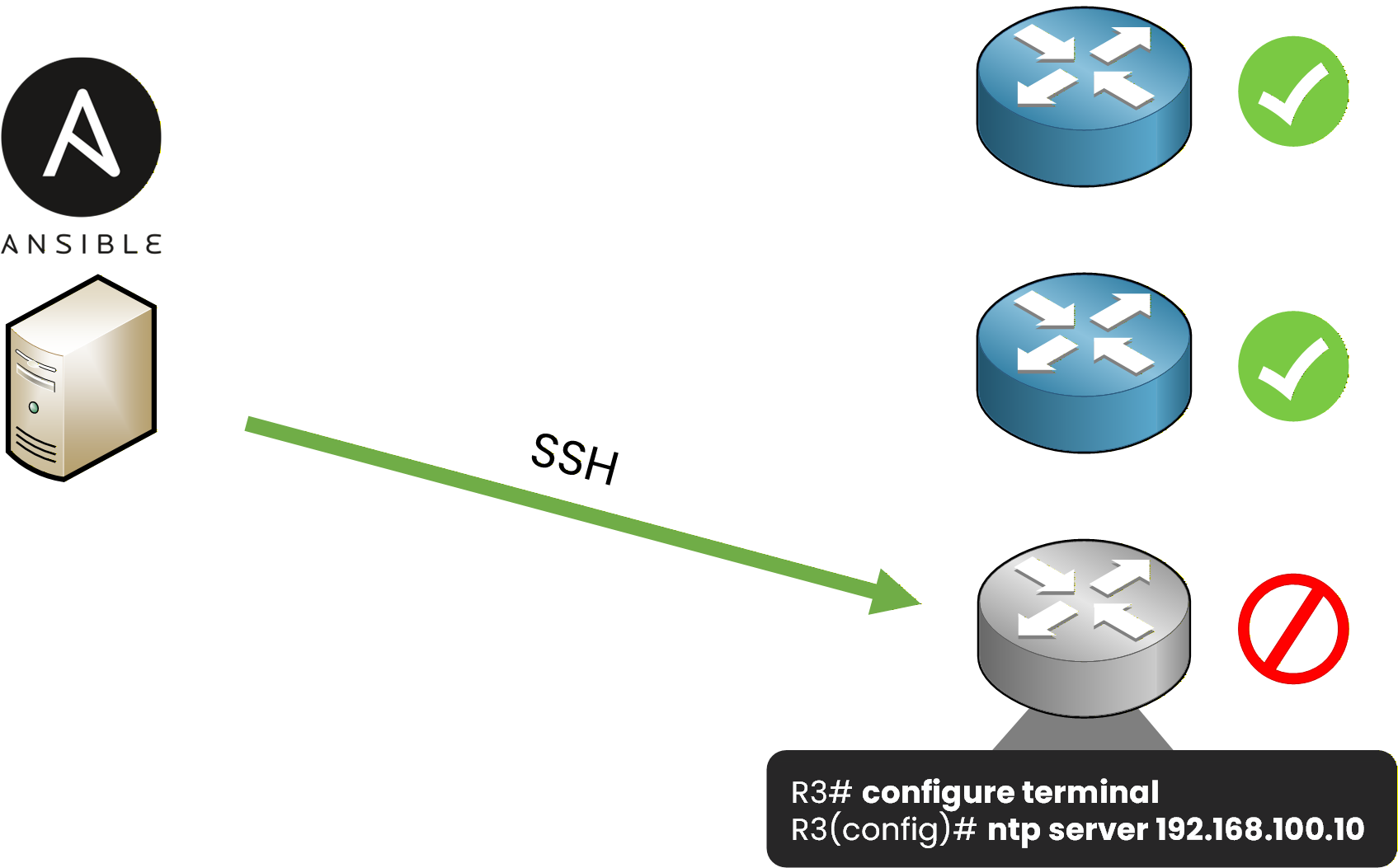
Figure 8 - Ansible correcting configuration drift
By pushing the desired configuration again, devices that have drifted away from the standard can be brought back into compliance.
It is important to note that Ansible does not automatically detect or predict configuration drift.
However, it can be used to enforce and reapply a known good configuration when required.Answer the question below
What problem occurs when network devices gradually move away from the standard configuration over time?
For the CCNA exam, you are expected to be familiar with two network automation tools.
Ansible
Terraform

Figure 9 - Network Automation Tools
Both tools are Infrastructure as Code (IaC) tools, meaning they use code-based files to automate network infrastructure.
Even though other automation tools exist, in networking these two tools are emphasized because they serve different but complementary purposes.Ansible
Ansible is primarily used for configuration management.
In networking, it is commonly used to:
configure existing network devices
apply configuration changes at scale
maintain consistent configurations across devices
Ansible works well for day-to-day network operations, such as managing routing, NTP, SNMP, and correcting configuration drift.
Terraform
Terraform is primarily used for infrastructure provisioning.
In networking, it focuses on:
creating infrastructure resources
managing infrastructure as code
defining the desired state of the infrastructure
Terraform is often used before configuration management, especially in cloud and virtualized environments.
What’s next
In the next lesson, we will focus specifically on Terraform and explain:
what Terraform is
how it works at a basic level
what you need to know about Terraform for the CCNA exam
Answer the question below
Which type of tool is mainly used to configure and manage existing network devices?