When you open an inherited router config and stumble on a QoS policy, the first reflex is panic.
Don't.
Every QoS configuration on a Cisco router or switch follows the same blueprint, called Modular QoS CLI (MQC).
Once you know how to read it, you can interpret any QoS policy, no matter how complex it looks.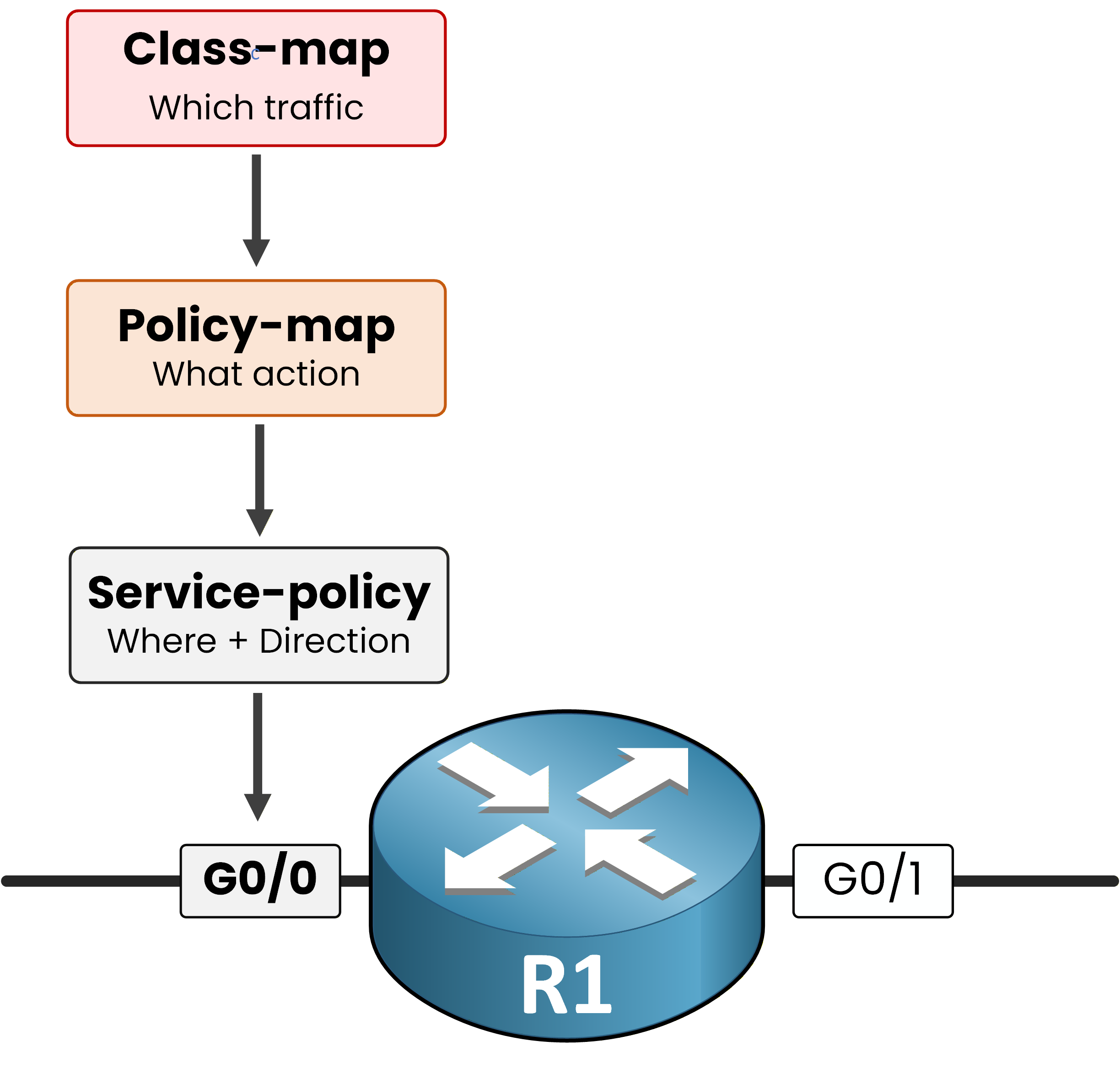
Figure 1 — The MQC framework
MQC splits any QoS policy into three independent building blocks that chain into each other:
class-mapdefines which traffic you care aboutpolicy-mapdefines what action to apply to that trafficservice-policydefines where the policy is attached and in which direction
You already saw this exact three-block model on CoPP in the previous lesson.
The grammar is universal.Answer the question below
Which MQC block defines the interface and direction where the policy is enforced?
Why This Matters for Interpretation
In production, you almost never write the QoS policy yourself.
You inherit it.
Your job is to read it, understand its intent, and explain its behavior.
That is exactly what you will do in the rest of this lesson, on a real enterprise edge config.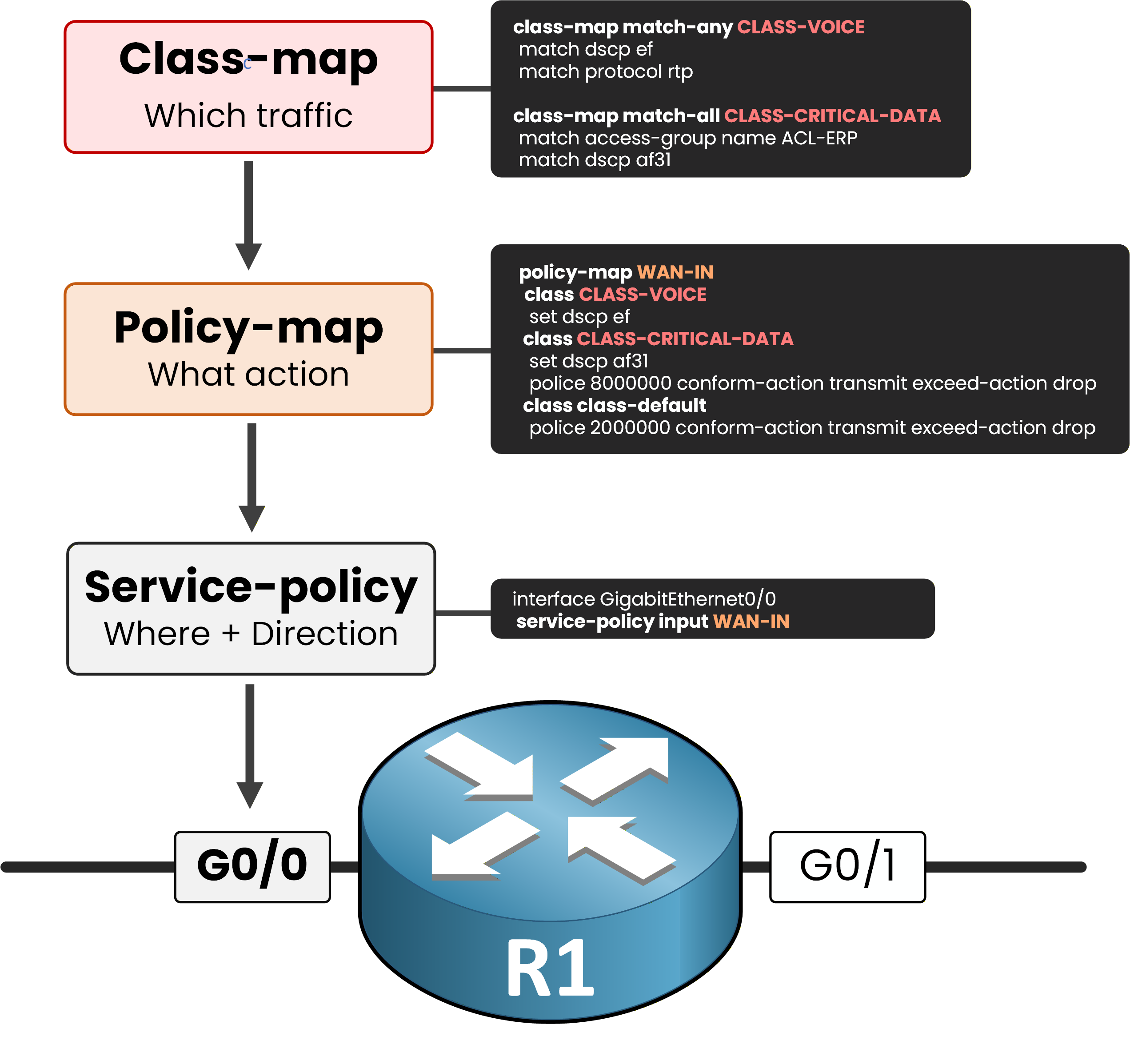
Figure 2 — The configuration you will decode
Here is the scene: router R1 sits at the enterprise edge, between your LAN and the WAN provider.
Take a moment to spot each block in the figure:two class-maps,
CLASS-VOICEandCLASS-CRITICAL-DATA, sort the incoming traffica policy-map called
WAN-INapplies actions to each classa service-policy attaches
WAN-INto interface G0/0 in the input direction
Throughout the rest of this lesson, you will decode each of these blocks one at a time.
Answer the question below
Which MQC block defines what action is applied to the matched traffic?
Your first step into the policy is the class-map.
Think of it as a named filter that groups packets sharing one or more characteristics into a single class, so the policy-map can act on them later.
Figure 3 — Two class-maps for two traffic types
Two class-maps live in the WAN-IN policy:
CLASS-VOICEfor voice traffic, andCLASS-CRITICAL-DATAfor business-critical data.
Reading either one answers the same question: which packets does this rule apply to?A Real Class-Map to Decode
Run the show command below to display the class-map block from the running config of R1:
R1# show running-config | section class-map
class-map match-any CLASS-VOICE
 match dscp ef
 match protocol rtp
class-map match-all CLASS-CRITICAL-DATA
 match access-group name ACL-ERP
 match dscp af31
Two classes appear in the output.
To interpret each one, you read the match logic first (match-any vs match-all), then the criteria below it.Answer the question below
Which DSCP value does CLASS-CRITICAL-DATA require a packet to carry?
Match-Any vs Match-All
The first word right after the class name controls how the criteria below it combine.
Misreading this single keyword is one of the most common QoS mistakes.match-anymeans OR: a packet is classified into the class if it satisfies at least one criterion.
Figure 4 — match-any: OR logic
Apply this to
CLASS-VOICEin your config.
A packet is classified as voice if it carries DSCP EF or if NBAR recognizes it as RTP.
Either match is enough.Answer the question below
Which match line in CLASS-VOICE relies on an existing DSCP marking from upstream?
match-allmeans AND: a packet is classified only if it satisfies every criterion.40 % Complete: you’re making great progress
Ready to pass your CCNP exam?