The Spanning Tree Protocol (STP) is a Layer 2 protocol designed to prevent switching loops in Ethernet networks.
It ensures that even if multiple physical paths exist between switches, only one logical path is active at a time.Why STP Is Needed
In modern Ethernet networks, reliability often relies on link redundancy.
Network engineers commonly connect switches using multiple links so that if one cable fails, another can immediately take over.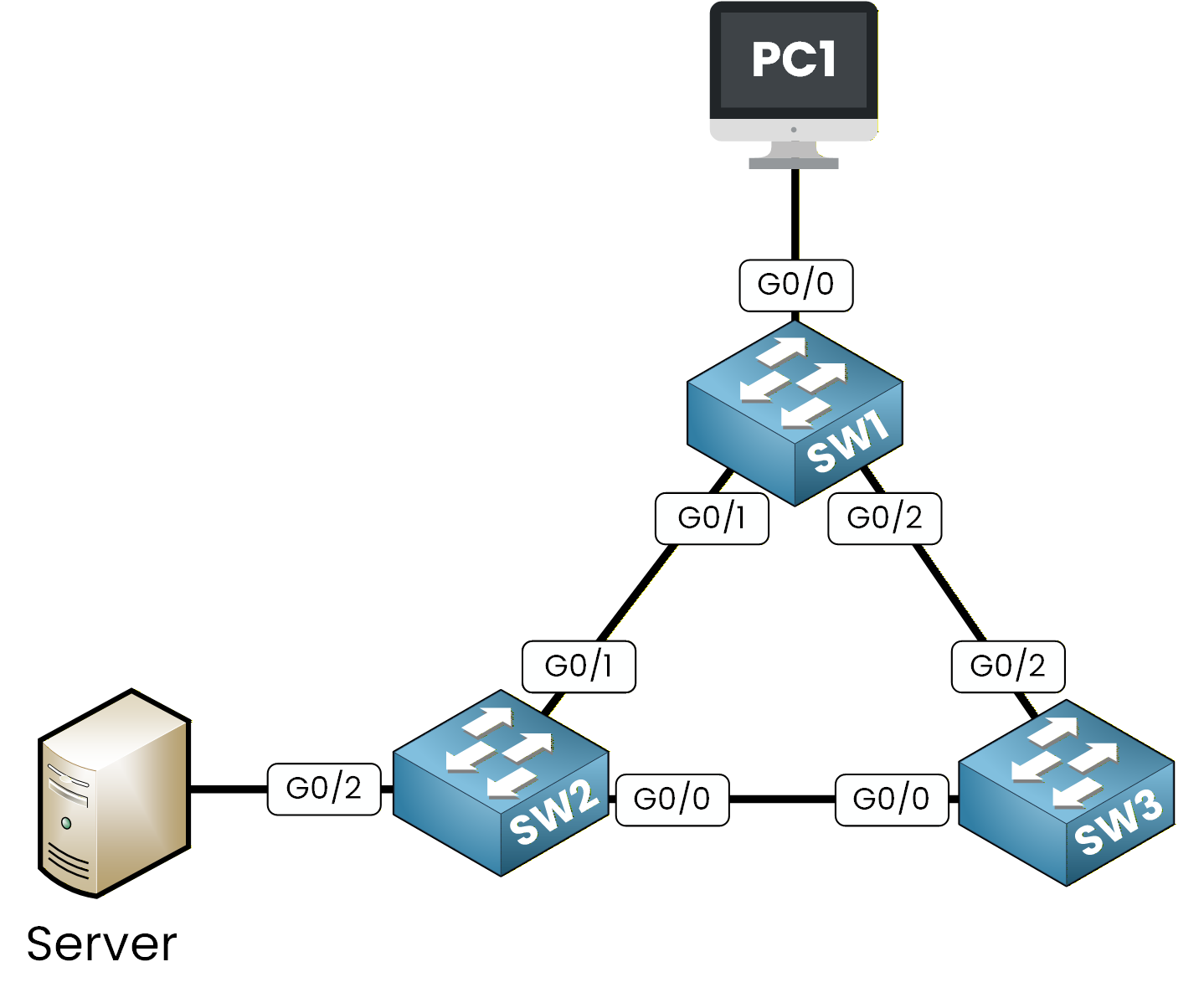
Figure 1 – Basic Redundant Network Topology
At first, this design seems ideal. For example, if PC1 needs to send traffic to the server, two possible paths exist:
One through PC1 → SW1 → SW2 → Server
Another through PC1 → SW1 → SW3 → SW2 → Server
However, having multiple paths to the same destination can be dangerous because it may create switching loops. A switching loop occurs when Ethernet frames circulate endlessly within the network, consuming bandwidth and potentially causing the switches to crash.
Let's examine how this problem happens in a simple redundant topology before STP is enabled.Answer the question below
Click 'Complete' to continue
Step 1 – PC1 Sends an ARP Request
Imagine you're on PC1 and want to communicate with the server.
Since PC1 doesn't yet know the server's MAC address, it sends an ARP broadcast asking, “Who has this IP address?”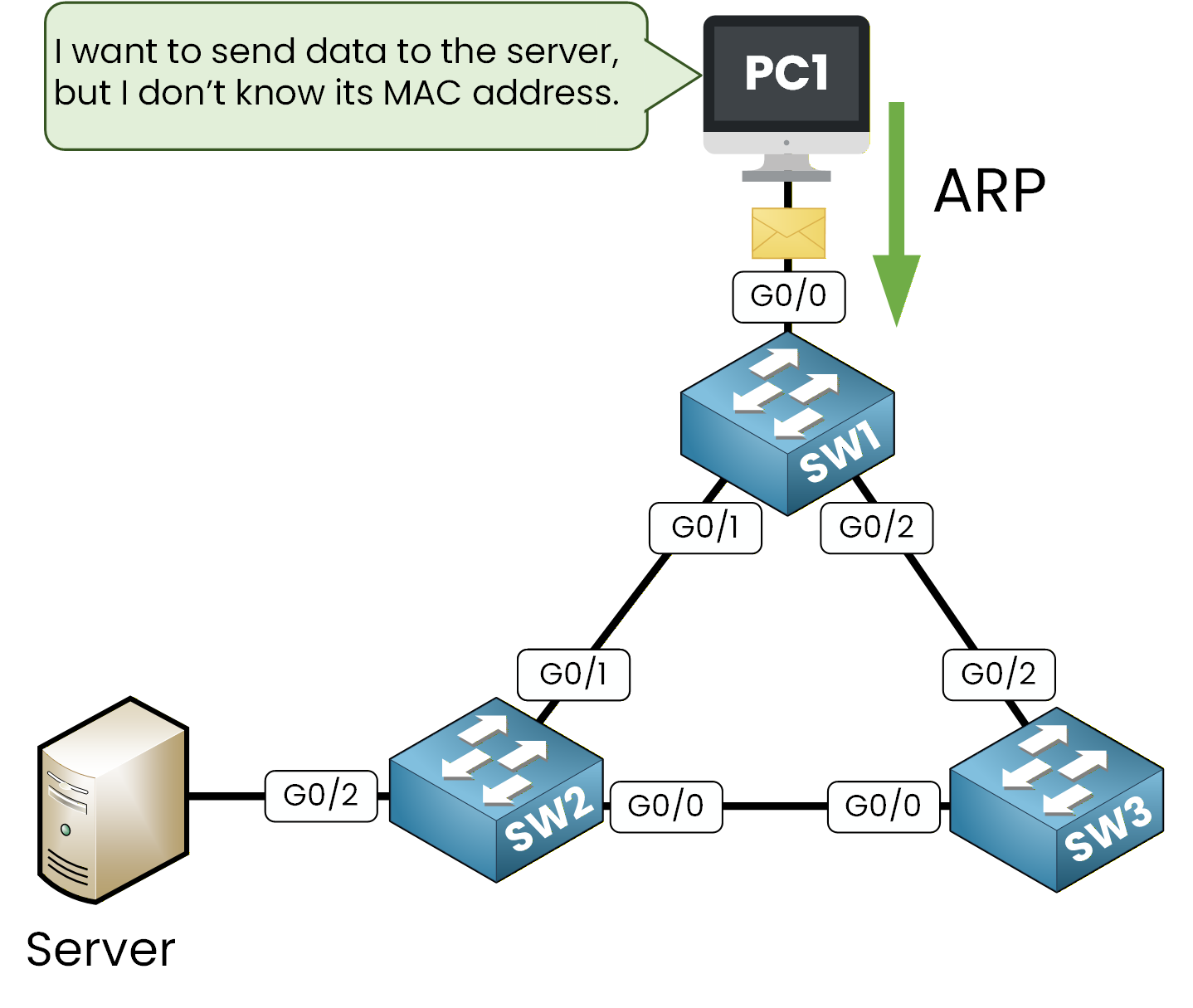
Figure 2 – PC1 Sends an ARP Request (Broadcast)
First, the broadcast ARP Request arrives at interface g0/0 of SW1.
Step 2 – SW1 Floods the Broadcast
The switch SW1 receives the ARP broadcast on G0/0 and floods it out of all other interfaces (G0/1 and G0/2).
At this stage, the frame is duplicated and sent toward both SW2 and SW3.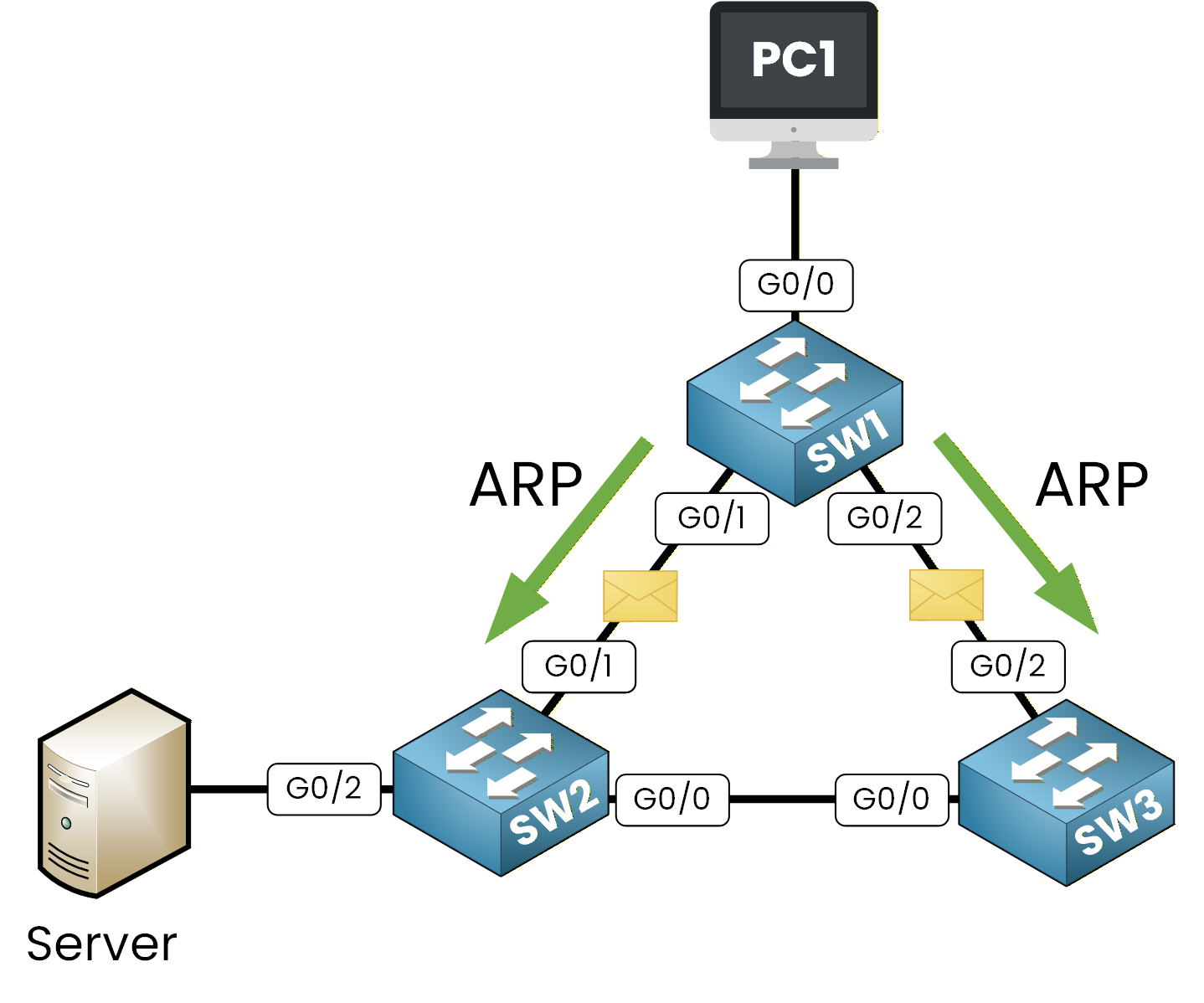
Figure 3 – SW1 Floods the ARP Broadcast
At this point, a single ARP request becomes two identical ARP frames, one sent toward SW2 and the other toward SW3. This is where the issue starts. Let's see what happens when these ARP requests reach SW2 and SW3.
Step 3 – SW2 and SW3 Flood the Broadcast Again
SW2 and SW3 receive the ARP broadcast from SW1.
Since they still don't know the server's MAC address, they forward the frame out of all ports except the one where it was received.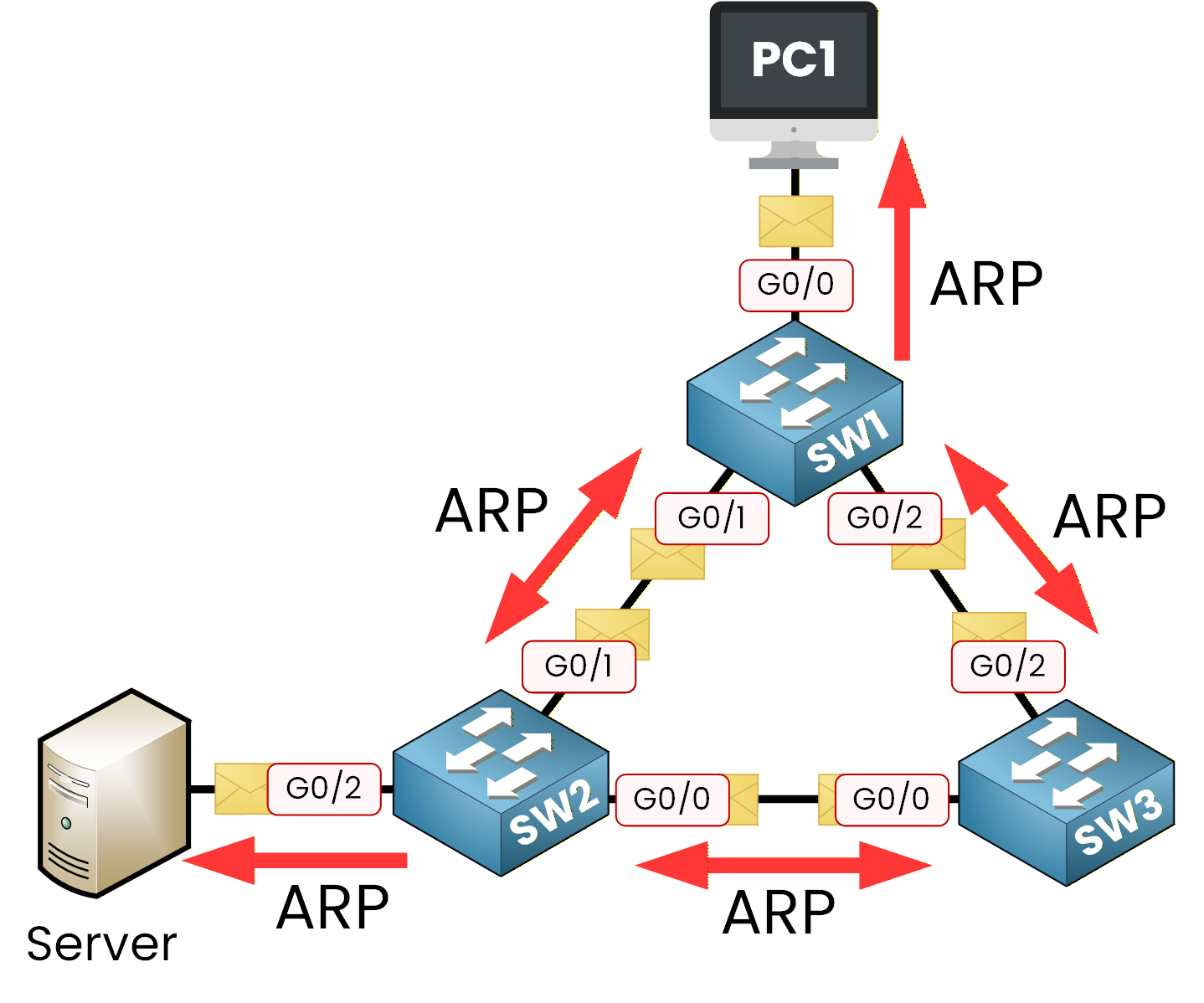
Figure 4 – SW2 and SW3 Flood the Broadcast Again (Loop Begins)
SW2 sends the ARP request to both the server and SW3, while SW3 sends it to SW2 and back to SW1.
Then, SW1 receives new copies of the same ARP request and floods them again toward PC1 and SW2.
At this point, every switch keeps forwarding new ARP broadcasts, and the number of frames grows exponentially.Soon, the network is overwhelmed with ARP requests circulating in every direction. This is what we call a switching loop.
Step 4 – The Impact of the Loop
As the switches keep flooding ARP broadcasts, the same frames circulate endlessly in the network. Each switch receives multiple copies of the same frame and tries to process them as new ones, which causes its CPU usage to rise significantly.
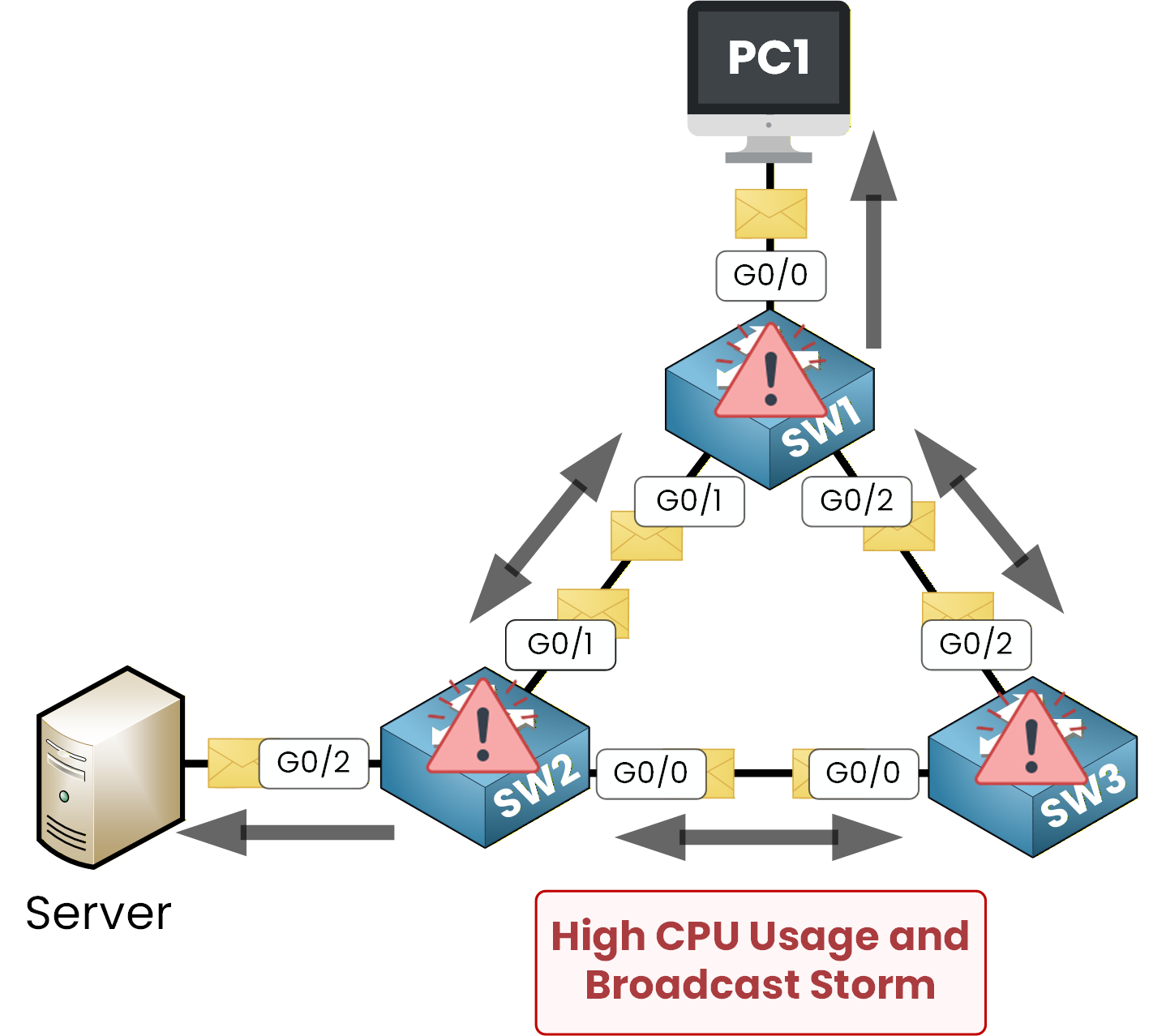
Figure 5 – Network Overloaded by the Loop
At the same time, the MAC address tables become unstable.
Because of the switching loop, the same Ethernet frame keeps circulating between SW1, SW2, and SW3.
Each time a switch receives the frame again on a different interface, it believes the device has moved to that port.As a result, the switch constantly relearns the same MAC address on different interfaces.
We can observe this behavior directly on SW1:SW1# show mac address-table Vlan Mac Address Type Ports ---- ----------- -------- ----- 1 3c52.829a.4f11 dynamic Gi0/0 1 3c52.829a.4f22 dynamic Gi0/1A few seconds later:
SW1# show mac address-table

Vlan    Mac Address       Type        Ports
----    -----------       --------    -----
  1     3c52.829a.4f11    dynamic     Gi0/0
  1     3c52.829a.4f22    dynamic     Gi0/2
Notice what is happening:
The MAC address 3c52.829a.4f22 (Server) was first learned on Gi0/1
A moment later, it appears on Gi0/2
The switch keeps changing its mind about where the server is located
This phenomenon is called MAC address flapping.
It happens because the broadcast storm causes frames to loop endlessly through different switch paths.
Each time the frame re-enters SW1 from another interface, the switch updates its MAC table.This constant relearning:
Overloads the CPU
Fills the switching table with unstable entries
Consumes bandwidth
Eventually causes a broadcast storm
At this point, the network becomes unstable and may completely stop responding.
Now, let's see how the Spanning Tree Protocol detects these redundant paths and blocks them to prevent loops.Answer the question below
What does the network turn into when the ARP frames circulate endlessly?
The Spanning Tree Protocol (STP) solves the problem of loops by blocking redundant paths.
Whenever multiple physical paths exist between switches, STP selects the best path and temporarily disables the others to ensure the network remains loop-free.In our example, traffic between PC1 and the Server could follow two paths:
PC1 → SW1 → SW2 → Server
PC1 → SW1 → SW3 → SW2 → Server
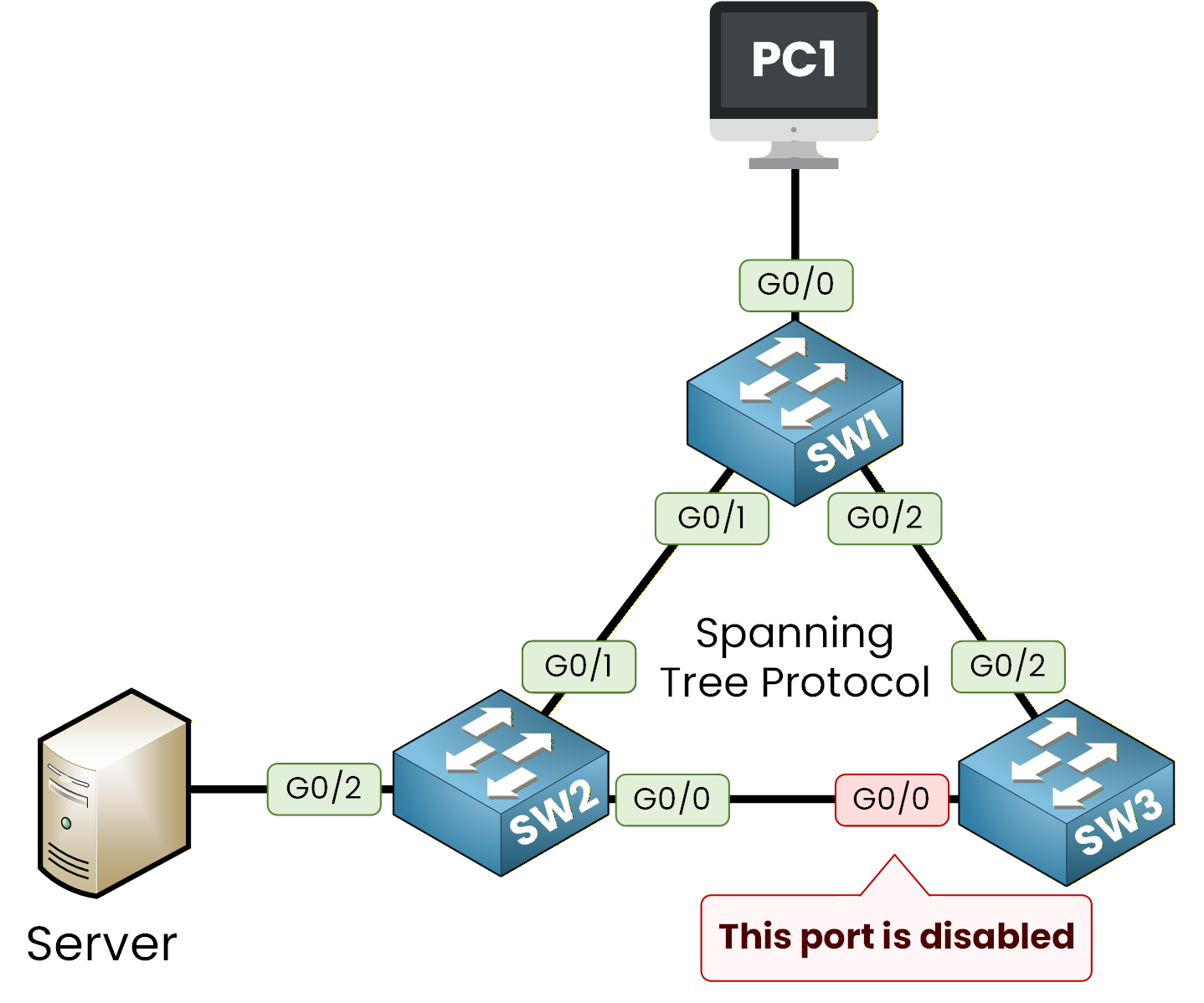
Figure 6 – Spanning Tree Protocol blocks the redundant path
In this scenario, STP chooses the primary path and disables the redundant one by blocking port Gi0/0 on SW3.
We can verify this directly on SW3:
SW3# show spanning-tree vlan 1

VLAN0001
  Spanning tree enabled protocol ieee
  Root ID    Priority    32769
             Address     0001.63A6.E107
             Cost        4
             Port        26 (Gi0/2)

  Bridge ID  Priority    32769  (priority 32768 sys-id-ext 1)
             Address     0090.2BE2.8EE9

Interface        Role Sts Cost      Prio.Nbr Type
---------------- ---- --- --------- -------- -----------------------------
Gi0/0            Altn BLK 4         128.1    P2p
Gi0/1            Desg FWD 4         128.2    P2p
Gi0/2            Root FWD 4         128.3    P2p
Notice the important part:
Gi0/0 → Role: Altn (Alternate)
Sts: BLK (Blocked)
This means:
The port is physically connected
But STP has logically disabled it
No user traffic is forwarded on this interface
As a result, when SW3 receives an ARP broadcast, it will not forward the frame out of the blocked Gi0/0 port.
This prevents the ARP request from looping back into the network.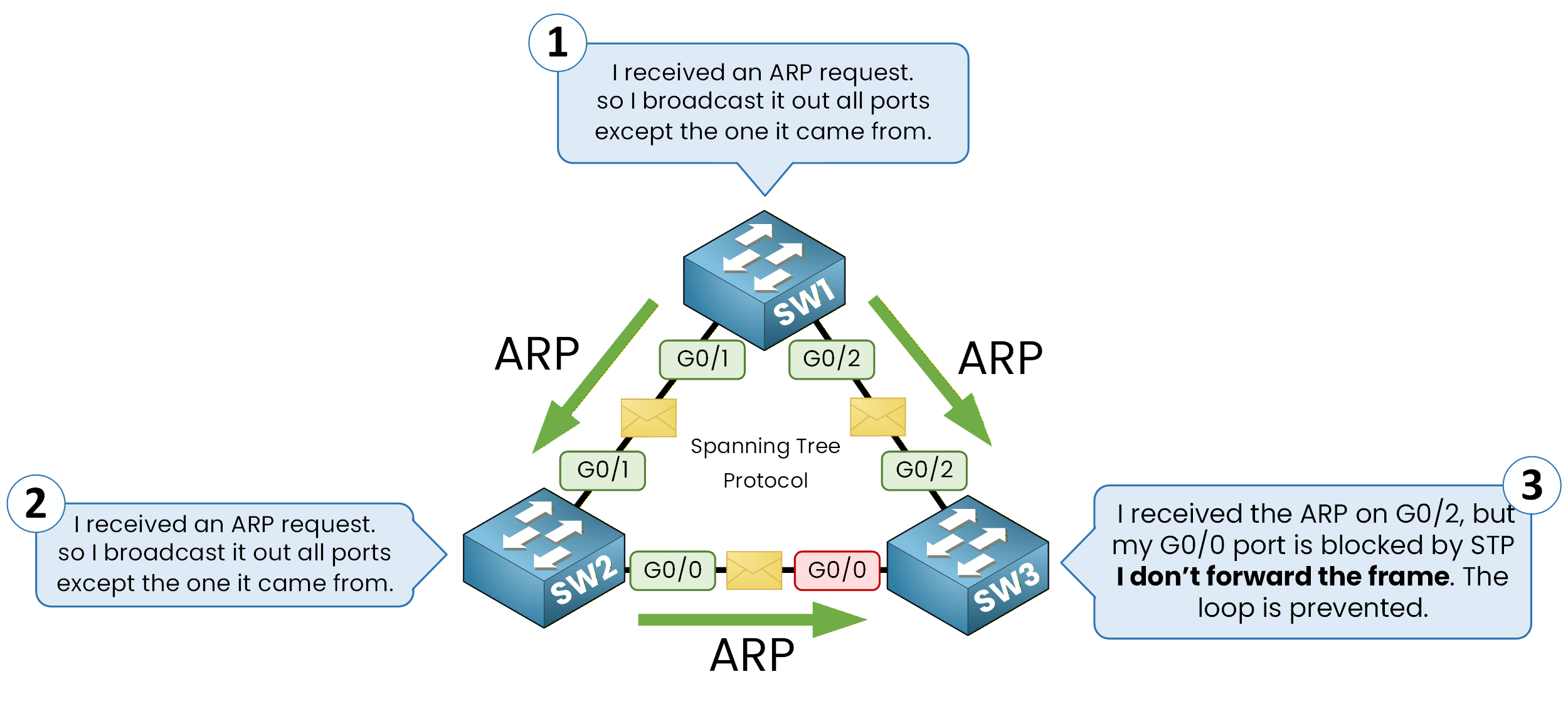
Figure 7 – ARP process with Spanning Tree Enabled
Answer the question below
Which protocol prevents these switching loops?
Spanning Tree Recap
Start with STP off and watch the frame counter climb until the links saturate, then switch STP on and compare.
Play the second run to the end to earn your flag.
Now that we understand how STP prevents network loops, let's dive deeper into the core mechanisms behind it.
In the next section, you'll learn how the Spanning Tree Protocol decides which ports stay active and which ones are blocked to keep every switched network loop-free.Answer the question below
Paste the flag you earned in the scenario.