The OSPF protocol needs to elect a DR (Designated Router) and a BDR (Backup Designated Router) to function on multi-access networks. You might have asked yourself several questions about this topic, and you're absolutely right. Let's uncover the truth behind DR and BDR.
Why are OSPF DR and BDR necessary?
On multi-access segments (such as Ethernet), many routers can be connected to the same network, as shown below. When each router tries to form OSPF neighbor adjacencies with every other router, the number of relationships increases rapidly.
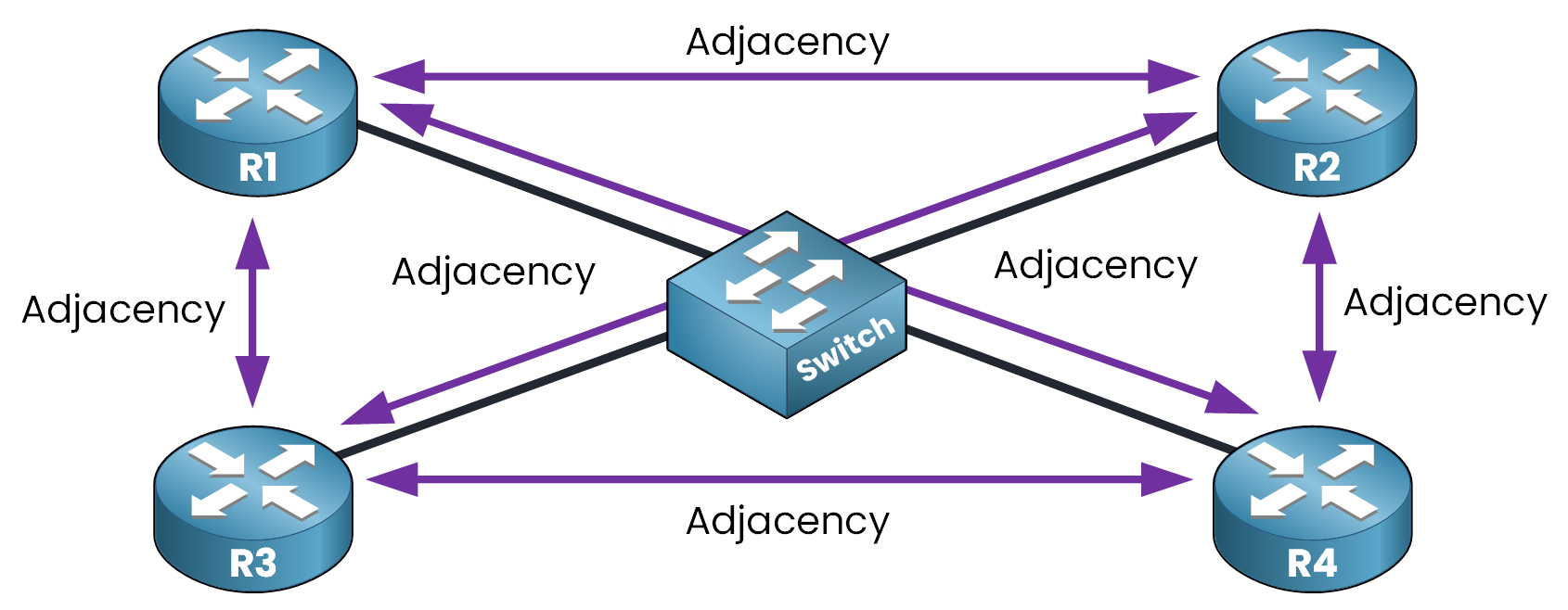
Figure 1 – Full Mesh OSPF Adjacency Without DR/BDR on a Multi-Access Network
As you can see, each router needs to establish an OSPF adjacency with every other router on the network. However, if we keep this approach, the number of adjacencies quickly increases according to the following formula:
n(n – 1) / 2, where n is the number of routers.
In the example above, we have 4 routers:
4(4 – 1) / 2 = 6 adjacenciesNow imagine a larger segment with 10 routers:
10(10 – 1) / 2 = 45 adjacenciesThis quickly becomes inefficient because adding more routers to the network means:
More OSPF neighbors to maintain.
More LSAs exchanged between devices.
More CPU and memory consumed to keep OSPF running.
To address these problems, the OSPF DR and BDR were introduced to reduce adjacency overload and improve scalability on multi-access networks.
Answer the question below
On which type of network does OSPF require a DR and BDR?
Imagine a network without a DR or BDR.
When a router like R1 joins the segment, it sends LSAs to 224.0.0.5 (All OSPF Routers) to advertise its known networks.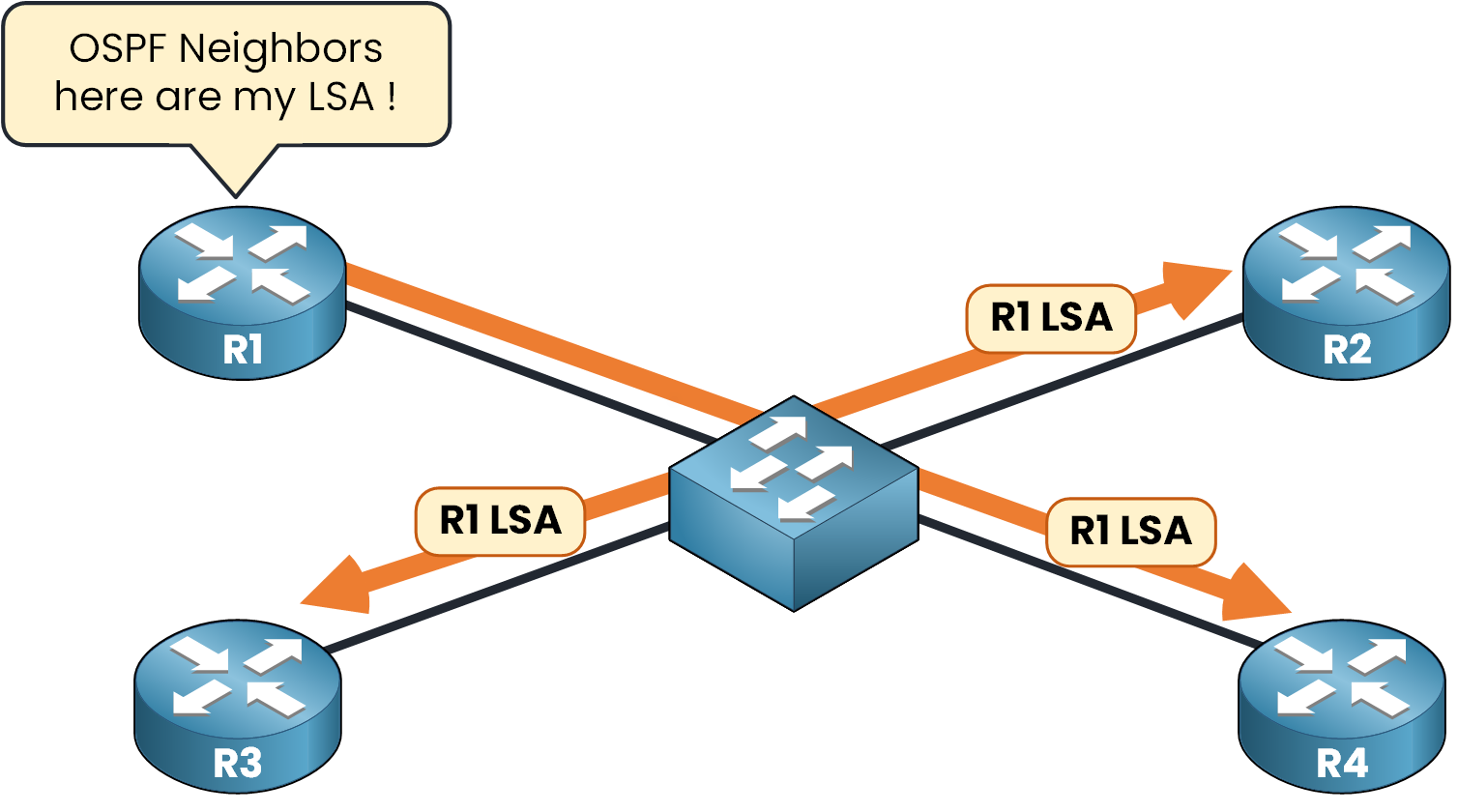
Figure 2 - R1 sends LSA to all Router OSPF (224.0.0.5)
All other routers on the segment (R2, R3, R4) receive this LSA, acknowledge it, and then re-flood it to the others on 224.0.0.5.
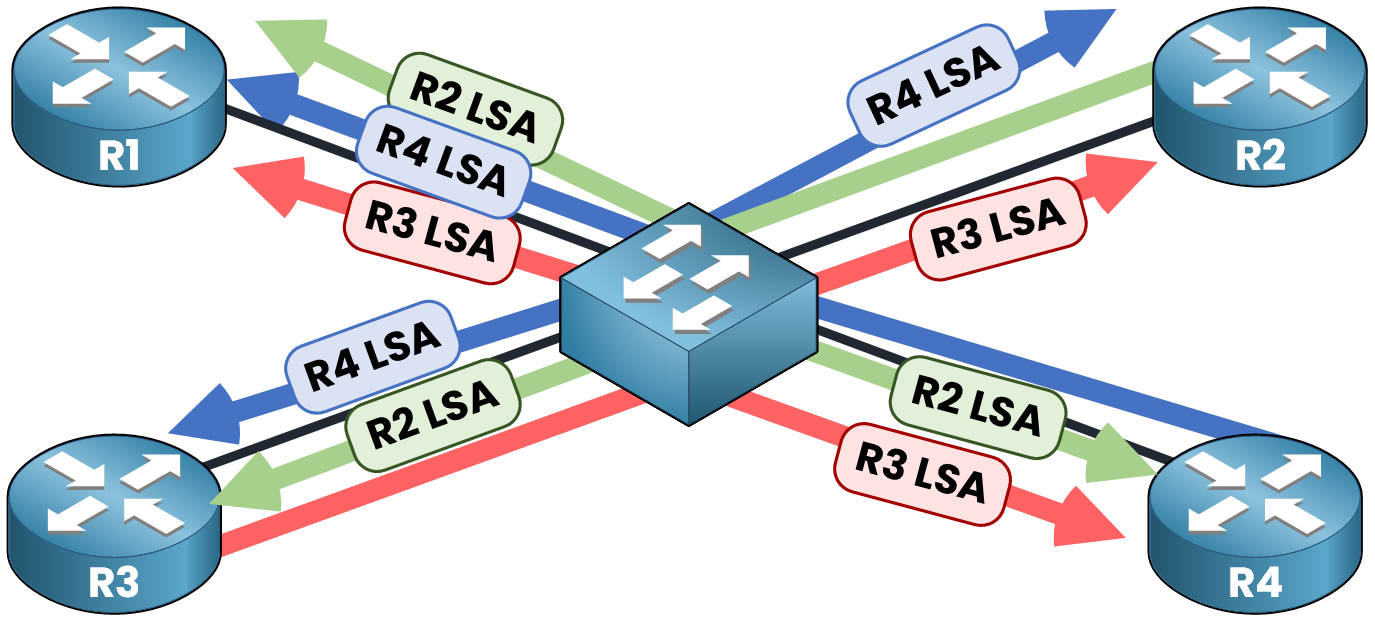
Figure 3 - Routers re-flood the LSA to all Router OSPF (224.0.0.5)
This creates a storm of redundant LSAs, especially when multiple routers advertise new information. It wastes bandwidth and CPU. To solve this issue, OSPF introduces the concept of a DR (Designated Router) and BDR (Backup Designated Router).
The concept is very simple: the DR collects all the LSAs and sends them one time to all other routers. The BDR acts as a Backup when the DR fails and takes its place.
Answer the question below
To which multicast address do routers flood LSAs when no DR/BDR exists?
Let's look at a scenario with a DR and BDR elected. Here R4 is the DR and R3 is the BDR.
R1 forms adjacencies only with the DR and BDR.
When R1 generates an LSA, it sends it only to 224.0.0.6 (All Designated Routers).
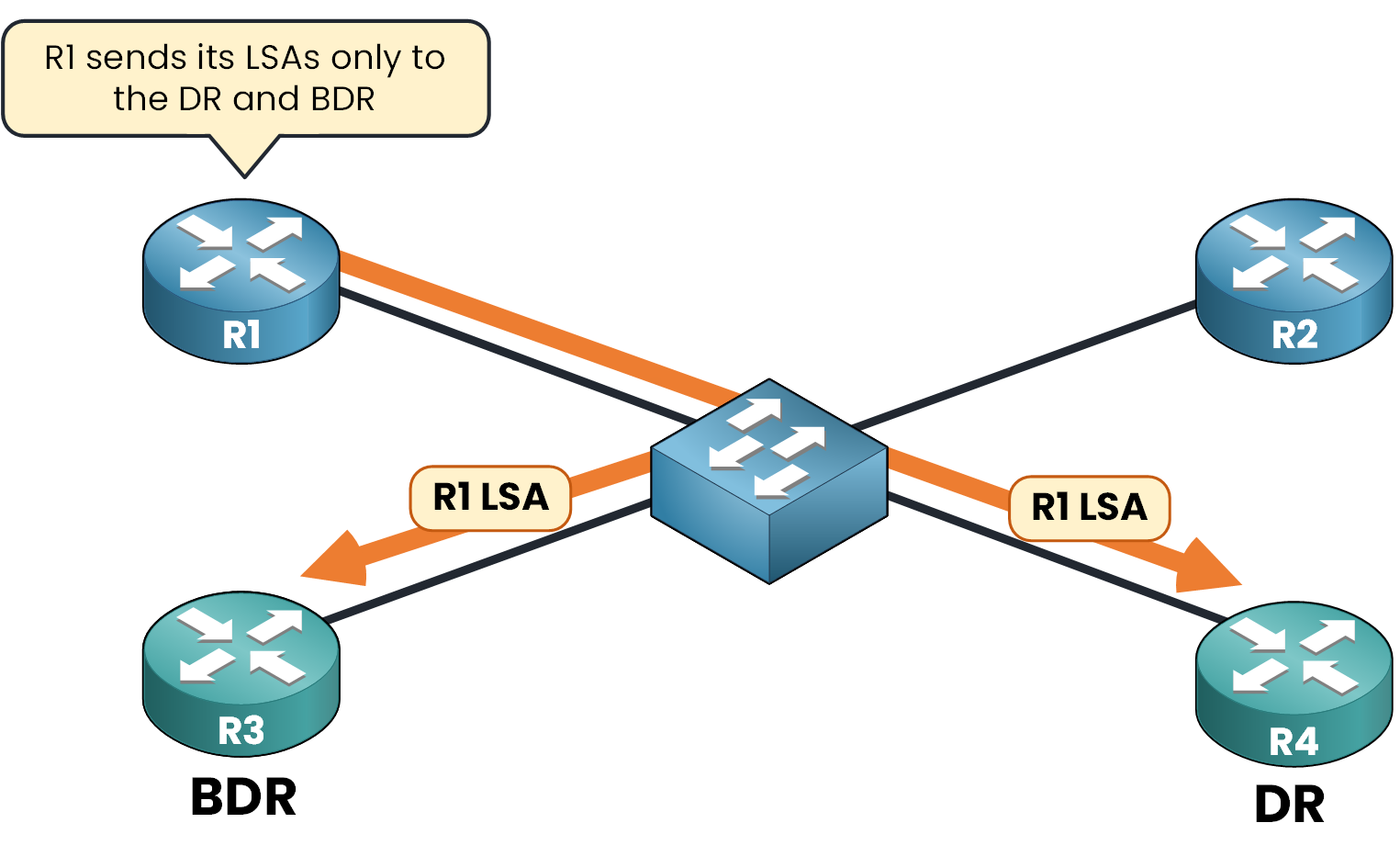
Figure 4 - R1 sends LSA only to DR and BDR using 224.0.0.6
The DR then forwards the LSA to 224.0.0.5 (AllSPFRouters) so that all other routers on the segment receive the update. The BDR stays in standby and will take over if the DR fails.
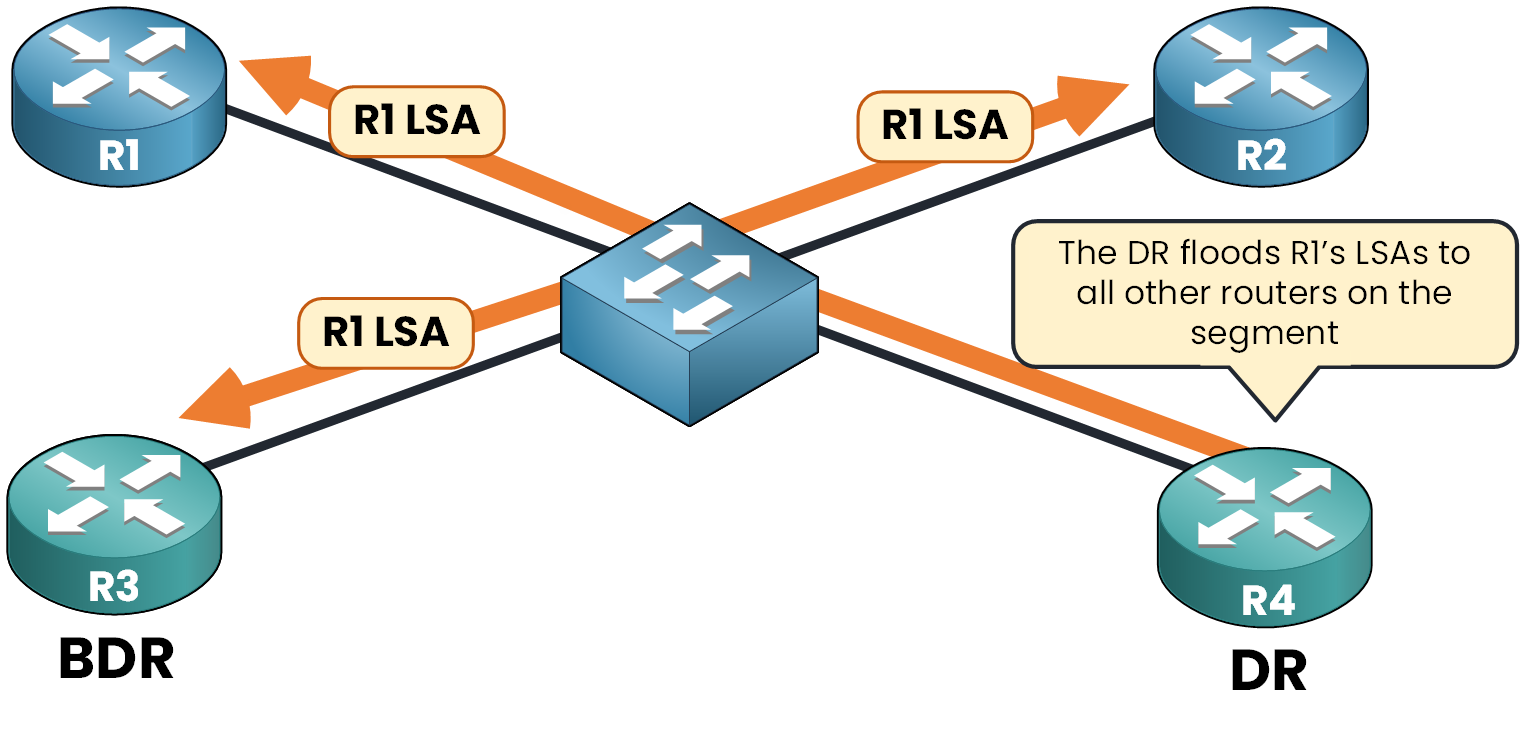
Figure 5 - DR sends LSA to all other routers
This way, the LSA is flooded only once across the network segment, and every router learns about it efficiently without unnecessary duplication. To enable this behavior, OSPF performs a DR/BDR election on multi-access networks.
Answer the question below
To which multicast address do routers send LSAs when a DR/BDR is present?
In OSPF, the DR/BDR election takes place on multi-access networks (like Ethernet), not on point-to-point links.
Where Does the DR/BDR Election Happen?
This election happens after the 2-Way state during OSPF neighbor formation.
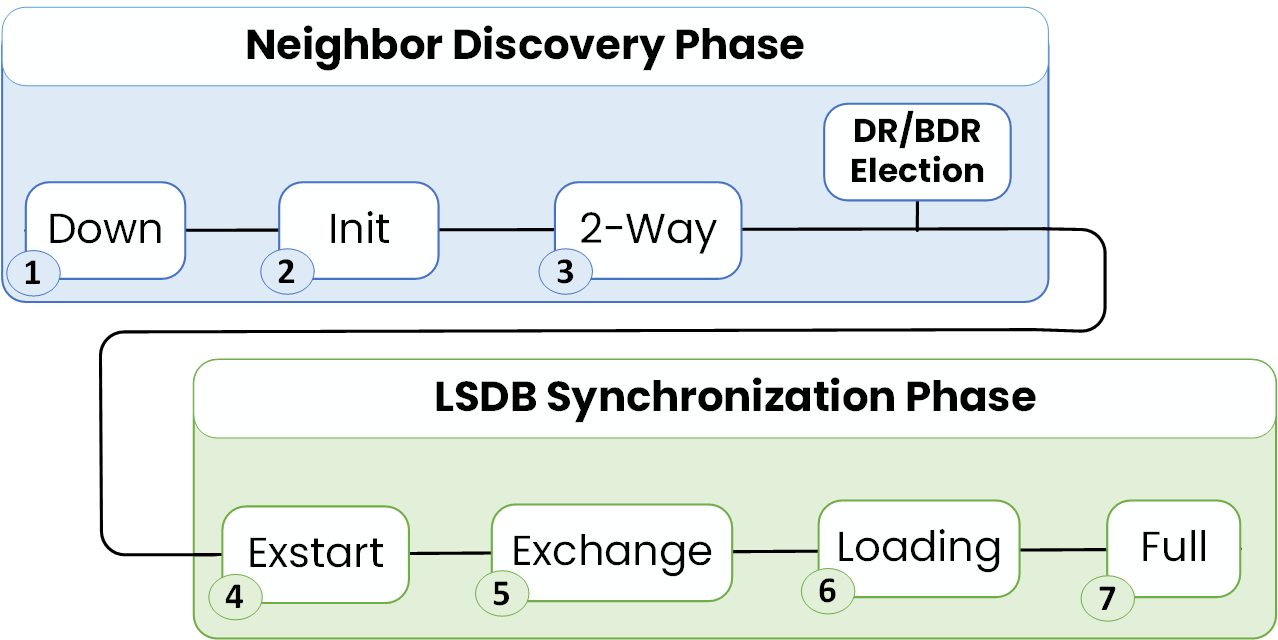
Figure 6 - How OSPF Reaches the DR/BDR Election Step
The Election only occurs on multi-access networks. If the interface is configured as a point-to-point link, there's no DR and BDR election.
Each OSPF router checks the network type on its interface and determines if it needs to participate in the DR/BDR election.
DR and BDR Election Rules
The DR and BDR routers are selected based on OSPF priority and Router ID:
Election rules
The router with the highest priority becomes DR
The second-highest becomes BDR
If equal, the highest Router ID wins
A router with priority 0 is not eligible
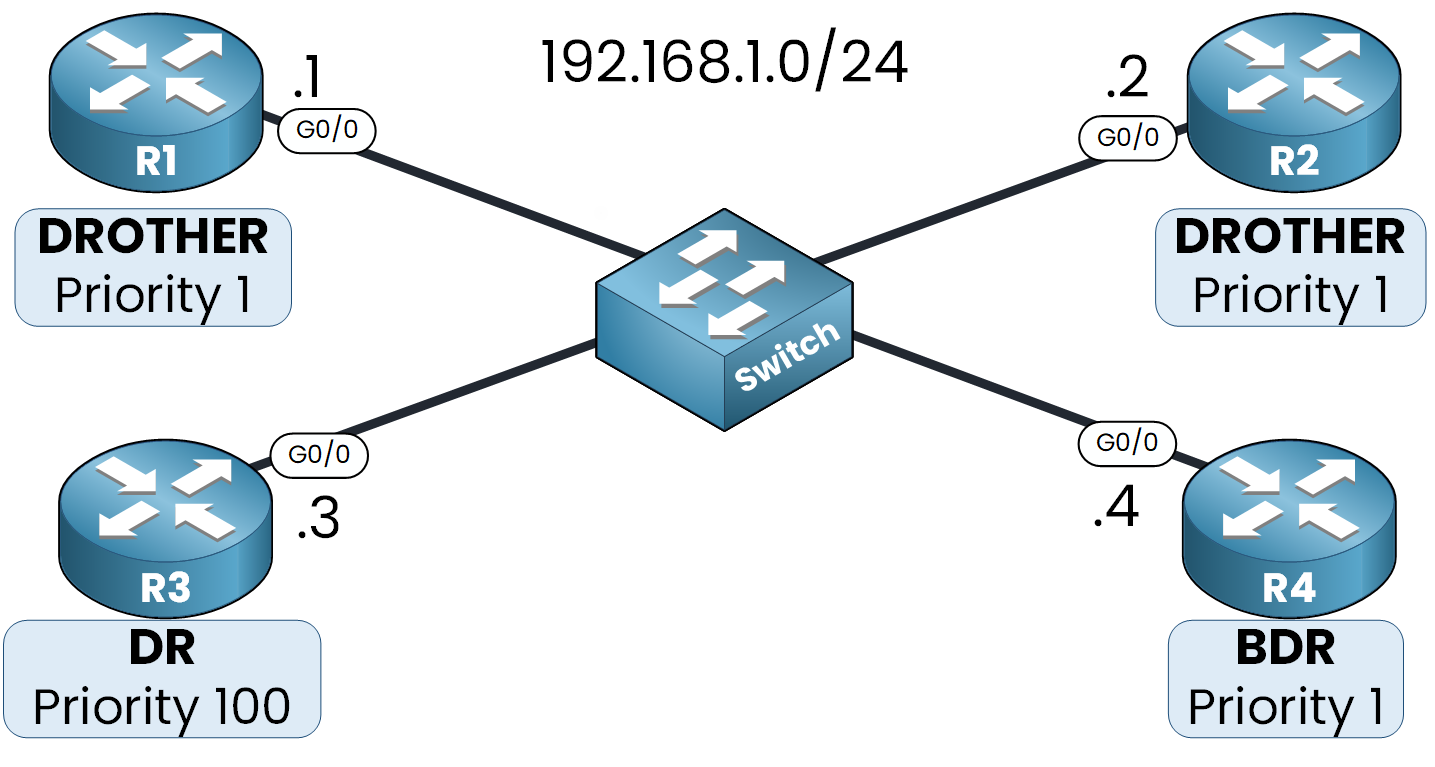
Figure 7 - OSPF Election Roles (DR, BDR and DROTHER)
In this example:
R3 (priority 100) → DR
R4 (priority 1 and the highest Router ID 192.168.1.4) → BDR
R1 and R2 → not elected → become DROTHERs
Answer the question below
Which parameter determines the DR election when priorities are equal?
A DROTHER is a router that is not elected as DR or BDR.
What does a DROTHER do?
A DROTHER forms a FULL adjacency only with the DR and BDR.
It forms a 2-WAY state with other DROTHERs.
Neighbor Table on R1
R1# show ip ospf neighbor

Neighbor ID   Pri    State         Dead Time  Address      Interface
192.168.1.4    1     FULL/BDR      00:00:24   192.168.1.4  GigabitEthernet0/0
192.168.1.3    100   FULL/DR       00:00:24   192.168.1.3  GigabitEthernet0/0
192.168.1.2    1     2WAY/DROTHER  00:00:24   192.168.1.2  GigabitEthernet0/0
R3 has priority 100 and is elected DR.
R4 is the BDR.
R2 is a DROTHER.
From R1's perspective, it has:
FULL adjacencies with R3 (DR) and R4 (BDR)
Only a 2-WAY state with R2 (another DROTHER)
This mechanism limits the number of adjacencies and controls LSA flooding.
Now that you understand how the DR and BDR work, the next lesson puts you on the CLI: in OSPF DR and BDR Configuration you will force the election with a priority, then shut the DR down and watch the BDR take over.
Answer the question below
What state do two DROTHER routers form with each other?
Let's recap the key concepts about Designated Router (DR) and Backup Designated Router (BDR) in OSPF multi-access Ethernet networks.
Category
Key Point
Description / Example
Purpose
Reduce overhead
DR/BDR minimize the number of adjacencies on multi-access networks.
Adjacency Count
Without DR/BDR
Full mesh: n(n – 1)/2 adjacencies.
With DR/BDR
Each router forms adjacency only with the DR and BDR.
LSA Exchange
DROTHER → DR/BDR
Sent to multicast address 224.0.0.6.
DR → All routers
Flooded to 224.0.0.5.
Election Rules
1. Priority
The router with the highest priority becomes DR.
2. Tie-breaker
Highest Router ID wins if priorities are equal.
3. Priority = 0
Router is not eligible to become DR or BDR.
Preemption
Election type
Non-preemptive: once elected, DR/BDR roles remain until failure.
Adjacency States
DROTHER ↔ DR/BDR
Reach FULL adjacency.
DROTHER ↔ DROTHER
Stay in 2-WAY state only.
Failure Handling
DR failure
BDR automatically takes over as DR.
Table 1 – Summary of OSPF DR and BDR
In short, the DR and BDR mechanism ensures OSPF remains efficient and stable on multi-access networks by limiting adjacencies and controlling how LSAs are exchanged.
Answer the question below
Click 'Complete' to continue