In a LAN, every device depends on a default gateway router to reach external networks. If this router fails, all hosts lose connectivity to the outside world.
To prevent this, First Hop Redundancy Protocols (FHRPs) such as HSRP, VRRP, and GLBP were created. HSRP and GLBP come from Cisco, while VRRP is an open standard from the IETF. These protocols allow multiple routers to share the gateway function so that end hosts always maintain access, even if one router goes down.
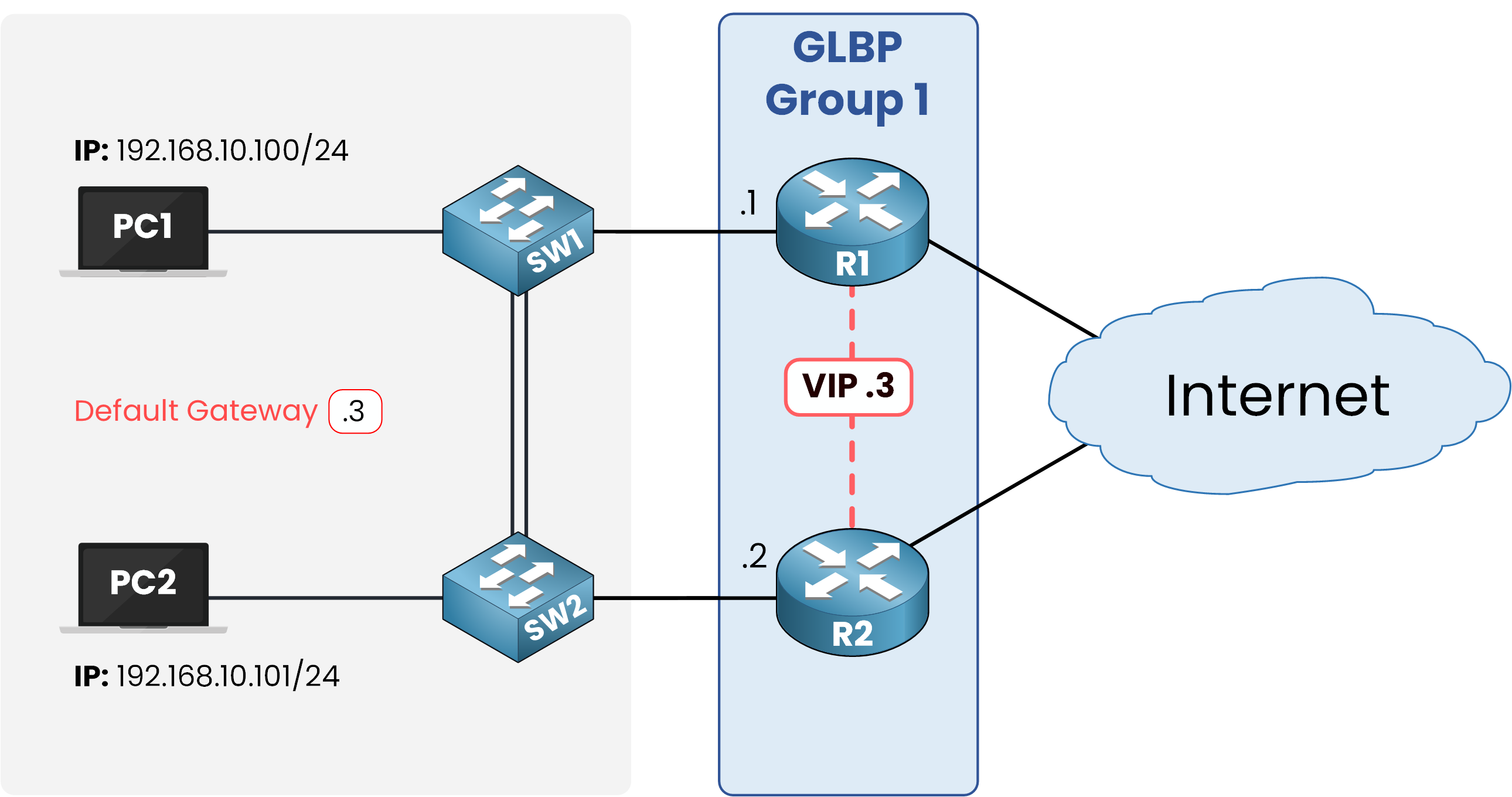
Figure 1 – Basic GLBP topology with a shared virtual IP (.3).
What makes GLBP different is that it not only provides redundancy but also shares traffic between routers. Instead of having one active router and another sitting idle, GLBP allows all routers in the group to actively forward packets.
Hosts can use different routers at the same time. This boosts efficiency and helps avoid wasting network resources.
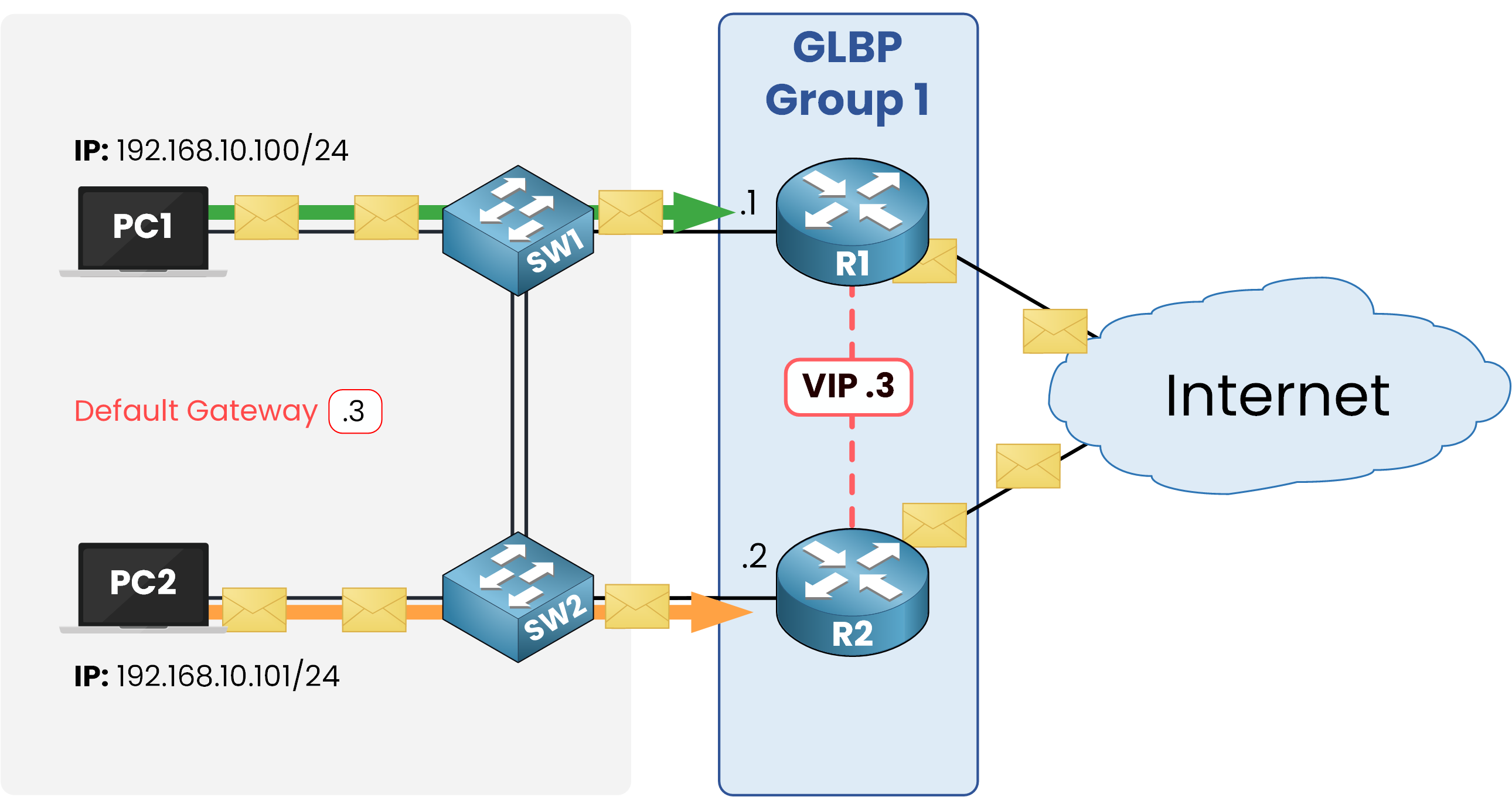
Figure 2 – GLBP load sharing: PC1 via R1, PC2 via R2.
GLBP works with GLBP groups, identified by a number, that share a single Virtual IP address (VIP). This VIP is configured as the default gateway on the hosts.
Answer the question below
What IP do all routers in a GLBP group share?
To fully grasp how GLBP works in practice, it is important to first look at the roles that routers can take within a GLBP group.
There are two main roles:
Active Virtual Gateway (AVG):
The AVG is the router that controls the group. It decides which routers will forward traffic as AVFs and ensures that hosts can always reach the virtual gateway. By default, the AVG also acts as a forwarder.Active Virtual Forwarder (AVF):
AVFs are the routers that forward traffic on behalf of the group.
Now let’s look at the diagram to connect these roles to the actual routers.
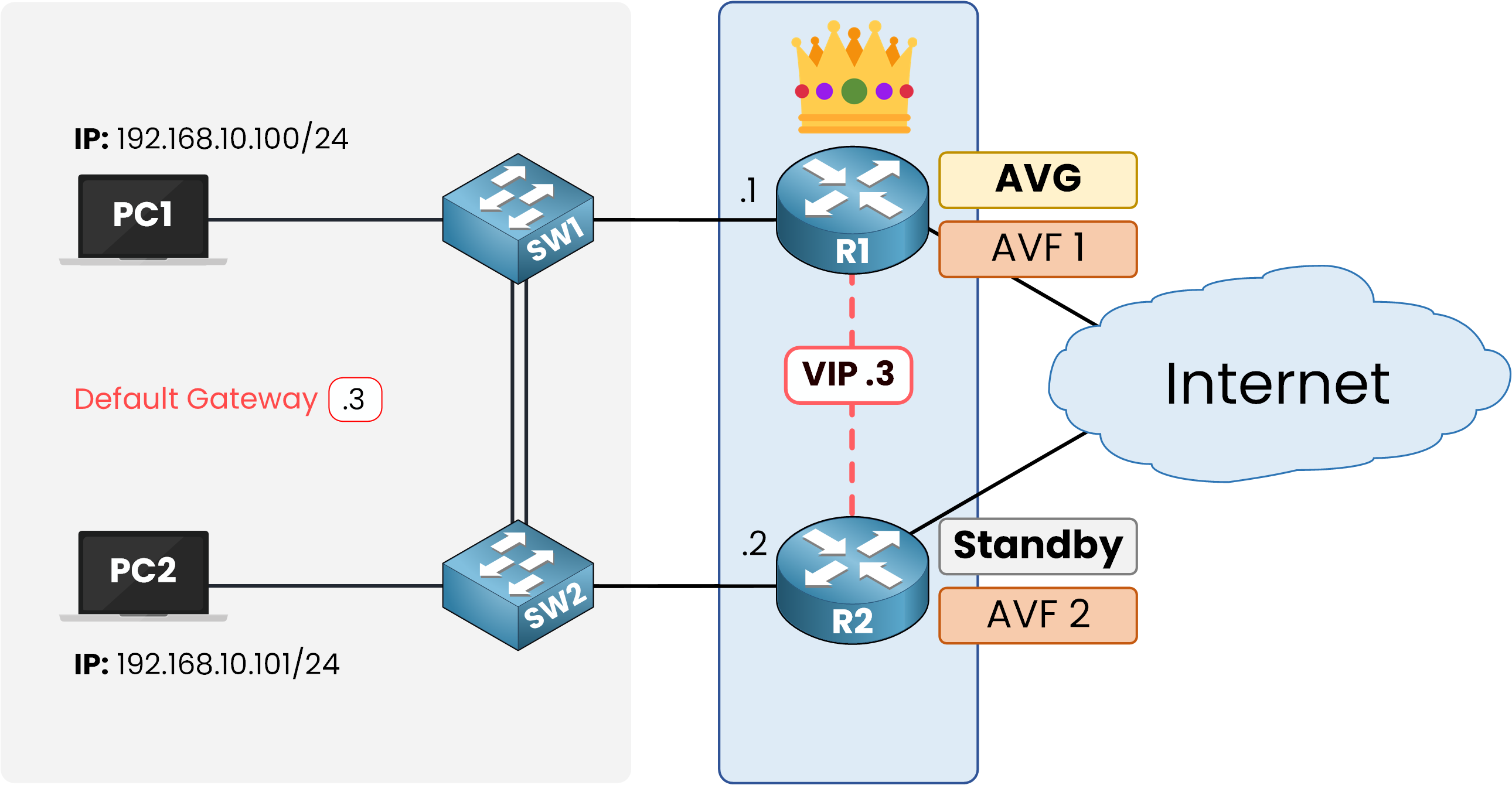
Figure 3 – GLBP roles: R1 as AVG/AVF1, R2 as Standby AVG/AVF2.
R1 is the Active Virtual Gateway (AVG).
It controls the GLBP group and decides how traffic will be distributed. Since the AVG also works as a forwarder by default, R1 is both the AVG and Active Virtual Forwarder 1 (AVF1).R2 is the Standby AVG.
If R1 fails, R2 will take over the AVG role. For now, it also works as Active Virtual Forwarder 2 (AVF2), so it forwards traffic at the same time.
The key point is that GLBP separates the gateway management role (AVG / Standby AVG) from the forwarding role (AVF). This is why both R1 and R2 can forward traffic, while only one of them manages the group.
Remember that the AVG doesn’t only coordinate the group. By default, it also forwards traffic like an AVF. This double role makes it central to GLBP’s operation. In the next section, we’ll see how the AVG assigns Virtual MAC addresses to make load sharing possible.
Answer the question below
What role acts as the leader and coordinator in a GLBP group?
To enable load sharing, the Active Virtual Gateway (AVG) assigns a virtual MAC address (VMAC) to each router in the group, including itself.
In our example, R1 (the AVG) keeps VMAC1, and R2 receives VMAC2. Each AVF has its own virtual MAC address.
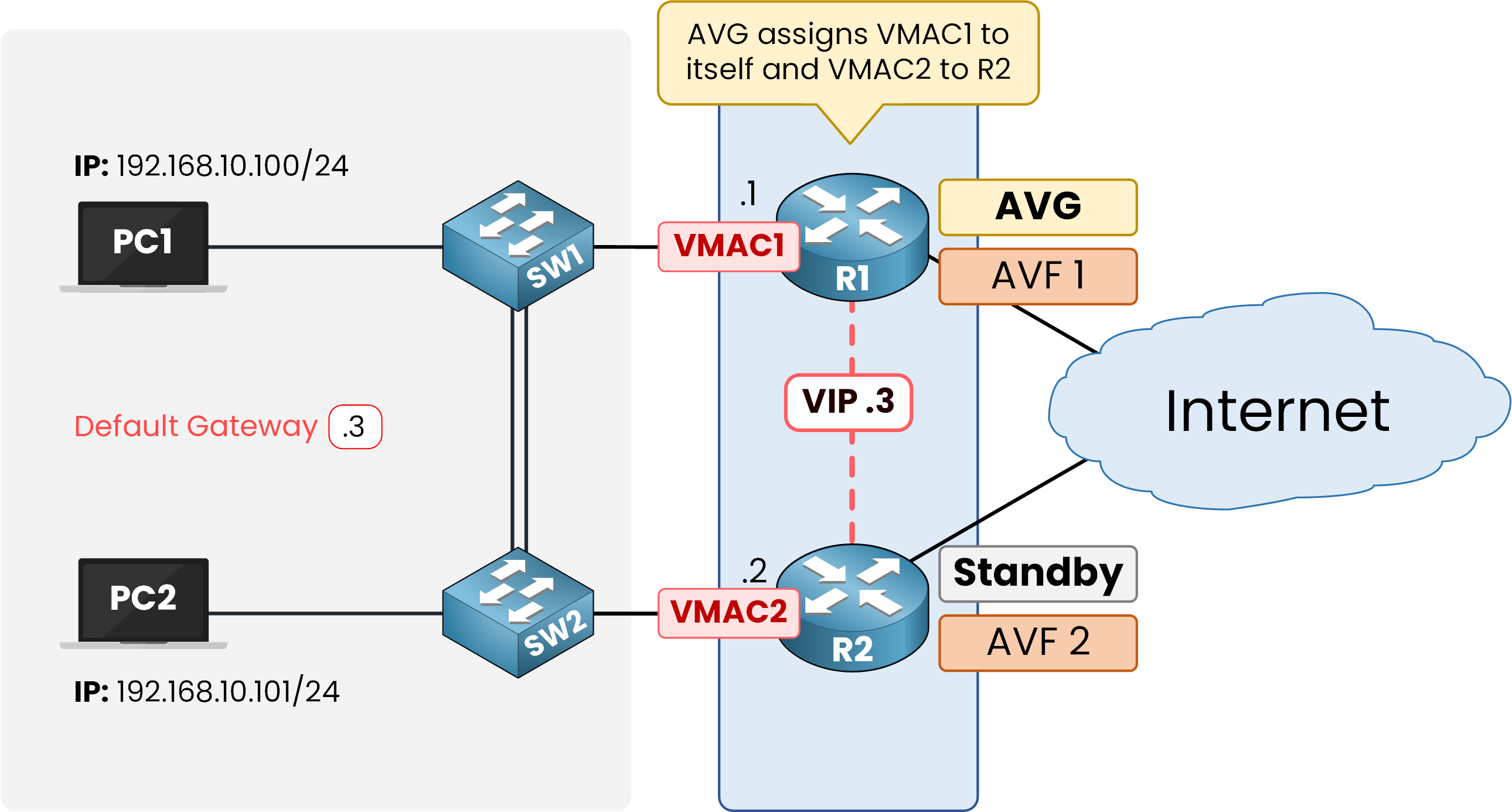
Figure 4 – Virtual MAC assignment: R1 gets VMAC1, R2 gets VMAC2.
For the hosts, nothing changes: they still use the same virtual IP (VIP), such as 192.168.10.3, as their default gateway. When a host sends an ARP request for this VIP, the AVG answers, but instead of always returning the same MAC address, it distributes different VMACs.
By default, GLBP uses a round-robin method:
PC1 sends an ARP request for 192.168.10.3 → the AVG replies with VMAC1 (R1).
PC2 sends the same request → the AVG replies with VMAC2 (R2).
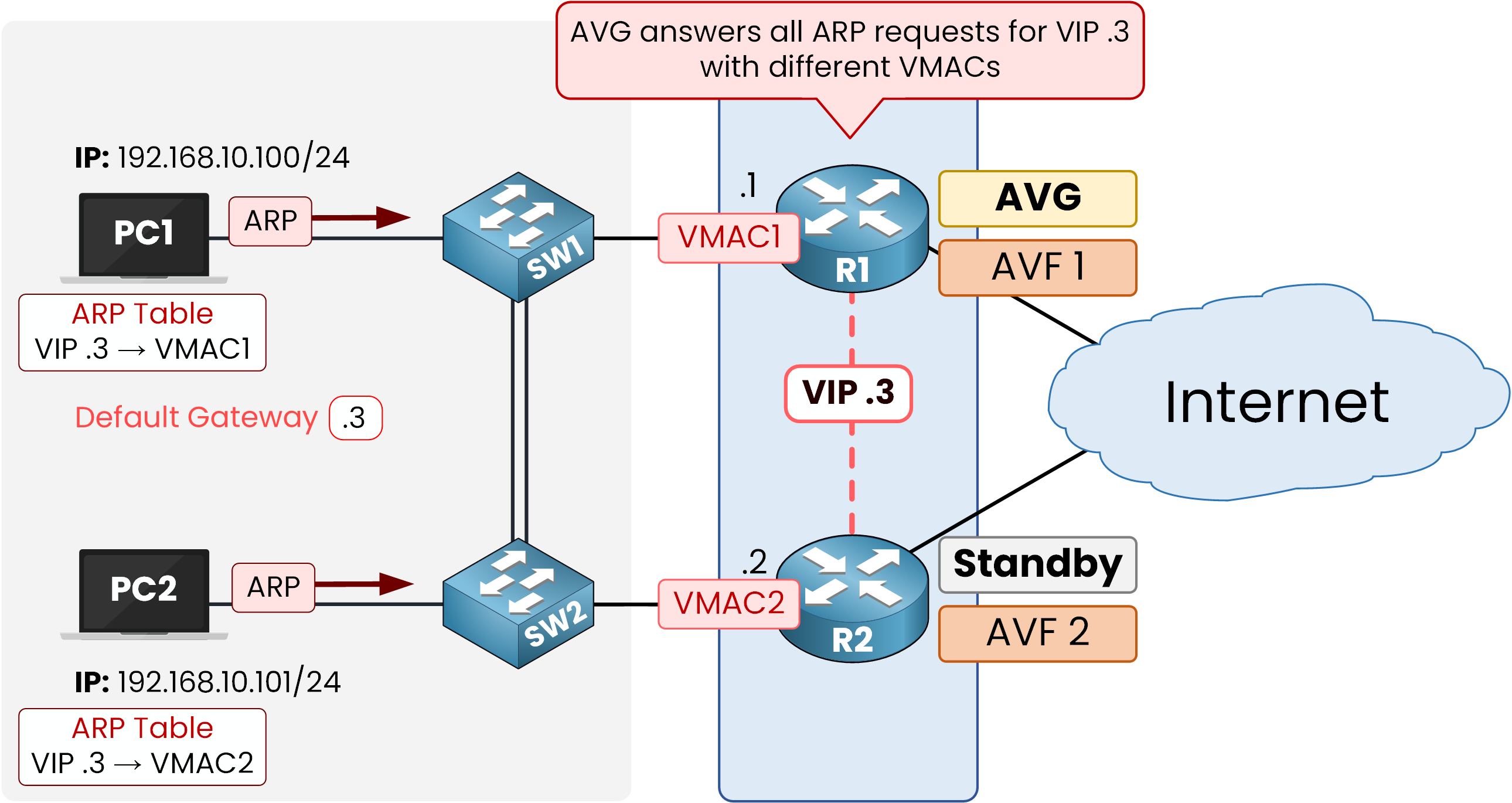
Figure 5 – ARP replies: PC1 receives VMAC1, PC2 receives VMAC2.
In the end, the same VIP is mapped to different VMACs. This allows some hosts to send their traffic through R1 and others through R2.
Answer the question below
What address does the AVG return to hosts in ARP replies?
In practice, a GLBP group must decide which router will become the Active Virtual Gateway (AVG). This is done through an election process.
Routers in the group compare their priority values:
The router with the highest priority is elected as the AVG.
If there is a tie, the router with the highest IP address on the interface wins.
By default, the priority is 100. Administrators can increase this value if they want a specific router to take the AVG role.
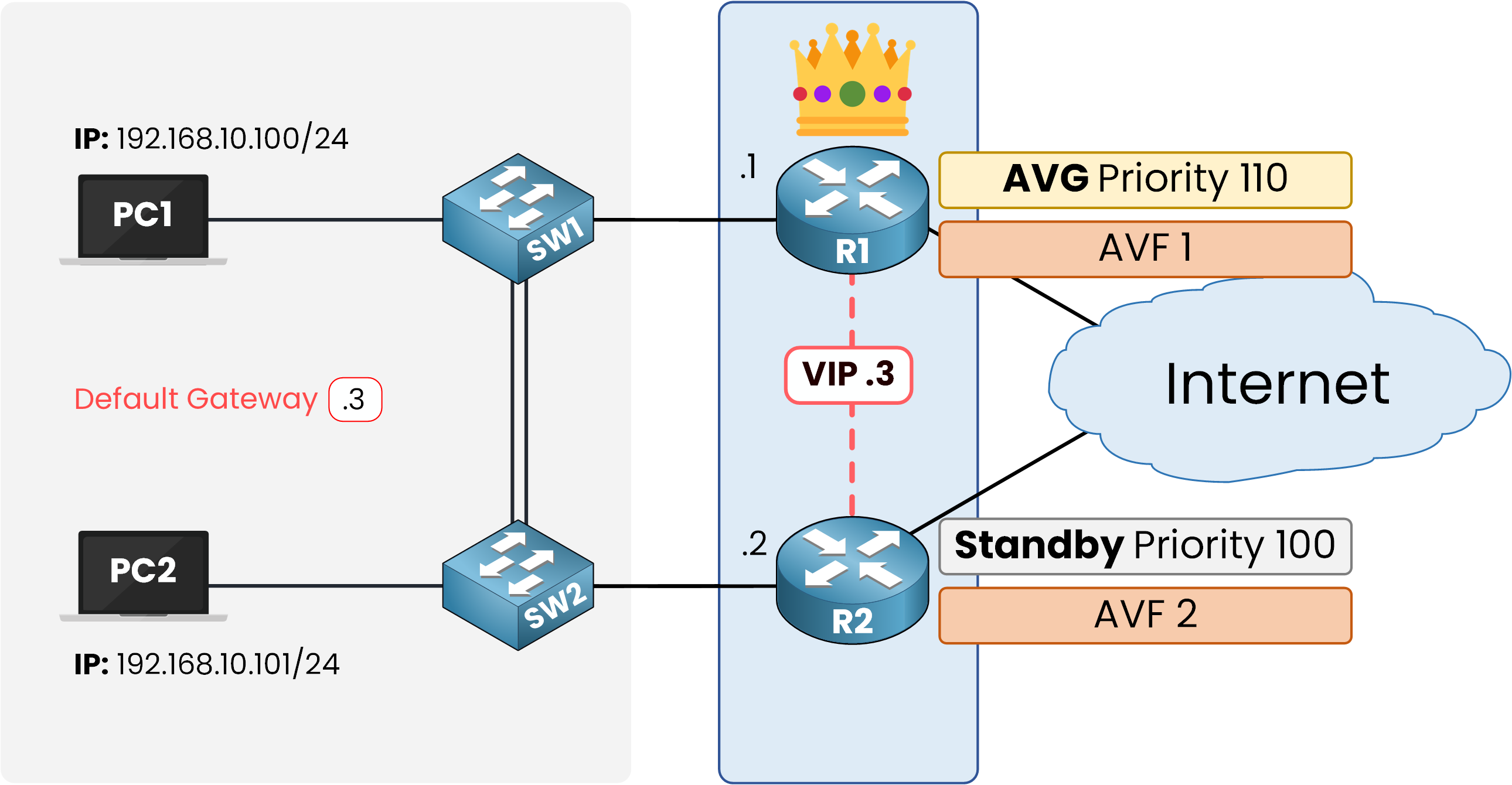
Figure 6 – AVG election: R1 wins (priority 110), R2 standby (100).
In our example, R1 has been configured with a priority of 110, so it wins the election and becomes the AVG. R2 keeps the default value of 100, so it becomes the Standby AVG.
The Standby AVG continuously monitors the current AVG and is ready to take over if it fails. This ensures that the group always has a leader available and hosts can keep reaching their gateway without interruption.
Answer the question below
When GLBP priorities are equal, what determines which router becomes the AVG?
Now that our hosts use the virtual IP
192.168.10.3as their default gateway and the GLBP group is active, we can observe how the protocol works in practice.Each PC has learned a different virtual MAC address through ARP. PC1 is associated with R1 and sends its traffic through it, while PC2 is associated with R2.
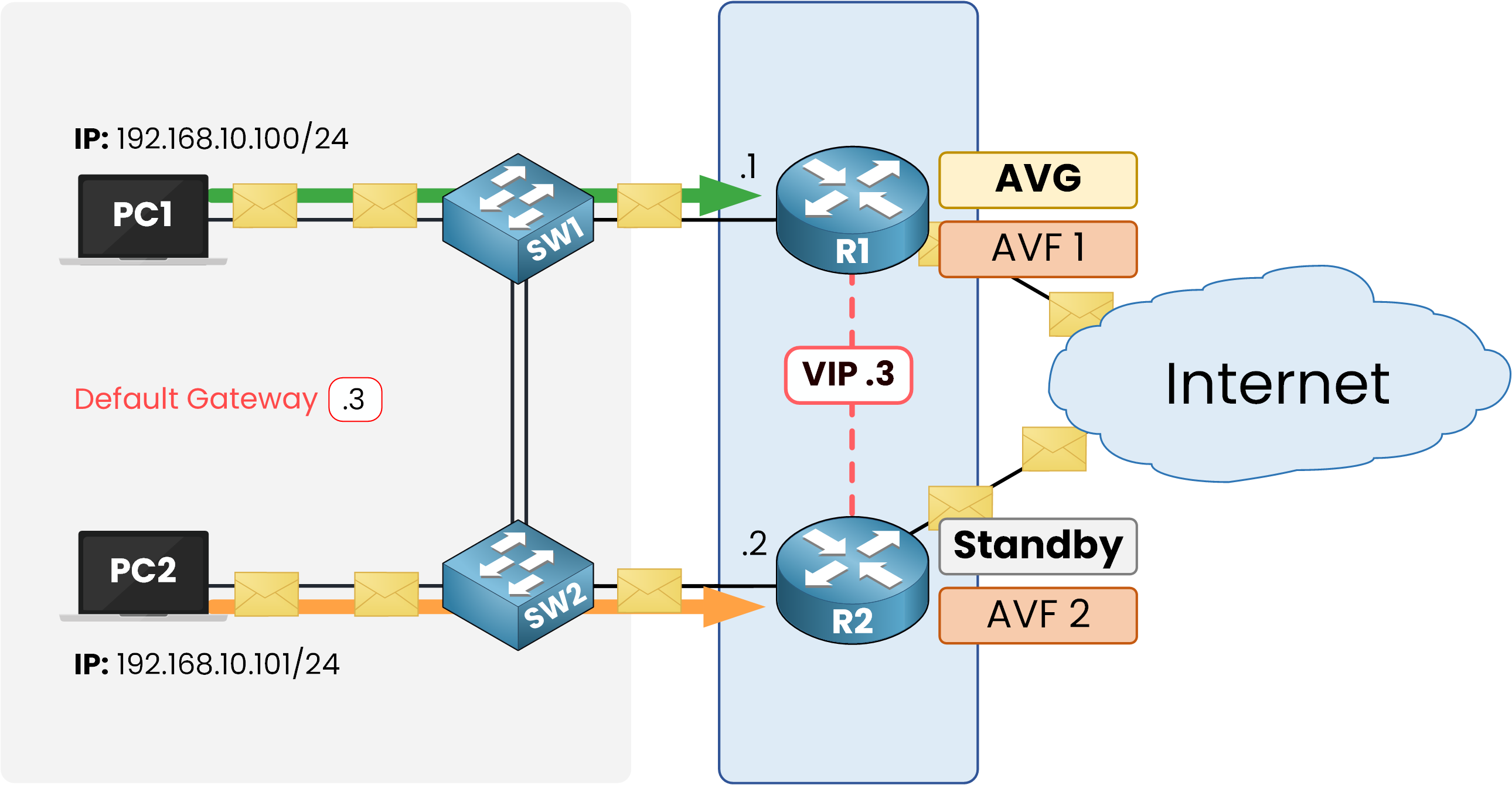
Figure 7 – Load sharing in action: PC1 uses R1, PC2 uses R2.
This example shows the real advantage of GLBP: instead of leaving one router idle, as happens with other redundancy protocols, every router in the group is actively forwarding traffic. In a large enterprise network, this ensures that resources are not wasted and that the available bandwidth is fully used.
Answer the question below
True or False: With GLBP, only one router forwards traffic at a time while the others stay idle.
GLBP was designed to solve two problems at the same time: providing gateway redundancy and enabling traffic load sharing.
Unlike HSRP and VRRP, where the backup router stays idle, GLBP allows all routers in the group to forward traffic simultaneously. This makes it both more efficient and resource-friendly.
The Active Virtual Gateway (AVG) plays a central role by assigning virtual MAC addresses (VMACs) to the routers in the group. These routers then become Active Virtual Forwarders (AVFs). Thanks to this mechanism, hosts only configure one virtual IP, but in reality, their traffic is distributed across multiple routers.
To sum up, GLBP offers three key benefits:
Redundancy – if the AVG fails, the Standby AVG immediately takes over to keep the group operational.
Efficiency – all routers can actively forward traffic instead of staying idle.
Transparency – hosts are unaware of the process and simply keep using their default gateway.
For the CCNA exam, remember that GLBP is Cisco proprietary, while VRRP is an open standard. The unique feature of GLBP is its built-in load sharing, which makes it stand out from the other First Hop Redundancy Protocols.
Answer the question below
Click 'Complete' to continue