Virtual Router Redundancy Protocol (VRRP) is an open standard protocol defined in RFC 5798 and is designed to provide gateway redundancy in IP networks. Instead of depending on a single physical router, VRRP allows several routers to share a Virtual IP address (VIP) that end devices use as their default gateway. This way, users always have a reliable gateway to reach external networks.
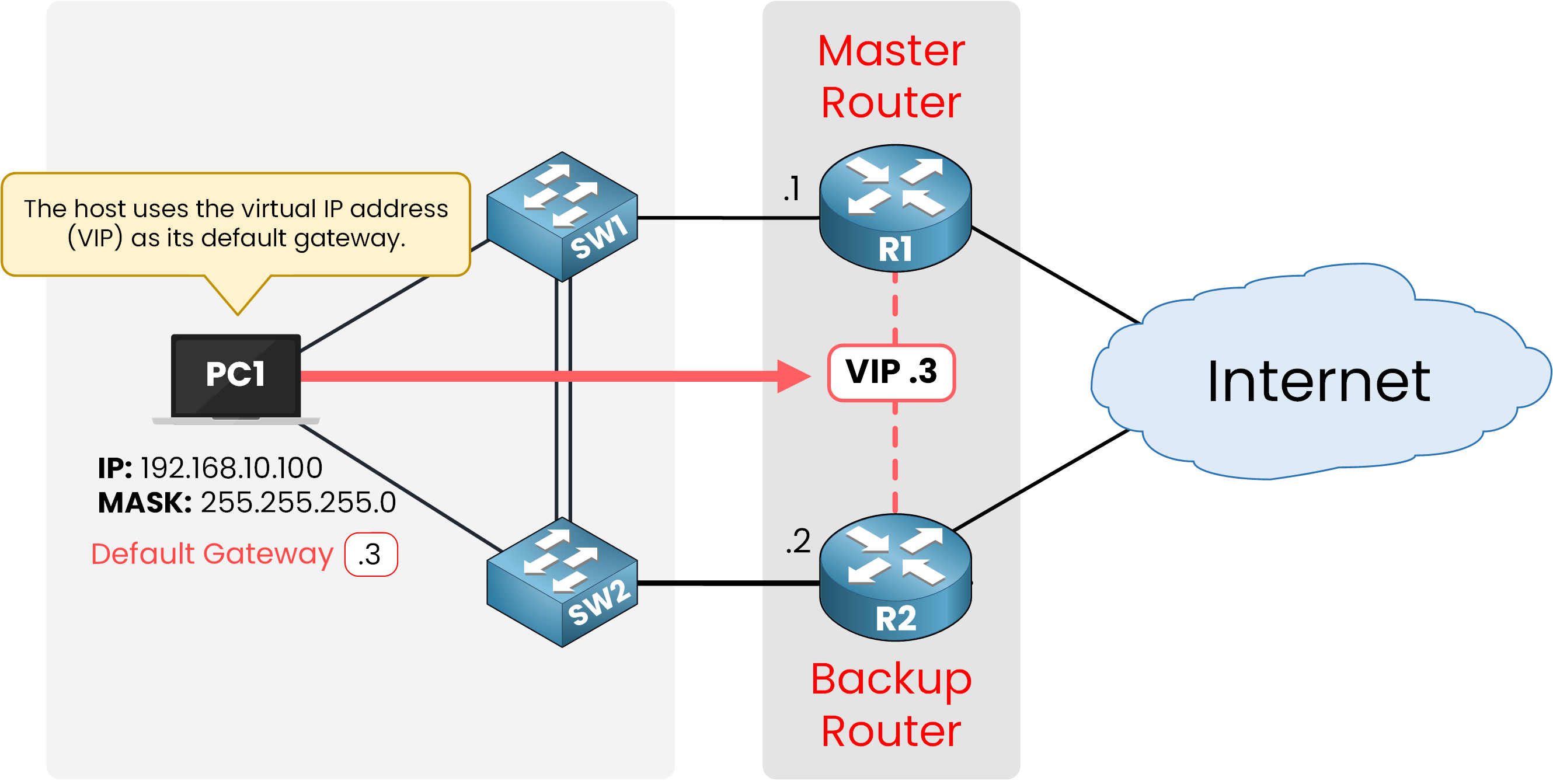
Figure 1 – VRRP topology with Master and Backup routers
VRRP belongs to the family of First Hop Redundancy Protocols (FHRPs), alongside HSRP and GLBP. These protocols all aim to protect the default gateway from failure, but each operates in a slightly different way. In this lesson, we will focus on VRRP.
HSRP is a Cisco proprietary protocol, while VRRP is an open standard that works across many vendors. For the CCNA exam, you only need to learn VRRP as a concept, which we’ll explore together.
Answer the question below
What type of protocol is VRRP?
In a typical LAN, every host relies on a single router as its default gateway to reach external networks. Under normal conditions, this setup works fine. Traffic flows through the default gateway, and users can access the internet without any issues.
But what happens if the router suddenly fails? This creates a single point of failure. When the default gateway is down, the whole LAN loses its connection to external networks immediately.
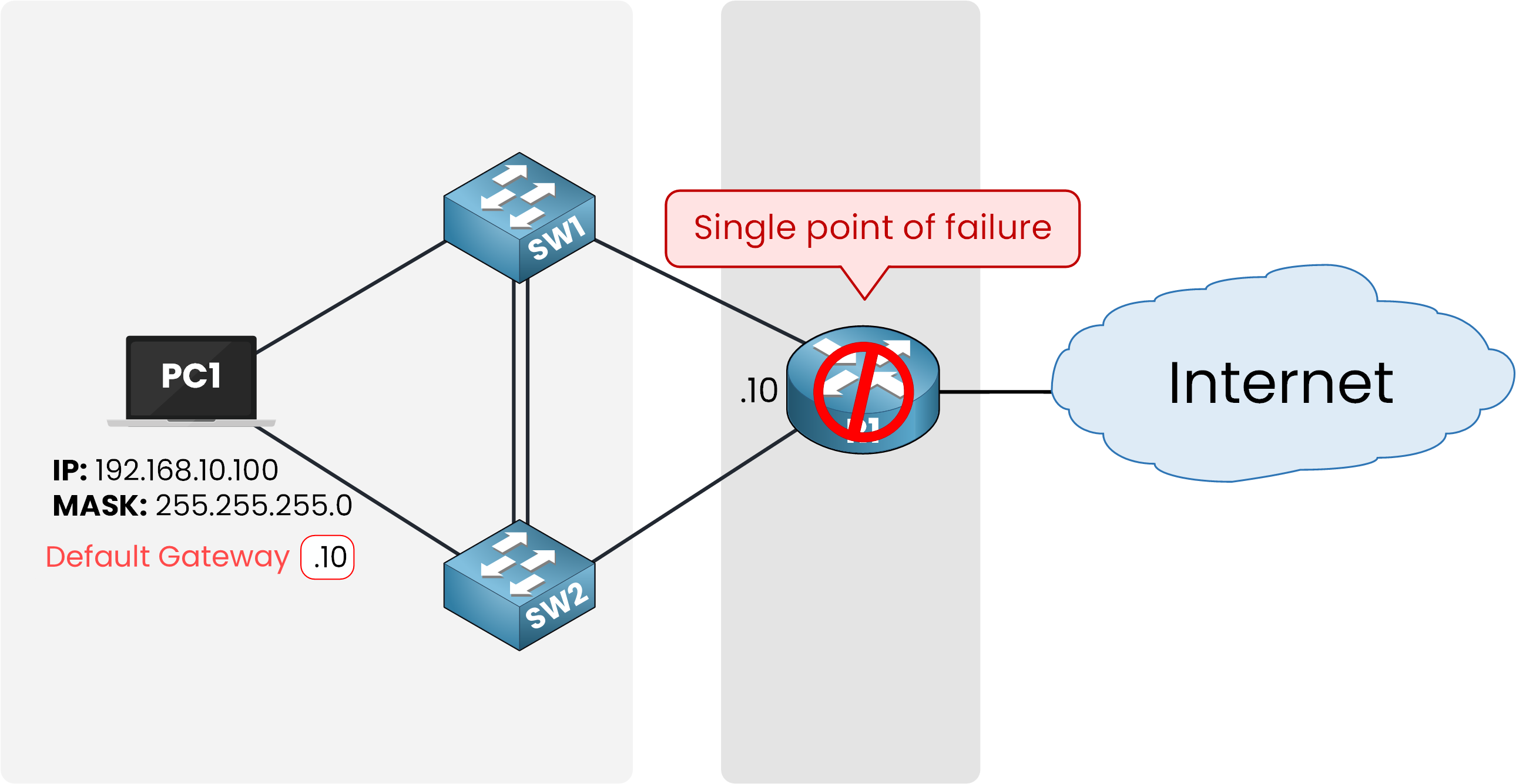
Figure 2 – Default gateway failure without VRRP
In this design, one broken device is enough to cut off the whole network. Without VRRP, recovering means manually reconfiguring each host with a new default gateway. This is not practical in today's environments with so many devices.
This is why VRRP was created. It removes the single point of failure and ensures constant access to external networks.
Answer the question below
True or False: VRRP removes the default gateway as a single point of failure.
VRRP routers operate as part of a VRRP group. Each group is identified by a number and shares the same Virtual IP address (VIP). This VIP is the address that hosts configure as their default gateway.
For example, in the topology below, PC1 uses
192.168.10.3as its default gateway. This address is the VIP of VRRP Group 1.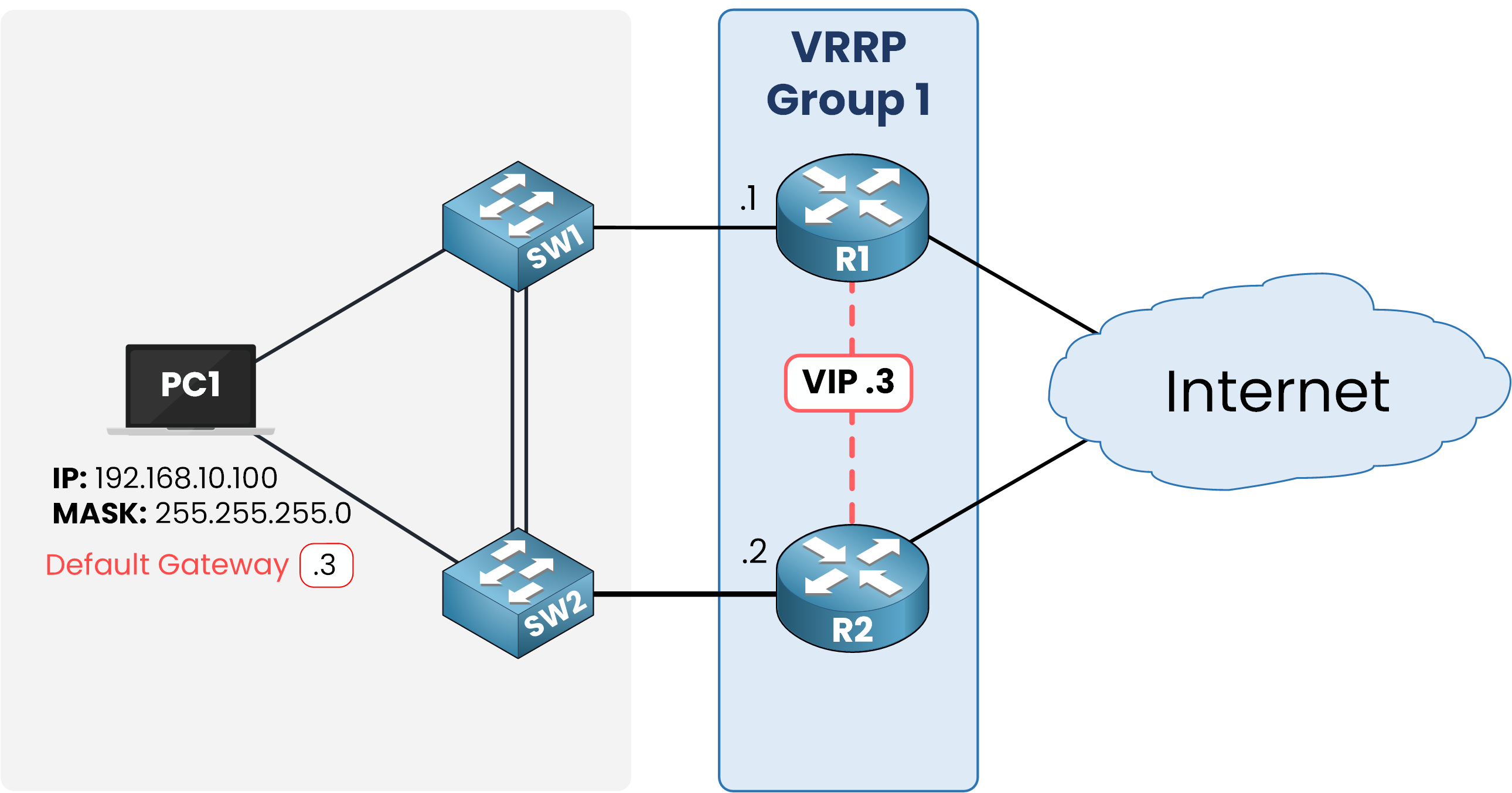
Figure 3 – VRRP group with shared Virtual IP
From PC1’s point of view, there is only one gateway: 192.168.10.3. The host doesn’t realize that this address is actually shared among many routers. It expects the gateway to always be reachable.
The responsibility for keeping this VIP available lies with the VRRP routers themselves. They work together behind the scenes. They decide who sends the traffic and who stays on standby.
This brings us to the next question: how are roles assigned within a VRRP group?
Answer the question below
Which address do hosts configure as their gateway in VRRP?
Inside a VRRP group, routers take on two possible roles: Master or Backup.
The Master router forwards all traffic sent to the Virtual IP (VIP) and represents the group to the hosts.
The Backup routers stay passive under normal conditions. They do not forward traffic but continuously check the Master. If the Master fails, one of the Backups is ready to immediately take over its role and become the new Master.
From PC1’s point of view, there is only one gateway: the VIP. The host does not know, and does not need to know, which physical router is actually forwarding the packets. At this moment, R1 is the Master handling all traffic, while R2 is waiting in reserve as a Backup.
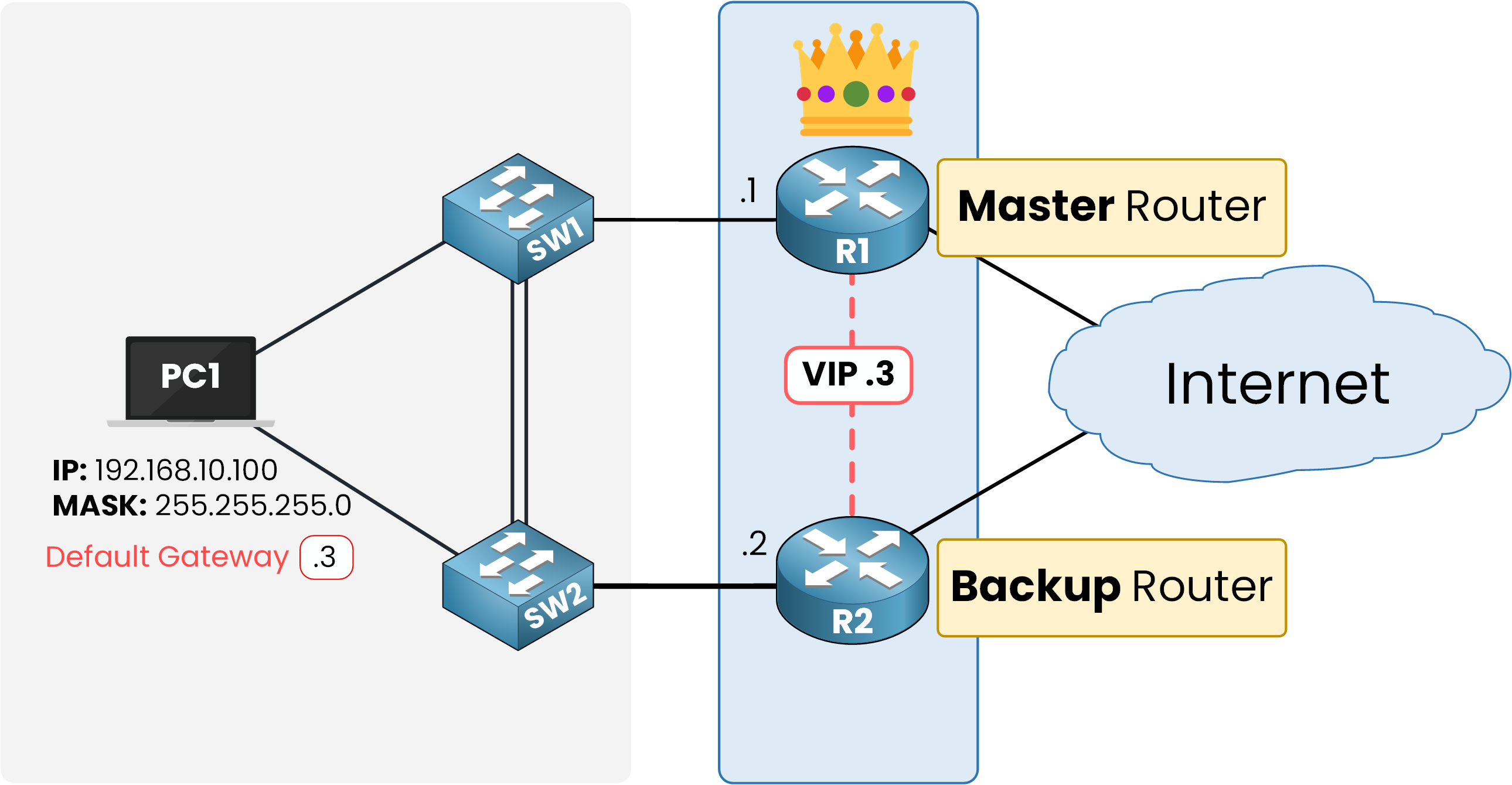
Figure 4 – VRRP roles: Master and Backup
But this raises a key question: PC1 is configured with the VIP (192.168.10.3) as its default gateway. On an Ethernet network, traffic is not sent directly to an IP address: it must be sent to a MAC address. So, how does PC1 always know which MAC address to use, even when the Master changes?
This is solved with the VRRP Virtual MAC address.
Answer the question below
Which router forwards traffic to the Virtual IP?
On an Ethernet LAN, every device needs both an IP address and a MAC address. When PC1 wants to send traffic to its gateway (192.168.10.3), it must first resolve the VIP into a MAC address using ARP.
With VRRP, the Master router owns a Virtual MAC address (VMAC). When PC1 sends an ARP Request asking “Who has 192.168.10.3?”, it is the Master (R1) that replies, but instead of giving its own physical MAC, it responds with the VMAC.
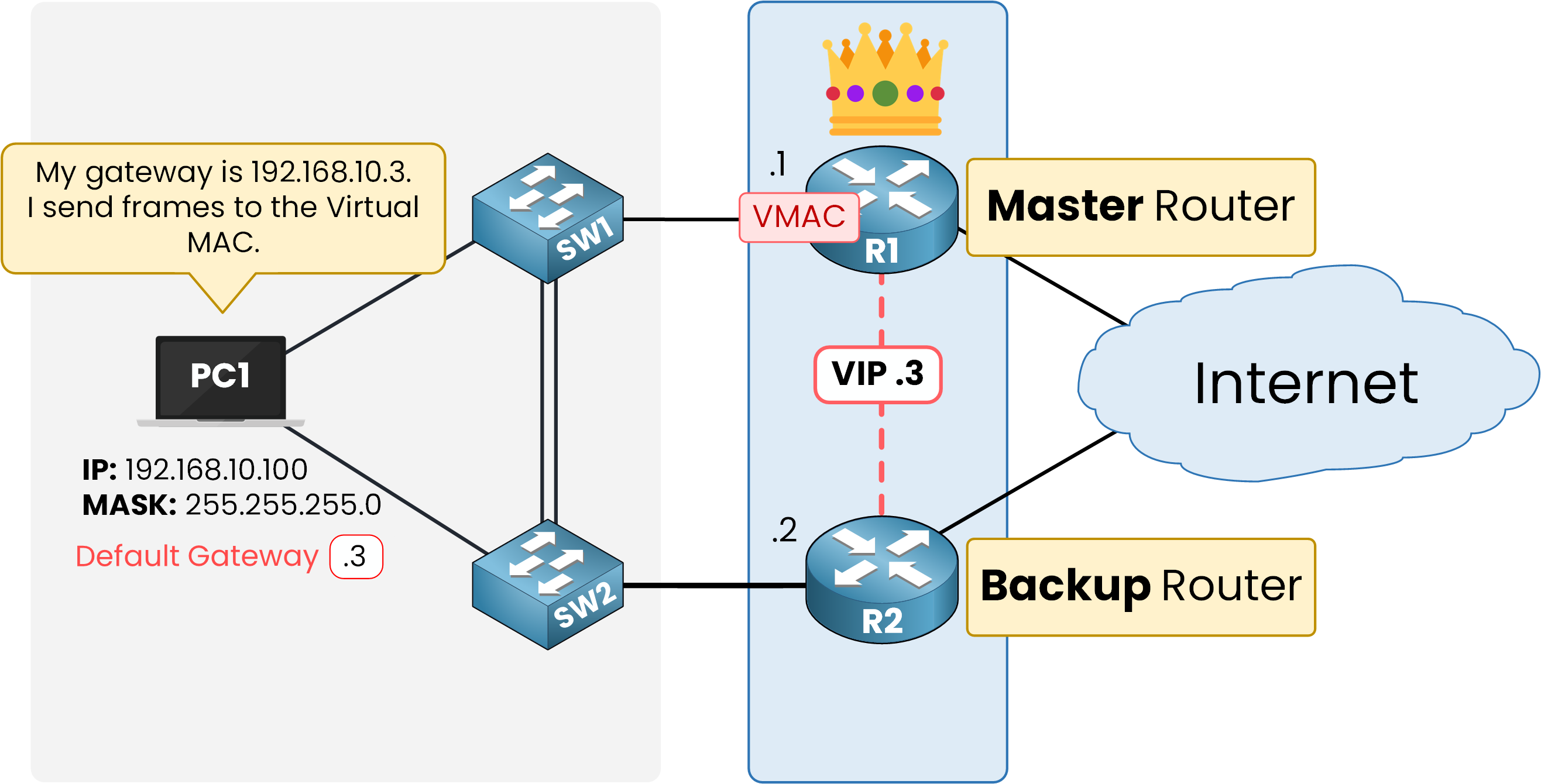
Figure 5 – VRRP Master owns the Virtual MAC and replies to ARP for the VIP
PC1 stores the Virtual MAC in its ARP table. From then on, it forwards its frames to this VMAC whenever it communicates with its default gateway. For the host, the gateway looks like a single stable device, even though many routers are in the group.
The format of the VRRP Virtual MAC is standardized:
00-00-5E-00-01-XXHere,
XXis the VRRP group number in hexadecimal. For example, if the group number is 1, the Virtual MAC becomes:00-00-5E-00-01-01The key point is this: PC1 always sends frames to the same Virtual MAC, no matter which router is currently the Master. If R1 fails, a Backup (R2) immediately takes ownership of the VMAC and begins answering ARP requests. This way, the switchover is transparent, PC1 does not need to update its ARP table, and connectivity is maintained without interruption.
Answer the question below
What address does PC1 store in its ARP table for the gateway?
The election of the Master router follows two rules:
Priority value – Each router in the group has a priority between 1 and 254, with 100 as the default. The router with the highest priority becomes the Master.
Highest IP address – If two routers have the same priority, the router with the highest IP address on the VRRP interface is chosen as the Master.
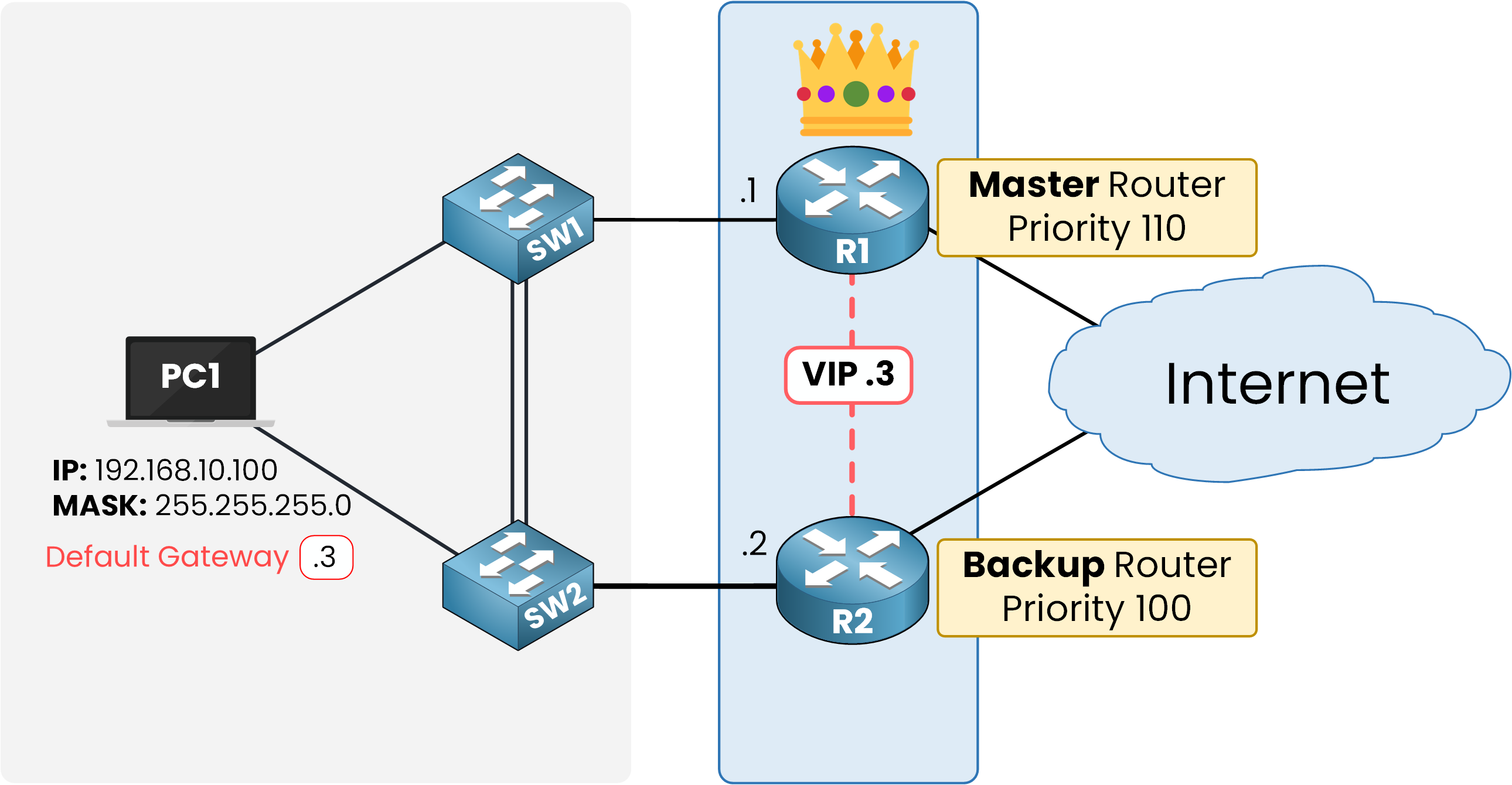
Figure 6 – VRRP election based on priority and IP address
A network administrator can assign a higher priority to a specific router to make sure it becomes the Master. In this example, R1 is configured with a priority of 110, while R2 keeps the default priority of 100. Because R1 has the higher value, it becomes the Master, and R2 stays as Backup.
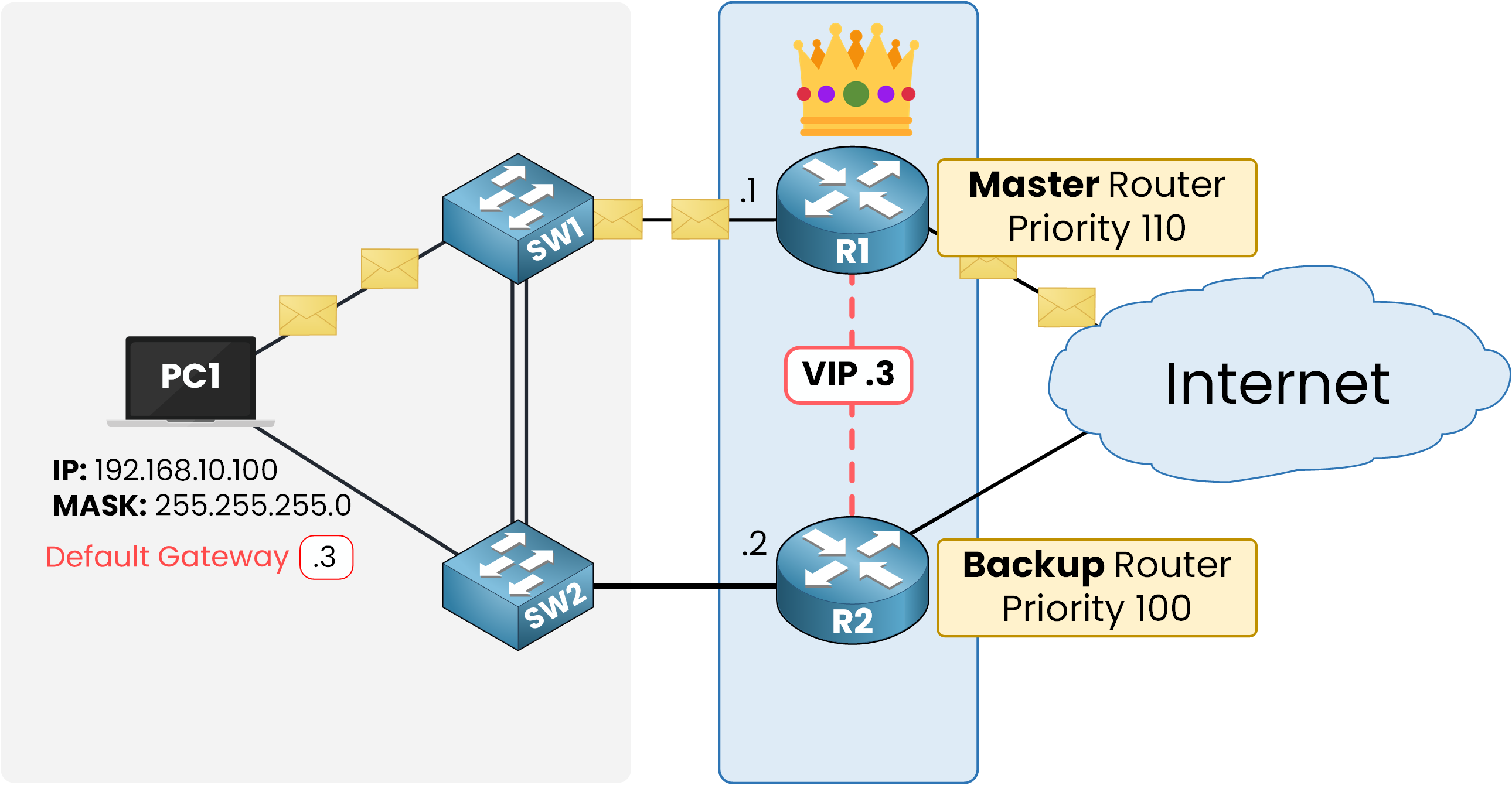
Figure 7 – Traffic flow with R1 as Master (VIP 192.168.10.3)
Once the election is done, PC1 uses 192.168.10.3 (the VIP) as its default gateway and can send traffic to external networks. R1, as the Master, responds to ARP requests and forwards the traffic.
Preemption
A major difference between VRRP and HSRP is that preemption is enabled by default in VRRP. If a router with a higher priority comes online, it immediately becomes the Master. Unlike HSRP, there is no need to configure preemption manually or wait for the current Master to fail.
Answer the question below
What is the default VRRP priority value?
VRRP ensures continuity by allowing a Backup router to take over if the Master stops working. This failover process is automatic and relies on Hello messages exchanged within the VRRP group.
Monitoring
The Master router periodically sends Hello messages (by default, every 1 second). Backup routers listen for these Hellos to confirm that the Master is still alive. If a Backup doesn’t get Hello messages within the Master Down Interval (3 times the Hello interval plus a small skew time, about 3.6 seconds by default), it thinks the Master has failed.
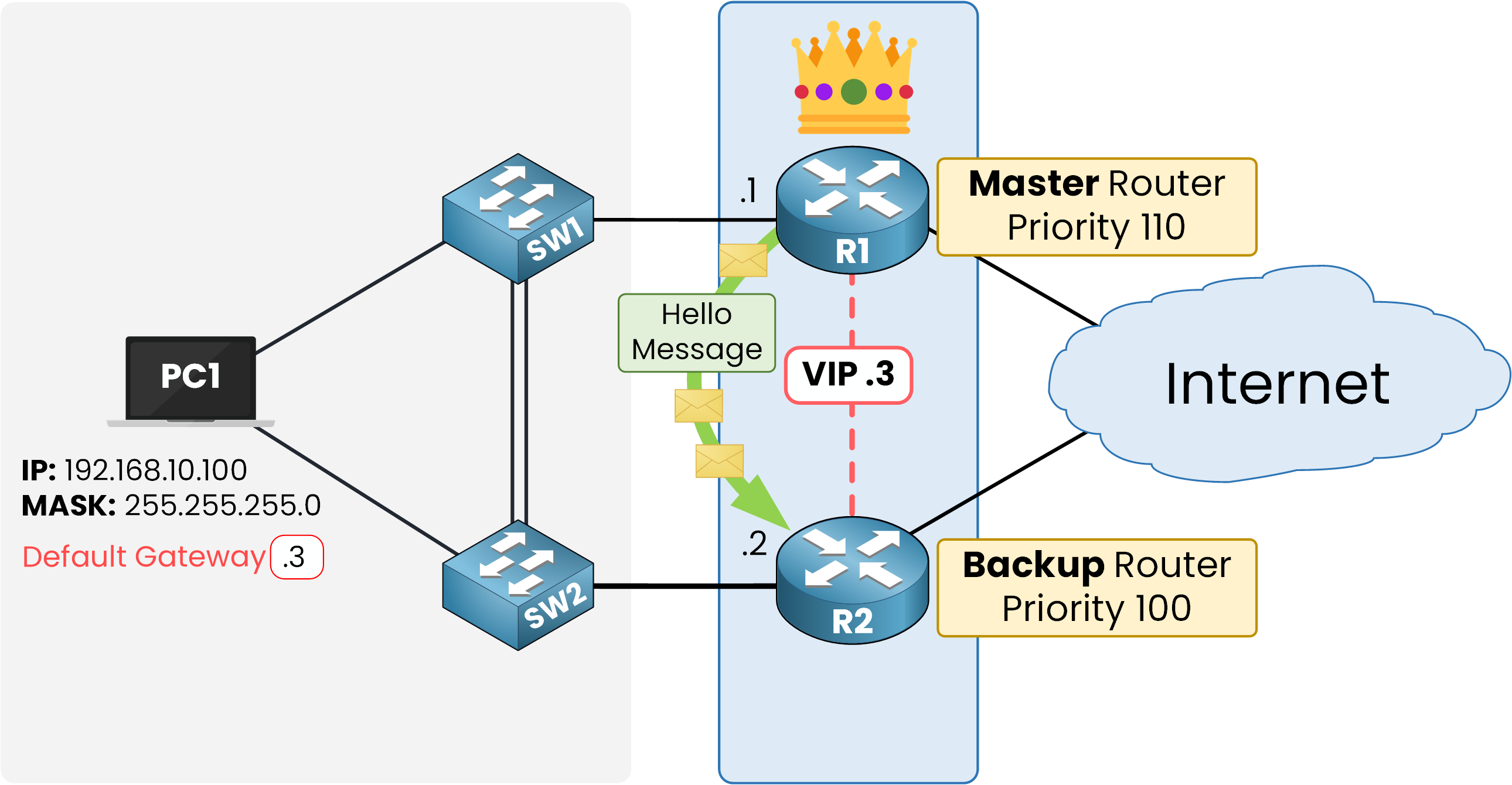
Figure 8 – VRRP hello message monitoring
Switchover
When the Master fails and its Hello messages stop, a new election is triggered. The Backup router with the highest priority becomes the new Master. If many routers have the same priority, the router with the highest IP address is selected.
In this example, when R1 (priority 110) fails, R2 (priority 100) takes over and becomes the Master.
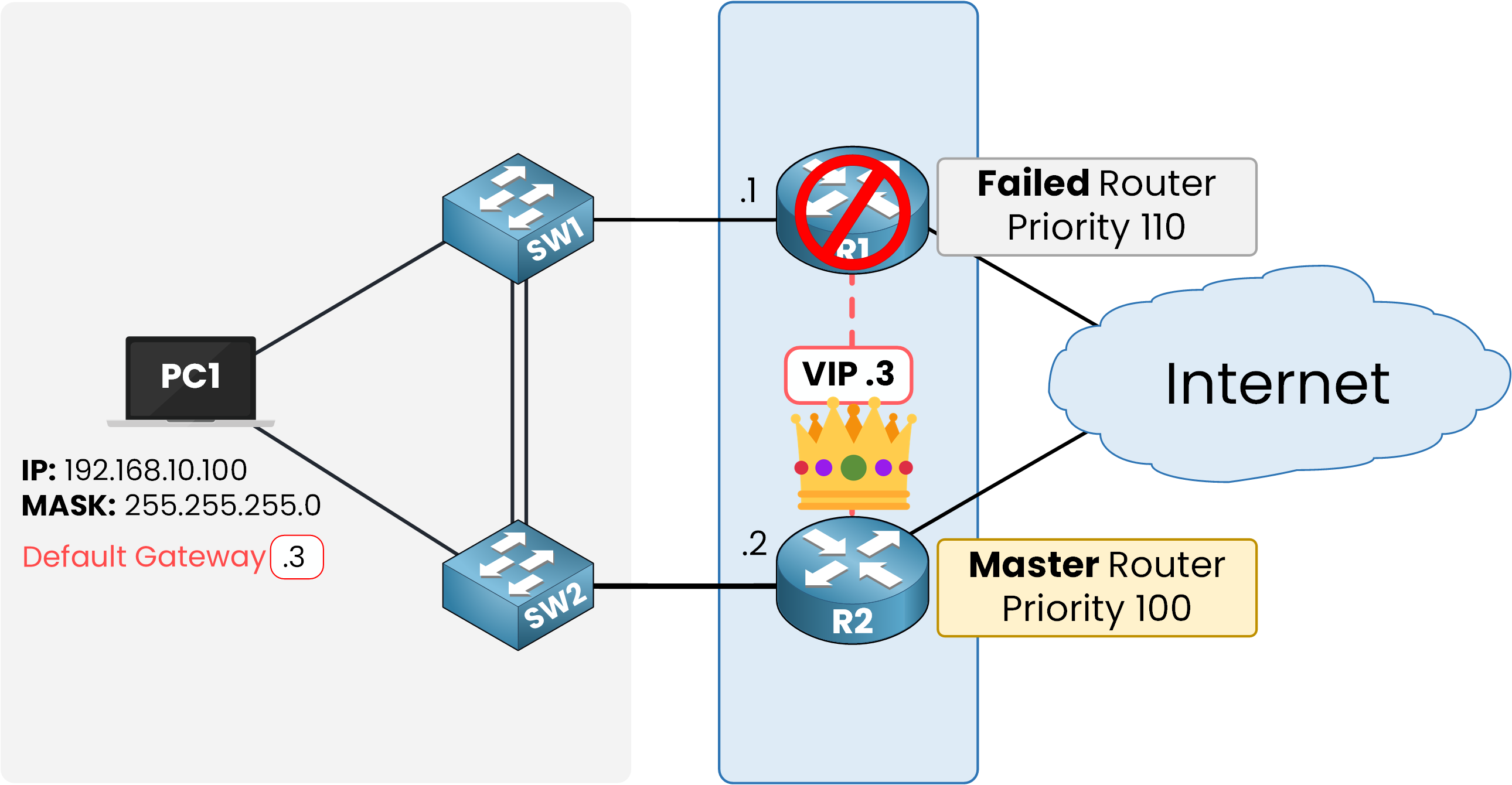
Figure 9 – VRRP failover when the Master fails
Continuity
As soon as the Backup is promoted, it takes ownership of both the Virtual IP (.3) and the Virtual MAC. PC1 keeps using the same ARP entry, so it continues sending its frames to the VMAC without any change.
This is the key to VRRP’s transparency: the failover does not require PC1 to send a new ARP request or reconfigure its gateway. Traffic flows normally, and users maintain internet and external network access without even noticing the switchover.
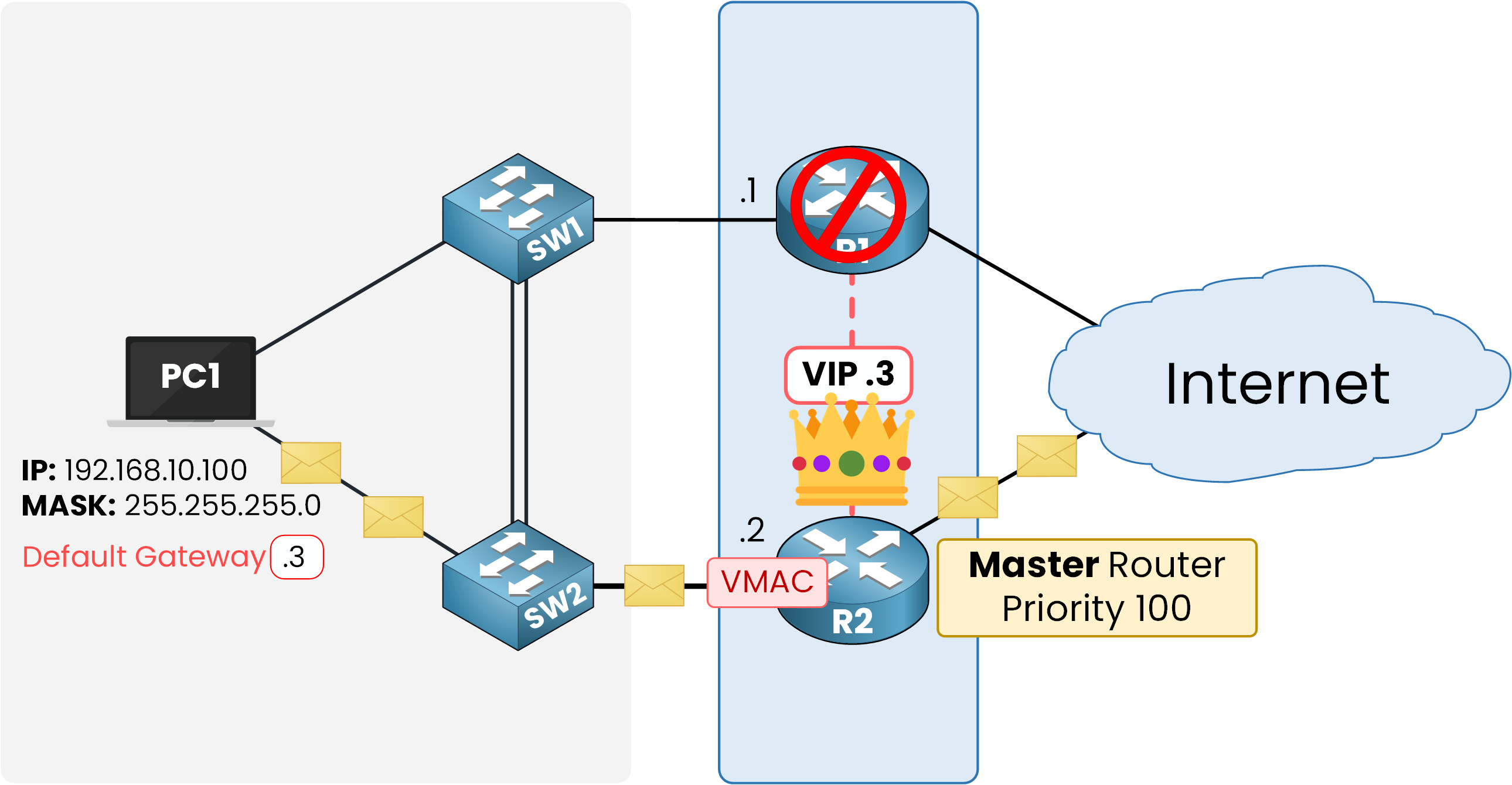
Figure 10 – Network continuity after VRRP failover
Answer the question below
What is the default VRRP Hello interval in seconds?
Virtual Router Redundancy Protocol (VRRP) is a simple and effective way to remove the single point of failure at the default gateway. It guarantees that end devices always have a reachable gateway without manual reconfiguration.
Because VRRP is an open standard, it works with many vendors, unlike HSRP, which is Cisco proprietary.
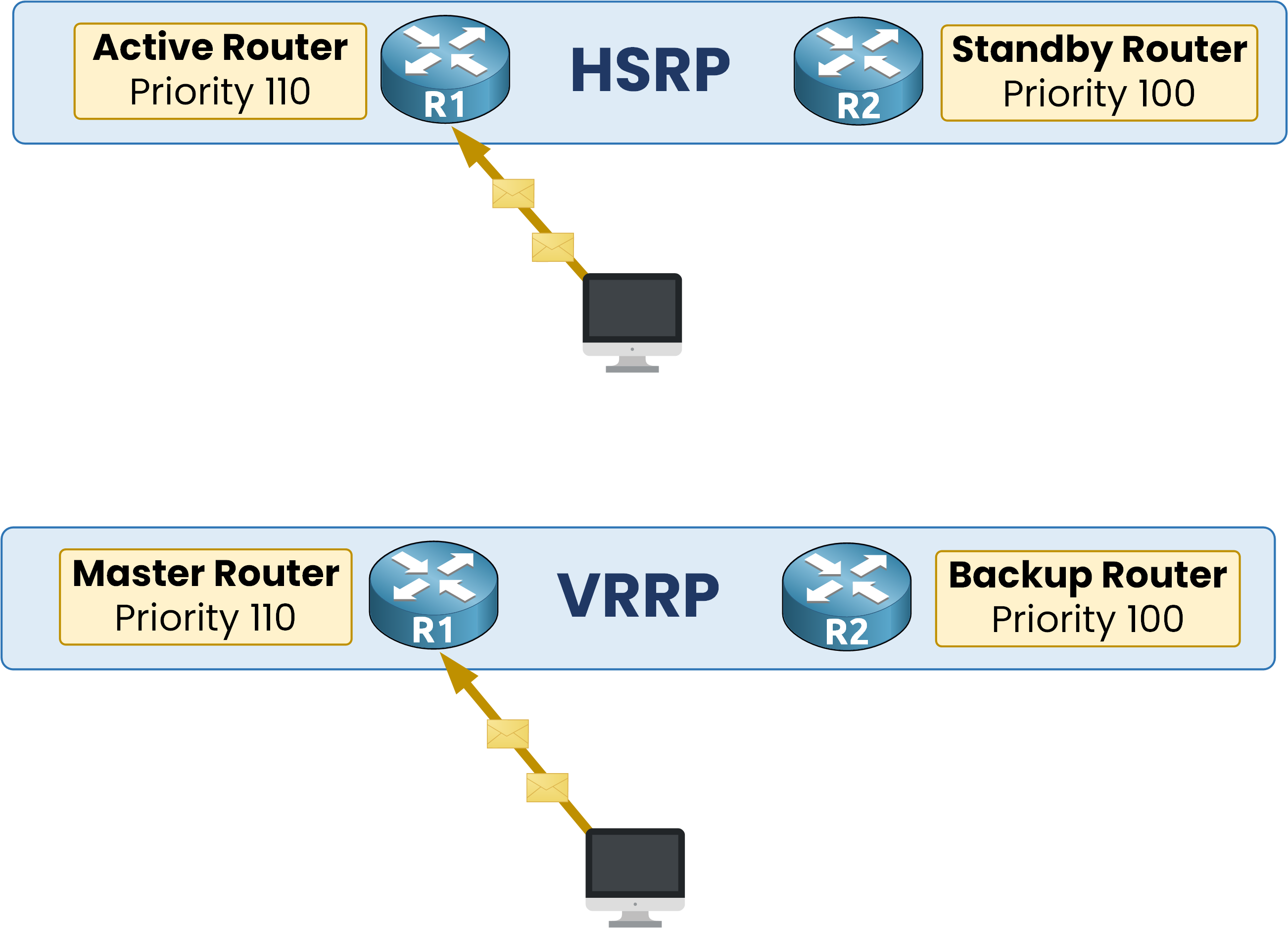
Figure 11 – Comparison of HSRP and VRRP roles
In HSRP, routers are called Active and Standby, and preemption must be configured manually. In VRRP, routers are called Master and Backup, and preemption is enabled by default.
For the CCNA exam, remember: VRRP is an open standard, uses Master/Backup roles, and preemption is enabled by default.
Answer the question below
Click 'Complete' to continue