The Collapsed Core Cisco Architecture, also called the Two-Tier Architecture, is a network design model commonly used for small to medium-sized enterprise networks.
It simplifies the network structure by reducing the number of layers compared to the traditional Three-Tier Architecture.
Here's what a typical Collapsed Core Cisco network looks like:
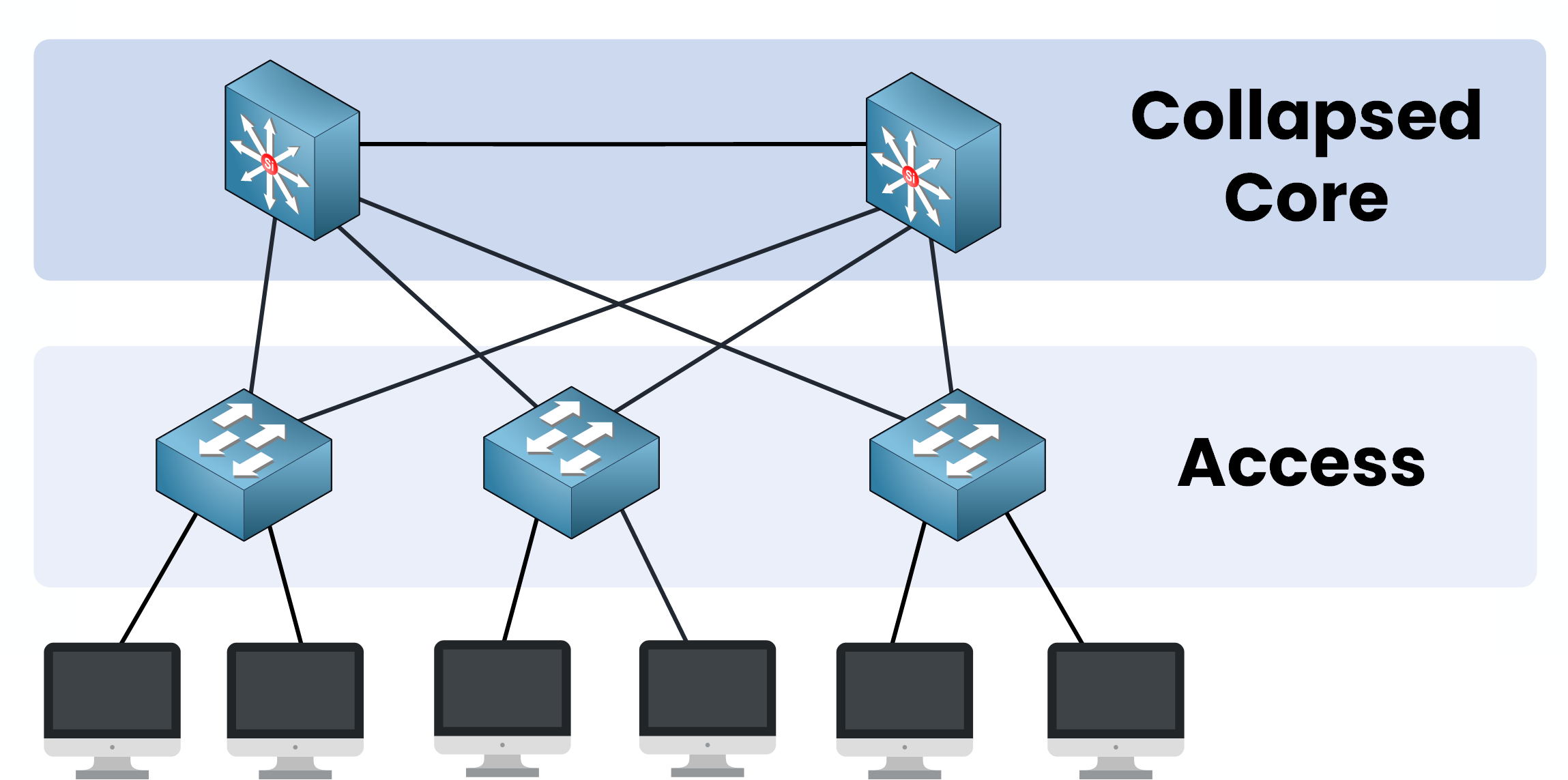
Figure 1 – Collapsed Core: Core and Distribution merged into one layer
Two Layers Instead of Three
As you can see, the Collapsed Core Architecture is made up of two layers:
Collapsed Core Layer
Access Layer
To help you understand this architecture, let’s compare it to a traditional three-layer design:
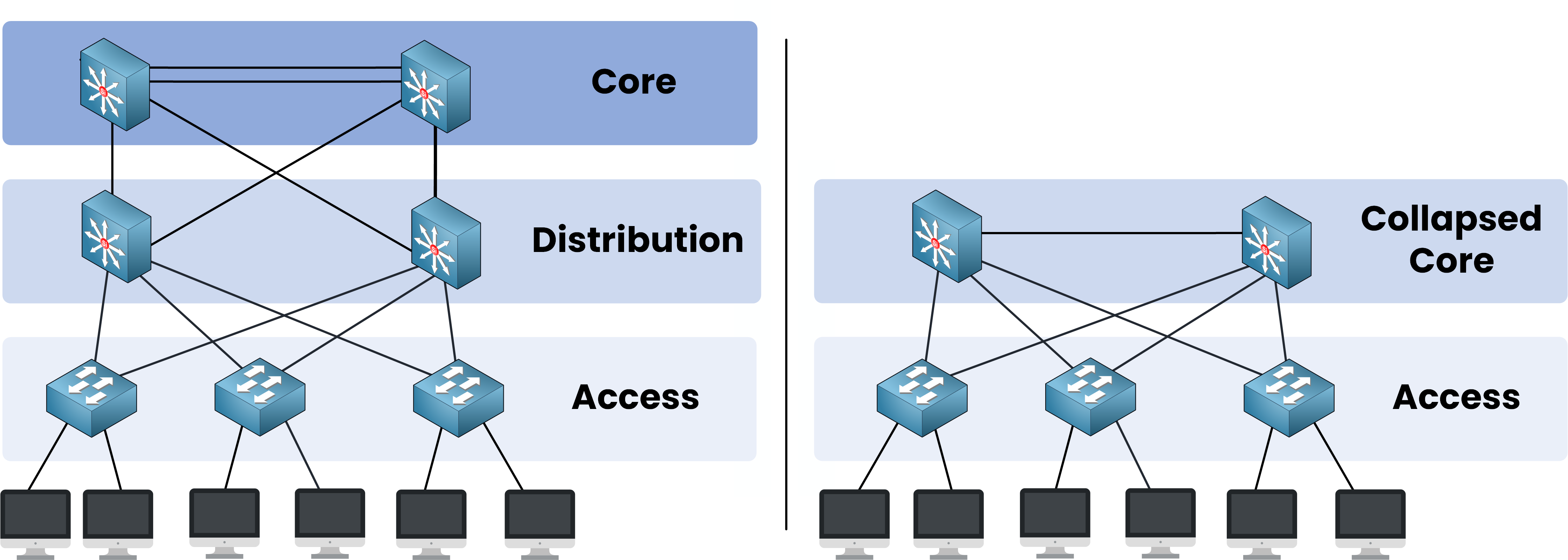
Figure 2 – Comparison between Three-Tier and Collapsed Core designs
On the left: Three-Tier Architecture separates the network into Core, Distribution, and Access layers.
On the right: Collapsed Core Cisco Architecture combines the Core and Distribution layers into a single layer.
This new design reduces the number of layers, simplifying the network.
When It Makes Sense
The Collapsed Core Cisco Architecture offers several key advantages, but it also has some limitations that you need to consider:
Advantages
Limitations
Simplified design: easier to deploy and manage.
Limited scalability: not ideal for very large networks.
Cost-effective: no need for expensive dedicated core switches.
May cause bottlenecks: if too many access switches are added.
In practice, this kind of design is perfect for:
Small and medium-sized businesses that don’t expect massive network growth.
Simple campus networks with a limited number of users and devices.
Organizations on a tighter budget that want solid performance without overspending.
In short: if you want a network that’s easy to build, affordable, and manageable, the Collapsed Core Cisco Architecture is a great fit.
Now that you have the big picture, let’s dive into the details, starting with the Access Layer.
Answer the question below
In the Collapsed Core Architecture, which single layer replaces both the Core and Distribution layers?
If you’ve already heard about the Access Layer in the Three-Tier Architecture, you’ll find it’s pretty much the same here.
But don’t worry, if that’s new for you, let's review the purpose of the Access Layer:
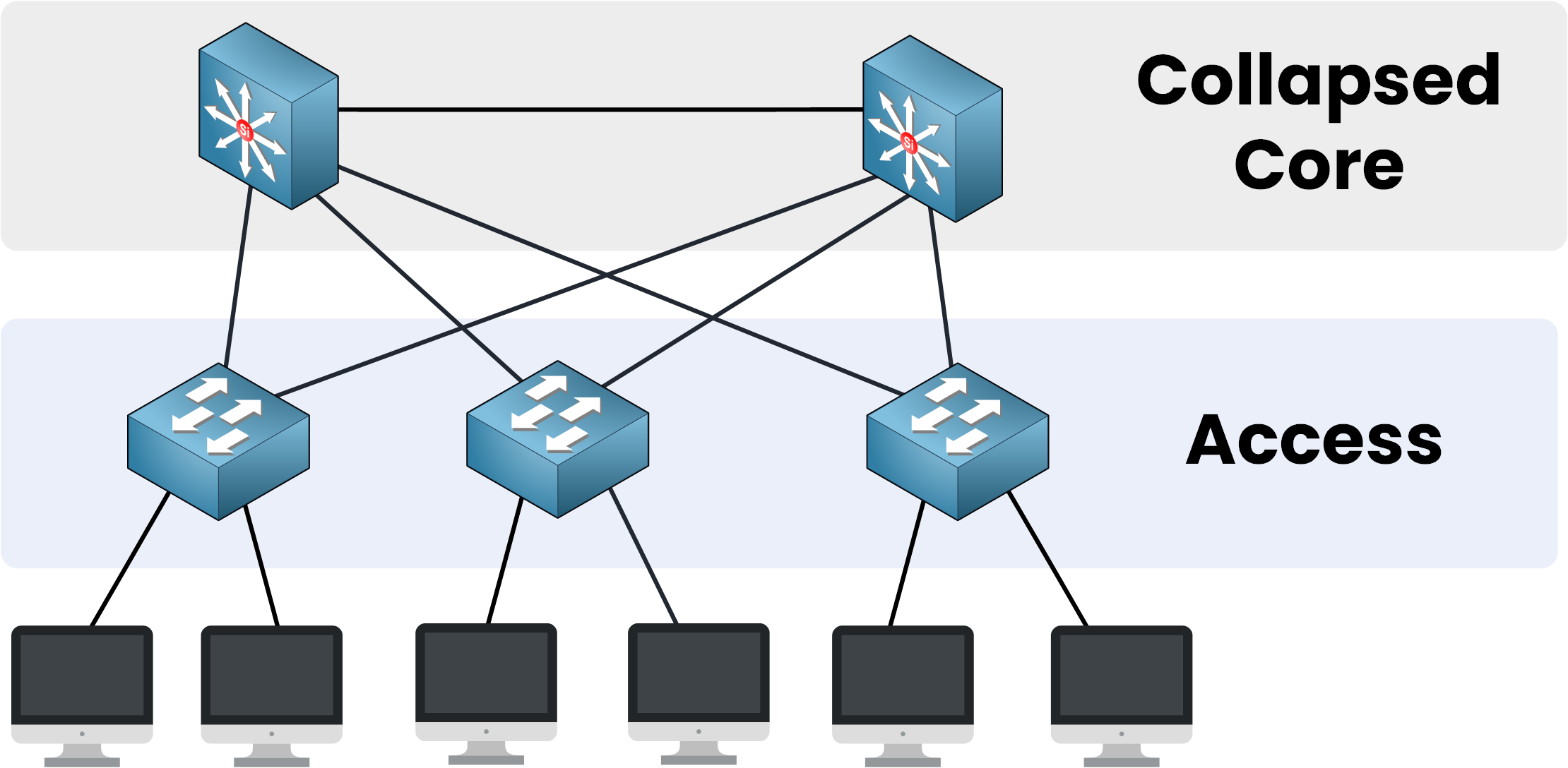
Figure 3 – The Access Layer connects end-user devices
What the Access Layer Does
The Access Layer is where users connect their devices, such as laptops, IP phones, printers, or wireless access points, to the network.
It’s the front door of the network and it handles a few essential jobs:
Physical network access links to plug in endpoints and Wi-Fi access points.
Power over Ethernet (PoE) to provide power directly over the network cables for devices like IP phones and wireless APs.
VLANs to logically segment the network.
Spanning Tree Protocol (STP/RSTP) to prevent switching loops.
Security at the Edge
On top of that, the Access Layer plays a major role in security:
Port Security to control which devices can connect to the network based on their MAC addresses.
DHCP Snooping to block unauthorized DHCP servers.
Dynamic ARP Inspection (DAI) to protect against ARP spoofing attacks.
And finally, it’s at the Access Layer that we set up the Quality of Service (QoS) trust boundary, marking and classifying traffic right at the edge, to make sure important data like voice and video get priority across the network.
As you can see, this layer heavily relies on key Layer 2 technologies.
Now that we've seen how end devices connect through the Access Layer, let’s look at how the Collapsed Core handles aggregation and routing.
Answer the question below
Which layer connects end-user devices like laptops, IP phones, printers, and wireless access points?
In the Collapsed Core Cisco Architecture, the Collapsed Core Layer merges two traditional layers you might also know: the Distribution Layer and the Core Layer.
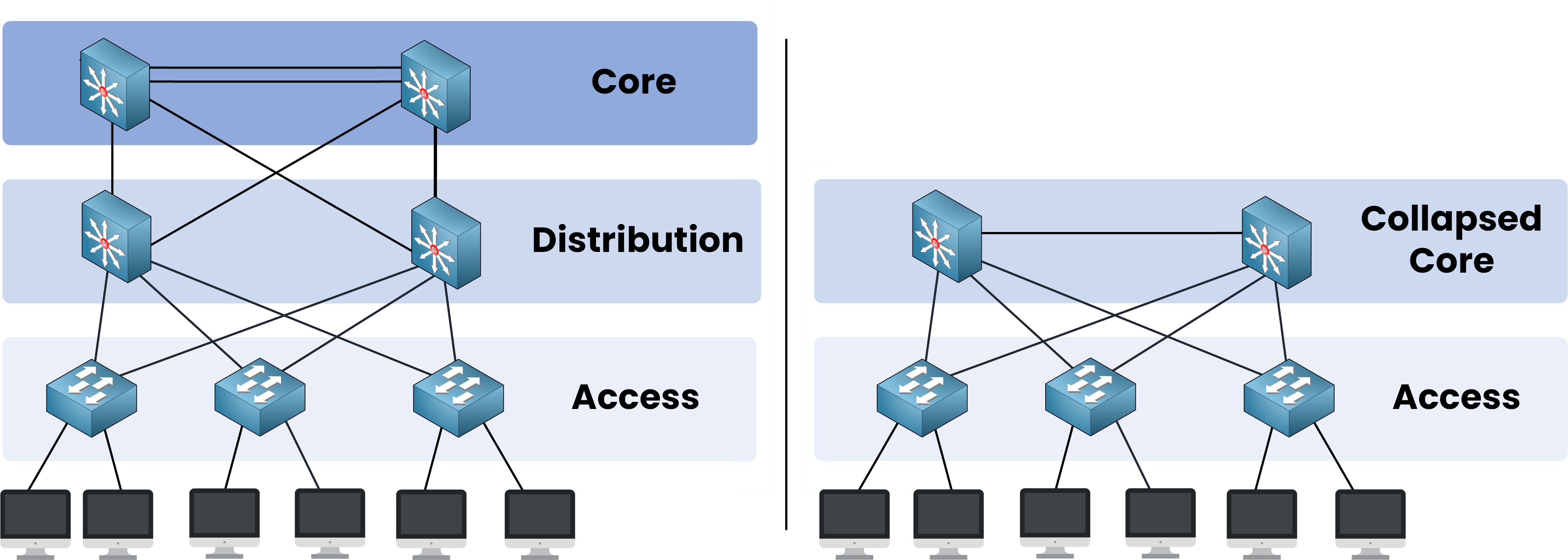
Figure 4 – Three-Tier vs Collapsed Core: two layers merged into one
That’s why we call it collapsed: we merge two layers into one to simplify the network.
Responsibilities of the Collapsed Core Layer
The Collapsed Core Layer plays several critical roles:
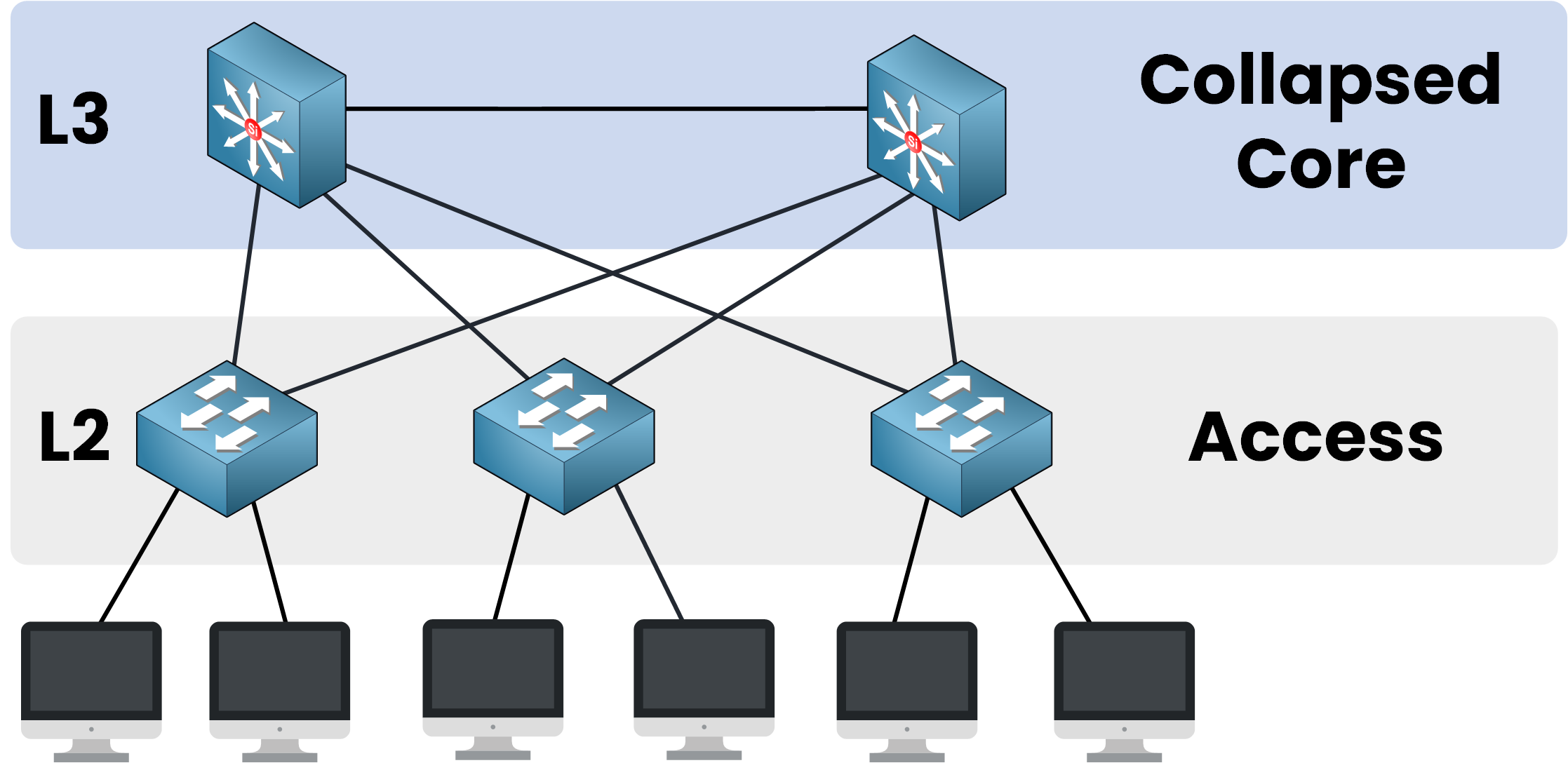
Figure 5 – The Collapsed Core Layer aggregates and routes all traffic
Aggregates traffic coming from all Access Layer switches.
Routes traffic between different VLANs.
Provides exit points for traffic heading to the WAN, Internet, or other external networks.
Transitions traffic from Layer 2 (Access Layer) to Layer 3 (routed network).
In short: it is both a high-speed backbone and a routing layer for the entire network.
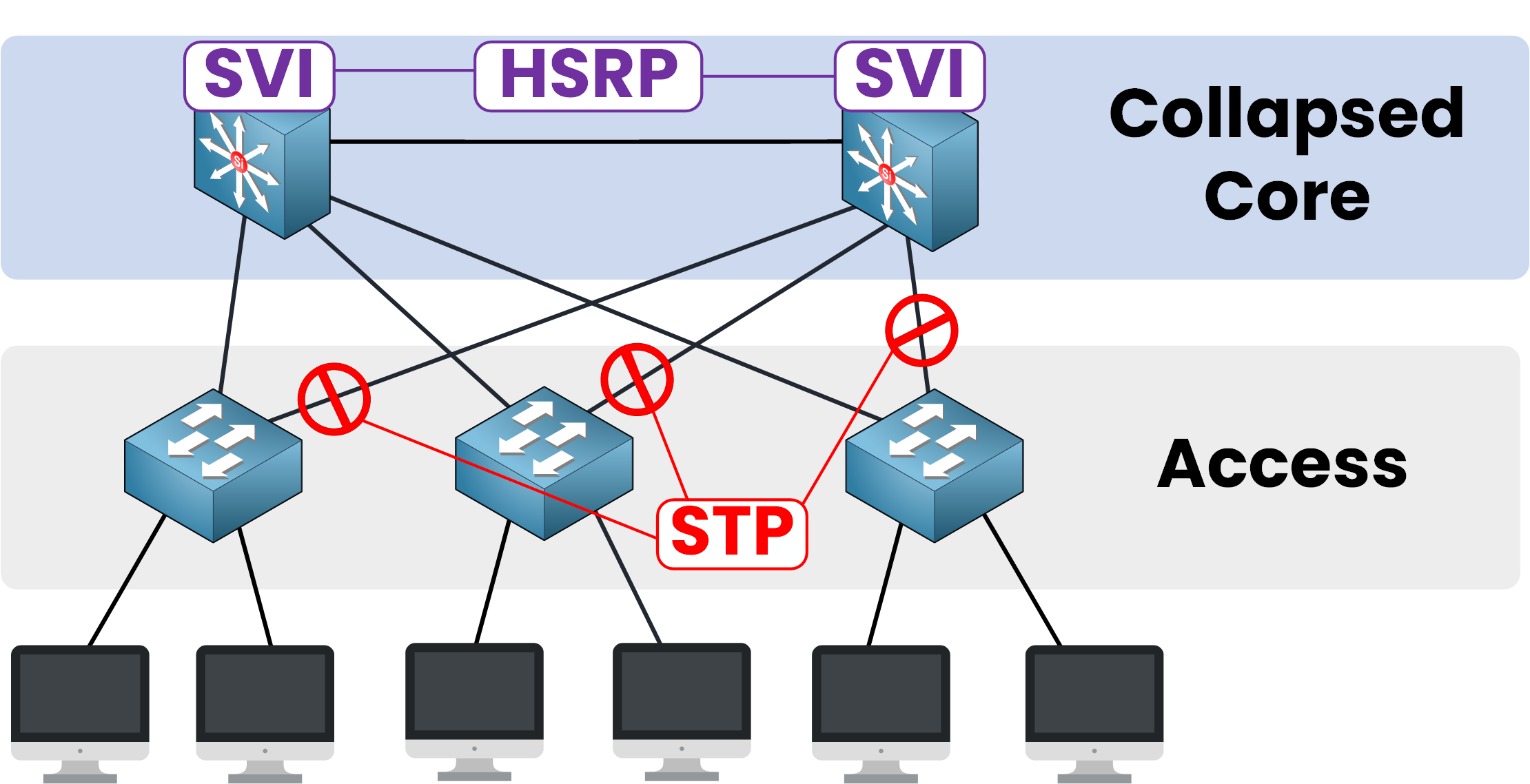
Figure 6 – SVI gateways, HSRP redundancy, and STP loop prevention
Technologies Used in the Collapsed Core Layer
Let’s dive into the key technologies you’ll find at this layer:
Technology
Purpose
SVIs (Switched Virtual Interfaces)
Act as default gateways for VLANs; allow inter-VLAN communication.
OSPF (Open Shortest Path First)
Dynamic routing protocol used between Collapsed Core switches; ensures fast and resilient route computation.
HSRP / VRRP / GLBP
Provide gateway redundancy; ensure failover in case a switch goes down.
STP (Spanning Tree Protocol)
Active between Access and Core layers; prevents Layer 2 loops by blocking redundant paths.
Answer the question below
Which layer merges the Distribution Layer and the Core Layer in this architecture?