You just built the HSRP lab.
Now you do the same on VRRP, same approach.Ready?
The VRRP Group
You group router interfaces into a VRRP group, identified by a group number, exactly like HSRP.
Because VRRP is an open standard (RFC 5798), the same group can even mix routers from different vendors.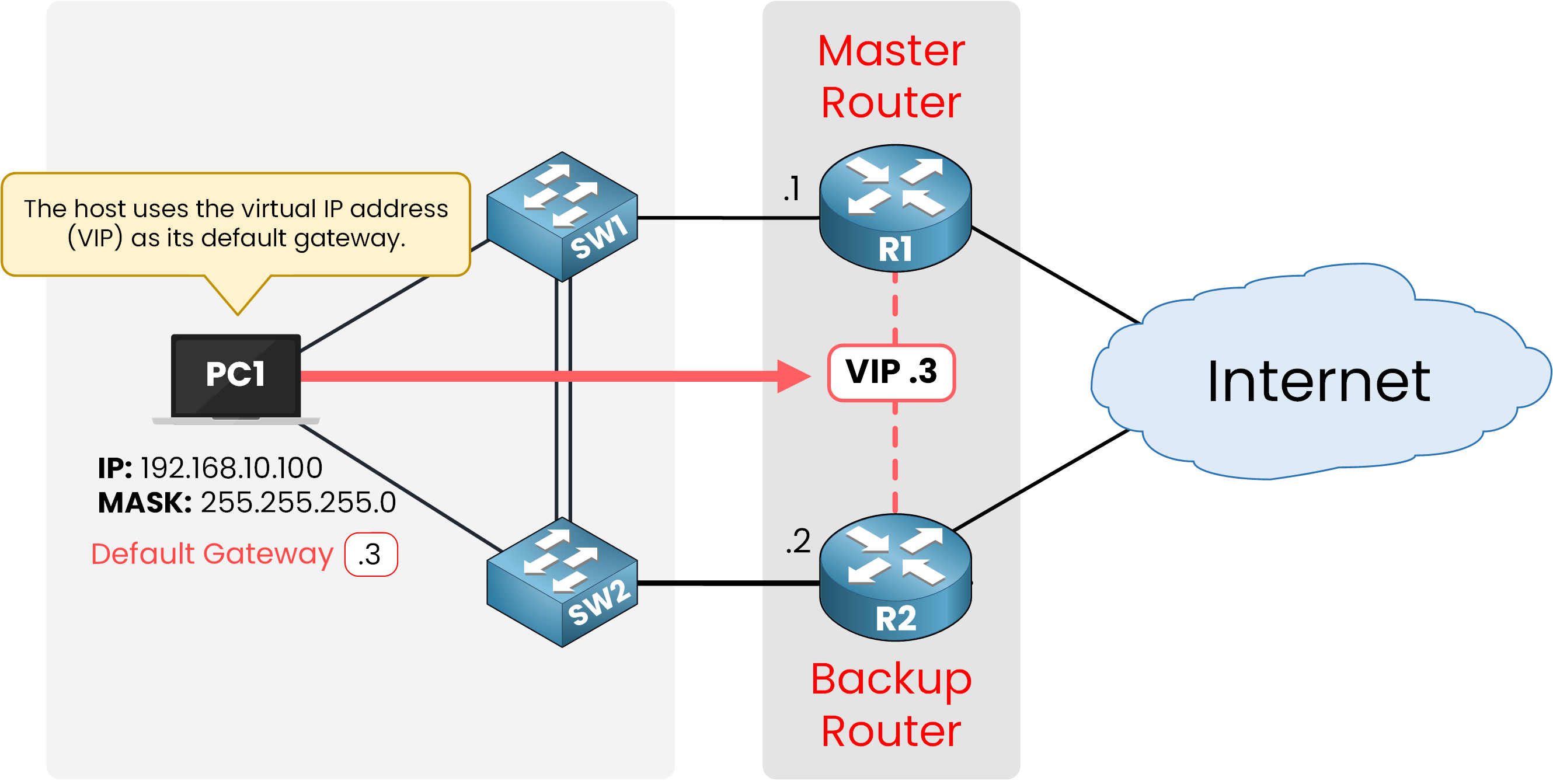
Figure 1 – R1 and R2 form VRRP Group 1
In the topology, R1 and R2 both join VRRP group 1 on their LAN interface.
The VRRP Virtual IP
The group shares one Virtual IP address (VIP).
No single router owns this address on its own: the group answers for it together.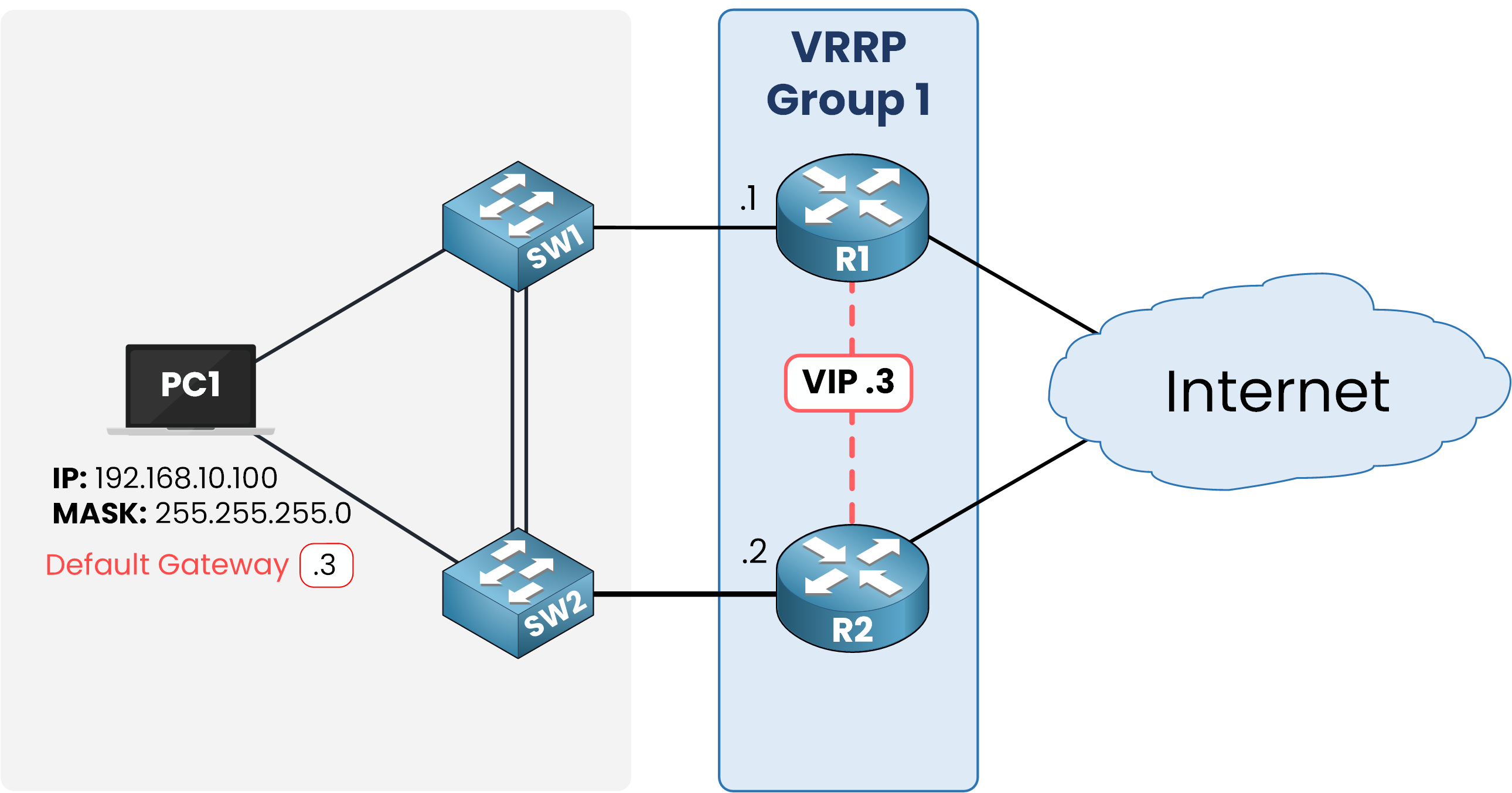
Figure 2 – The Virtual IP becomes the default gateway
Here the group uses 192.168.10.3 as the VIP, while R1 keeps .1 and R2 keeps .2 on their physical interfaces.
Every host in 192.168.10.0/24 points its default gateway at .3.Configure VRRP on R1 first:
R1# conf t
Enter configuration commands, one per line.  End with CNTL/Z.
R1(config)# int g0/0
R1(config-if)# ip address 192.168.10.1 255.255.255.0
R1(config-if)# no shut
R1(config-if)# vrrp 1 ip 192.168.10.3

%VRRP-6-STATECHANGE: GigabitEthernet0/0 Grp 1 state Init -> Backup
%VRRP-6-STATECHANGE: GigabitEthernet0/0 Grp 1 state Backup -> Master
R1(config-if)# end
R1 moved through the states on its own and settled as Master: nobody else was there to compete.
Three lines did the real work: they assigned the IP address, brought the interface up, and formed VRRP group 1 with VIP 192.168.10.3.With no competing router yet, R1 wins the election by default and takes the Master role.
Repeat the same steps on R2:
R2# conf t
Enter configuration commands, one per line.  End with CNTL/Z.
R2(config)# int g0/0
R2(config-if)# ip address 192.168.10.2 255.255.255.0
R2(config-if)# no shut
R2(config-if)# vrrp 1 ip 192.168.10.3

%VRRP-6-STATECHANGE: GigabitEthernet0/0 Grp 1 state Init -> Backup
R2(config-if)# end
R2 lands in Backup, since R1 already claimed Master.
Verify it on R1:R1# show vrrp GigabitEthernet0/0 - Group 1 State is Master Virtual IP address is 192.168.10.3 Virtual MAC address is 0000.5e00.0101 Advertisement interval is 1.000 sec Preemption enabled Priority is 100 Master Router is 192.168.10.1 (local), priority is 100 Master Advertisement interval is 1.000 sec Master Down interval is 3.609 secThe group answers for 192.168.10.3.
Check the same thing on R2:
R2# show vrrp GigabitEthernet0/0 - Group 1 State is Backup Virtual IP address is 192.168.10.3 Virtual MAC address is 0000.5e00.0101 Advertisement interval is 1.000 sec Preemption enabled Priority is 100 Master Router is 192.168.10.1, priority is 100 Master Advertisement interval is 1.000 sec Master Down interval is 3.609 sec (expires in 2.912 sec)R1 and R2 both point to 192.168.10.3 as the VIP.
The group is up and running.Answer the question below
What address do hosts use as their default gateway with VRRP?
Inside each group, one router holds the Master role.
The rest stay in Backup, ready to take over.Master and Backup Roles
The Master router forwards every packet sent to the VIP and answers ARP requests for it.
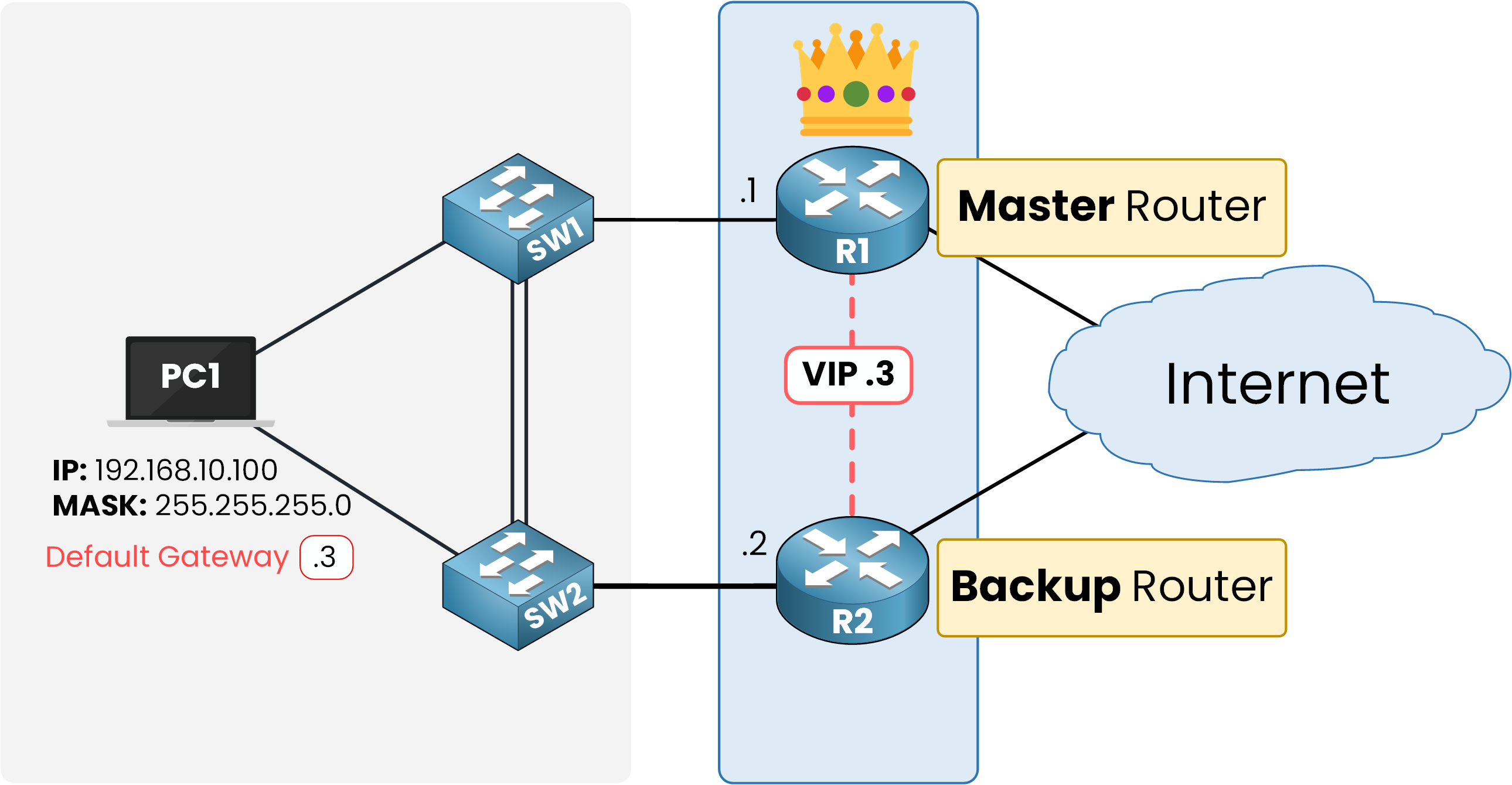
Figure 3 – Master and Backup roles inside the group
The Backup routers stay passive.
They monitor the Master's Advertisements and are ready to take over the moment it disappears.
Here is R1's perspective on the group:
R1# show vrrp GigabitEthernet0/0 - Group 1 State is Master Virtual IP address is 192.168.10.3 Virtual MAC address is 0000.5e00.0101 Advertisement interval is 1.000 sec Preemption enabled Priority is 100 Master Router is 192.168.10.1 (local), priority is 100 Master Advertisement interval is 1.000 sec Master Down interval is 3.609 secState is Master means R1 currently forwards traffic for the group.
Master Router is 192.168.10.1 (local) confirms R1 owns the VIP and answers ARP requests for it.
Look from R2's side:
R2# show vrrp
GigabitEthernet0/0 - Group 1
  State is Backup
  Virtual IP address is 192.168.10.3
  Virtual MAC address is 0000.5e00.0101
  Advertisement interval is 1.000 sec
  Preemption enabled
  Priority is 100
  Master Router is 192.168.10.1, priority is 100
  Master Advertisement interval is 1.000 sec
  Master Down interval is 3.609 sec (expires in 3.104 sec)
State is Backup means R2 stays silent and only monitors R1's Advertisements.
Master Router is 192.168.10.1 tells R2 exactly which router currently owns the VIP.
The VRRP Virtual MAC
Just like HSRP, VRRP hides the physical routers behind a Virtual MAC address (VMAC).
The Master owns this VMAC and replies with it whenever a host ARPs for the VIP.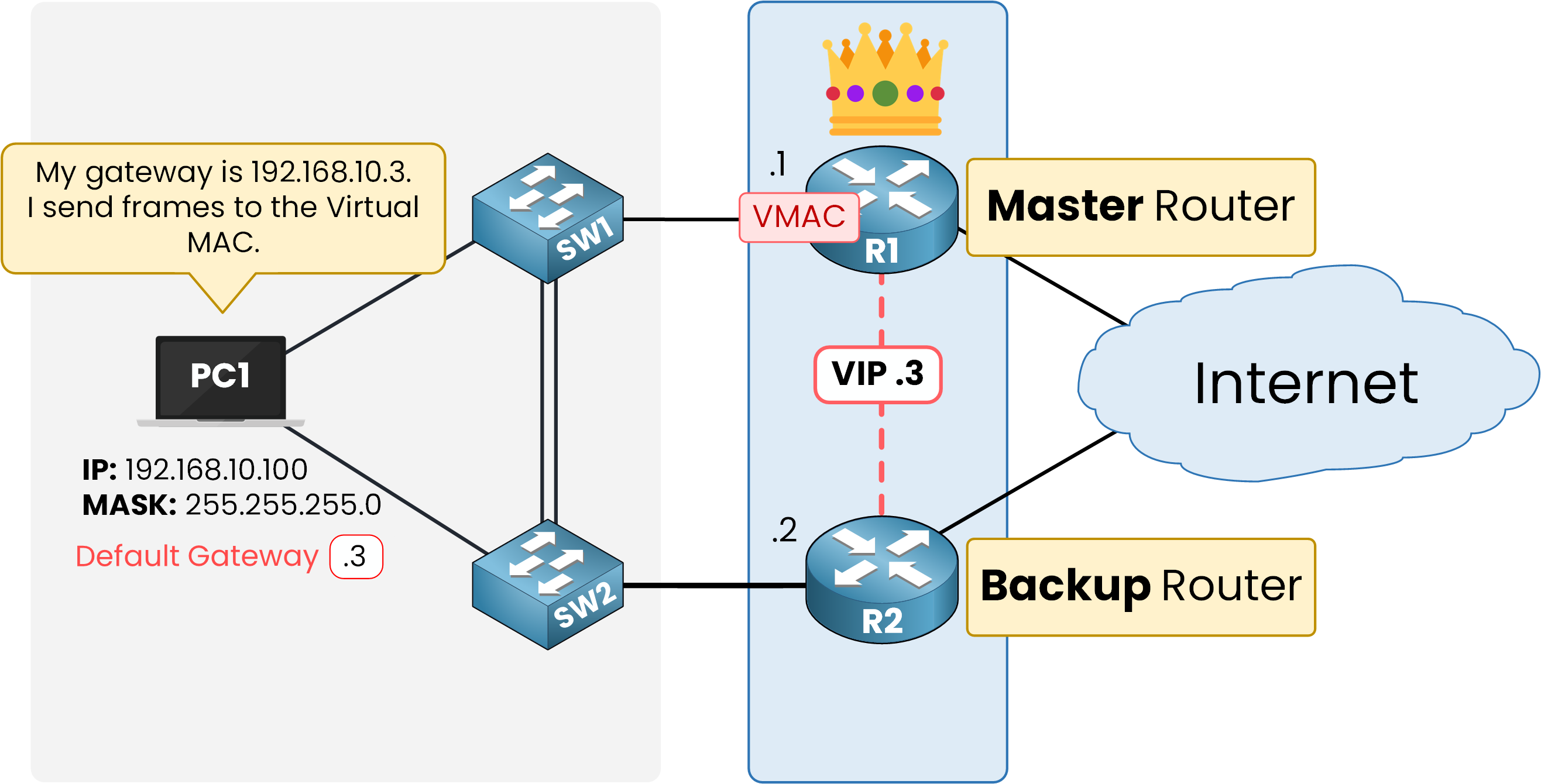
Figure 4 – VRRP Master owns the Virtual MAC and replies to ARP for the VIP
00-00-5E-00-01-XXXXis the VRRP group number in hexadecimal.
Group 1 gives:00-00-5E-00-01-01Notice the vendor block is different from HSRP's
0000.0C07.
VRRP uses the IANA-assigned block 00-00-5E, since it's an open standard.Answer the question below
Which router answers ARP requests for the VIP?
You saw it happen already: R1 took Master and R2 took Backup, and you never picked either role.
So what actually decides who gets which role?The VRRP Election Process
Every router carries a priority from 1 to 254, default 100.
Whoever has the highest number becomes Master.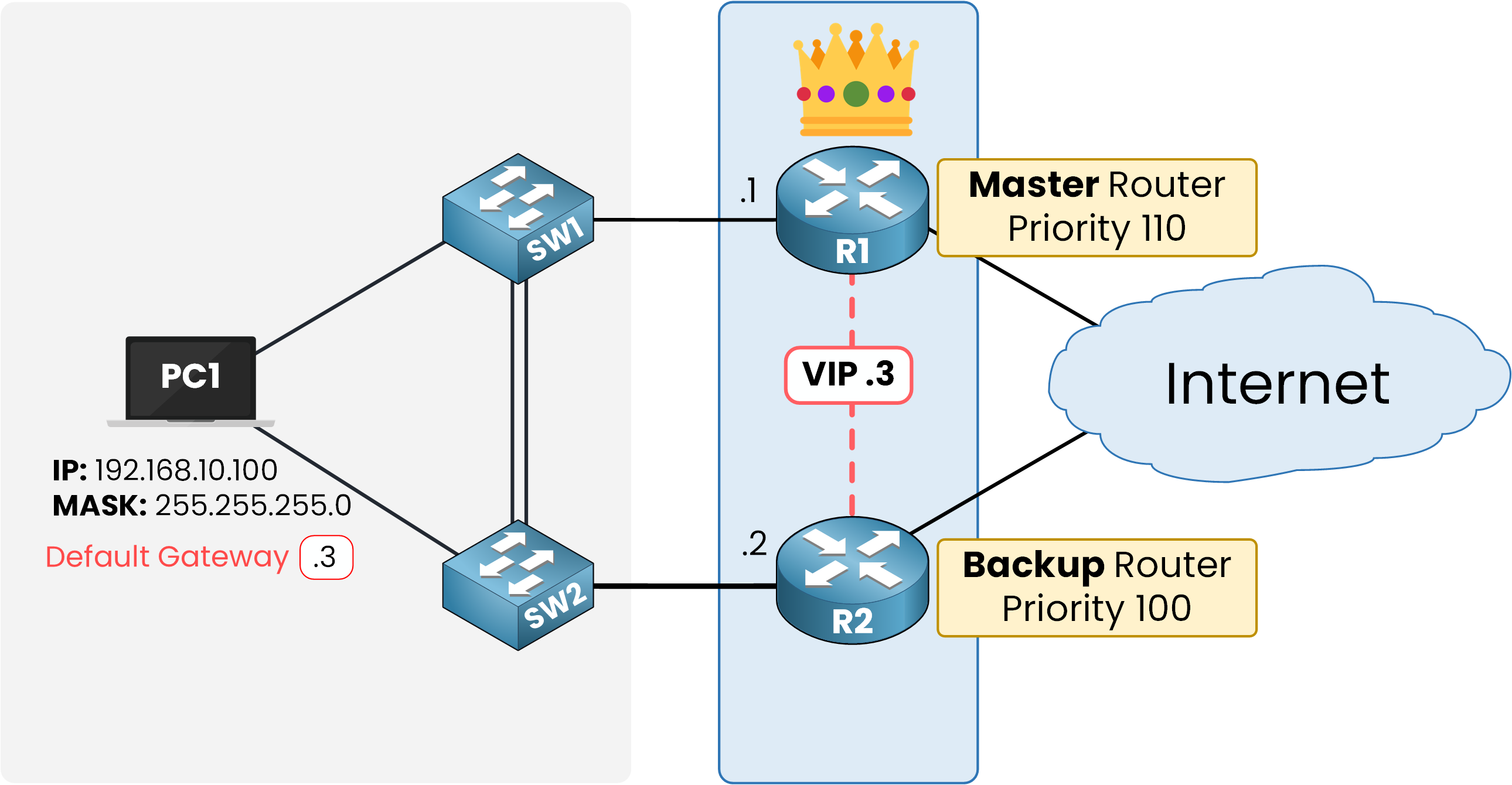
Figure 5 – VRRP election based on priority and IP address
If priorities tie, the router with the highest IP address on the VRRP interface wins the election.
Priority 255 is reserved for the address owner, a router whose physical interface IP is itself the VIP.
An owner always runs as Master and always preempts, since nothing can outrank it.Give R1 a higher priority so it becomes Master:
R1# conf t
Enter configuration commands, one per line.  End with CNTL/Z.
R1(config)# int g0/0
R1(config-if)# vrrp 1 priority 110
R1(config-if)# end

R1# show vrrp
GigabitEthernet0/0 - Group 1
  State is Master
  Virtual IP address is 192.168.10.3
  Virtual MAC address is 0000.5e00.0101
  Advertisement interval is 1.000 sec
  Preemption enabled
  Priority is 110
  Master Router is 192.168.10.1 (local), priority is 110
  Master Advertisement interval is 1.000 sec
  Master Down interval is 3.570 sec
Answer the question below
What is the default VRRP priority value?
VRRP States
VRRP keeps this simple: only three states exist.
Initialize – the router just started and waits for the interface to come up.
Backup – the router lost the election and monitors the Master's Advertisements.
Master – the router won the election and forwards traffic for the VIP.
Here is what R2 logged when it joined the group:
%VRRP-6-STATECHANGE: GigabitEthernet0/0 Grp 1 state Init -> BackupAnswer the question below
Which state does the backup router settle into?
A rogue router can join your VRRP group and try to become Master.
Authentication stops that: only routers with the right key can join.Types of Authentication
IOS supports two types: plaintext and MD5.
Plaintext sends the key in clear text, so anyone capturing the Advertisements can read it.
Always use MD5 in production.40 % Complete: you’re making great progress
Ready to pass your CCNP exam?