VRF (Virtual Routing and Forwarding) allows a router to maintain multiple independent routing tables on the same physical device.
Each VRF acts as a separate virtual router with its own interfaces and routes.The concept is the same as VLANs, but at a different layer.
VLANs isolate traffic at Layer 2 by creating separate MAC address tables.
VRFs isolate traffic at Layer 3 by creating separate routing tables.
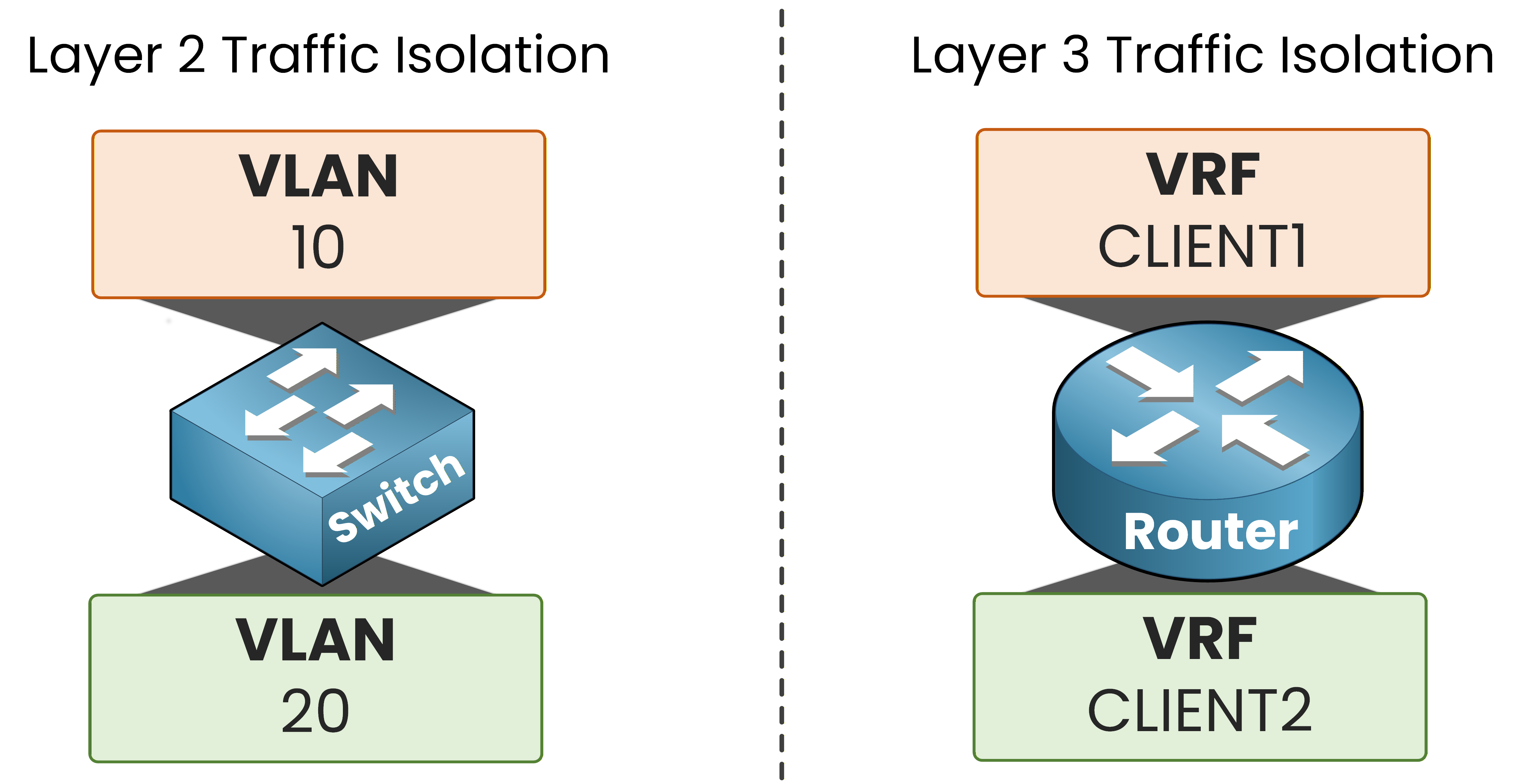
Figure 1 – VLANs vs VRFs
But in real service provider networks, your VRFs must travel across multiple routers end-to-end.
This is where VRF-Lite at the CCNP level begins.The Scenario
You are the network engineer of a service provider.
Two customers need connectivity through your ISP router.CLIENT1 has two sites: HQ1 and BR1.
CLIENT2 has two sites: HQ2 and BR2.
All four customer routers connect to your central ISP router through dedicated physical interfaces.
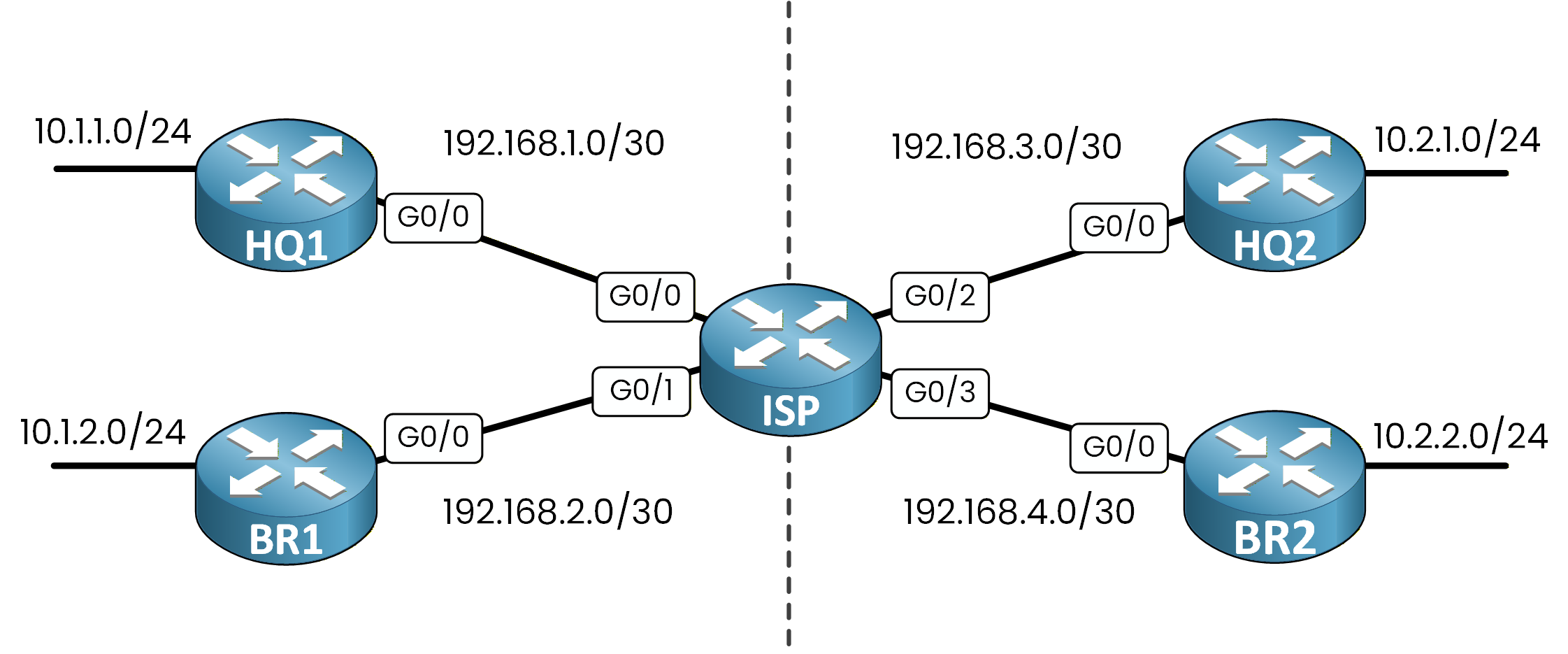
Figure 2 – ISP multi-customer topology
Your objective is clear: CLIENT1 and CLIENT2 must be completely isolated from each other, even though they share the same physical ISP router.
The VRF Solution
With VRF, you segment the network into isolated customer domains.
Each customer's links belong to its own VRF.CLIENT1 links (HQ1 and BR1) are shown in orange on the left.
CLIENT2 links (HQ2 and BR2) are shown in green on the right.
The dashed line represents the complete isolation between the two VRFs.
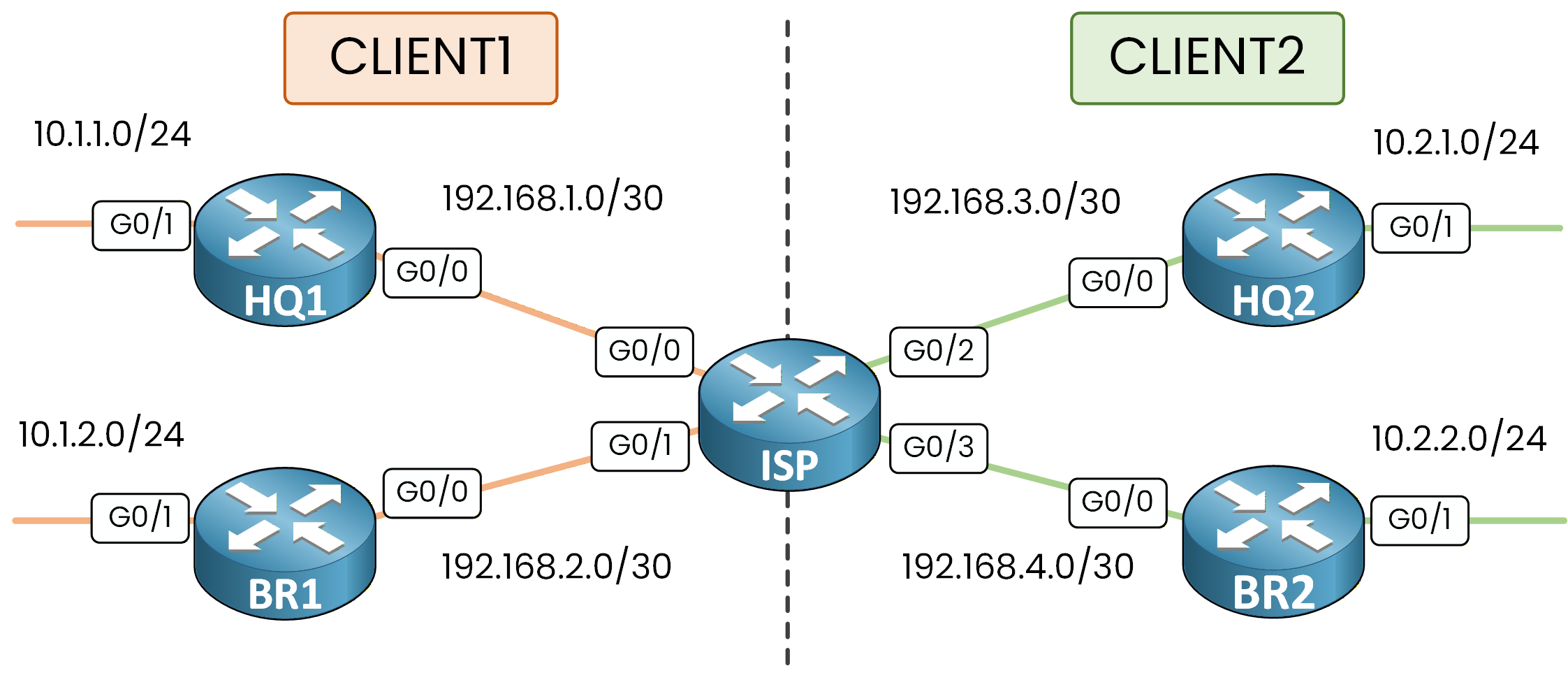
Figure 3 – VRF network segmentation
From the perspective of VRF CLIENT1, VRF CLIENT2 does not exist.
They share the same physical ISP router, but they live in completely separate worlds.Answer the question below
What does each VRF maintain to keep customer traffic separated?
The Modern Syntax: vrf definition
Older Cisco IOS used the
ip vrfcommand to create VRFs.
That is the legacy syntax, limited to IPv4 only.Modern Cisco IOS and IOS-XE use
vrf definition.
This command supports both IPv4 and IPv6 through address families.
This is the syntax you need for the CCNP ENCOR blueprint.Create the customer VRFs on every router in the topology.
On the ISP, create both VRFs:
ISP# conf t
Enter configuration commands, one per line.  End with CNTL/Z.
ISP(config)# vrf definition CLIENT1
ISP(config-vrf)# address-family ipv4
ISP(config-vrf-af)# exit-address-family
ISP(config-vrf)# exit

ISP(config)# vrf definition CLIENT2
ISP(config-vrf)# address-family ipv4
ISP(config-vrf-af)# exit-address-family
ISP(config-vrf)# exit
On HQ1, create VRF CLIENT1:
HQ1# conf t
Enter configuration commands, one per line.  End with CNTL/Z.
HQ1(config)# vrf definition CLIENT1
HQ1(config-vrf)# address-family ipv4
HQ1(config-vrf-af)# exit-address-family
HQ1(config-vrf)# exit
On BR1:
BR1# conf t
Enter configuration commands, one per line.  End with CNTL/Z.
BR1(config)# vrf definition CLIENT1
BR1(config-vrf)# address-family ipv4
BR1(config-vrf-af)# exit-address-family
BR1(config-vrf)# exit
On HQ2, create VRF CLIENT2:
HQ2# conf t
Enter configuration commands, one per line.  End with CNTL/Z.
HQ2(config)# vrf definition CLIENT2
HQ2(config-vrf)# address-family ipv4
HQ2(config-vrf-af)# exit-address-family
HQ2(config-vrf)# exit
On BR2:
BR2# conf t
Enter configuration commands, one per line.  End with CNTL/Z.
BR2(config)# vrf definition CLIENT2
BR2(config-vrf)# address-family ipv4
BR2(config-vrf-af)# exit-address-family
BR2(config-vrf)# exit
The
address-family ipv4block activates IPv4 routing inside this VRF.
Without it, the VRF exists but cannot process any IPv4 traffic.Answer the question below
Which command replaces ip vrf in modern IOS-XE for creating VRFs?
Your VRFs are defined on every router. Now you need to assign interfaces so that each customer's traffic stays inside its own VRF.
VRF Is Locally Significant
You assign interfaces to a VRF using the
vrf forwardingcommand.
A VRF is locally significant.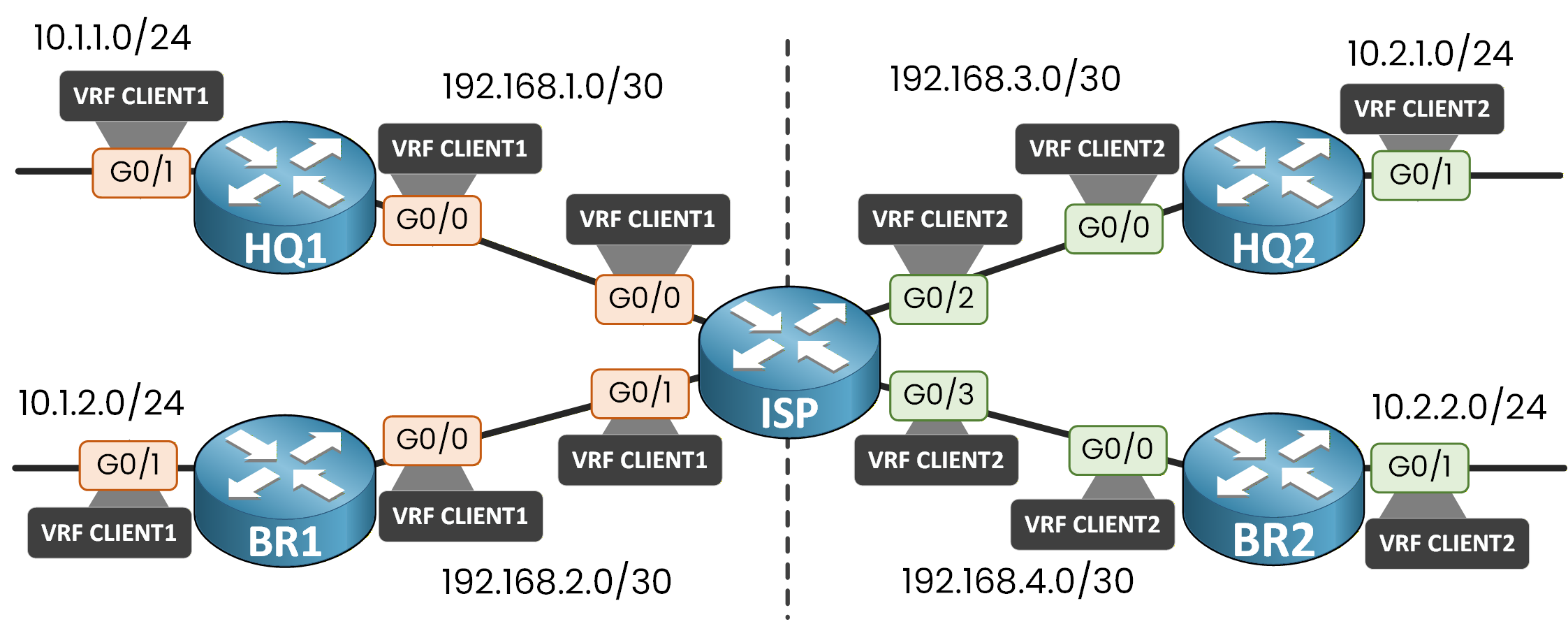
Figure 4 – VRF assignments on every interface
The other side of a link does not need the same VRF, or any VRF at all. In a typical ISP design, only the ISP interface facing the customer is in the customer VRF, and the CE router stays in its global table. In this lab, VRFs are configured on both the ISP router and the customer routers.
ISP Interface Configuration
Remember: applying
vrf forwardingto an interface removes any existing IP address.
Always assign the VRF first, then configure the IP.ISP(config)# interface G0/0 ISP(config-if)# vrf forwarding CLIENT1 ISP(config-if)# ip address 192.168.1.1 255.255.255.252 ISP(config-if)# no shutdown ISP(config-if)# exit ISP(config)# interface G0/1 ISP(config-if)# vrf forwarding CLIENT1 ISP(config-if)# ip address 192.168.2.1 255.255.255.252 ISP(config-if)# no shutdown ISP(config-if)# exit ISP(config)# interface G0/2 ISP(config-if)# vrf forwarding CLIENT2 ISP(config-if)# ip address 192.168.3.1 255.255.255.252 ISP(config-if)# no shutdown ISP(config-if)# exit ISP(config)# interface G0/3 ISP(config-if)# vrf forwarding CLIENT2 ISP(config-if)# ip address 192.168.4.1 255.255.255.252 ISP(config-if)# no shutdown ISP(config-if)# endCLIENT1 Router Interfaces
Each customer router needs the VRF on both its WAN interface (G0/0 toward ISP) and its LAN interface (G0/1).
On HQ1:
HQ1(config)# interface G0/0
HQ1(config-if)# vrf forwarding CLIENT1
HQ1(config-if)# ip address 192.168.1.2 255.255.255.252
HQ1(config-if)# no shutdown
HQ1(config-if)# exit

HQ1(config)# interface G0/1
HQ1(config-if)# vrf forwarding CLIENT1
HQ1(config-if)# ip address 10.1.1.1 255.255.255.0
HQ1(config-if)# no shutdown
HQ1(config-if)# end
On BR1:
BR1(config)# interface G0/0
BR1(config-if)# vrf forwarding CLIENT1
BR1(config-if)# ip address 192.168.2.2 255.255.255.252
BR1(config-if)# no shutdown
BR1(config-if)# exit

BR1(config)# interface G0/1
BR1(config-if)# vrf forwarding CLIENT1
BR1(config-if)# ip address 10.1.2.1 255.255.255.0
BR1(config-if)# no shutdown
BR1(config-if)# end
CLIENT2 Router Interfaces
On HQ2:
HQ2(config)# interface G0/0
HQ2(config-if)# vrf forwarding CLIENT2
HQ2(config-if)# ip address 192.168.3.2 255.255.255.252
HQ2(config-if)# no shutdown
HQ2(config-if)# exit

HQ2(config)# interface G0/1
HQ2(config-if)# vrf forwarding CLIENT2
HQ2(config-if)# ip address 10.2.1.1 255.255.255.0
HQ2(config-if)# no shutdown
HQ2(config-if)# end
On BR2:
40 % Complete: you’re making great progress
Ready to pass your CCNP exam?