A broken EtherChannel rarely announces itself.
Most of the time the bundle quietly fails to form, and your traffic falls back on a single link.You are the engineer on duty, and four tickets are waiting in your queue.
For each one, you will read the symptoms, find the cause, apply the fix, and verify it.
Figure 1 – EtherChannel Lab Topology
Every ticket starts from this topology.
Reading the Flags
Ticket 1: users report poor performance between two access switches.
Both uplinks are cabled and up, yet bandwidth feels like a single link.Open the console of SW1 and start with the summary.
SW1# show etherchannel summary
Flags:  D - down        P - bundled in port-channel
        I - stand-alone s - suspended
        H - Hot-standby (LACP only)
        R - Layer3      S - Layer2
        U - in use      f - failed to allocate aggregator
        M - not in use, minimum links not met
        u - unsuitable for bundling
        w - waiting to be aggregated
        d - default port
        A - formed by Auto LAG

Number of channel-groups in use: 1
Number of aggregators:           1

Group  Port-channel  Protocol    Ports
------+-------------+-----------+-----------------------------------------------
1      Po1(SD)         PAgP      Gi0/0(I)    Gi0/1(I)
Po1 (SD): the port-channel is Layer 2 and down.
Gi0/0 (I) and Gi0/1 (I): each member gave up on the negotiation and now runs as a plain stand-alone interface.
That matches the ticket: a stand-alone port still forwards traffic like an ordinary link, STP blocks the redundant one, and the network keeps working.
Nothing is down, you have only lost the aggregation.Run the same check from SW2.
SW2# show etherchannel summary
Flags:  D - down        P - bundled in port-channel
        I - stand-alone s - suspended
        H - Hot-standby (LACP only)
        R - Layer3      S - Layer2
        U - in use      f - failed to allocate aggregator
        M - not in use, minimum links not met
        u - unsuitable for bundling
        w - waiting to be aggregated
        d - default port
        A - formed by Auto LAG

Number of channel-groups in use: 1
Number of aggregators:           1

Group  Port-channel  Protocol    Ports
------+-------------+-----------+-----------------------------------------------
1      Po1(SD)         PAgP      Gi0/0(I)    Gi0/1(I)
Identical state on both sides: the failure is symmetrical.
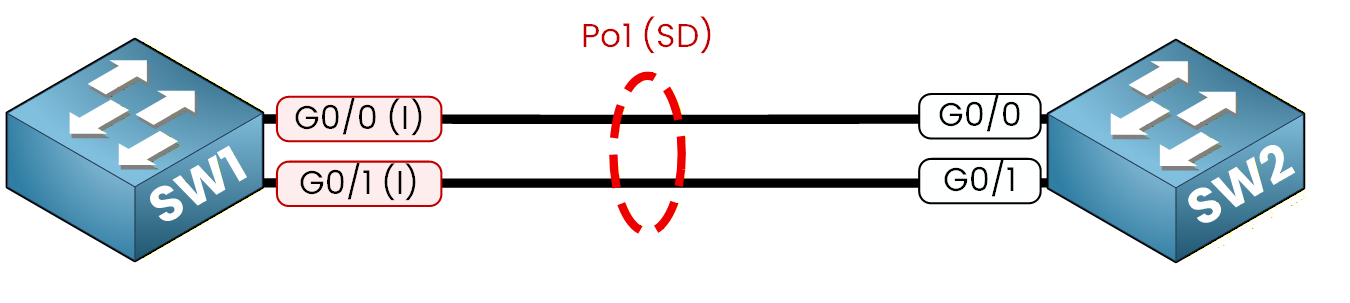
Figure 2 – Po1 down, both members stand-alone
You now know what you are chasing: the links are healthy, the negotiation is not.
Answer the question below
Which flag marks a PAgP port that failed to bundle?
Finding the Mismatch
Compare the channel-group line on both sides of the same link.
SW1# show running-config interface g0/0
Building configuration...

Current configuration : 154 bytes
!
interface GigabitEthernet0/0
 switchport trunk encapsulation dot1q
 switchport mode trunk
 channel-group 1 mode auto
end
Same command on SW2.
SW2# show running-config interface g0/0
Building configuration...

Current configuration : 154 bytes
!
interface GigabitEthernet0/0
 switchport trunk encapsulation dot1q
 switchport mode trunk
 channel-group 1 mode auto
end
Both sides sit in auto.
Straight from the mode-compatibility table in the previous lesson: auto plus auto is the dead cell.
Each side waits for the other to speak first, and nobody ever does.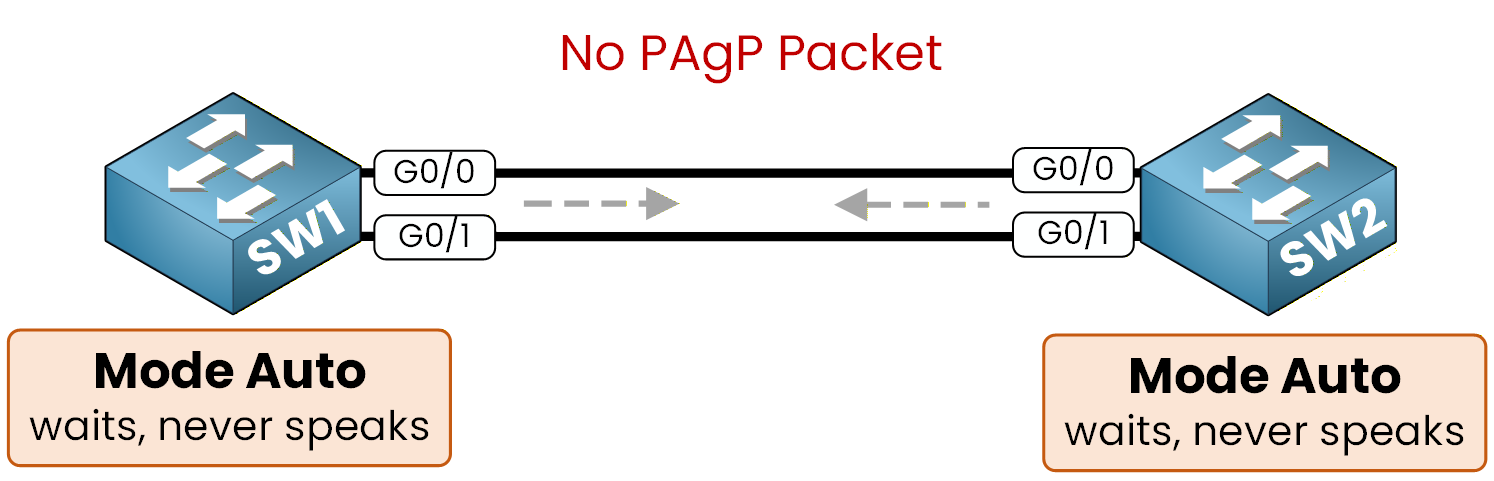
Figure 3 – Auto on both sides, nobody initiates
To fix it, one side has to initiate.
Answer the question below
Which PAgP mode waits and never initiates?
Fixing the Mode
Move SW1 to desirable.
The change stays inside PAgP, so you can type the new mode directly over the old one.SW1# configure terminal Enter configuration commands, one per line. End with CNTL/Z. SW1(config)# interface range g0/0-1 SW1(config-if-range)# channel-group 1 mode desirable SW1(config-if-range)# end %LINK-3-UPDOWN: Interface Port-channel1, changed state to up %LINEPROTO-5-UPDOWN: Line protocol on Interface Port-channel1, changed state to upThe syslog already announces the result.
Confirm it with the summary.SW1# show etherchannel summary Flags: D - down P - bundled in port-channel I - stand-alone s - suspended H - Hot-standby (LACP only) R - Layer3 S - Layer2 U - in use f - failed to allocate aggregator M - not in use, minimum links not met u - unsuitable for bundling w - waiting to be aggregated d - default port A - formed by Auto LAG Number of channel-groups in use: 1 Number of aggregators: 1 Group Port-channel Protocol Ports ------+-------------+-----------+----------------------------------------------- 1 Po1(SU) PAgP Gi0/0(P) Gi0/1(P)Confirm that SW2 agrees before you close anything.
SW2# show etherchannel summary
Flags:  D - down        P - bundled in port-channel
        I - stand-alone s - suspended
        H - Hot-standby (LACP only)
        R - Layer3      S - Layer2
        U - in use      f - failed to allocate aggregator
        M - not in use, minimum links not met
        u - unsuitable for bundling
        w - waiting to be aggregated
        d - default port
        A - formed by Auto LAG

Number of channel-groups in use: 1
Number of aggregators:           1

Group  Port-channel  Protocol    Ports
------+-------------+-----------+-----------------------------------------------
1      Po1(SU)         PAgP      Gi0/0(P)    Gi0/1(P)
SU on the port-channel, P on both members: the healthy signature from the previous lesson is back.
Desirable plus auto is one of that table's green cells.Answer the question below
Does a stand-alone (I) port still forward traffic?
Ticket 2 makes noise: the bundle went down minutes after a colleague reconfigured SW1 in static mode, while SW2 runs LACP active.
In a panic, he removed his channel-group from SW1 before escalating, so the evidence is gone.
Confirm the story in the configuration, then bring the bundle back.Figure 4 – EtherChannel Lab Topology
The Blind Bundle
The ticket names a culprit, but open it like any other: summary on both switches.
SW1# show etherchannel summary
Flags:  D - down        P - bundled in port-channel
        I - stand-alone s - suspended
        H - Hot-standby (LACP only)
        R - Layer3      S - Layer2
        U - in use      f - failed to allocate aggregator
        M - not in use, minimum links not met
        u - unsuitable for bundling
        w - waiting to be aggregated
        d - default port
        A - formed by Auto LAG

Number of channel-groups in use: 0
Number of aggregators:           0

Group  Port-channel  Protocol    Ports
------+-------------+-----------+-----------------------------------------------
Now SW2.
SW2# show etherchannel summary
Flags:  D - down        P - bundled in port-channel
        I - stand-alone s - suspended
        H - Hot-standby (LACP only)
        R - Layer3      S - Layer2
        U - in use      f - failed to allocate aggregator
        M - not in use, minimum links not met
        u - unsuitable for bundling
        w - waiting to be aggregated
        d - default port
        A - formed by Auto LAG

Number of channel-groups in use: 1
Number of aggregators:           1

Group  Port-channel  Protocol    Ports
------+-------------+-----------+-----------------------------------------------
1      Po1(SD)         LACP      Gi0/0(s)    Gi0/1(s)
No channel-group on SW1, two suspended members on SW2.
The summary tells you the state, never the cause.
Before touching anything, read the configuration on both sides of the link.SW1# show running-config interface g0/0 Building configuration... Current configuration : 129 bytes ! interface GigabitEthernet0/0 switchport trunk encapsulation dot1q switchport mode trunk endThe trunk settings are there, the channel-group line is gone: his rollback left g0/0 outside any bundle, exactly as the ticket said.
Same command on SW2.SW2# show running-config interface g0/0 Building configuration... Current configuration : 157 bytes ! interface GigabitEthernet0/0 switchport trunk encapsulation dot1q switchport mode trunk channel-group 1 mode active endThe configuration confirms it: SW2 waits in LACP active on both ports.
Its members sit suspended with the %ETC-5-L3DONTBNDL2 messages you met in the previous lesson, waiting for LACP answers that never come.One more proof before you replay anything: ask SW2 who answers its LACPDUs.
SW2# show lacp neighbor
Flags:  S - Device is requesting Slow LACPDUs
        F - Device is requesting Fast LACPDUs
        A - Device is in Active mode       P - Device is in Passive mode

Channel group 1 neighbors

Port-channel Po1 neighbors
The table under that last line is empty: SW2 keeps sending LACPDUs and nobody ever answers.
Aligning the Protocol
Everything matches his story: a channel-group in mode on never sends or answers LACPDUs, so SW2 suspended its members the moment his change landed.
The fix: recreate the bundle on SW1 with the protocol SW2 already runs.SW1# configure terminal Enter configuration commands, one per line. End with CNTL/Z. SW1(config)# interface range g0/0-1 SW1(config-if-range)# channel-group 1 mode active Creating a port-channel interface Port-channel 1 SW1(config-if-range)# end %LINK-3-UPDOWN: Interface Port-channel1, changed state to up %LINEPROTO-5-UPDOWN: Line protocol on Interface Port-channel1, changed state to upPo1 comes up as soon as the first LACPDUs are answered.
Verify on SW1.SW1# show etherchannel summary Flags: D - down P - bundled in port-channel I - stand-alone s - suspended H - Hot-standby (LACP only) R - Layer3 S - Layer2 U - in use f - failed to allocate aggregator M - not in use, minimum links not met u - unsuitable for bundling w - waiting to be aggregated d - default port A - formed by Auto LAG Number of channel-groups in use: 1 Number of aggregators: 1 Group Port-channel Protocol Ports ------+-------------+-----------+----------------------------------------------- 1 Po1(SU) LACP Gi0/0(P) Gi0/1(P)And close with SW2.
SW2# show etherchannel summary
Flags:  D - down        P - bundled in port-channel
        I - stand-alone s - suspended
        H - Hot-standby (LACP only)
        R - Layer3      S - Layer2
        U - in use      f - failed to allocate aggregator
        M - not in use, minimum links not met
        u - unsuitable for bundling
        w - waiting to be aggregated
        d - default port
        A - formed by Auto LAG

Number of channel-groups in use: 1
Number of aggregators:           1

Group  Port-channel  Protocol    Ports
------+-------------+-----------+-----------------------------------------------
1      Po1(SU)         LACP      Gi0/0(P)    Gi0/1(P)
SU on the bundle, P on both members: the EtherChannel is back to normal, ticket closed.
40 % Complete: you’re making great progress
Ready to pass your CCNP exam?