In this lab, you are going to configure OSPFv3 in a multi-area environment.
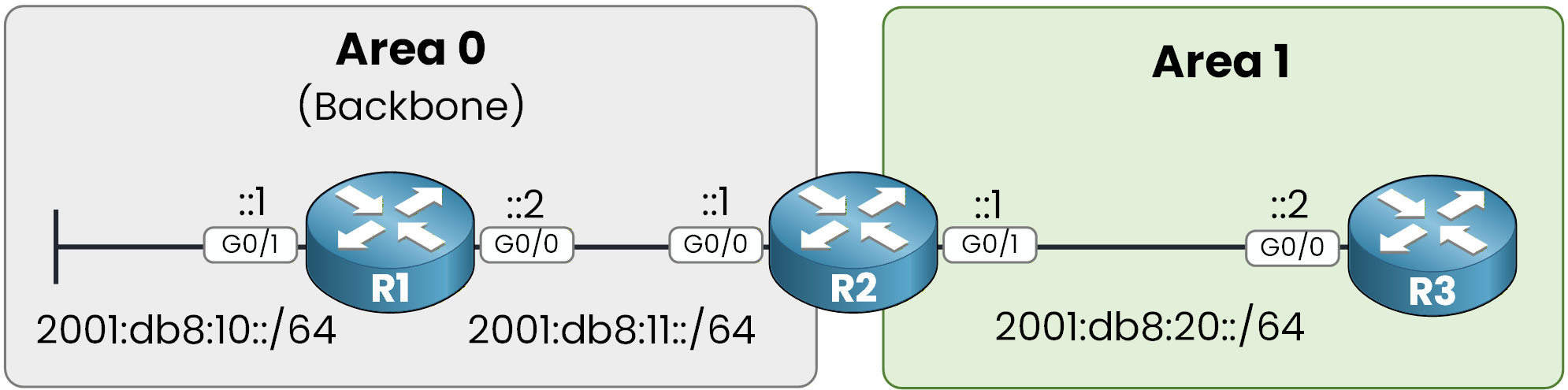
Figure 1 - OSPFv3 multi-area topology
In this topology, you have three routers.
The objective of this lab is to practice the configurations you must know for the CCNP ENCOR exam.We will not go extremely deep into every detail, but you will get solid hands-on practice.
Let’s begin.
Configure IPv6 on Interfaces
First, you need to configure IPv6 addresses on all router interfaces.
Start with R1:
R1# conf t
Enter configuration commands, one per line.  End with CNTL/Z.
R1(config)# int g0/1
R1(config-if)# ipv6 address 2001:db8:10::1/64
R1(config-if)# no shut
R1(config-if)# exit

R1(config)# int g0/0
R1(config-if)# ipv6 address 2001:db8:11::2/64
R1(config-if)# no shut
R1(config-if)# exit
Then move to R2:
R2# conf t
Enter configuration commands, one per line.  End with CNTL/Z
R2(config)# int g0/0
R2(config-if)# ipv6 address 2001:db8:11::1/64
R2(config-if)# no shut
R2(config-if)# exit

R2(config)# int g0/1
R2(config-if)# ipv6 address 2001:db8:20::1/64
R2(config-if)# no shut
R2(config-if)# exit
Finally, configure R3:
R3# conf t
Enter configuration commands, one per line.  End with CNTL/Z
R3(config)# int g0/0
R3(config-if)# ipv6 address 2001:db8:20::2/64
R3(config-if)# no shut
R3(config-if)# end
Verify IPv6 Connectivity
Now that IPv6 addressing is configured, you should verify it.
On R1:
R1# show ipv6 interface brief
GigabitEthernet0/0     [up/up]
    FE80::52CA:C4FF:FE00:1200
    2001:DB8:11::2
GigabitEthernet0/1     [up/up]
    FE80::52CA:C4FF:FE00:1201
    2001:DB8:10::1
GigabitEthernet0/2     [administratively down/down]
    unassigned
GigabitEthernet0/3     [administratively down/down]
    unassigned
As you can see, each active interface has:
A Global Unicast address
A Link-Local address
The link-local address is automatically generated using EUI-64 by default.
You must remember that link-local addresses are mandatory for OSPFv3 neighbor adjacency formation.Now verify the same on R2:
R2# show ipv6 interface brief
GigabitEthernet0/0     [up/up]
    FE80::52F7:B4FF:FE00:1300
    2001:DB8:11::1
GigabitEthernet0/1     [up/up]
    FE80::52F7:B4FF:FE00:1301
    2001:DB8:20::1
GigabitEthernet0/2     [administratively down/down]
    unassigned
GigabitEthernet0/3     [administratively down/down]
    unassigned
And finally on R3:
R3# show ipv6 interface brief
GigabitEthernet0/0     [up/up]
    FE80::523D:44FF:FE00:1400
    2001:DB8:20::2
GigabitEthernet0/1     [administratively down/down]
    unassigned
GigabitEthernet0/2     [administratively down/down]
    unassigned
GigabitEthernet0/3     [administratively down/down]
    unassigned
If all required interfaces show up/up and the IPv6 addresses are correctly configured, you are ready to move on to enabling OSPFv3.
Answer the question below
Which type of IPv6 address is mandatory for OSPFv3 neighbors to form an adjacency?
Now you are going to configure OSPFv3.
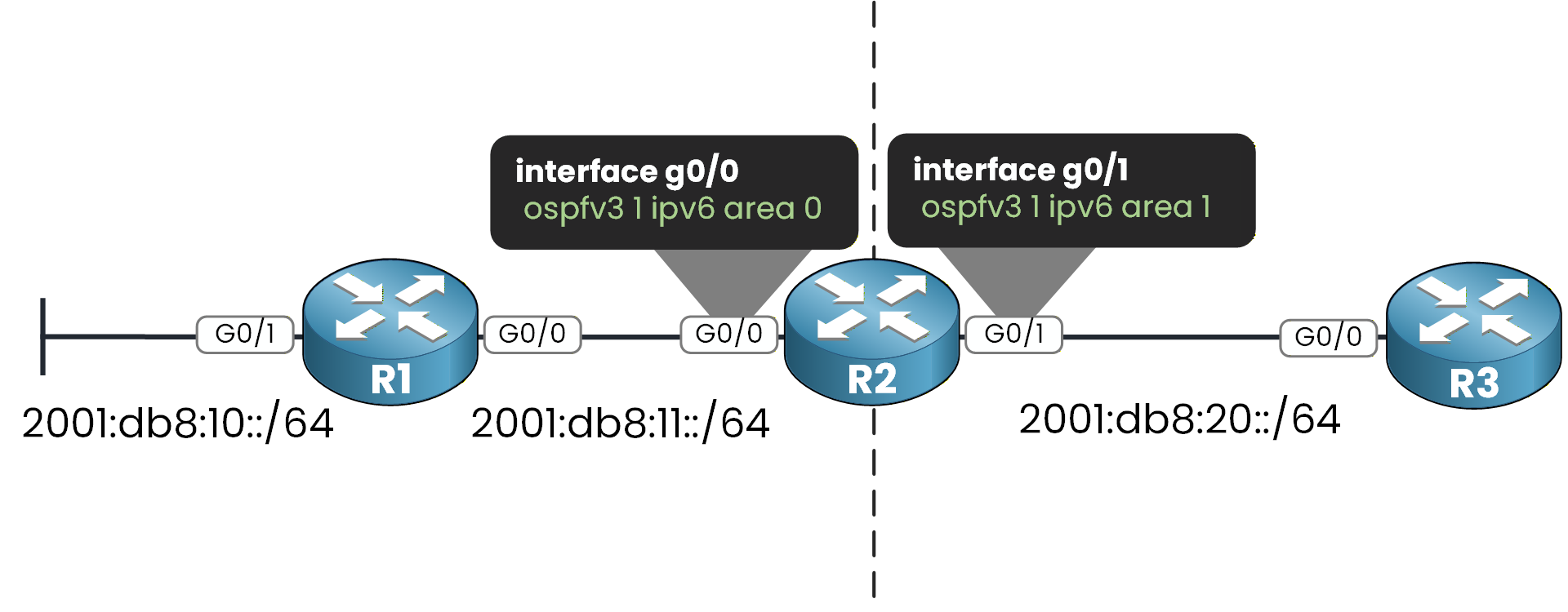
Figure 2 - OSPFv3 interface area assignment
Step 1 – Enable IPv6 Routing
Before you can run OSPFv3, you must enable IPv6 unicast routing.
On R1:
R1# conf t
Enter configuration commands, one per line.  End with CNTL/Z.
R1(config)# ipv6 unicast-routing
You must apply this command on every router.
On R2:
R2# conf t
Enter configuration commands, one per line.  End with CNTL/Z.
R2(config)# ipv6 unicast-routing
On R3:
40 % Complete: you’re making great progress
Ready to pass your CCNP exam?