Before diving into each LSA type, look at the following topology.
You can see three different areas:Area 1
Area 0 (Backbone Area)
Area 2
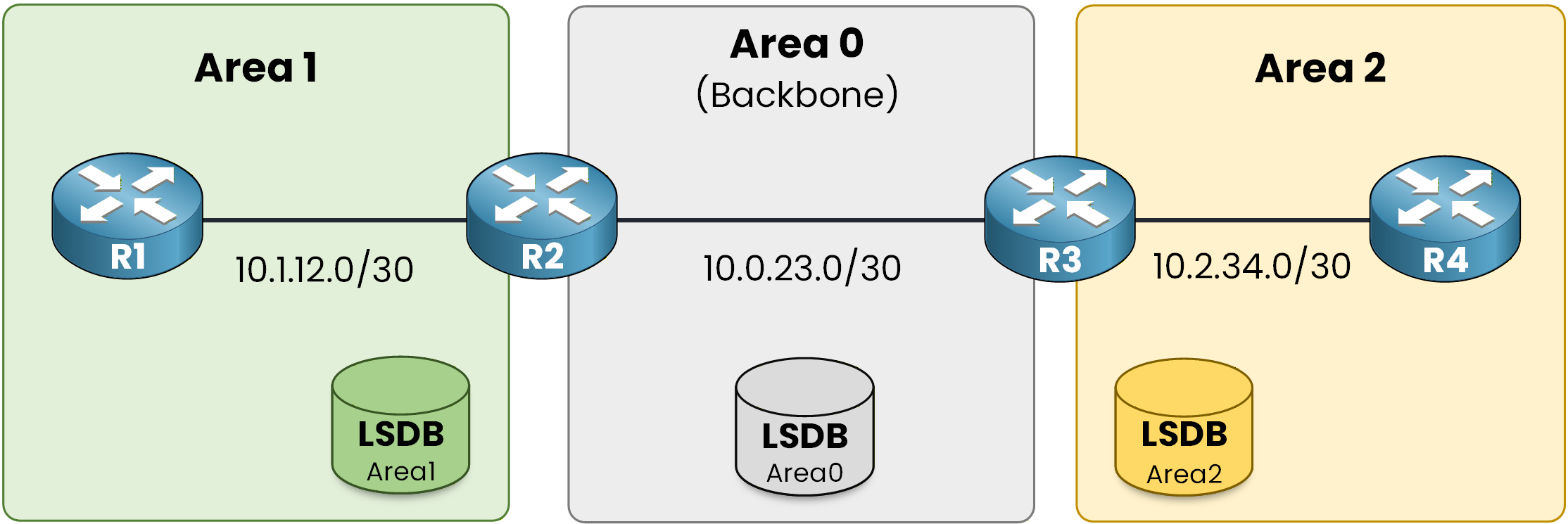
Figure 1 - OSPF Multi Area Topology
Area 0 connects everything together, while Areas 1 and 2 contain their own internal networks.
At first glance, the design looks simple.
But now think about what is really happening behind the scenes.How Do Routers Exchange Information in This Topology?
Let's think about what is really happening in this multi-area design.
How do routers in Area 1 learn about the network inside Area 2?
How do routers in Area 2 learn about external routes redistributed into OSPF?
And how does every router build an accurate and consistent view of the entire OSPF domain?
So how does OSPF handle this efficiently?
The answer is straightforward: it uses different types of LSAs.The Five LSA Types You Must Know
For the CCNP ENCOR, you must clearly understand these five LSA types:
Type 1 – Router LSA
Type 2 – Network LSA
Type 3 – Summary LSA
Type 4 – ASBR Summary LSA
Type 5 – External LSA
Now, let's break them down one by one and see exactly how they work.
Answer the question below
Which LSA type is called the Summary LSA?
A Type 1 LSA is generated by every OSPF router.
It describes the router's own links, interfaces, and their states inside the area.Type 1 LSA Scope
Type 1 LSAs remain inside the area.
Type 1 → Intra-area scope
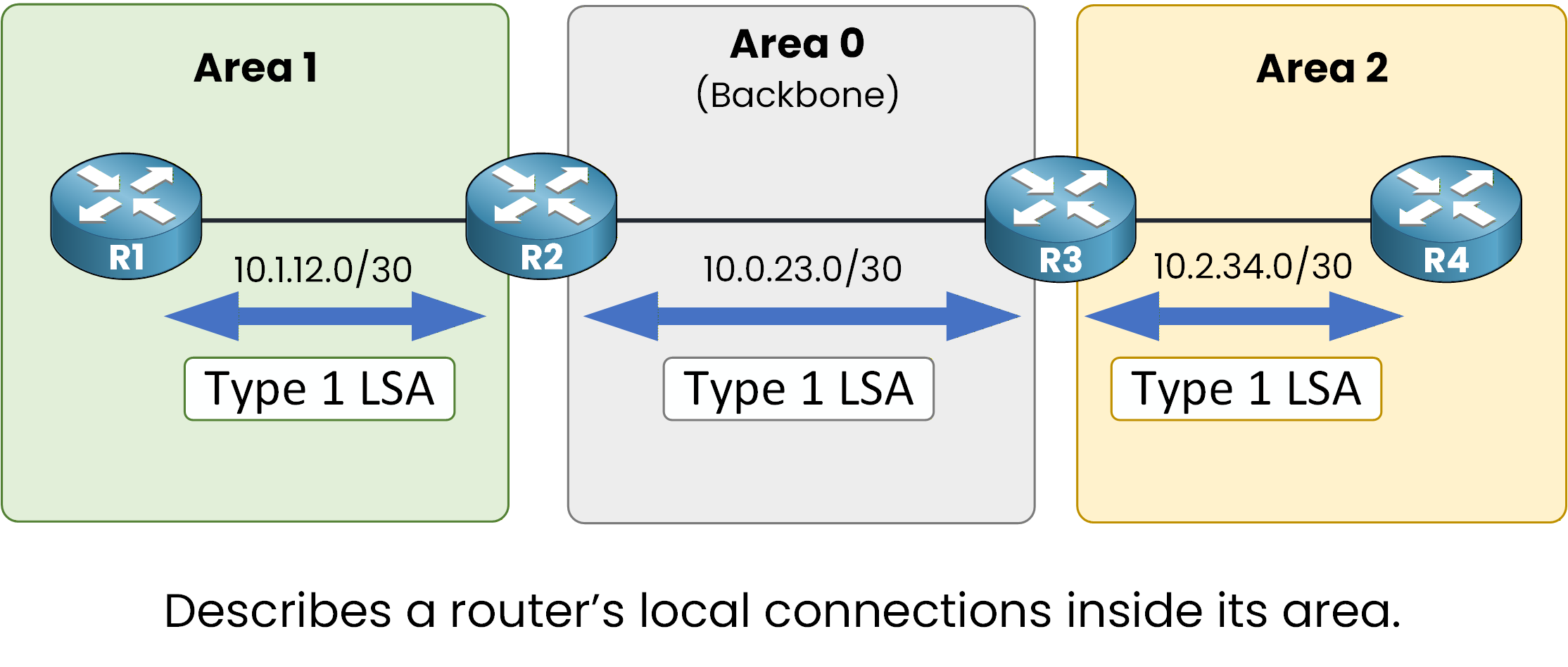
Figure 2 - Type 1 LSA
They are the foundation of the LSDB within an area.
Answer the question below
Who generates a Type 1 LSA?
Verifying a Type 1 LSA
We can verify a Type 1 LSA directly on a router using the following command:
R1# show ip ospf database router Router Link States (Area 1) Link State ID: 1.1.1.1 Advertising Router: 1.1.1.1 Link connected to: a Transit Network (Link ID) Designated Router address: 10.1.12.1 (Link Data) Router Interface address: 10.1.12.1Here, we can see that:
The Link State ID matches the router ID (1.1.1.1).
The Advertising Router is also 1.1.1.1.
The output describes one of R1's interfaces (10.1.12.1).
You do not need to understand every detail of the output for the CCNP ENCOR exam.
What matters is the concept:
Every router describes itself and its links inside its own area using a Type 1 LSA.
These LSAs are then used by all routers in the same area to build the topology and run the SPF algorithm.Answer the question below
A Type 1 LSA describes a router's own interfaces and what?
A Type 2 LSA is generated on a multi-access network segment.
It is created by the Designated Router (DR).Type 2 LSA Scope
Type 2 → Intra-area scope
Type 2 LSAs remain inside the area.
They describe the multi-access network and list all routers attached to that segment.
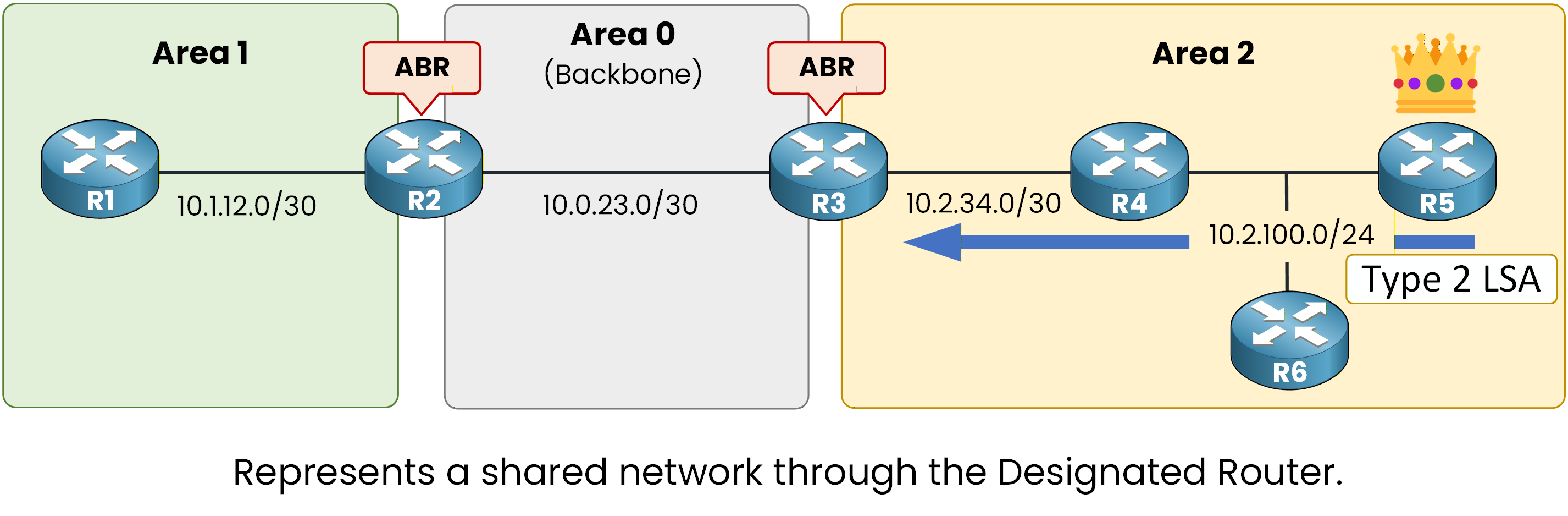
Figure 3 - Type 2 LSA
Type 2 LSAs exist:
Only in multi-access networks (Ethernet, for example)
Not on point-to-point links
Only one per segment (generated by the DR)
This reduces the number of adjacencies and simplifies the topology database.
Answer the question below
Which router generates a Type 2 LSA?
Verifying a Type 2 LSA
We can verify a Type 2 LSA using the following command:
R5# show ip ospf database network Net Link States (Area 2) Link State ID: 10.2.100.2 (address of Designated Router) Advertising Router: 55.55.55.55 Attached Router: 55.55.55.55 Attached Router: 4.4.4.4 Attached Router: 6.6.6.6Here, we can see:
The Link State ID corresponds to the IP address of the DR.
The Advertising Router is 55.55.55.55 (R5's router ID).
The Attached Router entries show all routers connected to that shared segment.
Conceptually, a Type 2 LSA represents the shared network itself and identifies which routers are connected to it.
Together, Type 1 and Type 2 LSAs build the complete intra-area topology used by the SPF algorithm.Answer the question below
A Type 2 LSA represents what type of network segment — point-to-point or multi-access?
A Type 3 LSA is generated by an Area Border Router (ABR).
It is used to advertise networks from one area into another area.Type 3 LSA Scope
Type 3 → Inter-area scope
Type 3 LSAs advertise networks, not routers.
They allow routers in different areas to learn about networks that exist outside their local area.

Figure 4 - Type 3 LSA
Without Type 3 LSAs, each area would only know its internal topology.
Answer the question below
Which router generates a Type 3 LSA?
Verifying a Type 3 LSA
We can verify a Type 3 LSA using the following command:
R1# show ip ospf database summary Summary Net Link States (Area 1) Link State ID: 10.0.23.0 (summary Network Number) Advertising Router: 2.2.2.2Here, we can see:
The Link State ID represents the advertised network (10.0.23.0).
The Advertising Router is 2.2.2.2, which is the ABR (R2).
This means R1, located in Area 1, learned about the 10.0.23.0 network from another area through the ABR.
Routing Table Verification
Now let's look at the routing table:
R1# show ip route ospf Codes: L - local, C - connected, S - static, R - RIP, M - mobile, B - BGP D - EIGRP, EX - EIGRP external, O - OSPF, IA - OSPF inter area N1 - OSPF NSSA external type 1, N2 - OSPF NSSA external type 2 E1 - OSPF external type 1, E2 - OSPF external type 2 i - IS-IS, su - IS-IS summary, L1 - IS-IS level-1, L2 - IS-IS level-2 ia - IS-IS inter area, * - candidate default, U - per-user static route o - ODR, P - periodic downloaded static route, H - NHRP, l - LISP a - application route + - replicated route, % - next hop override, p - overrides from PfR Gateway of last resort is not set 10.0.0.0/8 is variably subnetted, 5 subnets, 3 masks O IA 10.0.23.0/30 [110/2] via 10.1.12.2, 01:28:14, GigabitEthernet0/0 O IA 10.2.34.0/30 [110/3] via 10.1.12.2, 01:27:04, GigabitEthernet0/0 O IA 10.2.100.0/24 [110/4] via 10.1.12.2, 00:17:39, GigabitEthernet0/0Notice the code:
O IA → OSPF Inter-Area
These routes were installed because of Type 3 LSAs.
Conceptually:Type 1 and Type 2 build the topology inside an area.
Type 3 allows routers to learn networks from other areas.
This is how OSPF creates a multi-area view of the network while keeping each LSDB separated.
Answer the question below
Which routing table code indicates routes learned via Type 3 LSAs?
We now move to Type 5 LSAs because you must understand Type 5 before understanding Type 4.
A Type 5 LSA is generated by an ASBR (Autonomous System Boundary Router).
An ASBR injects routes from an external autonomous system into the OSPF domain.Type 5 LSA Scope
Type 5 → Domain-wide scope
Type 5 LSAs describe external networks, not routers.
They are flooded throughout the entire OSPF domain (except stub areas, you do not need to understand stub areas in detail at this stage).

Figure 5 - Type 5 LSA
When an ASBR redistributes an external route, it generates a Type 5 LSA.
This LSA is then flooded across the OSPF domain.Answer the question below
Which router generates a Type 5 LSA?
Verifying a Type 5 LSA
We can verify a Type 5 LSA using the following command:
R3# show ip ospf database external AS External Link States Link State ID: 172.16.1.0 Advertising Router: 1.1.1.1Here we can see:
The Link State ID represents the external network (172.16.1.0).
The Advertising Router is 1.1.1.1, which is the ASBR.
This confirms that the external network has been injected into OSPF.
Routing Table Verification
Now let's look at the routing table:
R3# show ip route ospf Codes: L - local, C - connected, S - static, R - RIP, M - mobile, B - BGP D - EIGRP, EX - EIGRP external, O - OSPF, IA - OSPF inter area N1 - OSPF NSSA external type 1, N2 - OSPF NSSA external type 2 E1 - OSPF external type 1, E2 - OSPF external type 2 i - IS-IS, su - IS-IS summary, L1 - IS-IS level-1, L2 - IS-IS level-2 ia - IS-IS inter area, * - candidate default, U - per-user static route o - ODR, P - periodic downloaded static route, H - NHRP, l - LISP a - application route + - replicated route, % - next hop override, p - overrides from PfR Gateway of last resort is not set 10.0.0.0/8 is variably subnetted, 4 subnets, 2 masks O IA 10.1.12.0/30 [110/2] via 10.0.23.1, 00:12:44, GigabitEthernet0/0 O 10.0.23.0/30 [110/1] is directly connected, GigabitEthernet0/0 O IA 10.2.34.0/30 [110/2] via 10.2.34.2, 00:12:41, GigabitEthernet0/1 O E2 172.16.1.0/24 [110/20] via 10.0.23.1, 00:05:18, GigabitEthernet0/0Notice the code:
O → OSPF
E2 → External Type 2 route
By default, routes redistributed by an ASBR are installed as E2 routes.
(Metric behavior between E1 and E2 will be covered in the OSPF Best Path Calculation section.)
Conceptually:Type 5 LSAs introduce external networks into the OSPF domain.
They allow all routers to learn about networks outside OSPF.
Next, we will see how routers know how to reach the ASBR itself, this is where Type 4 LSAs come into play.
Answer the question below
By default, redistributed routes are installed as which route type?
We now move to Type 4 LSAs because after understanding Type 5, you must understand how routers reach the ASBR.
A Type 4 LSA is generated by an ABR (Area Border Router).
An ABR advertises the location of the ASBR into other areas.Type 4 LSA Scope
Type 4 → Inter-area scope
Type 4 LSAs describe the ASBR, not networks.
They are flooded into other areas so routers know how to reach the ASBR.

Figure 6 - Type 4 LSA
When an ASBR generates a Type 5 LSA to advertise an external network, routers must also know how to reach that ASBR.
The ABR generates a Type 4 LSA to provide the path to the ASBR.Answer the question below
What does a Type 4 LSA describe?
Verifying a Type 4 LSA
We can verify a Type 4 LSA using:
R3# show ip ospf database asbr-summary OSPF Router with ID (3.3.3.3) (Process ID 1) ASBR Summary Link States (Area 0) Link State ID: 1.1.1.1 (ASBR Router ID) Advertising Router: 2.2.2.2 LS Type: ASBR Summary Links Network Mask: 255.255.255.255 Metric: 1Key points:
The Link State ID is the ASBR Router ID (1.1.1.1).
The Advertising Router is the ABR (2.2.2.2).
This means:
The ABR is informing Area 0 how to reach the ASBR.Routing Table Verification
When we check R4 routing table:
R4# show ip route ospf Gateway of last resort is not set O IA 10.1.12.0/30 [110/3] via 10.2.34.1, 00:15:22, GigabitEthernet0/0 O IA 10.0.23.0/30 [110/2] via 10.2.34.1, 00:15:22, GigabitEthernet0/0 O E2 172.16.1.0/24 [110/20] via 10.2.34.1, 00:08:11, GigabitEthernet0/0We can see:
The external route 172.16.1.0/24 is installed as O E2.
The next-hop points toward 10.2.34.1.
So:
Type 5 → tells us what the external network is.
Type 4 → tells us how to reach the ASBR that originated it.
Answer the question below
In a Type 4 LSA, what is the Link State ID?