OSPF filtering allows you to control which inter-area routes are advertised between different OSPF areas.
Why would you need this?
In many enterprise networks, security or design policies require that certain networks must not be reachable from specific areas. For example, a subnet used for internal services in Area 1 may not be allowed to appear in Area 0.
Assume that the network 10.1.12.8/30 must not be learned in Area 0.
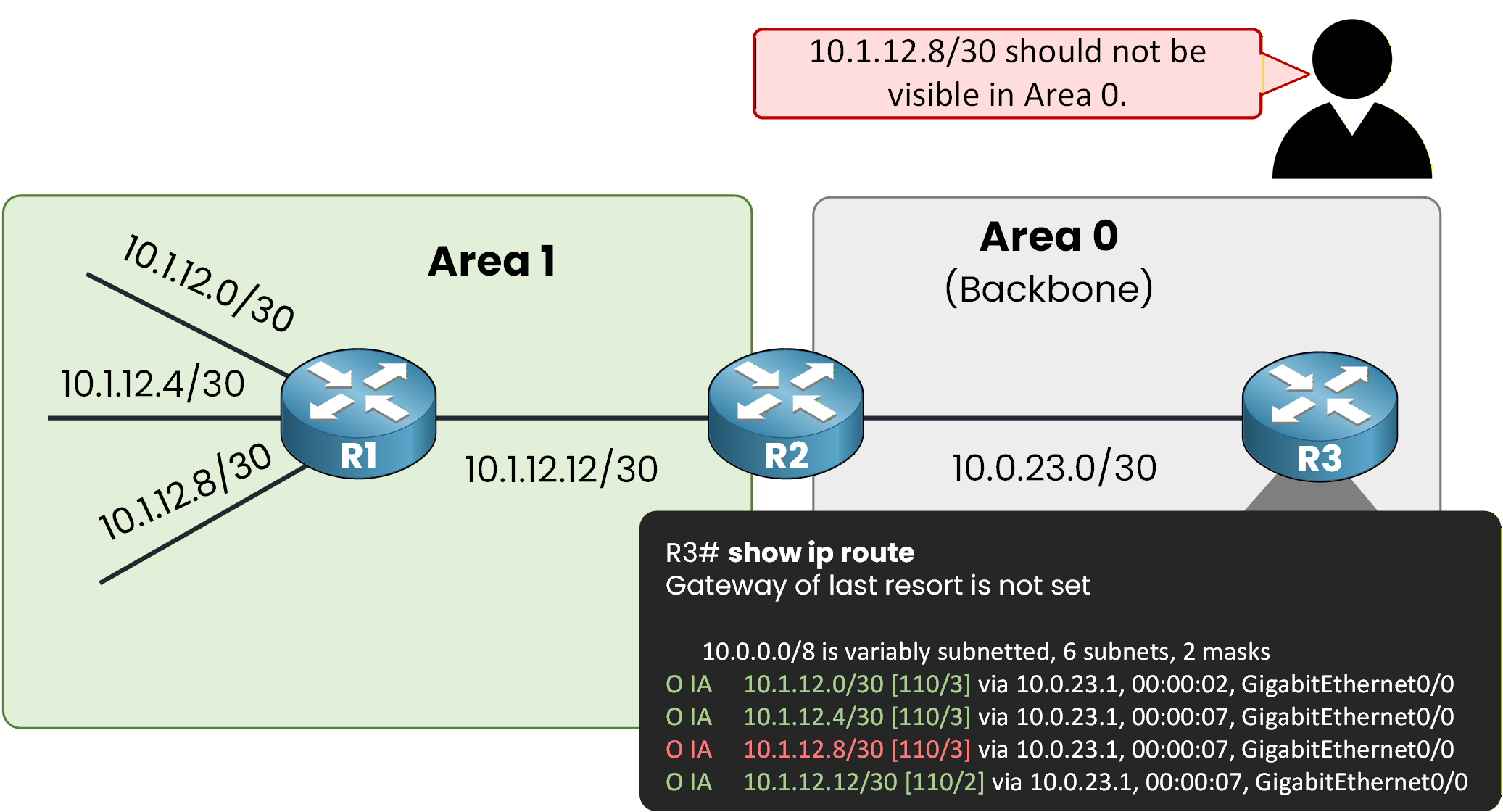
Figure 1 – All routes advertised
Since inter-area routes are advertised by the Area Border Router (ABR), filtering is performed on the ABR. In this topology, R2 acts as the ABR and therefore controls which Type 3 LSAs are generated and flooded between Area 1 and Area 0.
The ABR as the Decision Point
The ABR determines whether a Type 3 LSA is advertised into another area. If the LSA is suppressed, routers in the destination area will never receive it and therefore will not install the corresponding route in their routing tables.
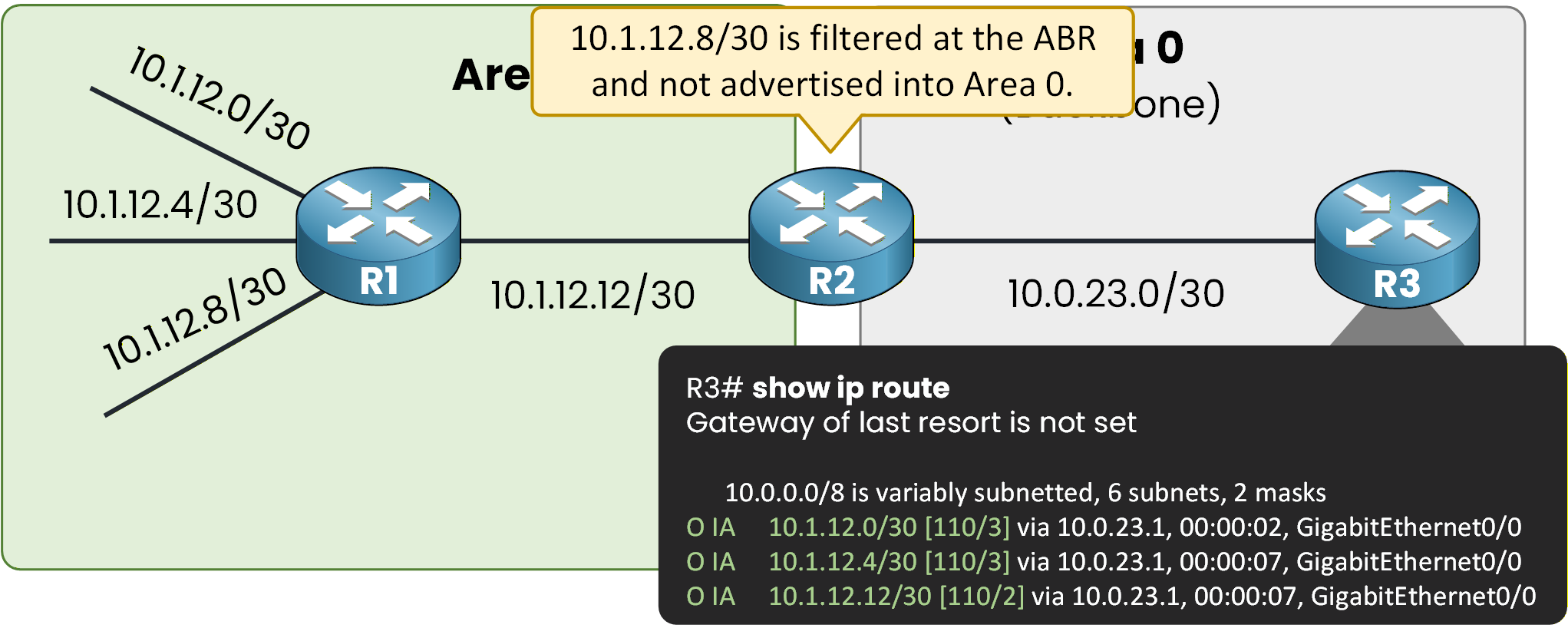
Figure 2 - Route blocked at ABR
This is the fundamental principle of OSPF inter-area filtering: control the generation and flooding of Type 3 LSAs at the ABR.
But how does OSPF filtering actually work?
It may seem simple: you block a route and it disappears.
To understand what really happens, we need to look at OSPF's internal behavior.Answer the question below
On which router is OSPF inter-area filtering performed?
To understand OSPF filtering, you must first remember that an ABR maintains a separate LSDB for each connected area.
In this topology, R2 has one LSDB for Area 1 and another LSDB for Area 0.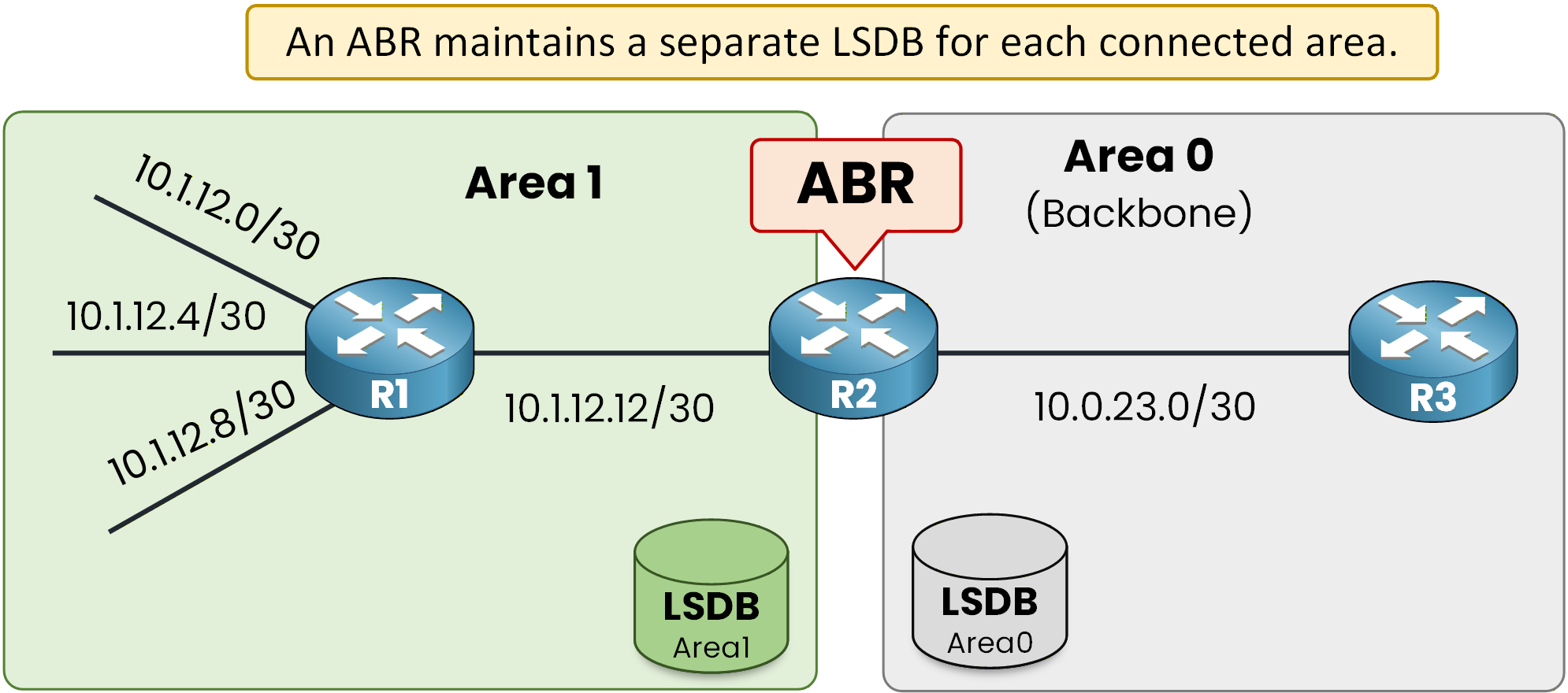
Figure 3 – Separate LSDB per area
The ABR Processing Sequence
When a Type 1 LSA is received from a specific area, the ABR installs it into the LSDB of that area.
In our example, Type 1 LSAs from Area 1 are stored in the Area 1 LSDB.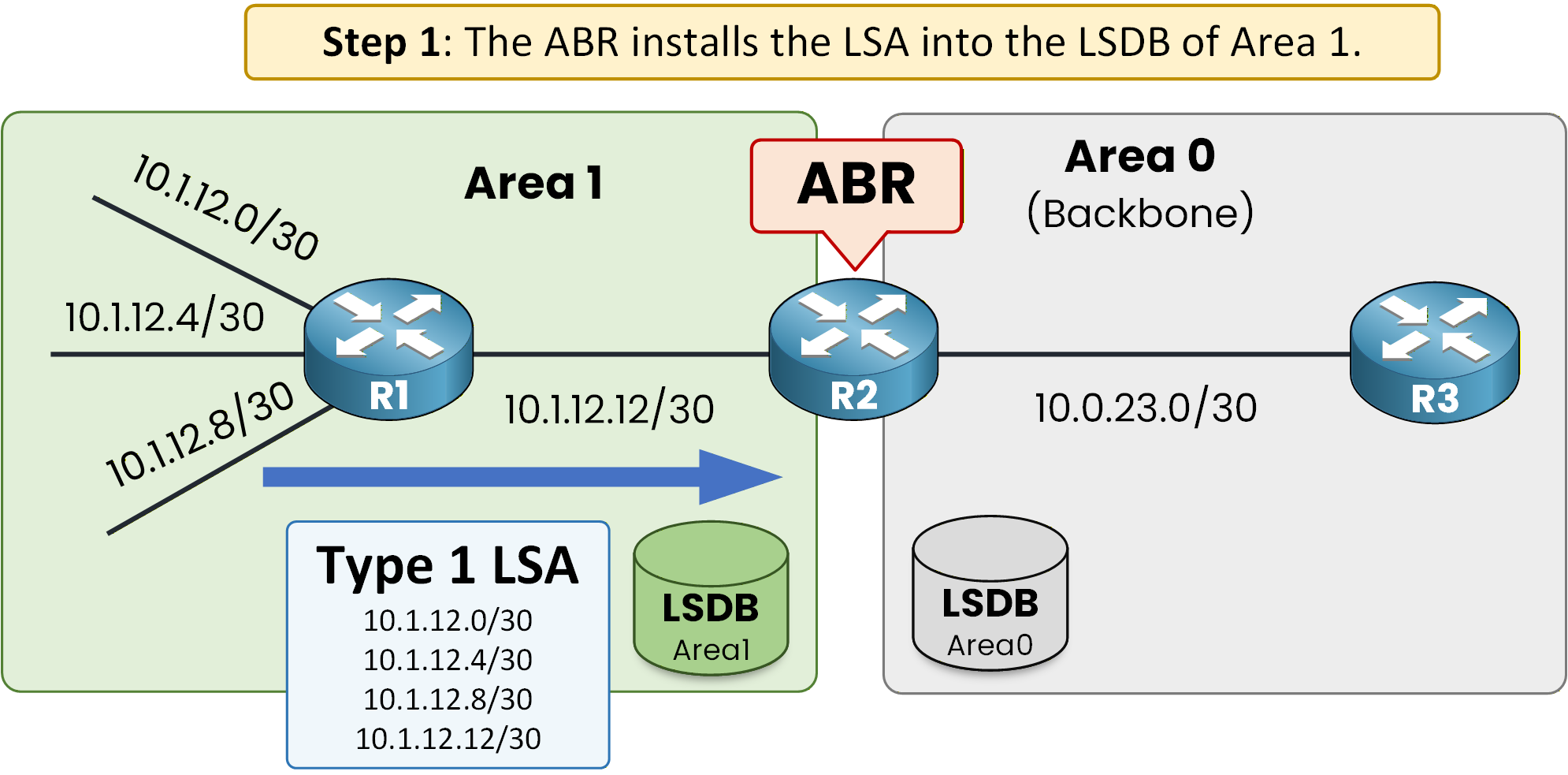
Figure 4 - Type 1 LSA installation
The ABR then runs the SPF algorithm for Area 1 and installs the resulting routes into its routing table (RIB).
After the SPF calculation, the ABR generates a Type 3 LSA to represent the Area 1 network inside Area 0.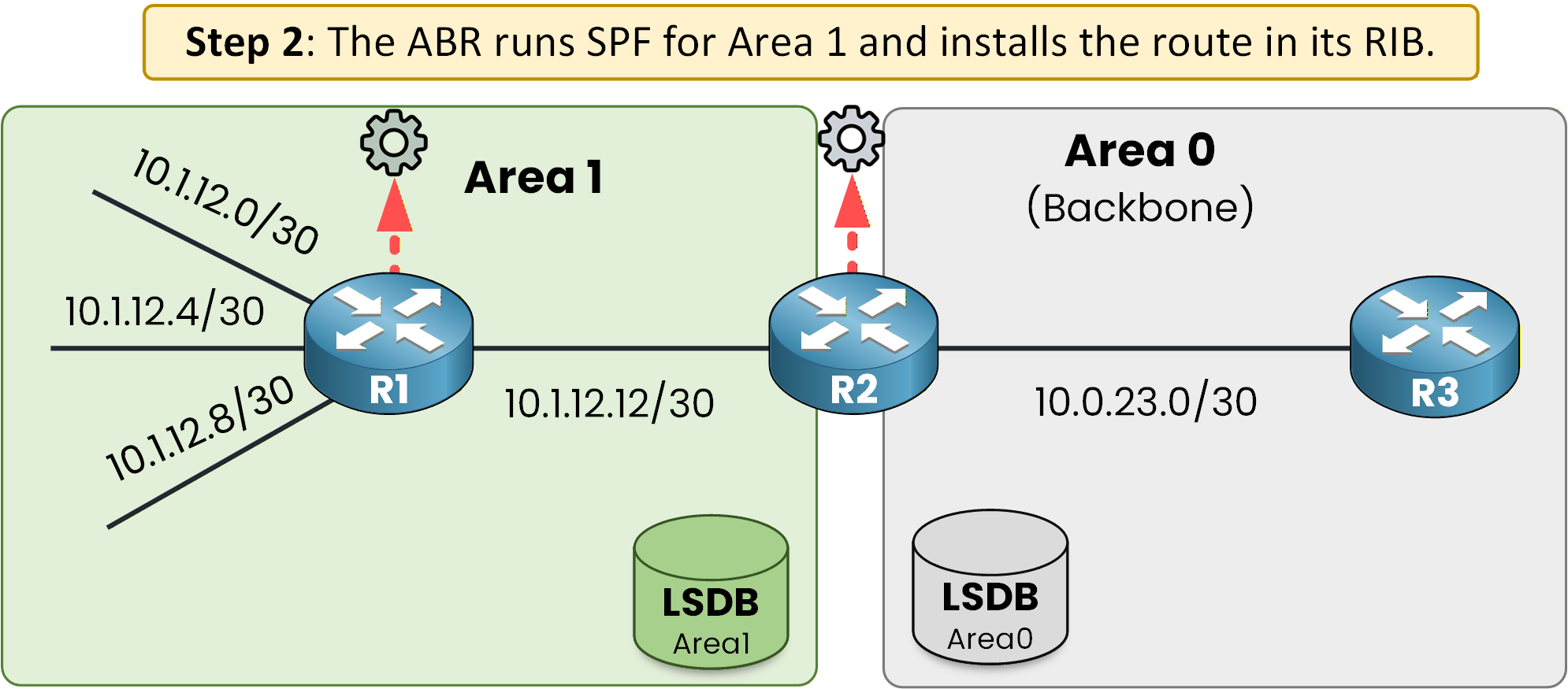
Figure 5 – SPF calculation executed
Before flooding this Type 3 LSA into Area 0, the ABR evaluates it against its inter-area filtering policy.
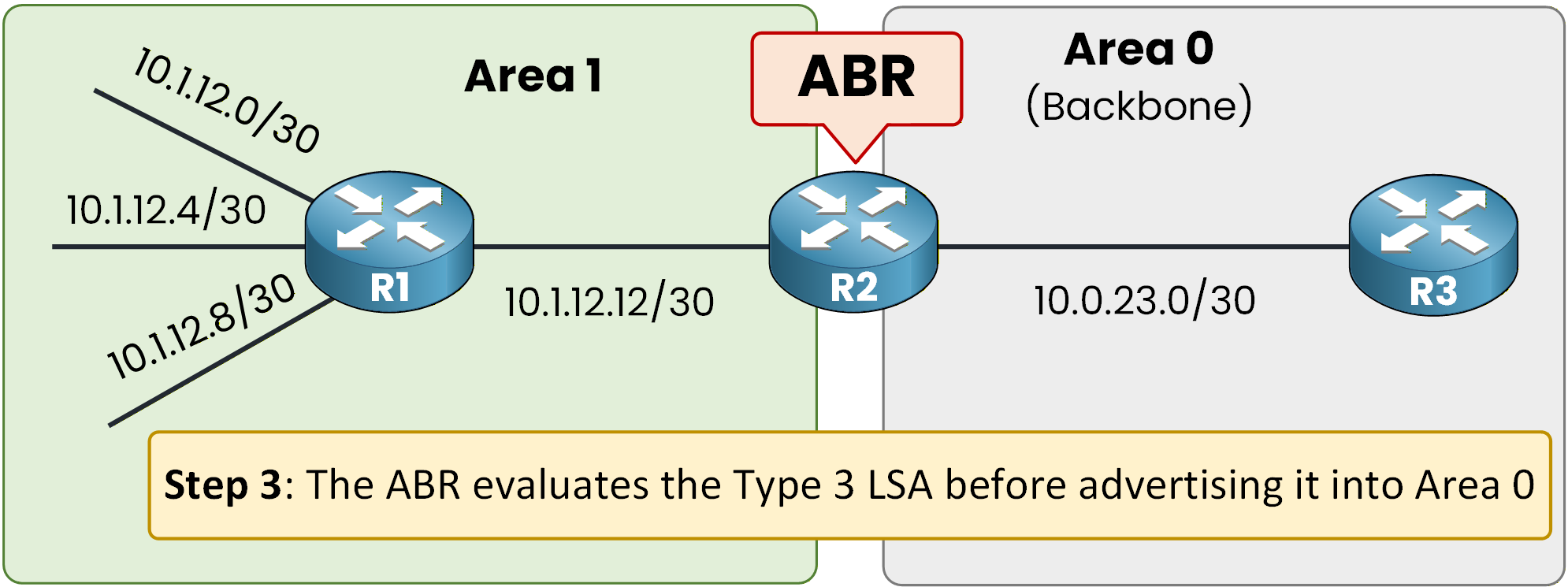
Figure 6 - Policy evaluation process
To better understand how this works in practice, let's move to the CLI and configure it step by step.
Answer the question below
How many LSDBs does an ABR maintain in this topology?
There are three primary methods to perform OSPF inter-area filtering on an ABR:
Area Range with not-advertise
Inbound inter-area filtering
Outbound inter-area filtering
All inter-area filtering mechanisms operate on Type 3 LSAs generated by the ABR.
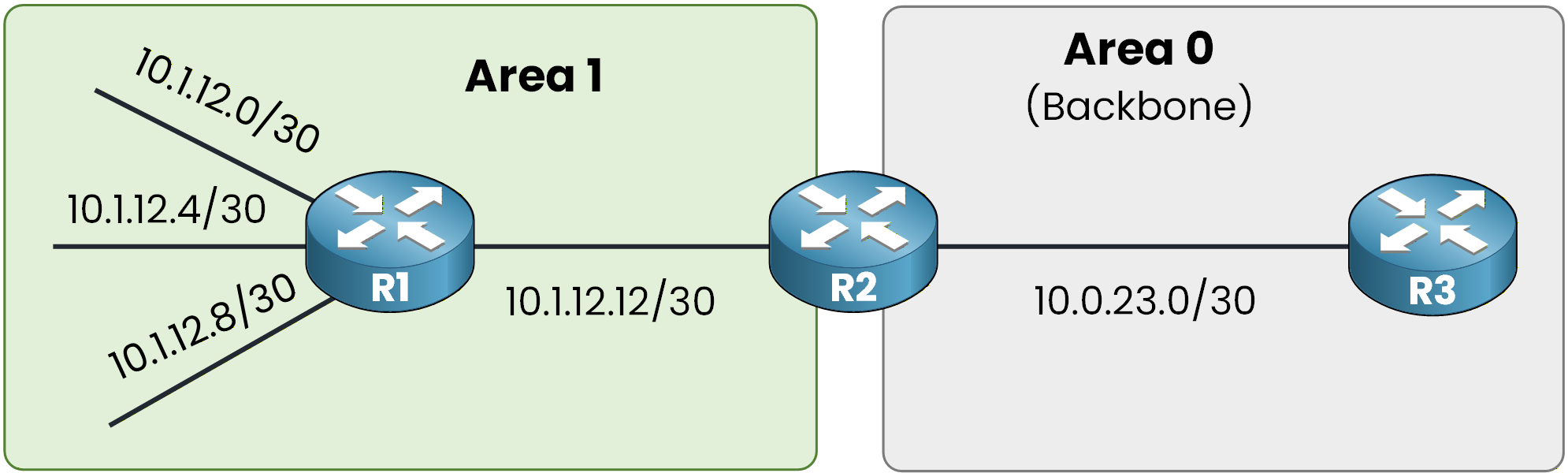
Figure 7 - OSPF Filtering Topology
OSPF inter-area filtering affects only Type 3 LSAs.
It does not impact intra-area LSAs (Type 1 and Type 2) or external LSAs (Type 5).Filtering with Area Range (not-advertise)
First, verify the current routing table on R3.
R3 learns four inter-area routes from Area 1:10.1.12.0/30
10.1.12.4/30
10.1.12.8/30
10.1.12.12/30
R3# show ip route ospf
Codes: L - local, C - connected, S - static, R - RIP, M - mobile, B - BGP
       D - EIGRP, EX - EIGRP external, O - OSPF, IA - OSPF inter area
       N1 - OSPF NSSA external type 1, N2 - OSPF NSSA external type 2
       E1 - OSPF external type 1, E2 - OSPF external type 2
       i - IS-IS, su - IS-IS summary, L1 - IS-IS level-1, L2 - IS-IS level-2
       ia - IS-IS inter area, * - candidate default, U - per-user static route
       o - ODR, P - periodic downloaded static route, H - NHRP, l - LISP
       a - application route
       + - replicated route, % - next hop override, p - overrides from PfR

Gateway of last resort is not set

      10.0.0.0/8 is variably subnetted, 6 subnets, 2 masks
O IA     10.1.12.0/30 [110/3] via 10.0.23.1, 00:00:02, GigabitEthernet0/0
O IA     10.1.12.4/30 [110/3] via 10.0.23.1, 00:00:07, GigabitEthernet0/0
O IA     10.1.12.8/30 [110/3] via 10.0.23.1, 00:00:07, GigabitEthernet0/0
O IA     10.1.12.12/30 [110/2] via 10.0.23.1, 00:00:07, GigabitEthernet0/0
Now we will configure an OSPF area range with the
not-advertiseoption to suppress a specific prefix.When the configured range exactly matches a single subnet, it behaves like a filter.
Instead of summarizing multiple routes, it prevents that specific prefix from being advertised as a Type 3 LSA to other areas.Configuring Area Range with not-advertise
On R2 (the ABR), configure:
R2# conf t
Enter configuration commands, one per line.  End with CNTL/Z.
R2(config)# router ospf 1
R2(config-router)# area 1 range 10.1.12.8 255.255.255.252 not-advertise
R2(config-router)# end
With this configuration, R2 no longer generates a Type 3 LSA for 10.1.12.8/30 toward Area 0.
If you verify on R3:R3# show ip route ospf Codes: L - local, C - connected, S - static, R - RIP, M - mobile, B - BGP D - EIGRP, EX - EIGRP external, O - OSPF, IA - OSPF inter area N1 - OSPF NSSA external type 1, N2 - OSPF NSSA external type 2 E1 - OSPF external type 1, E2 - OSPF external type 2 i - IS-IS, su - IS-IS summary, L1 - IS-IS level-1, L2 - IS-IS level-2 ia - IS-IS inter area, * - candidate default, U - per-user static route o - ODR, P - periodic downloaded static route, H - NHRP, l - LISP a - application route + - replicated route, % - next hop override, p - overrides from PfR Gateway of last resort is not set 10.0.0.0/8 is variably subnetted, 5 subnets, 2 masks O IA 10.1.12.0/30 [110/3] via 10.0.23.1, 00:03:28, GigabitEthernet0/0 O IA 10.1.12.4/30 [110/3] via 10.0.23.1, 00:03:33, GigabitEthernet0/0 O IA 10.1.12.12/30 [110/2] via 10.0.23.1, 00:03:33, GigabitEthernet0/0The network 10.1.12.8/30 is no longer present.
This occurs because the ABR does not generate the corresponding Type 3 LSA. Since the LSA is not flooded into Area 0, routers in Area 0 never run SPF for that prefix and therefore do not install the route.
Removing the Area Range Configuration
Before demonstrating the next filtering method, remove the previous configuration:
R2# conf t
Enter configuration commands, one per line.  End with CNTL/Z.
R2(config)# router ospf 1
R2(config-router)# no area 1 range 10.1.12.8 255.255.255.252 not-advertise
R2(config-router)# exit
After removing this command, the ABR resumes normal behavior and generates the Type 3 LSA for 10.1.12.8/30 again. Routers in Area 0 will learn and reinstall the route.
Answer the question below
Which command keyword is used in the first filtering method to suppress a specific prefix?
Inbound Inter-Area Filtering
Inbound filtering allows the ABR to control which Type 3 LSAs are flooded into a specific area.
In this example, we want to prevent the network 10.1.12.8/30 from being advertised into Area 0.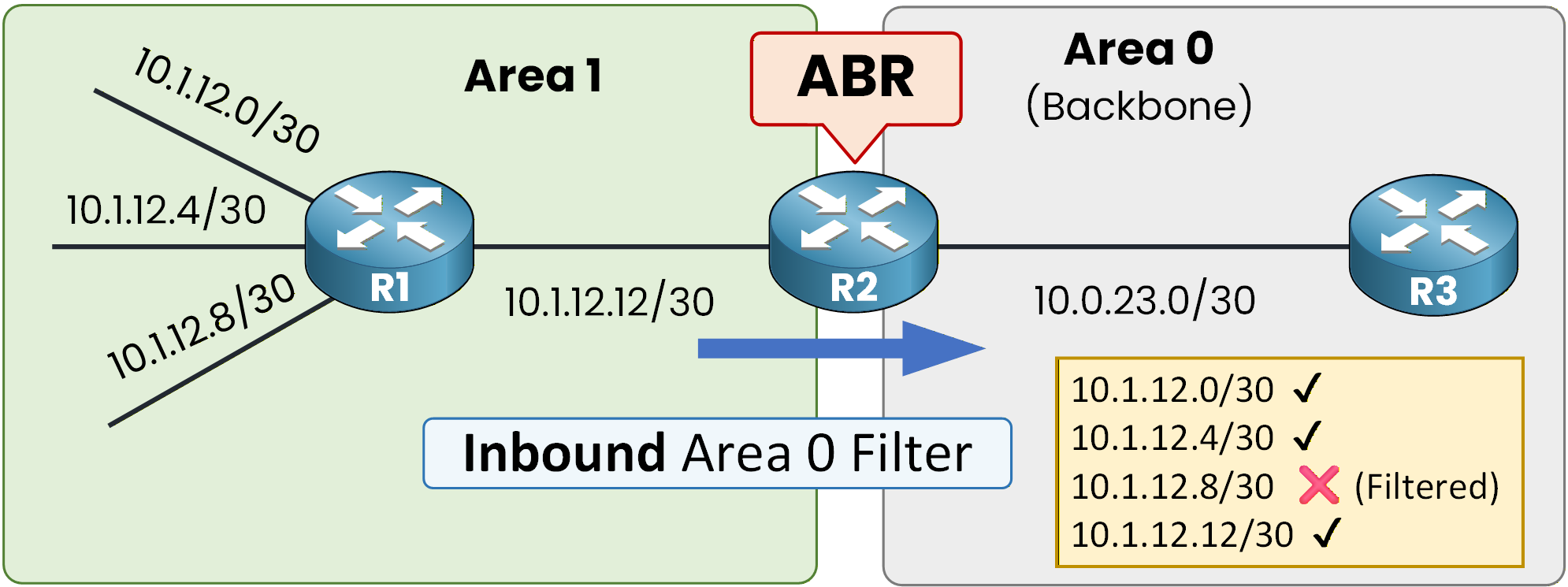
Figure 8 - Inbound Area 0 filter IN
Step 1 – Create a Prefix List
First, define a prefix list on R2 to block the specific subnet:
R2(config)# ip prefix-list BLOCK seq 5 deny 10.1.12.8/30
R2(config)# ip prefix-list BLOCK seq 10 permit 0.0.0.0/0 le 32
Sequence numbers work similarly to ACL entries.
The first statement denies 10.1.12.8/30.
The second statement permits all other IPv4 prefixes.The entry
0.0.0.0/0 le 32matches all IPv4 routes up to /32, ensuring that only the specified subnet is filtered.Step 2 – Apply the Filter to Area 0
Now apply the prefix list under the OSPF process using the
inkeyword:R2(config)# router ospf 1 R2(config-router)# area 0 filter-list prefix BLOCK in R2(config-router)# endThe
inkeyword means the ABR filters Type 3 LSAs before flooding them into Area 0.
As a result, the Type 3 LSA for 10.1.12.8/30 is not flooded into Area 0.Verification on R3
R3# show ip route ospf
Codes: L - local, C - connected, S - static, R - RIP, M - mobile, B - BGP
       D - EIGRP, EX - EIGRP external, O - OSPF, IA - OSPF inter area
       N1 - OSPF NSSA external type 1, N2 - OSPF NSSA external type 2
       E1 - OSPF external type 1, E2 - OSPF external type 2
       i - IS-IS, su - IS-IS summary, L1 - IS-IS level-1, L2 - IS-IS level-2
       ia - IS-IS inter area, * - candidate default, U - per-user static route
       o - ODR, P - periodic downloaded static route, H - NHRP, l - LISP
       a - application route
       + - replicated route, % - next hop override, p - overrides from PfR

Gateway of last resort is not set

      10.0.0.0/8 is variably subnetted, 5 subnets, 2 masks
O IA     10.1.12.0/30 [110/3] via 10.0.23.1, 00:09:37, GigabitEthernet0/0
O IA     10.1.12.4/30 [110/3] via 10.0.23.1, 00:09:42, GigabitEthernet0/0
O IA     10.1.12.12/30 [110/2] via 10.0.23.1, 00:09:42, GigabitEthernet0/0
The network 10.1.12.8/30 is no longer present.
Since the Type 3 LSA is not flooded into Area 0, routers in that area never run SPF for that prefix and therefore do not install the route in their routing tables.
Answer the question below
Which keyword is used in the OSPF command to filter routes before they are flooded into Area 0?
Outbound Inter-Area Filtering
The last method is outbound inter-area filtering.
Outbound filtering allows the ABR to control which Type 3 LSAs are generated from a specific source area toward other areas. In this example, we want to prevent the network 10.1.12.8/30 from being advertised out of Area 1 toward Area 0.
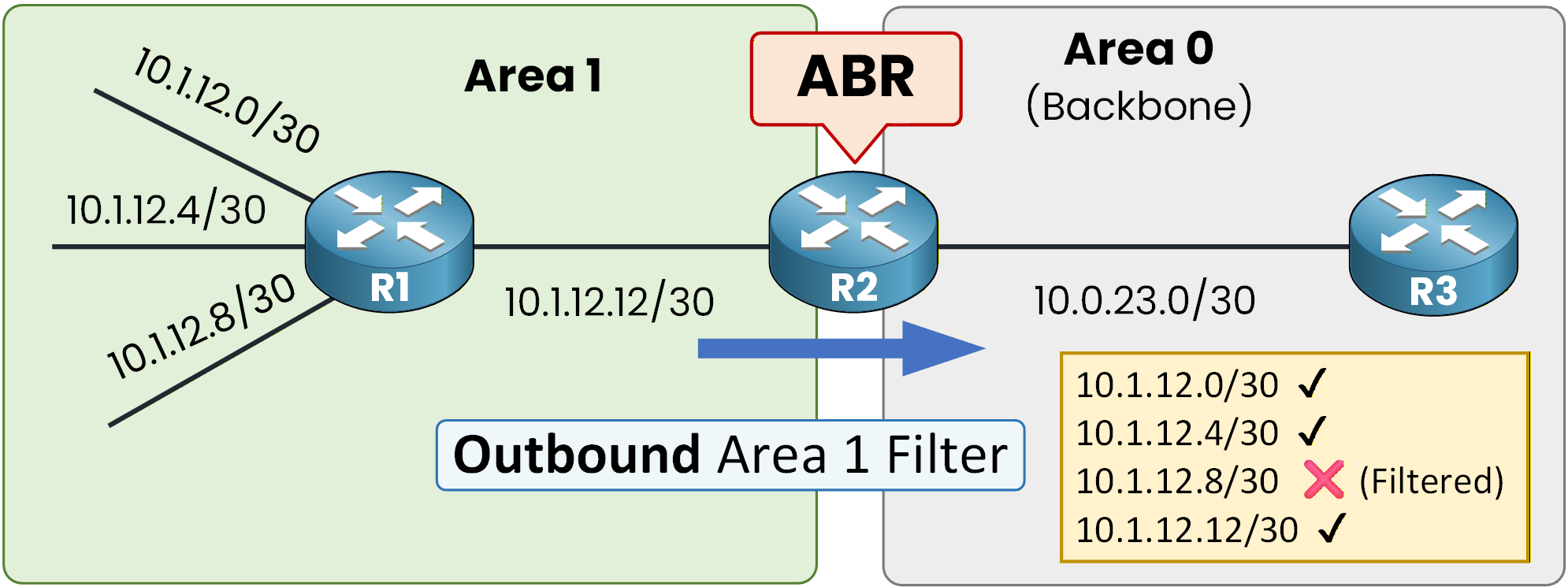
Figure 9 - Outbound Area 1 filter OUT
First, remove the previous inbound filter:
R2# conf t
Enter configuration commands, one per line.  End with CNTL/Z.
R2(config)# router ospf 1
R2(config-router)# no area 0 filter-list prefix BLOCK in
Then apply the outbound filter:
R2(config-router)# area 1 filter-list prefix BLOCK outWith the
outkeyword, the ABR filters Type 3 LSAs when they leave Area 1 toward other areas.
As a result, the corresponding Type 3 LSA for 10.1.12.8/30 is not advertised into Area 0.If we verify on R3:
R3# show ip route ospf
Codes: L - local, C - connected, S - static, R - RIP, M - mobile, B - BGP
       D - EIGRP, EX - EIGRP external, O - OSPF, IA - OSPF inter area
       N1 - OSPF NSSA external type 1, N2 - OSPF NSSA external type 2
       E1 - OSPF external type 1, E2 - OSPF external type 2
       i - IS-IS, su - IS-IS summary, L1 - IS-IS level-1, L2 - IS-IS level-2
       ia - IS-IS inter area, * - candidate default, U - per-user static route
       o - ODR, P - periodic downloaded static route, H - NHRP, l - LISP
       a - application route
       + - replicated route, % - next hop override, p - overrides from PfR

Gateway of last resort is not set

      10.0.0.0/8 is variably subnetted, 5 subnets, 2 masks
O IA     10.1.12.0/30 [110/3] via 10.0.23.1, 00:14:26, GigabitEthernet0/0
O IA     10.1.12.4/30 [110/3] via 10.0.23.1, 00:14:31, GigabitEthernet0/0
O IA     10.1.12.12/30 [110/2] via 10.0.23.1, 00:14:31, GigabitEthernet0/0
The route 10.1.12.8/30 is no longer installed in Area 0.
The intra-area LSAs and routes still exist inside Area 1 and in the ABR's Area 1 LSDB.
Only the inter-area Type 3 LSA advertisement toward Area 0 is suppressed.Answer the question below
Which keyword is used to filter Type 3 LSAs as they leave Area 1 toward other areas?
Filtering Summary Methods
The following table summarizes the three inter-area OSPF filtering techniques:
Method
Where Applied
Technical Effect
area range not-advertise
On ABR
Prevents Type 3 LSA creation
area X filter-list in
On ABR
Filters Type 3 LSAs entering Area X
area X filter-list out
On ABR
Filters Type 3 LSAs leaving Area X
All three methods operate only on Type 3 LSAs generated by the ABR.
They do not affect:
Intra-area LSAs (Type 1 and Type 2)
External LSAs (Type 5)
The key difference lies in when the Type 3 LSA is controlled:
not-advertise stops LSA creation.
in filters LSAs before they enter a specific area.
out filters LSAs as they leave a specific area.
Answer the question below
Which filtering method prevents the ABR from creating the inter-area advertisement in the first place?