In a multi-area OSPF design, understanding how OSPF selects the best path is essential.
You may have learned that OSPF always chooses the route with the lowest cost.
That statement is incomplete.OSPF does not compare cost first.
It first evaluates the route type.
Look at the picture below: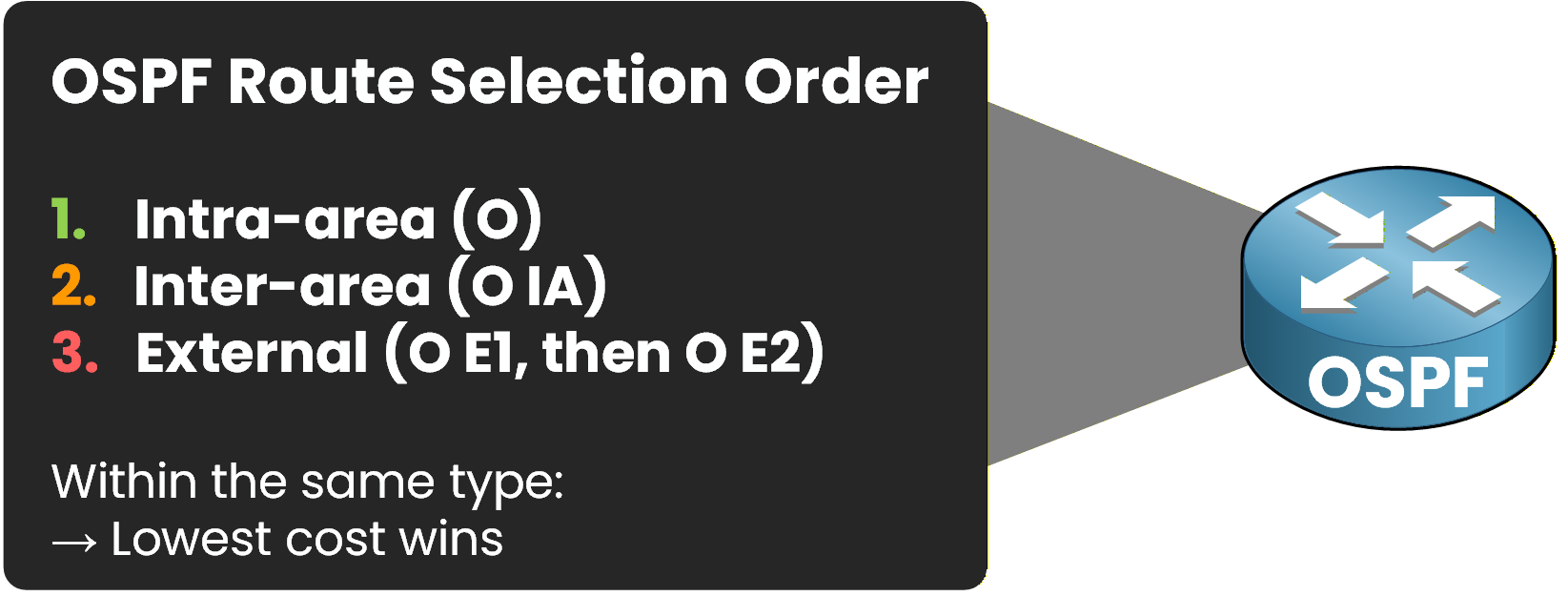
Figure 1 - OSPF Route Selection Order
OSPF Route Selection Order (Most Preferred to Least Preferred)
Intra-Area (O)
Inter-Area (O IA)
External Type 1 (O E1)
External Type 2 (O E2)
When OSPF learns two routes to the same destination, it does not compare the cost immediately.
OSPF first evaluates the route type and gives priority according to the order above.Cost comparison occurs only when the routes are of the same type.
In the following sections, you will analyze practical scenarios to understand how OSPF selects the best route.Answer the question below
Between external routes, which type is preferred?
In this first scenario, R1 needs to reach the network 10.0.23.0/24.
OSPF provides two possible paths:Route 1: R1 → R3
Route 2: R1 → R2 → R3
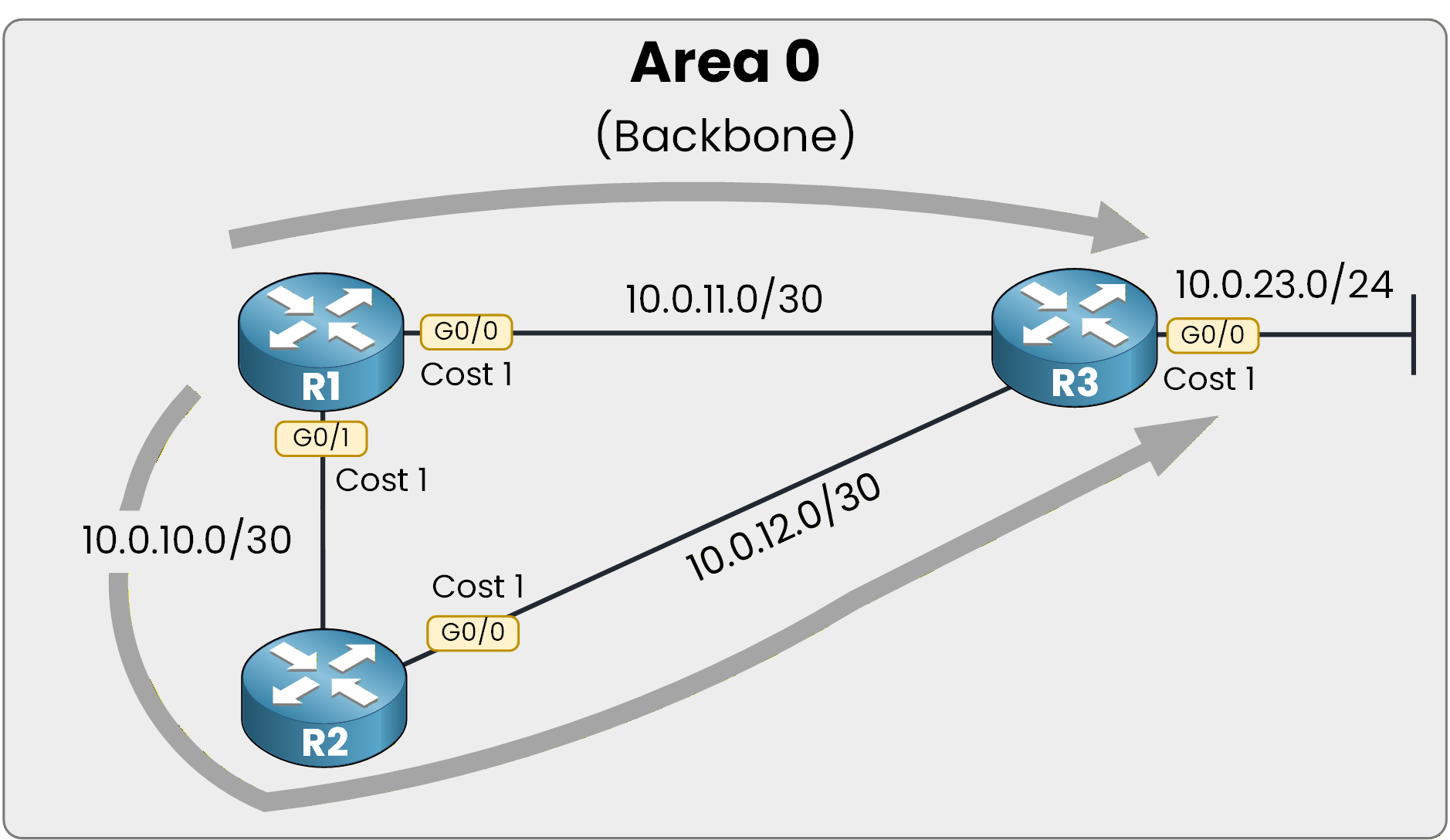
Figure 2 – OSPF Single Area Topology
Both routes are learned as Intra-Area (O) routes.
Route Selection Question
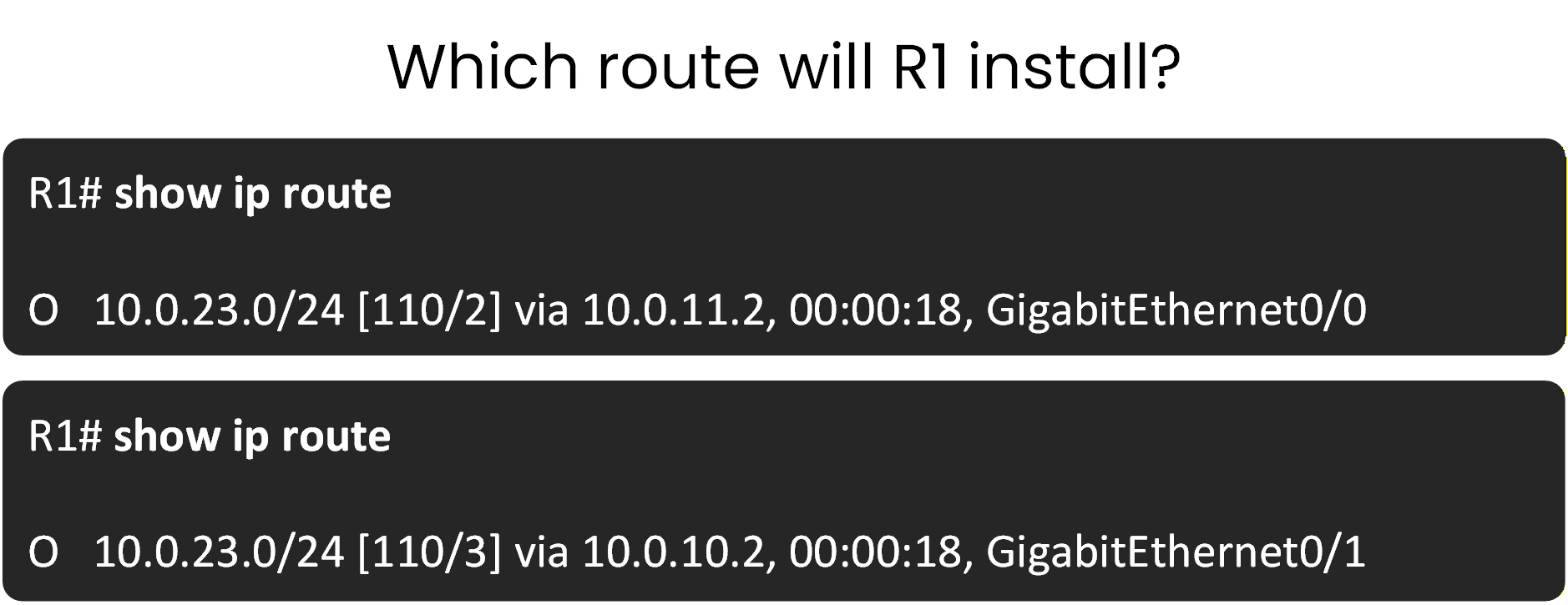
Figure 3 – Which route is installed?
Answer with:
“1” for Route 1
“2” for Route 2
Answer the question below
Which route will R1 install in its routing table?
The correct answer was Route 1.
In this scenario, R1 learns two paths to the same destination, and both routes are Intra-Area (O) routes.Since the route types are identical, OSPF cannot use route type to make the decision.
The selection is therefore based only on the total OSPF cost of the path.Verification on the Router
You can verify the installed route using the following command:
R1# show ip route 10.0.23.0
Routing entry for 10.0.23.0/24
  Known via "ospf 1", distance 110, metric 2, type intra area
  Last update from 10.0.11.2 on GigabitEthernet0/0, 00:00:12 ago
  Routing Descriptor Blocks:
  * 10.0.11.2, from 3.3.3.3, 00:00:12 ago, via GigabitEthernet0/0
      Route metric is 2, traffic share count is 1
Focus on the key elements:
type intra area
metric 2
This confirms that R1 selected the path with a total cost of 2.
Confirmation in the Routing Table
R1# show ip route ospf
Codes: L - local, C - connected, S - static, R - RIP, M - mobile, B - BGP
       D - EIGRP, EX - EIGRP external, O - OSPF, IA - OSPF inter area
       N1 - OSPF NSSA external type 1, N2 - OSPF NSSA external type 2
       E1 - OSPF external type 1, E2 - OSPF external type 2

Gateway of last resort is not set

     10.0.0.0/8 is variably subnetted, 5 subnets, 2 masks
O       10.0.12.0/30 [110/2] via 10.0.11.2, 00:00:18, GigabitEthernet0/0
O       10.0.23.0/24 [110/2] via 10.0.11.2, 00:00:18, GigabitEthernet0/0
The network 10.0.23.0/24 is installed with a metric of 2, via R3.
Therefore, the selected path is:R1 → R3
The second path had a total metric of 3, making it less optimal.
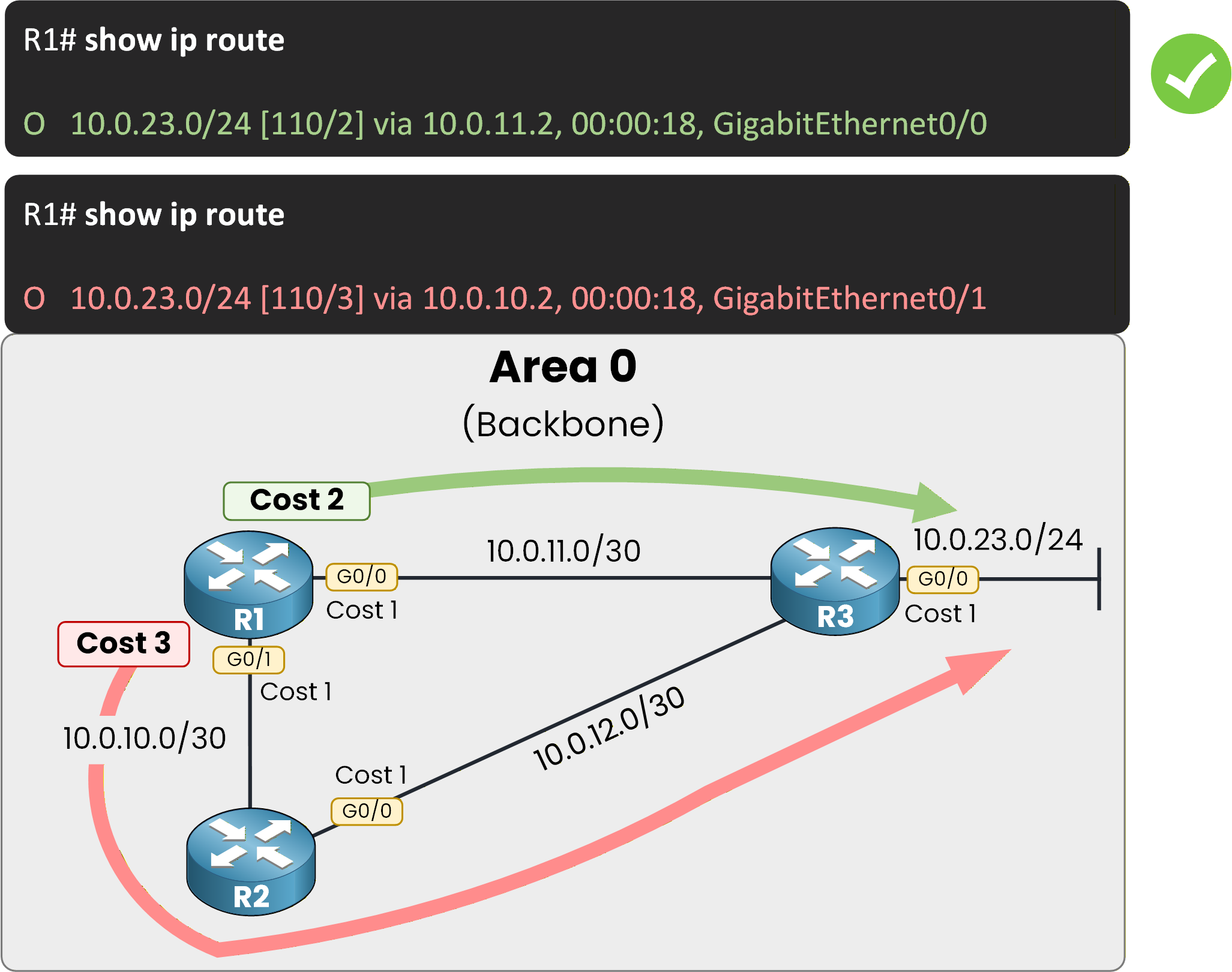
Figure 4 – Lowest cost wins
Key Takeaway
In this scenario, route selection was purely metric-based because both routes were of the same type.
OSPF compares route type first.
When route types are identical, it compares the total accumulated path cost.
The route with the lowest total OSPF cost is installed.
The total cost includes all interface costs along the path.
Why?
Because both routes come from the same area, they have the same trust level and topology visibility.
When trust is equal, OSPF selects the most efficient path.Answer the question below
In the show ip route output above, what is the OSPF metric of the route installed to 10.0.23.0/24?
We now move to a more advanced comparison.
In this scenario, R1 learns the same destination network through:One Intra-Area route (O)
One Inter-Area route (O IA)
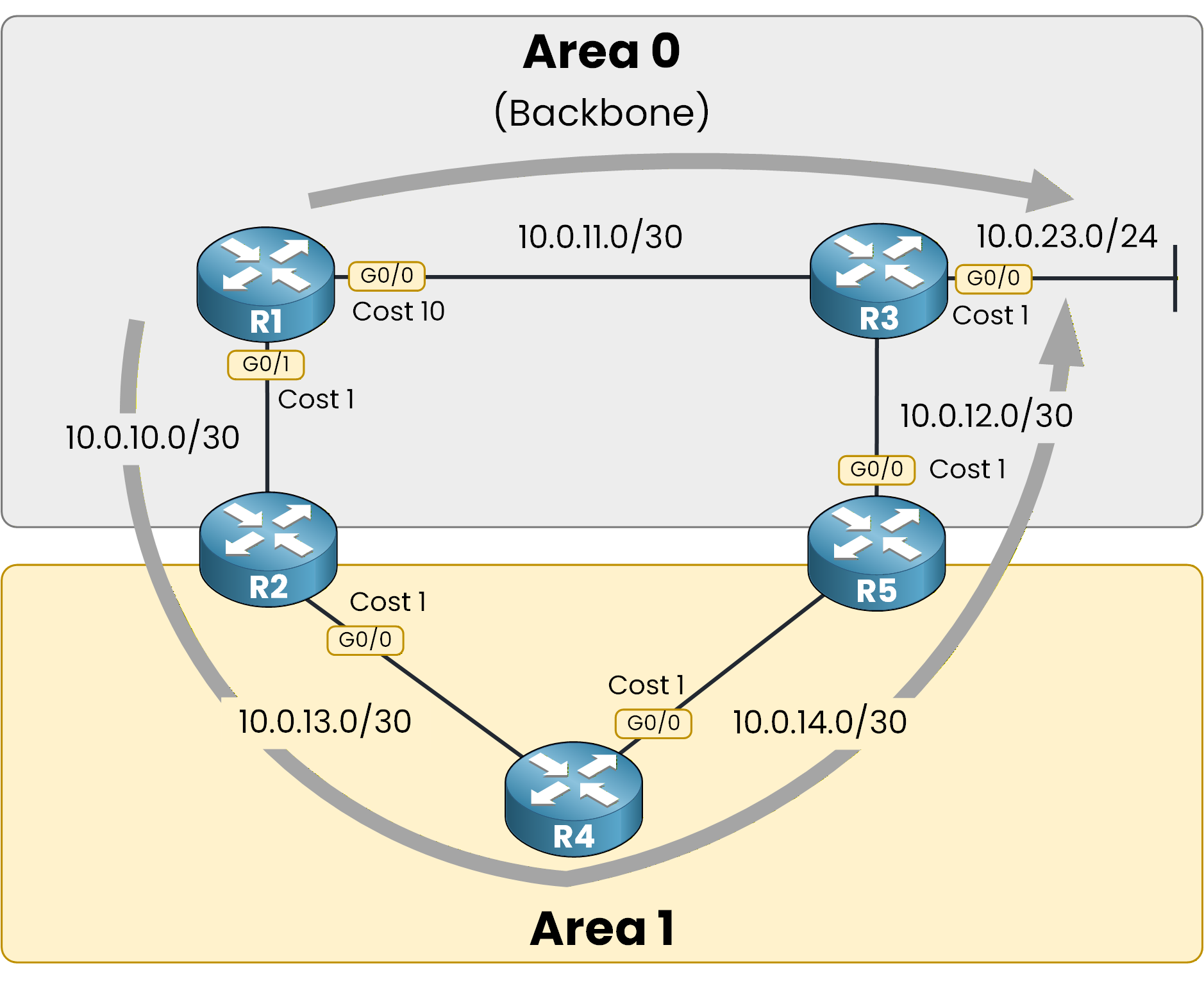
Figure 5 – Intra vs Inter
If you refer to the OSPF route selection order, you should already be able to determine which route R1 will install.
Route Selection Question
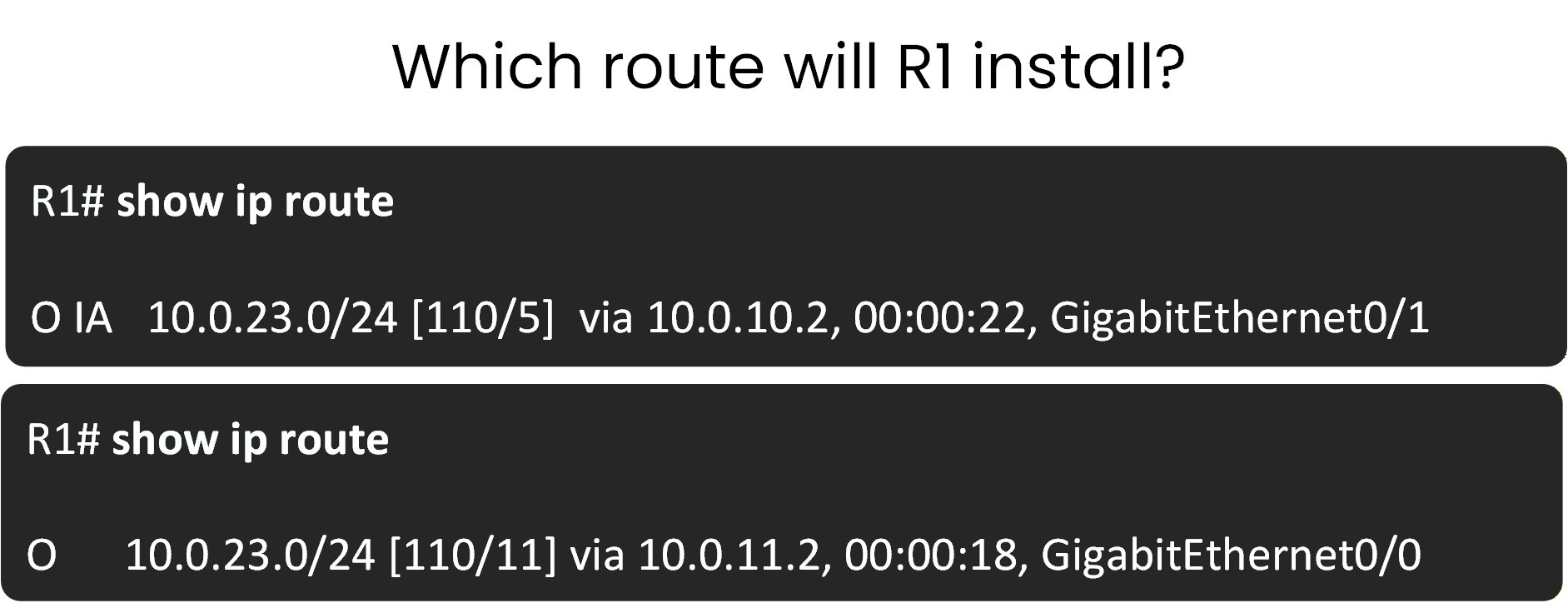
Figure 6 – Intra vs Inter: which route?
Answer with:
“1” for Route 1
“2” for Route 2
Answer the question below
Which route will R1 install in its routing table?
OSPF installs Route 2.
Route 2 is an Intra-Area (O) route, which has a higher priority than an Inter-Area (O IA) route.40 % Complete: you’re making great progress
Ready to pass your CCNP exam?