Your group is up, R1 is Active, R2 is Standby, and you know how the roles move when one of them fails. One door is still open: any router can join the group. Time to close it.
A rogue router can join an HSRP group and even promote itself to Active, taking down the default gateway.
Look at the figure below: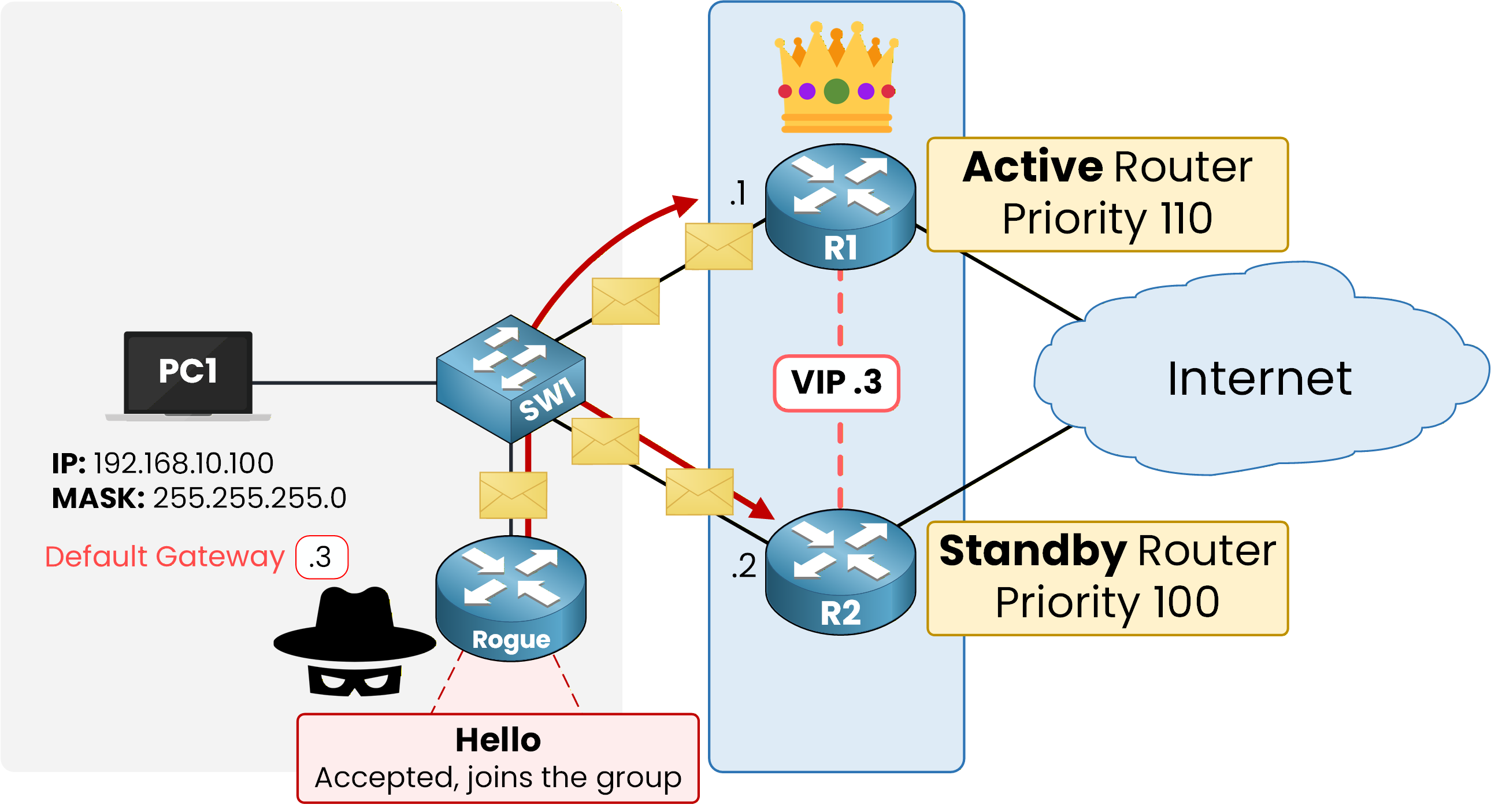
Figure 1 – Without authentication, any router can join the group
HSRP authentication closes that gap by requiring every Hello to carry a shared secret.
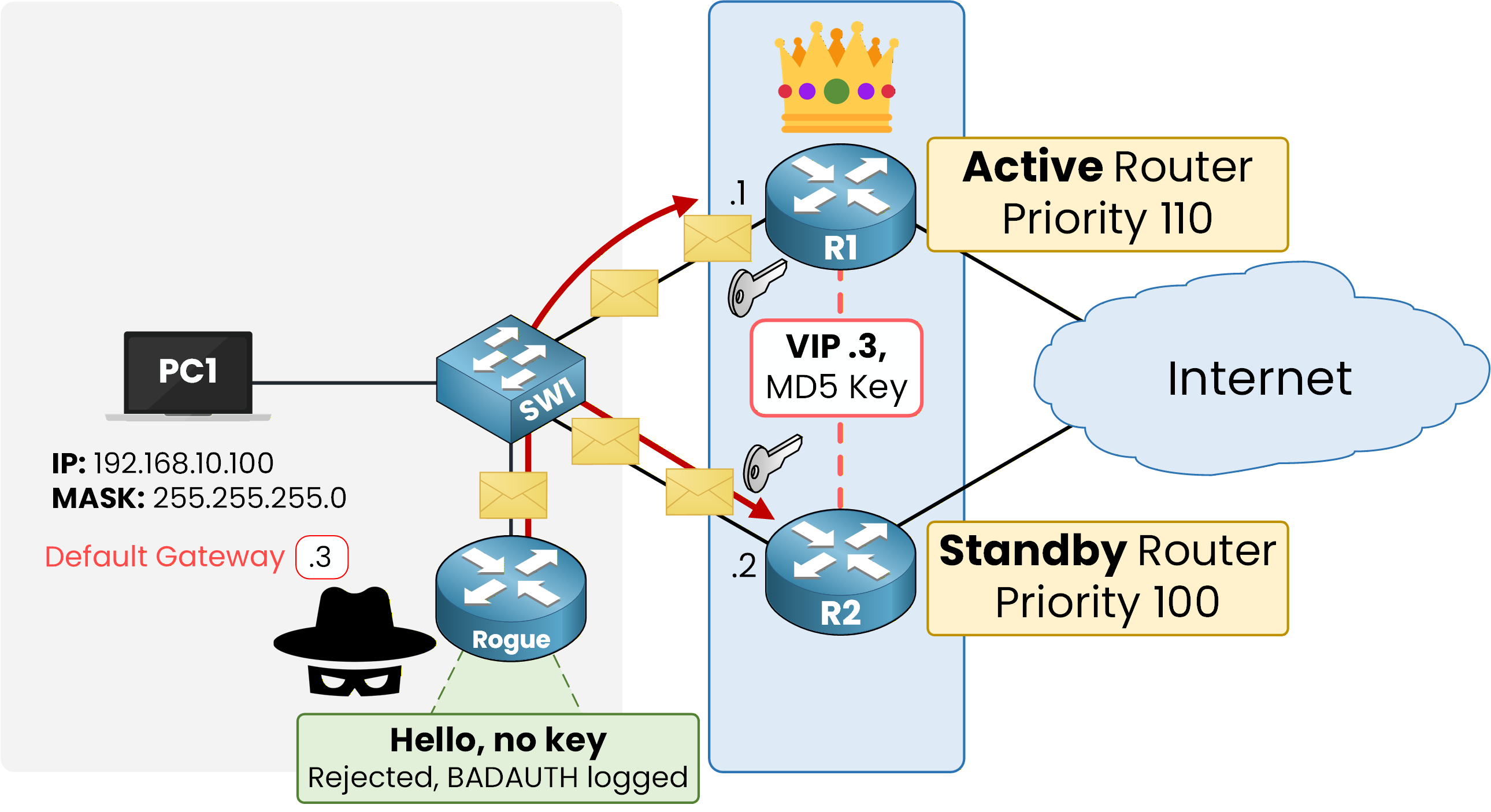
Figure 2 – With MD5 authentication, the rogue router's Hello is rejected
Here, R1 and R2 share an MD5 key.
The rogue router has no way to guess it, so its Hello is rejected before it can influence the election.Answer the question below
What must every Hello carry for a router to join an authenticated group?
IOS supports plaintext and MD5 authentication.
Plaintext is visible to anyone capturing the Hellos, so always configure MD5 in production.Lock the Group on R1
First, configure the MD5 shared key on R1:
R1# conf t
Enter configuration commands, one per line.  End with CNTL/Z.
R1(config)# int g0/0
R1(config-if)# standby 1 authentication md5 key-string PINGMYNETWORK_SECRET
R1(config-if)# end

%HSRP-4-BADAUTH: Bad authentication from 192.168.10.2, group 1, remote state Speak
The BADAUTH message confirms that R1 requires the key, but R2 hasn't been configured yet, so its Hellos are rejected.
Share the Same Key on R2
Configure the same key on R2.
If the two routers don't agree on the secret, they reject each other's Hellos and both claim the Active role.R2# conf t Enter configuration commands, one per line. End with CNTL/Z. R2(config)# int g0/0 R2(config-if)# standby 1 authentication md5 key-string PINGMYNETWORK_SECRET R2(config-if)# end %HSRP-6-STATECHANGE: GigabitEthernet0/0 Grp 1 state Speak -> StandbyAs soon as R2's key matches, R2 re-joins as Standby.
Verify the Authentication
Verify on R1 with the usual command:
R1# show standby
GigabitEthernet0/0 - Group 1 (HSRP-V1)
  State is Active
    2 state changes, last state change 00:09:47
  Virtual IP address is 192.168.10.3
  Active virtual MAC address is 0000.0c07.ac01
    Local virtual MAC address is 0000.0c07.ac01 (v1 default)
  Hello time 3 sec, hold time 10 sec
    Next hello sent in 0.688 secs
  Authentication MD5, key-string
  Preemption disabled
  Active router is local
  Standby router is 192.168.10.2, priority 100 (expires in 7.404 sec)
  Priority 110 (configured 110)
  Group name is "hsrp-Gi0/0-1" (default)
The new Authentication MD5, key-string line confirms the group now requires the shared secret.
A router that boots without the matching key can no longer join group 1 or influence the election.
The group is now locked. Let's continue with the HSRP Configuration lesson, where you'll build the full setup on R1 and R2, authentication included, and test the failover yourself.
Answer the question below
Which authentication type should you use in production, plaintext or MD5?
Answer the question below
R1-R2 share key ALPHA, R3-R4 BRAVO, R5 CHARLIE in group 1: how many routers end up Active?