We are going to configure HSRP together, step by step.
You need to understand every mechanism, so we will walk through them one by one.By the end, you will configure everything yourself.
The HSRP Group
HSRP starts by grouping router interfaces into an HSRP group, identified by a group number.
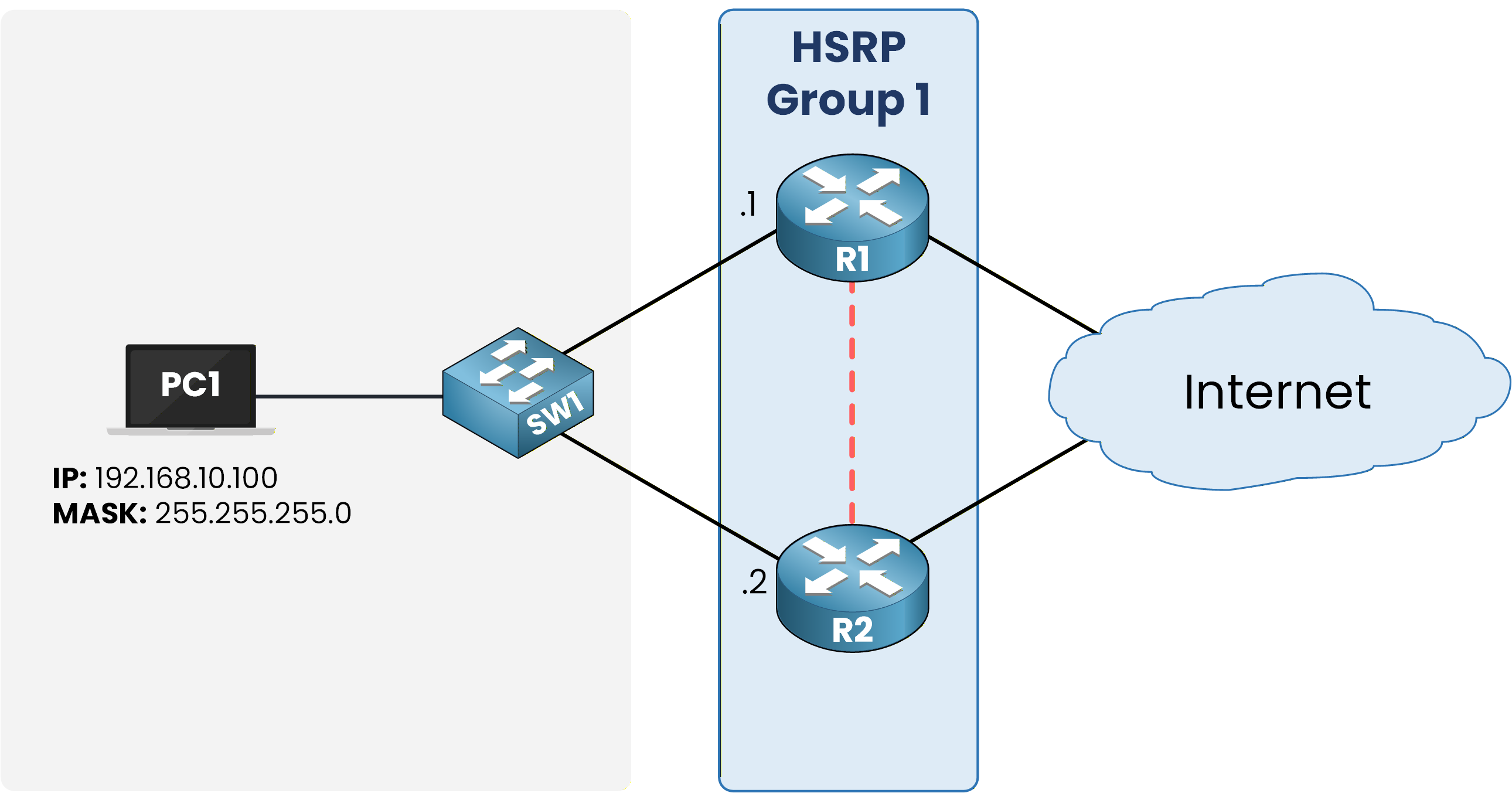
Figure 1 – R1 and R2 form HSRP Group 1
In the topology, R1 and R2 both join HSRP group 1 on their LAN interface.
The HSRP Virtual IP
The group then shares one Virtual IP address (VIP).
That address belongs to no physical interface: the group itself answers for it.
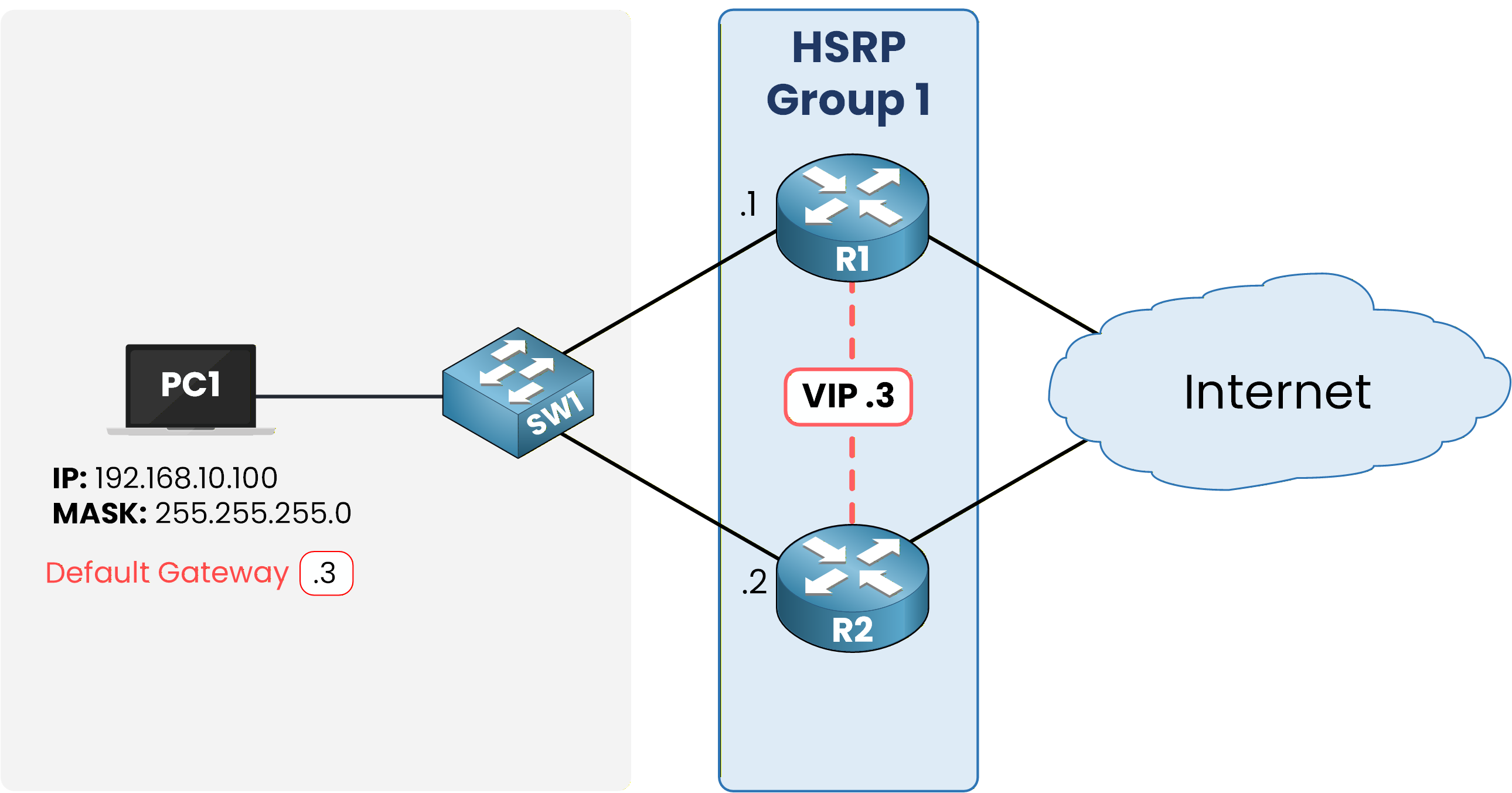
Figure 2 – The Virtual IP becomes the default gateway
Here the group uses 192.168.10.3 as the VIP, while R1 keeps .1 and R2 keeps .2 on their physical interfaces.
Every host in 192.168.10.0/24 points its default gateway at .3.
Let's configure HSRP on R1 first:
R1# conf t Enter configuration commands, one per line. End with CNTL/Z. R1(config)# int g0/0 R1(config-if)# ip address 192.168.10.1 255.255.255.0 R1(config-if)# no shut R1(config-if)# standby 1 ip 192.168.10.3 %HSRP-6-STATECHANGE: GigabitEthernet0/0 Grp 1 state Init -> Init %HSRP-6-STATECHANGE: GigabitEthernet0/0 Grp 1 state Speak -> Standby %HSRP-6-STATECHANGE: GigabitEthernet0/0 Grp 1 state Standby -> Active R1(config-if)# endR1 walked through the states on its own and took the Active role: no other router answered.
The three commands did the work: they set the physical IP address, brought the interface up, and created HSRP group 1 with the VIP 192.168.10.3.R1 is Active because it is alone in the group for now: with no other router to compete against, it wins the election by default.
Now do the same on R2:
R2# conf t Enter configuration commands, one per line. End with CNTL/Z. R2(config)# int g0/0 R2(config-if)# ip address 192.168.10.2 255.255.255.0 R2(config-if)# no shut R2(config-if)# standby 1 ip 192.168.10.3 %HSRP-6-STATECHANGE: GigabitEthernet0/0 Grp 1 state Init -> Init %HSRP-6-STATECHANGE: GigabitEthernet0/0 Grp 1 state Speak -> Standby R2(config-if)# endR2 settled into Standby: the Active role was already taken.
Verify it on R1:R1# show standby GigabitEthernet0/0 - Group 1 (HSRP-V1) State is Active 2 state changes, last state change 00:01:24 Virtual IP address is 192.168.10.3 Active virtual MAC address is 0000.0c07.ac01 Local virtual MAC address is 0000.0c07.ac01 (v1 default) Hello time 3 sec, hold time 10 sec Next hello sent in 1.324 secs Preemption disabled Active router is local Standby router is 192.168.10.2, priority 100 (expires in 8.912 sec) Priority 100 (default 100) Group name is "hsrp-Gi0/0-1" (default)Focus on one line for now: the group answers for 192.168.10.3.
Every other line of this output, State, Priority, timers, virtual MAC, is exactly what the next sections decode.Run the same command on R2:
R2# show standby GigabitEthernet0/0 - Group 1 (HSRP-V1) State is Standby 2 state changes, last state change 00:01:24 Virtual IP address is 192.168.10.3 Active virtual MAC address is 0000.0c07.ac01 Local virtual MAC address is 0000.0c07.ac01 (v1 default) Hello time 3 sec, hold time 10 sec Next hello sent in 1.324 secs Preemption disabled Active router is 192.168.10.1, priority 100 (expires in 8.912 sec) Standby router is local Priority 100 (default 100) Group name is "hsrp-Gi0/0-1" (default)Both routers agree on the same virtual IP address, 192.168.10.3.
The group is formed.Answer the question below
What address do hosts use as their default gateway with HSRP?
Inside each group, one router holds the Active role.
Let's look at the Active and Standby roles, confirmed with show standby on both routers.Active and Standby Roles
The Active router owns the virtual addresses.
It answers ARP requests for the VIP and forwards every packet sent to the virtual gateway.
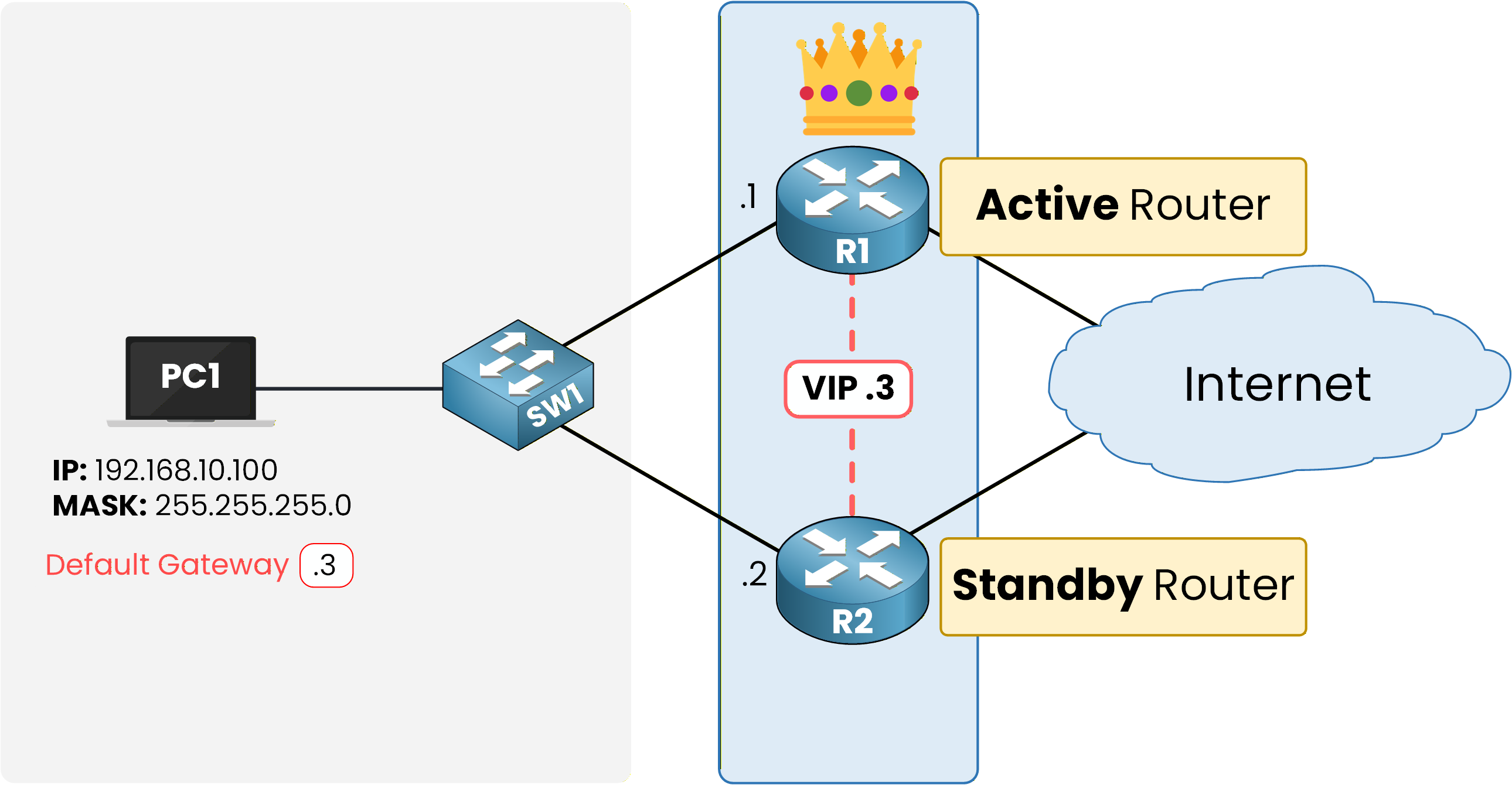
Figure 3 – Active and Standby roles inside the group
The Standby router watches its peer through periodic Hello messages.
It stays silent, ready to take over the moment the Active router disappears.
Here is R1's perspective on the group, now that you know what the Active role means:
R1# show standby GigabitEthernet0/0 - Group 1 (HSRP-V1) State is Active 2 state changes, last state change 00:01:24 Virtual IP address is 192.168.10.3 Active virtual MAC address is 0000.0c07.ac01 Local virtual MAC address is 0000.0c07.ac01 (v1 default) Hello time 3 sec, hold time 10 sec Next hello sent in 1.324 secs Preemption disabled Active router is local Standby router is 192.168.10.2, priority 100 (expires in 8.912 sec) Priority 100 (default 100) Group name is "hsrp-Gi0/0-1" (default)Here are the key lines to focus on:
State is Active means R1 currently forwards traffic for the group.
Active router is local confirms R1 owns the VIP and answers ARP requests for it.
Now look at the same group from R2's side:
R2# show standby GigabitEthernet0/0 - Group 1 (HSRP-V1) State is Standby 4 state changes, last state change 00:02:38 Virtual IP address is 192.168.10.3 Active virtual MAC address is 0000.0c07.ac01 Local virtual MAC address is 0000.0c07.ac01 (v1 default) Hello time 3 sec, hold time 10 sec Next hello sent in 2.117 secs Preemption disabled Active router is 192.168.10.1, priority 100 (expires in 9.216 sec) Standby router is local Priority 100 (default 100) Group name is "hsrp-Gi0/0-1" (default)Here are the key lines to focus on:
State is Standby means R2 stays silent and only monitors R1's Hellos.
Active router is 192.168.10.1 tells R2 exactly which router currently owns the VIP.
Each router reports its own view of the same group.
Answer the question below
Which router answers ARP requests for the VIP?
You noticed it already: R1 became Active and R2 Standby, without you choosing anything.
But how do the two routers decide which one takes each role?

Figure 4 – How are Active and Standby elected?
The answer is that HSRP compares two parameters in a specific order.
The HSRP Election Process
Every router carries a priority between 0 and 255, with a default of 100.
The highest priority becomes the Active router.
Figure 5 – Election criteria: priority first, highest IP as tiebreaker
If priorities tie, the router with the highest IP address on the HSRP interface wins the election.
In your demo group, both routers still run the default of 100.
R1 holds the Active role simply because it came up first.To control the outcome, you set the priority yourself.
Answer the question below
What is the default HSRP priority?
Controlling the HSRP Election with Priority
Raise the priority on the router you want as Active.

Figure 6 – Priority 110 makes R1 the Active router
To do this we use the command below:
R1# conf t Enter configuration commands, one per line. End with CNTL/Z. R1(config)# int g0/0 R1(config-if)# standby 1 priority 110 R1(config-if)# end R1# show standby GigabitEthernet0/0 - Group 1 (HSRP-V1) State is Active 2 state changes, last state change 00:09:47 Virtual IP address is 192.168.10.3 Active virtual MAC address is 0000.0c07.ac01 Local virtual MAC address is 0000.0c07.ac01 (v1 default) Hello time 3 sec, hold time 10 sec Next hello sent in 0.688 secs Preemption disabled Active router is local Standby router is 192.168.10.2, priority 100 (expires in 7.404 sec) Priority 110 (configured 110) Group name is "hsrp-Gi0/0-1" (default)The output confirms it: Priority 110 (configured 110).
Answer the question below
Which value does HSRP compare first during the election?
HSRP States
Before a router settles into Active or Standby, it walks through a series of states.
Follow the figure from left to right.
Figure 7 – HSRP state machine from Initial to Active
In Initial, HSRP just started on the interface.
In Learn, the router still waits to discover the VIP.
In Listen, it knows the VIP and monitors Hellos.
In Speak, it sends its own Hellos and competes in the election.
The election ends with:
One router in Active
The other in Standby
You already watched this sequence happen.
Here is what R2 logged when it joined the group:%HSRP-6-STATECHANGE: GigabitEthernet0/0 Grp 1 state Init -> Init %HSRP-6-STATECHANGE: GigabitEthernet0/0 Grp 1 state Speak -> StandbyYou will read them constantly in show standby outputs and STATECHANGE logs when you verify or troubleshoot a group.
Answer the question below
Which state does the backup router settle into?
A rogue router can join an HSRP group and even promote itself to Active, taking down the default gateway.
Look at the figure below:
Figure 8 – Without authentication, any router can join the group
HSRP authentication closes that gap by requiring every Hello to carry a shared secret.

Figure 9 – With MD5 authentication, the rogue router's Hello is rejected
Here, R1 and R2 share an MD5 key.
The rogue router has no way to guess it, so its Hello is rejected before it can influence the election.Answer the question below
What must every Hello carry for a router to join an authenticated group?
Types of Authentication
IOS supports plaintext and MD5 authentication.
Plaintext is visible to anyone capturing the Hellos, so always configure MD5 in production.First, configure the MD5 shared key on R1:
R1# conf t Enter configuration commands, one per line. End with CNTL/Z. R1(config)# int g0/0 R1(config-if)# standby 1 authentication md5 key-string PINGMYNETWORK_SECRET R1(config-if)# end %HSRP-4-BADAUTH: Bad authentication from 192.168.10.2, group 1, remote state SpeakThe BADAUTH message confirms that R1 requires the key, but R2 hasn't been configured yet, so its Hellos are rejected.
Configure the same key on R2.
If the two routers don't agree on the secret, they reject each other's Hellos and both claim the Active role.R2# conf t Enter configuration commands, one per line. End with CNTL/Z. R2(config)# int g0/0 R2(config-if)# standby 1 authentication md5 key-string PINGMYNETWORK_SECRET R2(config-if)# end %HSRP-6-STATECHANGE: GigabitEthernet0/0 Grp 1 state Speak -> StandbyAs soon as R2's key matches, R2 re-joins as Standby.
Verify on R1 with the usual command:
R1# show standby GigabitEthernet0/0 - Group 1 (HSRP-V1) State is Active 2 state changes, last state change 00:09:47 Virtual IP address is 192.168.10.3 Active virtual MAC address is 0000.0c07.ac01 Local virtual MAC address is 0000.0c07.ac01 (v1 default) Hello time 3 sec, hold time 10 sec Next hello sent in 0.688 secs Authentication MD5, key-string Preemption disabled Active router is local Standby router is 192.168.10.2, priority 100 (expires in 7.404 sec) Priority 110 (configured 110) Group name is "hsrp-Gi0/0-1" (default)The new Authentication MD5, key-string line confirms the group now requires the shared secret.
A router that boots without the matching key can no longer join group 1 or influence the election.
Answer the question below
Which authentication type should you use in production, plaintext or MD5?
Now let's see what happens when the Active router fails: how fast does the group notice, and what exactly happens next?
Hello and Hold Timers
The two routers exchange Hello packets to prove they are alive.

Figure 10 – Hello and Hold timers between the two routers
40 % Complete: you’re making great progress
Ready to pass your CCNP exam?