Encapsulated Remote SPAN (ERSPAN) is the most advanced form of traffic mirroring that you need to understand for the CCNP ENCOR exam.
With Local SPAN, everything happens on a single switch.
With RSPAN, traffic can travel across switches using a dedicated VLAN.
Figure 1 - ERSPAN Topology
But what if the traffic collector is located in a different IP network?
This is where ERSPAN becomes useful.Why ERSPAN Is Needed
ERSPAN allows you to capture traffic on one device and send it to a traffic collector located in another network.
This situation is common in large enterprise environments where:
The source traffic is in a remote site
The traffic collector is centralized in a data center
Layer 2 connectivity is not available between the two

Figure 2 – ERSPAN traffic overview
Unlike RSPAN, ERSPAN does not rely on a VLAN.
Instead, it uses Layer 3 routing.Answer the question below
At which layer does ERSPAN operate?
How ERSPAN Works
To make this possible, the source switch encapsulates the mirrored traffic inside a GRE tunnel.
The original Layer 2 frame is wrapped inside:
A GRE header
An outer IP header
This allows the mirrored traffic to be routed across Layer 3 networks.
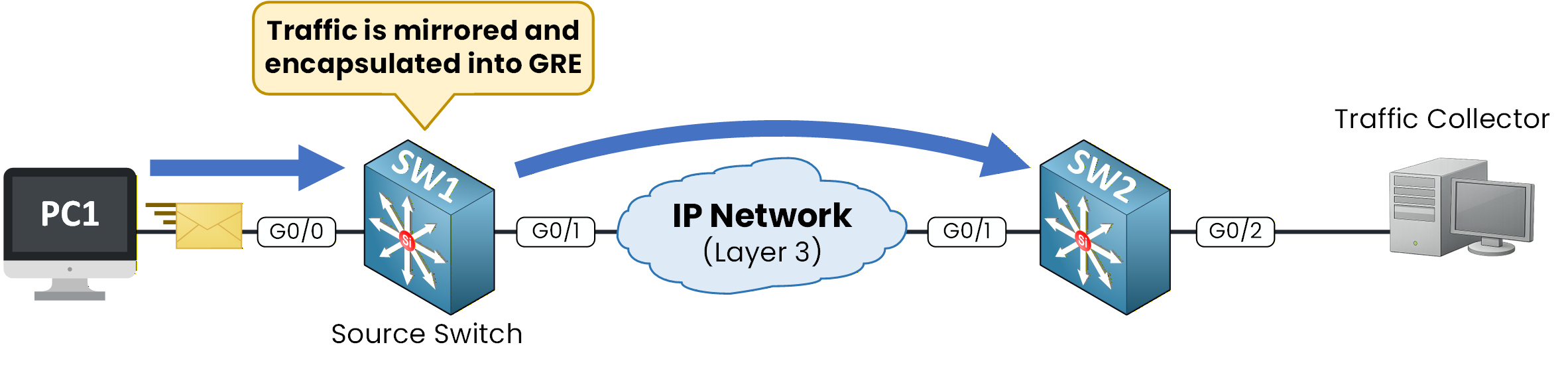
Figure 3 – ERSPAN GRE encapsulation
Once encapsulated, the GRE packet is forwarded through the IP network like any other routed packet.
As long as IP connectivity exists between the source and the destination, ERSPAN traffic can reach the traffic collector.
Figure 4 – ERSPAN GRE transport
Answer the question below
Which protocol encapsulates ERSPAN traffic?
To configure ERSPAN, you must complete two major parts:
Configure the ERSPAN source (SW1)
Configure the ERSPAN destination (SW2)
Before creating the ERSPAN session, you must define an origin IP address.

Figure 5 - ERSPAN Topology Configuration
Step 1 – Configure the ERSPAN Origin IP (SW1)
Before creating the ERSPAN session, you must configure an origin IP address.
This IP address will be used as the source IP address of the GRE tunnel that transports the mirrored traffic.
The best practice is to use a Loopback interface, because it remains up as long as the device is operational.SW1# conf t Enter configuration commands, one per line. End with CNTL/Z. SW1(config)# int lo1 *Feb 9 09:43:06.008: %LINK-3-UPDOWN: Interface Loopback1, changed state to up *Feb 9 09:43:07.007: %LINEPROTO-5-UPDOWN: Line protocol on Interface Loopback1, changed state to up SW1(config-if)# ip address 10.1.1.1 255.255.255.0 SW1(config-if)# exitAt this point, SW1 has a stable IP address that will be used as the GRE tunnel source.
Step 2 – Create the ERSPAN Source Session (SW1)
Now create the ERSPAN source session on SW1.
40 % Complete: you’re making great progress
Ready to pass your CCNP exam?