To understand how EIGRP selects the best path, walk through this topology step by step.
In this scenario, you are on R1, and you need to reach the destination network 10.0.23.0/24.
Figure 1 – EIGRP Path Selection Topology with Multiple Paths
From R1, you have multiple possible paths to reach that network.
Your task is simple: determine which path EIGRP will install in the routing table.
To do that, EIGRP must evaluate all available paths and decide which one is the best according to its metric calculation.Successor and Feasible Successor
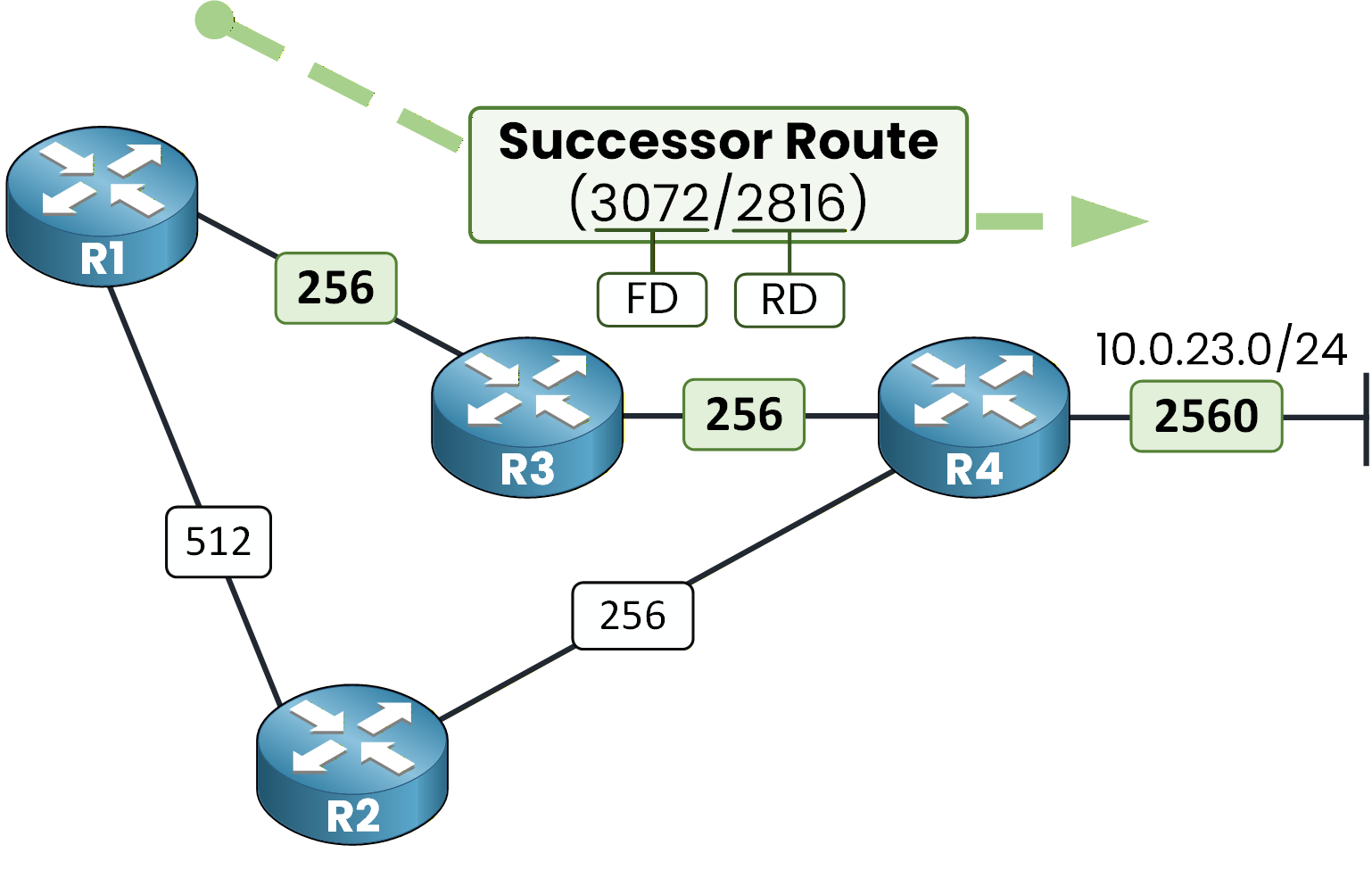
As you saw in previous modules, EIGRP always selects a Successor route as the primary path.

Figure 2 – Successor Route and Feasible Successor Route in EIGRP
It also tries to maintain a Feasible Successor route as a backup path.
If the primary path fails, EIGRP can switch immediately to this backup without recalculating the entire network.This behavior enables fast convergence.
Answer the question below
When the primary EIGRP route fails, which type of route allows you to switch immediately without recalculation?
The Role of DUAL
EIGRP makes these decisions using the DUAL (Diffusing Update Algorithm).
DUAL analyzes all learned routes stored in the topology table, not just the best one.
It selects the optimal path and determines whether a loop-free backup path exists.The Two Key Metrics
To understand how DUAL makes its decision, you must understand two key values:
Reported Distance (RD)
Feasible Distance (FD)
These two values form the foundation of EIGRP path selection.
In the next section, we will define them and examine how they relate to our example topology.Answer the question below
Which algorithm does EIGRP use to select the best path and verify a loop-free backup?
The Reported Distance is the metric that a neighbor advertises to reach a destination network.
Understanding the Reported Distance (RD)
Before making a decision, you need to know how far your neighbors are from that destination.

Figure 3 – EIGRP Topology
That information is provided through the Reported Distance (RD).
RD Propagation toward R1
Each EIGRP router advertises to its neighbors the metric it calculates locally to reach the destination.
In this scenario, R4 advertises a metric of 2560.
This value represents the total metric from R4 to the destination.
Figure 4 – R4 Advertising Reported Distance to R3
As the update travels through the network, each router adds its outgoing interface cost before advertising the new metric.
Answer the question below
Before adding your own link cost, what value do you receive from R3 (2816)?
RD from R3 – R1’s Point of View
When R3 receives 2560, it adds its outgoing interface cost of 256.
It then advertises 2816.
Figure 5 – R3 Updating and Advertising Reported Distance
From your perspective on R1, you now receive a Reported Distance of 2816 via R3.
This value tells you how far R3 is from the destination.
It does not yet include your own link cost.Introducing the Feasible Distance (FD)
Now you must calculate the total cost from R1 to the destination.
Your link cost to R3 is 256.So you add it to the received RD:
2816 + 256 = 3072
Figure 6 – Feasible Distance Calculation at R1
The value 3072 is the total metric from R1 to 10.0.23.0/24 via R3.
You then compare this total metric with any other available paths.
The lowest total metric becomes your Feasible Distance (FD).Answer the question below
After receiving an RD of 2816 and adding your link cost of 256, what value do you calculate (3072)?
In this scenario, R4 also advertises a metric of 2560 toward R2.

Figure 7 – R4 Advertising Reported Distance Toward R2
R2 receives 2560, adds its outgoing interface cost (256), and advertises 2816 to R1.

Figure 8 – R2 Updating and Advertising Reported Distance
40 % Complete: you’re making great progress
Unlock the rest of this lesson
If you’d like to continue your CCNA journey, simply create your free account.
Access all CCNA lessons
Practice with hands-on labs
Train with Practice exams and Quizzes
Progress tracking in your dashboard
Made by network engineers - CCNP certified
learners globally