It is Monday morning and a user calls you.
"I can't reach the file server anymore. It worked on Friday."
You sit down at your console.
Three routers stand between the user and the server, and any of them could be the cause.The Lab
PC1 lives in 10.10.10.0/24 and the server SRV lives in 10.20.20.0/24.

Figure 1 – Lab topology from PC1 to the application server
R1 is the user gateway, R2 is the core, R3 is the data center edge.
The break can be anywhere along that chain.
In this lesson we will see a method that does not waste time, and make sure you use the right tool to answer the right question.Answer the question below
How many routers stand between PC1 and SRV?
The Method
In networking, troubleshooting can be very complex.
But having a view on all the tools you have is a great start.
Look at the diagram below:
Figure 2 – The five-step troubleshooting flow
Here you can see multiple tools you can use as a network engineer to make sure you are troubleshooting efficiently. Let's go step by step.
You will troubleshoot with me, step by step.
The first one is ping.Answer the question below
Which step comes right after confirming the problem with ping?
The first task you can do when a network problem occurs is to confirm the problem exists.
The user might have made a mistake. The cable might be loose. The server might be fine.
You can log into R1 and send your own packet across the network.
This is what ping does.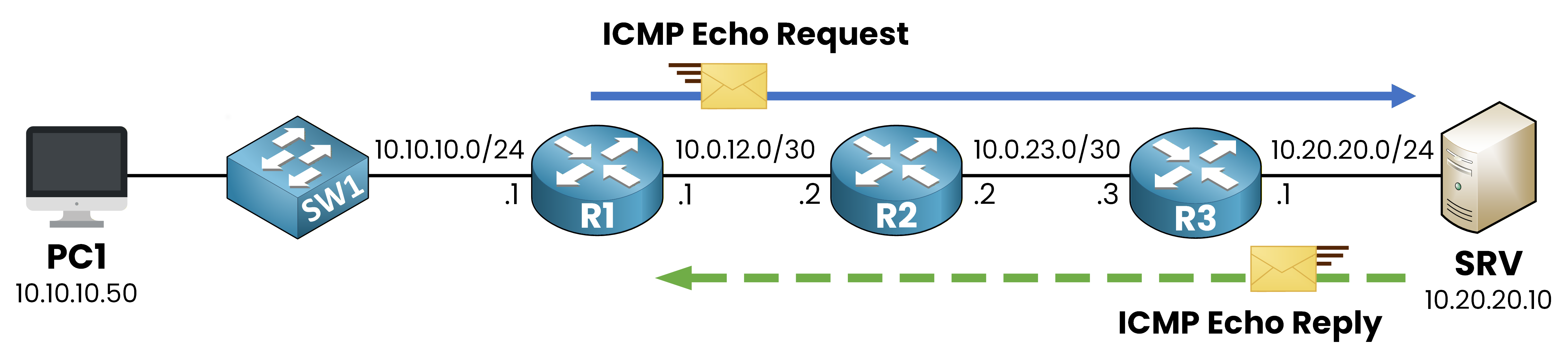
Figure 3 – Ping echo request and reply across the topology
The ICMP echo request leaves R1, crosses R2, then R3, and lands on SRV.
If the server is operational and the path is functioning in both directions, an echo reply will be sent back in the same way, as shown in the figure.Run a basic ping toward the server.
R1# ping 10.20.20.10
Type escape sequence to abort.
Sending 5, 100-byte ICMP Echos to 10.20.20.10, timeout is 2 seconds:
.....
Success rate is 0 percent (0/5)
Here you see five dots and zero replies out of five.
The connectivity is broken.
You have your confirmation.
Now you need to find where.Answer the question below
Which tool do you use first to confirm a connectivity problem?
Ping told you the path is broken.
You still do not know where.
That is what traceroute answers.Traceroute
Traceroute is clever.
It does not ask the routers along the path to identify themselves.
Instead, it sends probes with a Time To Live (TTL) that increases by one each time.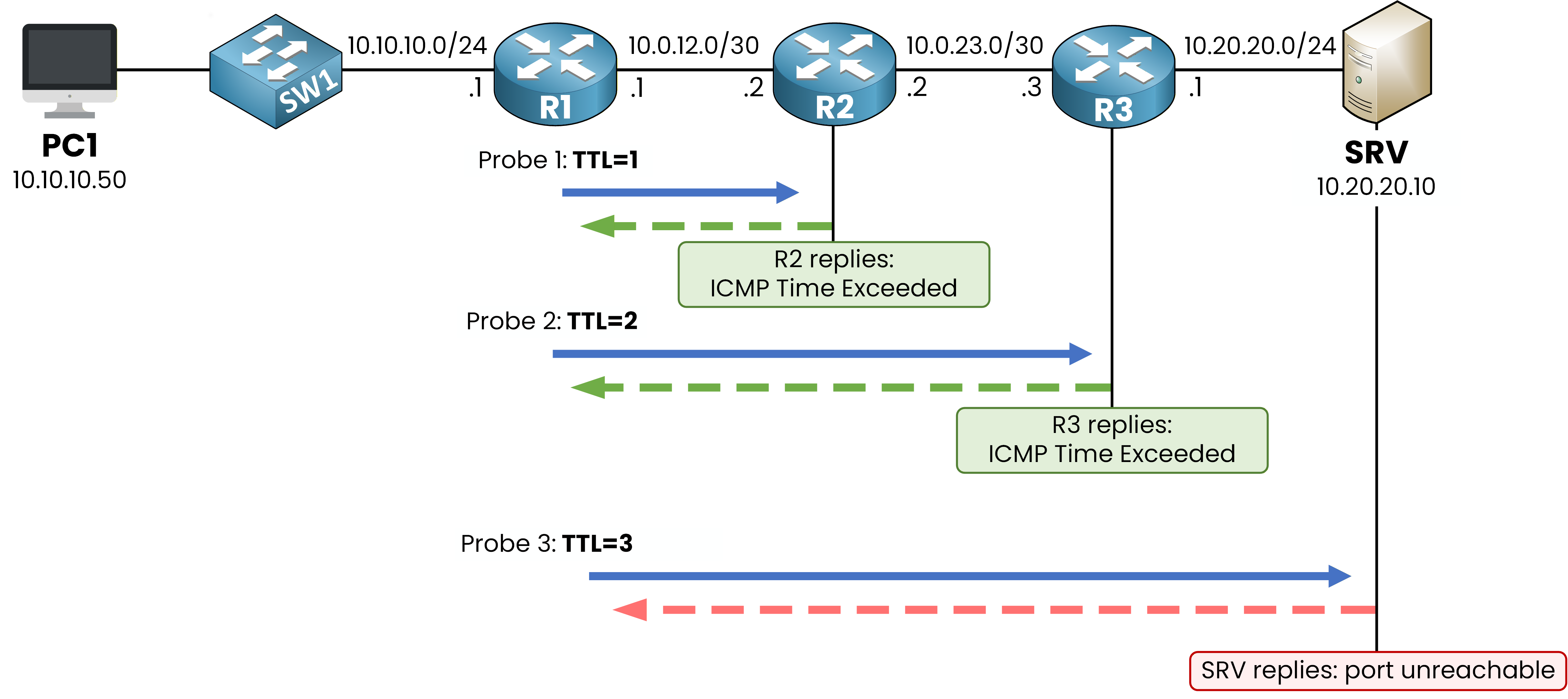
Figure 4 – Each probe goes one router further before the TTL expires
The TTL is a number carried in every IP packet.
Each router that forwards the packet decreases this number by one.
When the TTL reaches 0, the router drops the packet and tells the sender about it with an ICMP Time Exceeded message.
The TTL was originally designed to prevent packets from looping forever in the network.
But traceroute uses this exact mechanism in a clever way to discover the path step by step.Answer the question below
Which ICMP message does a router send when the TTL reaches 0?
Traceroute Flow
The first probe leaves R1 with TTL = 1.
R2 receives it, decrements the TTL to 0, drops the packet, and sends back an ICMP Time Exceeded.
That is how R1 learns R2 is the first hop.The second probe leaves with TTL = 2.
It dies on R3, which reveals itself.
The third probe with TTL = 3 makes it all the way to the destination.
Run it from R1.
R1# traceroute 10.20.20.10
Type escape sequence to abort.
Tracing the route to 10.20.20.10
  1 10.0.12.2 4 msec 4 msec 4 msec
  2 10.0.23.3 8 msec 8 msec 8 msec
  3  *  *  *
  4  *  *  *
  5  *  *  *
Hop 1 is R2 at 10.0.12.2.
Hop 2 is R3 at 10.0.23.3.
Both reply within milliseconds.
From hop 3 onward, you only see stars.Answer the question below
What does a star mean in a traceroute hop?
Reading the Stars
A star is not always a dead router.
The probe might have reached the next hop, but the reply was filtered.Three causes are common when stars appear after a successful chain of hops:
an ACL is dropping ICMP on the next router
a route is missing toward the destination subnet, so R3 has nowhere to forward the probe
the next-hop device exists but is configured to not reply to ICMP
In your case, the chain stops right after R3.
R3 is the last router that responds.
Whatever happens on R3 is the next thing to investigate.Answer the question below
Where does your investigation continue after this traceroute?
Traceroute pointed at R3.
You log into R3 and you want to see what it actually does with the packets it receives.40 % Complete: you’re making great progress
Ready to pass your CCNP exam?