Now that you understand how BGP establishes sessions and exchanges routes, you must master something critical for the CCNP ENCOR exam:
How BGP decides which path to install when multiple paths exist.
BGP is a policy-based routing protocol.
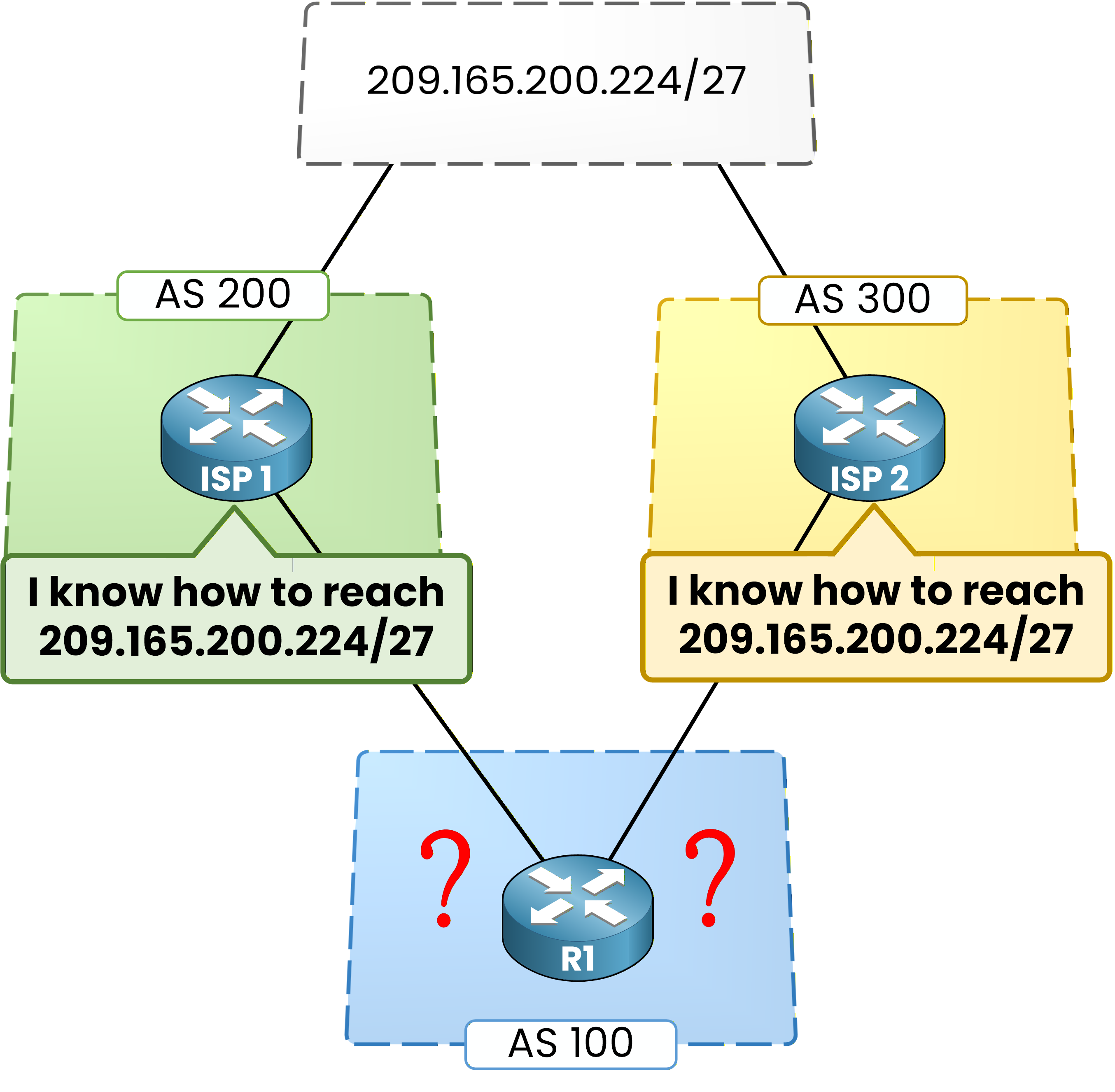
That means:
You, as the network engineer, can influence path selection.BGP Best-Path Algorithm
When a router receives multiple paths toward the same destination, it runs the BGP Best-Path Algorithm.
This Best-Path Algorithm allows us to influence the routing behavior of BGP.We will now walk through the first four attributes in the exact order BGP evaluates them:
Weight
Local Preference
Locally Originated
AS-PATH
Answer the question below
What type of routing protocol is BGP?
Until now, every prefix had a single path.
In real-world environments, this is rarely the case.
Routers often receive multiple paths to the same destination.When that happens, BGP must decide:
Which path should be installed in the routing table?
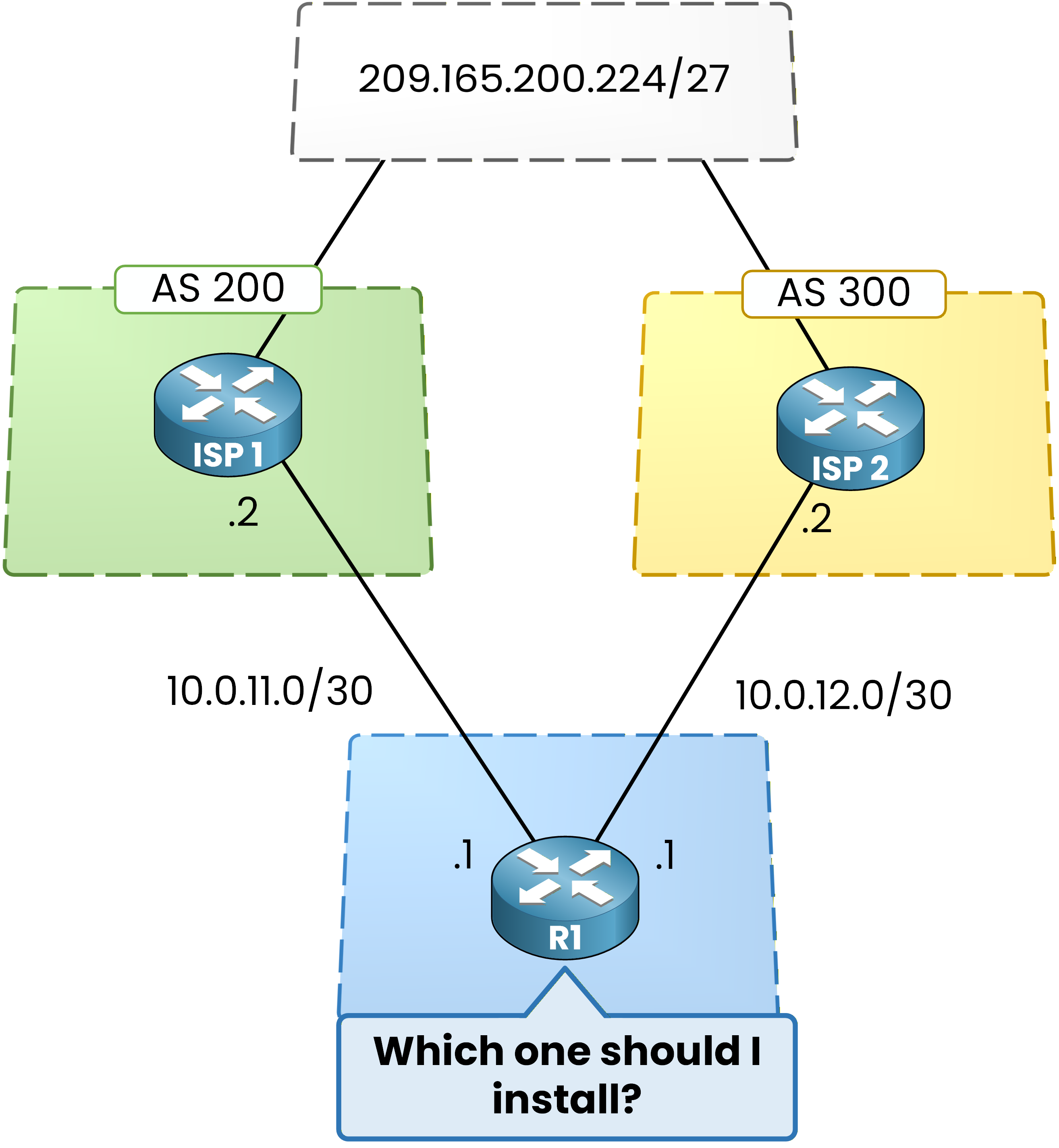
Figure 2 – Two AS advertise prefix
In this topology:
AS 200 advertises
209.165.200.224/27AS 300 advertises
209.165.200.224/27R1 receives both advertisements
You are on R1.
Your job is to determine which path will be selected, using the Weight attribute.What is Weight?
Weight is a Cisco proprietary attribute that is local to the router. It is not advertised to neighbors and is the first attribute evaluated in the BGP decision process.
You can configure R1 to assign a weight to routes received from a specific neighbor. When that neighbor sends a prefix, the prefix arrives with the weight you defined.
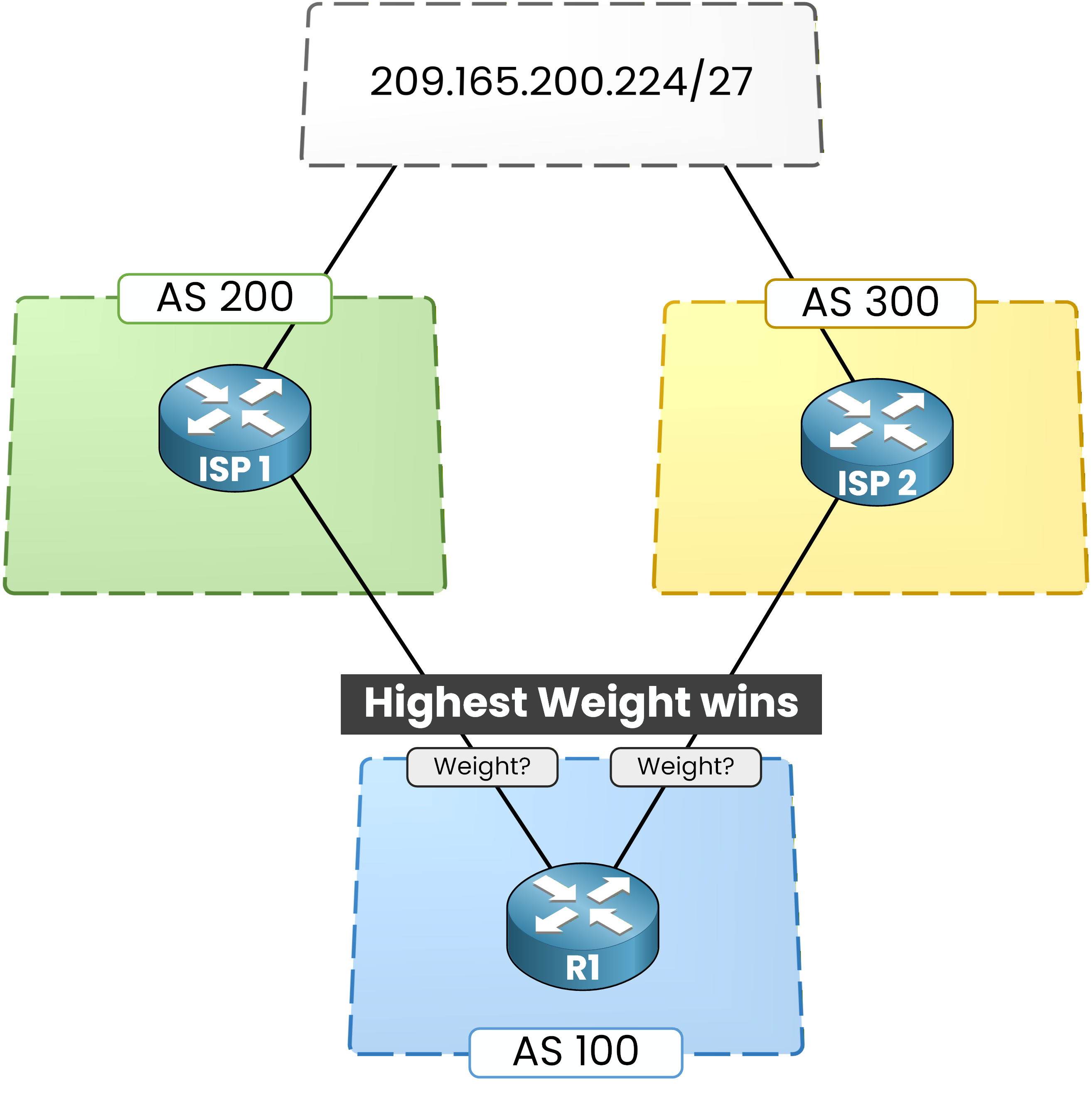
Figure 3 – BGP Weight Attribute
The default values to remember are:
0 for routes learned from a neighbor
32768 for routes locally originated by the router
The Weight range goes from 0 to 65535.
Highest Weight wins.
Answer the question below
R1 receives 209.165.200.224/27 from AS 200 (Weight 500) and AS 300 (default Weight). Which path wins?
Configuring Weight on R1
To configure Weight, you create a route-map that defines the action to apply.
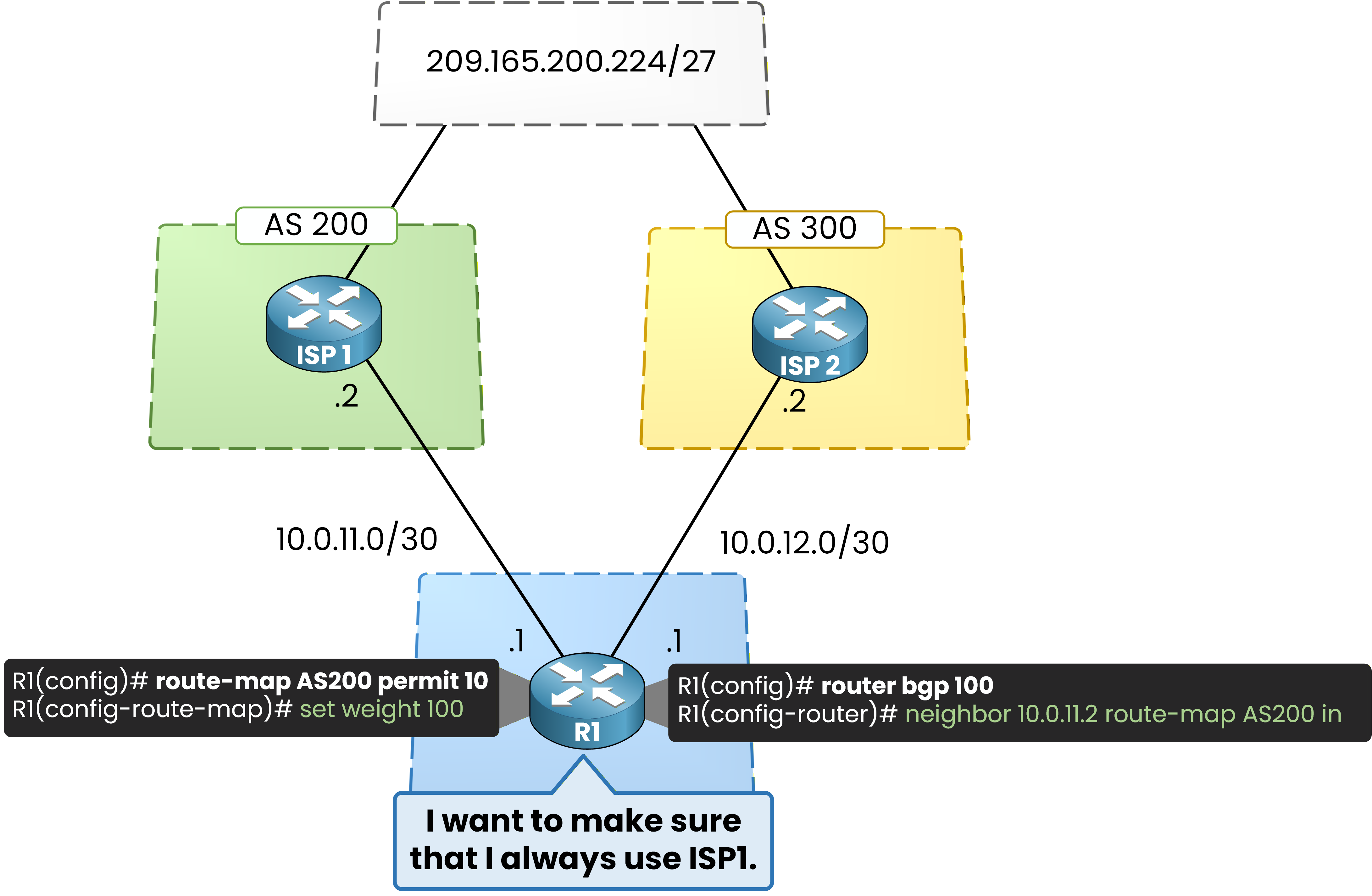
Figure 4 – Setting BGP Weight
The route-map is named
AS200, and its action is to set a weight value of 100.
Since there is nomatchclause, the route-map applies to all routes received from the targeted neighbor.R1# conf t Enter configuration commands, one per line. R1(config)# route-map AS200 permit 10 R1(config-route-map)# set weight 100 R1(config-route-map)# exitThen on R1, you enter the BGP process for AS 100 and apply this route-map inbound to the neighbor in AS 200.
R1(config)# router bgp 100 R1(config-router)# neighbor 10.0.11.2 route-map AS200 in R1(config-router)# endVerifying the Result
Now verify the BGP table:
R1# show bgp ipv4 unicast BGP table version is 6, local router ID is 10.0.12.1 Status codes: s suppressed, d damped, h history, * valid, > best, i - internal, r RIB-failure, S Stale, m multipath, b backup-path, f RT-Filter, x best-external, a additional-path, c RIB-compressed, t secondary path, Origin codes: i - IGP, e - EGP, ? - incomplete RPKI validation codes: V valid, I invalid, N Not found Network Next Hop Metric LocPrf Weight Path *> 209.165.200.224/27 10.0.11.2 0 100 200 i * 209.165.200.224/27 10.0.12.2 0 0 300 iThe path through 10.0.11.2 now carries Weight 100, while the path through 10.0.12.2 still has Weight 0.
The best-path marker*>confirms R1 selected the AS 200 path to reach209.165.200.224/27.
Figure 5 – Highest Weight Preferred
Because Weight is local to the router and never advertised, this decision applies only to R1.
No other router in the network is affected.Answer the question below
Is the Weight attribute advertised to BGP neighbors?
In the previous section, you saw that Weight influences path selection on a single router. However, in real-world networks, decisions often need to be consistent across the entire Autonomous System (AS).
This is where Local Preference comes into play.
Local Preference influences: Which exit point an entire AS should use to reach a destination.
Local Preference Topology
The scenario for this section is different from the Weight one.
You now focus on a network where AS 200 has two border routers, both connected to AS 300.
Figure 6 – Local preference topology
In this topology, AS 200 has two exit points toward AS 300:
R1 connects to AS 300 through R3
R2 connects to AS 300 through R4
Both R1 and R2 receive the same prefix:
209.165.200.224/27
The question is:
Which exit point should AS 200 use?
Default Situation
By default, Local Preference equals 100. Verify what R2 sees first:
R2# show bgp ipv4 unicast BGP table version is 9, local router ID is 10.0.24.1 Status codes: s suppressed, d damped, h history, * valid, > best, i - internal, r RIB-failure, S Stale, m multipath, b backup-path, f RT-Filter, x best-external, a additional-path, c RIB-compressed, t secondary path, Origin codes: i - IGP, e - EGP, ? - incomplete RPKI validation codes: V valid, I invalid, N Not found Network Next Hop Metric LocPrf Weight Path * i 209.165.200.224/27 10.0.12.1 0 100 0 300 i *> 209.165.200.224/27 10.0.24.2 0 100 0 300 iR2 sees two valid paths:
One internal (iBGP) via R1, next-hop
10.0.12.1One external (eBGP) via R4, next-hop
10.0.24.2
Both paths have the same Weight (
0) and the same Local Preference (100). Because all higher-priority attributes are equal, BGP keeps going down the decision list and eventually picks the eBGP path.You will see why eBGP is preferred over iBGP in section 7. For now, just observe the result.

Figure 7 – R2 uses the eBGP path
R2 selects the direct eBGP path via
10.0.24.2.What is Local Preference?
Local Preference is a well-known discretionary attribute that you use to influence outbound traffic from an AS. It has two key behaviors:
It is propagated to all iBGP peers inside the AS
It is never advertised to eBGP neighbors
Highest Local Preference wins.
The default value is
100.
Unlike Weight, Local Preference affects all routers inside the AS, not just the local one.Answer the question below
Unlike Weight, which scope does Local Preference affect?
Configuring Local Preference
Now assume the routing policy is clear:
All traffic leaving AS 200 must exit through R1.

Figure 8 – Set default local preference
You configure Local Preference on R1 to make this happen.
R1# conf t Enter configuration commands, one per line. R1(config)# router bgp 200 R1(config-router)# bgp default local-preference 200 R1(config-router)# endThis command does two things:
Every route R1 learns from its eBGP neighbor gets Local Preference
200R1 then advertises these routes to its iBGP peers (R2) with Local Preference
200

Figure 9 – Local preference 200 applied
Verifying the New Behavior
Now check R2 again:
R2# show bgp ipv4 unicast BGP table version is 9, local router ID is 10.0.24.1 Status codes: s suppressed, d damped, h history, * valid, > best, i - internal, r RIB-failure, S Stale, m multipath, b backup-path, f RT-Filter, x best-external, a additional-path, c RIB-compressed, t secondary path, Origin codes: i - IGP, e - EGP, ? - incomplete RPKI validation codes: V valid, I invalid, N Not found Network Next Hop Metric LocPrf Weight Path *>i 209.165.200.224/27 10.0.12.1 0 200 0 300 i * 209.165.200.224/27 10.0.24.2 0 100 0 300 iThree things changed:
The path via R1 now carries Local Preference
200The path via R2 still carries the default
100The best-path marker
*>moved to the iBGP path through R1

Figure 10 – Highest local preference wins
The path with Local Preference
200wins, even though it is iBGP and the other one is eBGP.
This proves that Local Preference is evaluated before the eBGP vs iBGP rule.The entire AS 200 now prefers exiting through R1 to reach
209.165.200.224/27.
The decision is consistent across all routers inside the AS.Answer the question below
What is the default Local Preference value?
After Weight and Local Preference, the next decision point in the BGP best-path algorithm is:
Prefer locally originated routes.
This rule applies when a router both owns a prefix (it has injected it into BGP itself) and receives the same prefix from a BGP neighbor. The router must decide which version to install.
40 % Complete: you’re making great progress
Unlock the rest of this lesson
If you’d like to continue your CCNA journey, simply create your free account.
Access all CCNA lessons
Practice with hands-on labs
Train with Practice exams and Quizzes
Progress tracking in your dashboard
Made by network engineers - CCNP certified
3714 learners globally