A Floating Static Route is a route with a higher Administrative Distance than the primary route. This route acts as a backup route in case the primary route is down.
Let's look at the example below. Here you can see a network topology with R1, R2, and R3.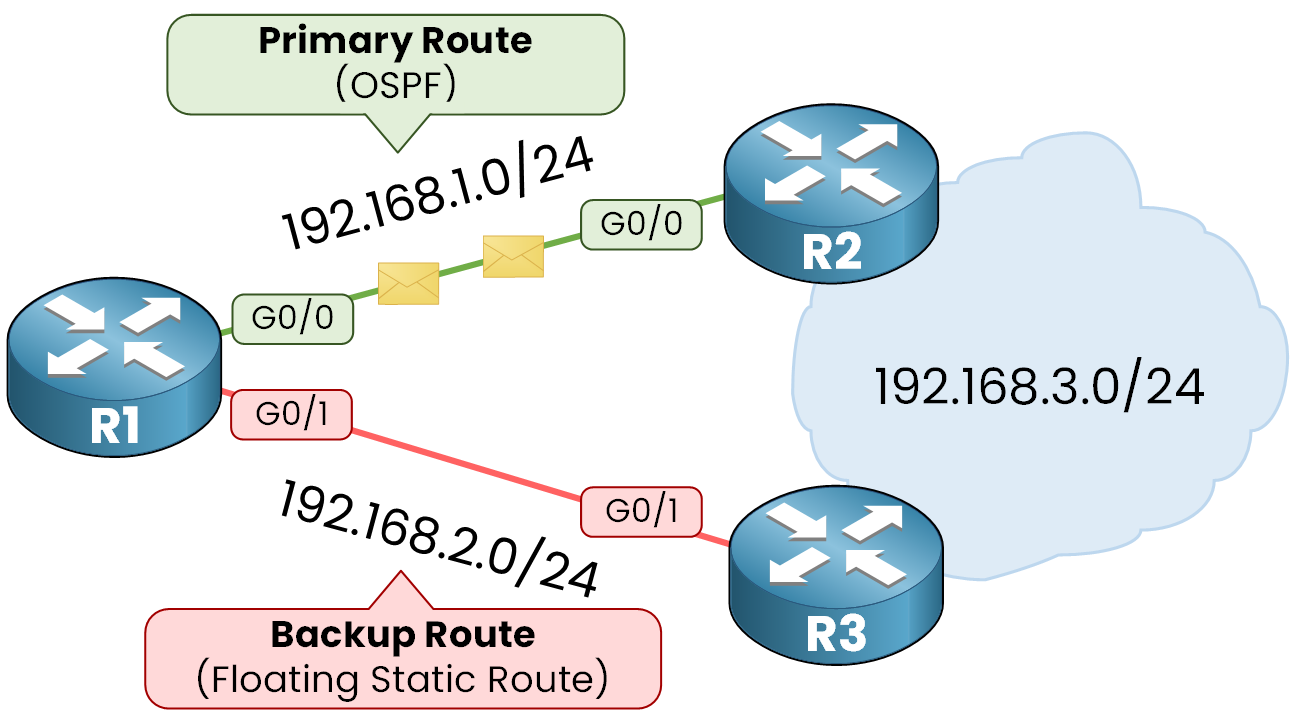
Figure 1 – Floating Static Route Topology
In this topology, R1 wants to reach the 192.168.3.0/24 network.
It can use two paths:
The primary route goes through R2 using OSPF, a dynamic routing protocol covered later in this path, which has an administrative distance of 110.
The backup path uses a Floating Static route with an administrative distance of 130.
Primary Route with OSPF
R1 installs the route with the lowest administrative distance in its routing table. In this case, it will select and use the OSPF route, which has an administrative distance of 110.
R1 can send traffic through R2 and reach 192.168.3.0/24.
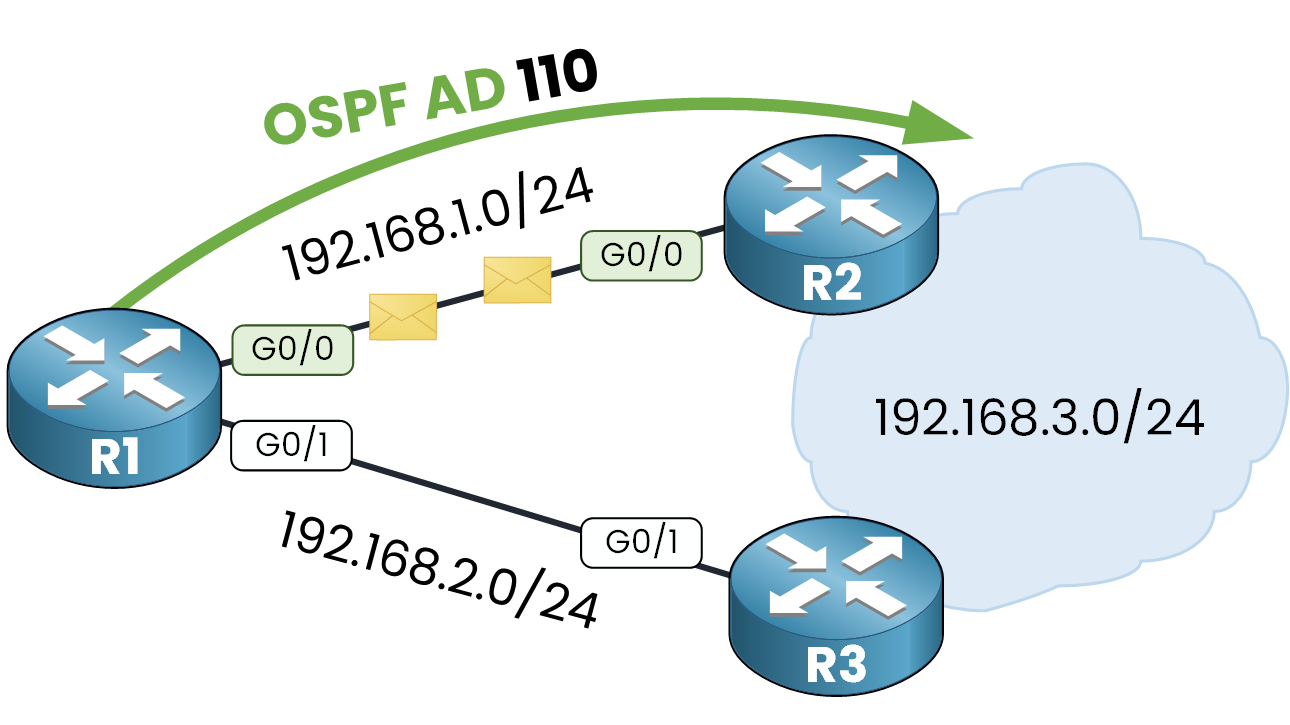
Figure 2 – OSPF Preferred Path and Floating Static Route Fallback
Floating Static Route on OSPF Failure
But now let me show you why the Floating Static Route is used. Imagine the link between R1 and R2 is down. The OSPF neighbor adjacency will go down and the route for the 192.168.3.0/24 network learned via OSPF will be lost.
Since the path with R1 -> R3 -> 192.168.3.0/24 does not use OSPF, a floating static route can be used. In case the primary route goes down, a static route with a higher administrative distance can be installed during the outage of the primary route.
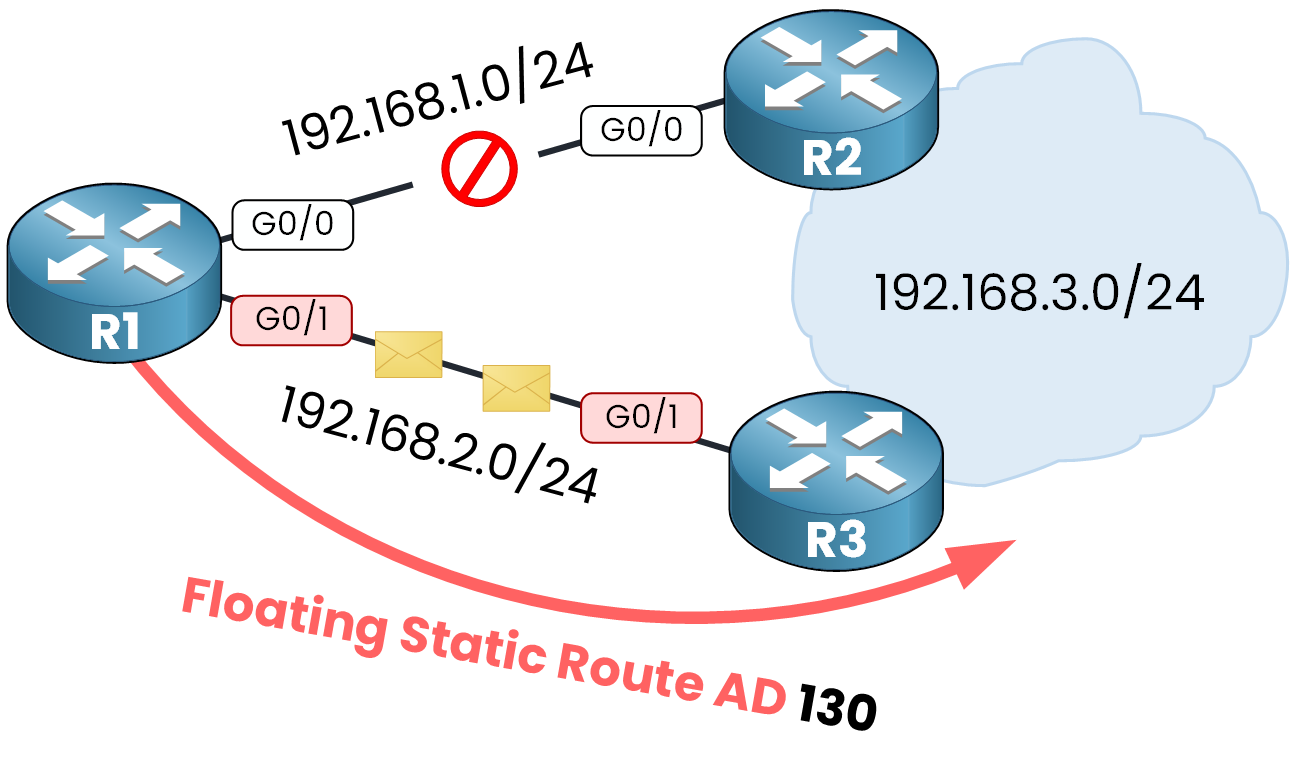
Figure 3 – Floating Static Route Activation After OSPF Failure
Here, R1 will install the floating static route in its routing table and will be able to send traffic to 192.168.3.0/24.
Restoring the OSPF Route
When the link between R1 and R2 is back, the router will use the OSPF route again. This happens because the router prefers the route with the lowest administrative distance.
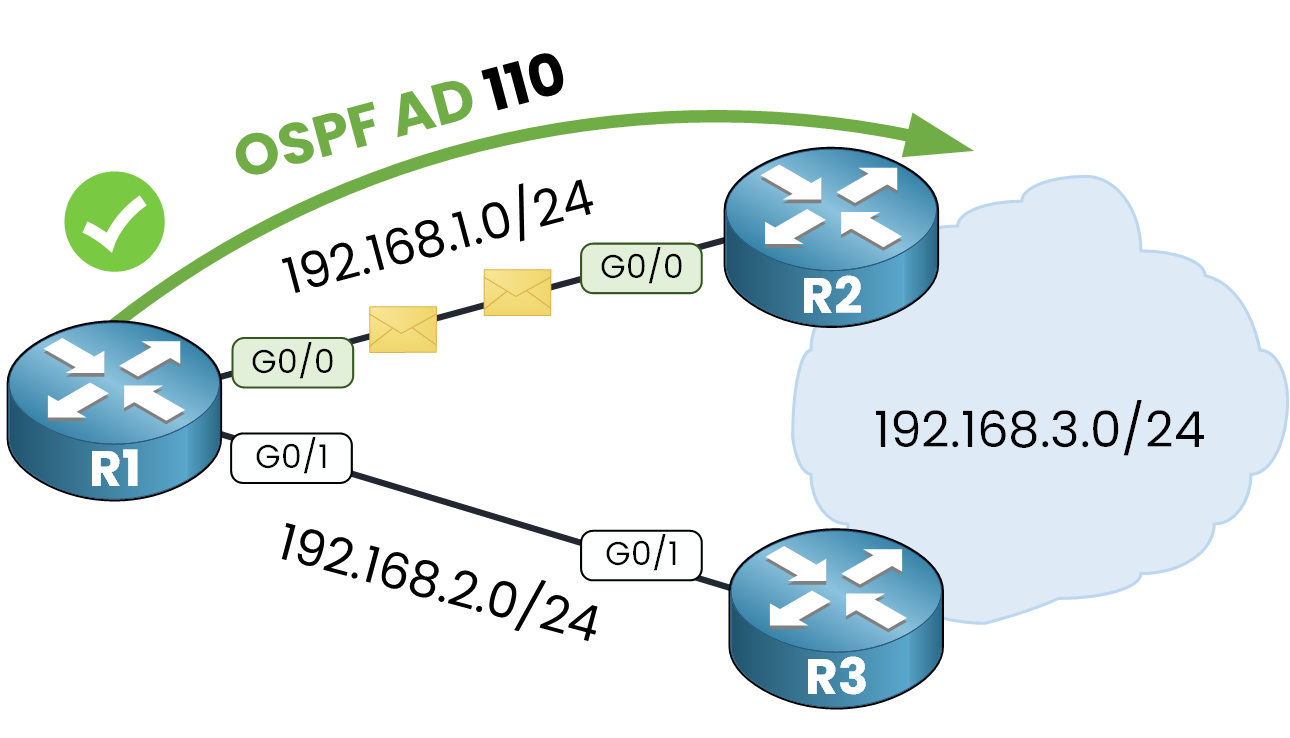
Figure 4 – Reinstating OSPF as the Primary Route After Link Recovery
Why not use OSPF everywhere?
One question you can ask yourself is:
"Okay, but why didn't we use OSPF on all routers? OSPF can decide on a new route."
That's a great question! The answer is simple: you can't always run a dynamic routing protocol everywhere.
R3 might be a client router you can’t control. Since OSPF can’t run on the link between R1 and R3, using a floating static route is the best option.Answer the question below
What role does a Floating Static Route provide in the network?
Let's take a look at how we configure the floating static route on a Cisco router.
The command works like a static route. But, instead of an administrative distance of 1 (the default), you must set a higher distance at the end. This tells the router how much it prefers this route.Since we want a higher administrative distance than 110 (used by OSPF), we can specify 130, for example.
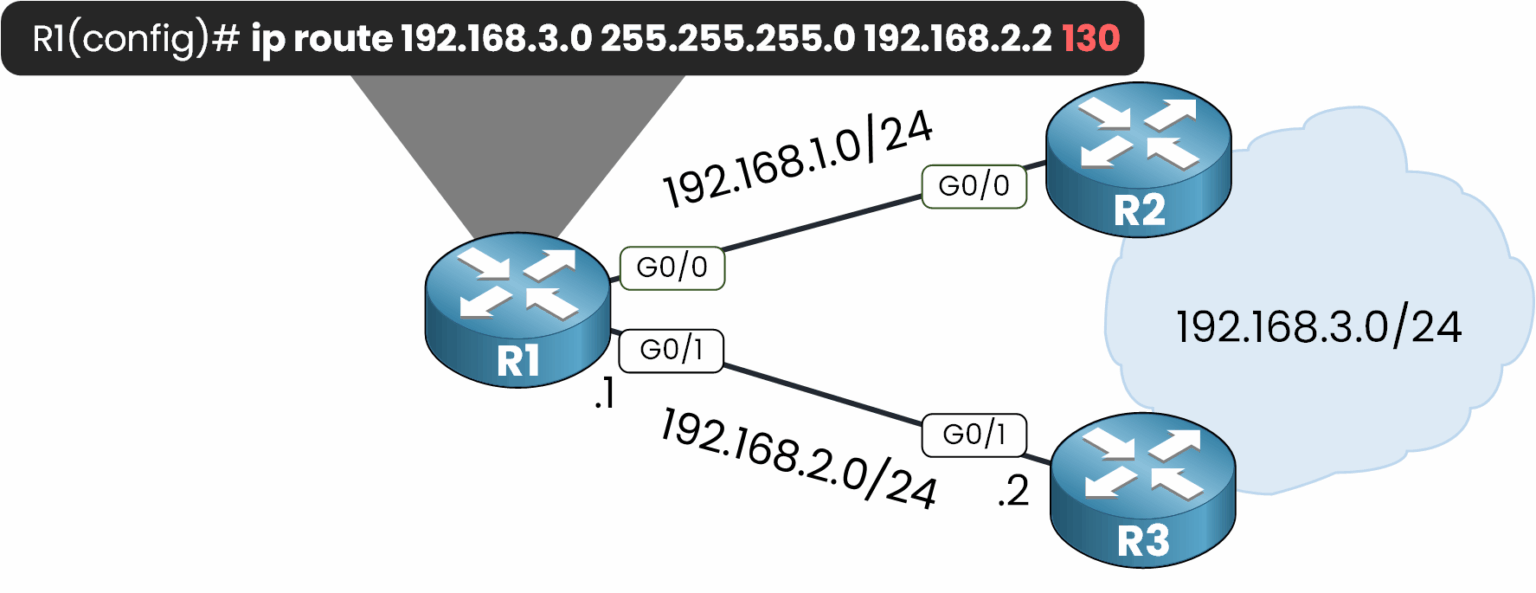
Figure 5 – Configuration of a Floating Static Route
In our topology, R1 and R2 have the 192.168.1.0/24 and 192.168.3.0/24 networks advertised in OSPF:
R1# conf t Enter configuration commands, one per line. End with CNTL/Z. R1(config)# router ospf 1 R1(config-router)# network 192.168.1.0 0.0.0.255 area 0R2# conf t Enter configuration commands, one per line. End with CNTL/Z. R2(config)# router ospf 1 R2(config-router)# network 192.168.1.0 0.0.0.255 area 0 R2(config-router)# network 192.168.3.0 0.0.0.255 area 0We can now check the routing table on R1:
R1# show ip route
Codes: L - local, C - connected, S - static, R - RIP, M - mobile, B - BGP
       D - EIGRP, EX - EIGRP external, O - OSPF, IA - OSPF inter area
       N1 - OSPF NSSA external type 1, N2 - OSPF NSSA external type 2
       E1 - OSPF external type 1, E2 - OSPF external type 2, E - EGP
       i - IS-IS, L1 - IS-IS level-1, L2 - IS-IS level-2, ia - IS-IS inter area
       * - candidate default, U - per-user static route, o - ODR
       P - periodic downloaded static route

Gateway of last resort is not set

     192.168.1.0/24 is variably subnetted, 2 subnets, 2 masks
C       192.168.1.0/24 is directly connected, GigabitEthernet0/0
L       192.168.1.1/32 is directly connected, GigabitEthernet0/0
     192.168.2.0/24 is variably subnetted, 2 subnets, 2 masks
C       192.168.2.0/24 is directly connected, GigabitEthernet0/1
L       192.168.2.1/32 is directly connected, GigabitEthernet0/1
O       192.168.3.0/24 [110/2] via 192.168.1.2, 00:00:57, GigabitEthernet0/0
Here, 192.168.3.0/24 is learned through OSPF with an administrative distance of 110, using the path through R2.
We can now configure the floating static route to 192.168.3.0/24 with an administrative distance of 130:
R1# conf t
Enter configuration commands, one per line.  End with CNTL/Z.
R1(config)# ip route 192.168.3.0 255.255.255.0 192.168.2.2 130
R1(config)# end
If we check the routing table again, the route to 192.168.3.0/24 is still learned through OSPF:
R1# show ip route
Codes: L - local, C - connected, S - static, R - RIP, M - mobile, B - BGP
       D - EIGRP, EX - EIGRP external, O - OSPF, IA - OSPF inter area
       N1 - OSPF NSSA external type 1, N2 - OSPF NSSA external type 2
       E1 - OSPF external type 1, E2 - OSPF external type 2, E - EGP
       i - IS-IS, L1 - IS-IS level-1, L2 - IS-IS level-2, ia - IS-IS inter area
       * - candidate default, U - per-user static route, o - ODR
       P - periodic downloaded static route

Gateway of last resort is not set

     192.168.1.0/24 is variably subnetted, 2 subnets, 2 masks
C       192.168.1.0/24 is directly connected, GigabitEthernet0/0
L       192.168.1.1/32 is directly connected, GigabitEthernet0/0
     192.168.2.0/24 is variably subnetted, 2 subnets, 2 masks
C       192.168.2.0/24 is directly connected, GigabitEthernet0/1
L       192.168.2.1/32 is directly connected, GigabitEthernet0/1
O       192.168.3.0/24 [110/2] via 192.168.1.2, 00:00:57, GigabitEthernet0/0
Simulating a Failure
To see the floating static route in action, we can simulate a failure between R1 and R2.
R1# conf t
Enter configuration commands, one per line. End with CNTL/Z.
R1(config)# int g0/0
R1(config-if)# shutdown

%LINK-5-CHANGED: Interface GigabitEthernet0/0, changed state to administratively down
%LINEPROTO-5-UPDOWN: Line protocol on Interface GigabitEthernet0/0, changed state to down

01:29:11: %OSPF-5-ADJCHG: Process 1, Nbr 192.168.3.1 on GigabitEthernet0/0 from FULL to DOWN, Neighbor Down: Interface down or detached
The primary route is now down, since OSPF lost its neighbor adjacency.
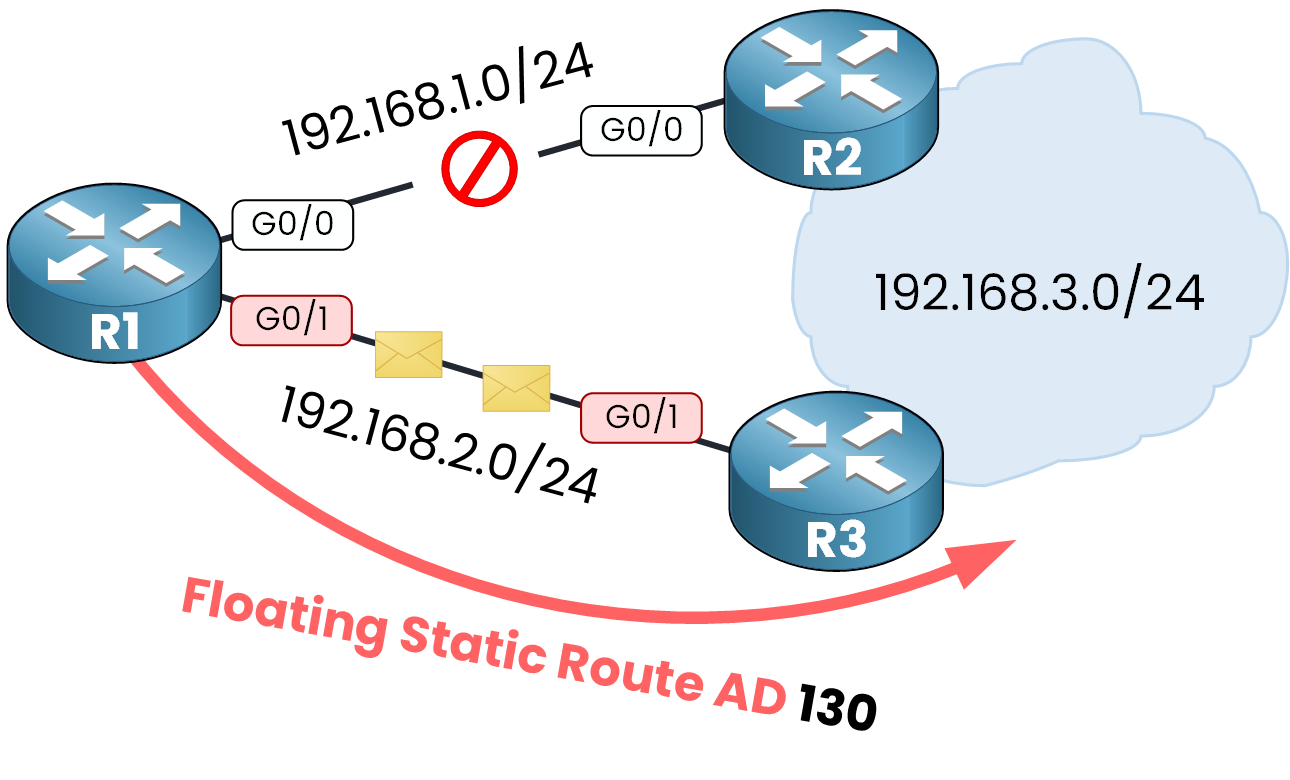
Figure 6 – Floating Static Route Activation After Interface Shutdown
R1 can now use the backup route with an administrative distance of 130. Let’s verify this behavior in the routing table:
R1# show ip route
Codes: L - local, C - connected, S - static, R - RIP, M - mobile, B - BGP
       D - EIGRP, EX - EIGRP external, O - OSPF, IA - OSPF inter area
       N1 - OSPF NSSA external type 1, N2 - OSPF NSSA external type 2
       E1 - OSPF external type 1, E2 - OSPF external type 2, E - EGP
       i - IS-IS, L1 - IS-IS level-1, L2 - IS-IS level-2, ia - IS-IS inter area
       * - candidate default, U - per-user static route, o - ODR
       P - periodic downloaded static route

Gateway of last resort is not set

     192.168.1.0/24 is variably subnetted, 2 subnets, 2 masks
C       192.168.1.0/24 is directly connected, GigabitEthernet0/0
L       192.168.1.1/32 is directly connected, GigabitEthernet0/0
     192.168.2.0/24 is variably subnetted, 2 subnets, 2 masks
C       192.168.2.0/24 is directly connected, GigabitEthernet0/1
L       192.168.2.1/32 is directly connected, GigabitEthernet0/1
S       192.168.3.0/24 [130/0] via 192.168.2.2
Here, we can see the route installed by R1.
This route will stay in the routing table until the OSPF primary link is restored.Answer the question below
What administrative distance is used for the floating static route?
A Floating Static Route can be used as a backup route. This route always has a higher administrative distance than the primary route.
The route is installed only when the primary route is down. It stays in the background as long as it is not needed.
The configuration is simple:
You use the command:ip route <network> <mask> <next-hop> <administrative-distance>This way, the router prefers the primary route first and only uses the floating static route when the main one fails.
Answer the question below
Which parameter in the ip route command defines preference between routes?