Let’s start with a question: how does data travel from one device to another?
In this lesson, we’ll look at a wireless vs wired network because traffic on Wi-Fi doesn’t behave like traffic on a cable. This difference drives speed, collisions, and security.
In Wired Networks with a Switch
In wired networks with a switch, data travels directly to the recipient:
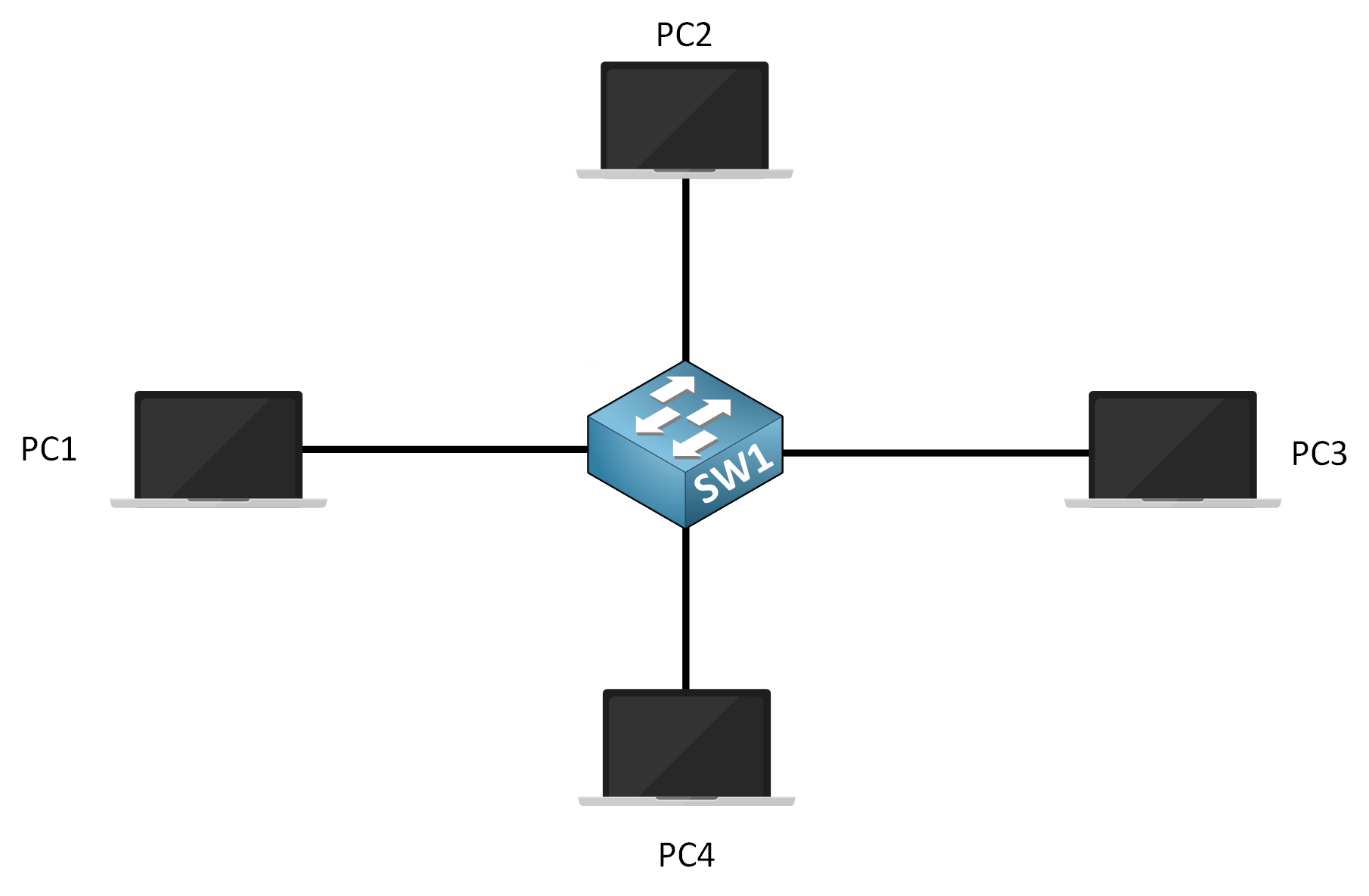
Figure 1 – Switched Wired Network
When PC1 sends data to PC3, the switch forwards the data only to PC3 based on its destination MAC address.
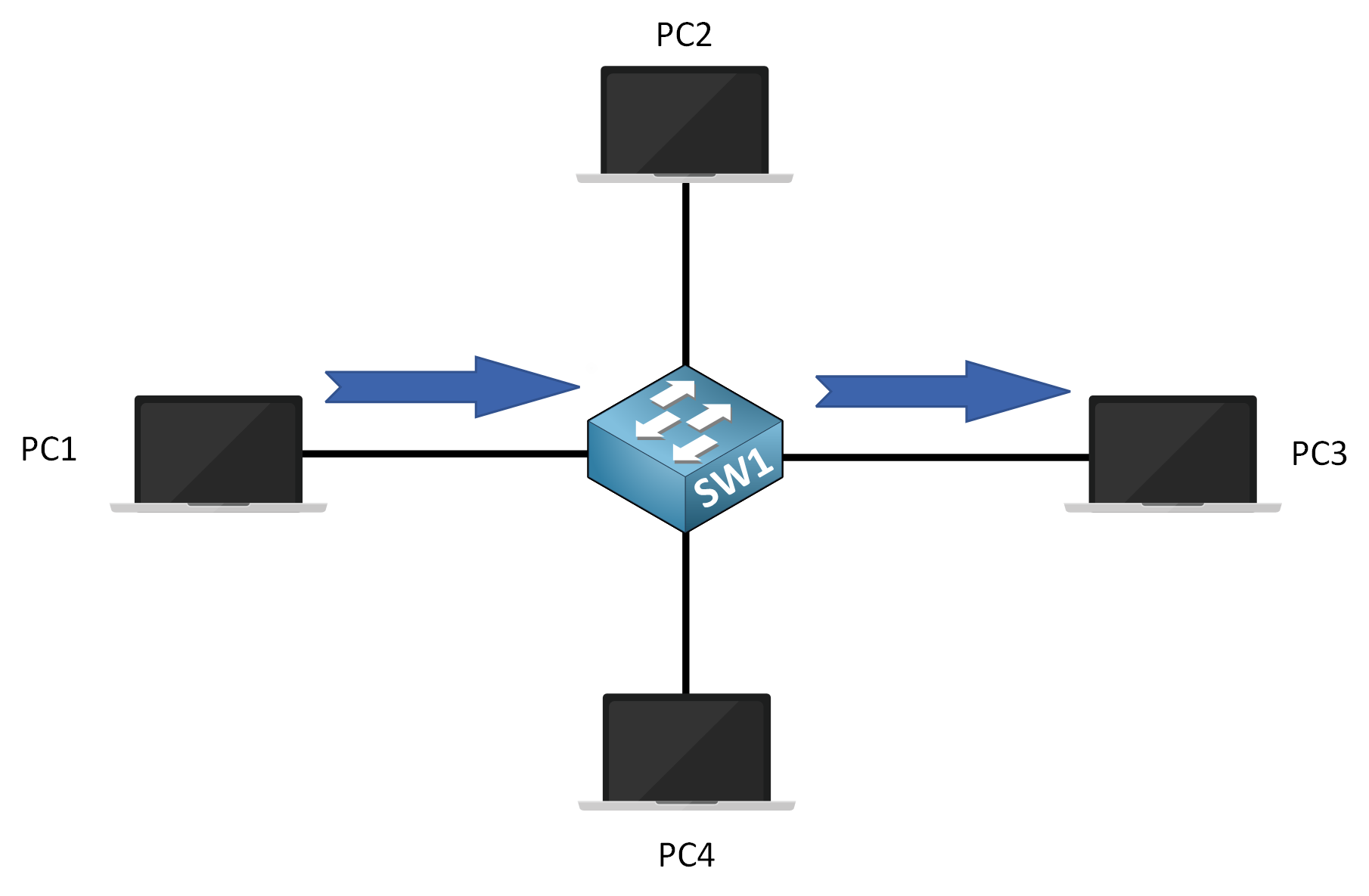
Figure 2 – Full-duplex communication in a switched wired network
PC2 and PC4 don’t receive the data because the switch sends it privately to the intended recipient.
Communication occurs in full-duplex mode: PC1 and PC3 can send and receive data simultaneously without collisions.
Answer the question below
In a switched wired network, what mode allows devices to send and receive at the same time?
In Hub-Based Wired Networks
In hub-based wired networks, data is sent as a broadcast:
When PC1 sends data to PC3, the hub broadcasts the data to all devices on the network (PC2, PC3, and PC4).
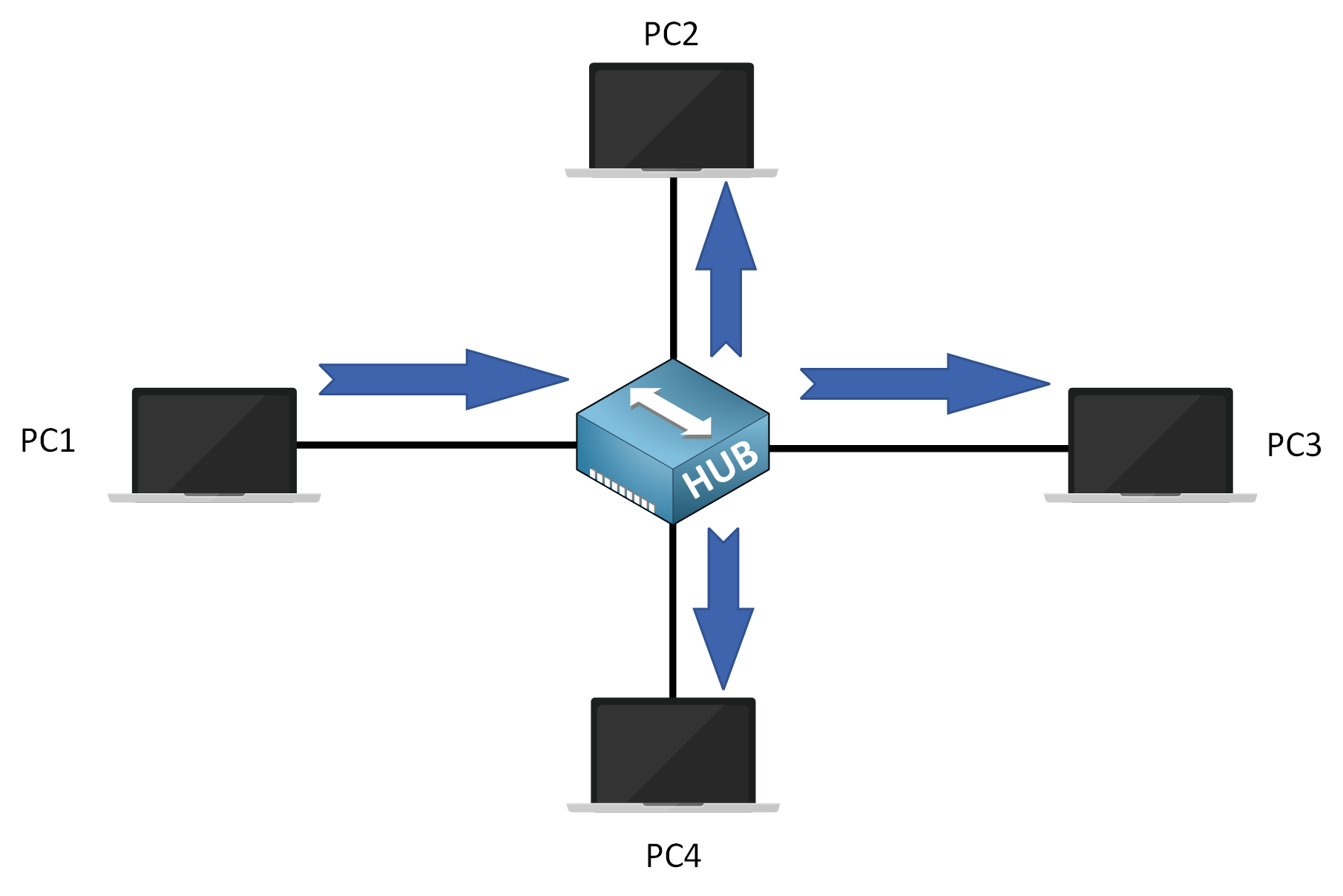
Figure 3 – Data broadcast in a hub-based wired network
PC3 is the only device that processes the data, while PC2 and PC4 ignore it.
Communication is in half-duplex mode when using a hub, meaning devices can only send or receive data, not both at the same time.
This shared-medium behavior can lead to transmission conflicts if multiple devices, such as PC1 and PC4, attempt to send data at the same time.
Answer the question below
What network device causes all frames to be broadcast to every connected device?
In Wireless Networks with an Access Point (AP)
In wireless networks with an Access Point (AP), data is transmitted over a shared medium, which makes it appear similar to a hub at a physical level.
When PC1 sends data to PC3, the frame is transmitted over the air, so all devices within range can receive the signal.
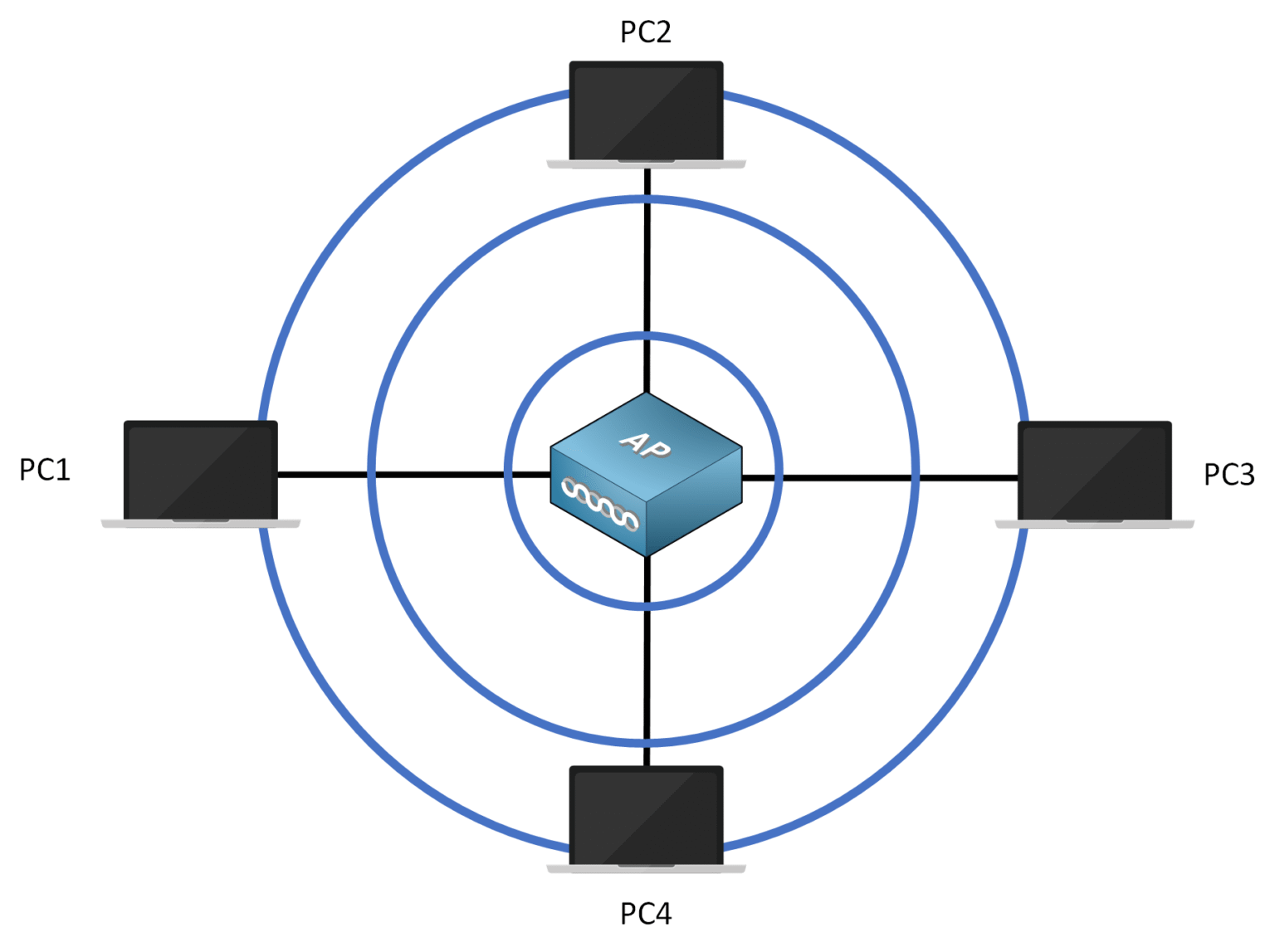
Figure 4 – Frame is transmitted over the air
How Wireless Transmission Works
PC3 processes the data because the frame is addressed to its MAC address.
Other nearby devices receive the frame but ignore it since they are not the intended destination.
Communication operates in half-duplex mode, meaning devices must wait their turn to send or receive data.
Since wireless frames travel through the air and can be received by any nearby device, encryption is necessary to protect the contents of the data from being intercepted by unauthorized devices.
Comparison with Wired Networks
With a switch, data is normally forwarded only to the intended recipient based on the destination MAC address.
In wireless networks, frames are transmitted over a shared medium and can be received by all devices within range, which increases:
the need for coordination mechanisms
the importance of security and encryption
Answer the question below
Wireless communication uses which duplex mode?
In wireless networks, all devices within range can hear transmissions on the shared medium, similar to devices connected to a hub at a physical level. This makes wireless communication more susceptible to data interception and privacy issues.
⚠️ In wired networks, Ethernet frames on the LAN are typically not encrypted at Layer 2, as the medium is physically contained. In wireless networks, however, frames travel through the air, so encryption is essential, even within the LAN, to prevent unauthorized access. Without encryption, any device within range could capture the traffic.
We will cover wireless security mechanisms in a later lesson.
Half-Duplex Communication and Transmission Conflicts
Wireless networks operate in half-duplex mode, meaning devices cannot send and receive data at the same time.
Because multiple devices share the same radio channel, simultaneous transmissions can interfere with each other, resulting in failed transmissions that must be retried when an acknowledgment (ACK) is not received.
So, how do wireless devices coordinate access to the shared medium and reduce transmission conflicts?
Answer the question below
Wireless networks operate using which duplex mode?
Wireless LANs (WLANs) use:
Half-duplex: Only one device can send or receive data at a time.
Shared media: All devices use the same radio channel to communicate.
The main challenge with wireless communication is that devices cannot detect a collision while sending data because they cannot listen and transmit simultaneously.
Instead of detecting collisions after they occur, CSMA/CA (Carrier Sense Multiple Access with Collision Avoidance) aims to prevent collisions from happening in the first place by coordinating when devices send data.
How CSMA/CA Works
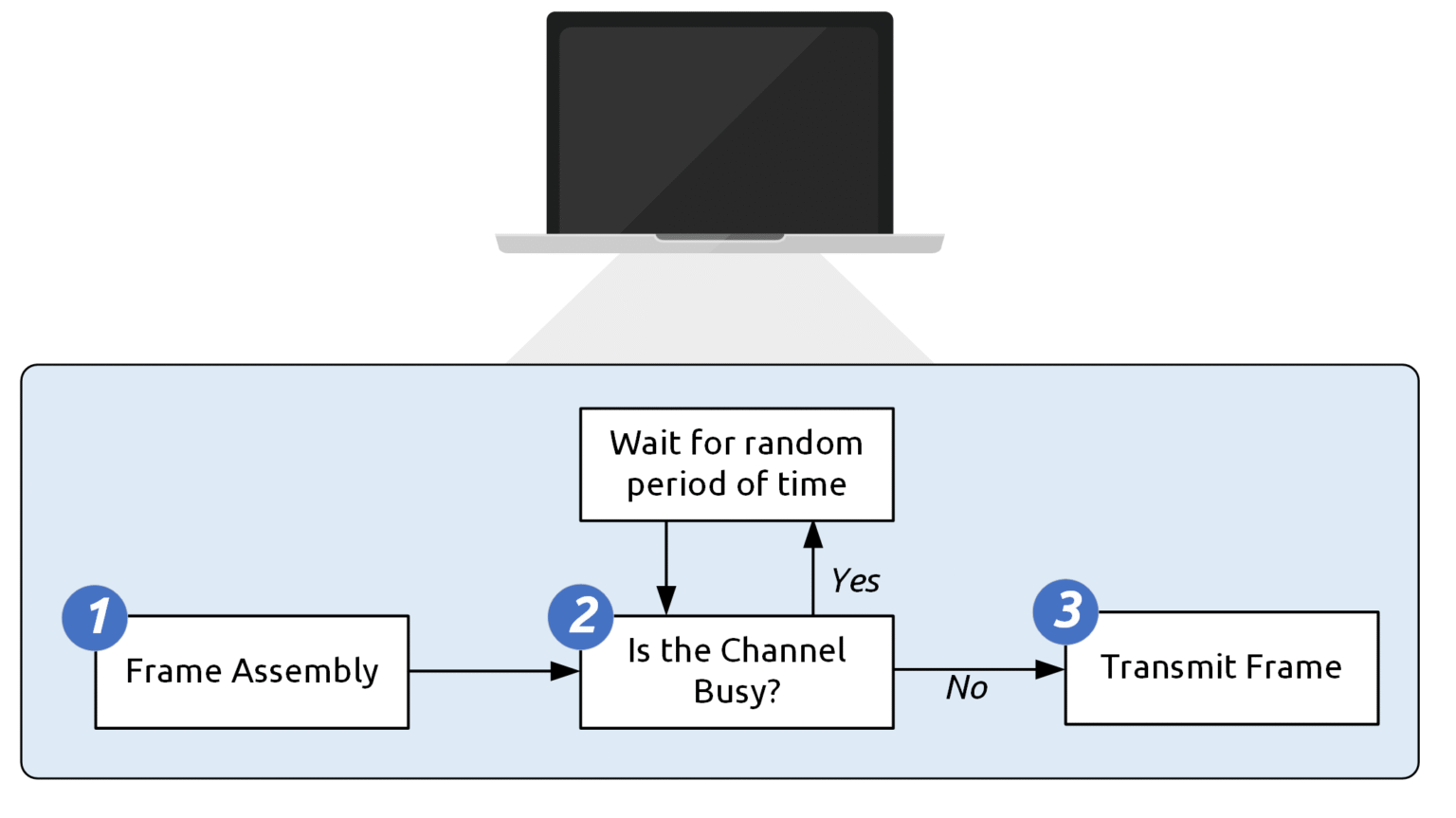
Figure 5 – CSMA/CA process for wireless communication
Channel Check: The client listens to the channel to check if it’s free (no other traffic detected).
Random Wait if Busy: If the channel is busy, the client waits for a random period before checking again.
Frame Transmission: If the channel is free, the client transmits the frame.
Acknowledgment (ACK): Every transmission must be acknowledged. If the wireless client doesn’t receive an acknowledgment, it interprets this as a failed transmission due to a possible collision and initiates the process again.
RTS/CTS Mechanism (Optional)
The RTS/CTS mechanism is an optional feature used to prevent frame collisions caused by the hidden node problem. Here’s how it works:
Request to Send (RTS): The client sends an RTS packet to the AP, requesting permission to transmit data.
Clear to Send (CTS): The AP responds with a CTS packet to grant permission to use the channel.
Once the CTS is received, the client sends the frame.
The ACK confirms successful reception of the data.
💡 Think of It Like This: It’s like waiting your turn to speak in a conversation: you check if someone else is speaking before you start. If you don’t get a signal that it’s your turn, you wait before trying again.
The RTS/CTS process adds coordination to reduce collisions in networks with hidden nodes but is not required in all wireless setups. While this level of detail isn’t mandatory for the CCNA exam, it helps to understand how CSMA/CA can go deeper to handle specific network scenarios.
Answer the question below
After sending a frame in a wireless network, what must the client receive to confirm successful transmission?
Now that we’ve covered how data is transmitted in wired and wireless networks, the challenges wireless networks face, and how CSMA/CA helps prevent collisions, you're better equipped to understand the mechanics behind network communication.
In the next lesson, we’ll dive deeper into Wireless LAN 802.11 Service Sets to explore how wireless networks organize devices. Let’s continue!
Answer the question below
Click 'Complete' to continue