Wireless security protects Wi-Fi networks from many potential threats that you might not even think about.
Unlike wired connections, wireless signals travel through the air, which makes them easier to capture or exploit.Without wireless security, attackers can listen to traffic, impersonate access points, or alter data in transit.
In this lesson, you'll learn about the most common wireless attacks and how we can protect ourselves against them.Eavesdropping
Let's imagine a university campus with Wi-Fi everywhere. It's in classrooms, libraries, and even outside.
At first, this principle seems great, but you need to understand that wireless signals don’t stop at the walls. They extend beyond the building, allowing anyone nearby to capture them.In Figure 1, you can see how this happens. PC1 sends wireless frames to the access point, but a hacker outside the building can also receive them.

Figure 1 - Wireless signals leak outside the building
Even without connecting to the Wi-Fi network, the attacker can listen to the communication taking place in the air.
This is called eavesdropping, which means someone can silently intercept wireless signals as they travel between a device and an access point. If the wireless traffic is not encrypted, the attacker can easily read the data being exchanged.
Rogue AP
Now imagine that the attacker takes it one step further.
Instead of only listening to wireless traffic, they create their own fake access point using the same SSID as the real network.In Figure 2, the user sees two Wi-Fi networks with the same SSID, “University Network.”
Since the fake access point has a stronger signal, PC1 automatically connects to it, thinking it is the legitimate network.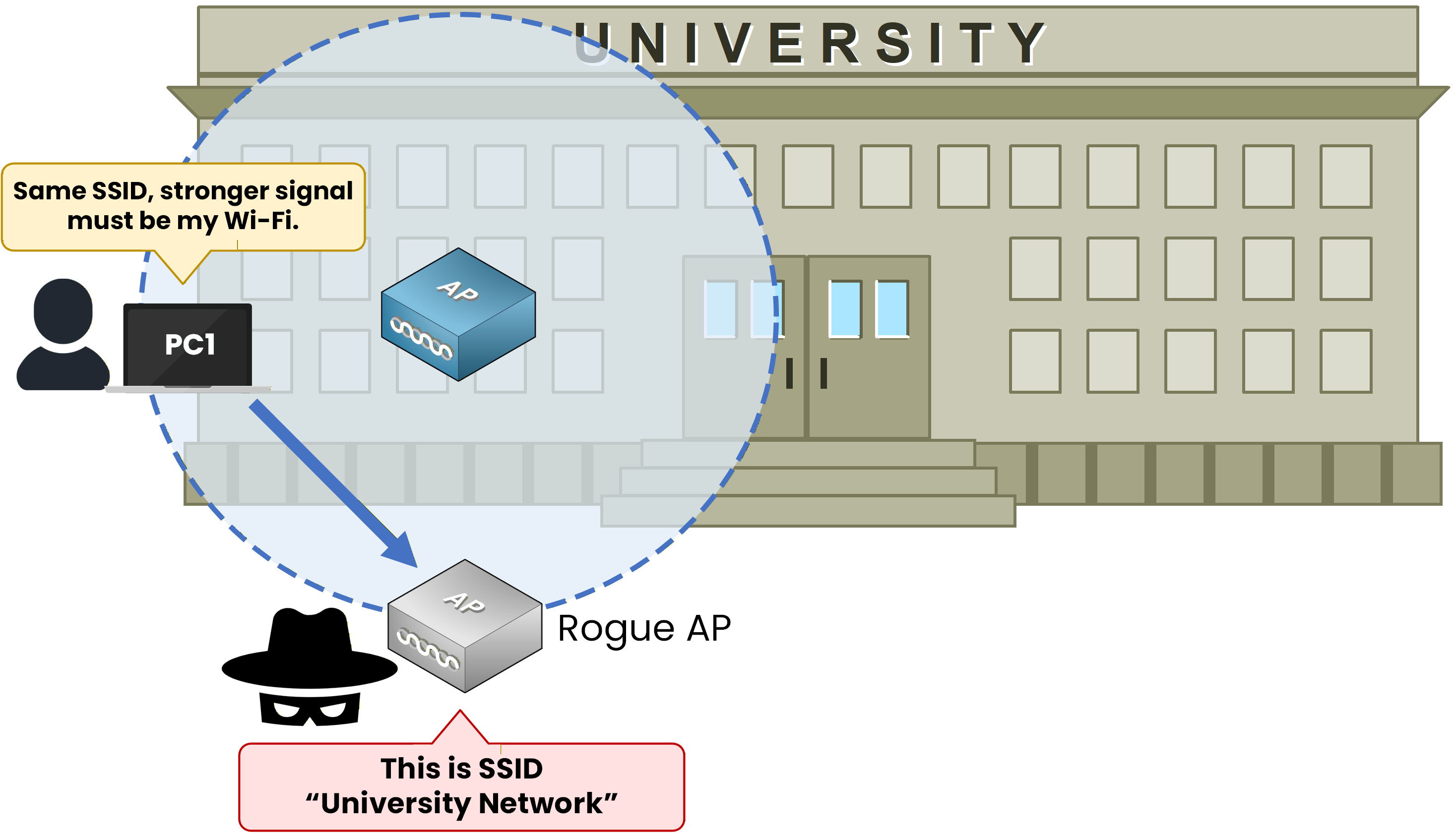
Figure 2 - Rogue AP mimics the real Wi-Fi to trick users into connecting.
Once connected, all of the user’s traffic goes through the attacker’s device, allowing them to monitor or modify the data in real time.
This type of attack is called a Rogue Access Point.
It tricks users into joining a fake Wi-Fi network that seems real. This gives the attacker complete control over the communication.Once the attacker controls the traffic, the next step is to manipulate it.
Data Tampering
After eavesdropping or setting up a rogue access point, an attacker can go even further.
Instead of just listening to traffic or tricking users into a false access point, they can intercept and alter the data being transmitted.Figure 3 shows PC1 transmitting wireless frames to the access point. An attacker first captures those frames, modifies their content, and then forwards them to the access point so the traffic looks legitimate.

Figure 3 - Attacker intercepts, alters and forwards PC1's wireless frames to the server.
This means the attacker can inject false information or even redirect network traffic, all without the user noticing. This type of attack targets data integrity.
All these types of wireless attacks raise an important question: how can wireless networks be secured?
From Threats to Protection
To stay secure, network engineers rely on mechanisms that authenticate users, protect data, and ensure every frame arrives intact. Let me show you the three pillars of Wireless Security to help you understand how these protections work together.
Answer the question below
Which wireless attack consists of silently capturing frames in the air without joining the network?
Wireless Security relies on three main principles that work together to defend the network.
Authentication — Who Are You?
Before a device can send or receive data on a wireless network, it first needs to prove its identity. This process is called Authentication. It ensures that only legitimate users can connect to the access point.
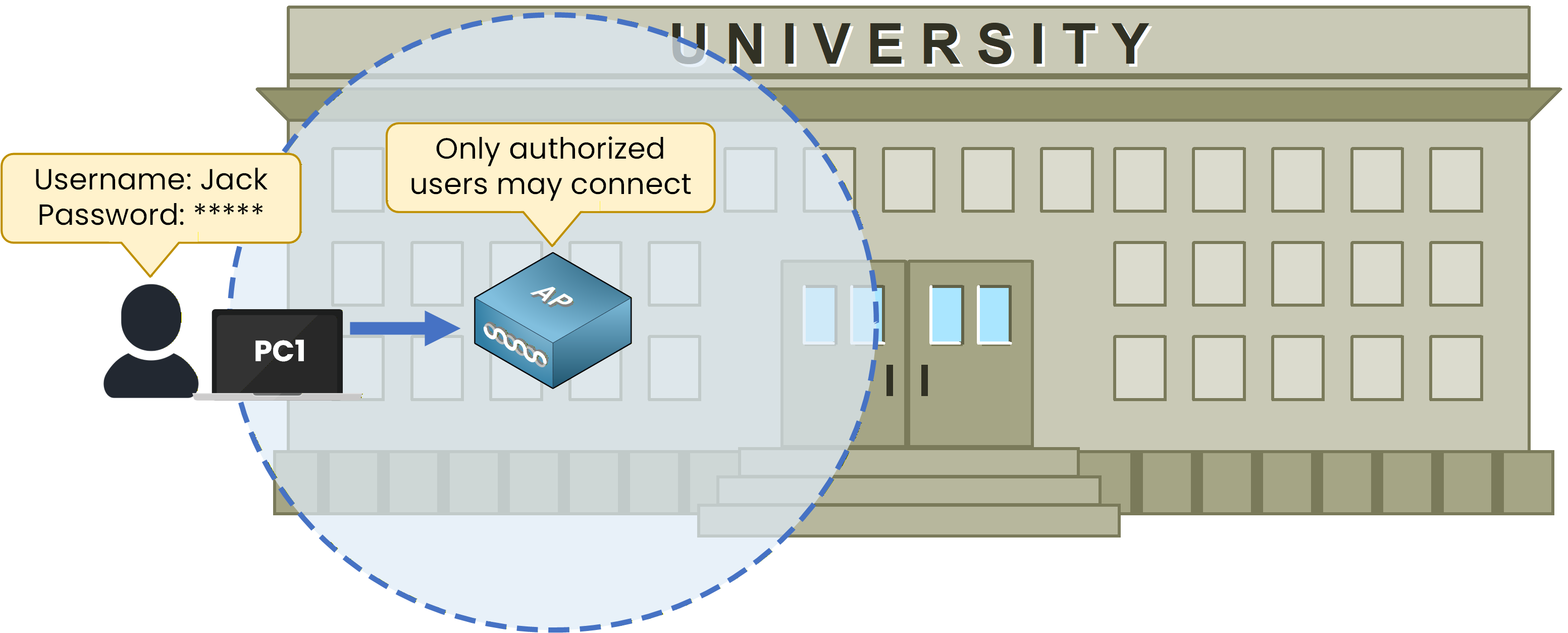
Figure 4 – Authentication: Only authorized users can connect after providing valid credentials.
In Figure 4, PC1 tries to join the university Wi-Fi by sending its username and password. The access point checks these credentials and only allows the connection if they are valid. This prevents unauthorized people from joining the network, even if they can see the wireless signal.
Answer the question below
What process ensures that only legitimate users can join a Wi-Fi network?
Encryption — Hide the Data
If an attacker manages to capture wireless frames, we can use encryption to ensure they cannot read the content. By using encryption, data is converted into an unreadable format that only authorized devices can decrypt using a shared key.
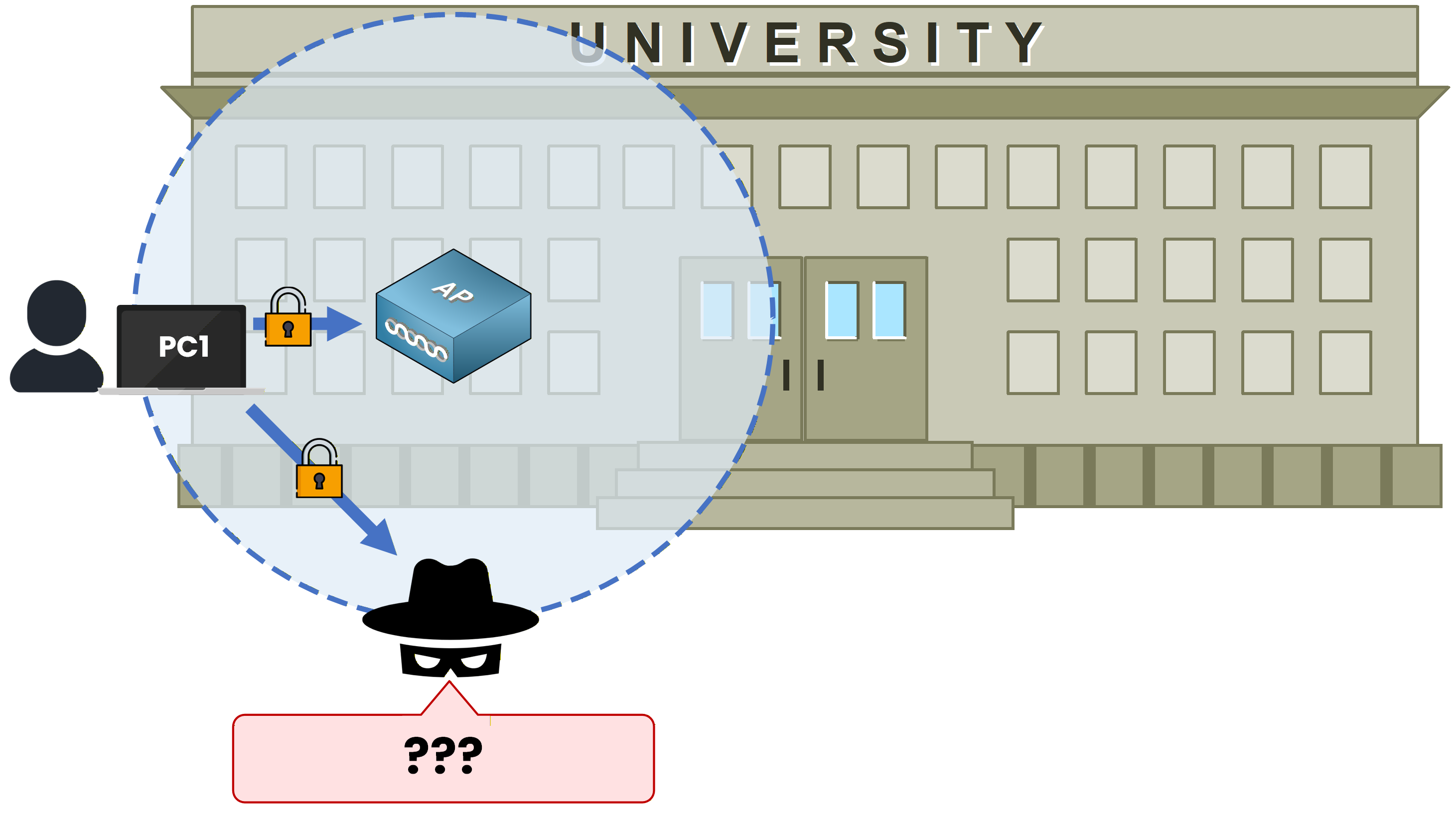
Figure 5 – Encryption: Data is encrypted to block eavesdropping.
In Figure 5, PC1 communicates with the access point by encrypting its traffic. The hacker tries to capture the wireless signal, but all they can see is meaningless data. Too bad for the hacker!
Remember that encryption protects the confidentiality of network traffic, and it’s especially important in wireless networks to block eavesdropping attempts.Answer the question below
When attackers capture Wi-Fi frames during eavesdropping, what protects the data from being read?
Integrity — Keep Data Untouched
Even if data is protected by encryption, there is still a risk that someone could intercept and modify it before it reaches its destination. To prevent this, wireless networks use a Message Integrity Check (MIC). This mechanism is part of data integrity. Data integrity ensures that every frame arrives exactly as it was sent.
As shown in Figure 6, the sender adds a small digital code called the Message Integrity Check (MIC) to the frame before sending it.
The MIC is a cryptographic value calculated from the frame data and a shared key, acting like a digital fingerprint that allows the receiver to verify the frame’s integrity.
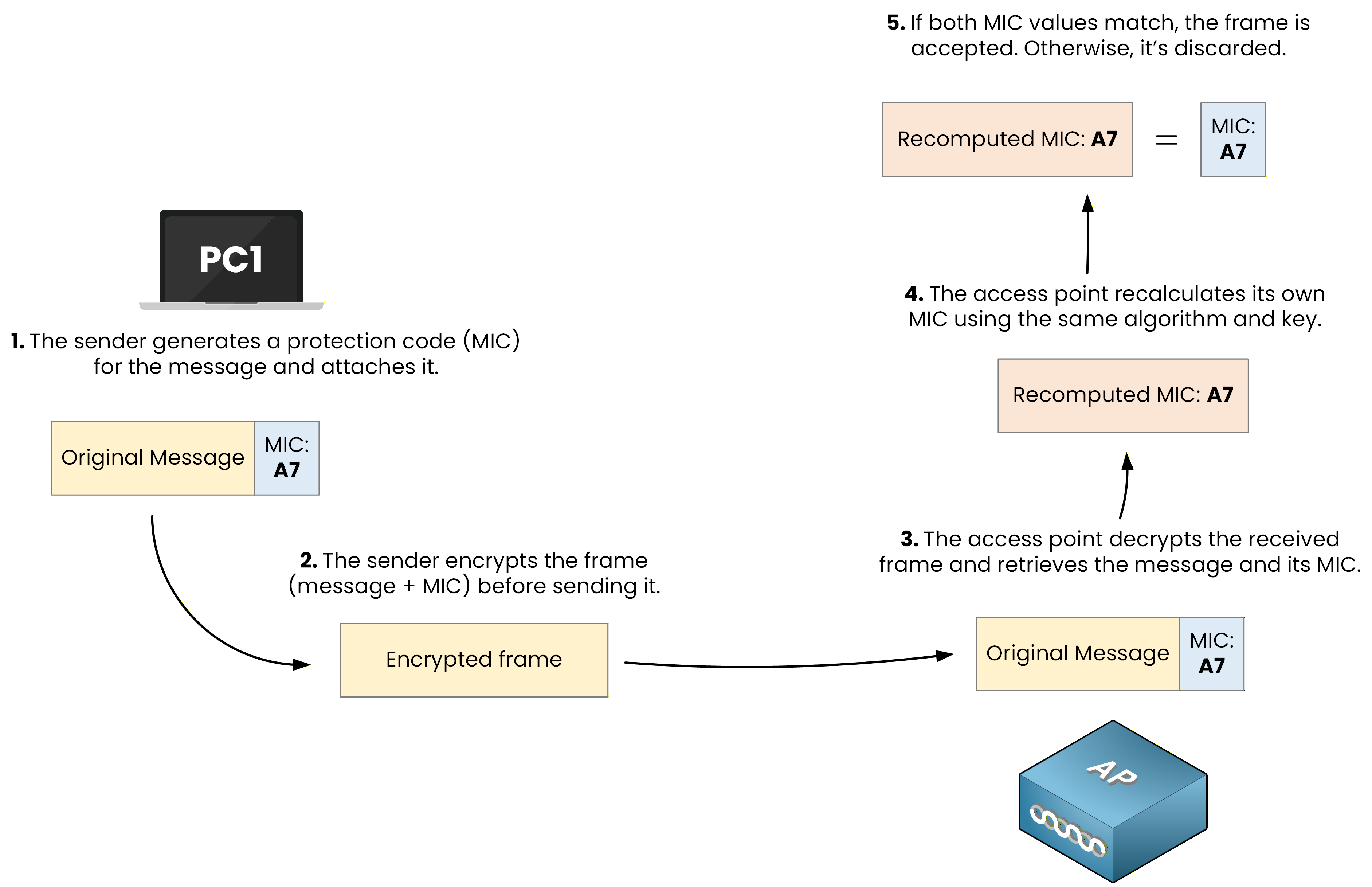
Figure 6 – Integrity: The AP recomputes and compares the MIC to ensure the data wasn’t modified.
In our example, the MIC value is A7. When the access point receives the frame, it decrypts it, recalculates its own MIC using the same shared key, and compares it with the one included in the frame.
If both MIC values match, the data is considered intact. If they differ, it means the frame was altered during transmission, and the access point rejects it to protect the network.Answer the question below
What mechanism verifies that a wireless frame hasn’t been modified in transit?
Wireless networks are exposed to multiple attacks such as eavesdropping, rogue access points, and data tampering. To stay protected, network engineers rely on three essential security principles: Authentication, Encryption, and Integrity.
These mechanisms ensure that wireless traffic is trusted, data remains private, and information is not altered.
Key Takeaway
Authentication verifies who is allowed to connect.
Encryption protects data from being read by unauthorized users.
Integrity ensures that data is not modified during transmission.
Mastering these three pillars will help you understand how modern wireless security protocols keep Wi-Fi networks safe.
In the next lesson, you will see how these principles are implemented through protocols such as WEP, WPA, WPA2, and WPA3.
Answer the question below
Click 'Complete' to continue