In this lesson, you are going to discover the life of a packet and understand the decisions made at each step.
You might ask yourself: what does “the life of a packet” actually mean?
When two devices communicate on a network, data does not magically appear at the destination. It is sent in packets, and each packet follows a precise path across the network. That journey, from the source to the destination, is what we call the life of a packet, and this is exactly what you are going to follow step by step.
The Communication Scenario
Take a look at the diagram below. Imagine that PC1 wants to communicate with PC2, which is located in a different network.
The packet must cross switches, routers, and multiple IP networks before it can reach its destination.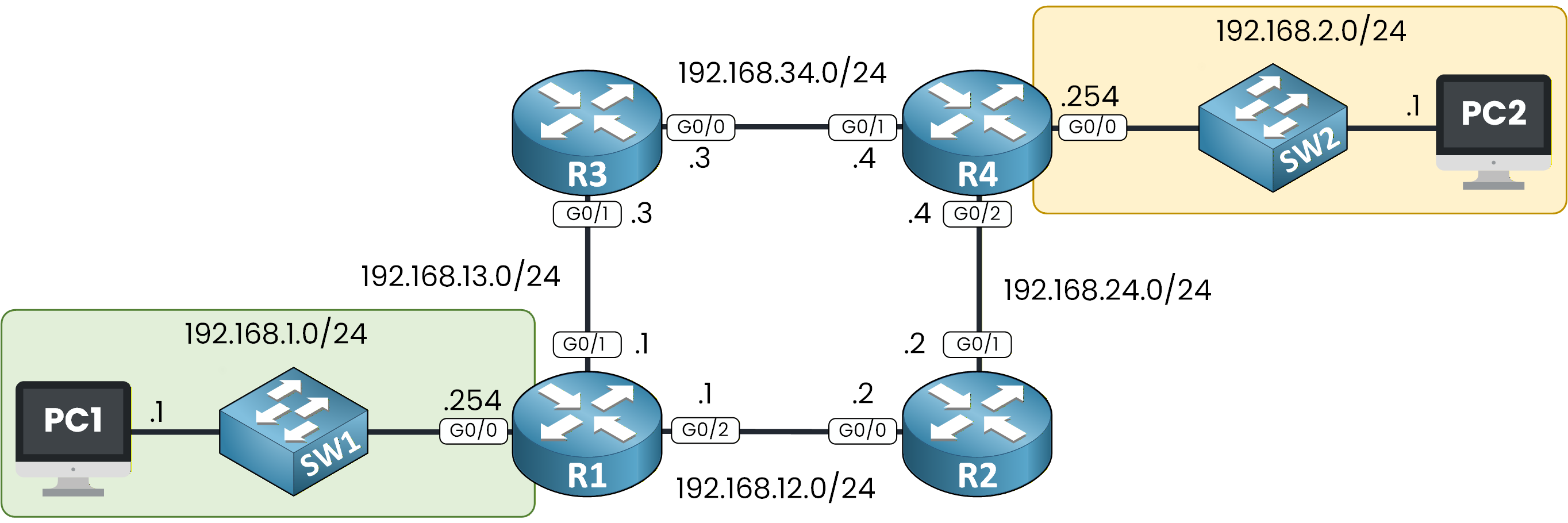
Figure 1 - Network Topology
This diagram shows the networks involved in this communication. You can see the source host, the destination host, and all the intermediate devices that the packet must pass through.
Before going into details, it is important to understand why we are studying this process.
The Goal of This Lesson
The goal of this lesson is to help you understand how a packet moves through a network and how forwarding and routing decisions are made.
This lesson is a bit more challenging than the previous ones, but it is also one of the most important. If you truly understand the logic behind packet behavior, many networking concepts will suddenly become much clearer.
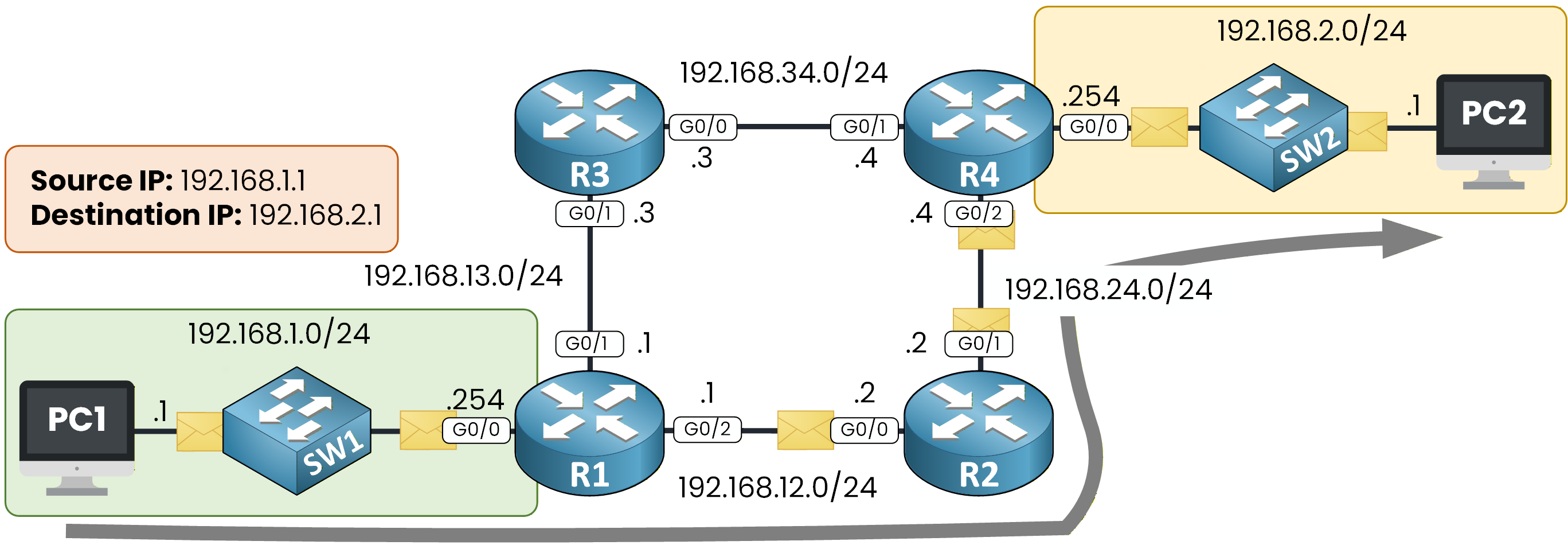
Figure 2 - Life of a Packet Path in the Topology
To explain this process, we will use one example to guide us through it from start to finish: PC1 communicating with PC2.
As you can see above, the arrow represents the path that the packet will take through the network. In the rest of this lesson, our objective is simple: follow that path step by step and understand what happens at each stage.
Let's dive in!
Answer the question below
What do we call the journey of a packet from the source to the destination?
Let’s start from the topology and define the communication we are about to analyze.
PC1 uses the IP address 192.168.1.1 and belongs to the 192.168.1.0/24 network, shown in green.
PC2 uses the IP address 192.168.2.1 and belongs to the 192.168.2.0/24 network, shown in yellow.
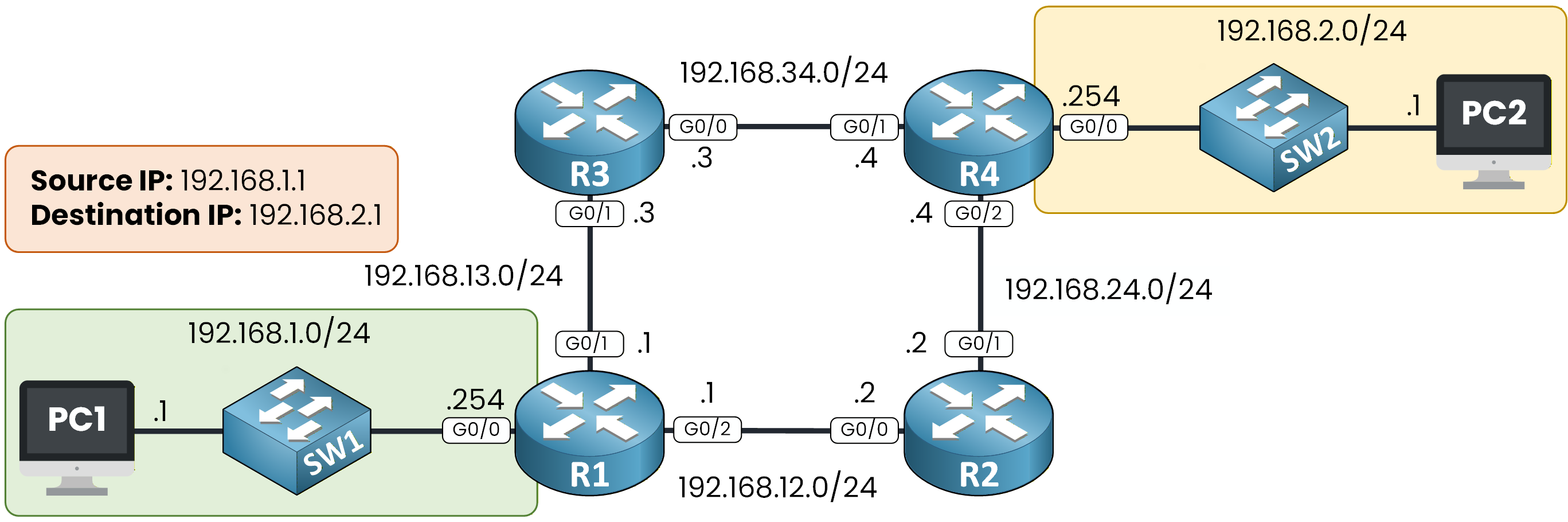
Figure 3 - Network Topology
Local vs Remote Destination
Before sending any packet, PC1 first determines whether the destination is local or remote.
To do this, PC1 compares the destination IP address, 192.168.2.1, with its own subnet, 192.168.1.0/24.
Because the destination IP does not belong to the local subnet, PC1 identifies the destination as remote.This single decision defines the entire forwarding behavior of the host, so make sure this logic is clear before moving on.
Using the Default Gateway
When the destination is remote, PC1 cannot send the packet directly to the destination host.
Instead, it must forward the traffic to its default gateway.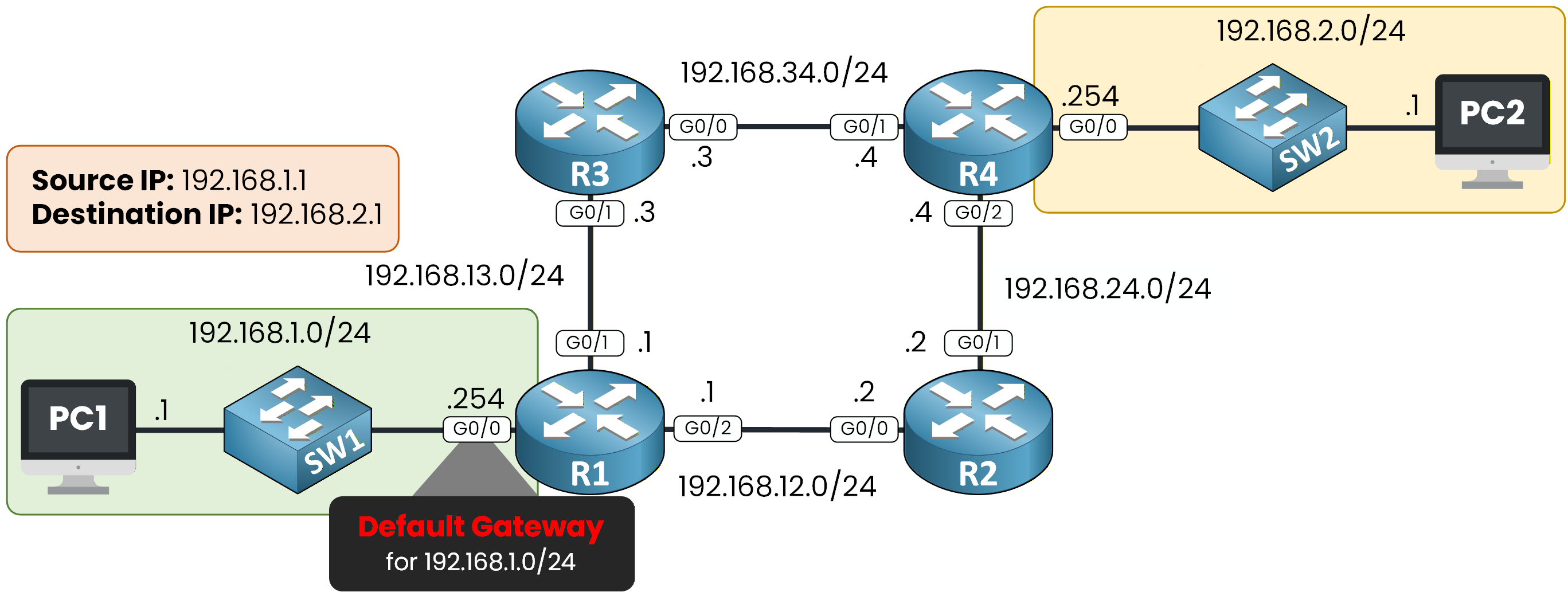
Figure 4 - R1 is the default gateway for 192.168.1.0
The default gateway is the IP address used to exit the local network.
In this topology, the default gateway for the 192.168.1.0/24 network is router R1, using IP address 192.168.1.254.PC1 now knows which device is responsible for forwarding the packet outside the local network.
Answer the question below
Which device does PC1 send the packet to when the destination is remote?
Resolving the Default Gateway MAC Address
PC1 already knows the IP address of the default gateway, but this is not enough to send the packet.
On an Ethernet network, frames are forwarded using MAC addresses.
Before sending anything to R1, PC1 must first learn the MAC address of the router’s interface.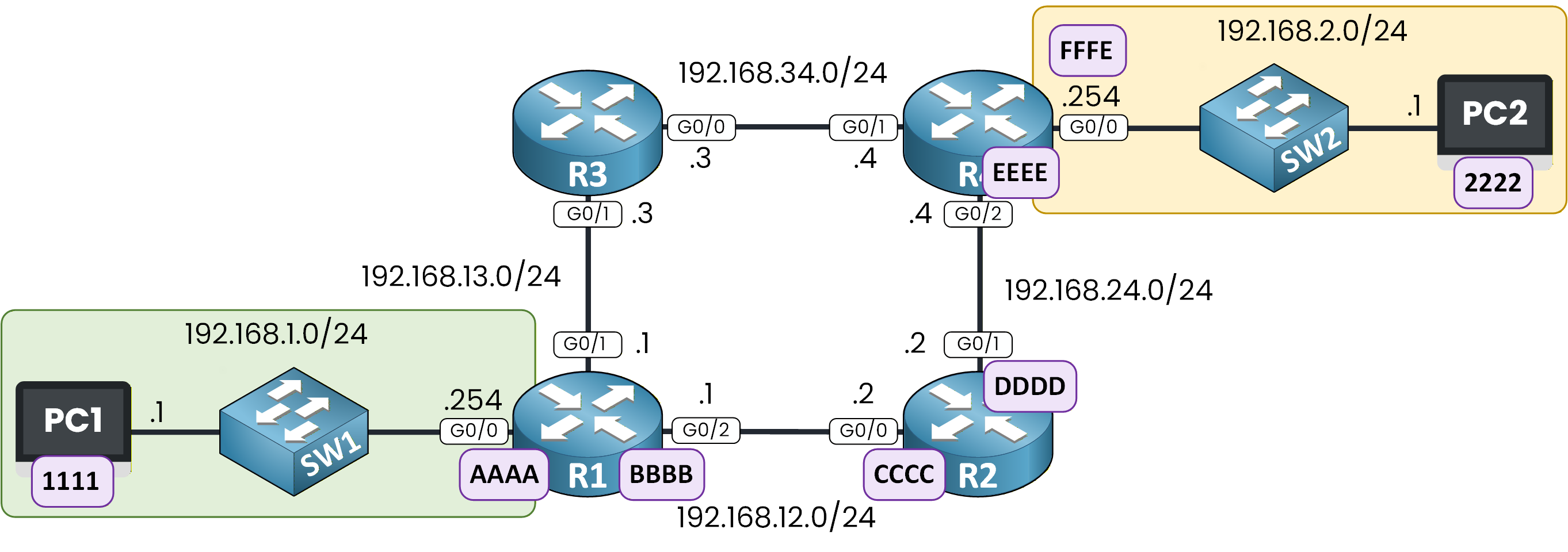
Figure 5 - Network Path with MAC Addresses
The diagram shows the MAC addresses used along the path.
For clarity, the MAC addresses are simplified. In real networks, MAC addresses are 48-bit hexadecimal values.
ARP Request from PC1
To leave the local network, PC1 needs the MAC address of its default gateway.
Throughout this lesson, FFFF.FFFF.FFFF is the Ethernet broadcast address. It is a placeholder used only inside ARP requests, while a device is still waiting to learn a real MAC address. It never appears as the destination MAC of an actual data frame: by the time PC1 (or any router) sends real traffic, FFFF.FFFF.FFFF has already been replaced by the real MAC address learned through ARP (for example AAAA for R1, or 2222 for PC2).
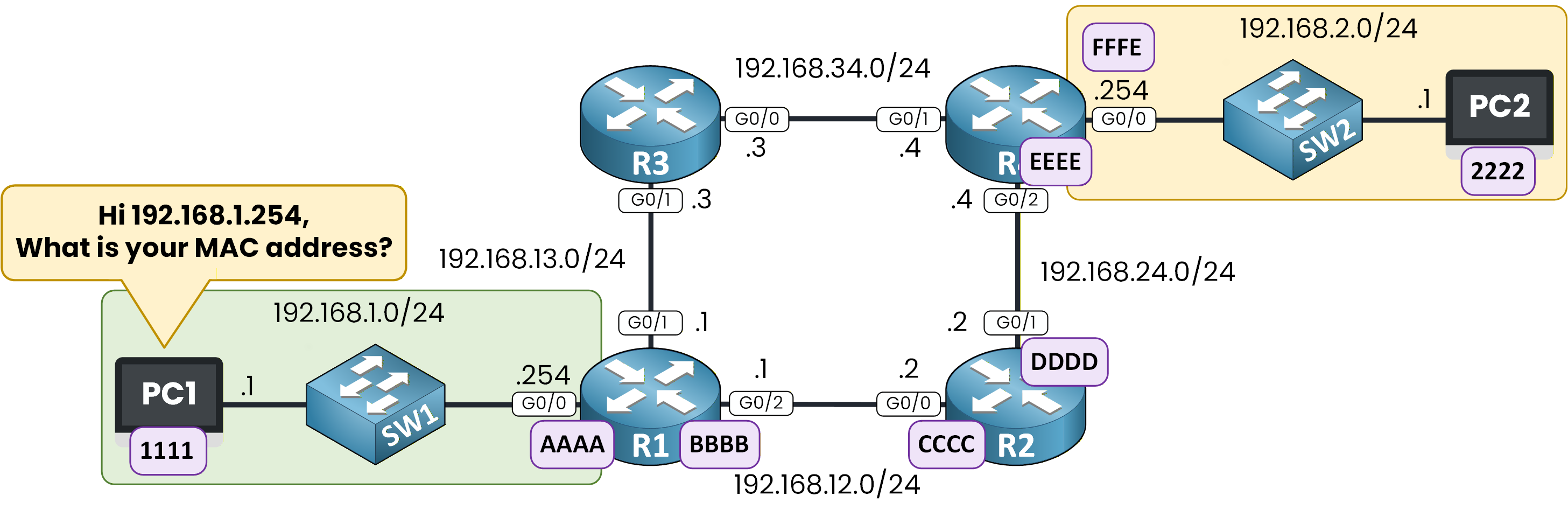
Figure 6 - PC1 Asks for the MAC Address
PC1 is configured with 192.168.1.254 as the default gateway, but it does not yet know the associated MAC address.
To resolve this, PC1 sends an ARP request.The ARP request contains:
Source IP: 192.168.1.1
Destination IP: 192.168.1.254
Destination MAC: FFFF.FFFF.FFFF
Source MAC: 1111
The broadcast destination MAC ensures that all devices in the local network receive the request.
Only the device owning IP address 192.168.1.254 will reply.During this ARP exchange, the destination IP (192.168.1.254) and the destination MAC (FFFF.FFFF.FFFF) don’t match the same device yet, and that’s expected: PC1 doesn’t know R1’s real MAC address, which is exactly why it sends this ARP request. R1’s reply confirms that 192.168.1.254 is associated with MAC AAAA.
But once PC1 builds the actual packet for PC2 (see below), the destination IP and destination MAC belong to two different devices again: the destination IP is 192.168.2.1 (PC2, the final destination), while the destination MAC is AAAA (R1, the next hop). This is normal: the destination MAC always points to the next hop, not necessarily to the final destination, unless that next hop is the destination itself.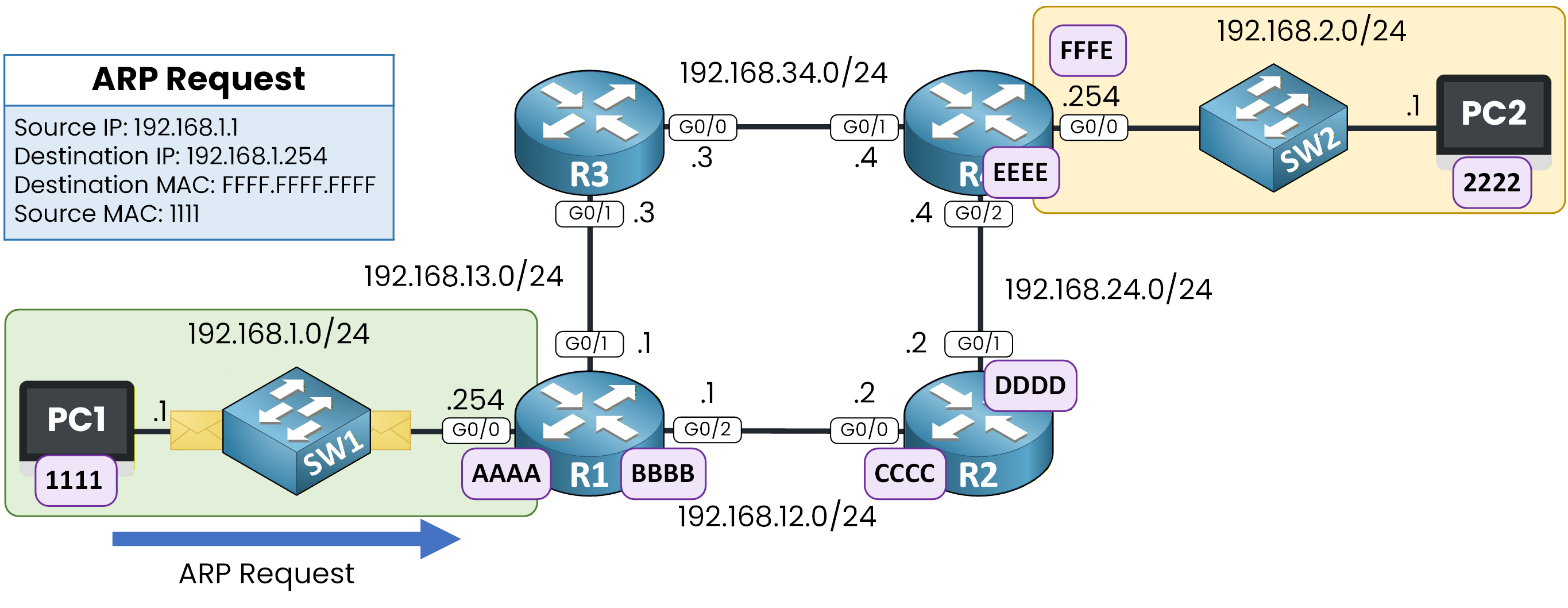
Figure 7 - ARP Request to R1
ARP Reply from R1
The device with IP address 192.168.1.254 receives the ARP request and recognizes itself as the destination.
R1 sends an ARP reply directly to PC1, indicating that IP address 192.168.1.254 is associated with MAC address AAAA.
This MAC address corresponds to the router’s G0/0 interface.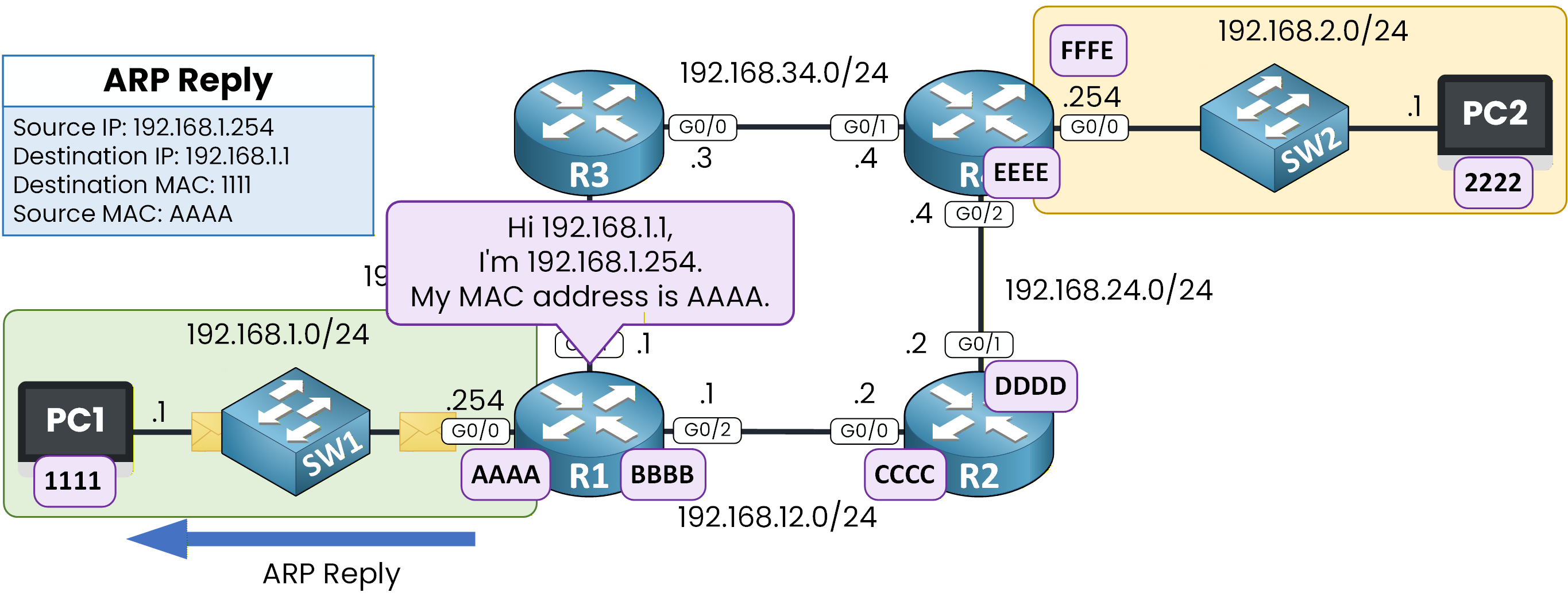
Figure 8 - ARP Reply from R1
At this point, PC1 knows the MAC address of its default gateway.
PC1> arp -a
Internet Address      Physical Address      Type
192.168.1.254         AAAA-AAAA-AAAA        dynamic
It can now send the packet.
PC1 builds the frame with:Source IP: 192.168.1.1
Destination IP: 192.168.2.1
Destination MAC: AAAA
Source MAC: 1111
The packet is forwarded to R1, and the forwarding process continues.
Answer the question below
What does PC1 use to reach a remote network?
Once the packet reaches R1, the router must decide what to do next.
When a router receives a frame, it removes the Ethernet header, examines the IP header to make a forwarding decision, and then builds a new Ethernet frame for the next link.
At this stage, R1 makes its decision based on the destination IP address carried in the packet, which is exactly what you should focus on here.
Routing Table Lookup
R1 examines the destination IP address, which is 192.168.2.1.
Using this destination IP address, R1 performs a routing table lookup to determine how to forward the packet.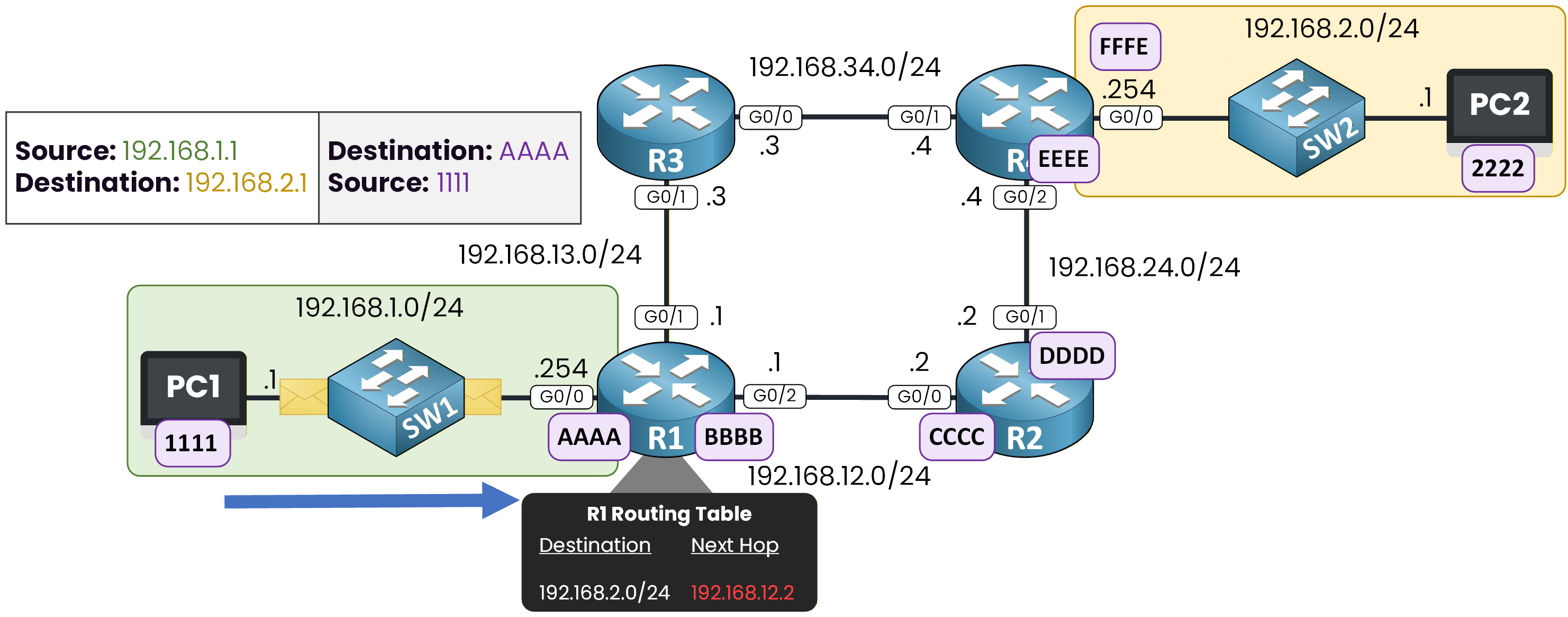
Figure 9 - R1 Routing Table Check
R1# show ip route
Codes: L - local, C - connected, S - static, R - RIP, M - mobile, B - BGP
       D - EIGRP, EX - EIGRP external, O - OSPF, IA - OSPF inter area
       N1 - OSPF NSSA external type 1, N2 - OSPF NSSA external type 2
       E1 - OSPF external type 1, E2 - OSPF external type 2
       i - IS-IS, L1 - IS-IS level-1, L2 - IS-IS level-2

Gateway of last resort is not set

     192.168.1.0/24 is variably subnetted, 2 subnets, 2 masks
C       192.168.1.0/24 is directly connected, GigabitEthernet0/0
L       192.168.1.254/32 is directly connected, GigabitEthernet0/0
S    192.168.2.0/24 [1/0] via 192.168.12.2
     192.168.12.0/24 is variably subnetted, 2 subnets, 2 masks
C       192.168.12.0/24 is directly connected, GigabitEthernet0/2
L       192.168.12.1/32 is directly connected, GigabitEthernet0/2
     192.168.13.0/24 is variably subnetted, 2 subnets, 2 masks
C       192.168.13.0/24 is directly connected, GigabitEthernet0/1
L       192.168.13.1/32 is directly connected, GigabitEthernet0/1
In the routing table, R1 finds an entry for the network 192.168.2.0/24.
This entry indicates that the packet must be forwarded to a next-hop router to reach the destination network.Understanding the Next Hop
The next hop identifies the device that will receive the packet next, allowing it to move closer to the destination.
To reach the 192.168.2.0/24 network, R1 forwards the packet to router R2, using the next-hop IP address 192.168.12.2.
This IP address belongs to R2, on interface G0/0, and is reachable through a directly connected network.At this point, R1 knows where to send the packet at Layer 3.
It now needs to determine how to send it at Layer 2.Answer the question below
What address does R1 examine in the packet header to make its forwarding decision?
Resolving the Next Hop MAC Address
The IP header of the packet keeps the same source and destination IP addresses:
Source IP: 192.168.1.1
Destination IP: 192.168.2.1
At this hop, the Ethernet header is rebuilt for the next link, while the IP source and destination addresses remain unchanged.
To send the packet to 192.168.12.2, R1 must learn the MAC address of R2’s interface.
Since this MAC address is not yet known, R1 starts an ARP process.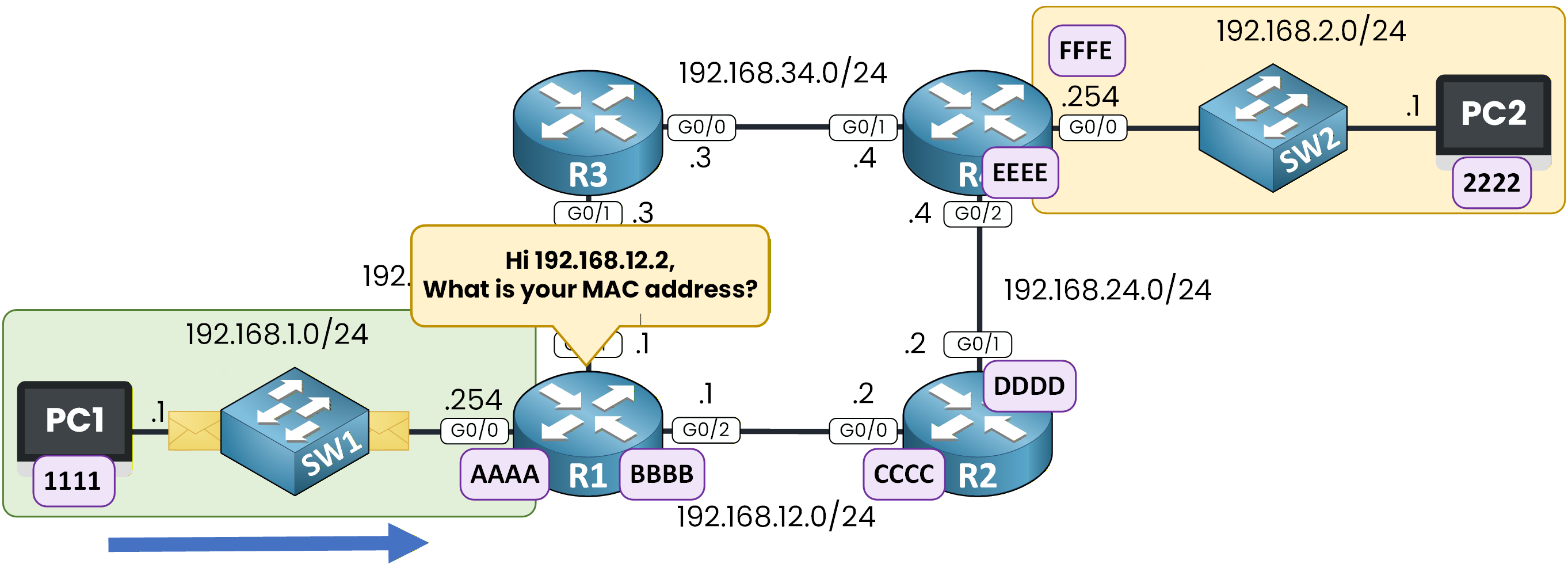
Figure 10 - ARP Request to 192.168.12.2
ARP Request from R1
In this ARP request:
Source IP: 192.168.12.1 (R1 outgoing interface G0/2)
Destination IP: 192.168.12.2 (R2 interface G0/0)
Destination MAC: FFFF.FFFF.FFFF
Source MAC: MAC address of R1 G0/2
The broadcast destination MAC ensures that the device owning IP address 192.168.12.2 can receive the request.
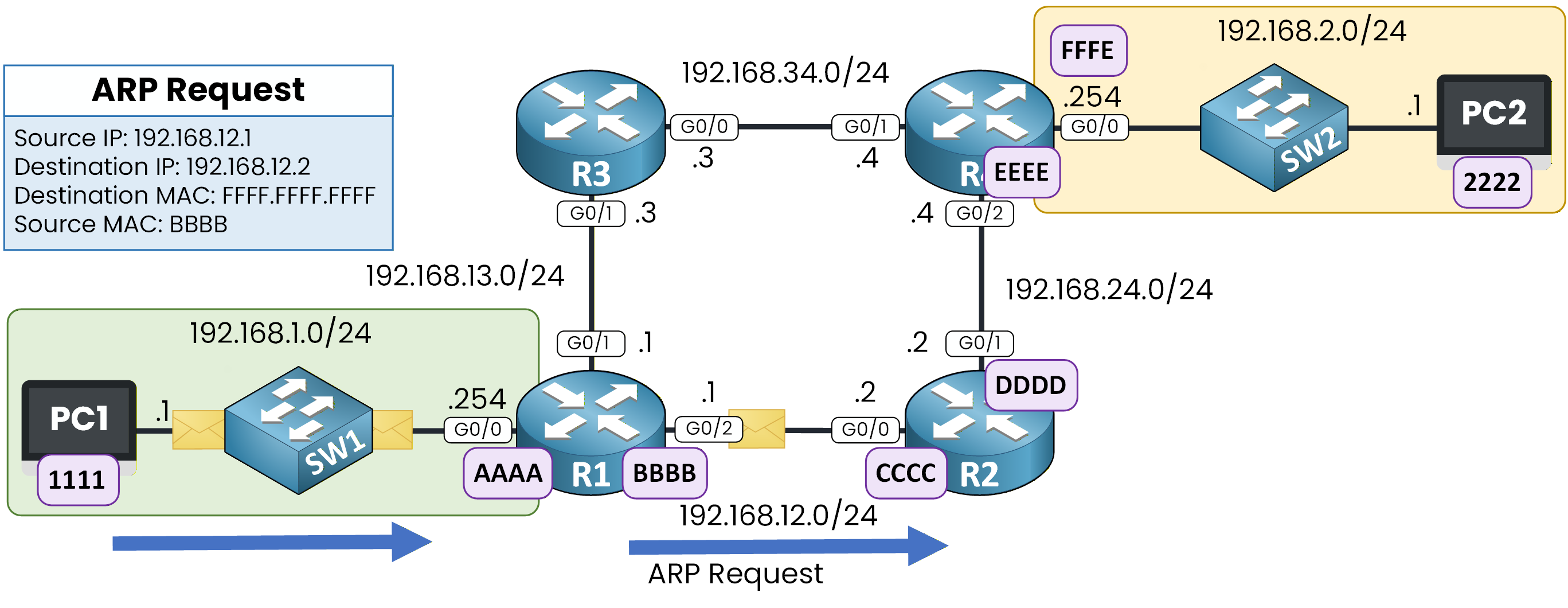
Figure 11 - ARP Request from R1 to 192.168.12.2
ARP Reply from R2
R2 receives the ARP request and recognizes its own IP address.
It replies directly to R1, providing the MAC address of its G0/0 interface, represented here as CCCC.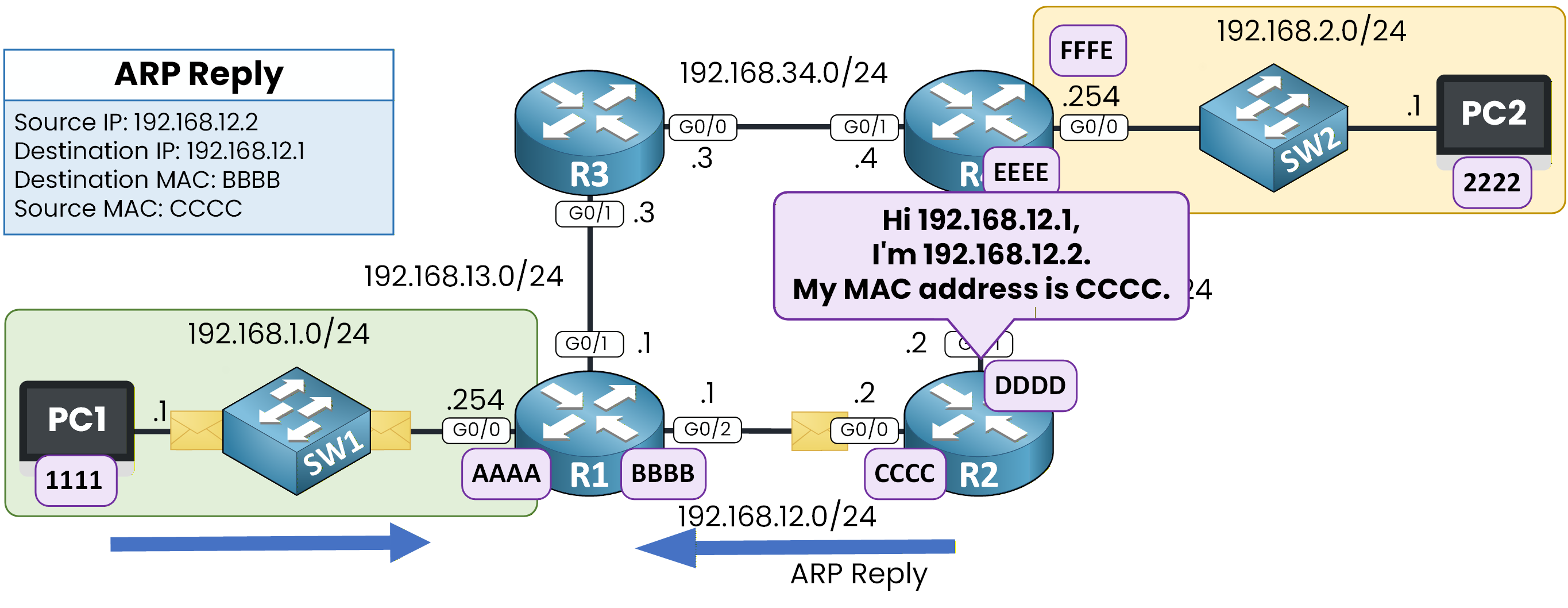
Figure 12 - ARP Reply from R2 to 192.168.12.1
Verifying the ARP Table on R1
R1# show ip arp
Protocol  Address          Age (min)  Hardware Addr   Type   Interface
Internet  192.168.12.2           2    CCCC.CCCC.CCCC  ARPA   GigabitEthernet0/2
R1 now knows the MAC address of the next hop and can forward the packet.
MAC Changes, IP Stays the Same
R1 sends the packet to R2 using:
Source IP: 192.168.1.1
Destination IP: 192.168.2.1
Source MAC: MAC address of R1 outgoing interface
Destination MAC: CCCC
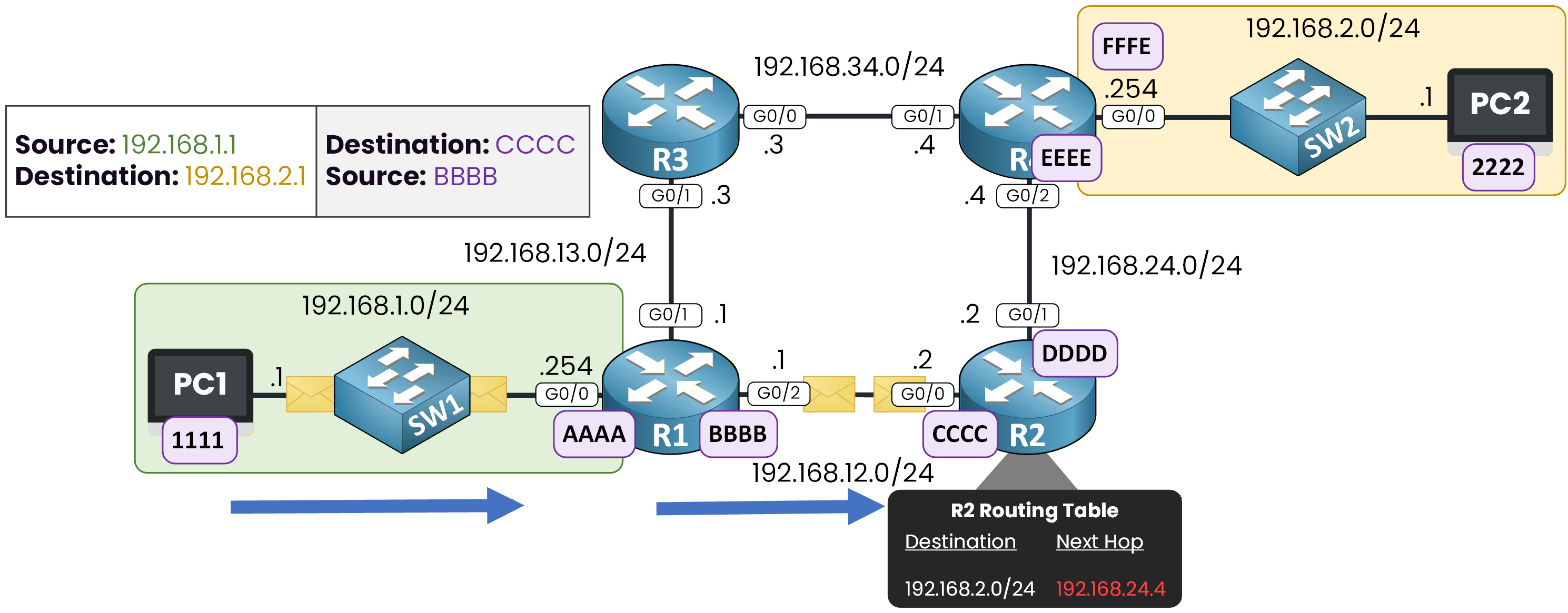
Figure 13 - R2 Routing Table Check
The packet has now reached R2, where the same forwarding logic will be applied again.
Answer the question below
What information does the router use to select the next hop?
R2 has now received the packet and must decide what to do next.
Its goal is to select the next hop toward the destination network.To do this, R2 performs a routing table lookup.
ARP Toward the Final Router
In R2’s routing table, the next hop for the destination network is 192.168.24.4.
This IP address belongs to router R4, on interface G0/2.
R2 now knows where to send the packet, but it still needs the MAC address of that interface.To forward the packet to 192.168.24.4, R2 starts an ARP process on the 192.168.24.0/24 network.
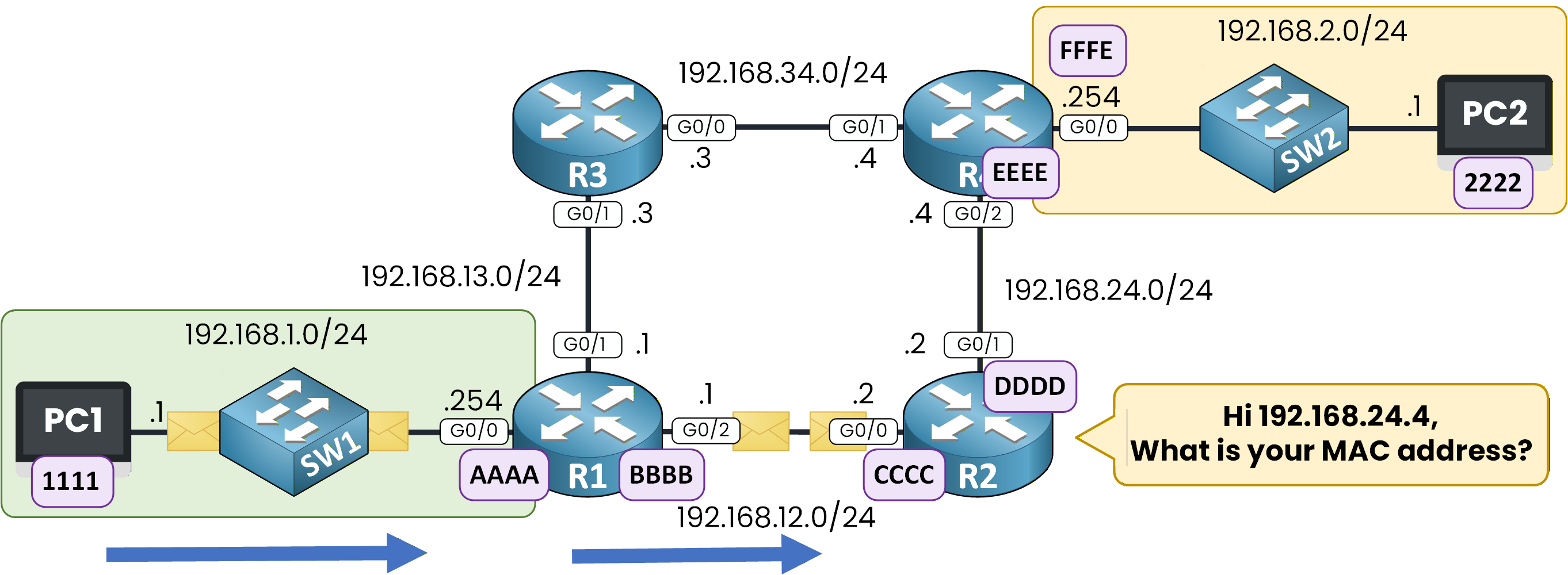
Figure 14 - R2 ARP Request to 192.168.24.4
R2 sends an ARP request with the destination MAC address set to FFFF.FFFF.FFFF, so that the device owning IP address 192.168.24.4 can receive it.
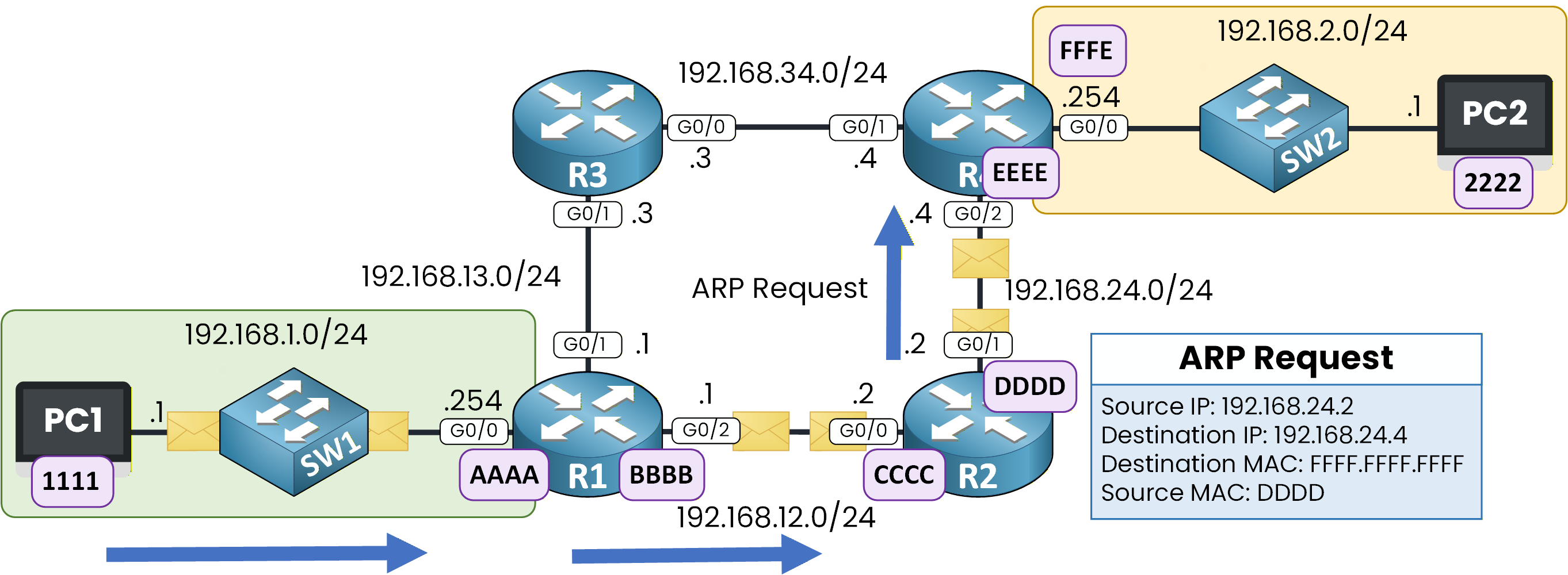
Figure 15 - R2 ARP Request to 192.168.24.4
Router R4 receives the ARP request on its G0/2 interface and recognizes its own IP address.
It replies directly to R2, providing the MAC address associated with 192.168.24.4, represented here as EEEE.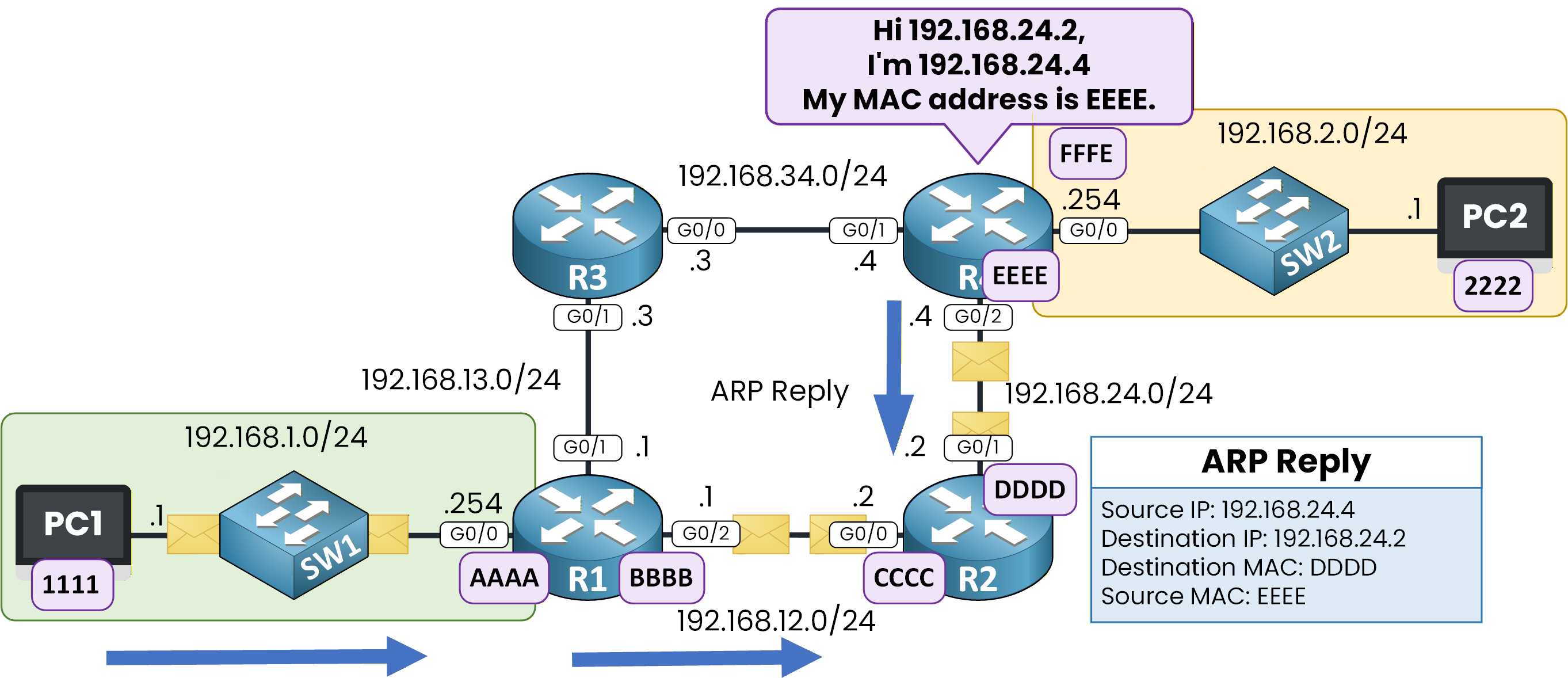
Figure 16 - R2 ARP Reply from 192.168.24.4
R2 now knows the MAC address of R4 and can forward the packet to the next router.
Final Delivery to the Destination Host
Throughout the journey, the source and destination IP addresses never change.
It is important to recognize this behavior because only the source and destination MAC addresses are updated at each hop.When the packet arrives on R4, the router performs a routing table lookup to determine how to reach the destination network.
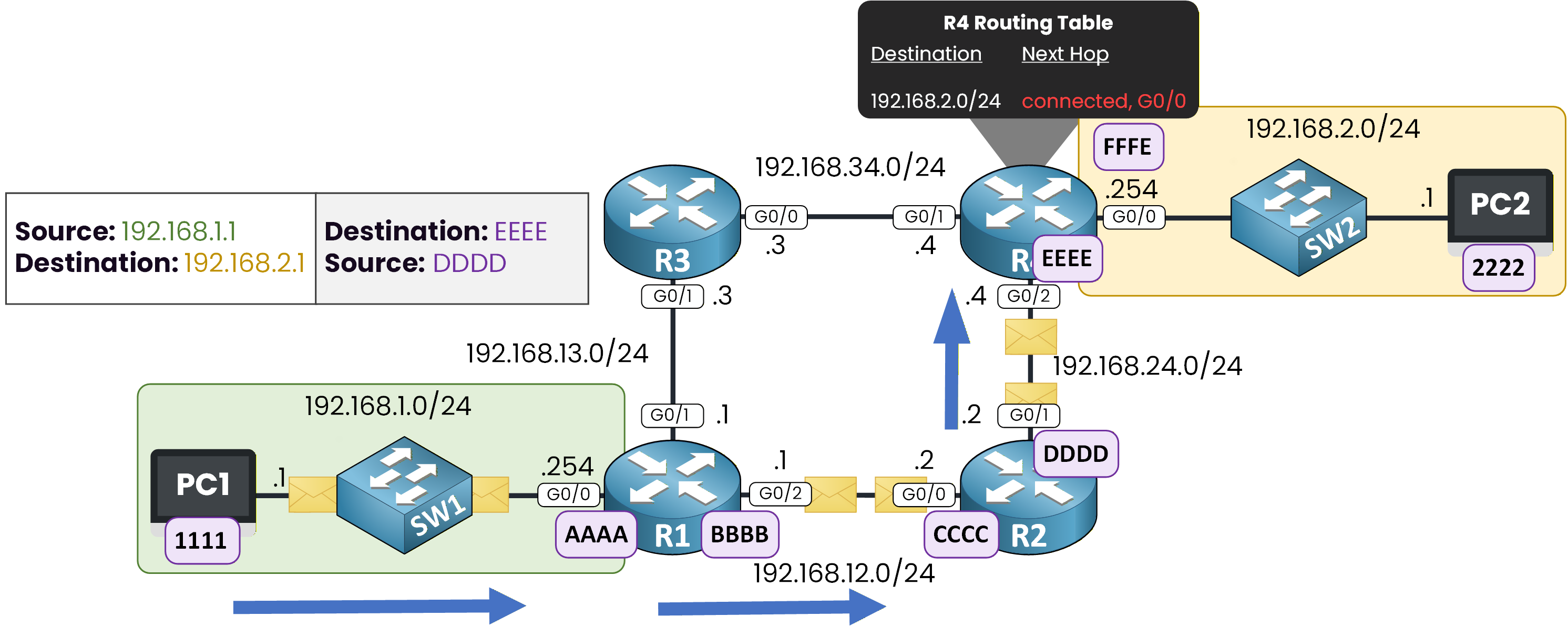
Figure 17 - R4 Routing Table for Destination 192.168.2.0/24
R4 finds that the destination network 192.168.2.0/24 is directly connected to its G0/0 interface.
This interface leads to the network where the destination host resides.Because the destination is now on a directly connected network, R4 must deliver the packet to the final host, PC2 (192.168.2.1).
R4’s G0/0 interface uses IP address 192.168.2.254, which is the default gateway for the 192.168.2.0/24 network.
Answer the question below
When a router finds the destination network attached to one of its own interfaces, how is this network described?
ARP for the Destination Host
To send the packet to PC2, R4 needs the MAC address associated with IP address 192.168.2.1.
Since this MAC address is not yet known, R4 starts one final ARP process.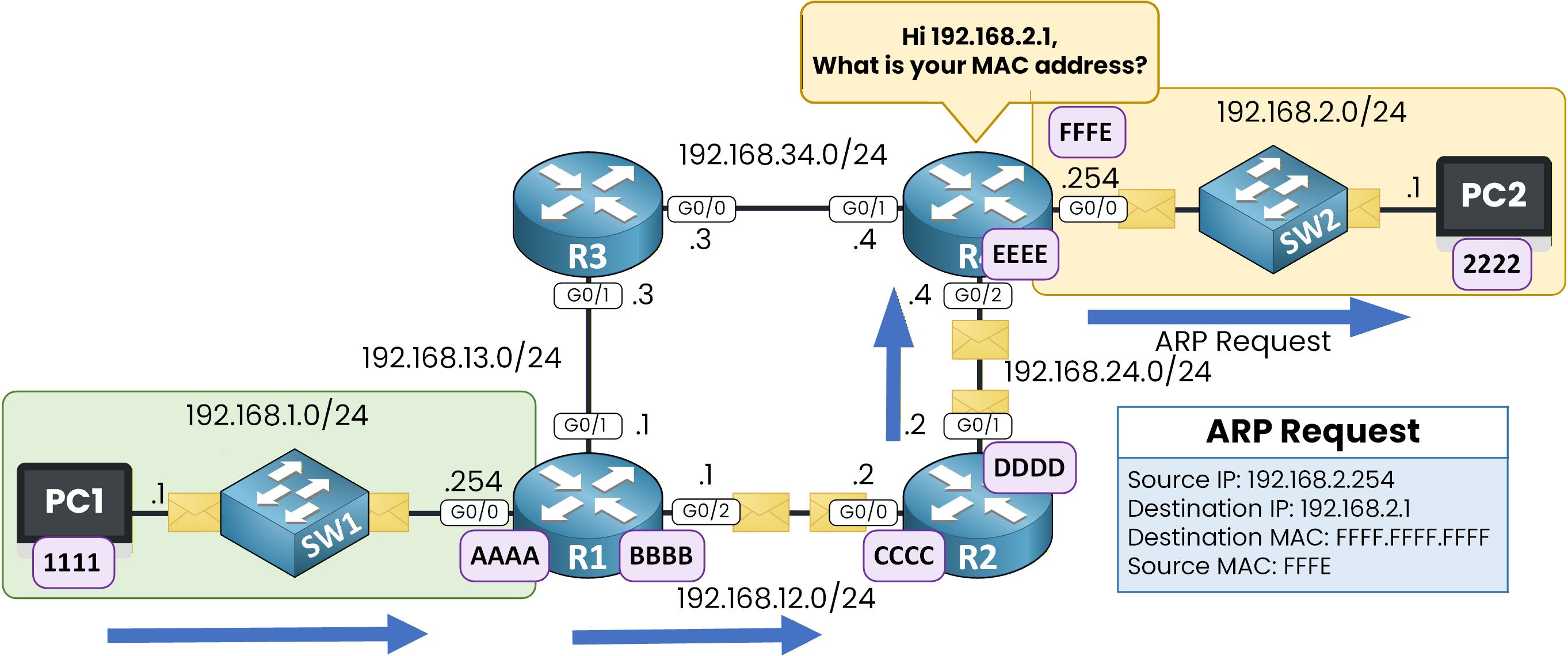
Figure 18 - ARP Request for 192.168.2.1
PC2 receives the ARP request and replies, indicating that IP address 192.168.2.1 is associated with MAC address 2222.
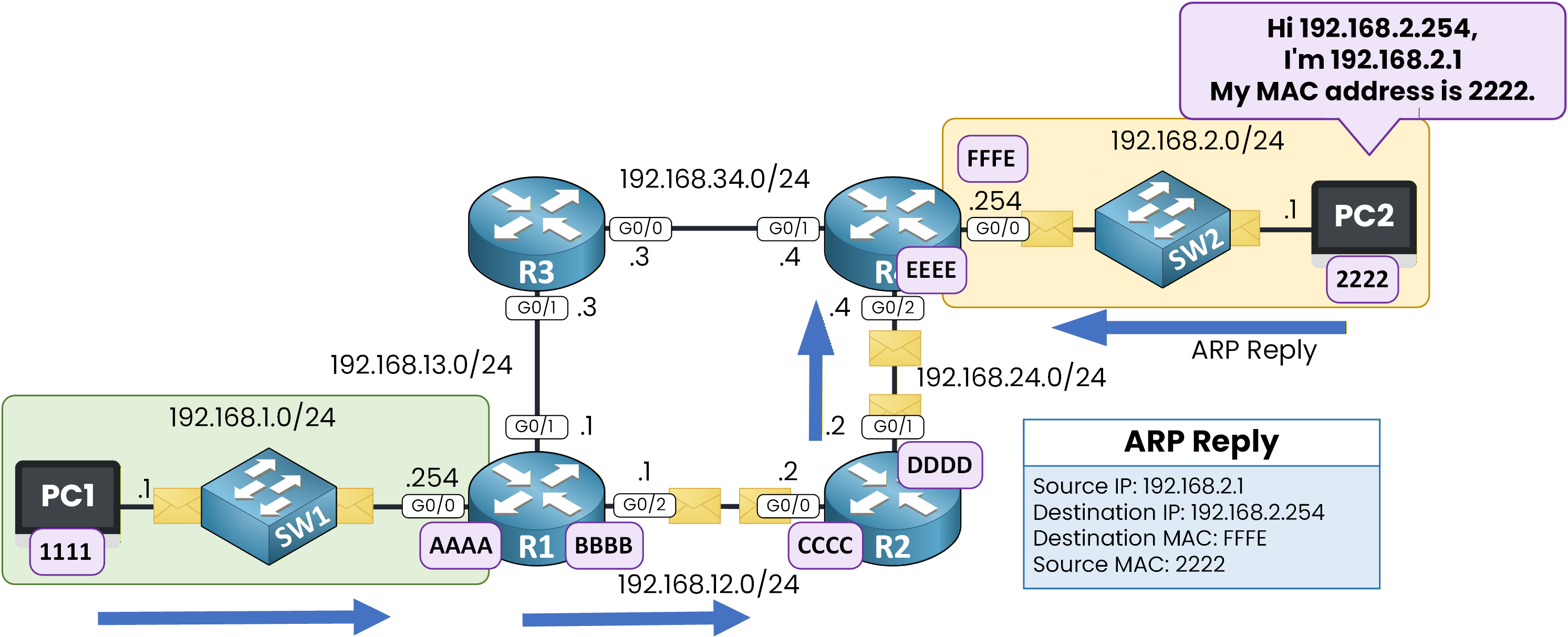
Figure 19 - ARP Reply from 192.168.2.1 to 192.168.2.254
R4 can now build the Ethernet frame using the correct destination MAC address and send the packet to PC2.
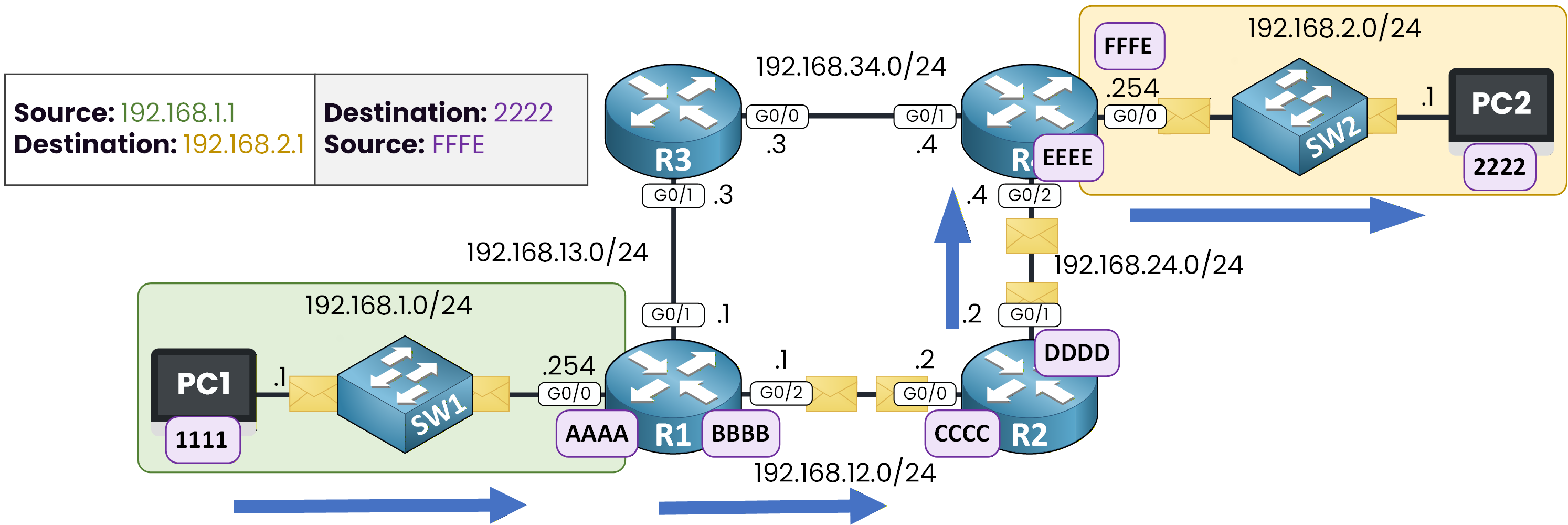
Figure 20 - Traffic path from PC1 to PC2
The packet has successfully reached its destination.
Answer the question below
Which router delivers the packet to PC2?
Now that PC2 has received the packet, it sends a response back to PC1.
The return traffic follows the same forwarding logic, but in the opposite direction.No New ARP Requests on the Return Path
In this example, no new ARP requests are needed because the required MAC addresses were already learned during the initial communication and are still present in the ARP cache.
Each device along the path already knows the necessary MAC addresses from the previous exchanges.
These entries are stored in the ARP cache, allowing the packet to be forwarded immediately.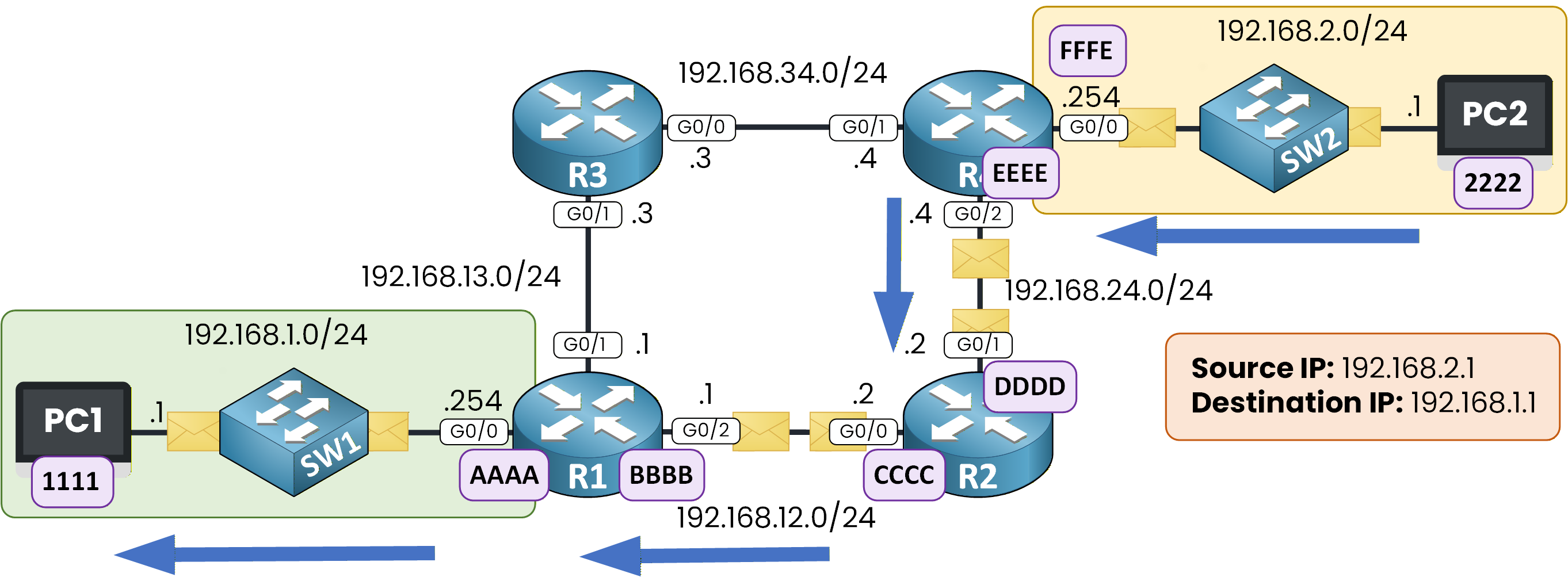
Figure 21 - Return Traffic from PC2 to PC1
Same Logic, Reverse Path
The forwarding logic remains exactly the same as before, so if you understood the first path, this one should feel familiar.
This time:
Source IP: 192.168.2.1
Destination IP: 192.168.1.1
The IP header stays unchanged from hop to hop.
Only the source and destination MAC addresses change at each link, depending on the next hop.The packet is forwarded router by router until it reaches PC1.
Answer the question below
On the return path, why does each device avoid sending a new ARP request?
Test what you just learned.
Build the frame at each hop and earn your flag:Answer the question below
Enter the flag you got from completing the challenge.