Loop Guard in STP is a feature designed to mitigate the risks posed by unidirectional links in a Spanning Tree Topology.
You might be asking yourself, "What exactly is a unidirectional link?"
Great question! Let me break it down for you.What is a unidirectional link?
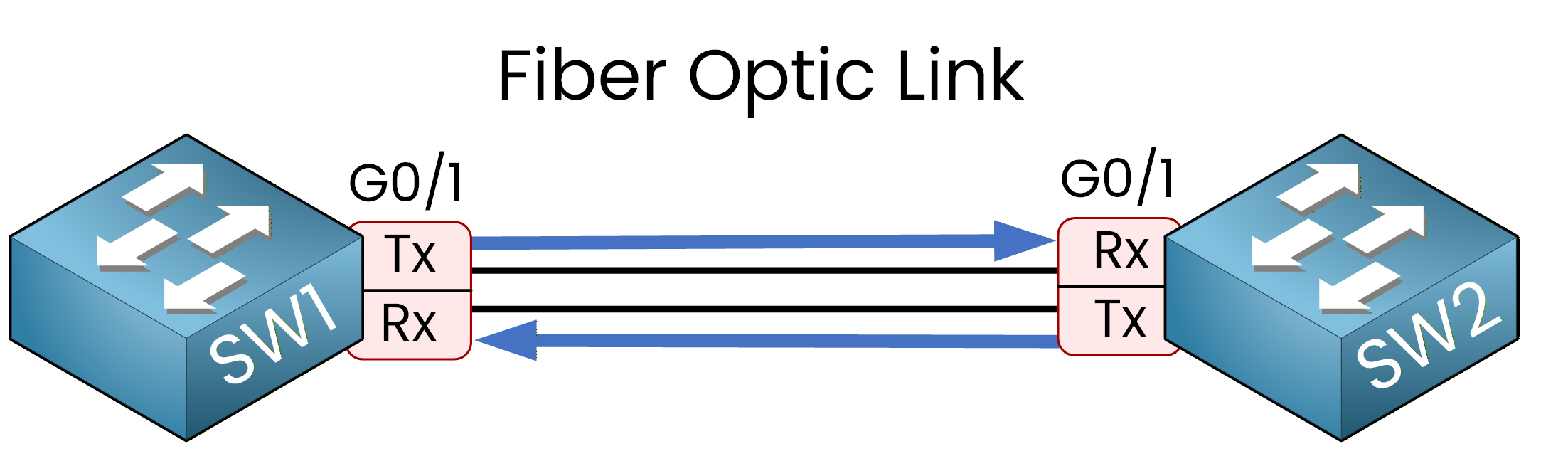
Figure 1 – Fiber optic links use two fibers for full-duplex communication
Imagine you have a fiber optic link between two switches. Fiber optic cables typically consist of two fibers:
One for reception (Rx) => That will make sure you receive traffic on the fiber optic cable
One for transmission (Tx) => That will make sure you can send your traffic on the fiber optic cable
These two fibers work together to enable two-way communication. However, fiber optic cables can be fragile. If one fiber is broken, you end up with a unidirectional link.
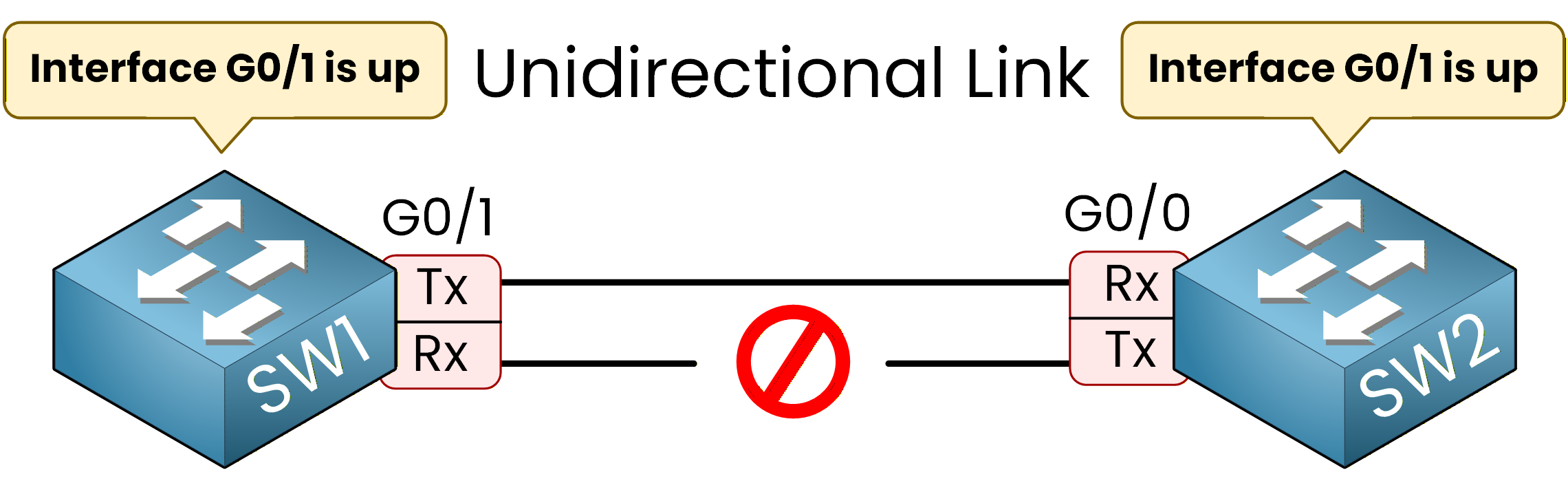
Figure 2 – A unidirectional link occurs when one fiber is broken but interfaces stay up
This means data can flow in only one direction. The real problem?
Your switches might not detect the physical issue. The link will still appear as up/up, even though it’s not functioning properly. Now that you understand how a unidirectional link can occur, let’s move on to why this is a problem for spanning tree protocols (STP).
Answer the question below
Loop Guard protects against which type of link failure: bidirectional or unidirectional?
In a typical STP topology:
BPDUs are sent from the Root Bridge to other switches via Designated Ports.
Non-designated ports receive these BPDUs to determine their role in the topology.
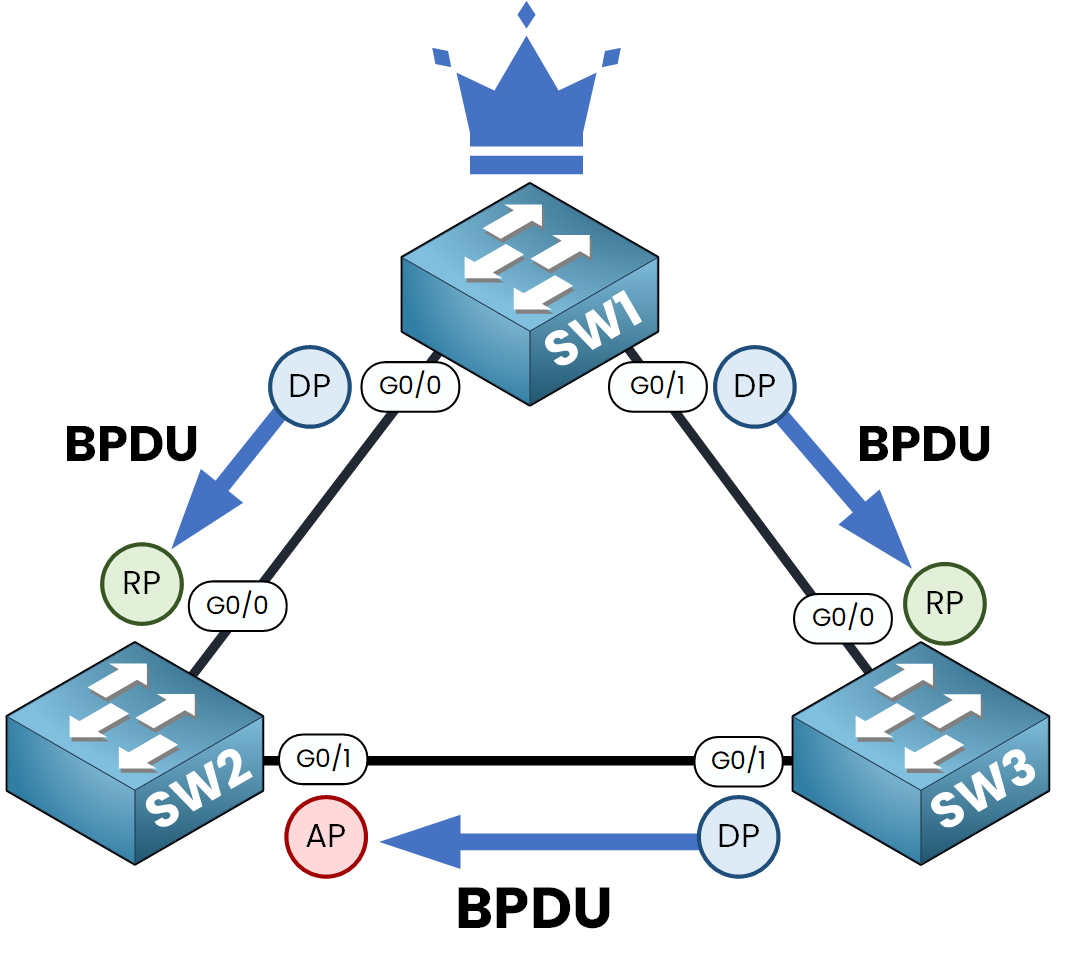
Figure 3 – Normal STP operation with BPDUs received on all ports
What Happens Without Loop Guard?
Now, let’s say the link between SW2 and SW3 is a fiber optic link and one of the fibers is damaged. This unidirectional link will prevent SW3 from sending BPDUs back to SW2.
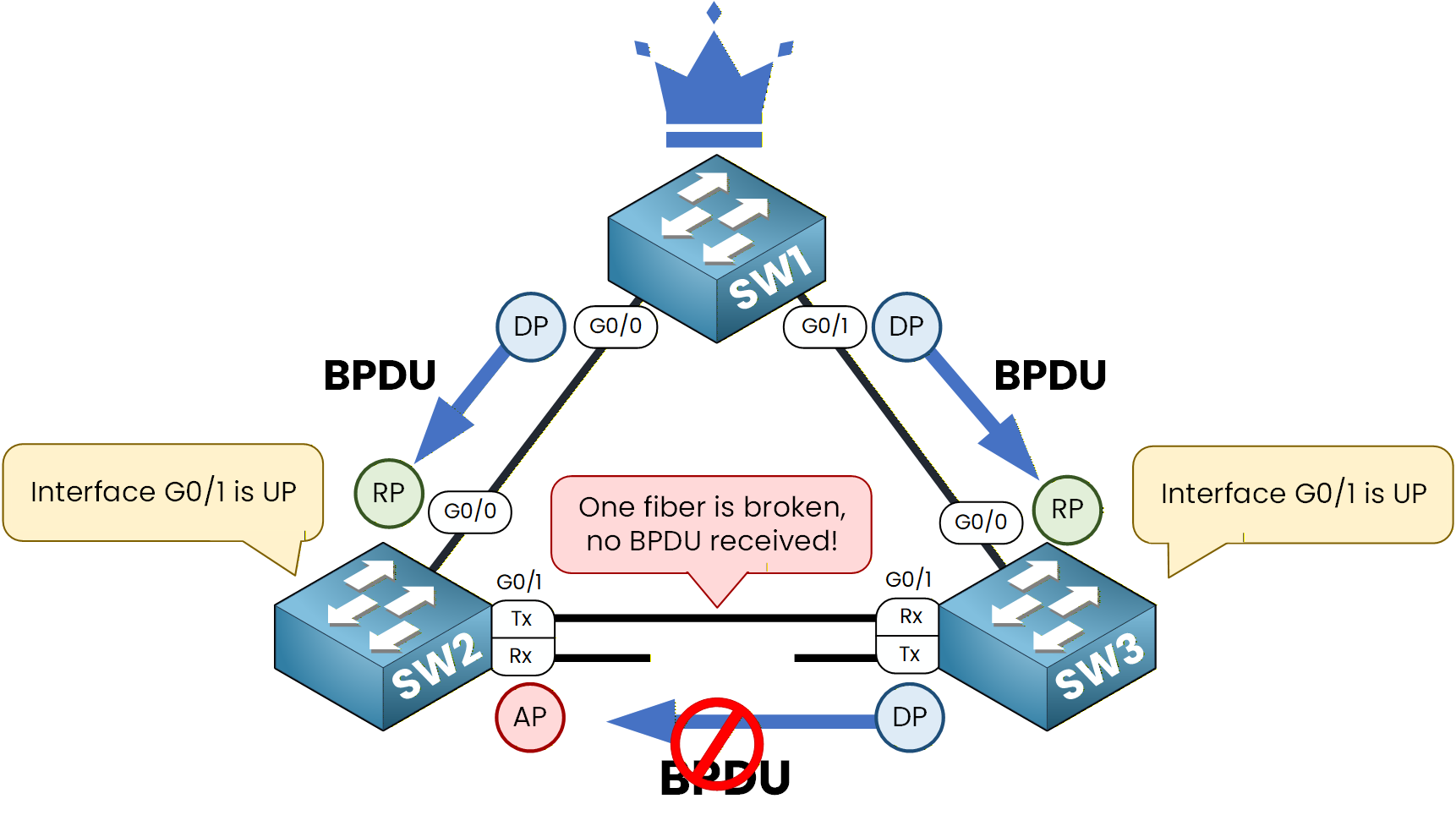
Figure 4 – A broken fiber causes BPDU loss on the unidirectional link
Without Loop Guard:
SW2 G0/1 blocking port will stop receiving BPDUs.
After the Max Age timer expires (20 seconds), SW2 assumes the designated port on SW3 is dead.
SW2 will transition its blocking port g0/1 into a Designated Port.
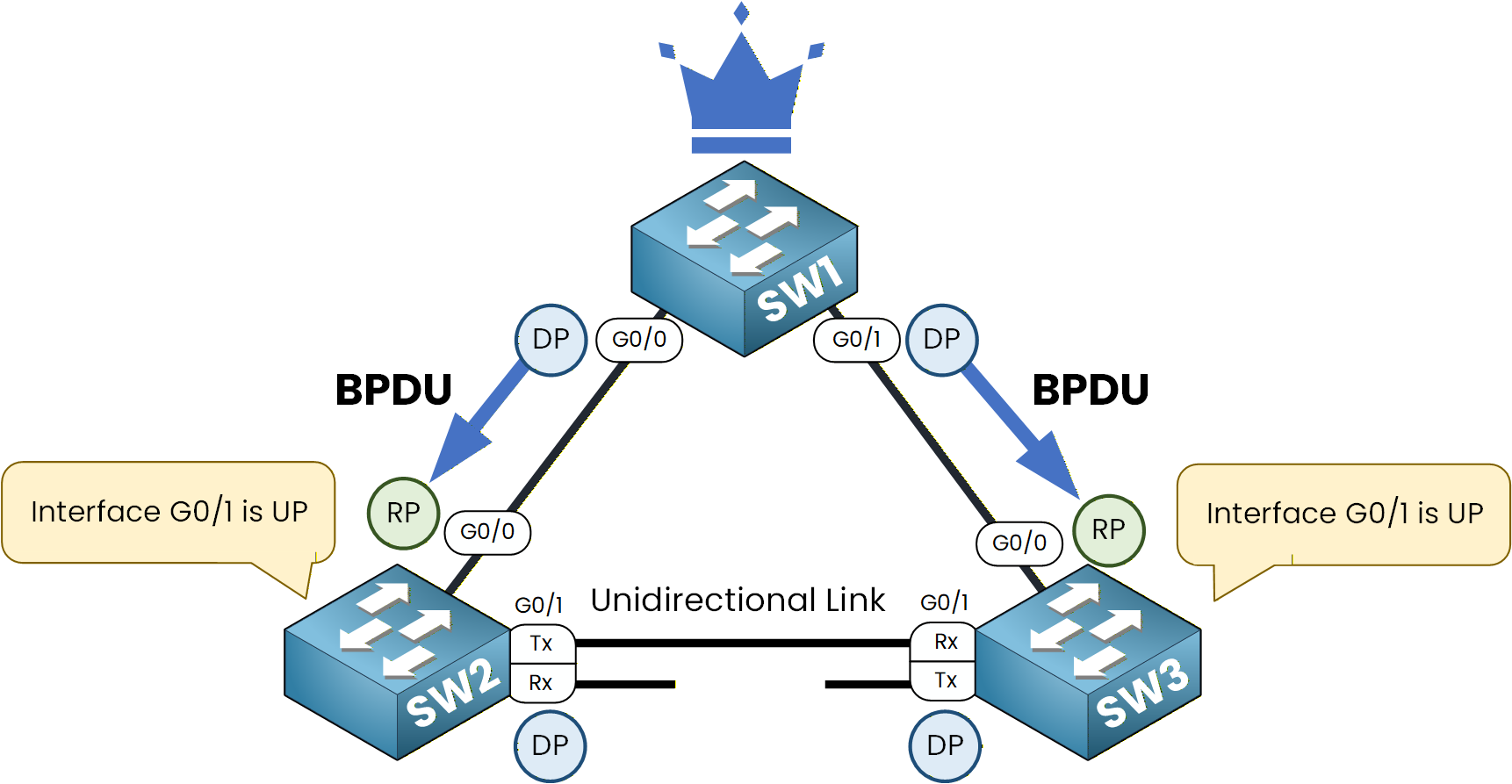
Figure 5 – Without Loop Guard, both ports become Designated
If you look at the spanning tree topology, you’ll notice that there are no longer any blocking ports, which could potentially create a loop!
Example of a Spanning Tree Loop
Let me show you how a spanning tree loop can occur:
PC1 sends a broadcast frame to SW1.
SW1 forwards the frame to SW2 and SW3.
Due to the unidirectional link, SW3 cannot send the broadcast frame back to SW2.
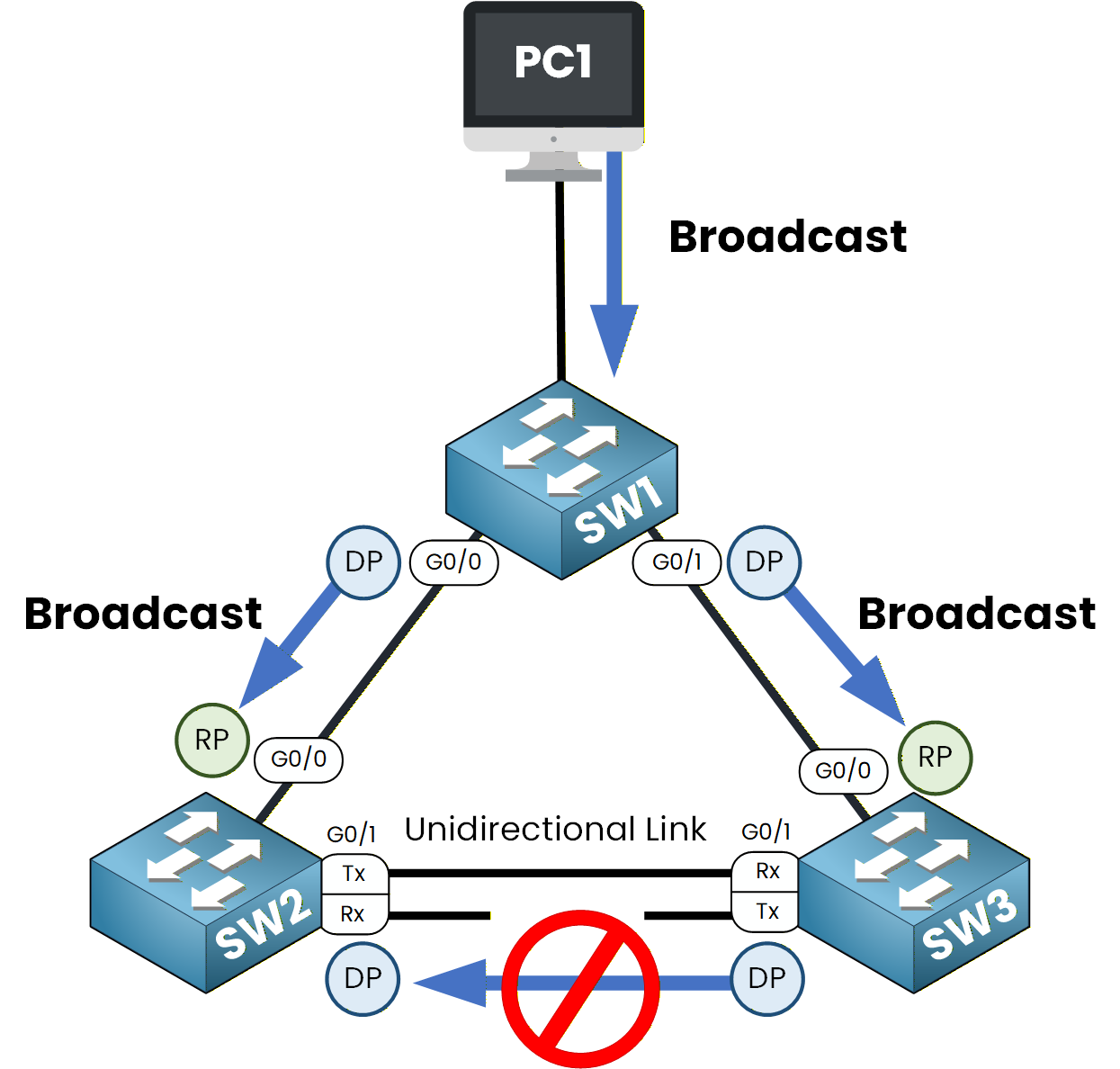
Figure 6 – Broadcast traffic is sent from PC1 and propagated by switches
4. However, SW2 forwards the frame to SW3, which then sends it back to SW1 and the process repeats as the frame returns to SW2, creating a loop.
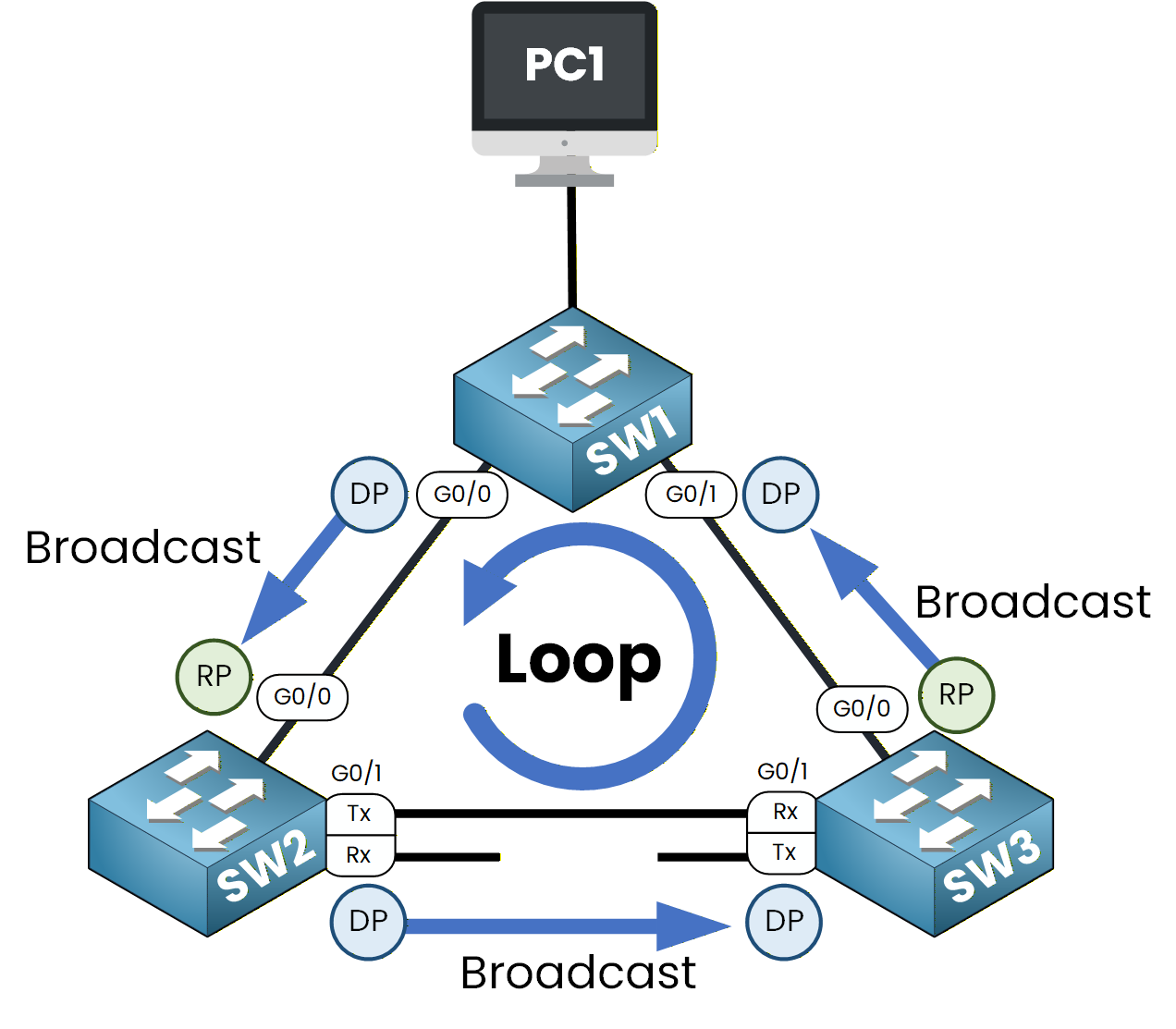
Figure 7 – Unidirectional link causes a broadcast loop between switches
This loop will severely disrupt your network by causing broadcast storms.
Answer the question below
After how many seconds does the Max Age timer expire in STP?
To avoid scenarios like unidirectional links causing spanning tree loops, we have a tool in the Spanning Tree Protocol toolkit called Loop Guard.
The Role of Loop Guard
As its name suggests, Loop Guard helps protect your STP topology by preventing loops. It ensures that ports do not transition to the Designated Port role when BPDUs stop being received.
Loop Guard is especially effective in preventing ports with Loop Guard enabled from becoming designated ports after the Max Age timer expires.
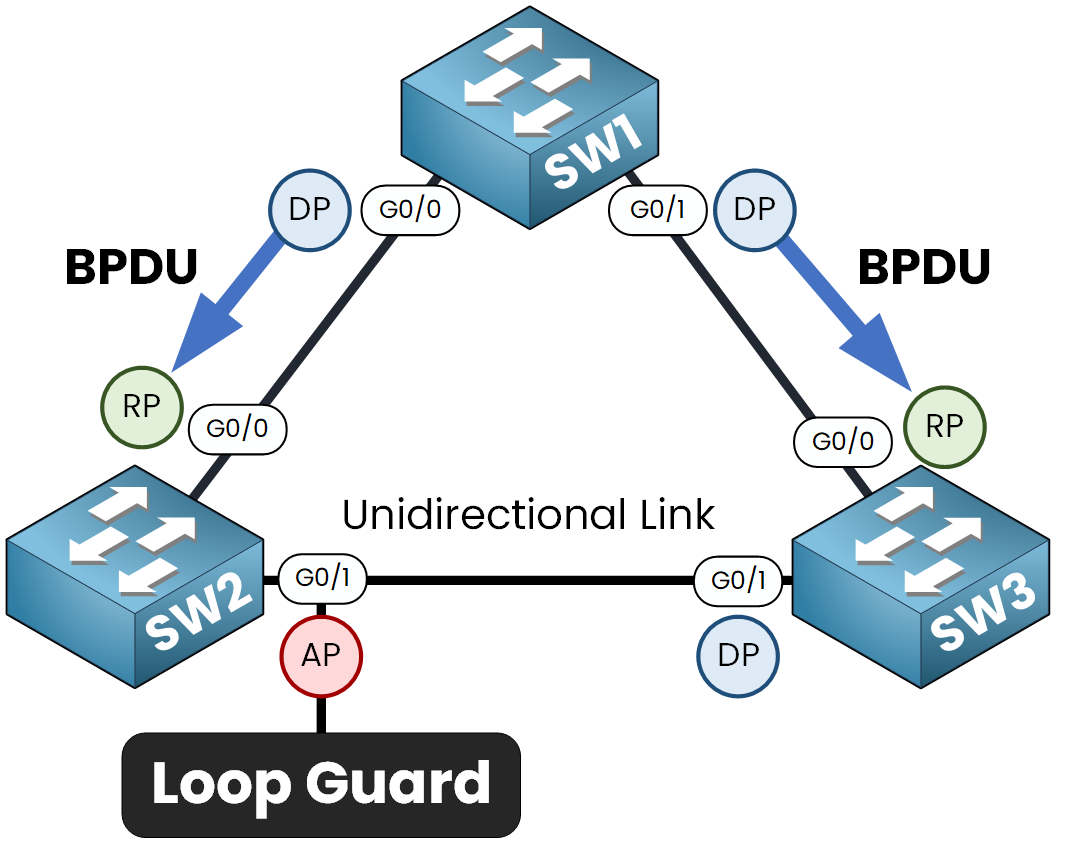
Figure 8 – Loop Guard blocks the port and prevents the loop formation
Example with Loop Guard Enabled
Let’s revisit our earlier example to see how Loop Guard works in practice:
Loop Guard is enabled on SW2’s G0/1 port.
If BPDUs stop arriving on this port (due to a unidirectional link, for example), the Max Age timer expires.
The port now transitions to the Broken (Loop-Inconsistent) state instead of becoming a designated port.
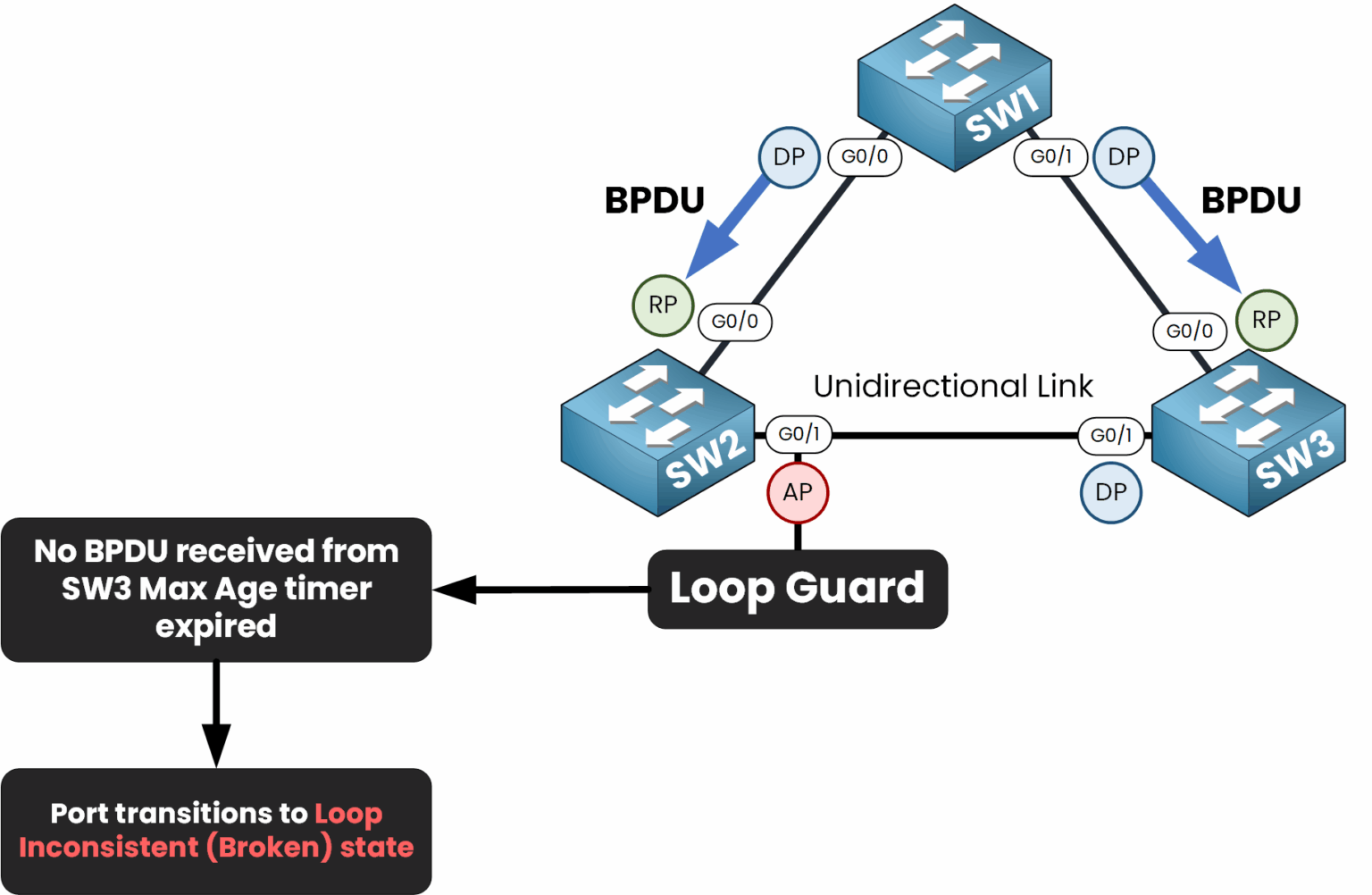
Figure 9 – Loop Guard blocks the port by putting it in Loop Inconsistent state
In the Broken (Loop-Inconsistent) state:
The port is blocked and cannot forward traffic.
This effectively prevents a spanning tree loop.
This behavior ensures that no traffic flows through the problematic port, maintaining the stability of the STP topology.
Answer the question below
What state does a port enter when Loop Guard detects missing BPDUs?
Let’s configure Loop Guard to protect our STP topology. There are two ways to configure Loop Guard:
Per-Port Configuration
Global Configuration
Loop Guard Per-Port Configuration
We’ll start by enabling Loop Guard on an individual port:
SW2# conf t
Enter configuration commands, one per line.  End with CNTL/Z.
SW2(config)# int g0/1
SW2(config-if)# spanning-tree guard loop
SW2(config-if)# end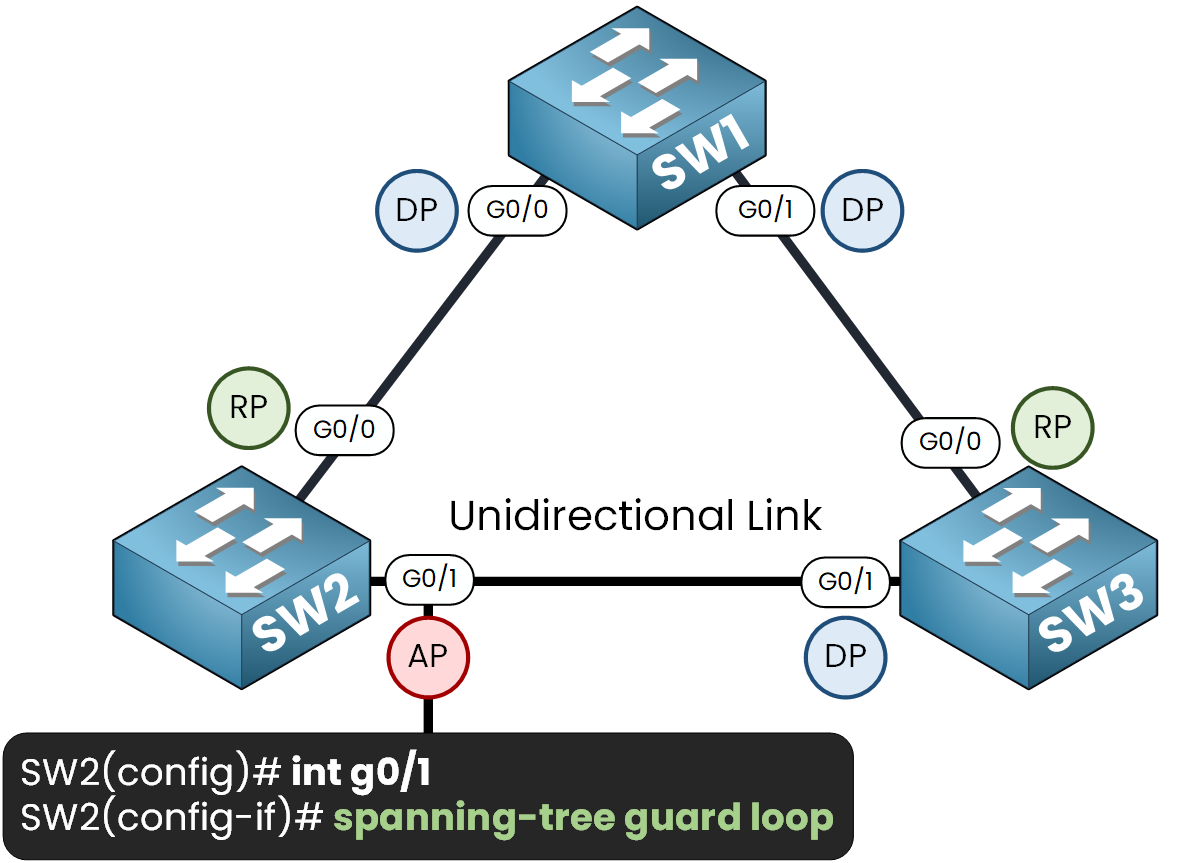
Figure 10 – Enabling Loop Guard on SW2’s G0/1 interface
Verifying the Configuration
To ensure that Loop Guard is correctly configured, use the following command:
SW2# show spanning-tree interface g0/1 detail
 Port 2 (GigabitEthernet0/1) of VLAN0001 is alternate blocking
   Port path cost 4, Port priority 128, Port Identifier 128.2.
   Designated root has priority 1, address 505a.4004.6e00
   Designated bridge has priority 28673, address 50d4.8304.7000
   Designated port id is 128.2, designated path cost 4
   Timers: message age 2, forward delay 0, hold 0
   Number of transitions to forwarding state: 1
   Link type is point-to-point by default
   Loop guard is enabled on the port
   BPDU: sent 246, received 59
Now, if the port stops receiving BPDUs and the Max Age timer has expired, it transitions to the Loop-Inconsistent state and blocks traffic to prevent a loop.
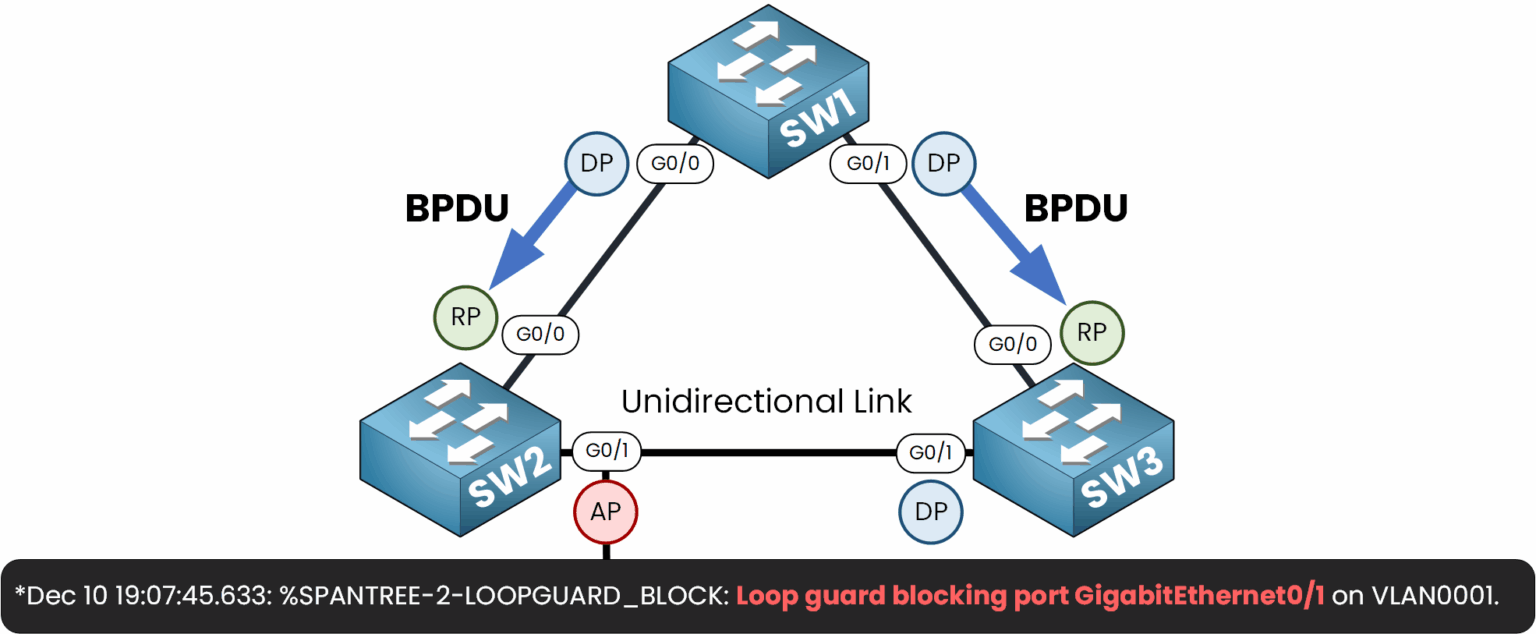
Figure 11 – Verification of Loop Guard blocking a port in Loop Inconsistent state
We can verify with this command:
SW2# show spanning-tree interface g0/1
Vlan             Role Sts Cost      Prio.Nbr Type
---------------- ---- --- --------- -------- --------------------------------
VLAN0001         Desg BKN*4        128.2     P2p *LOOP_Inc
The port is in the Loop-Inconsistent state.
Disabling Loop Guard on an Interface
To disable Loop Guard on a specific interface, we can use the following command:
SW2# conf t
Enter configuration commands, one per line.  End with CNTL/Z.
SW2(config)# int g0/1
SW2(config-if)# spanning-tree guard none
SW2(config-if)# end
Loop Guard Global Configuration
To enable Loop Guard globally across all interfaces on the switch:
SW2# conf t
Enter configuration commands, one per line.  End with CNTL/Z.
SW2(config)# spanning-tree loopguard default
SW2(config)# end
Answer the question below
Which command enables Loop Guard on an interface?
One of the great advantages of Loop Guard is its automatic recovery mechanism.
When the issue causing the port to enter the Loop-Inconsistent state is resolved (for example, the unidirectional link is fixed) and the port starts receiving BPDUs again, it will automatically unblock and transition back to its normal STP states without requiring any manual intervention.
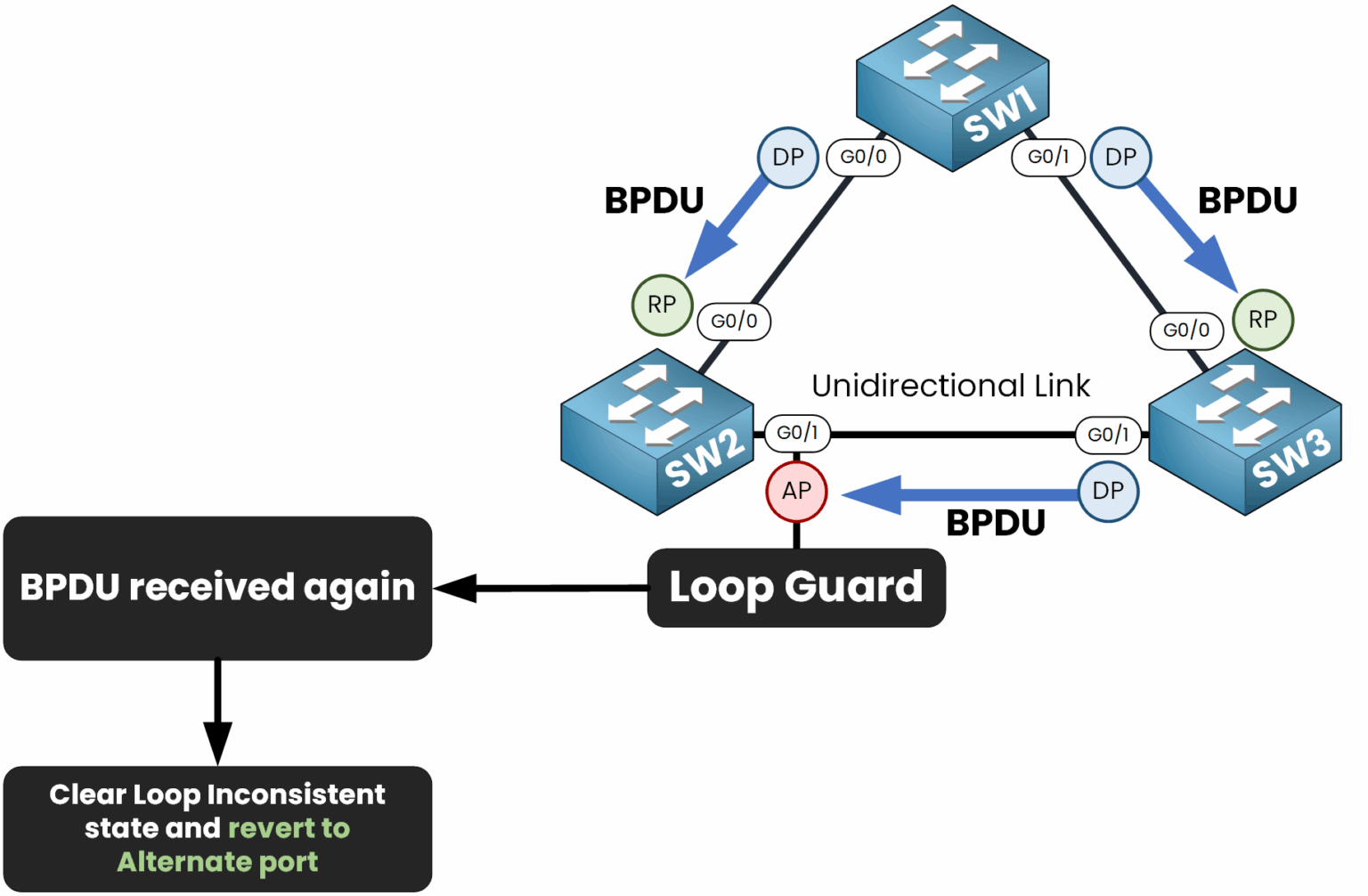
Figure 12 – Loop Guard automatically restores the port once BPDUs are received again
This recovery process ensures that once the network issue is resolved, your spanning tree topology can quickly return to a stable state without further configuration.
Answer the question below
What restores a port from Loop-Inconsistent state automatically?
Now that we’ve covered Loop Guard, let’s recap both Root Guard and Loop Guard to clarify their differences and ensure you know how to apply them correctly in your topology.
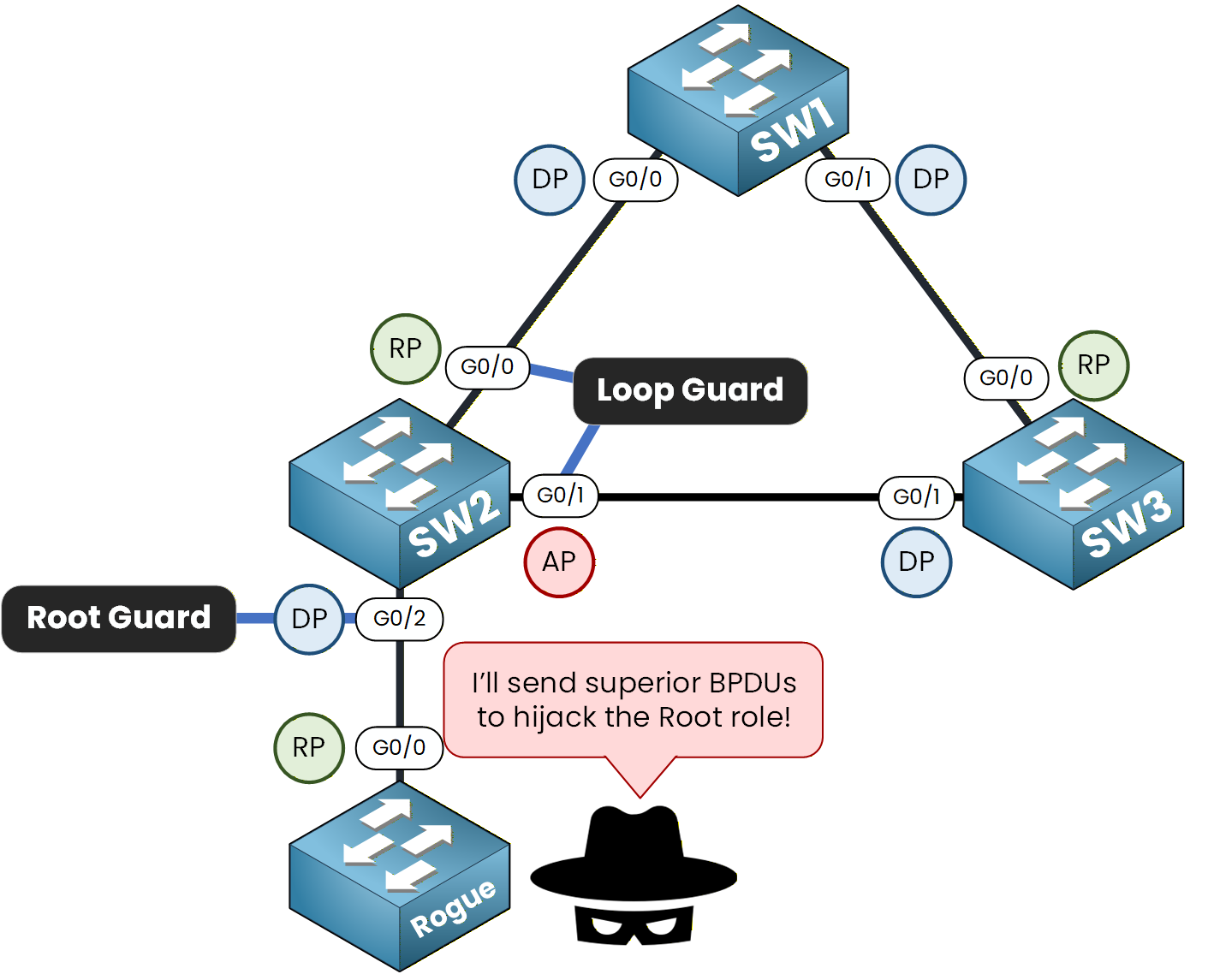
Figure 13 – Loop Guard and Root Guard protect the STP topology from loops and rogue root bridges
Root Guard: This feature is applied to designated ports to prevent them from becoming root ports, ensuring the Root Bridge remains in its intended location.
Loop Guard: This feature is applied to non-designated ports (root ports or alternate ports) to prevent them from transitioning into designated ports when BPDUs are no longer received.
Keep in mind that Root Guard and Loop Guard in STP cannot be enabled on the same port. Each serves a unique purpose, and applying both would create a conflict.
Answer the question below
Which feature prevents a designated port from becoming a root port?
Loop Guard in STP is an essential tool for preventing spanning tree loops caused by unidirectional links.
By strategically enabling Loop Guard, you can protect your network from broadcast storms and maintain optimal performance. Remember, it’s always better to prevent issues before they occur.
Answer the question below
Click 'Complete' to continue