For the CCNA exam, you need to be able to understand and interpret JSON (JavaScript Object Notation).
To begin this lesson, we will answer two questions:Why do we need JSON?
What problem does JSON solve in networking?
Let’s start with a simple example.
Why we need JSON
Imagine you are using a network monitoring application.
This application needs to regularly check the status of interfaces on multiple routers to make sure the network is operating correctly.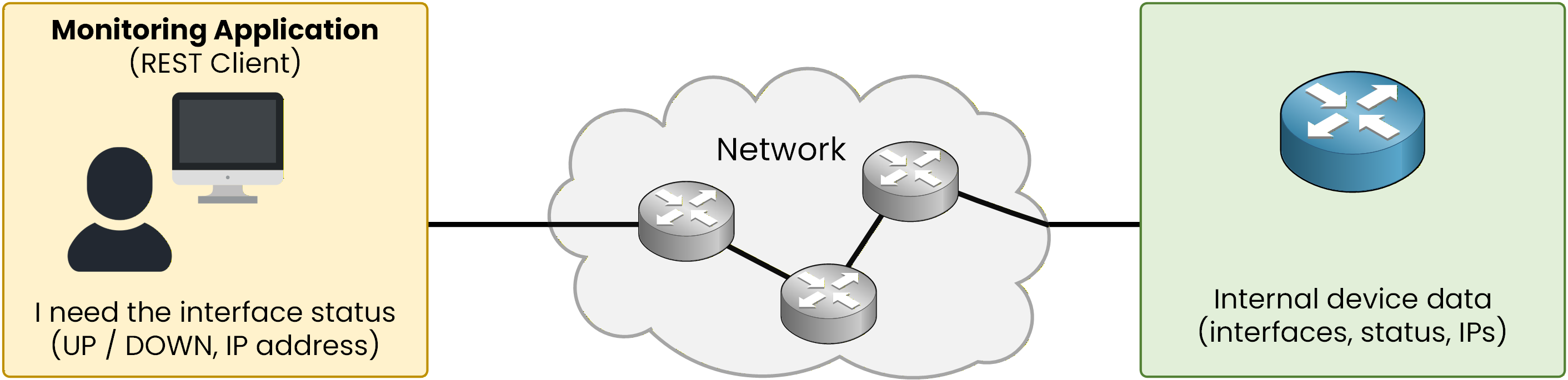
Figure 1 - Network monitoring application requesting interface status information
Modern network devices provide APIs that allow applications to request this information.
At first glance, this seems simple:
the monitoring application sends a GET request
the router replies with the requested information
The Problem Without a Standard Format
Figure 2 illustrates this process.
The monitoring application sends a GET request to the router.
The router accesses its internal variables, such as interface status and IP address.
The router sends the information back without a standardized format, making the response not machine-readable.
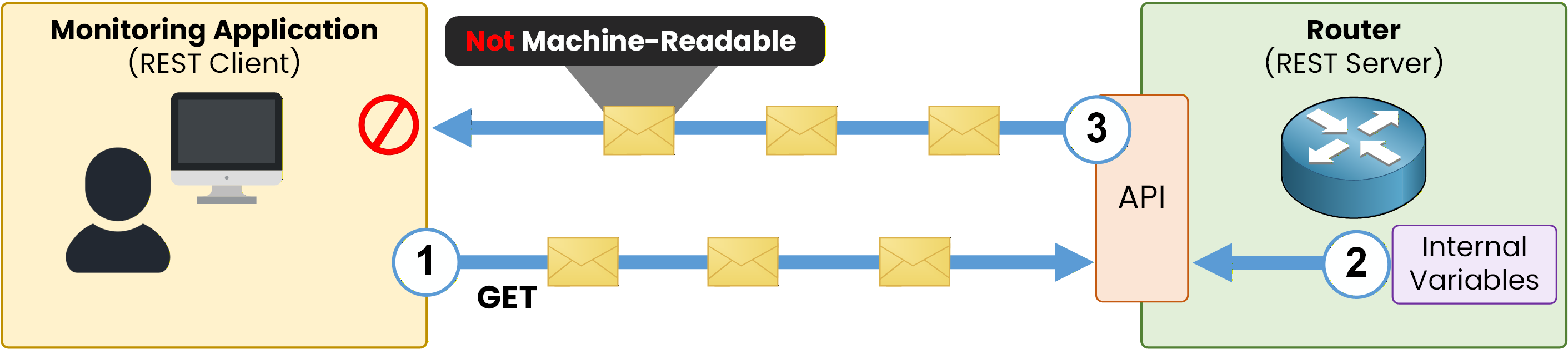
Figure 2 – Interface information exchanged without a standardized format
However, this is where the problem appears.
The router cannot simply send its raw internal variables back to the application in a usable form.Internal device variables:
are designed for the router’s operating system
are not readable by external applications
As a result, the monitoring application cannot interpret the data directly.
Answer the question below
In Figure 2, the router's response is not machine-readable because it lacks a standardized ___?
JSON as the Standard Data Format
We need a standard and structured format to exchange system information.
This format must be:
readable by machines
vendor-independent
easy to parse
JSON is used to represent internal device variables in a standard format that can be exchanged over the network.
This is called a data format.Let’s return to our example.
The monitoring application sends an API request to the router.
The router checks its internal variables to retrieve the requested information.
These internal variables are then converted into JSON format by the API.
The information is sent to the monitoring application encoded in JSON.
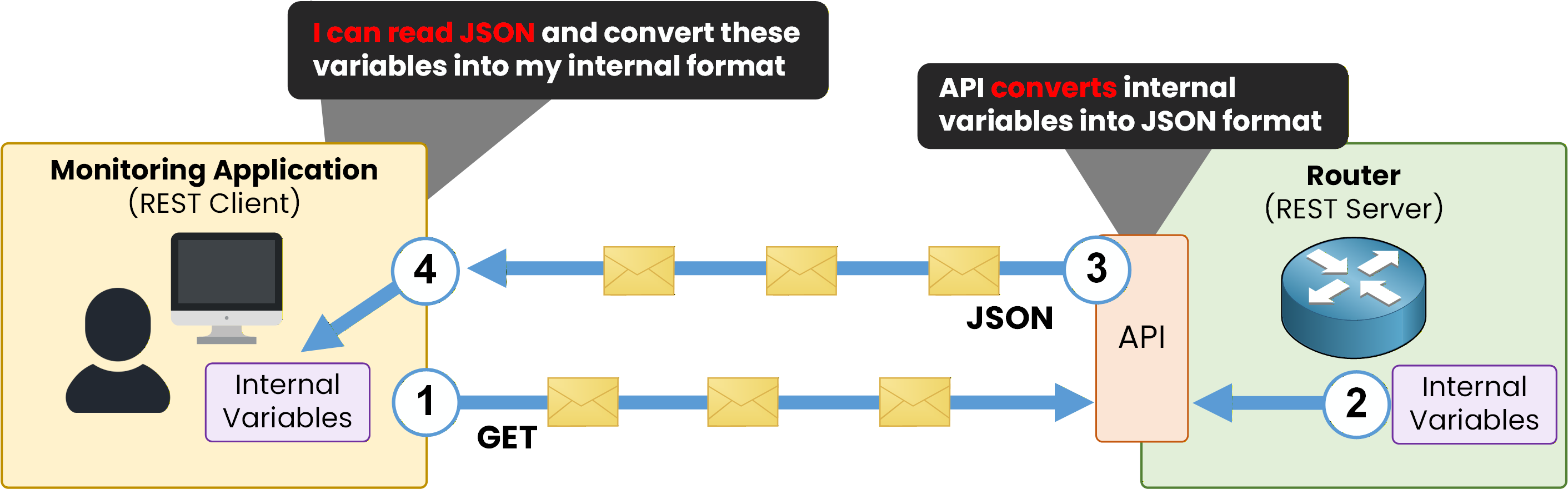
Figure 3 – Interface variables exchanged using JSON format
When the monitoring application receives the JSON message:
it reads the structured data
it extracts the values
it converts them into its own internal representation
In this way, different devices and applications are able to exchange data using the same standard format.
Answer the question below
What data format is used for exchanging information?
Now that we understand why JSON is used in networking, we need to learn what a JSON message represents.
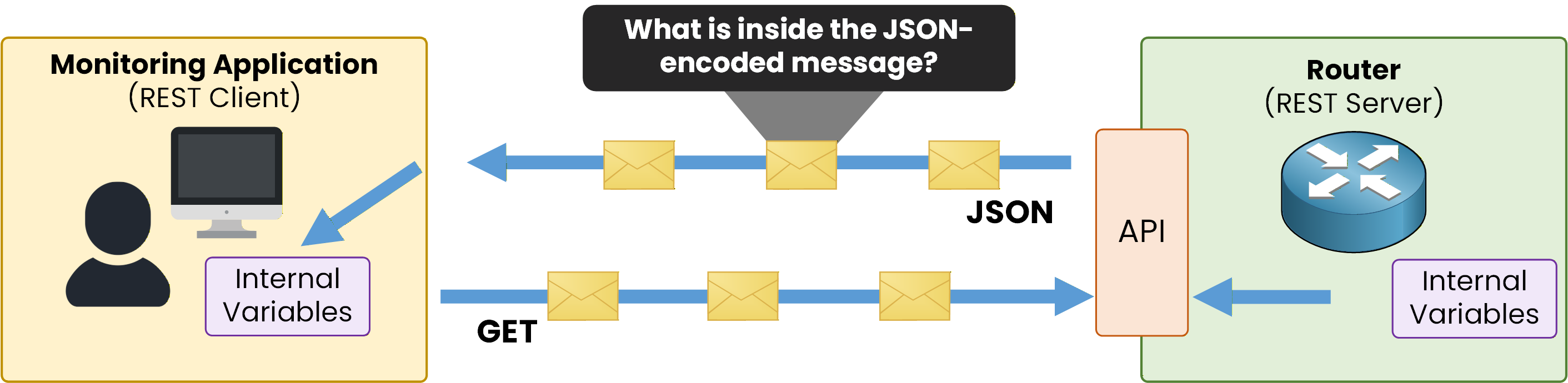
Figure 4 - JSON data exchange
To do this, we will start with something you already know well: the Cisco CLI.
Checking Interface Information with the CLI
When we check the status of an interface on a router, we use a CLI command such as:
R1# show ip interface g0/1
GigabitEthernet0/1 is up, line protocol is up (connected)
  Internet address is 10.10.12.2/24
  Broadcast address is 255.255.255.255
This output is:
human-readable
easy for a network engineer to understand
The Same Interface Information in JSON
JSON represents the exact same information, but in a machine-readable format.
Important to understand:
nothing new is added
nothing is removed
only the format changes
{
  "interface": "GigabitEthernet0/1",
  "status": "up",
  "protocol": "up",
  "connection_state": "connected",
  "ip_address": "10.10.12.2",
  "prefix": 24,
  "broadcast_address": "255.255.255.255"
}
JSON organizes the information in a structured way so applications can easily read and interpret it.
JSON does not replace the CLI.
The CLI is designed for humans, while JSON is designed for machines.At first, JSON may look unfamiliar.
This is only because we have not yet learned how to read it.The next section focuses on understanding the structure of JSON, step by step.
Answer the question below
What is the main difference between CLI output and JSON?
To understand JSON, we need to move step by step.
In JSON, the root element can be:
an object
or an array
We will start with the most common one: the JSON object.
Identifying a JSON Object
In JSON, everything between { and } is one JSON object.
{
  "interface": "GigabitEthernet0/1",
  "status": "up",
  "protocol": "up",
  "connection_state": "connected",
  "ip_address": "10.10.12.2",
  "prefix": 24,
  "broadcast_address": "255.255.255.255"
}
In this example:
the curly braces
{ }define one objectthis object represents one interface
A JSON object is an unordered collection of variables.
Here, the object contains information about interface GigabitEthernet0/1:
interface name
status
protocol state
connection state
IP address
prefix
broadcast address
All the information is listed inside the object.
⚠️ Important
The order of the variables does not matter.Key–Value Pairs (Variables)
Each variable in a JSON object is written as a key–value pair.
In this example:
the key is shown in orange
the value is shown in green
{
  "interface": "GigabitEthernet0/1",
  "status": "up",
  "protocol": "up",
  "connection_state": "connected",
  "ip_address": "10.10.12.2",
  "prefix": 24,
  "broadcast_address": "255.255.255.255"
}
Rules to Remember
keys are always strings
keys are enclosed in double quotes
a colon
:separates the key from the valueeach key–value pair is separated by a comma
each line represents one variable
Each variable describes one property of the interface.
Now that we can identify variables, the next step is to understand the type of data each value contains.Answer the question below
What does everything between { and } represent in JSON?
JSON Data Types
Each value in a JSON key–value pair has a data type.
For the CCNA exam, you need to recognize the most common JSON data types.Note: In the examples below, short annotations are added outside of the JSON syntax to guide you.
These annotations are for learning purposes only and are not part of valid JSON.String
A string represents text.
strings are enclosed in double quotes
interface names, status values, and IP addresses are often strings in Cisco JSON outputs
{
  "interface": "GigabitEthernet0/1", <= String
  "status": "up",
  "protocol": "up",
  "connection_state": "connected",
  "ip_address": "10.10.12.2",
  "prefix": 24,
  "broadcast_address": "255.255.255.255"
}
In this example, the value of the interface key is a string.
Number
A number represents a numeric value.
numbers are written without quotes
{
  "interface": "GigabitEthernet0/1",
  "status": "up",
  "protocol": "up",
  "connection_state": "connected",
  "ip_address": "10.10.12.2",
  "prefix": 24, <= Number
  "broadcast_address": "255.255.255.255"
}
Here, prefix has the numeric value 24, which is a number.
Boolean
A boolean represents a true or false state.
boolean values are written in lowercase
they are often used to describe an enabled / disabled state
{
  "enabled": true <= Boolean
}
Possible values are:
truefalse
Null
null represents the absence of a value.
very common in networking data
different from the string
"null"
"ip_address": null <= NullThis means the value exists, but no data is assigned.
Key point to remember
The data type depends on the value, not the key.
Now that you can identify:
strings
numbers
booleans
null values
the next step is to understand arrays.
That is what we will cover next.Answer the question below
What JSON data type is used for the value 24 in the example?
Simple Array
Now let’s look at arrays.
We will start with a simple array.An array is delimited by square brackets [].
Here is an example of an array that represents a list of interfaces:"interfaces": [ "GigabitEthernet0/0", "GigabitEthernet0/1" ]In this example:
interfaces is the key
the value associated with interfaces is an array
the array contains two elements
each element is a string
each string represents an interface name
So, this array simply lists:
GigabitEthernet0/0
GigabitEthernet0/1
This type of array is used when we only need a simple list, without additional details.
Array Containing Objects
Now let’s look at a more realistic and important case for the CCNA:
an array containing objects.
{
  "interfaces": [
    {
      "interface": "GigabitEthernet0/0",
      "status": "up",
      "protocol": "up",
      "connection_state": "connected",
      "ip_address": "10.10.10.1",
      "prefix": 24,
      "broadcast_address": "255.255.255.255"
    },
    {
      "interface": "GigabitEthernet0/1",
      "status": "up",
      "protocol": "up",
      "connection_state": "connected",
      "ip_address": "10.10.12.2",
      "prefix": 24,
      "broadcast_address": "255.255.255.255"
    }
  ]
}
In this example:
interfaces is the key
the value of interfaces is an array
each element inside the array is a JSON object
each object represents one interface
all objects use the same structure
Each object contains multiple variables describing the interface, such as:
interface name
status
protocol
IP address
prefix length
broadcast address
This structure is very common in Cisco JSON outputs and is frequently used in CCNA exam questions.
To make sure you are comfortable with it, the next section will focus on real, practical CCNA-style questions.Answer the question below
In the second JSON example, how many interfaces are described?
We will look at five concrete examples of questions. Here, I have removed the colors of the elements in the code blocks to represent a practical case in the exam.
Look at each example and answer the question at the bottom. If you cannot find the answer, go back through the lesson to see what you need to know to answer correctly.
Example 1
{
  "company": "NetOps Lab",
  "location": "Berlin"
}
Answer the question below
Refer to the exhibit. What is the JSON data type of the entire structure?
Example 2
{
  "routers": [
    { "name": "R1", "model": "ISR4331" },
    { "name": "R2", "model": "ISR4451" }
  ]
}
Answer the question below
Refer to the exhibit. How many JSON objects are contained in the routers array?
Example 3
{
  "switches": [
    {
      "hostname": "SW1",
      "model": "2960",
      "status": "up"
    },
    {
      "hostname": "SW2",
      "model": "3560",
      "status": "down"
    },
    {
      "hostname": "SW3",
      "model": "9200",
      "status": "up"
    }
  ]
}
Answer the question below
Refer to the exhibit. How many JSON objects are contained in the array?
Example 4
{
  "device": {
    "hostname": "R1",
    "model": "ISR4331",
    "interfaces": [
      {
        "name": "GigabitEthernet0/0",
        "enabled": true,
        "vlan": 10
      },
      {
        "name": "GigabitEthernet0/1",
        "enabled": false,
        "vlan": 30
      }
    ]
  }
}
Answer the question below
Refer to the exhibit. What is the JSON data type of the value 30?
Example 5
{
  "network": {
    "site": "HQ",
    "devices": [
      {
        "hostname": "R1",
        "role": "edge",
        "interfaces": [
          {
            "name": "GigabitEthernet0/0",
            "admin_state": true,
            "ip_address": "192.168.1.1"
          },
          {
            "name": "GigabitEthernet0/1",
            "admin_state": false,
            "ip_address": null
          }
        ]
      },
      {
        "hostname": "SW1",
        "role": "access",
        "vlans": [10, 20, 30]
      }
    ]
  }
}
Answer the question below
Refer to the exhibit. What is the JSON data type of the value false?
For the CCNA exam, remember: you do not need to write JSON.
You only need to recognize its structure, data types, and meaning.