IPv6 is divided into several address types.
Each IPv6 Address Type has a distinct purpose. Some identify a single device, others reach entire groups.
Before configuring anything, it is essential to understand the full picture of how these address types are organized.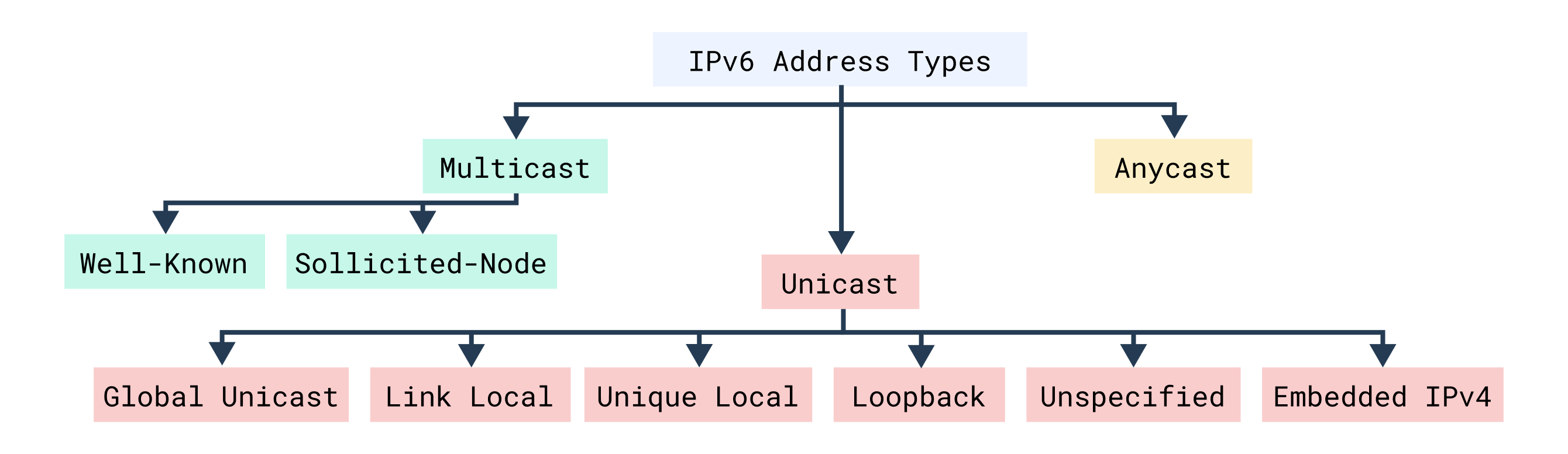
Figure 1 - IPv6 address types
IPv6 divides its address space into three main categories: Unicast for one-to-one communication, Multicast for one-to-many, and Anycast for one-to-nearest.
By the end of this lesson, you will know exactly which type to use, when to use it, and how each behaves in real networks.
Answer the question below
How many main IPv6 address categories exist?
Unicast addresses are the most common type of IPv6 addresses. They identify a single interface on a device, meaning that packets sent to a unicast address are delivered to one specific destination.
This represents a one-to-one communication model, which is the foundation of most IPv6 traffic.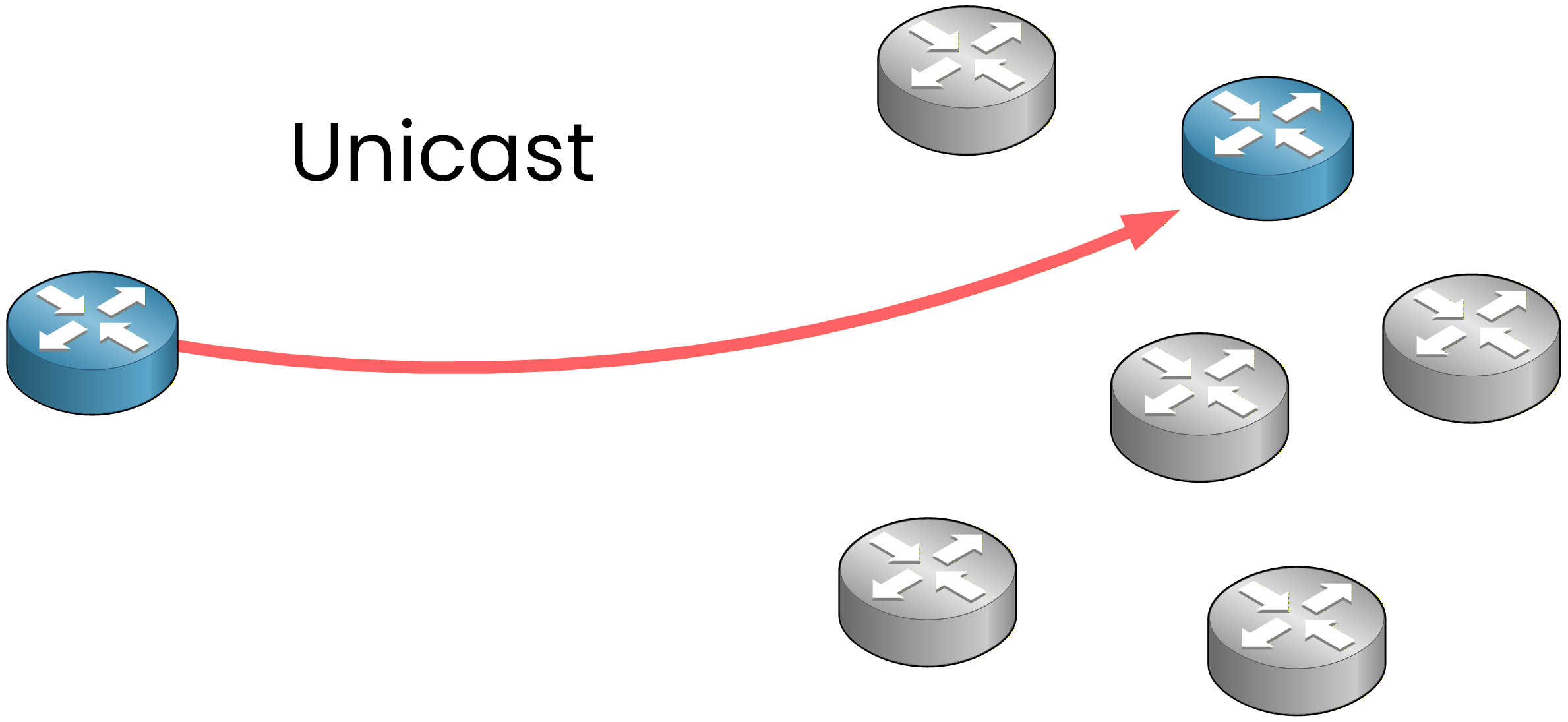
Figure 2 - Unicast traffic: packets go directly from one device to another.
IPv6 defines several unicast address types, each with a specific purpose.
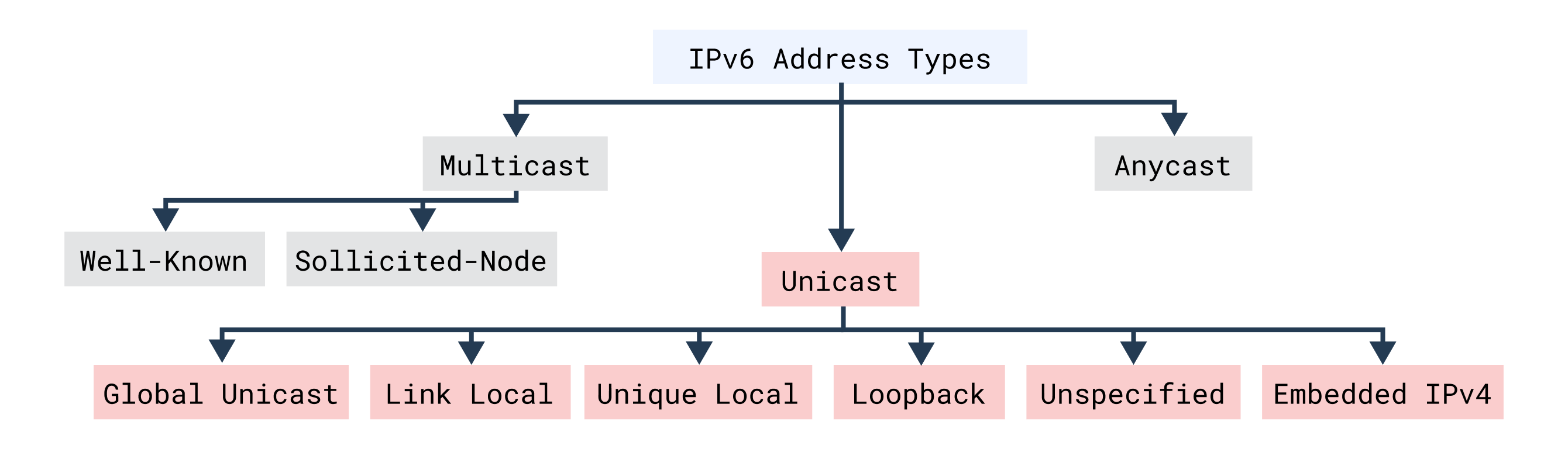
Figure 3 – IPv6 Unicast Addresses
You'll encounter Global Unicast, Link-Local, Unique Local, Loopback, Unspecified, and Embedded IPv4 addresses.
Let's start with the most common type used across global networks.Global Unicast Addresses
Global Unicast addresses are the IPv6 equivalent of public IPv4 addresses.
They are globally unique and routable across the Internet, allowing direct communication between devices in different networks.Let's look at an example together in Figure 4 to see how a Global Unicast address is structured.
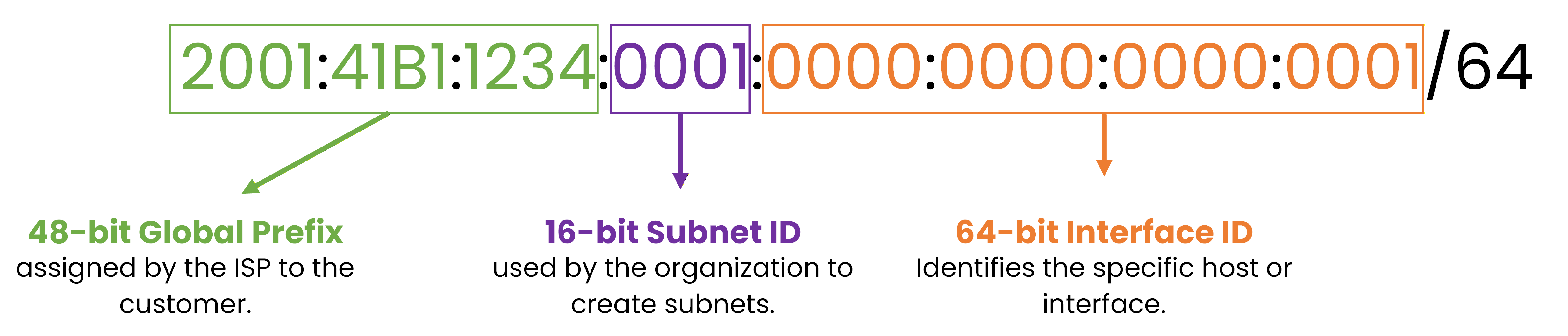
Figure 4 - IPv6 Global Unicast Address Breakdown
This address is divided into three parts that you should remember:
The Global Prefix (48 bits) — assigned by your ISP to identify your network on the Internet,
The Subnet ID (16 bits) — the part you'll use to organize and create your internal subnets,
The Interface ID (64 bits) — which identifies the exact host or interface within that subnet.
Configure Global Unicast Address
Now, let's configure a global unicast address on a router.
R1# conf t
Enter configuration commands, one per line.  End with CNTL/Z.
R1(config)# interface G0/0
R1(config-if)# ipv6 address 2001:41B1:1234:1::1/64
R1(config-if)# no shutdown
R1(config-if)# end
Now verify it:
R1# show ipv6 interface brief
GigabitEthernet0/0    [up/up]
  FE80::A8BB:CCFF:FE12:3401
  2001:41B1:1234:1::1
Here you can clearly see:
The Link-Local address (FE80::)
The Global Unicast address (2001:41B1:1234:1::1)
That's how IPv6 addresses appear on a real router.
Answer the question below
How many bits does the Interface ID contain in a Global Unicast address?
Next, let's look at the addresses that every IPv6 interface generates automatically.
Link-Local Addresses
Link-Local addresses are automatically generated on every IPv6-enabled interface.
They are used for communication within the same local network segment and are not routable beyond it.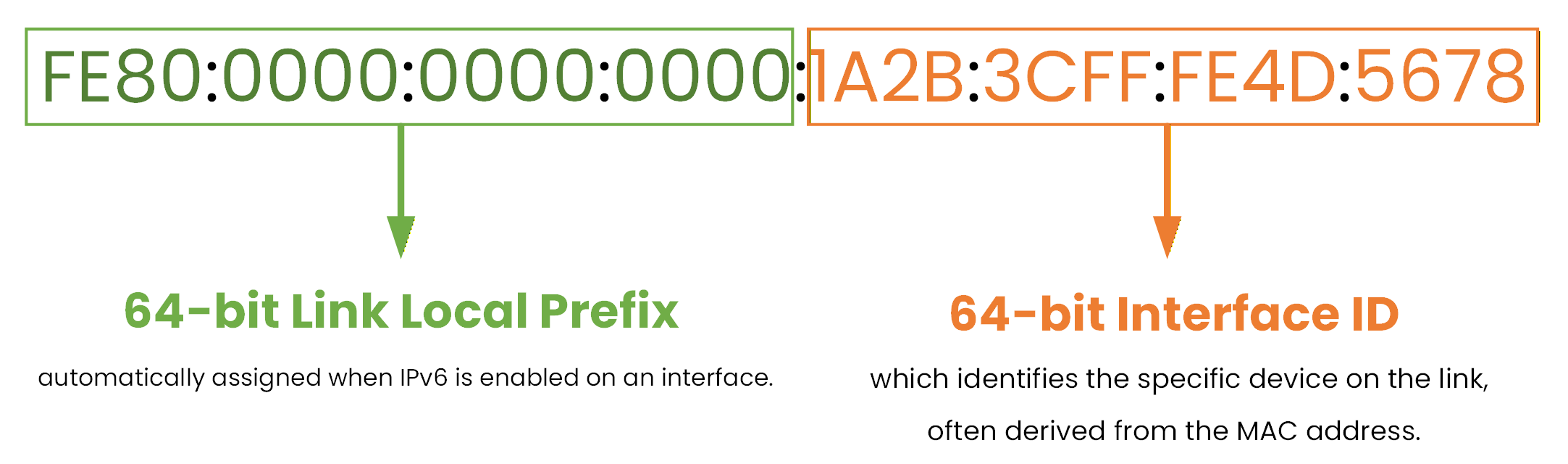
Figure 5 - IPv6 Link-Local Address BreakdownBy default, the Interface ID portion is generated automatically (often using EUI-64 based on the MAC address).
Automatic Link-Local Address
This allows each interface to have a unique IPv6 address without any manual configuration.
You can verify the automatically generated Link-Local address with the command:R1# show ipv6 interface g0/1 GigabitEthernet0/1 is up, line protocol is up IPv6 is enabled, link-local address is FE80::A8BB:CCFF:FE12:3402 Global unicast address(es): 2001:41B1:1234:2:A8BB:CCFF:FE12:3402, subnet is 2001:41B1:1234:2::/64Here you can see:
The Link-Local address (FE80::)
The Global Unicast address
Every IPv6 interface has a Link-Local address, even if no Global Unicast address is configured.
Manual Configuration of a Link-Local Address
In some scenarios, you may want to manually configure the Link-Local address instead of letting the router generate it automatically.
Here's how to do it:
R1# conf t
Enter configuration commands, one per line.  End with CNTL/Z.
R1(config)# interface g0/1
R1(config-if)# ipv6 address FE80::1 link-local
R1(config-if)# end
Notice the keyword
link-local: this tells the router that the address must be used as a Link-Local address only.
Now check it:R1# show ipv6 interface g0/1 GigabitEthernet0/1 is up, line protocol is up IPv6 is enabled, link-local address is FE80::1 Global unicast address(es): 2001:41B1:1234:1::1, subnet is 2001:41B1:1234:1::/64Answer the question below
All Link-Local IPv6 addresses start with which four characters?
Unique Local Addresses
Unique Local Addresses (ULA) are similar in concept to private IPv4 addresses such as 192.168.x.x or 10.x.x.x.
They are used inside private networks and are not routable on the public Internet. This makes them ideal for internal communication between routers, servers, or virtual machines within an organization.Let's look at one example together in Figure 6.
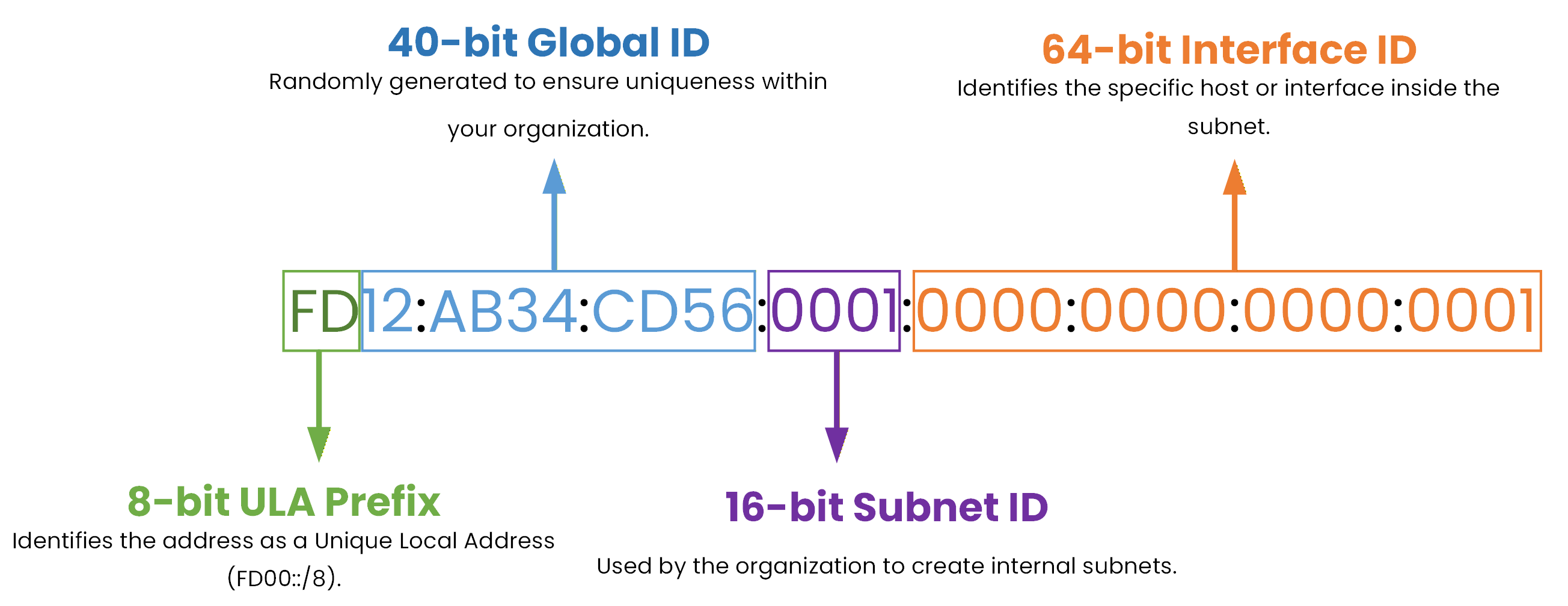
Figure 6 – IPv6 Unique Local Address Breakdown
All ULA addresses start with the prefix FD00::/8, and the next 40 bits form a randomly generated Global ID to ensure uniqueness across networks. After that, a 16-bit Subnet ID identifies internal subnets, and the 64-bit Interface ID identifies the specific device on that subnet.
Loopback and Unspecified Addresses
Some IPv6 addresses are reserved for special internal functions such as testing or initialization.
The Loopback address (::1/128) is used by a device to test its own IPv6 stack.
It allows a device to send traffic to itself, without leaving the device.You can use it to verify that IPv6 is functioning properly on the router.
R1# ping ::1
Type escape sequence to abort.
Sending 5, 100-byte ICMP Echos to ::1, timeout is 2 seconds:
!!!!!
Success rate is 100 percent (5/5)
If you see successful replies, it means the IPv6 protocol stack is working correctly on the device.
The loopback address never leaves the router and cannot be reached from the network.
It is purely used for local testing.The Unspecified address (::/128) means “no address.”
It's temporarily used when an interface doesn't yet have a configured IPv6 address, for example, during the initial Neighbor Discovery phase.Answer the question below
What is the IPv6 loopback address?
Embedded IPv4 Addresses
Embedded IPv4 addresses are used to represent an IPv4 address inside an IPv6 format. They are especially useful during the transition phase from IPv4 to IPv6, allowing dual-stack devices to communicate.
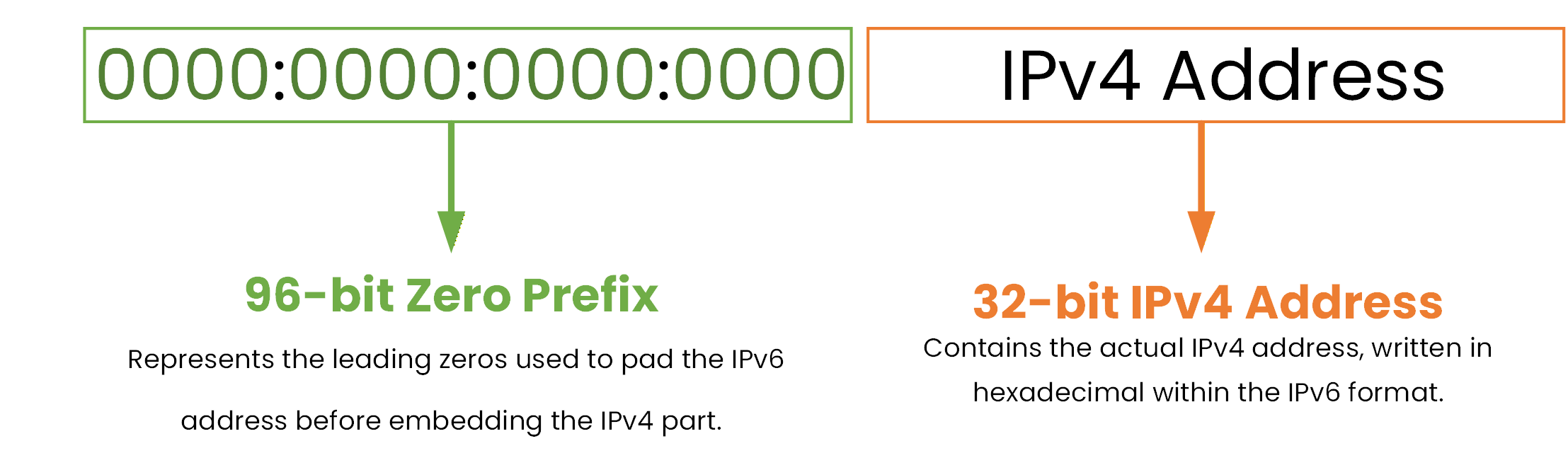
Figure 7 - Embedded IPv4 Addresses
These addresses contain 96 leading zero bits, followed by the 32-bit IPv4 address, written in hexadecimal form.
For example, the IPv4 address 172.16.5.10 becomes ::AC10:50A when written in IPv6 format.
Answer the question below
How many leading zero bits are used in an embedded IPv4 address?
IPv6 multicast addresses are used for one-to-many communication. Instead of sending multiple copies of the same packet, one device can send a single packet that reaches all members of a multicast group.
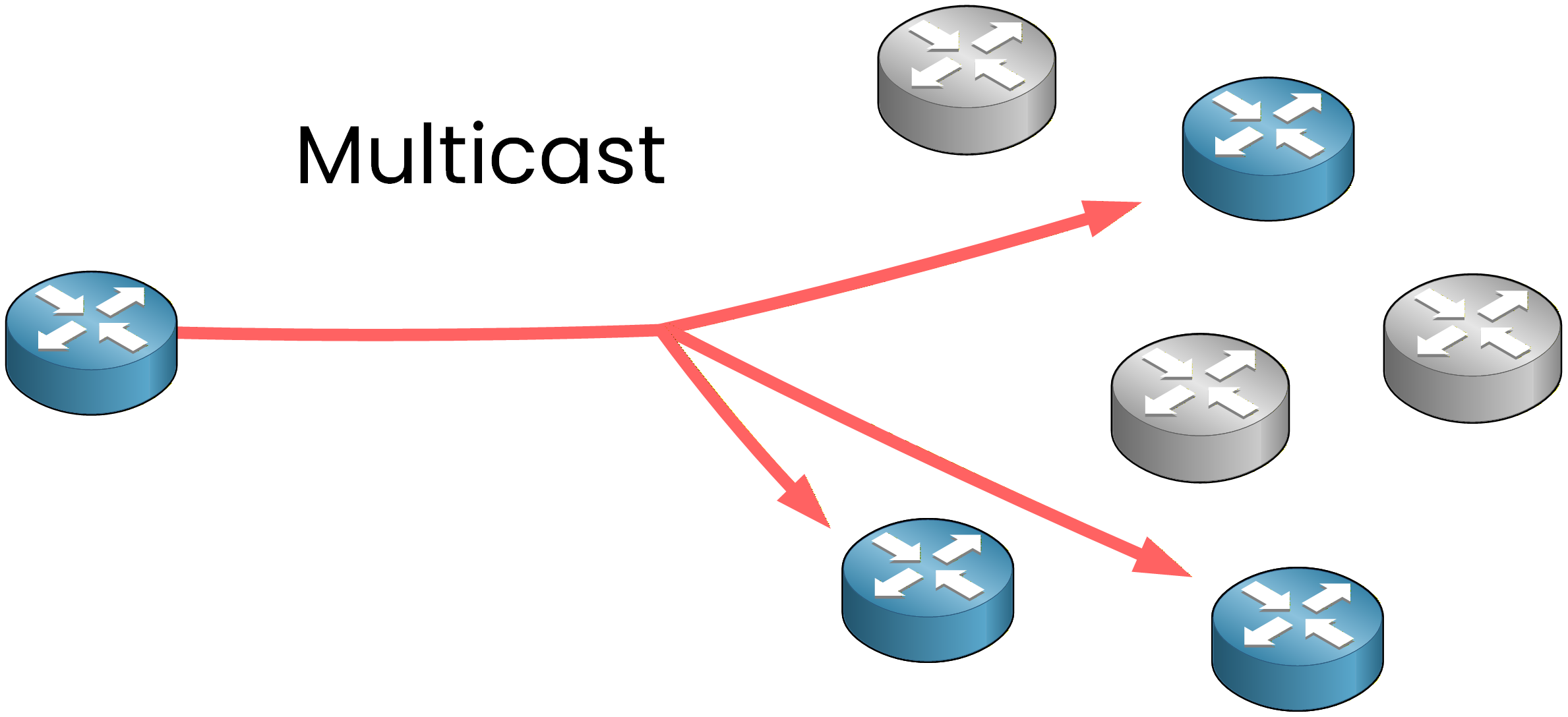
Figure 8 – Multicast Traffic Type
This makes communication more efficient than using broadcast or multiple unicasts.
As you can see below, there are two types of IPv6 multicast addresses you should know for the CCNA exam:
Well-Known Multicast Addresses and Solicited-Node Multicast Addresses.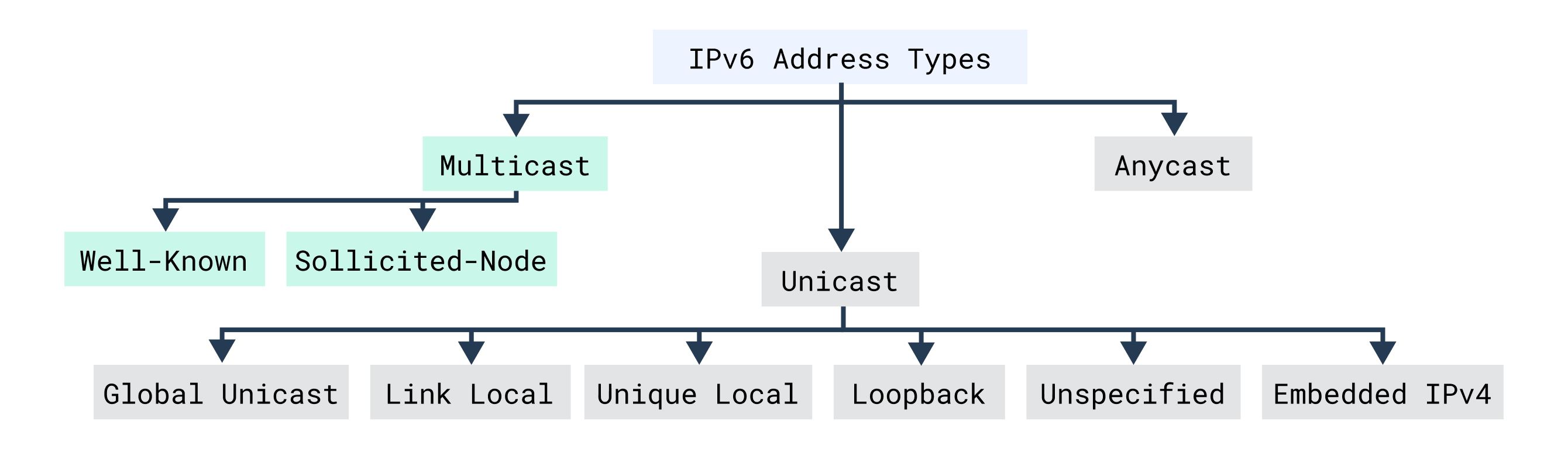
Figure 9 – Multicast Addresses
Well-Known Multicast Addresses
These addresses are predefined for specific routing protocols and network services.
Each protocol, such as OSPFv3 or EIGRP, uses a unique multicast group so devices running the same protocol can communicate efficiently.Function
IPv6 Address
IPv4 Equivalent
All Nodes
FF02::1
224.0.0.1
All Routers
FF02::2
224.0.0.2
All OSPF Routers
FF02::5
224.0.0.5
OSPF DR/BDR Routers
FF02::6
224.0.0.6
RIP Routers
FF02::9
224.0.0.9
EIGRP Routers
FF02::A
224.0.0.10
Table 1 - Example of Well-Known Multicast Addresses
You can see the multicast groups your router has joined by checking its IPv6 interface:
R1# show ipv6 interface g0/0
GigabitEthernet0/0 is up, line protocol is up
  IPv6 is enabled, link-local address is FE80::A8BB:CCFF:FE12:3401
  Global unicast address(es):
    2001:41B1:1234:1:A8BB:CCFF:FE12:3401, subnet is 2001:41B1:1234:1::/64 [EUI]
  Joined group address(es):
    FF02::1
    FF02::2
    FF02::1:FF12:3401
  MTU is 1500 bytes
  ICMP error messages limited to one every 100 milliseconds
  ND DAD is enabled, number of DAD attempts: 1
You don't need to memorize every multicast address for the exam. What matters is understanding that each routing protocol or service uses its own well-known multicast group to communicate with the right devices.
Answer the question below
Which multicast address represents “All Nodes” in IPv6?
Solicited-Node Multicast Addresses
Solicited-node multicast addresses replace broadcasts in IPv6. They are used by Neighbor Discovery to find the MAC address of a device on the same link without flooding the entire network. Each IPv6 interface automatically joins its own solicited-node group.
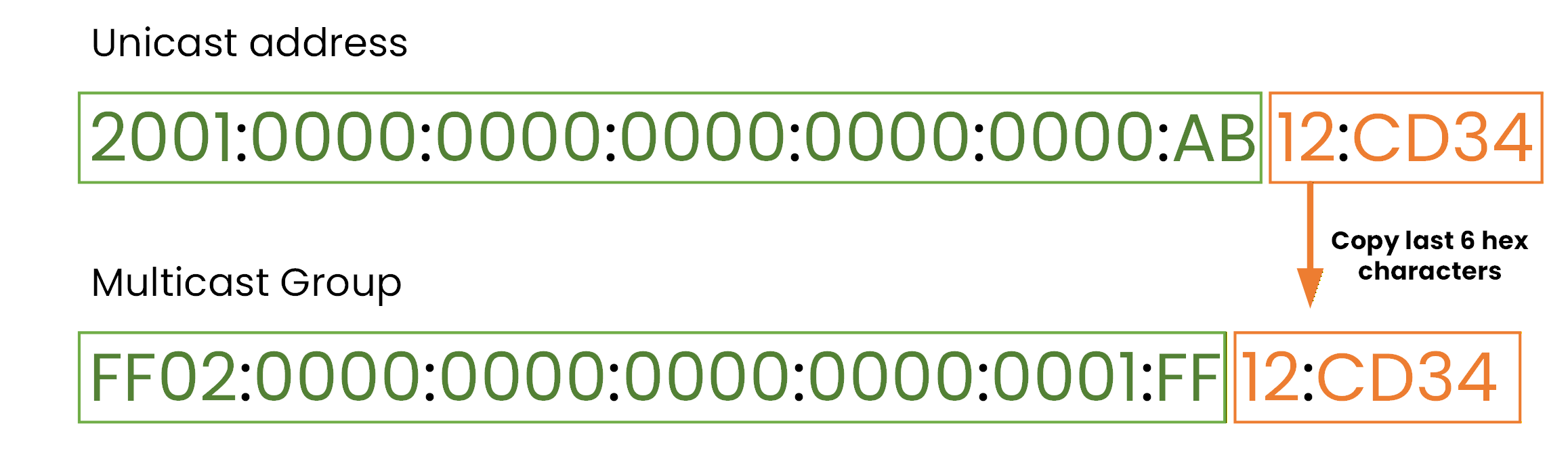
Figure 10 - Solicited-Node Multicast Addresses
As shown in the figure, your device builds this address in two steps:
Copy the last 6 hex characters of the unicast address,
Append them to the prefix FF02::1:FF00:0/104.
Only the matching device answers. No flooding, no broadcast.
And where does the /104 come from?
An IPv6 address is 128 bits long,
The 6 copied hex characters are the last 24 bits (6 × 4),
The remaining 104 bits are fixed: that's your /104 prefix.
Now that you understand how IPv6 communicates with multiple devices using multicast, let's look at the last address type, the IPv6 Anycast type.
Answer the question below
Which prefix is used to build a Solicited-Node multicast address?
An anycast address is a single IPv6 address assigned to multiple devices. When a packet is sent to an anycast address, it is delivered to the closest device according to the routing table. This is known as one-to-nearest communication.
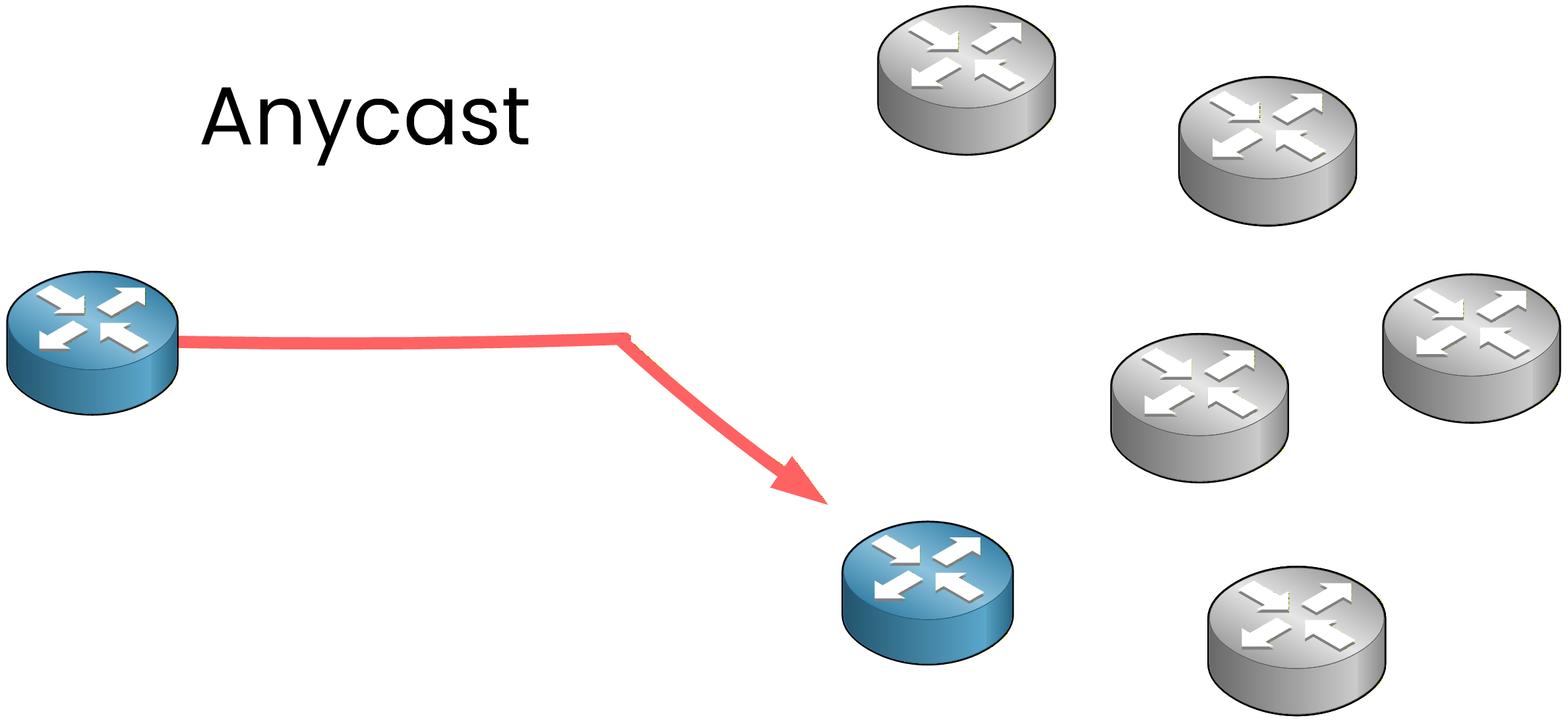
Figure 11 - Anycast Traffic Type
Anycast is useful when you want a request to reach the nearest available node.
For example, DNS often uses anycast so that queries are answered by the nearest server, improving response time and reliability. It provides a simple way to improve performance without adding complexity to the client side.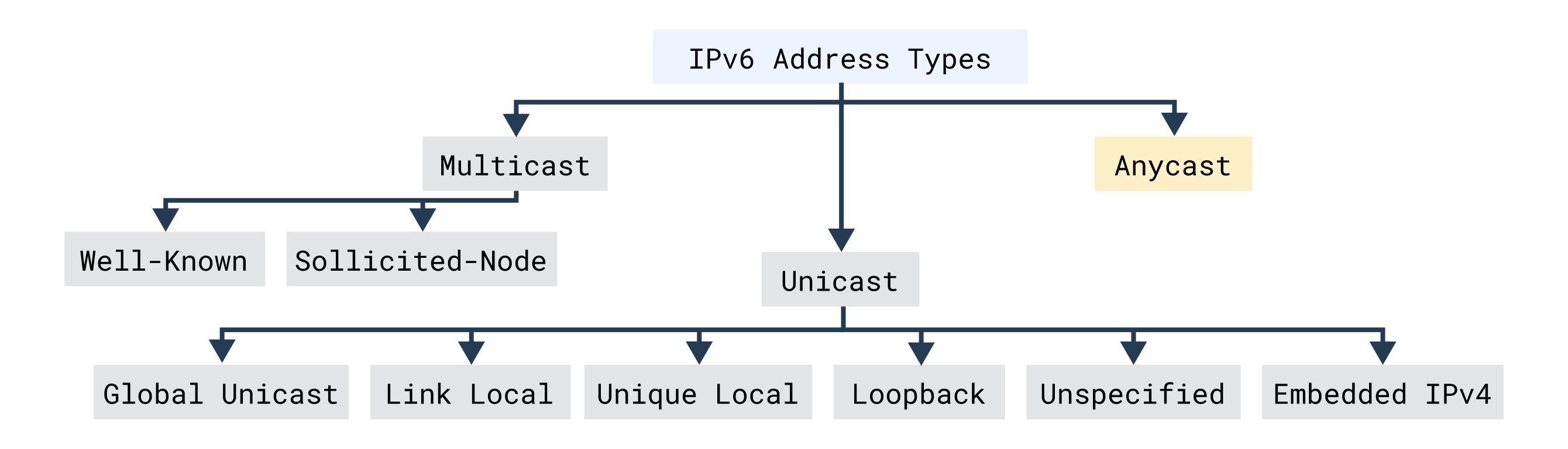
Figure 12 – IPv6 Anycast Addresses
In IPv6, there is no special prefix for anycast addresses. They look exactly like unicast addresses. The difference comes from configuration: the same unicast address is assigned to several interfaces on different routers or servers. The routing process automatically forwards packets to the device that appears as the nearest destination in the routing table.
In short, anycast allows multiple devices to share the same IPv6 address while ensuring that traffic always reaches the nearest one, improving both efficiency and reliability.
Answer the question below
Is an Anycast packet delivered to all devices or to the nearest device?
IPv6 defines three main address types: Unicast, Multicast, and Anycast.
Each serves a specific purpose: Unicast identifies a single device, Multicast reaches multiple devices, and Anycast delivers traffic to the nearest one.Address Type
Communication Model
Purpose
Example
Unicast
One-to-one
Communication between two devices
2001:DB8::1
Multicast
One-to-many
Sends traffic to multiple devices
FF02::1
Anycast
One-to-nearest
Reaches the closest device
2001:DB8:100::1
Table 2 - IPv6 Address Type Summary
Understanding IPv6 addressing is all about recognizing the purpose of each type and knowing when to use them. Focus especially on the Unicast variations: Global, Unique Local, and Link-Local, since they are the ones you'll configure and troubleshoot most often in real networks.
Answer the question below
Which IPv6 address type uses one-to-many communication?