Fiber optics are used in modern networks for high bandwidth and low latency in connections.
Fiber optics send information using light pulses, not electrical signals like copper cables. This allows for faster data transfer.
In this lesson, we will focus on the two main families of fiber optics: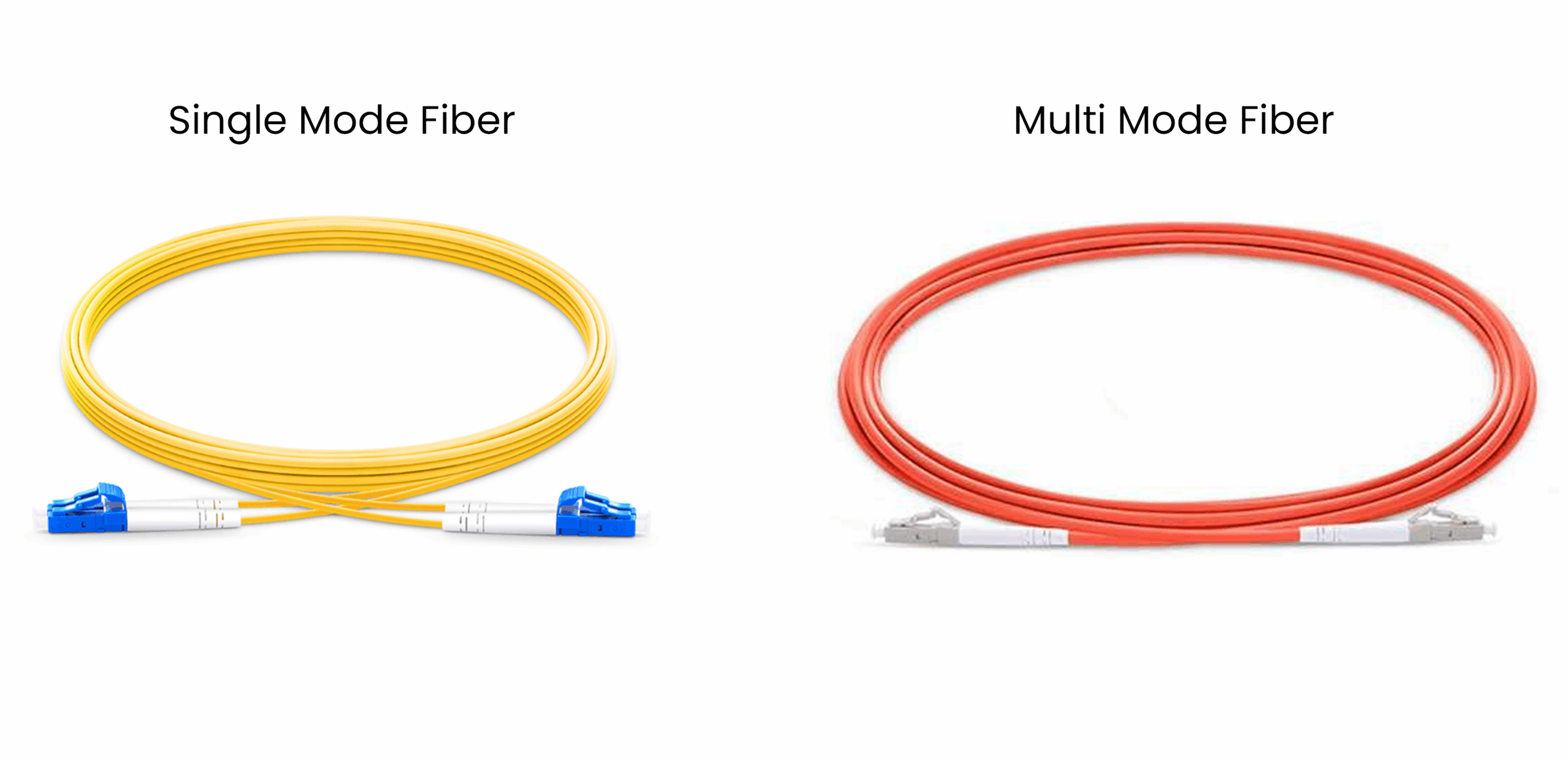
Figure 1 – Single Mode vs Multi Mode Fiber
Single-Mode Fiber (SMF)
Multi-Mode Fiber (MMF)
The main difference between these two types lies in the core size, the light source, and the greatest supported distance.
Now that you know the two main families of fiber, let's take a closer look at how a fiber optic cable is structured.Answer the question below
What do fiber optics use to send information?
To begin with, you need to understand that a fiber optic cable is made up of several parts.
As you can see below, there are three main layers.On the outside, there is the Coating. This is the protective layer that shields the fiber from shocks or humidity. (Additional layers such as buffer, strength members, or outer jacket may also be added for extra protection.)
Just below it is the Cladding. It surrounds the core and plays a crucial role: it keeps the light inside the core by reflecting it back through the phenomenon of total internal reflection.
Finally, at the center, we have the Core. This is the part where the light actually travels and where information is transmitted.
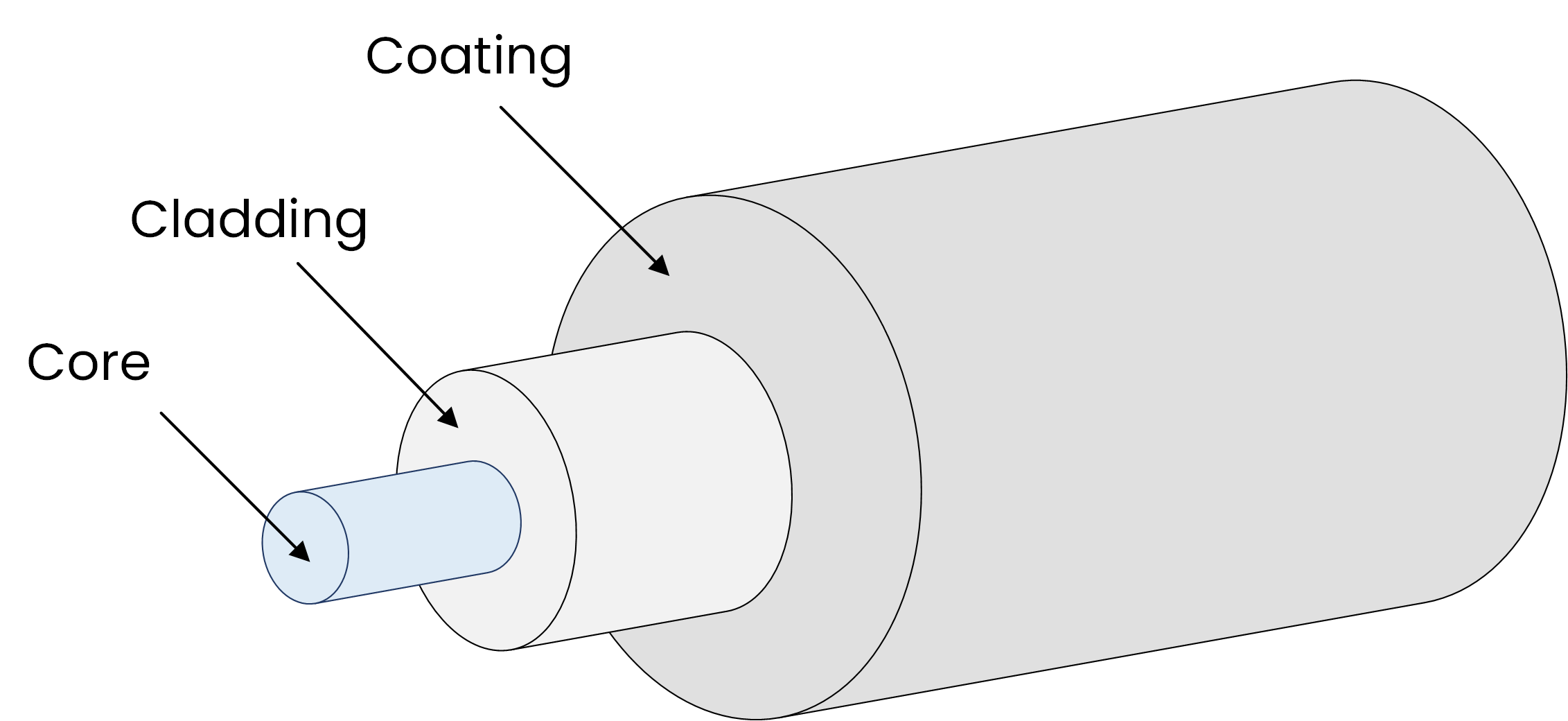
Figure 2 – Optical fiber structure
The size of the core changes depending on the type of fiber optic cable.
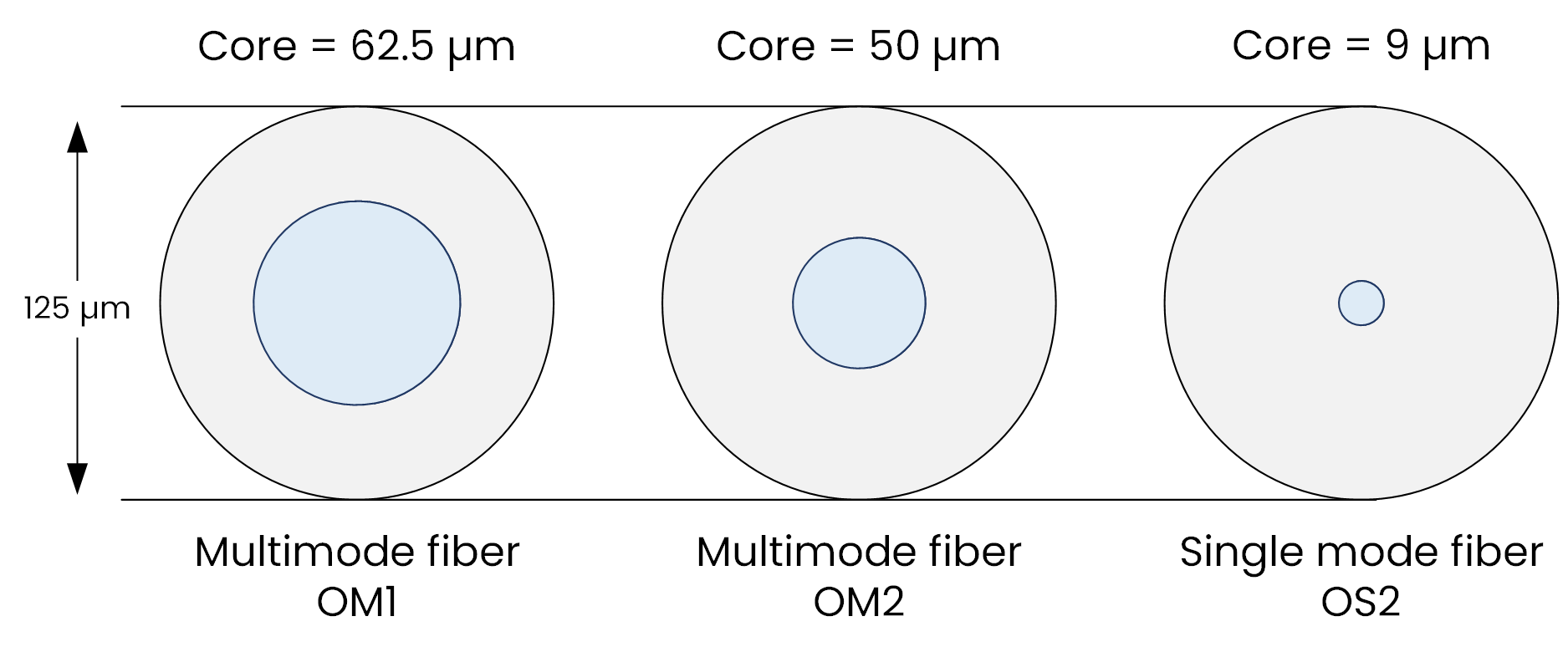
Figure 3 – Core sizes comparison: OM1, OM2, OS2
In Single-Mode Fiber
OS1 / OS2 → about 9 µm
In Multi-Mode Fiber
OM1 → 62.5 µm
OM2, OM3, OM4, OM5 → 50 µm
These core sizes are important and should be memorized for the CCNA exam. Since the size of the core determines the fiber type, let's now focus on single-mode fiber and see how it works.
Answer the question below
Which fiber has a very small core?
In Single-Mode Fiber, light transmission is achieved using a laser. This device is expensive, but very precise.
The light travels in a straight line through the fiber core, which makes it possible to carry information across very long distances.
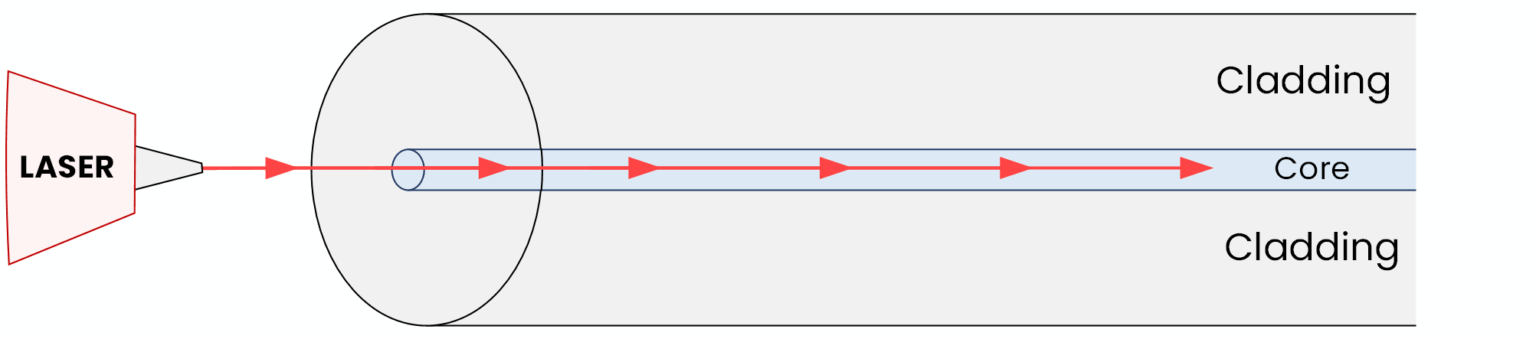
Figure 4 – Light transmission in Single-Mode fiber
Light in single-mode fiber experiences minimal loss and almost no dispersion.
Ethernet Standards to Know
For the CCNA exam, you should be able to identify common single-mode Ethernet standards.
1000BASE-LX
“1000” = 1 Gb/s
“BASE” = baseband transmission (one digital signal uses the full cable, always the case in Ethernet)
“LX” = Long-wavelength (~1310 nm)
Typical range: 5 to 10 km.
10GBASE-LR
“10G” = 10 Gb/s
“BASE” = baseband transmission
“LR” = Long Reach (~1310 nm)
Typical range: around 10 km.
LX and LR always refer to Single-mode fiber.
Single-Mode is great for long distances, as you can see, but what about shorter distances and cost-effective links? That’s where Multi-Mode fiber comes in.
Answer the question below
Which light source does Single Mode fiber use?
Multi-Mode fiber works differently from Single-mode. Here, the core is much larger (50 or 62.5 µm) and allows several light rays to propagate in parallel.
The light source is usually an LED (Light-Emitting Diode) or a VCSEL (Vertical-Cavity Surface-Emitting Laser). These components are less expensive than lasers but are less precise.
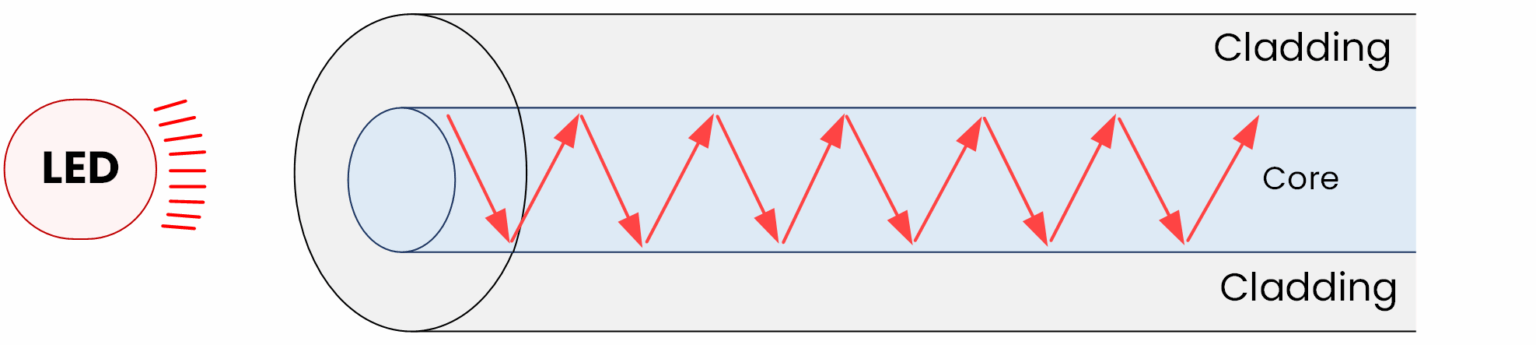
Figure 5 – Light transmission in Multi-Mode
Because multiple light rays bounce inside the core and follow different paths, dispersion occurs. This limits the range significantly, usually to a few hundred meters.
Multi-Mode is most often used for short-distance connections, such as inside data centers or within the same building.
Ethernet Standards to Know
Again for the CCNA exam, you should be able to identify common Multi-Mode Ethernet standards.
1000BASE-SX
“1000” = 1 Gb/s
“BASE” = baseband transmission
“SX” = Short-wavelength (~850 nm)
Typical range: 220 m (OM1) to 550 m (OM2)
10GBASE-SR
“10G” = 10 Gb/s
“BASE” = baseband transmission
“SR” = Short Reach (~850 nm)
Typical range: 300 m (OM3) to 400 m (OM4)
SX and SR always refer to Multi-Mode fiber.
To make it easier to distinguish them in practice, fibers also come with different jacket colors.
Answer the question below
Which light source is common in Multi-Mode fiber?
These two types of optical fibers can also be recognized by the color of their jackets.
Single-Mode → usually yellow
Multi-Mode → typically orange or aqua
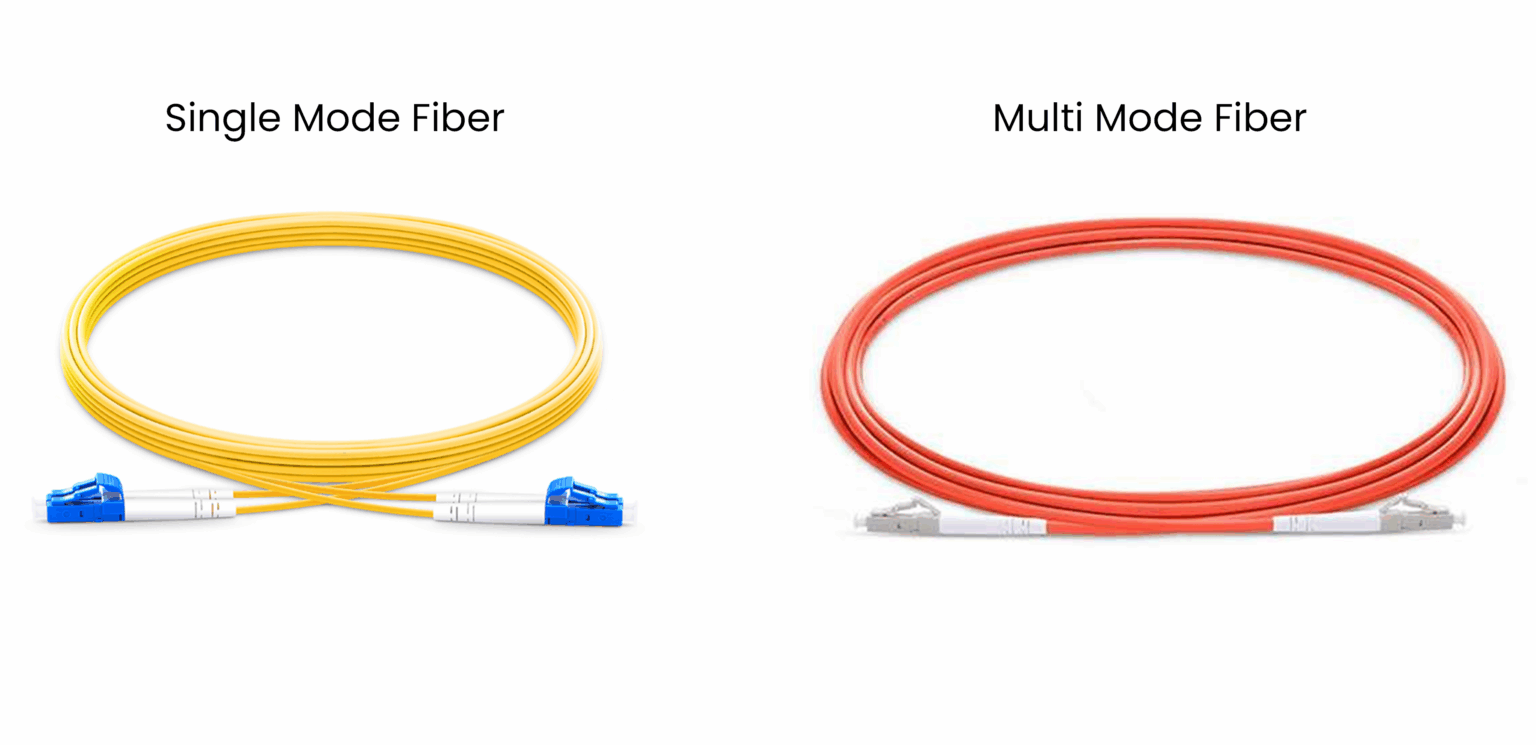
Figure 6 – Jacket color of Single Mode vs Multi Mode Fiber
Main Differences
Single-Mode: small core, uses a laser, supports long distances, more expensive.
Multi-Mode: larger core, uses an LED or VCSEL, suited for shorter distances, and less expensive.
Beyond color and core size, it’s also important to understand how fiber links actually transmit and receive data.
Answer the question below
What is the typical jacket color of Single Mode fiber?
Fiber optic cabling is used in pairs of strands.
One strand is used as Tx (Transmit) to send information.
The other strand is used as Rx (Receive) to receive information.
This design allows fiber optics to operate in full-duplex mode.

Figure 7 – Fiber connection showing Tx and Rx pairs
In the diagram above, you can see two interfaces connected with fiber optics, for example, between two routers.
On the left side (grey), there is an SFP (Small Form-factor Pluggable). This is a compact, hot-swappable transceiver. Its job is to change the router’s electrical signals into light for the Tx strand. Then, it converts the light received on the Rx strand back into electrical signals.
The sides are always cross-connected: the Tx on one side is connected to the Rx on the other. This way, one strand sends data while the other receives it.

Figure 8 – Data flow over fiber
Here, the two fiber interfaces are communicating with each other.
If the fibers are reversed, the link will not work.In a real scenario, imagine router R1 in building A and router R2 in building B. Single-Mode fiber would be used to connect these two devices over long distances.
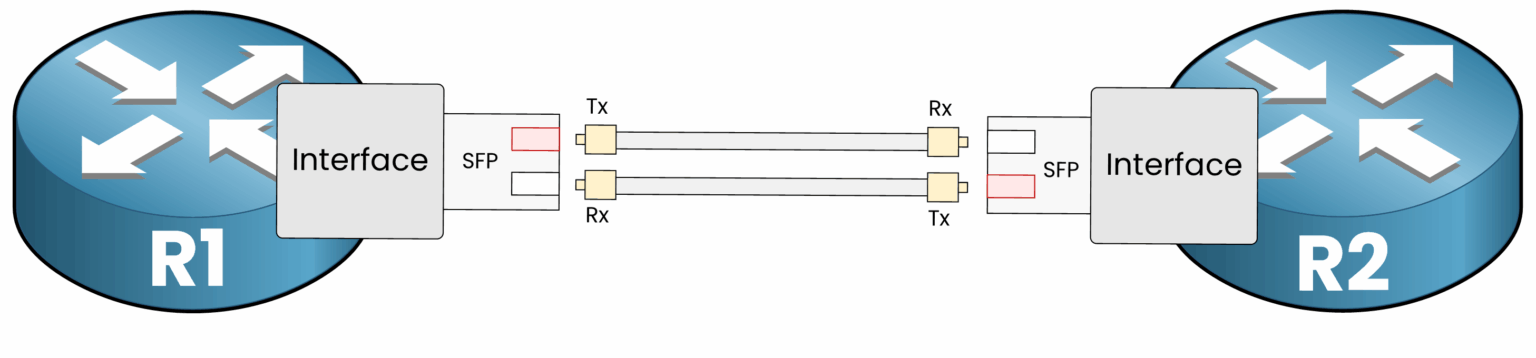
Figure 9 – Fiber connection between two routers
Now that you’ve seen how a fiber optic connection works, let’s verify this link from the router’s point of view.
CLI Preview – Verifying a Fiber Optic Link
In this step, you will access the CLI of router R1 to check the status of the fiber GigabitEthernet interface.
Click on the CLI Task below, connect to router R1, and follow the instructions to display the interface status.If the fiber is correctly connected, you should see a line similar to the following:
GigabitEthernet0/0/0 is up, line protocol is up (connected)This confirms that:
the fiber link is detected on router R1
Tx and Rx are correctly connected between R1 and R2
the fiber interface is operational
If the fibers were reversed, the interface would not fully come up, and the fiber link would not function correctly.
Now that you’ve seen how fiber optics work in practice, let’s summarize the key differences you need to know for the CCNA exam.
Answer the question below
Which strand is used to send information?
To wrap up, here is a Single Mode vs Multi Mode summary table of the key differences you need to know for the CCNA exam:
Feature
Single-Mode Fiber (SMF)
Multi-Mode Fiber (MMF)
Core size
~9 µm (OS1/OS2)
62.5 µm (OM1)
50 µm (OM2/OM3/OM4/OM5)Light source
Laser
LED / VCSEL
Jacket color
Yellow
Orange / Aqua
Distance (typical)
Up to ~100 km
(5–10 km for LX/LR)A few hundred meters
(220–550 m for SX, 300–400 m for SR)Standards to know
1000BASE-LX, 10GBASE-LR
1000BASE-SX, 10GBASE-SR
Table 1 - Fiber Summary for CCNA
Answer the question below
Which fiber type uses a laser and reaches the longest distances?