The Domain Name System (DNS) is a network service that allows devices to resolve domain names into IP addresses. It enables users to access network services using names, while the network itself operates using numerical IP addressing.
The Problem DNS Solves
When you access a website, you naturally use a name.
You type a name such as youtube.com because names are easy for humans to remember and understand.
Network devices do not communicate using names. Routers and hosts rely on IP addresses to identify destinations and forward traffic across the network.
Figure 1 – Humans use names, devices use IP addresses
This creates a fundamental mismatch:
Humans think in names.
Networks operate using IP addresses.
Before any communication with a remote service can begin, this gap must be resolved. The name you use must first be associated with an IP address that the network can reach.
Until this happens, no data can be exchanged and the network cannot forward traffic to the destination. This is the problem DNS is designed to solve.
Answer the question below
What do network devices use to identify destinations?
Now that you understand the problem DNS must solve, let's look at how DNS works at a high level.
Imagine you are using PC1 and want to watch a video on YouTube. You type youtube.com in the search bar and press Enter. From your point of view, this feels simple and natural because you only need to remember the name of the website, not its IP address.
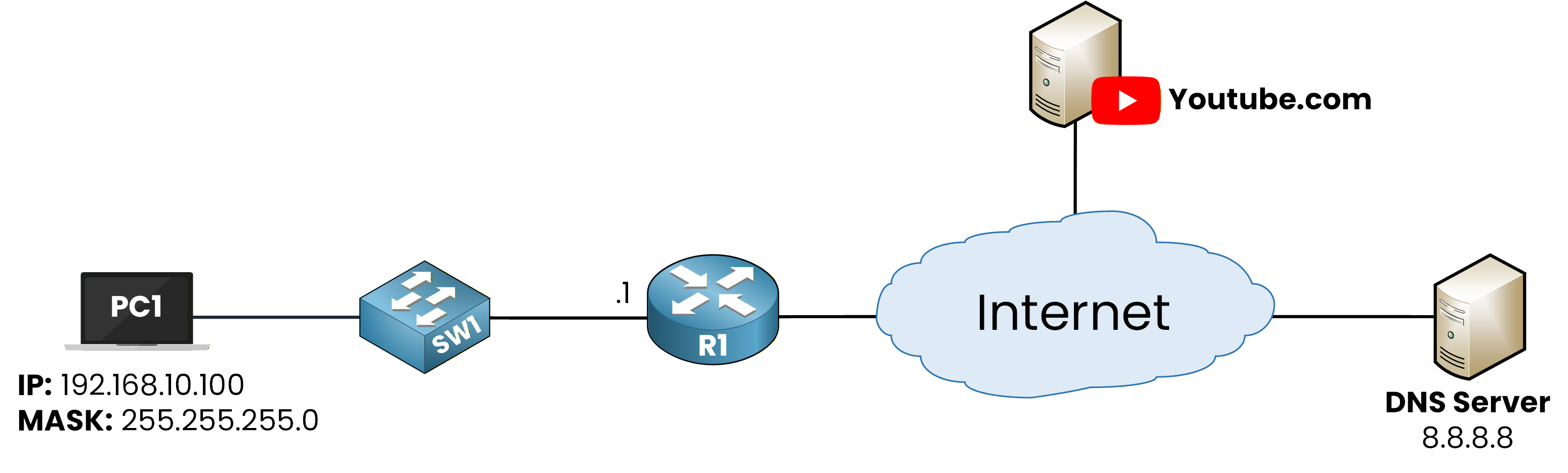
Figure 2 - Domain Name System (DNS) Topology
However, IP devices do not work this way. They cannot communicate using names and instead require IP addresses to identify destinations on the network. Before any communication with YouTube can occur, the domain name must first be resolved to an IP address.
Sending the DNS Query
At a high level, DNS resolution follows a clear and ordered sequence:
PC1 starts with a domain name, not an IP address.
PC1 contacts a DNS server to ask for the IP address associated with that name.

Figure 3 – DNS query sent by the PC to the DNS server to resolve youtube.com
Receiving the DNS Response
The DNS server processes the request and looks up the corresponding IP address.
The DNS server replies to PC1 with that IP address.
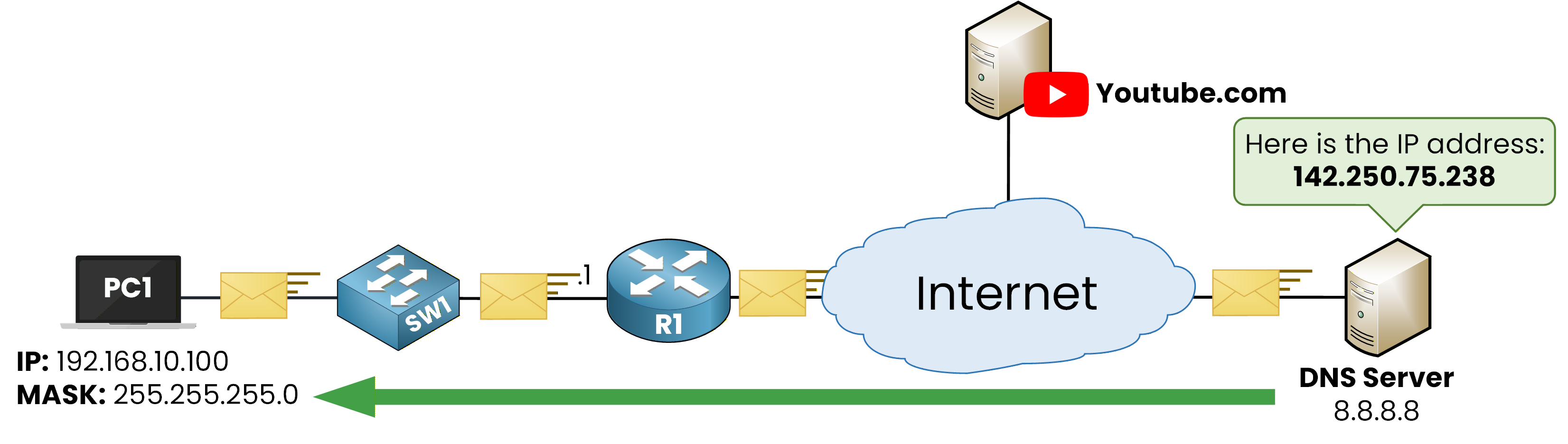
Figure 4 – DNS response returning the IP address of youtube.com to the PC
Once PC1 receives the IP address, it can communicate directly with the YouTube server.
From this point on, the network forwards traffic using the IP address, not the domain name.
On a Windows PC, you can manually verify the DNS response:
C:\Users\pingmynetwork> nslookup youtube.com
Server:  dns.google
Address:  8.8.8.8

Non-authoritative answer:
Name:    youtube.com
Address: 142.250.75.238
What you see here is exactly what happened in Figure 4:
The PC sent a DNS query.
The DNS server replied with an IP address.
The PC can now use this IP address to communicate with the destination.
The key idea in this section is the order of events. Communication with the remote service cannot begin until the domain name has been resolved into an IP address.
In the next section, you will see what the PC actually asks for when it sends a DNS request.
Answer the question below
Before PC1 can send traffic to youtube.com, what must be resolved into an IP address?
In the previous section, you saw that PC1 must contact a DNS server before it can communicate with youtube.com. At this stage, PC1 is not sending any data to YouTube yet. It is asking a simple question to a DNS server.
When PC1 sends a DNS request, it only knows the domain name. It does not know any IP address associated with youtube.com, so it needs the DNS server to provide that information.
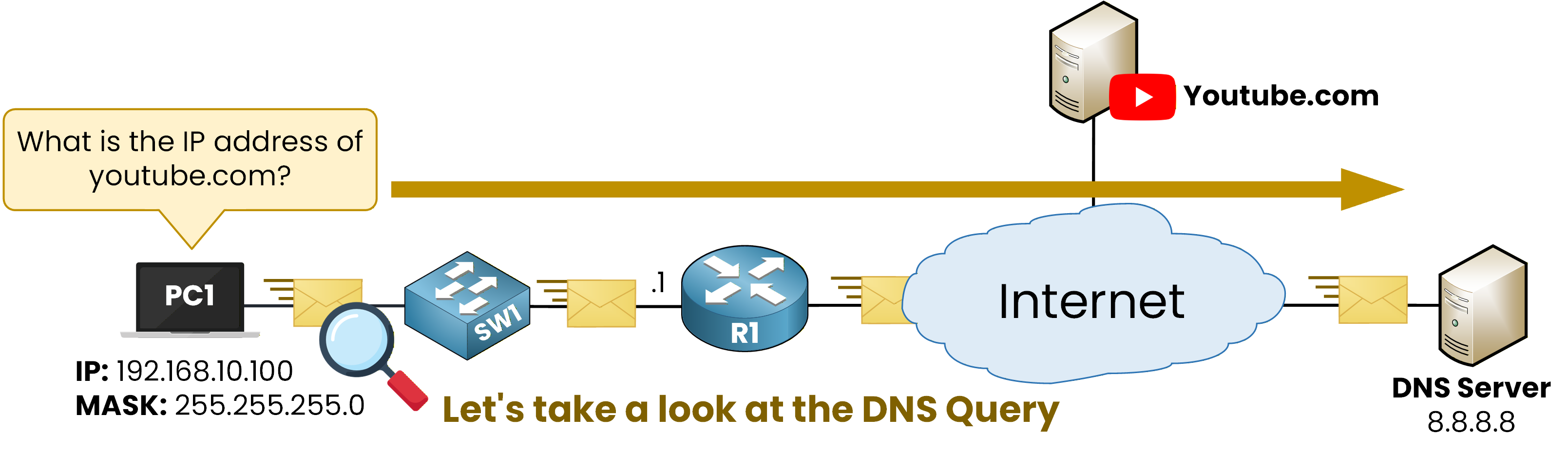
Figure 5 – The DNS Query
At this point, the question asked by PC1 is straightforward:
"What is the IP address of youtube.com?"IPv4 and IPv6 Resolution
A DNS server can return different types of information depending on what the client is requesting. In modern networks, a PC may be able to communicate using IPv4, IPv6, or both.
To handle this, DNS uses different record types.
An A record is used to obtain the IPv4 address associated with a domain name.
An AAAA record is used to obtain the IPv6 address associated with a domain name.
These records do not change how DNS works conceptually. They only specify which type of IP address the client wants to receive from the DNS server.
At this stage, the important idea is what the PC is asking for, not how the exchange looks on the network.
In the next section, you will observe these DNS requests and responses directly on the network.
Answer the question below
Which DNS record is used to obtain an IPv4 address?
Now that you understand what the PC asks for in a DNS request, let's observe how this exchange appears on the network.
By default, DNS uses the User Datagram Protocol (UDP) and communicates on port 53. Using UDP allows DNS queries and responses to be lightweight and fast, which is important because DNS resolution happens frequently on the network.
With this in mind, let's look at how DNS resolution actually appears in a packet capture.
Observing the DNS Queries and Responses
Look at the first DNS packets in the capture.
PC1 sends a DNS query asking for information related to youtube.com. This query corresponds to the request discussed earlier, where the PC asks the DNS server for IP address information associated with a domain name.
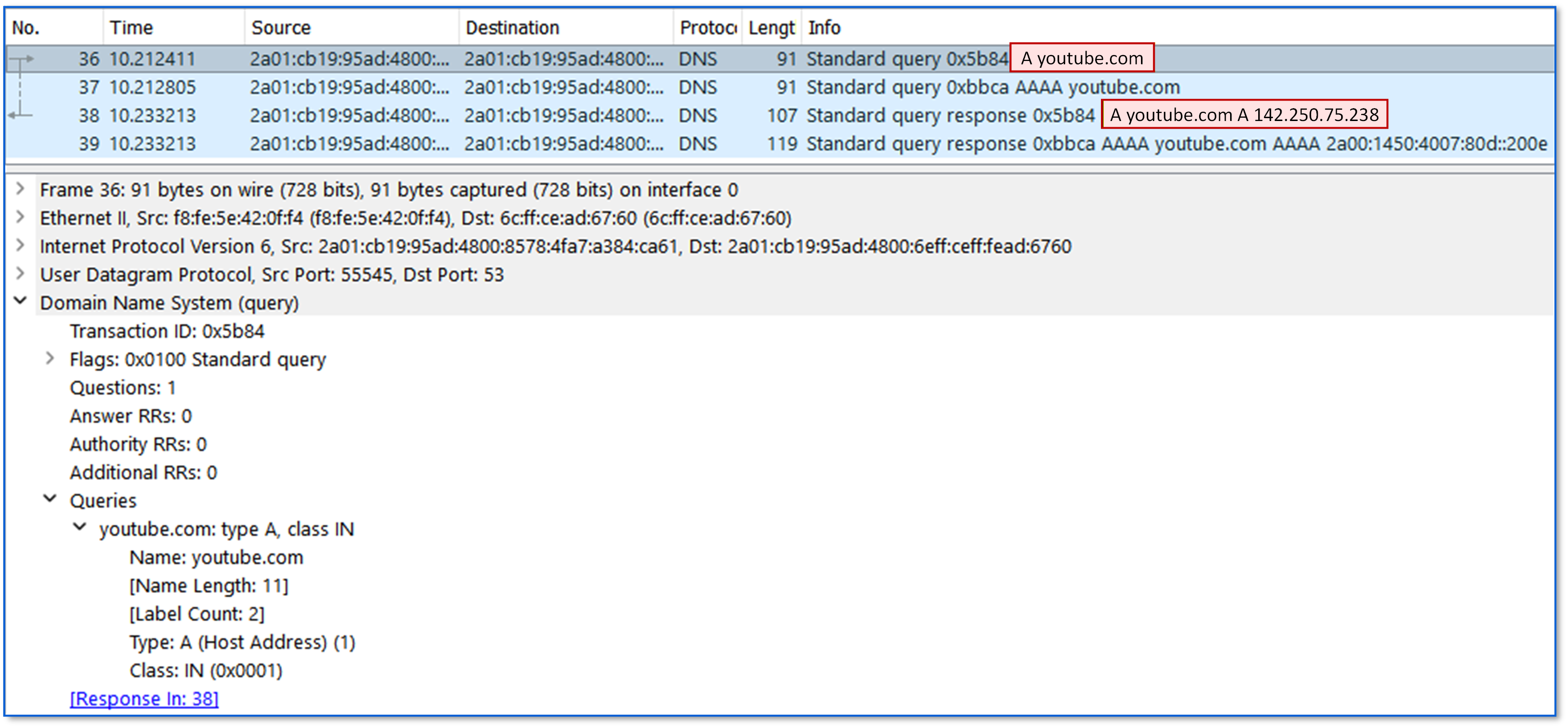
Figure 6 – DNS A record resolution for youtube.com
In this capture, you can see a DNS query of type A for youtube.com, followed by the DNS response.
This response contains the IPv4 address associated with youtube.com, which PC1 can use to reach the destination using IPv4.After this exchange, PC1 sends another DNS query for the same domain name.
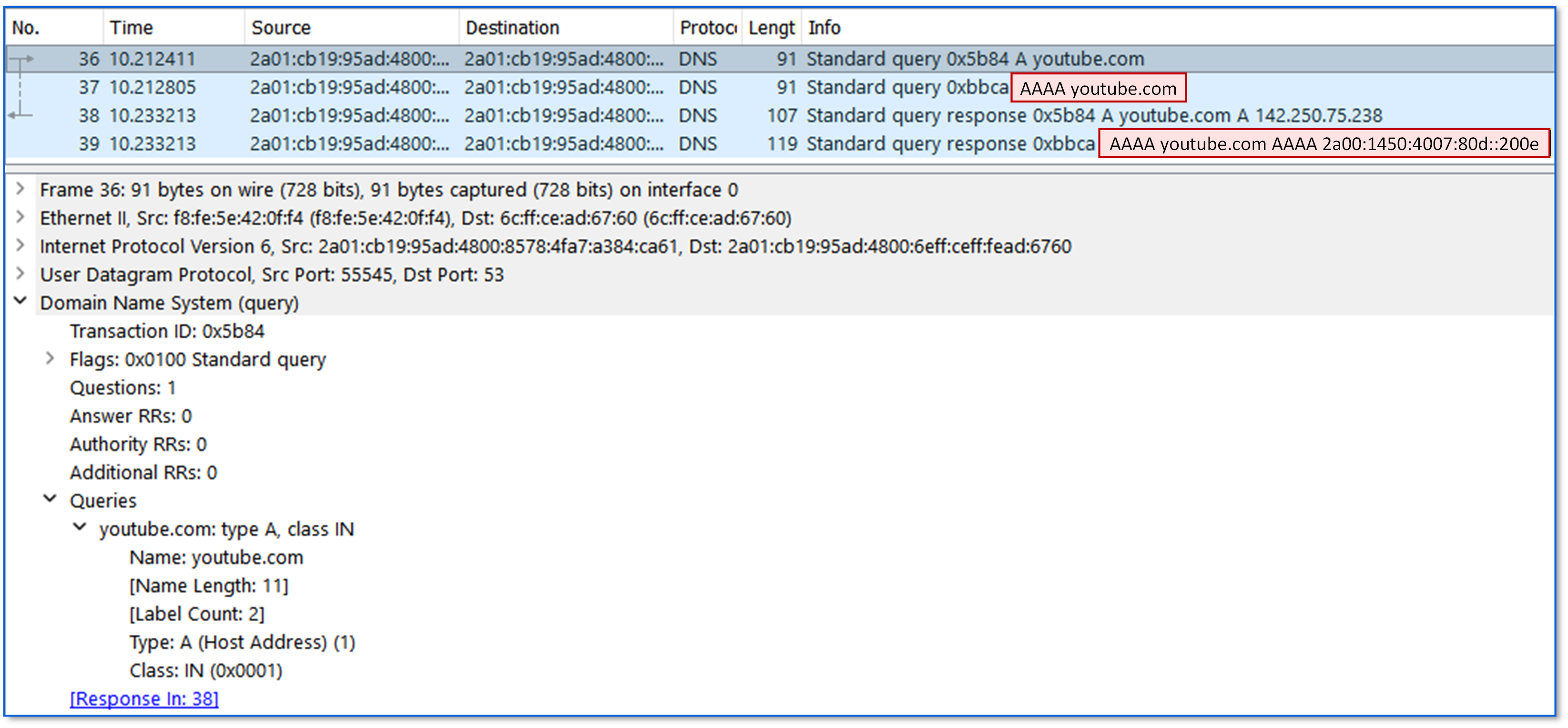
Figure 7 – DNS AAAA record resolution for youtube.com
This second query is of type AAAA and is followed by a DNS response containing the IPv6 address associated with youtube.com. This provides PC1 with the IPv6 information for the same destination.
At this stage, PC1 has received both the IPv4 and IPv6 addresses associated with youtube.com. It can now use the appropriate address to communicate with the remote service.
In the next section, you will see how this information is stored locally so that DNS resolution does not need to occur every time the same domain name is accessed.
Answer the question below
Which DNS record provides the IPv4 address for youtube.com?
Answer the question below
Which DNS record provides the IPv6 address for youtube.com?
Answer the question below
Which port number does DNS use by default?
In the previous section, you saw that PC1 received the IPv4 and IPv6 addresses associated with youtube.com.
Once these addresses are learned, PC1 stores this information locally. The domain name and its associated IP addresses are saved so they can be reused later.
This local storage is called the DNS cache.
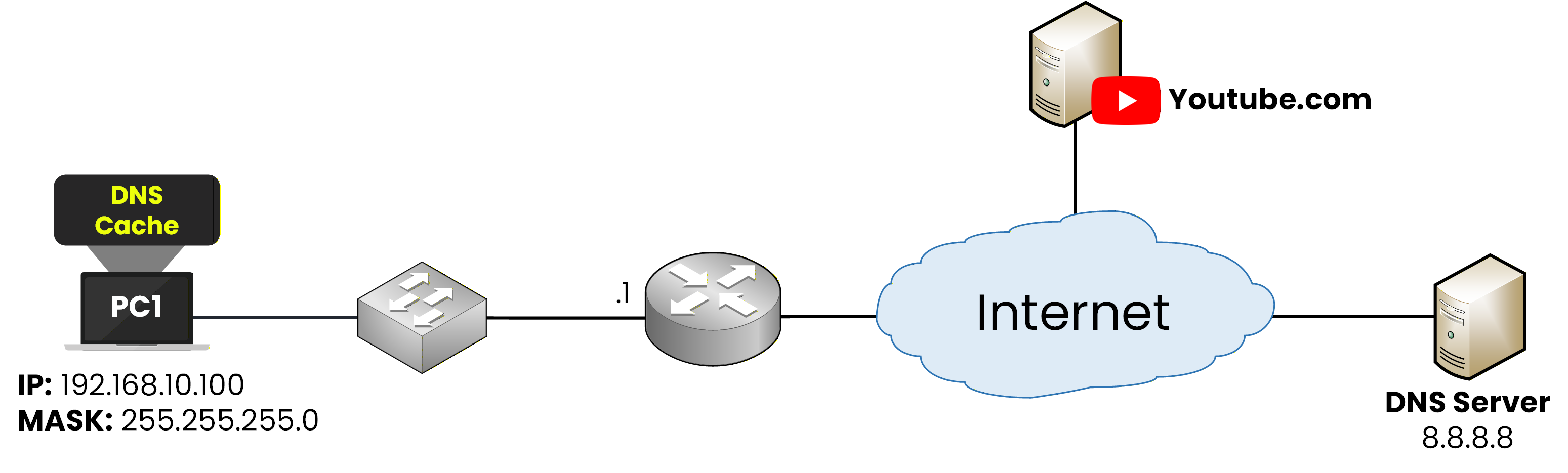
Figure 8 – DNS Cache on PC1
The DNS cache allows PC1 to remember which IP addresses are associated with domain names it has already resolved. As long as this information remains valid, the PC can reuse it instead of asking the DNS server again.
When PC1 wants to access youtube.com, it first checks its DNS cache. If an entry already exists, PC1 can immediately use the stored IP address to reach the destination.
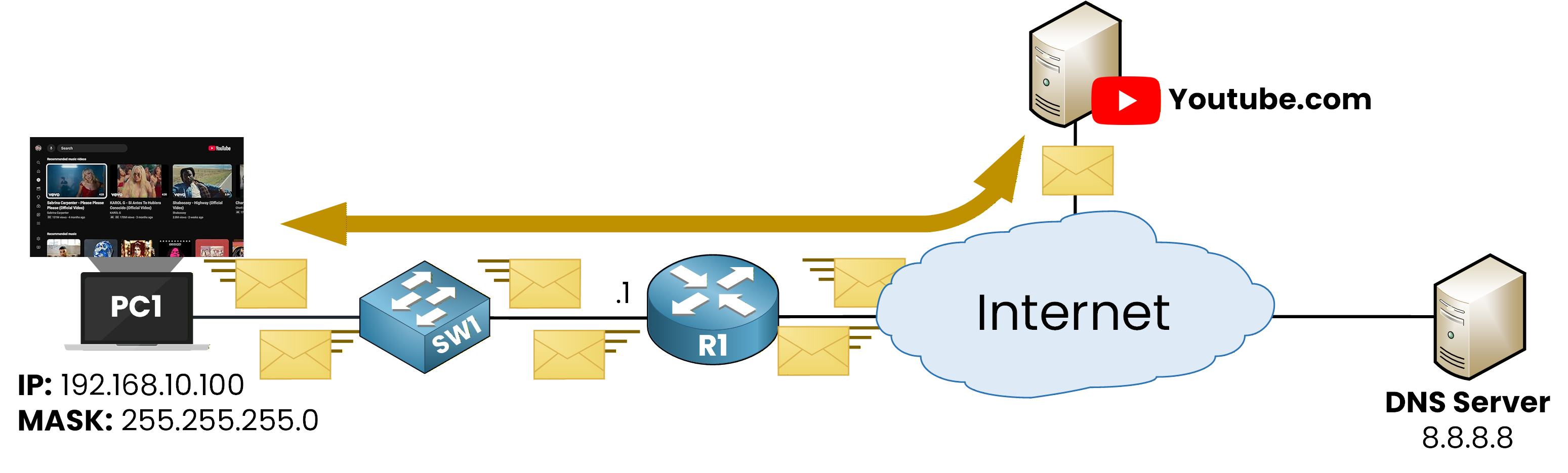
Figure 9 - PC1 is now able to watch the YouTube video
At this stage, DNS resolution has already been completed. The PC knows where to send traffic, so data can flow directly between PC1 and the remote service.
Viewing the DNS Cache on Windows
You can verify the DNS cache directly on a Windows PC.
To display the DNS cache, use the following command:
C:\Users\pingmynetwork> ipconfig /displaydns

Windows IP Configuration

    youtube.com
    ----------------------------------------
    Record Name . . . . . : youtube.com
    Record Type . . . . . : 28
    Time To Live  . . . . : 483041
    Data Length . . . . . : 16
    Section . . . . . . . : Answer
    AAAA Record . . . . . : 2a00:1450:4007:80d::200e


    Record Name . . . . . : youtube.com
    Record Type . . . . . : 1
    Time To Live  . . . . : 483118
    Data Length . . . . . : 4
    Section . . . . . . . : Answer
    A (Host) Record . . . : 142.250.75.238
When you look at the output, you can clearly see an entry for youtube.com.
PC1 has stored two DNS records for this domain:
an AAAA record, which contains the IPv6 address.
an A record, which contains the IPv4 address.
This confirms that the IP addresses returned by the DNS server are now saved locally on the PC.
As long as these entries remain valid, PC1 can reuse them to reach youtube.com without sending a new DNS request.
Answer the question below
Where are resolved domain names stored locally?
So far, you have seen how DNS works automatically on a PC. Now let's look at where the DNS server information comes from and how it is configured.
DNS Configuration on the PC
For a PC to resolve domain names, it must know which DNS server to contact.
On a Windows PC, you can view the DNS configuration using the following command:
C:\Users\pingmynetwork> ipconfig /all

Wireless LAN adapter Wi-Fi:

IPv4 Address. . . . . . . . . . . : 192.168.10.100 (Preferred)
Subnet Mask . . . . . . . . . . . : 255.255.255.0
Default Gateway . . . . . . . . . : 192.168.10.1
DNS Servers . . . . . . . . . . . : 8.8.8.8
NetBIOS over Tcpip. . . . . . . . : Enabled

[output omitted]
This command displays detailed network configuration information, including the DNS server addresses currently used by the PC.
In the output, look for the DNS Servers field. This field indicates which DNS server the PC contacts when it needs to resolve a domain name. In this example, the PC is using 8.8.8.8 as its DNS server.
DNS Configuration on the Router
A router can also perform DNS resolution, but only for its own operations, not for traffic it forwards.
To configure a DNS server on a Cisco router, you specify the DNS server address using the following command:R1# conf t Enter configuration commands, one per line. End with CNTL/Z. R1(config)# ip name-server 8.8.8.8This command tells the router which DNS server to use when it needs to resolve a domain name.
Enabling DNS Lookups on the Router
Configuring a DNS server is not enough on its own. The router must also be allowed to perform DNS lookups.
To enable DNS resolution, use the following command:R1(config)# ip domain lookup R1(config)# endThis command allows the router to send DNS queries when you use domain names in commands such as
pingortraceroute.Testing DNS Resolution on the Router
Once DNS is configured, you can test name resolution directly from the router:
R1# ping youtube.com
Translating "youtube.com"...domain server (8.8.8.8) [OK]
Sending 5, 100-byte ICMP Echos to 142.250.75.238, timeout is 2 seconds:
!!!!!
Success rate is 100 percent (5/5), round-trip min/avg/max = 8/10/13 ms
Before sending ICMP packets, the router first resolves the domain name into an IP address using the configured DNS server.
To do this, the router sends a DNS query to the DNS server it has been configured to use.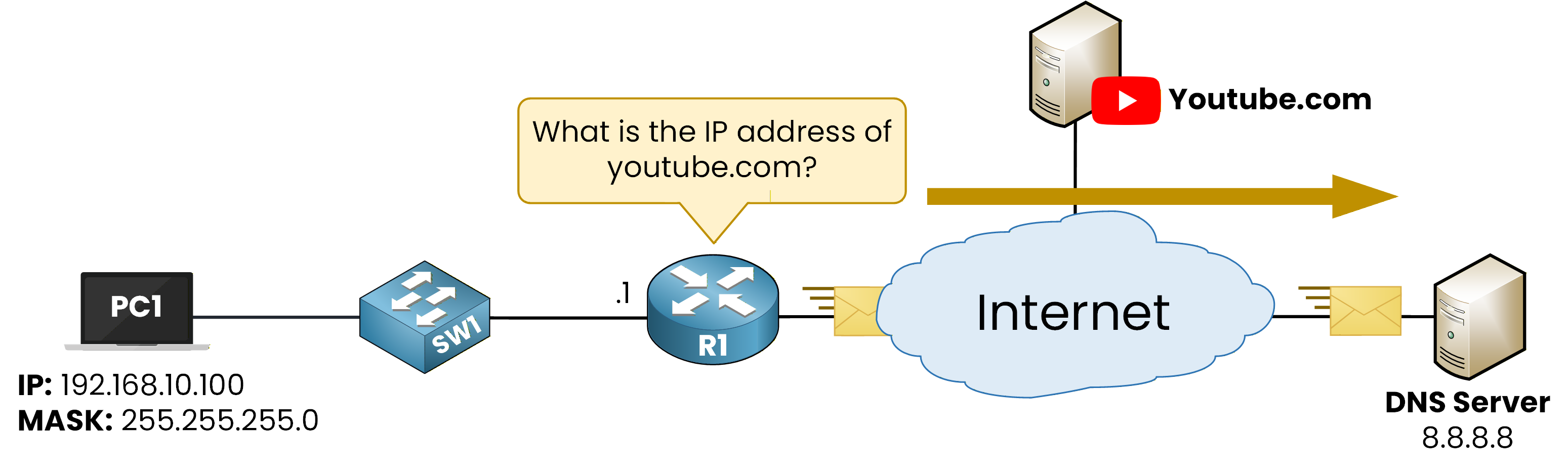
Figure 10 – Router sends a DNS query to DNS Server for youtube.com
In this example, the router asks a simple question:
What is the IP address of youtube.com?The DNS server processes the query and replies with the IPv4 address associated with the domain name.
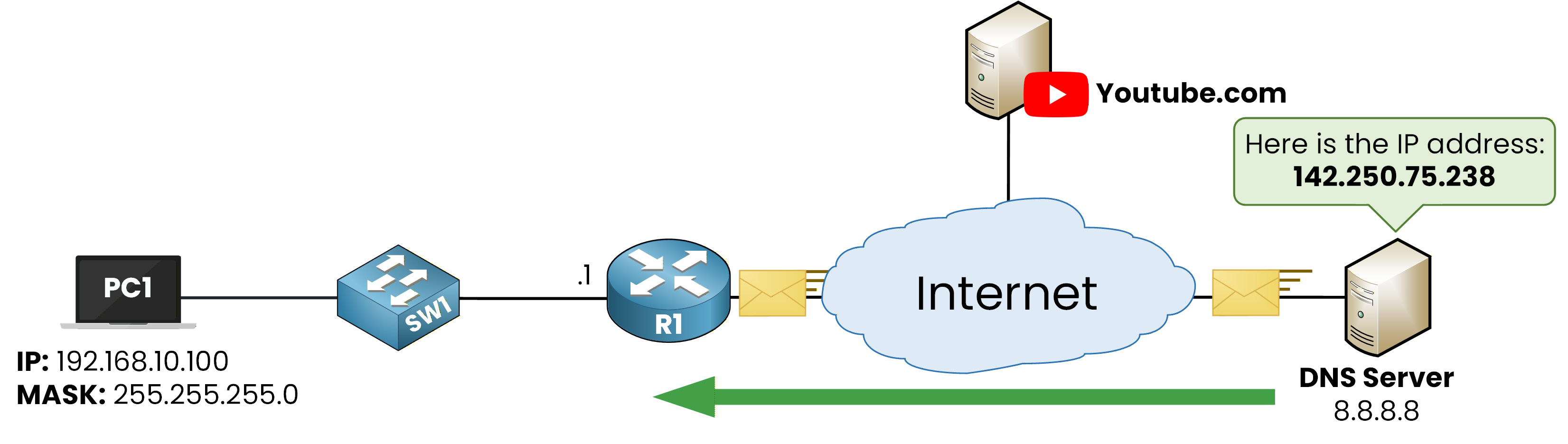
Figure 11 – Router receives a DNS response for youtube.com
Once the router receives this response, it has learned the destination IP address.
Since the router uses IPv4 only in this example, it can now send ICMP packets to the remote server using the IPv4 address returned by the DNS server.
The ping succeeds because the router has resolved the domain name and learned the correct destination IP address.
Answer the question below
In the router configuration, which IP address is set as the DNS server?
So far, you have seen DNS queries that return IP addresses directly using A and AAAA records.
However, large services such as Netflix do not always associate a domain name directly with IP addresses.
Instead, they often use CNAME records.What a CNAME Record Is
A CNAME record creates an alias between two domain names.
Instead of returning an IP address, the DNS server indicates that one domain name points to another domain name. The IP address resolution happens only after this redirection.
DNS Query for netflix.com
When PC1 wants to access netflix.com, it sends a DNS query asking for the A and AAAA records of that domain.
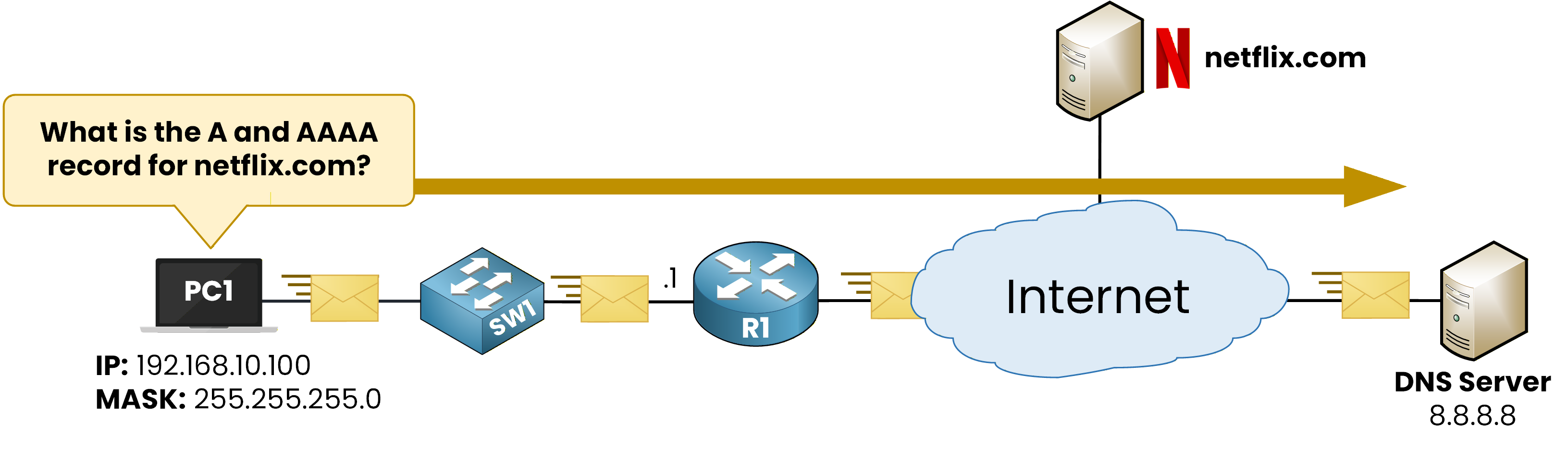
Figure 12 – DNS query sent by the PC to the DNS server to resolve netflix.com
At this point, PC1 is asking the same type of question as before:
What are the IP addresses associated with netflix.com?CNAME Mapping
The DNS server checks its zone information and finds that netflix.com does not have A or AAAA records directly.
Instead, it finds a CNAME record.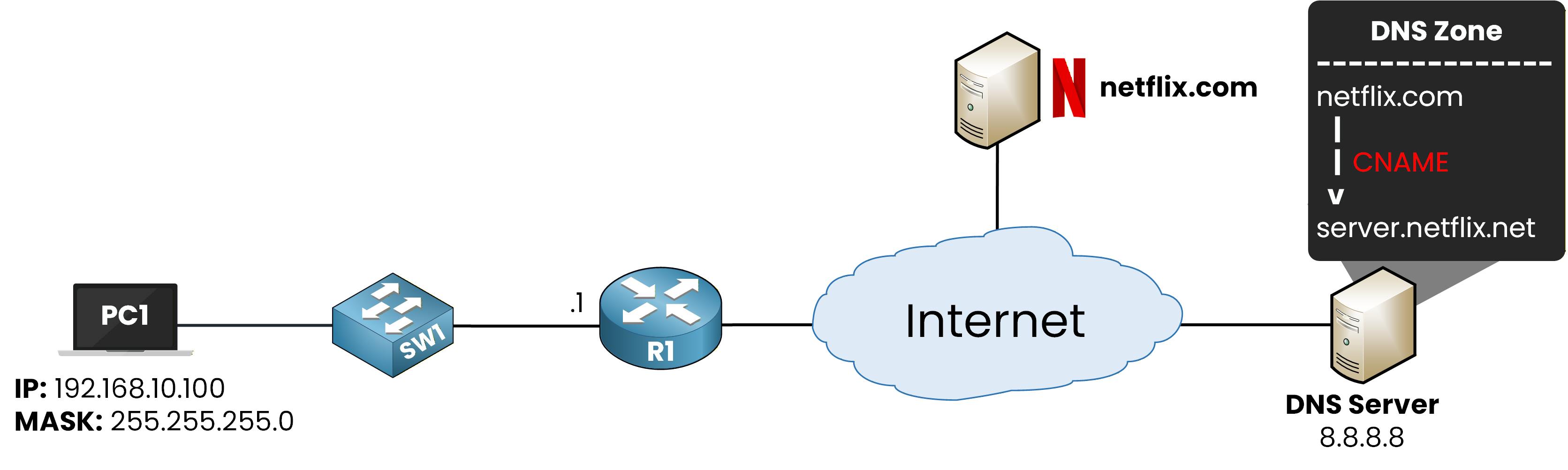
Figure 13 – DNS CNAME record mapping netflix.com to server.netflix.net before IP resolution
This means that netflix.com is an alias that points to another domain name: server.netflix.net.
At this stage, no IP address has been returned yet.Resolving the Target of the CNAME
After identifying the CNAME, the DNS server must now resolve the target domain name.
It looks up the A and AAAA records associated with server.netflix.net.
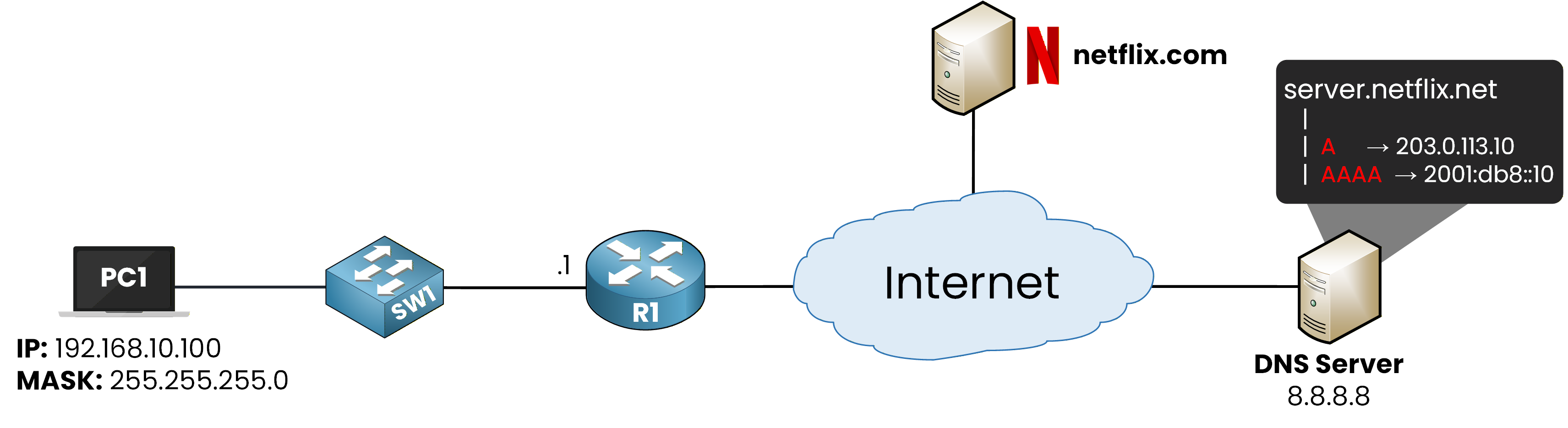
Figure 14 – DNS CNAME resolution for netflix.com
The DNS server finds:
an IPv4 address from an A record
an IPv6 address from an AAAA record
These addresses belong to server.netflix.net, not directly to netflix.com.
DNS Response Returned to the Client
The DNS server sends the response back to PC1.
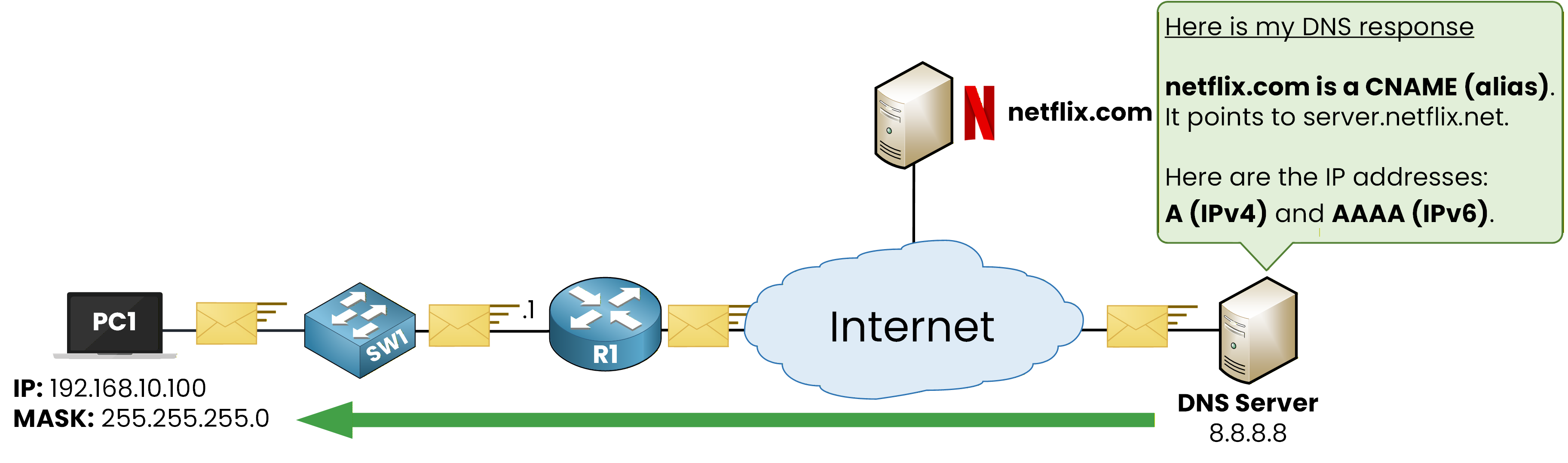
Figure 15 – DNS response returned to the client
In the response, the DNS server provides two pieces of information:
netflix.com is a CNAME that points to server.netflix.net
the A and AAAA records associated with server.netflix.net
From the client's perspective, the result is the same. PC1 now knows which IP addresses to use to reach the service.
Why CNAME Records Are Used
CNAME records allow services to change their backend infrastructure without changing the public domain name.
The user continues to access netflix.com, while the actual servers can be moved, replaced, or load-balanced behind the scenes. This provides flexibility and scalability for large platforms.
Answer the question below
What type of DNS record points to another domain name?