In this lab, you will configure DNS settings on a small network to allow local hosts to access internet services (such as YouTube) using domain names instead of IP addresses.
For this exercise, we will only use IPv4, which is more than sufficient for CCNA-level training.
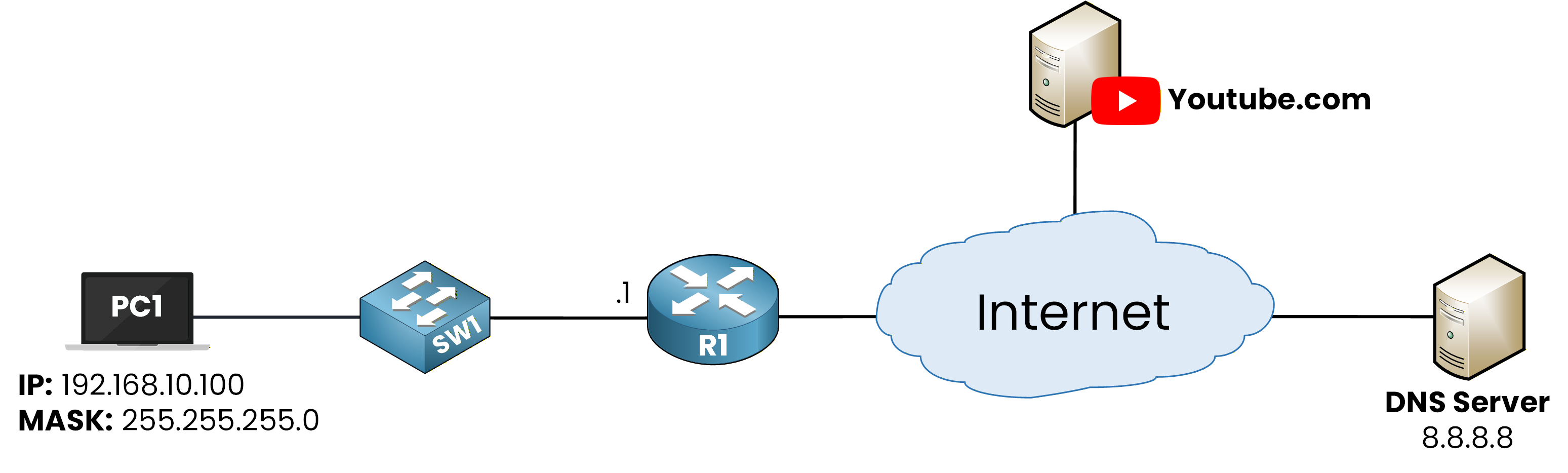
Figure 1 - DNS Configuration Lab Topology
How to Begin
The topology above is already set up for you, with all interfaces and IP addresses configured.
You can focus entirely on the DNS tasks and run every command directly in the integrated CLI below.Lab Overview
You will follow the steps below to configure and verify DNS connectivity:
Step 1 – Verify the DNS Configuration on PC1
Step 2 – Configure the Default Route on R1
Step 3 – Test DNS Resolution with a Ping to youtube.com
Step 4 – Perform a DNS Lookup Using nslookup
Step 5 – Configure DNS Settings on Router R1
Let’s get started!
Answer the question below
Click 'Complete' to continue
For this lab, we assume that PC1 has already been pre-configured to use the public DNS server 8.8.8.8 (Google’s public DNS).
Our first task is to verify that this DNS setting is indeed applied on PC1.From PC1’s command prompt, use the following command to display all network details:
C:\> ipconfig /all

FastEthernet0 Connection:(default port)

   Connection-specific DNS Suffix..:
   Physical Address................: 0002.1679.9DB5
   Link-local IPv6 Address.........: FE80::202:16FF:FE79:9DB5
   IPv6 Address....................: ::
   IPv4 Address....................: 192.168.10.100
   Subnet Mask.....................: 255.255.255.0
   Default Gateway.................: ::
                                     192.168.10.1
   DHCP Servers....................: 0.0.0.0
   DHCPv6 IAID.....................:
   DHCPv6 Client DUID..............: 00-01-00-01-5E-0D-13-E2-00-02-16-79-9D-B5
   DNS Servers.....................: ::
                                     8.8.8.8
At the bottom of the output, you can see the DNS Servers field.
The address 8.8.8.8 confirms that the DNS configuration is correctly applied on PC1.Everything looks good, so we can continue with the lab.
Answer the question below
What DNS server address is configured on PC1?
Before we can verify whether PC1 is able to use the DNS server, we must ensure that the router (R1) can reach the internet.
If you look at the topology, you can see that R1 is connected to an external network.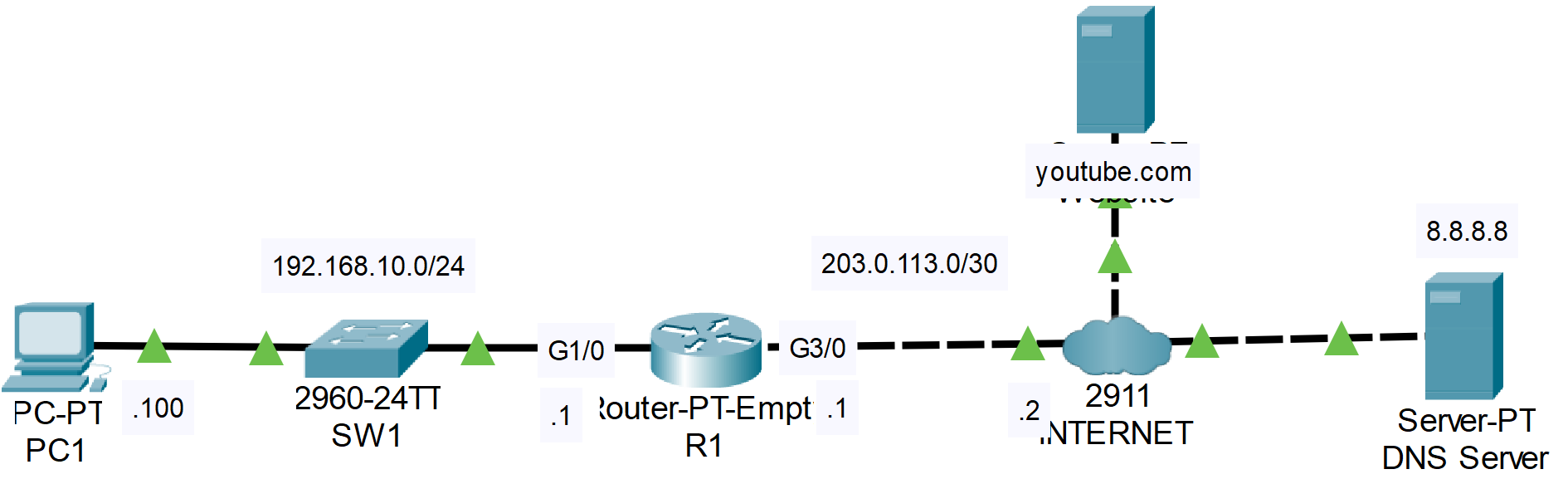
Figure 2 - Network Topology
All interfaces and IP addresses are already configured for this lab, but the default route is missing.
Without it, R1 cannot forward packets toward the internet.Configure the Default Route
Open the CLI of router R1 and configure a default route pointing to the next-hop address toward the internet:
R1> en
R1# conf t
Enter configuration commands, one per line.  End with CNTL/Z.
R1(config)# ip route 0.0.0.0 0.0.0.0 203.0.113.2
R1(config)# end
This command tells R1 to send all traffic destined for unknown networks to 203.0.113.2.
Verify the Routing Table
To confirm that the default route has been added correctly, use:
R1# show ip route
Codes: C - connected, S - static, I - IGRP, R - RIP, M - mobile, B - BGP
       D - EIGRP, EX - EIGRP external, O - OSPF, IA - OSPF inter area
       N1 - OSPF NSSA external type 1, N2 - OSPF NSSA external type 2
       E1 - OSPF external type 1, E2 - OSPF external type 2, E - EGP
       i - IS-IS, L1 - IS-IS level-1, L2 - IS-IS level-2, ia - IS-IS inter area
       * - candidate default, U - per-user static route, o - ODR
       P - periodic downloaded static route

Gateway of last resort is 203.0.113.2 to network 0.0.0.0

C    192.168.10.0/24 is directly connected, GigabitEthernet1/0
     203.0.113.0/30 is subnetted, 1 subnets
C       203.0.113.0 is directly connected, GigabitEthernet3/0
S*   0.0.0.0/0 [1/0] via 203.0.113.2
The line starting with S* confirms that the default route is active.
Now that R1 can reach the internet, we can proceed to test DNS resolution in the next step.
Answer the question below
What is the next-hop IP used in R1’s default route?
To test whether DNS is working correctly, we will perform a connectivity test from PC1 by pinging the domain youtube.com.
When you ping a domain name, the DNS resolution process is triggered automatically.
If the DNS server responds with the correct IP address, the ping will succeed.Run the following command from the PC1 command prompt:
C:\> ping youtube.com

Pinging 142.250.75.238 with 32 bytes of data:

Request timed out.
Reply from 142.250.75.238: bytes=32 time<1ms TTL=126
Reply from 142.250.75.238: bytes=32 time<1ms TTL=126
Reply from 142.250.75.238: bytes=32 time<1ms TTL=126

Ping statistics for 142.250.75.238:
    Packets: Sent = 4, Received = 3, Lost = 1 (25% loss),
Approximate round trip times in milli-seconds:
    Minimum = 0ms, Maximum = 0ms, Average = 0ms
The first packet times out, which is completely normal.
This happens because the DNS resolution occurs in the background before the first ICMP reply can be sent.After that, the remaining packets succeed, confirming that PC1 can now communicate with youtube.com using DNS.
Answer the question below
Does the first ping to a domain name often succeed or fail?
Now that DNS resolution has been confirmed using the
pingcommand, we will use another useful tool: nslookup.The
nslookupcommand allows you to manually query the DNS server to resolve a domain name.
This is helpful for verifying which DNS server is being used and what IP address it returns.Run the following command from the PC1 command prompt:
C:\> nslookup youtube.com

Server: [8.8.8.8]
Address:  8.8.8.8

Non-authoritative answer:
Name:   youtube.com
Address:   142.250.75.238
In this example, the DNS server 8.8.8.8 responds with the IPv4 address associated with youtube.com, which confirms that DNS resolution is working correctly.
Answer the question below
Which command lets you manually query a DNS server?
In this final step, we will configure router R1 to use the DNS server 8.8.8.8.
Just like PC1, the router must also be able to perform DNS lookups when resolving domain names.To configure DNS on R1, enter the following commands:
R1# conf t
Enter configuration commands, one per line.  End with CNTL/Z.
R1(config)# ip name-server 8.8.8.8
R1(config)# ip domain-lookup
R1(config)# end
The command
ip name-server 8.8.8.8specifies which DNS server the router should use.The command
ip domain-lookupenables DNS resolution on the router.
Test DNS Resolution from R1
Now that DNS is configured, we can test it by pinging a domain name directly from the router:
R1# ping youtube.com
Translating "youtube.com"...domain server (8.8.8.8)
Type escape sequence to abort.
Sending 5, 100-byte ICMP Echos to 142.250.75.238, timeout is 2 seconds:
.!!!!
Success rate is 80 percent (4/5), round-trip min/avg/max = 0/0/0 ms
The first packet fails, which is normal: the router must first resolve the domain name using DNS.
Once the IP address is obtained, the remaining packets succeed.DNS Resolution Process
R1 sends a DNS request to the server 8.8.8.8 to resolve youtube.com.
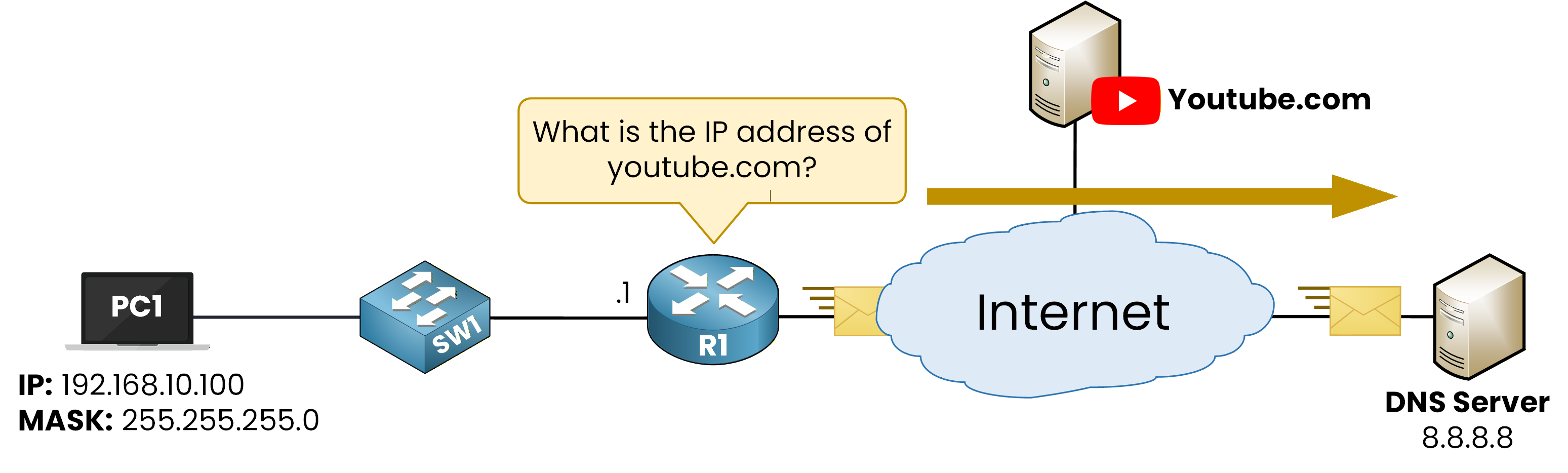
Figure 3 - R1 sends a DNS Query
The DNS server replies with the corresponding IPv4 address.
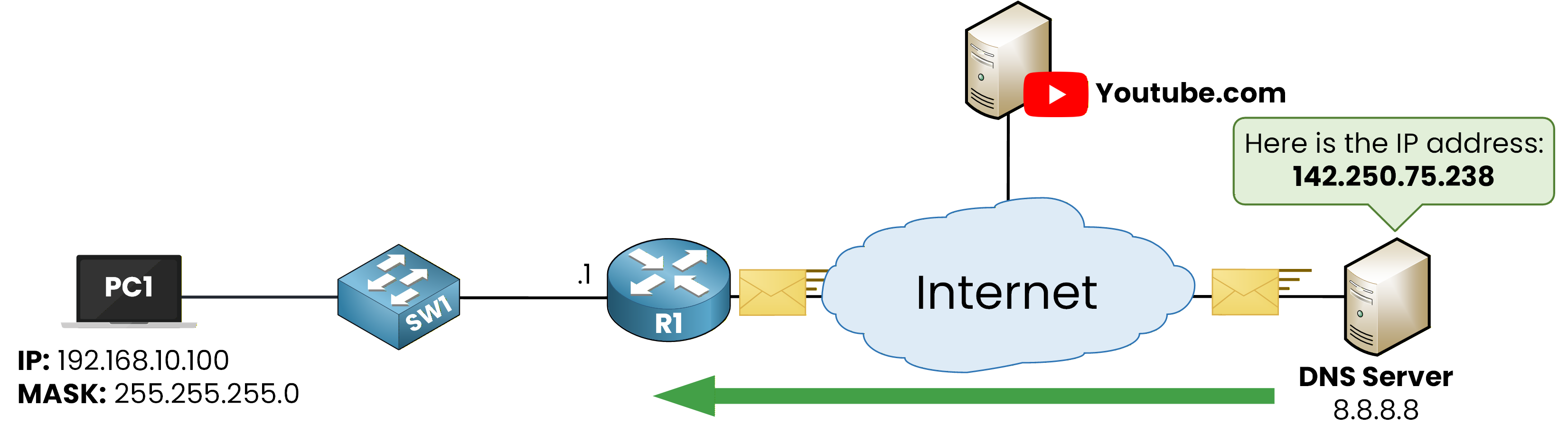
Figure 4 - DNS Server responds to DNS Query
With the IP address resolved, R1 can now successfully reach youtube.com.
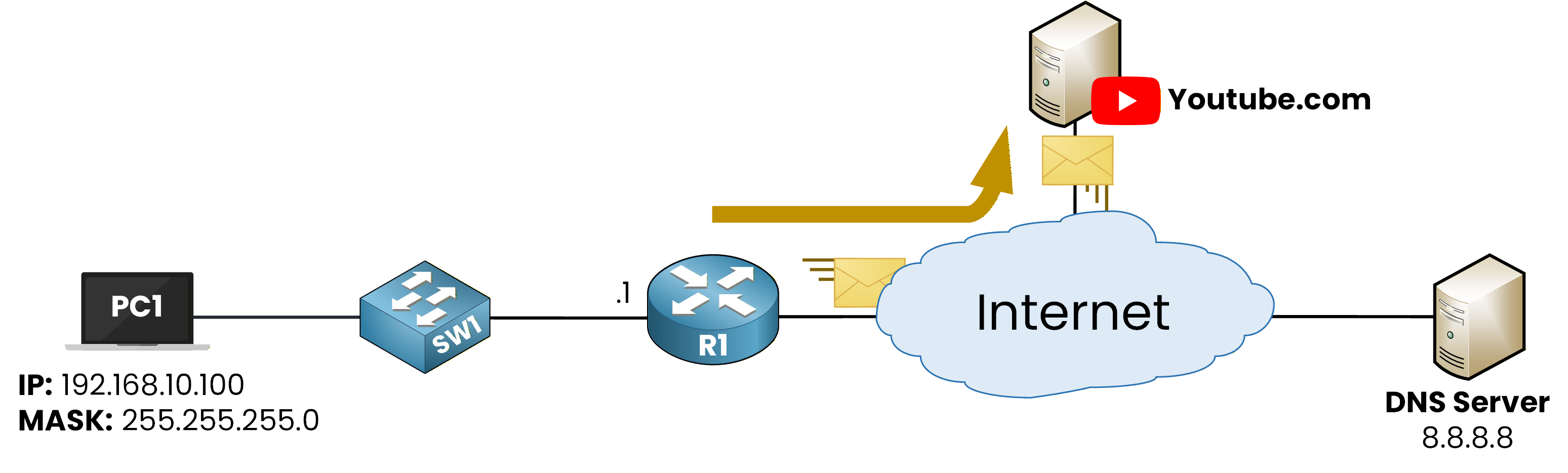
Figure 5 - R1 can communicate with youtube.com
Answer the question below
Which command enables a Cisco router to perform DNS lookups?