In this lab, you will configure OSPF in a simple network made of four routers and two PCs.
This is your first hands-on OSPF configuration.
You don’t need to know any Cisco commands yet. Just follow the steps with me, type the commands as shown, and observe how OSPF behaves on real routers.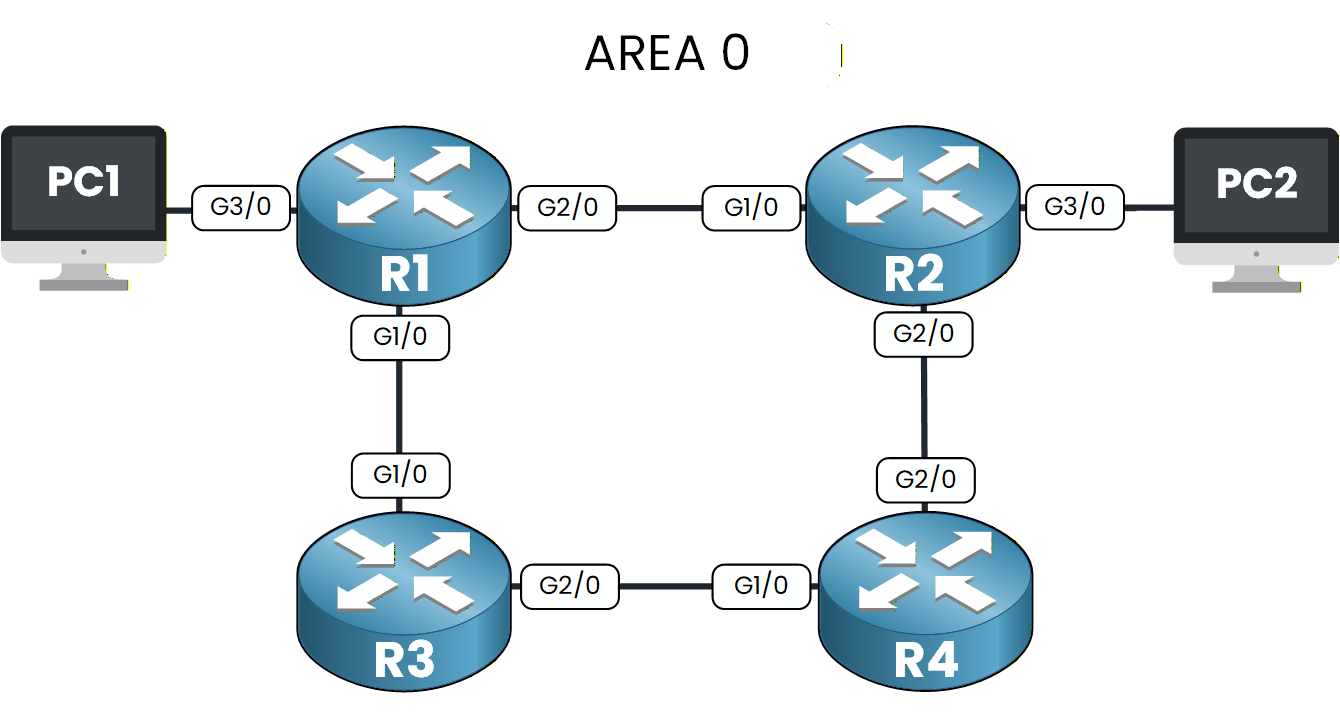
Figure 1 – OSPF Configuration Lab Topology
Your objective is to start the OSPF process, advertise networks, verify adjacencies, inspect learned routes, and finally test end-to-end connectivity between the two PCs.
We will walk through everything step by step together.
Lab Overview
Here is the structure we will follow throughout this lab:
Step 1 – Enable the OSPF process
Step 2 – Advertise networks in OSPF
Step 3 – Verify OSPF neighbor adjacencies
Step 4 – Verify OSPF learned routes
Step 5 – Test end-to-end connectivity
Let’s Get Started
Begin with Step 1 to enable OSPF on each router.
Follow each step carefully to configure, test, and fully understand how OSPF operates.Answer the question below
Click 'Complete' to continue
Before configuring anything, take a moment to look at the OSPF topology.
Every router belongs to Area 0, and all IP addresses are already configured.Your first task is to activate OSPF on each router.
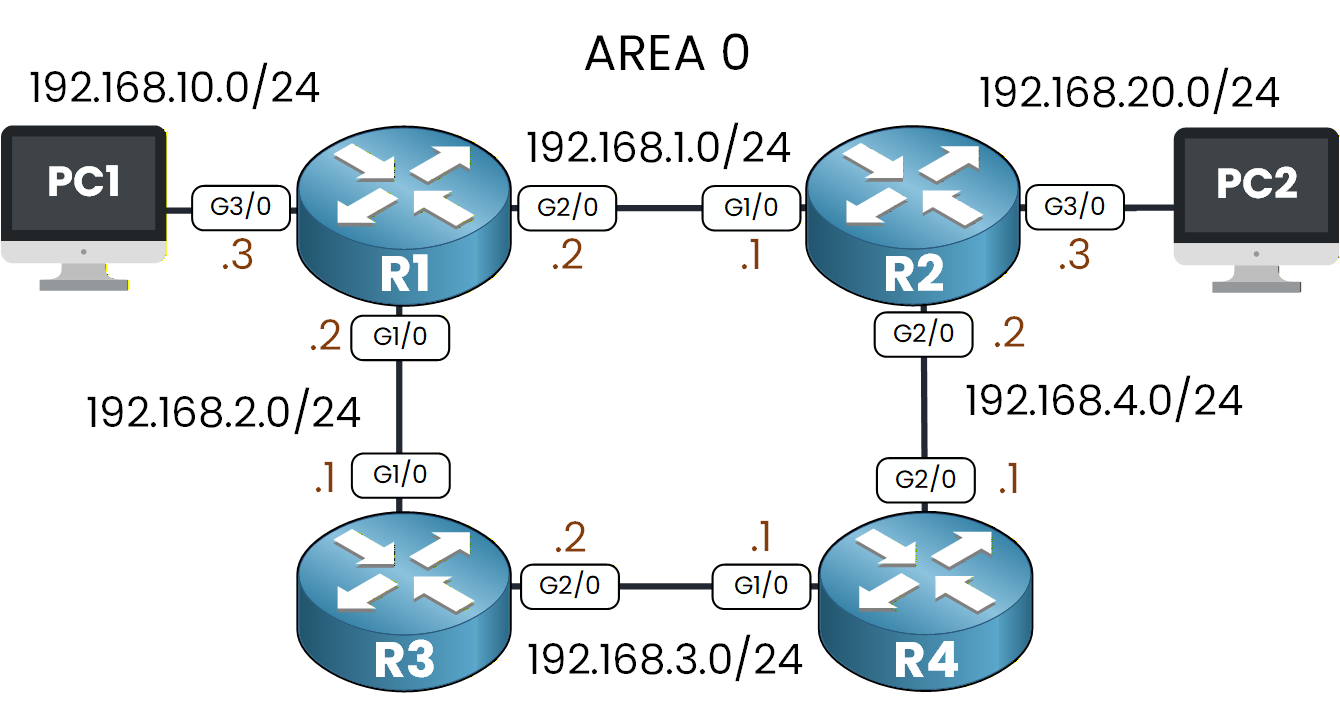
Figure 2 – OSPF Topology with IP Addressing
To enable OSPF, we need to create an OSPF process.
This tells the router to start running OSPF.
In our case, we will use OSPF process 1.Creating the OSPF Process
We start with router R1:
R1# conf t
Enter configuration commands, one per line.  End with CNTL/Z.
R1(config)# router ospf 1
R1(config-router)# end
This command enables OSPF using Process ID 1.
The Process ID is locally significant, which means you can choose any number.
It only matters on the router itself.To verify that the OSPF process is running, type:
R1# show ip ospf
 Routing Process "ospf 1" with ID 192.168.10.3
 Supports only single TOS(TOS0) routes
 Supports opaque LSA
 SPF schedule delay 5 secs, Hold time between two SPFs 10 secs
 Minimum LSA interval 5 secs. Minimum LSA arrival 1 secs
 Number of external LSA 0. Checksum Sum 0x000000
 Number of opaque AS LSA 0. Checksum Sum 0x000000
 Number of DCbitless external and opaque AS LSA 0
 Number of DoNotAge external and opaque AS LSA 0
 Number of areas in this router is 0. 0 normal 0 stub 0 nssa
 External flood list length 0
You don’t need to interpret the full output yet.
For now, just look for the first line Routing Process "ospf 1".
If you see it, OSPF is active on the router.Now go ahead and repeat the exact same action on the remaining routers.
On R2, R3, and R4, enter:R2# conf t Enter configuration commands, one per line. End with CNTL/Z. R2(config)# router ospf 1R3# conf t Enter configuration commands, one per line. End with CNTL/Z. R3(config)# router ospf 1R4# conf t Enter configuration commands, one per line. End with CNTL/Z. R4(config)# router ospf 1Once you’ve done this on all routers, OSPF is enabled everywhere.
In the next step, you will tell each router which networks should participate in OSPF.Answer the question below
Look at the first line of the show ip ospf output on R1. What OSPF Process ID is displayed?
Now that OSPF is enabled on every router, the next step is to tell each router which networks should participate in OSPF.
Each router must advertise the networks that are directly connected to its interfaces.
By doing this, OSPF will discover the entire topology and exchange routes between all routers.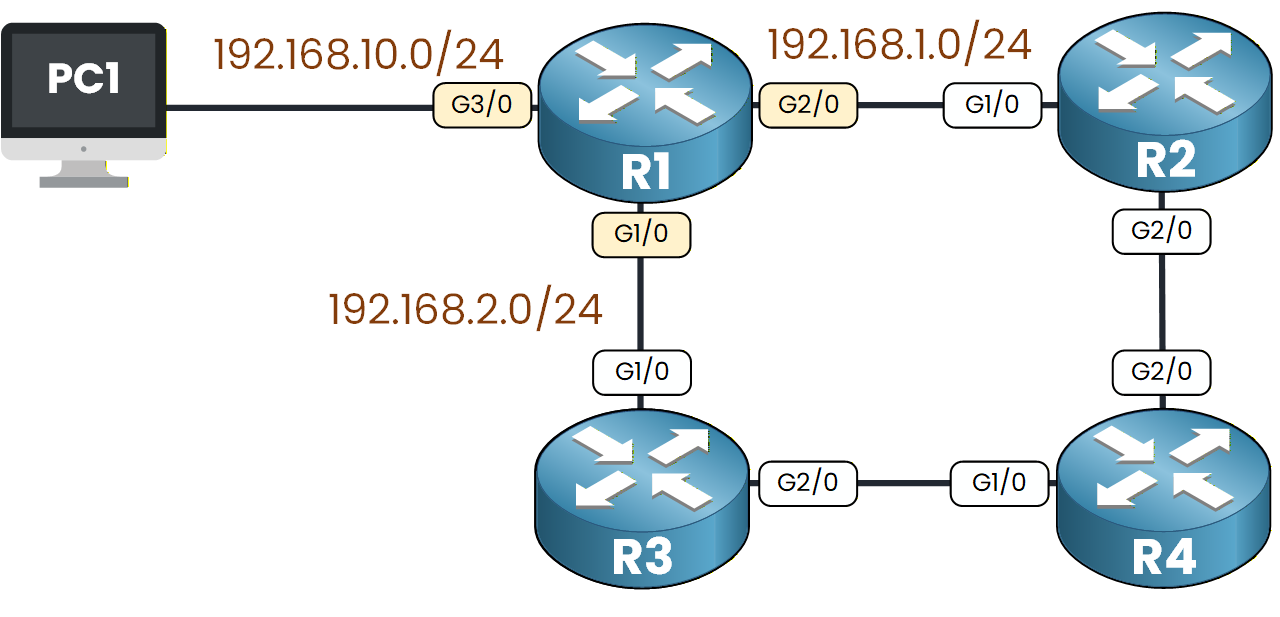
Figure 3 – OSPF Network Advertisement from R1
If we look at the topology, R1 is directly connected to:
192.168.1.0/24
192.168.2.0/24
192.168.10.0/24
How to Advertise a Network?
To advertise a network in OSPF, we use the
networkcommand inside OSPF router configuration mode.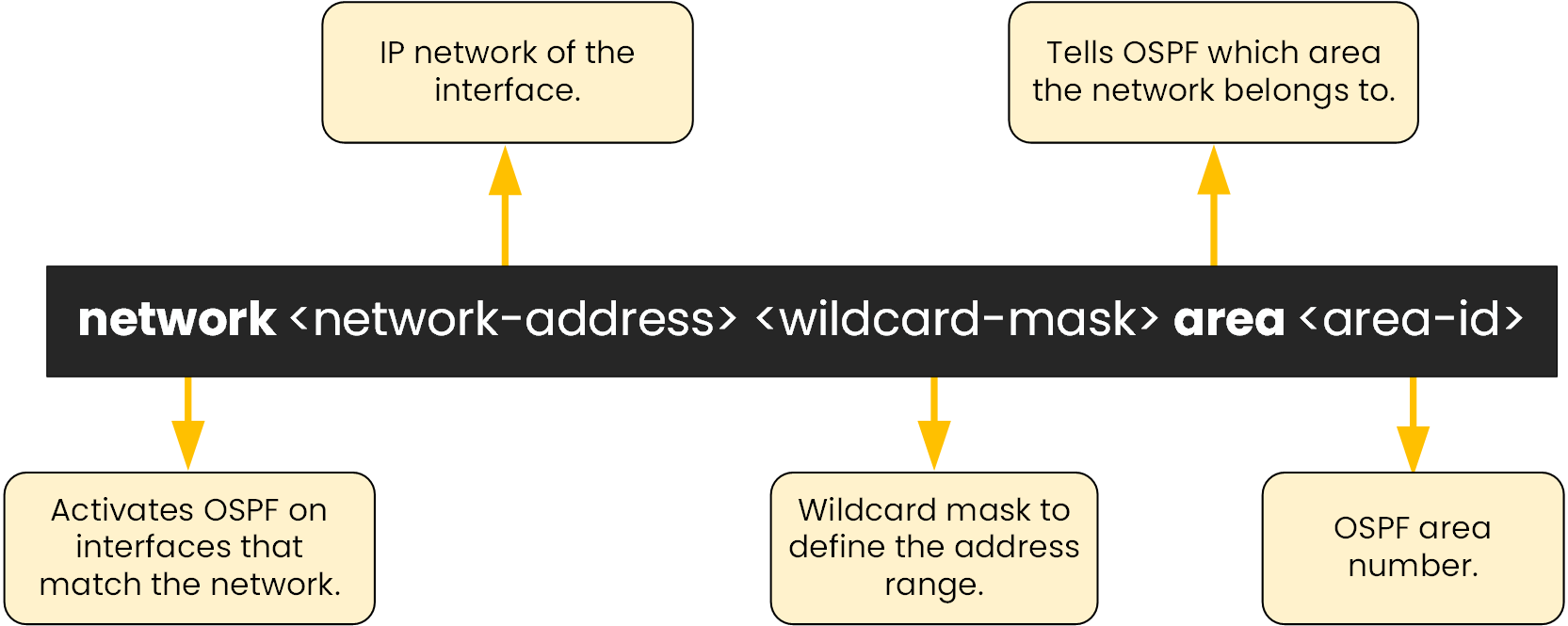
Figure 4 – OSPF Network Command Breakdown
This diagram shows the meaning of each part of the command.
A wildcard mask tells OSPF which part of an IP address must match, and which part it can ignore.
It is the inverse of the subnet mask: where the subnet mask has a 1, the wildcard has a 0, and where it has a 0, the wildcard has a 1.Calculating the Wildcard Mask
The fastest way to find it is to subtract each octet of the subnet mask from 255.
    255   255   255   255     (255 in every octet)
  - 255   255   255     0     (subnet mask 255.255.255.0)
  -------------------------
      0     0     0   255     → wildcard mask = 0.0.0.255
Now apply it to the first network on R1:
Subnet:
192.168.1.0/24Subnet mask:
255.255.255.0Wildcard mask:
0.0.0.255
The same rule works for any mask.
A/30point-to-point link uses the subnet mask255.255.255.252, so its wildcard becomes0.0.0.3(because 255 - 252 = 3).Advertising the Networks on R1
To advertise the 192.168.1.0/24 network:
R1# conf t
Enter configuration commands, one per line.  End with CNTL/Z.
R1(config)# router ospf 1
R1(config-router)# network 192.168.1.0 0.0.0.255 area 0
This tells OSPF:
“Enable OSPF on any interface whose IP address is between 192.168.1.0 and 192.168.1.255.”
Then advertise the remaining networks:
R1(config-router)# network 192.168.2.0 0.0.0.255 area 0
R1(config-router)# network 192.168.10.0 0.0.0.255 area 0
R1(config-router)# end
Now, we can verify which interfaces are participating in OSPF:
R1# show ip ospf interface brief
Interface     PID   Area                     IP Address/Mask          Cost  State  Nbrs F/C
Gig2/0          1   0                      192.168.1.2/255.255.255.0   1     WAIT  0/0
Gig1/0          1   0                      192.168.2.2/255.255.255.0   1     WAIT  0/0
Gig3/0          1   0                     192.168.10.3/255.255.255.0   1     WAIT  0/0
Every interface connected to R1 is now participating in OSPF.
Next, we will advertise the networks on the remaining routers.Advertising Networks on the Other Routers
Repeat the exact same process on the remaining routers.
For each router, advertise all networks directly connected to its interfaces: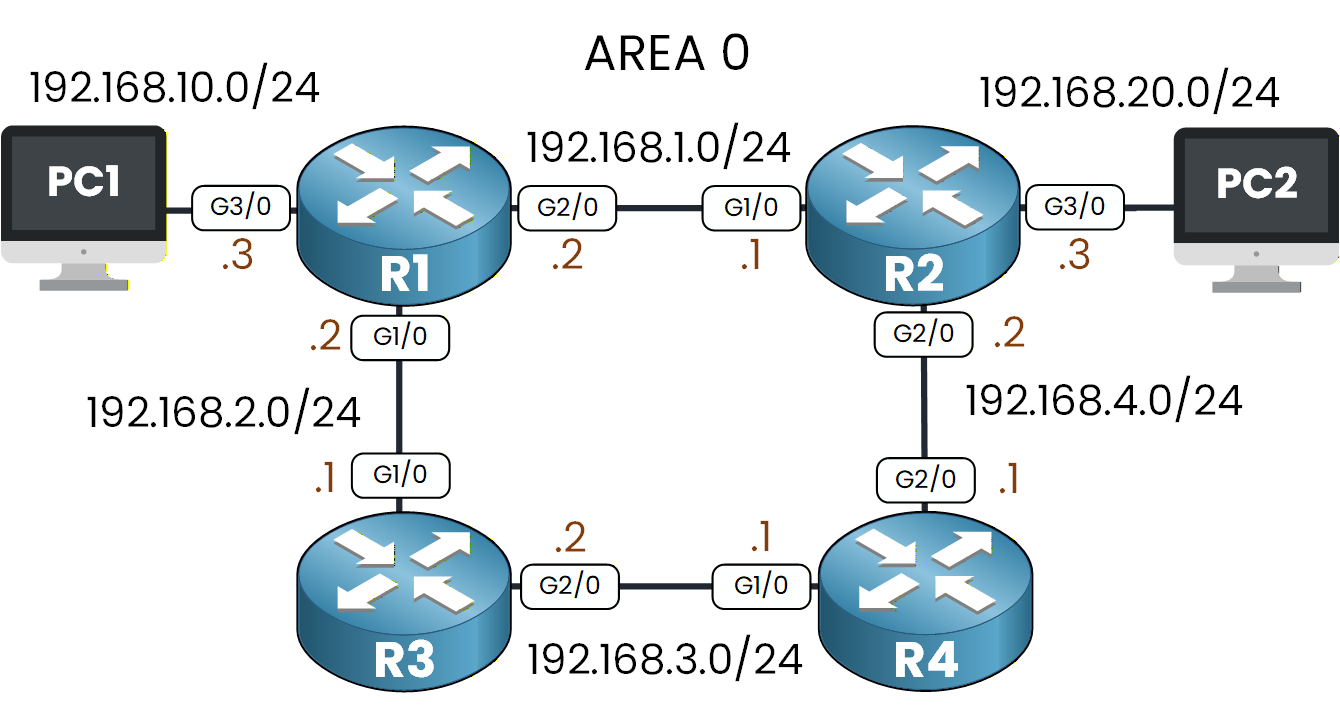
Figure 5 – OSPF Network Topology
R2
R2(config)# router ospf 1
R2(config-router)# network 192.168.1.0 0.0.0.255 area 0
R2(config-router)# network 192.168.4.0 0.0.0.255 area 0
R2(config-router)# network 192.168.20.0 0.0.0.255 area 0
R2(config-router)# end
R3
R3(config)# router ospf 1
R3(config-router)# network 192.168.2.0 0.0.0.255 area 0
R3(config-router)# network 192.168.3.0 0.0.0.255 area 0
R3(config-router)# end
R4
R4(config)# router ospf 1
R4(config-router)# network 192.168.3.0 0.0.0.255 area 0
R4(config-router)# network 192.168.4.0 0.0.0.255 area 0
R4(config-router)# end
Once these networks are advertised, OSPF is enabled on the router interfaces that match the network command.
The routers start sending Hello packets, discover each other, and begin forming adjacencies.You have now advertised all connected networks in the topology.
Let’s move to the next step.Answer the question below
According to the text, how many connected networks did R1 advertise into OSPF?
Once all networks are advertised, each router begins sending OSPF Hello packets on its active interfaces. These Hello packets allow routers to detect their neighbors and build OSPF adjacencies.
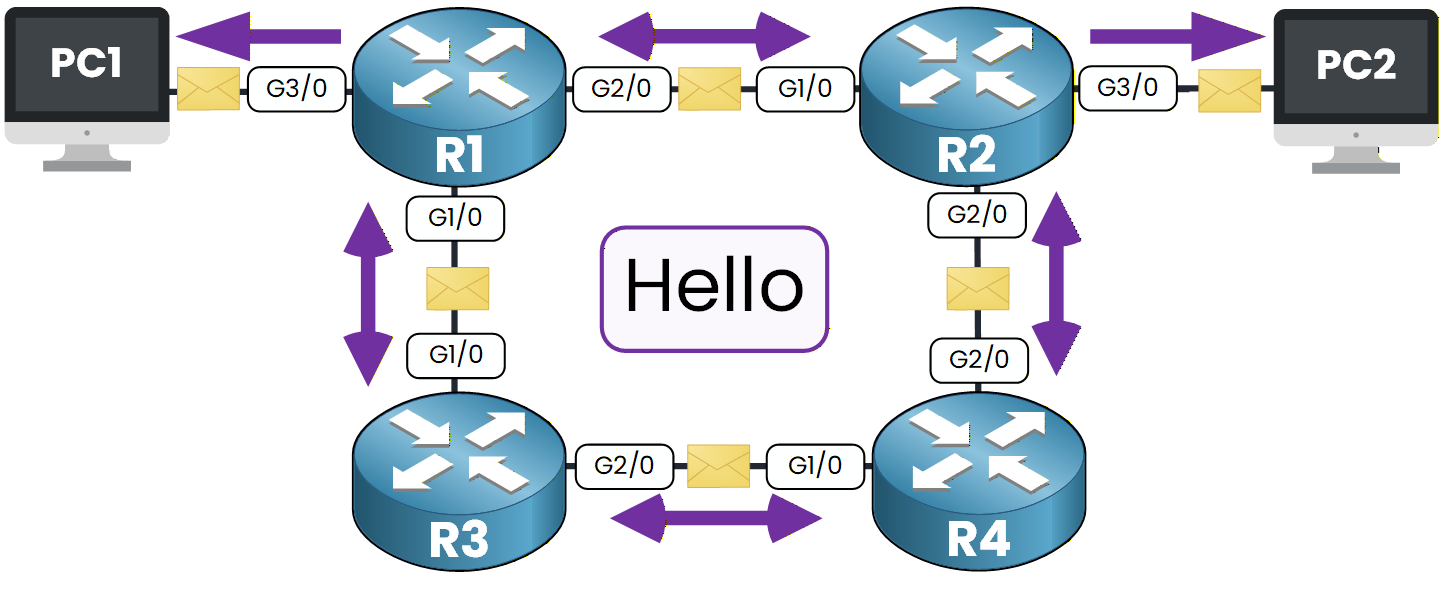
Figure 6 – OSPF Hello Packets and Adjacency
If the configuration is correct, routers will form adjacencies with their connected neighbors. For example, on R1 you might see a system message like this:
*Jul 12 10:21:18.123: %OSPF-5-ADJCHG: Process 1, Nbr 192.168.20.3 on GigabitEthernet2/0 from LOADING to FULL, Loading DoneThis simply means:
“R1 has successfully formed a FULL OSPF adjacency with the router connected on that link.”
Check OSPF Neighbors on Each Router
Now let’s verify the adjacencies manually using the CLI.
Figure 7 – OSPF Network Topology
Use the command
show ip ospf neighbor.R1
R1# show ip ospf neighbor

Neighbor ID     Pri   State           Dead Time   Address         Interface
192.168.20.3      1   FULL/BDR        00:00:35    192.168.1.1     GigabitEthernet2/0
192.168.3.2       1   FULL/BDR        00:00:33    192.168.2.1     GigabitEthernet1/0
Look for two things only:
State must be FULL → adjacency established
Address must match the IP of the router connected to you → you are seeing the correct neighbor
That’s all you need to check at this stage.
R2
R2# show ip ospf neighbor

Neighbor ID     Pri   State           Dead Time   Address         Interface
192.168.4.1       1   FULL/DR         00:00:35    192.168.4.1     GigabitEthernet2/0
192.168.10.3      1   FULL/DR         00:00:35    192.168.1.2     GigabitEthernet1/0
R3
R3# show ip ospf neighbor

Neighbor ID     Pri   State           Dead Time   Address         Interface
192.168.4.1       1   FULL/DR         00:00:32    192.168.3.1     GigabitEthernet2/0
192.168.10.3      1   FULL/DR         00:00:35    192.168.2.2     GigabitEthernet1/0
R4
R4# show ip ospf neighbor Neighbor ID Pri State Dead Time Address Interface 192.168.20.3 1 FULL/BDR 00:00:34 192.168.4.2 GigabitEthernet2/0 192.168.3.2 1 FULL/BDR 00:00:37 192.168.3.2 GigabitEthernet1/0Note: the Address column shows the neighbor’s IP on the link, not your own interface. That’s why R4 lists 192.168.3.2 (R3’s side) and not its own 192.168.3.1.
For each router, make sure that:
State = FULL
Address = the IP of your directly connected neighbor
If both conditions are met, your OSPF adjacencies are correctly formed across the entire topology.
Now that neighbor relationships are established, we can continue with Step 4 to check the routes learned through OSPF.Answer the question below
Using the show ip ospf neighbor output shown for R1, how many OSPF neighbors did R1 successfully form a FULL adjacency with?
Now that OSPF adjacencies are up, let’s verify that each router has learned the remote networks through OSPF.
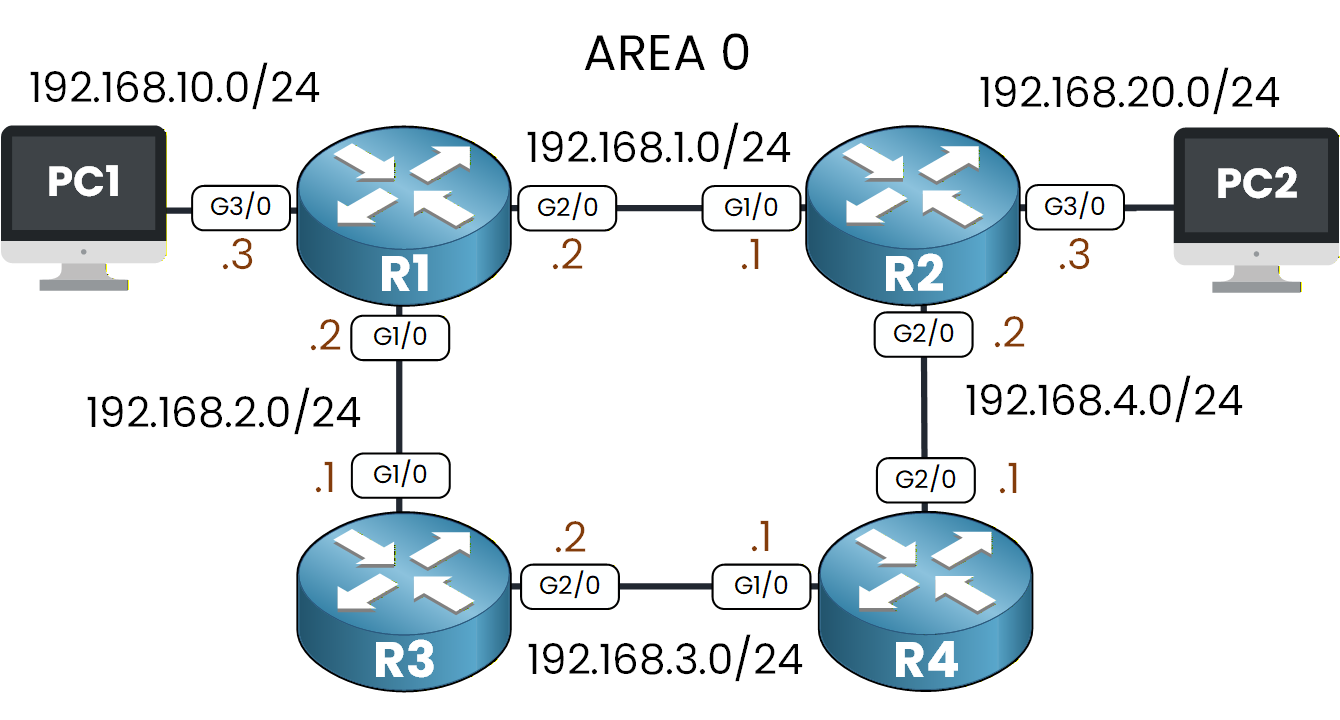
Figure 8 – OSPF Topology
Start with R1:
R1# show ip route ospf
O    192.168.3.0 [110/2] via 192.168.2.1, 00:28:08, GigabitEthernet1/0
O    192.168.4.0 [110/2] via 192.168.1.1, 00:03:09, GigabitEthernet2/0
O    192.168.20.0 [110/2] via 192.168.1.1, 00:03:09, GigabitEthernet2/0
These three networks are not directly connected to R1, but they now appear in its routing table thanks to OSPF.
This means R1 has successfully learned the remote networks from its neighbors.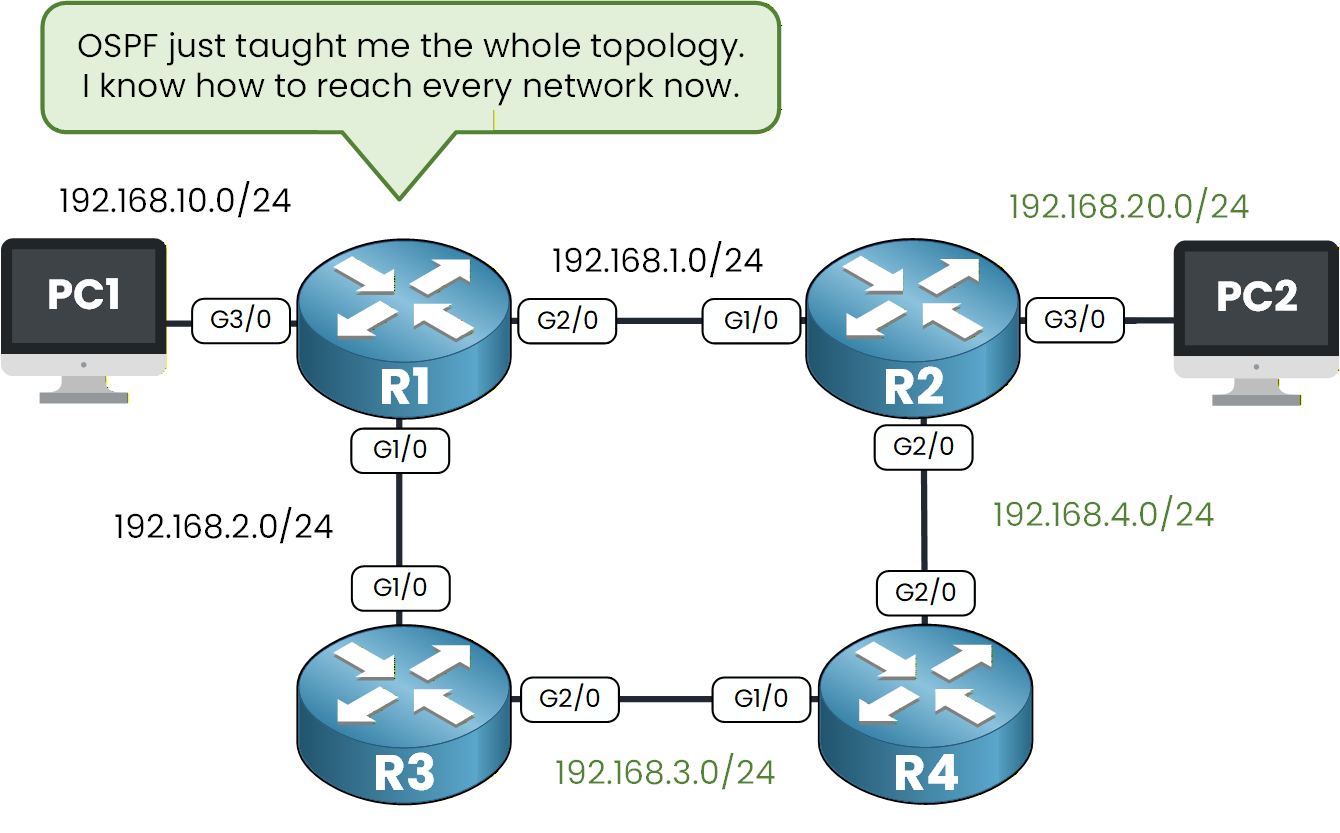
Figure 9 – R1 learns remote network by using OSPF
In the diagram, the green networks represent the remote subnets that R1 learned dynamically.
OSPF has now built a complete view of the entire topology, allowing R1 to reach every network in the design.Verifying OSPF on Other Routers
After confirming that R1 has learned its OSPF routes, let’s quickly verify that the other routers have also received the remote networks.
Here’s the output from R2:
R2# show ip route ospf
O    192.168.10.0 [110/2] via 192.168.1.2, 00:00:12, GigabitEthernet1/0
O    192.168.2.0 [110/2] via 192.168.1.2, 00:00:12, GigabitEthernet1/0
O    192.168.3.0 [110/2] via 192.168.4.1, 00:00:14, GigabitEthernet2/0
R3 also learns its remote networks:
R3# show ip route ospf
O    192.168.1.0 [110/2] via 192.168.2.2, 00:48:13, GigabitEthernet1/0
O    192.168.4.0 [110/2] via 192.168.3.1, 00:48:13, GigabitEthernet2/0
O    192.168.10.0 [110/2] via 192.168.2.2, 01:14:08, GigabitEthernet1/0
O    192.168.20.0 [110/3] via 192.168.2.2, 01:10:04, GigabitEthernet1/0
                  [110/3] via 192.168.3.1, 01:10:04, GigabitEthernet2/0
And here is R4:
R4# show ip route ospf
O    192.168.1.0 [110/2] via 192.168.4.2, 00:48:33, GigabitEthernet2/0
O    192.168.2.0 [110/2] via 192.168.3.2, 00:48:33, GigabitEthernet1/0
O    192.168.10.0 [110/3] via 192.168.3.2, 00:48:33, GigabitEthernet1/0
                  [110/3] via 192.168.4.2, 00:48:33, GigabitEthernet2/0
O    192.168.20.0 [110/2] via 192.168.4.2, 00:48:33, GigabitEthernet2/0
Each of these routes appears with the O code, confirming they were learned through OSPF.
This shows that:
All routers have exchanged routes successfully
The entire topology is synchronized
Every router now knows how to reach all remote networks
OSPF is fully operational across the network.
Answer the question below
In R1’s OSPF routing table, which interface does R1 use to reach the 192.168.4.0 network?
Now that all routers have successfully exchanged routes via OSPF, let’s confirm that communication works from one end of the network to the other.
We’ll test connectivity by pinging PC2 (192.168.20.1) from PC1 (192.168.10.1).
C:\> ping 192.168.20.1

Pinging 192.168.20.1 with 32 bytes of data:

Request timed out.
Reply from 192.168.20.1: bytes=32 time<1ms TTL=126
Reply from 192.168.20.1: bytes=32 time<1ms TTL=126
Reply from 192.168.20.1: bytes=32 time<1ms TTL=126

Ping statistics for 192.168.20.1:
    Packets: Sent = 4, Received = 3, Lost = 1 (25% loss),
Approximate round trip times in milli-seconds:
    Minimum = 0ms, Maximum = 0ms, Average = 0ms
The first timeout is normal (ARP).
The important part is that the next replies succeed.To help you visualize how the traffic flows across the OSPF-enabled network, look at the diagram below.
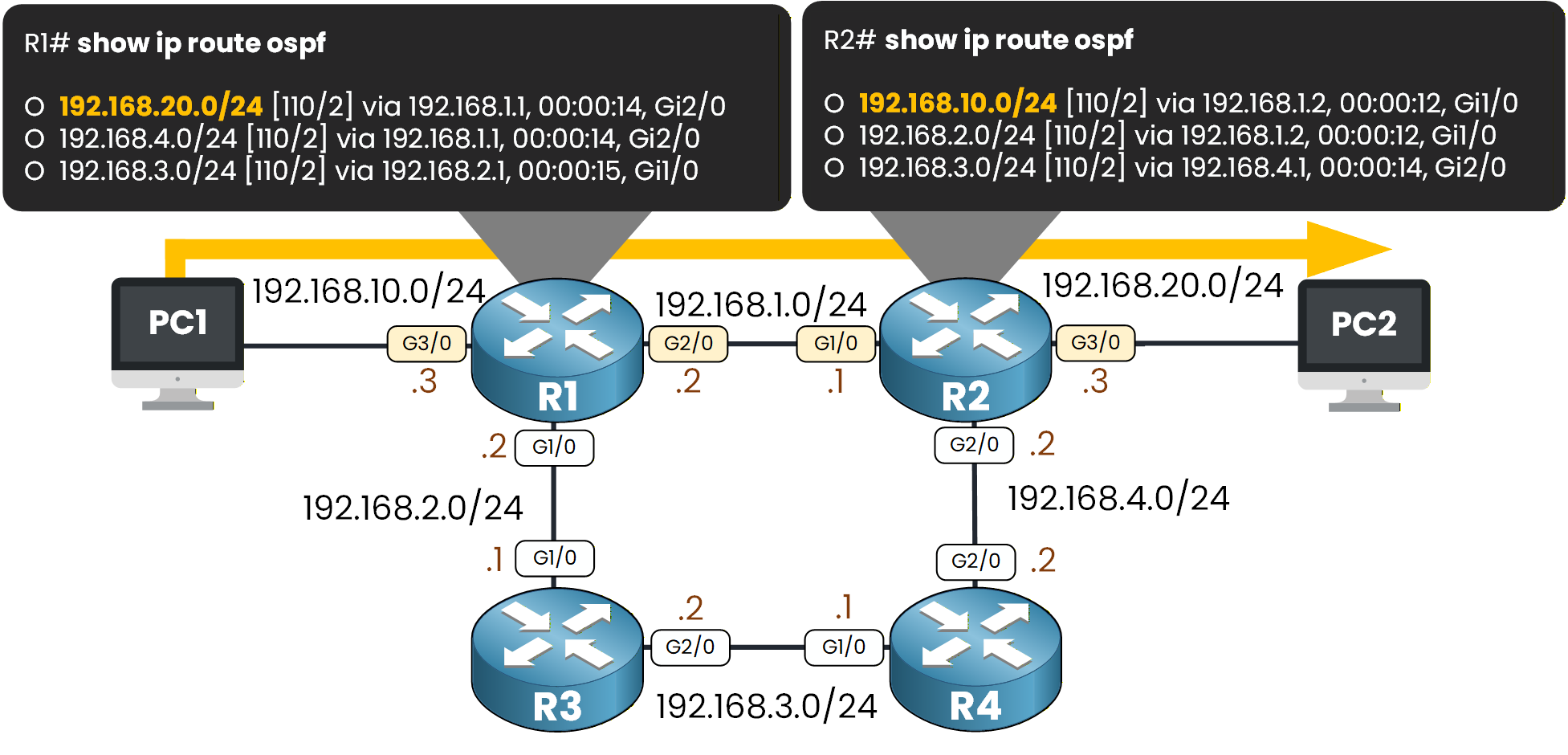
Figure 10 – End-to-End Connectivity Test (PC1 to PC2)
R1 forwards traffic toward R2 via the 192.168.1.0/24 link, and R2 forwards it toward PC2 on 192.168.20.0/24, exactly as expected.
Test the Path with Traceroute
C:\> tracert 192.168.20.1 Tracing route to 192.168.20.1 over a maximum of 30 hops: 1 0 ms 0 ms 0 ms 192.168.10.3 2 0 ms 0 ms 0 ms 192.168.1.1 3 0 ms 0 ms 0 ms 192.168.20.1 Trace complete.Note: each hop shows the interface where the packet enters the router, not the one it leaves. That’s why R2 appears as 192.168.1.1 and not 192.168.20.3. The last line isn’t a router: it’s PC2 (192.168.20.1).
The traffic flows exactly as the diagram shows:
PC1 → R1 → R2 → PC2
No static routes were needed. OSPF handled everything automatically.
Answer the question below
Based on the traceroute output from PC1 to PC2, what is the IP address of the first router hop reached by PC1?
Let’s wrap up.
In this lab, you configured OSPF on a real multi-router topology and watched how the protocol automatically built neighbor relationships and exchanged routes.
You activated OSPF on each router, advertised the connected networks, verified adjacencies, checked the routing tables, and finally confirmed end-to-end connectivity between PC1 and PC2.Take a moment to review the commands you used and the outputs you observed.
Try repeating the configuration on your own or building a small variation of this topology. The more you practice, the more naturally OSPF will make sense.Great job completing the lab.
You’re now ready to move toward more advanced OSPF concepts.Answer the question below
Click 'Complete' to continue