After HSRP, learn VRRP, the open-standard alternative for high availability in multi-vendor networks.
The VRRP Group
You group router interfaces into a VRRP group, identified by a group number, exactly like HSRP.
Because VRRP is an open standard (RFC 5798), the same group can even mix routers from different vendors.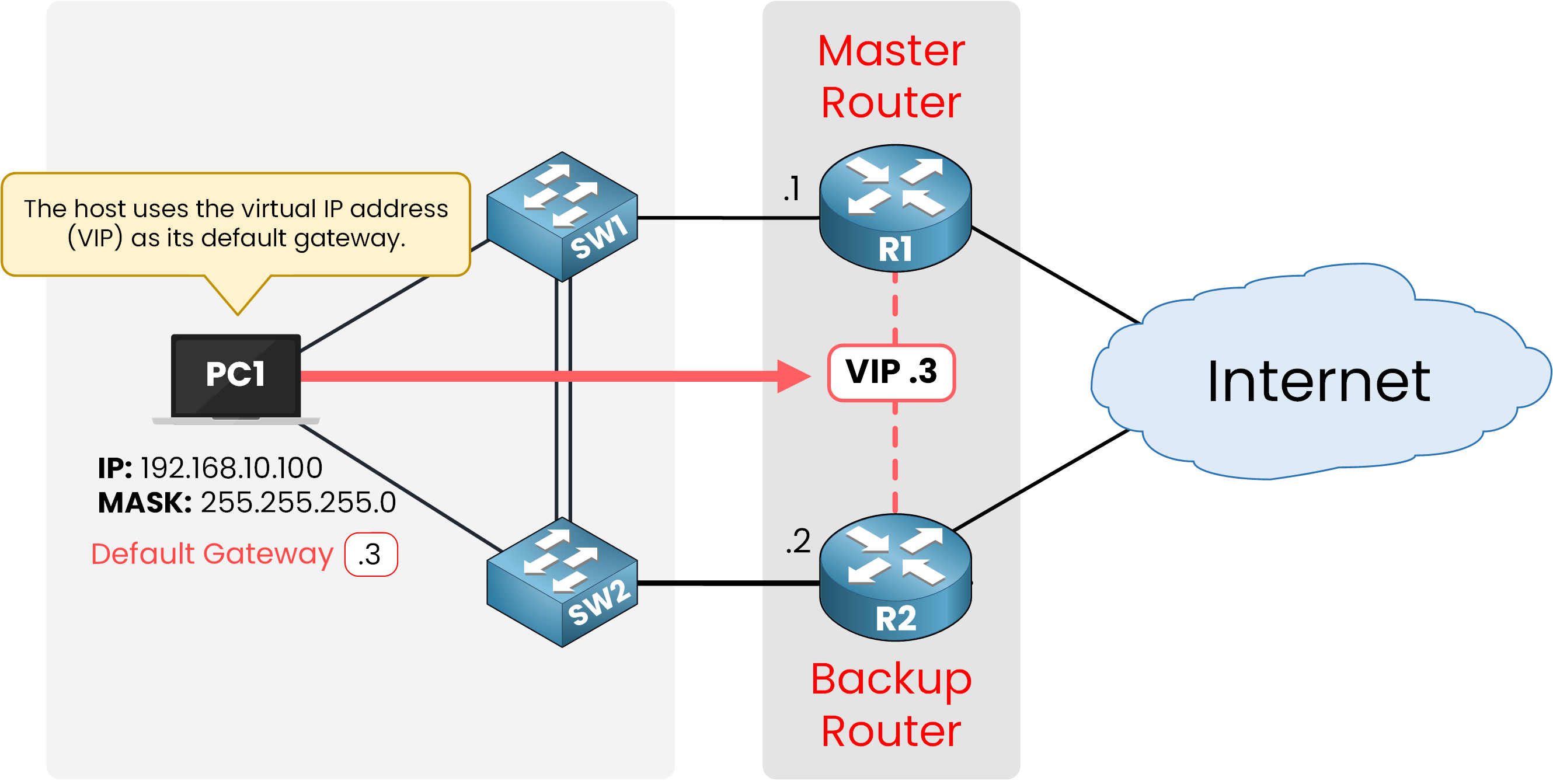
Figure 1 – R1 and R2 form VRRP Group 1
In the topology, R1 and R2 both join VRRP group 1 on their LAN interface.
The VRRP Virtual IP
The group shares one Virtual IP address (VIP).
No single router owns this address on its own: the group answers for it together.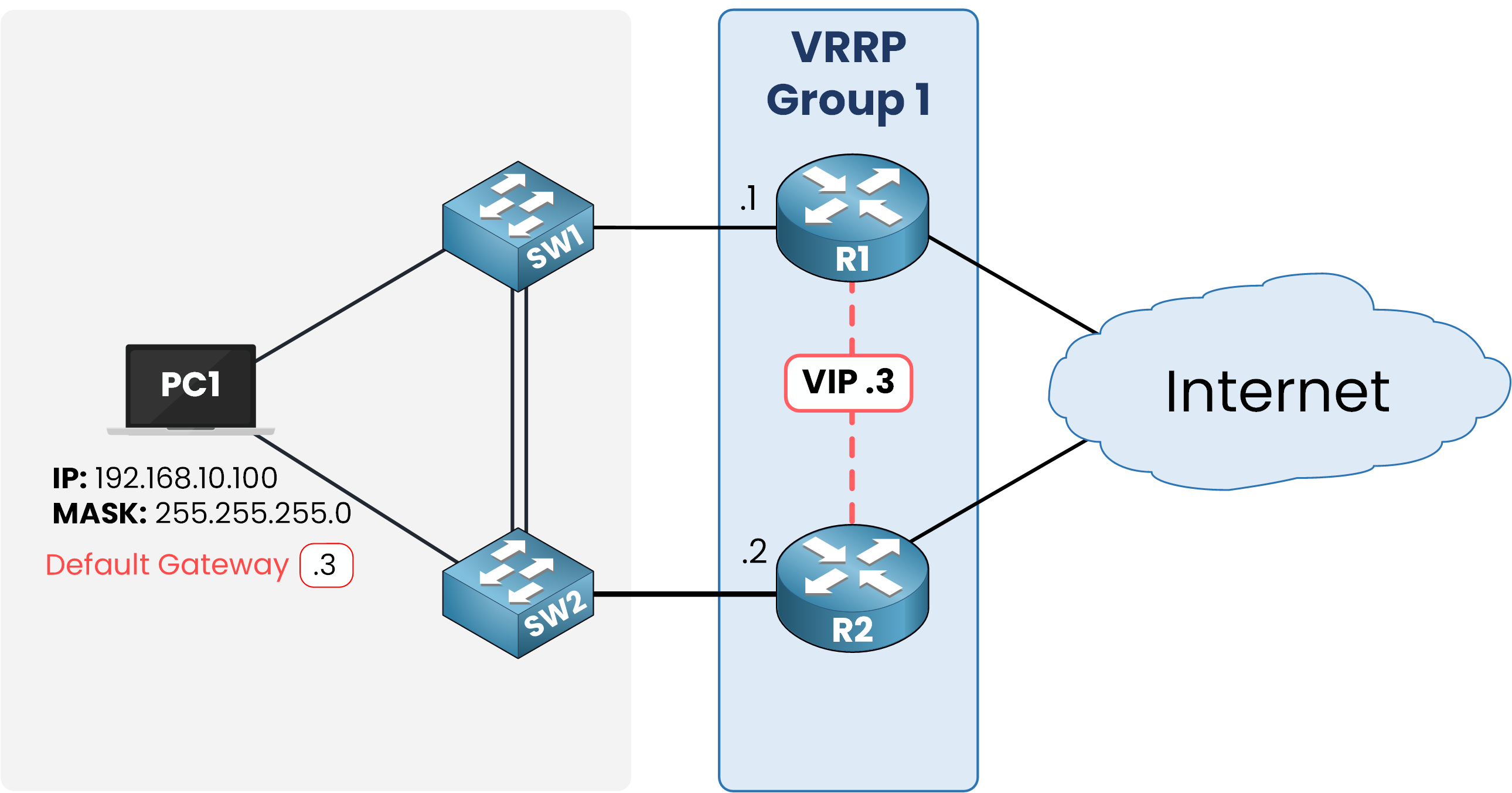
Figure 2 – The Virtual IP becomes the default gateway
Here the group uses 192.168.10.3 as the VIP, while R1 keeps .1 and R2 keeps .2 on their physical interfaces.
Every host in 192.168.10.0/24 points its default gateway at .3.Configure VRRP on R1 first:
R1# conf t
Enter configuration commands, one per line.  End with CNTL/Z.
R1(config)# int g0/0
R1(config-if)# ip address 192.168.10.1 255.255.255.0
R1(config-if)# no shut
R1(config-if)# vrrp 1 ip 192.168.10.3

%VRRP-6-STATECHANGE: GigabitEthernet0/0 Grp 1 state Init -> Backup
%VRRP-6-STATECHANGE: GigabitEthernet0/0 Grp 1 state Backup -> Master
R1(config-if)# end
R1 moved through the states on its own and settled as Master: nobody else was there to compete.
Three lines did the real work: they assigned the IP address, brought the interface up, and formed VRRP group 1 with VIP 192.168.10.3.With no competing router yet, R1 wins the election by default and takes the Master role.
Repeat the same steps on R2:
R2# conf t
Enter configuration commands, one per line.  End with CNTL/Z.
R2(config)# int g0/0
R2(config-if)# ip address 192.168.10.2 255.255.255.0
R2(config-if)# no shut
R2(config-if)# vrrp 1 ip 192.168.10.3

%VRRP-6-STATECHANGE: GigabitEthernet0/0 Grp 1 state Init -> Backup
R2(config-if)# end
R2 lands in Backup, since R1 already claimed Master.
Verify it on R1:R1# show vrrp GigabitEthernet0/0 - Group 1 State is Master Virtual IP address is 192.168.10.3 Virtual MAC address is 0000.5e00.0101 Advertisement interval is 1.000 sec Preemption enabled Priority is 100 Master Router is 192.168.10.1 (local), priority is 100 Master Advertisement interval is 1.000 sec Master Down interval is 3.609 secThe group answers for 192.168.10.3.
Check the same thing on R2:
R2# show vrrp
GigabitEthernet0/0 - Group 1
  State is Backup
  Virtual IP address is 192.168.10.3
  Virtual MAC address is 0000.5e00.0101
  Advertisement interval is 1.000 sec
  Preemption enabled
  Priority is 100
  Master Router is 192.168.10.1, priority is 100
  Master Advertisement interval is 1.000 sec
  Master Down interval is 3.609 sec (expires in 2.912 sec)
R1 and R2 both point to 192.168.10.3 as the VIP.
The group is up and running.Answer the question below
What address do hosts use as their default gateway with VRRP?
Inside each group, one router holds the Master role.
The rest stay in Backup, ready to take over.40 % Complete: you’re making great progress
Ready to pass your CCNP exam?