You have practiced every command on the demo pair.
Time to build the whole configuration on a full topology, start to finish.
You manage the 192.168.10.0/24 LAN as its network administrator.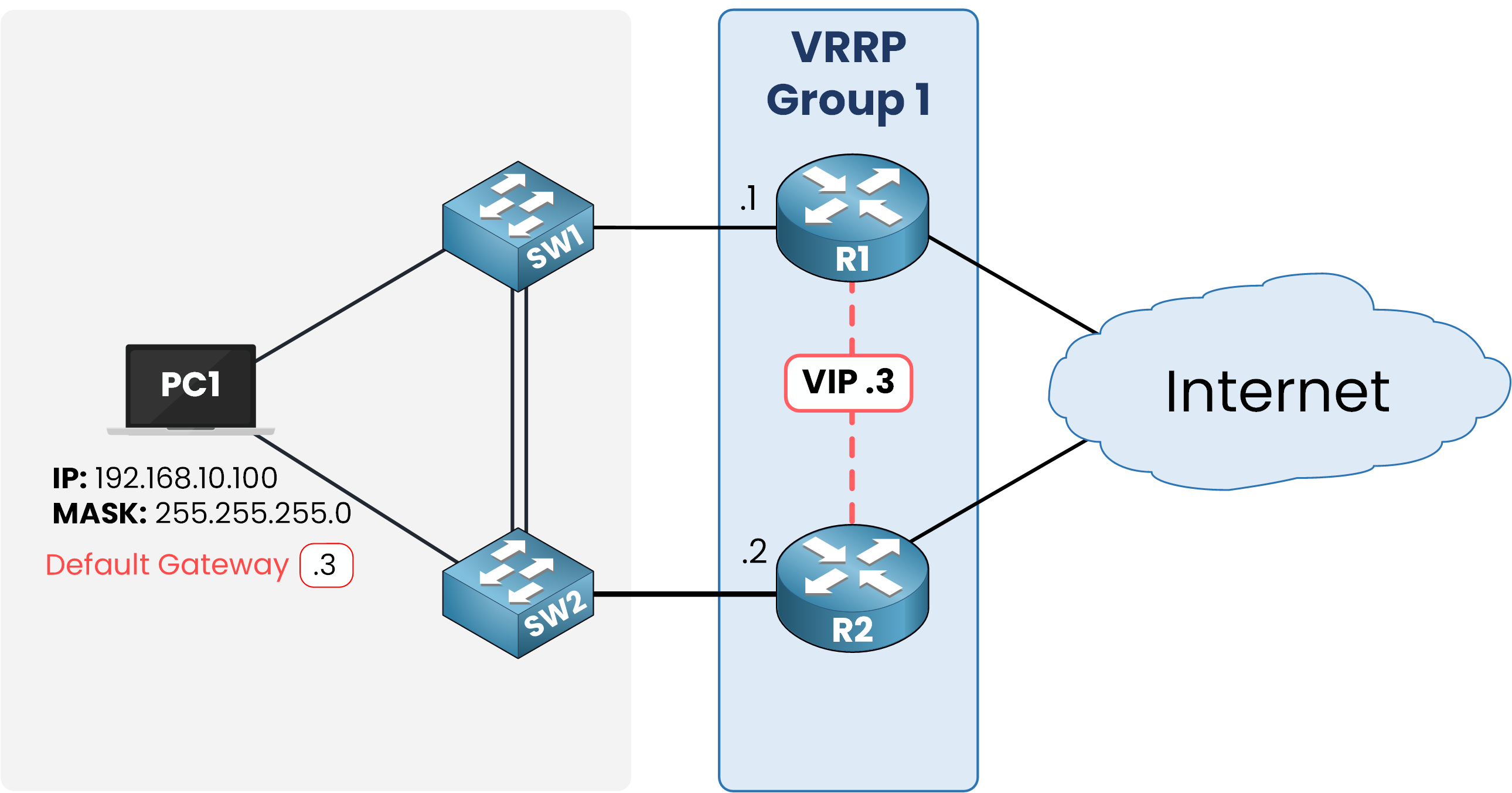
Figure 10 – Target design: VRRP Group 1 with VIP 192.168.10.3
Your objective: deploy VRRP so the LAN survives a router failure, with authentication and the default preemption behavior verified.
Configure VRRP on R1
On R1, create group 1 with the VIP, a priority of 110, and MD5 authentication:
R1# conf t
Enter configuration commands, one per line.  End with CNTL/Z.
R1(config)# int g0/0
R1(config-if)# vrrp 1 ip 192.168.10.3
R1(config-if)# vrrp 1 priority 110
R1(config-if)# vrrp 1 authentication md5 key-string PINGMYNETWORK_SECRET

%VRRP-6-STATECHANGE: GigabitEthernet0/0 Grp 1 state Init -> Backup
%VRRP-6-STATECHANGE: GigabitEthernet0/0 Grp 1 state Backup -> Master
R1(config-if)# end
R1# write memory
vrrp 1 ip 192.168.10.3 forms group 1 and sets its VIP.
vrrp 1 priority 110 makes R1 the preferred Master.
Preemption needs no extra command: it is on by default.vrrp 1 authentication md5 key-string keeps out any router that doesn't know the shared key.
Configure VRRP on R2
R2 gets the same logic, with a lower priority:
R2# conf t
Enter configuration commands, one per line.  End with CNTL/Z.
R2(config)# int g0/0
R2(config-if)# vrrp 1 priority 90
R2(config-if)# vrrp 1 ip 192.168.10.3
R2(config-if)# vrrp 1 authentication md5 key-string PINGMYNETWORK_SECRET

%VRRP-6-STATECHANGE: GigabitEthernet0/0 Grp 1 state Init -> Backup
R2(config-if)# end
R2# write memory
R2 joins group 1 but loses on priority, so it stays in Backup.
Answer the question below
What priority did you configure on R1?
Verify the group first.
Run show vrrp on R1:40 % Complete: you’re making great progress
Ready to pass your CCNP exam?