In the previous lesson, you configured eBGP between the Enterprise and the ISP using the traditional method.
That approach works and is still supported.
However, modern Cisco IOS uses a structured configuration model based on address families.In this lab, you will rebuild the same eBGP session using this model.
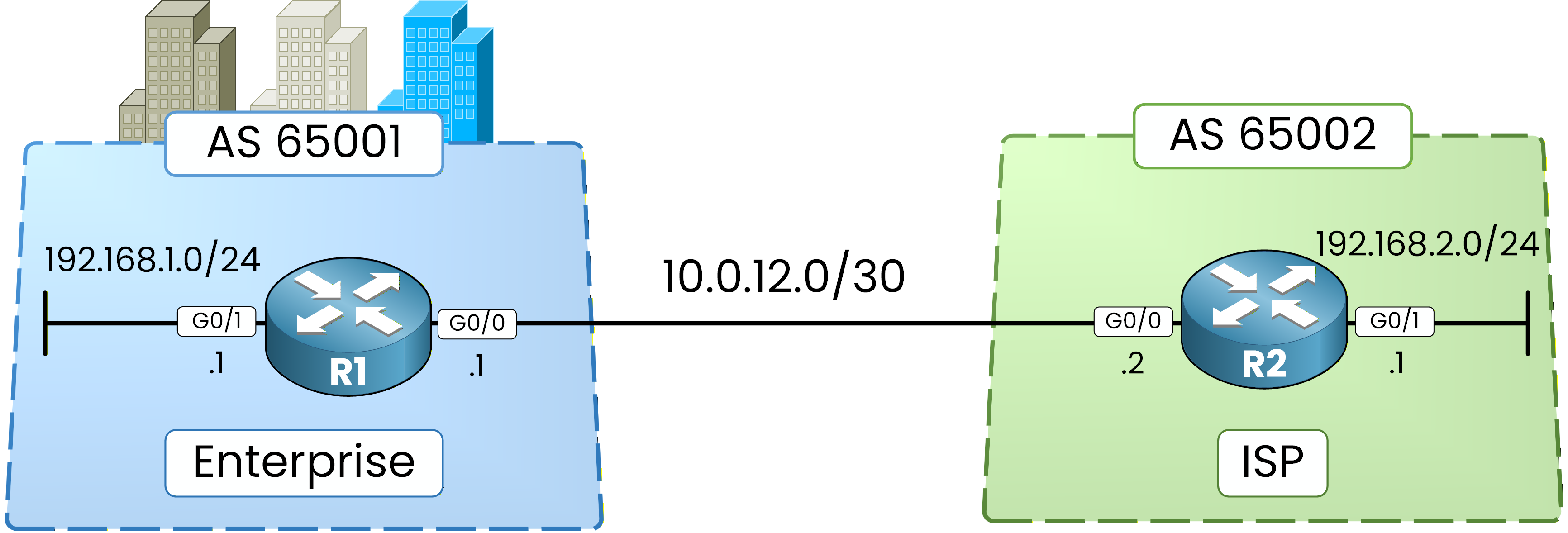
Figure 1 - Basic BGP Configuration Topology
Instead of automatically activating IPv4 for a neighbor, the address-family model requires explicit activation of each address family.
This configuration style supports scalable environments and multiple protocols (such as IPv6) and is the expected model at the CCNP ENCOR level.
Step 1 – Remove Previous BGP Configuration
Before applying the modern configuration model, we must remove the previous BGP configuration.
We delete the network statements and the neighbor relationship.R1# conf t Enter configuration commands, one per line. End with CNTL/Z. R1(config)# router bgp 65001 R1(config-router)# no network 192.168.1.0 mask 255.255.255.0 R1(config-router)# no neighbor 10.0.12.2 remote-as 65002 %BGP-3-NOTIFICATION: sent to neighbor 10.0.12.2 6/3 (Peer De-configured) 0 bytes %BGP_SESSION-5-ADJCHANGE: neighbor 10.0.12.2 IPv4 Unicast topology base removed from session Neighbor deleted %BGP-5-ADJCHANGE: neighbor 10.0.12.2 Down Neighbor deleted R1(config-router)# endWhen the neighbor is removed, the BGP session immediately goes down.
This is expected behavior.R2# conf t Enter configuration commands, one per line. End with CNTL/Z. R2(config)# router bgp 65002 R2(config-router)# no network 192.168.2.0 mask 255.255.255.0 R2(config-router)# no neighbor 10.0.12.1 remote-as 65001 R2(config-router)# endAt this point, BGP is no longer active between the routers.
Step 2 – Verify BGP Is Cleared
We now confirm that BGP has been fully removed.
R1# show ip bgp ipv4 unicast R1# R1# show ip bgp ipv4 unicast summary R1#R2# show ip bgp ipv4 unicast R2# R2# show ip bgp ipv4 unicast summary R2#Both routers show:
No neighbors
No prefixes
The BGP process is clean.
Answer the question below
When its neighbor statement is removed, the BGP session immediately goes ____
The process is empty.
You now rebuild the exact same session, but this time every address family is declared explicitly.Step 3 – Configure R1 with Address Families
We now rebuild the same eBGP session using the address-family model.
There are three key differences compared to the traditional configuration:
IPv4 is no longer implicitly activated.
We enter an address-family context.
We must explicitly activate the neighbor.
R1# conf t
Enter configuration commands, one per line.  End with CNTL/Z.
R1(config)# router bgp 65001
R1(config-router)# no bgp default ipv4-unicast
R1(config-router)# neighbor 10.0.12.2 remote-as 65002
R1(config-router)# address-family ipv4
R1(config-router-af)# neighbor 10.0.12.2 activate
R1(config-router-af)# network 192.168.1.0 mask 255.255.255.0
R1(config-router-af)# end
What changes compared to the traditional model:
40 % Complete: you’re making great progress
Ready to pass your CCNP exam?