Each packet that reaches your router asks one question: where do I send this?
To answer this, your router looks up the destination address in its routing table.Traditional IP Routing
A packet arrives on G0/0 from your LAN, headed for 203.0.113.50 on the Internet.
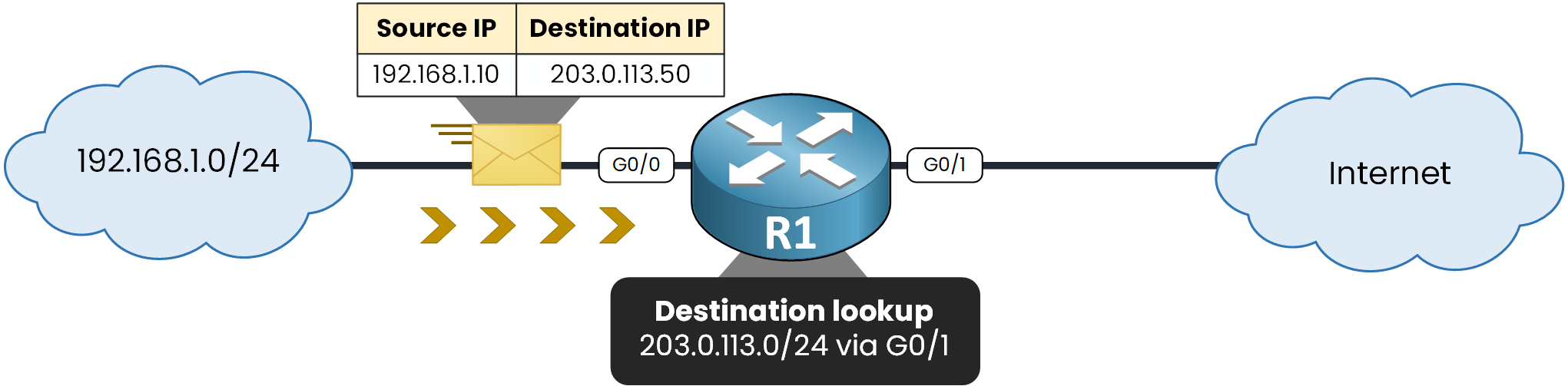
Figure 1 – Only the destination is looked up
Your router will check its routing table to find a route that matches this destination.
You can use the following command:R1# show ip route 203.0.113.50 Routing entry for 203.0.113.0/24 Known via "static", distance 1, metric 0 Routing Descriptor Blocks: * 10.0.1.2, via GigabitEthernet0/1 Route metric is 0, traffic share count is 1There it is.
203.0.113.0/24 is reachable via G0/1, so your router forwards the packet out of that interface.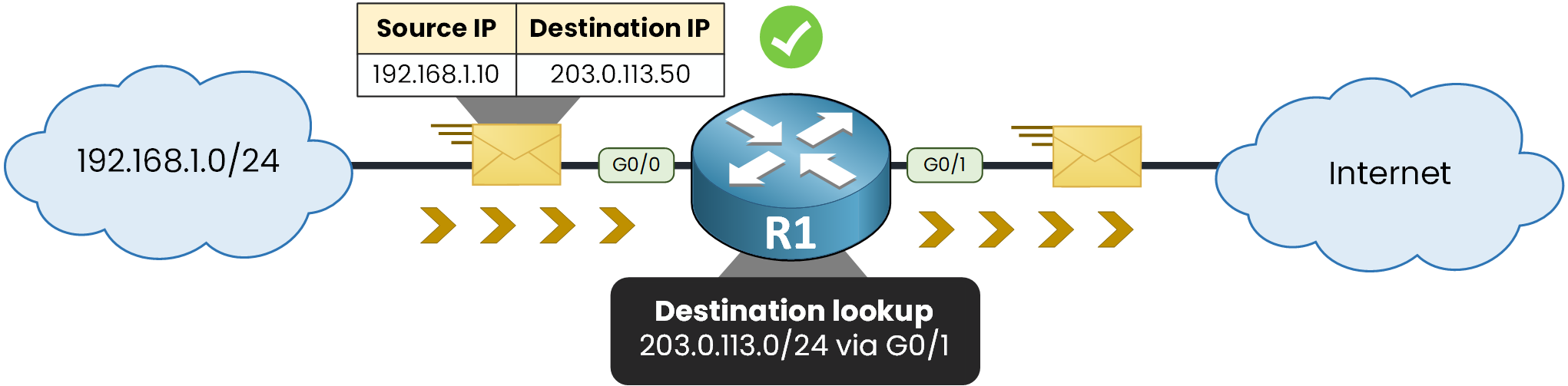
Figure 2 – Forwarded out of G0/1
That is the whole process.
Answer the question below
Which address does your router look up to forward a packet?
The Source Is Never Checked
Now, notice what did not happen.
Your router never asked whether 192.168.1.10 was a plausible source address.Nothing stops a host on your LAN from writing any source address it wants.
This is IP spoofing!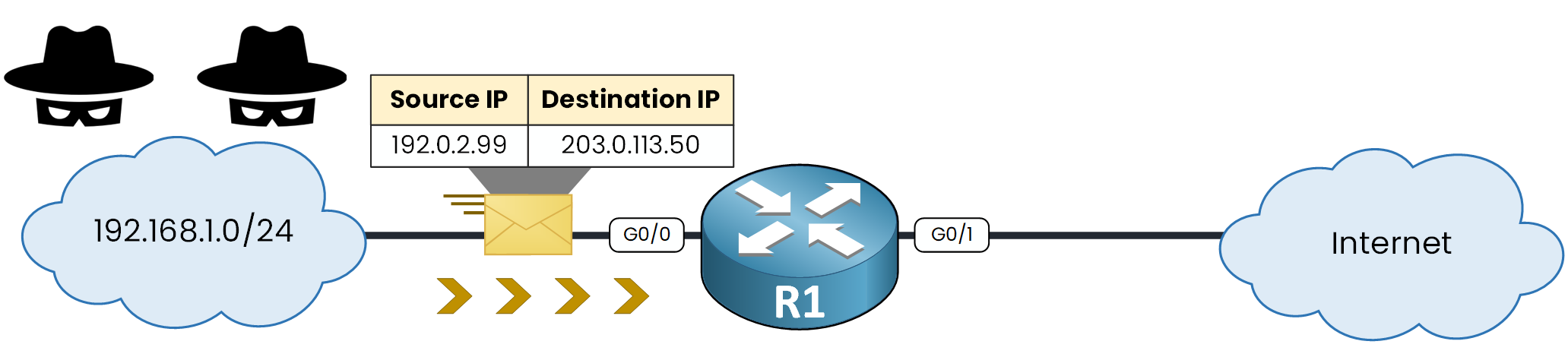
Figure 3 – A forged source, forwarded anyway
Put yourself in your router's place.
No protection mechanism is enabled on it, so it does exactly what it did before: it looks up the destination in its routing table.R1# show ip route 203.0.113.50 Routing entry for 203.0.113.0/24 Known via "static", distance 1, metric 0 Routing Descriptor Blocks: * 10.0.1.2, via GigabitEthernet0/1 Route metric is 0, traffic share count is 1Your router forwards them all, without ever questioning that address.
What does that buy an attacker?A host that lies about its source address can:
hide where the traffic really comes from
send the replies to a victim instead of itself
slip past your filters that trust internal addresses
Answer the question below
Forging the source address of a packet is called IP ________
Turning uRPF On
Now, let's configure uRPF.
It cannot run without CEF, so that one goes on first:R1# conf t Enter configuration commands, one per line. End with CNTL/Z. R1(config)# ip cef R1(config)# interface g0/0 R1(config-if)# ip verify unicast source reachable-via rx R1(config-if)# endOne line on your interface, and every packet arriving on G0/0 now gets its source address checked.
Now, a malicious host sends a packet with a source address of 192.0.2.99.Your router checks whether that source address exists in its routing table.
If no route matches it, your router drops the packet.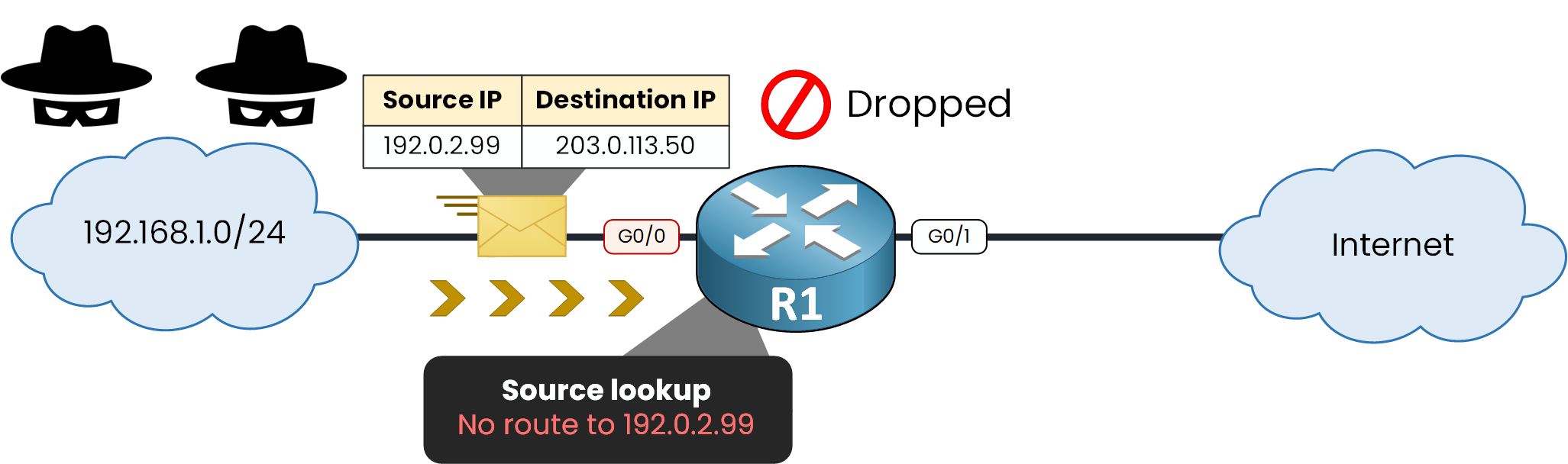
Figure 4 – No route to the source, packet dropped
Let's simulate that scenario and forge a packet with the source address 192.0.2.99.
R2 sits on your LAN, and its Loopback 1 carries the forged address. Send five packets from it:R2# ping 203.0.113.50 source loopback 1 Type escape sequence to abort. Sending 5, 100-byte ICMP Echos to 203.0.113.50, timeout is 2 seconds: Packet sent with a source address of 192.0.2.99 ..... Success rate is 0 percent (0/5)Five dots, not one reply.
Go and look on R1:R1# show ip interface g0/0 | include verif IP verify source reachable-via RX 5 verification drops 0 suppressed verification drops 0 verification drop-rateFive spoofed packets, five drops.
Answer the question below
uRPF searches for the source address in the _______ table
You saw uRPF drop a packet. Here is what actually happened inside your router.
It comes down to one extra lookup, and the order in which it runs.Source Lookup
With uRPF running on your G0/0, the packet now triggers two lookups.
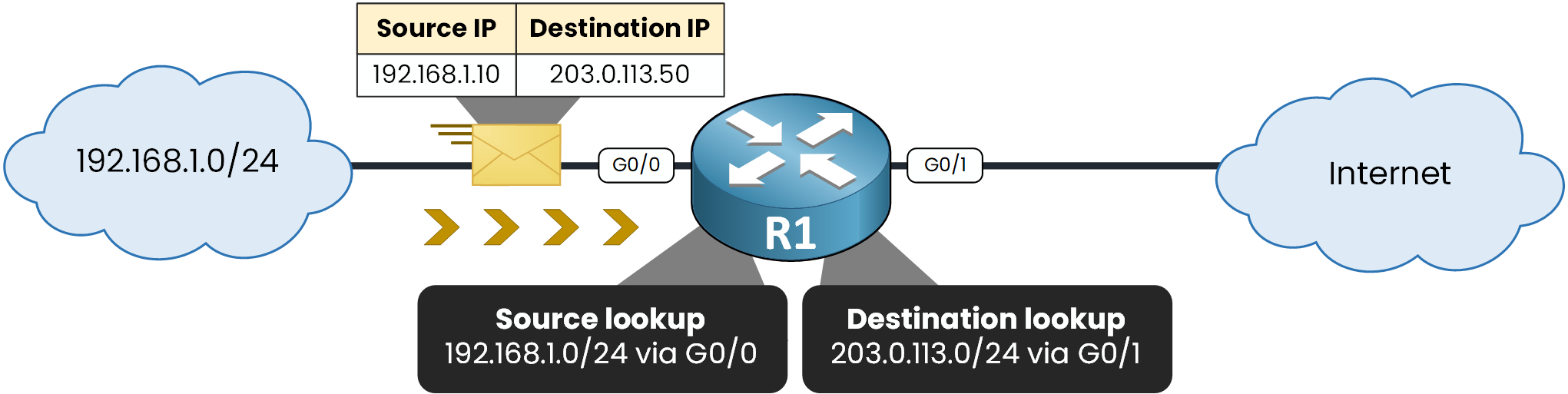
Figure 5 – uRPF adds a source lookup
The source lookup comes first.
If it fails, your router drops the packet and the destination lookup never happens.Answer the question below
Which lookup does uRPF run first, source or destination?
A Valid Packet
192.168.1.0/24 is reachable via G0/0.
That is exactly where the packet arrived, so the source is valid.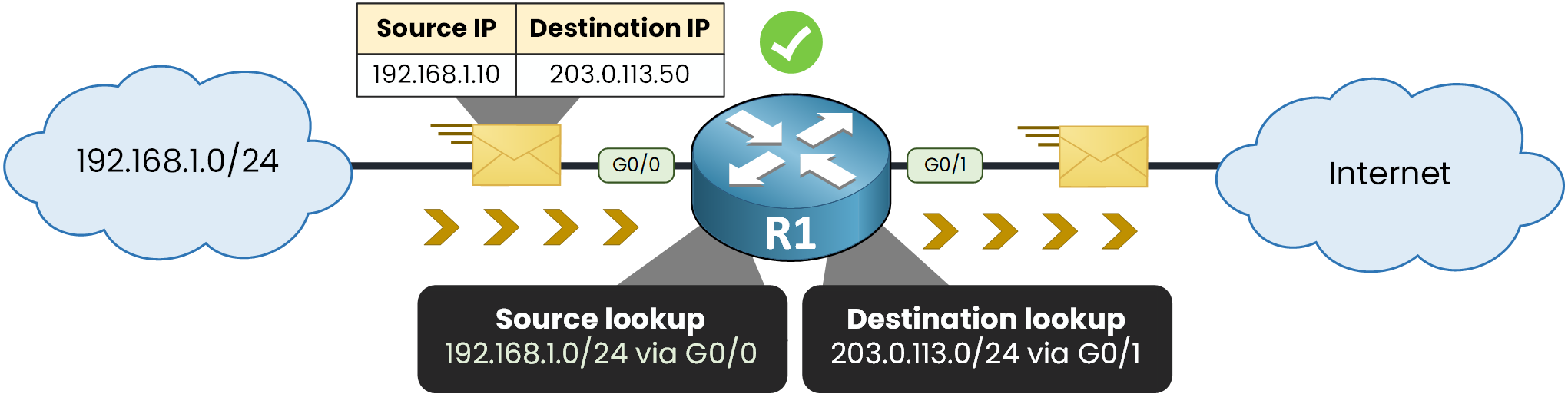
Figure 6 – Source reachable via the ingress interface
Ask your router where it would send traffic back to that source:
R1# show ip route 192.168.1.10 Routing entry for 192.168.1.0/24 Known via "connected", distance 0, metric 0 (connected) Routing Descriptor Blocks: * directly connected, via GigabitEthernet0/0 Route metric is 0, traffic share count is 1Look at the outgoing interface.
G0/0 is the return path, and G0/0 is where the packet arrived.
Your check passes.CEF must be enabled for uRPF to work on your router.
uRPF reads the forwarding table that CEF builds.One command proves both:
R1# show cef interface g0/0 GigabitEthernet0/0 is up (if_number 2) Internet address is 192.168.1.1/24 ICMP redirects are always sent Per packet load-sharing is disabled IP unicast RPF check is enabled Input features: uRPF Hardware idb is GigabitEthernet0/0 IP CEF switching enabled IP CEF switching turbo vectorYou can see two things:
IP unicast RPF check is enabledconfirms uRPF is active on G0/0IP CEF switching enabledconfirms CEF, without which uRPF cannot run
Answer the question below
Which feature must be enabled for uRPF to work on your router?
Now that you know what uRPF does, you need to know it runs in several modes.
One keyword decides which one.Strict comes first, and it is already running on your G0/0.
The Two Checks
Strict mode runs two checks on every packet you receive, and both must pass.
First, is the source address in your routing table?
Second, does that route point to the interface the packet arrived on?
Watching It Drop
An attacker on your LAN now spoofs 203.0.113.5, a real Internet address.
The route exists, but it points to G0/1.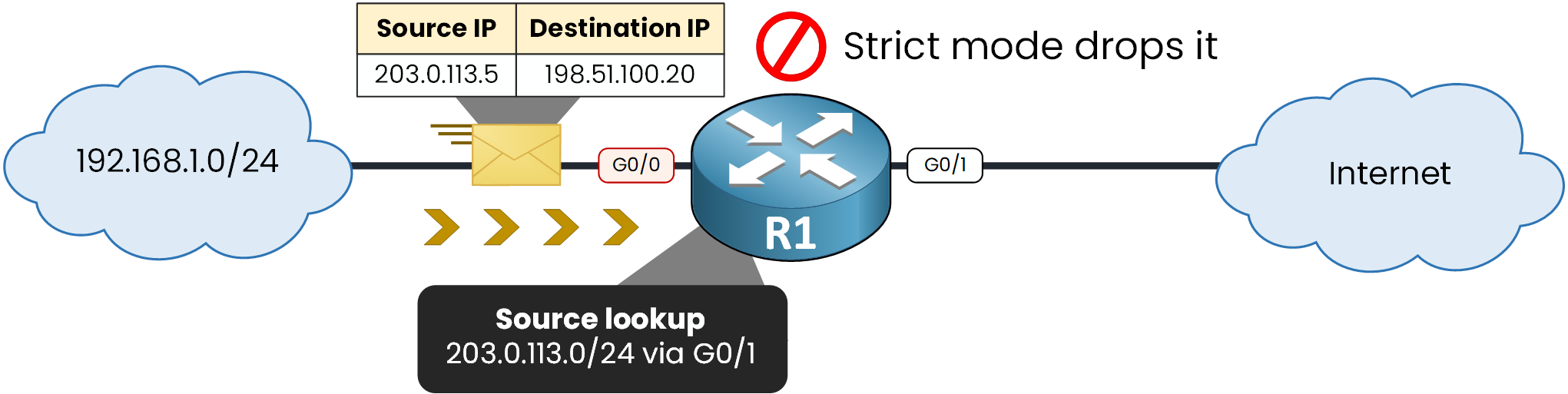
Figure 7 – Strict mode: wrong interface, dropped
Ask your router the same question as before, this time about the spoofed source:
R1# show ip route 203.0.113.5 Routing entry for 203.0.113.0/24 Known via "static", distance 1, metric 0 Routing Descriptor Blocks: * 10.0.1.2, via GigabitEthernet0/1 Route metric is 0, traffic share count is 1Your router would answer G0/1, but the packet reached you on G0/0.
The second check fails.That second check is what makes strict mode effective.
It is also what makes it risky.
When your traffic leaves through one interface and comes back through another, strict mode drops perfectly valid traffic.Answer the question below
In strict mode, the source route must point to the _______ interface
Configuring Strict Mode
One keyword carries both checks:
rx.
CEF first, then the check on your access interface:R1(config)# ip cef R1(config)# interface g0/0 R1(config-if)# ip verify unicast source reachable-via rxConfirm it is in the configuration:
R1# show running-config interface g0/0 Building configuration... Current configuration : 142 bytes ! interface GigabitEthernet0/0 ip address 192.168.1.1 255.255.255.0 ip verify unicast source reachable-via rx endNow read the mode back from the interface itself:
R1# show ip interface g0/0 | include verif IP verify source reachable-via RX 5 verification drops 0 suppressed verification drops 0 verification drop-rateRXis strict mode, and the counter still holds the five packets you dropped earlier.Answer the question below
Which keyword enables strict mode?
Strict mode is safe where your topology is predictable.
On an uplink it rarely is.Only One Check
Loose mode runs the first of those two checks and skips the second.
A route to 203.0.113.5 exists somewhere, and that is enough.
Nothing but an unroutable source will stop it.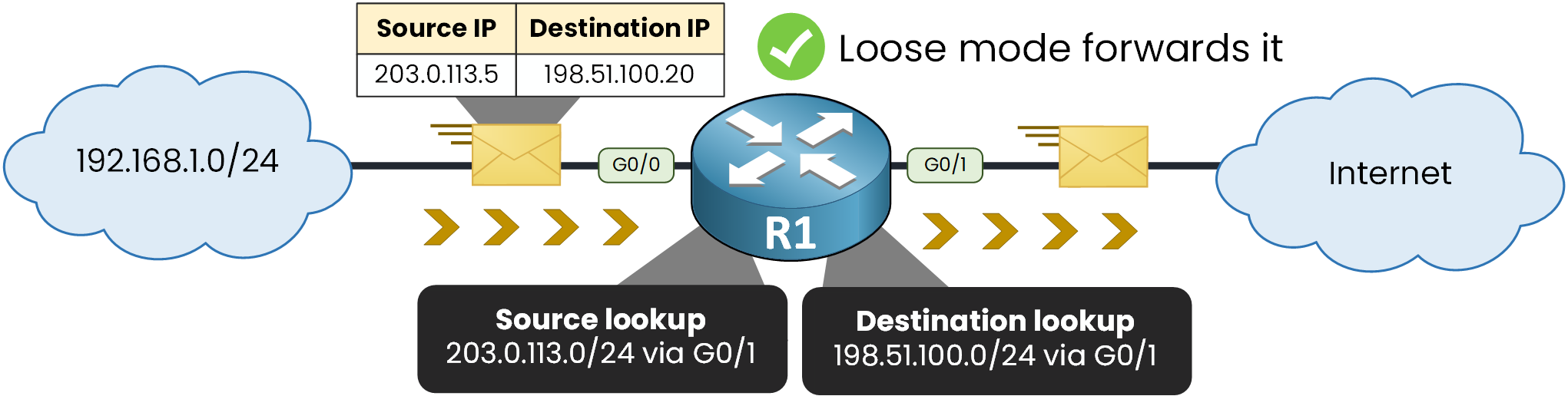
Figure 8 – Loose mode: a route exists, forwarded
But it survives asymmetric routing.
Switching the Keyword
Change one keyword on your interface and the verdict flips:
R1# conf t
Enter configuration commands, one per line.  End with CNTL/Z.
R1(config)# interface g0/0
R1(config-if)# ip verify unicast source reachable-via any
R1(config-if)# end
R2 sends the spoofed packet again, same source 203.0.113.5, same interface.
Read the counter on G0/0:R1# show ip interface g0/0 | include verif IP verify source reachable-via ANY 5 verification drops 0 suppressed verification drops 0 verification drop-rateStill five, the same five from your first test.
uRPF did not drop this one: a route to 203.0.113.5 exists, and loose mode asks for nothing more.
You changed it on G0/0 only to see the difference. In production, loose mode belongs on your uplinks, where the return path is unpredictable.So put G0/0 back to strict before you go any further:
R1(config)# interface g0/0
R1(config-if)# ip verify unicast source reachable-via rx
Answer the question below
Which keyword enables loose mode?
Loose Mode on Your Uplink
Put it on your uplink G0/1, where the return path is unpredictable.
R1(config)# interface g0/1
R1(config-if)# ip verify unicast source reachable-via any
Read it back exactly the same way:
R1# show ip interface g0/1 | include verif
  IP verify source reachable-via ANY
  0 verification drops
  0 suppressed verification drops
  0 verification drop-rate
One word in the output, and you know which mode is live on which interface.
Answer the question below
After switching to any, reachable-via displays ___
The Full Syntax
The full syntax gives you four options:
ip verify unicast source reachable-via {rx | any} [allow-default] [allow-self-ping] [list]The keyword carries the mode, the rest refine the behavior:
rxselects strict mode,anyselects loose modeallow-defaultaccepts a source matched only by the default route, which is otherwise refusedallow-self-pinglets your router ping its own addresses, which uRPF blocks by defaultlistattaches an ACL that selects which packets go through the check
Answer the question below
Which option accepts a source matched only by the default route?
You have one more mode to know.
VRF mode is loose mode, limited to interfaces in the same VRF.Let's line the three modes up. They differ only in what they compare:
Strict compares the route and the ingress interface
Loose compares nothing but the existence of a route
VRF does the same as loose, inside one VRF only
Answer the question below
Which mode ignores the ingress interface?