TACACS+ (Terminal Access Controller Access-Control System Plus) is an AAA protocol created by Cisco. It helps manage secure access to network devices like routers, switches, and firewalls. While it was initially proprietary, TACACS+ is now widely supported by other vendors, making it a great choice for complex networks.
Purpose of TACACS+
TACACS+ is designed for detailed access control. Unlike other protocols, it separates the three AAA functions, Authentication, Authorization and Accounting, to give administrators more control over user access, actions, and logs.
How TACACS+ Works
TACACS+ uses a client-server model with TCP on port 49 to ensure reliable and secure communication. Here's how it works:

Figure 1 – TACACS+ Operation
TACACS+ Client: The network device (for example a router or switch) sends user login details to the TACACS+ server for verification.
TACACS+ Server: This is the central system that verifies user credentials, checks permissions, and logs all user actions.
Unlike RADIUS, TACACS+ encrypts all the data sent between the client and server, making it more secure for sensitive networks.
Answer the question below
In TACACS+, does the router or the TACACS+ server act as the client?
In TACACS+, the authentication process is fully encrypted, which protects all user details during transmission.
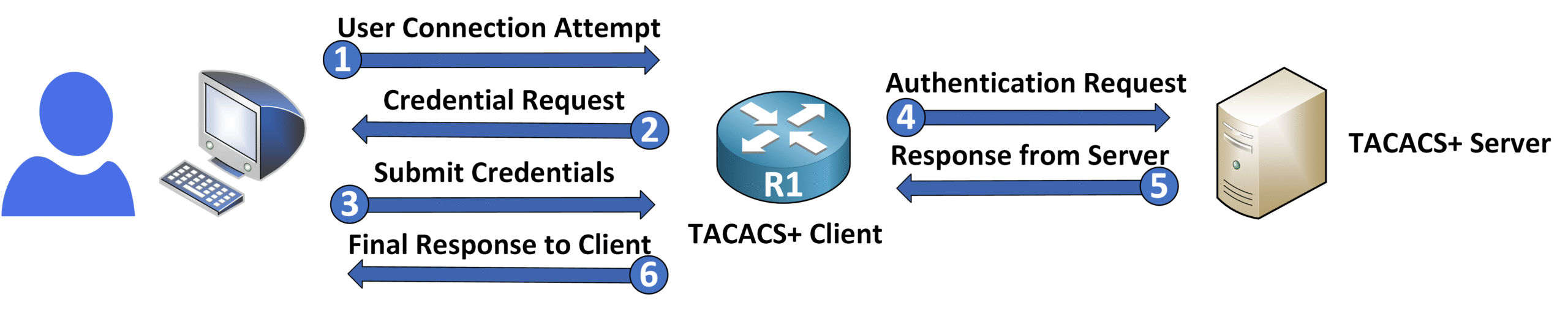
Figure 2 – TACACS+ Authentication Process
Authentication Workflow
Here's how TACACS+ authenticates a user:
Authentication Request: The network device (client) sends the user's login details to the TACACS+ server.
Server Response: The server checks the credentials and replies with either:
Accept: The user is granted access.
Reject: Access is denied if the credentials are incorrect.
This encryption ensures no sensitive data is exposed, even if someone intercepts the communication.
Answer the question below
When the TACACS+ server approves a user's login, what response does it send?
Authorization
TACACS+ provides granular control over user actions:
Command-Level Authorization: When command authorization is enabled, every command a user tries to execute is checked against their permissions.
Example: A user might be allowed to run show run to view the configuration but not to use configure terminal to make changes.
This ensures users can only perform tasks they are authorized for, improving both security and accountability.
Accounting
TACACS+ keeps detailed logs of all user actions:
Command Logging: Every command a user executes is recorded.
Session Details: Tracks when users log in, log out, and the results of their actions.
These logs create a full audit trail, making it easier to troubleshoot issues or review compliance.
Answer the question below
According to the text, what does TACACS+ record to keep a detailed audit trail?
Setting up TACACS+ on a Cisco device involves enabling AAA, defining the TACACS+ server, and applying the configuration to user authentication. Here's a step-by-step guide:
Enable AAA
Before configuring TACACS+, you need to enable the AAA framework on the device:
R1# conf t
Enter configuration commands, one per line.  End with CNTL/Z.
R1(config)# aaa new-model
This command activates AAA, allowing you to manage authentication, authorization, and accounting centrally.
Define the TACACS+ Server
Next, create a named TACACS+ server, then specify its IP address and the shared encryption key:
R1(config)# tacacs server PMN_TACACS
R1(config-server-tacacs)# address ipv4 192.168.1.100
R1(config-server-tacacs)# key tacacskey
R1(config-server-tacacs)# exit
tacacs server PMN_TACACS: Creates a named TACACS+ server entry and enters its configuration sub-mode.
address ipv4: Defines the IP address of the TACACS+ server.
key: Sets the shared key for secure communication between the network device and the TACACS+ server.
💡 Note: On older IOS versions, you will often come across the legacy one-line syntax
tacacs-server host <IP> key <KEY>(here:tacacs-server host 192.168.1.100 key tacacskey). Although deprecated, it is still very common in enterprise networks, so recognize it when you see it. The named-server syntax shown above is the standard Cisco recommends since IOS 15.2(4)M and on IOS-XE.Configure Authentication
Set up authentication so that TACACS+ is the primary method, with a fallback to the local database:
R1(config)# aaa authentication login default group tacacs+ localExplanation:
aaa authentication login: Configures login authentication settings.
default: The list that every line (console, VTY) uses automatically, unless a line names another list.
group tacacs+ local: Uses TACACS+ first. The local database is used only if the server does not answer (unreachable). If the server answers and rejects the password, the login fails and local is not tried.
Apply Authentication to User Access Lines
Because you used the
defaultlist, the VTY lines (Telnet or SSH) already use TACACS+. Typing it on the lines is optional: it only makes the link visible in the running-config.R1(config)# line vty 0 4 R1(config-line)# login authentication default💡 When is login authentication required?
default list: applies to every line on its own.
login authentication defaultis optional.Named list (for example
VTY-AUTH): does nothing until you apply it to the lines withlogin authentication VTY-AUTH. Here the command is required.
R1(config)# aaa authentication login VTY-AUTH group tacacs+ local
R1(config)# line vty 0 4
R1(config-line)# login authentication VTY-AUTH
Create Local User Accounts
To ensure fallback authentication works when the TACACS+ server is unavailable, create a local user account with an encrypted password:
R1(config)# username Admin secret pingmynetw0rk!This provides a backup method for logging in if the TACACS+ server cannot be reached.
Complete Configuration
Here's the full configuration example for TACACS+ on device
R1:R1(config)# aaa new-model R1(config)# tacacs server PMN_TACACS R1(config-server-tacacs)# address ipv4 192.168.1.100 R1(config-server-tacacs)# key tacacskey R1(config-server-tacacs)# exit R1(config)# aaa authentication login default group tacacs+ local R1(config)# username Admin secret pingmynetw0rk! R1(config)# line vty 0 4 R1(config-line)# login authentication defaultWith this configuration, TACACS+ will handle login authentication as the primary method, with a secure fallback to the local user database.
Benefits
TACACS+ is ideal for high-security environments due to its advanced features:
Granular Control: Allows specific command-level permissions.
Enhanced Security: Encrypts the entire communication, including usernames, passwords, and session data.
Detailed Logs: Tracks every user action, making audits and compliance checks easier.
Limitations
Despite its benefits, TACACS+ has a few drawbacks:
More Resources Needed: It uses more system resources compared to RADIUS.
Complex Setup: Configuration is more detailed, which might be challenging for smaller teams.
Answer the question below
Which command enables the AAA framework on the router before any TACACS+ configuration?