SNMP version 2 (SNMPv2) was designed to overcome the limitations of SNMPv1, especially in large enterprise networks where performance and reliability are essential.
The most commonly used variant of SNMP version 2 is SNMPv2c, where "c" stands for community-based. It retains the simple security model of SNMPv1 while introducing several key improvements:
GetBulk: Retrieves large amounts of data with fewer requests.
Informs: Allows alerts to be acknowledged.
While SNMPv2c addressed many performance and functionality limitations of SNMPv1, it still lacks strong security features, which were later introduced in SNMPv3.
SNMP Versions Overview
Over the years, SNMP has evolved through multiple versions to meet increasing demands for speed, scalability, and secure communication:
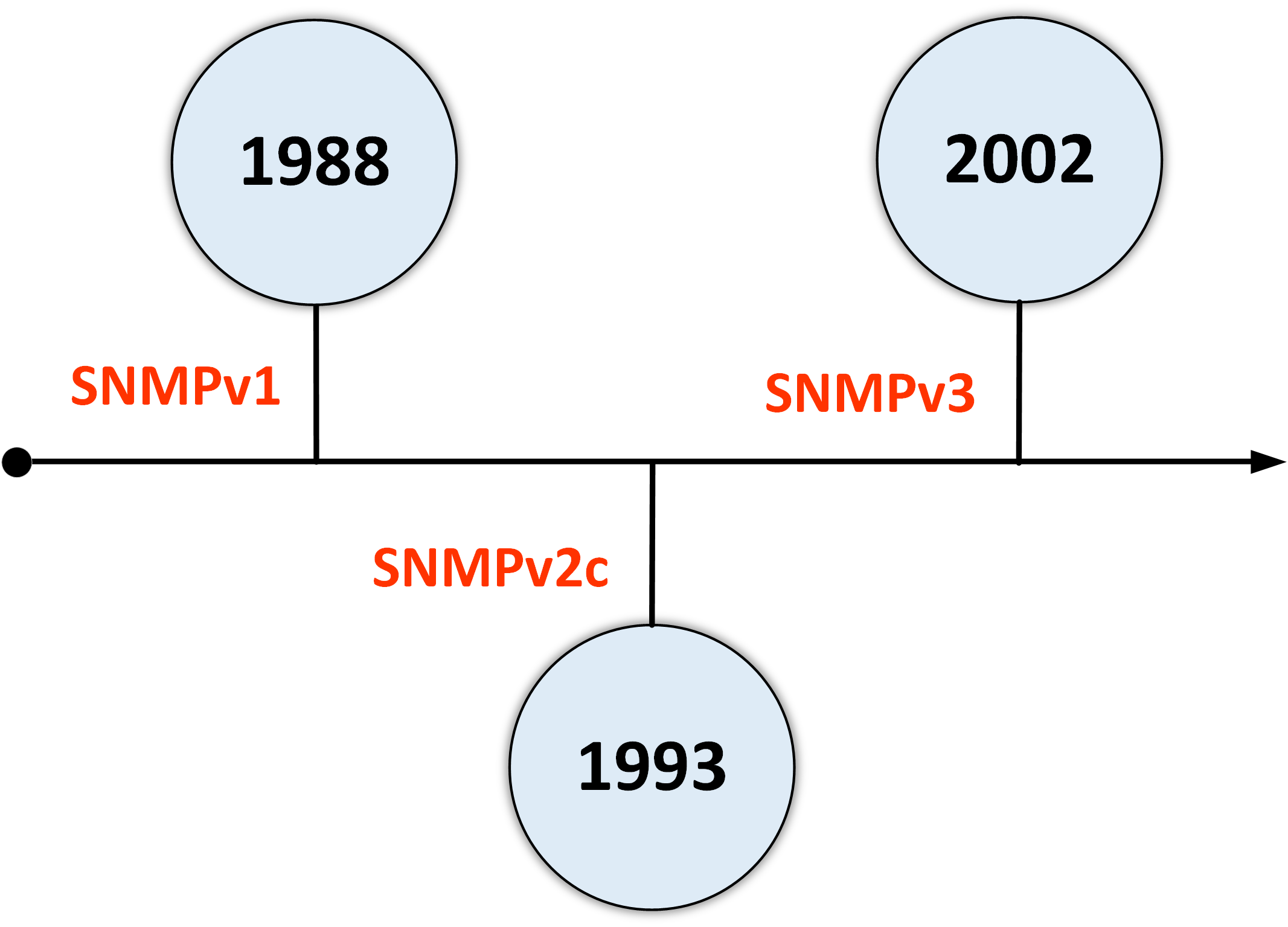
Figure 1 – Timeline of SNMP Versions
SNMPv1 (1988): Basic monitoring, no security
SNMPv2c (1993): Performance improvements, but still no encryption
SNMPv3 (2002): Adds authentication and encryption for secure communication
Curious to see how SNMPv2 actually improves network monitoring? Let's break it down.
Answer the question below
Which SNMP version introduces performance improvements like GetBulk but still has no encryption?
SNMP GetBulk
The GetBulk operation allows an SNMP manager to retrieve multiple pieces of data in a single request, unlike SNMPv1, where data must be polled one item at a time using GetNext.
This becomes especially useful when querying large MIB tables such as interface statuses, routing tables, or system counters.
Example: Retrieving Interface Status
Imagine a switch with 48 interfaces, and you want to check the status of each one.
With SNMPv1 (GetNext):
You need to send 48 separate commands, one for each interface.
Each command retrieves only one interface status.
So you end up sending 48 requests and receiving 48 responses...
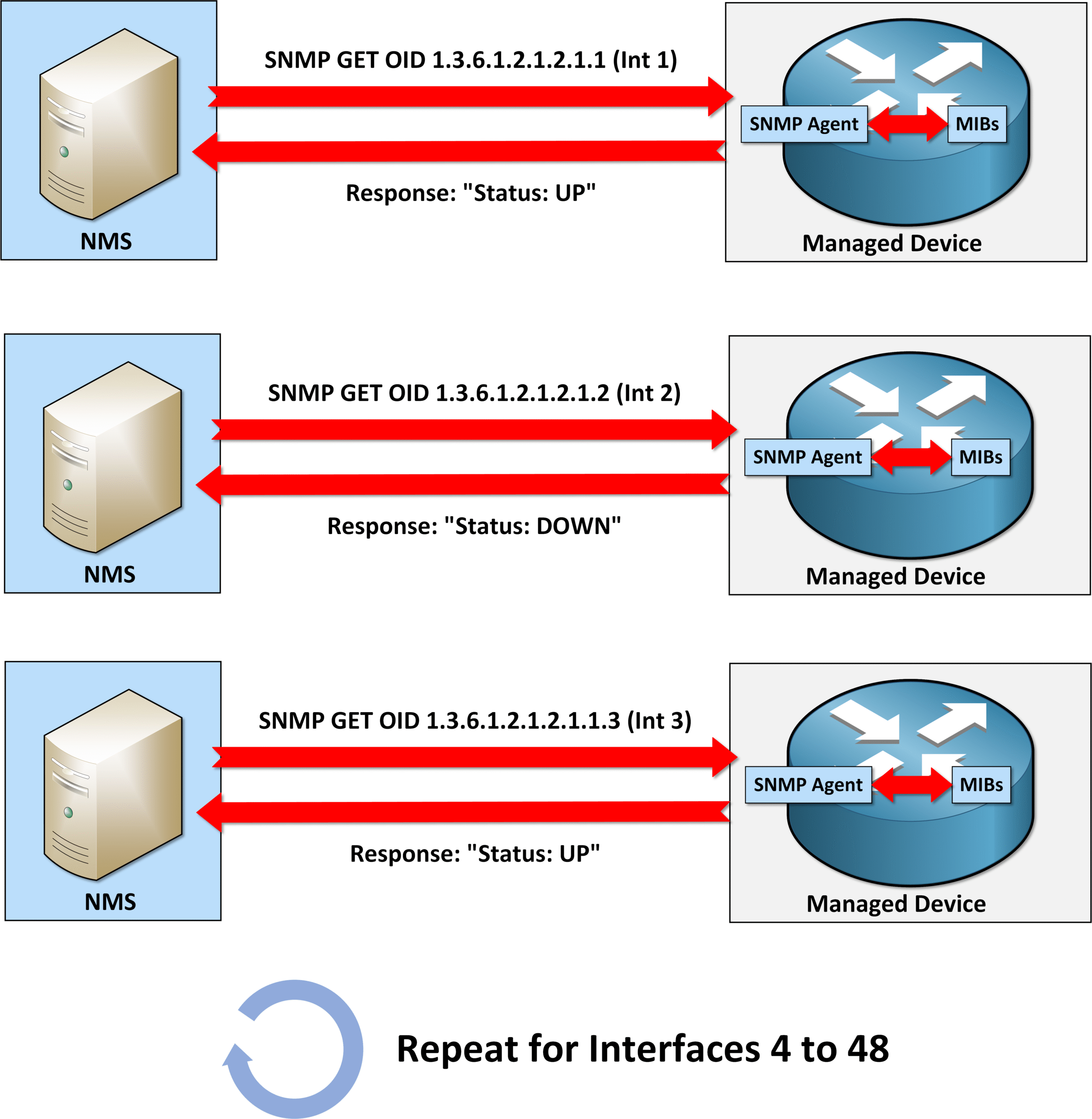
Figure 2 – SNMPv1 Interface Polling (GetNext Limitation)
What a waste of resources, right?
And you're absolutely right: SNMPv2c uses GetBulk to retrieve information much more efficiently.
With SNMPv2c (GetBulk):
You send a single command, specifying:
Where to start in the MIB table,
And how many rows to retrieve, in our case 48.
The switch replies with all 48 interface statuses in one response.
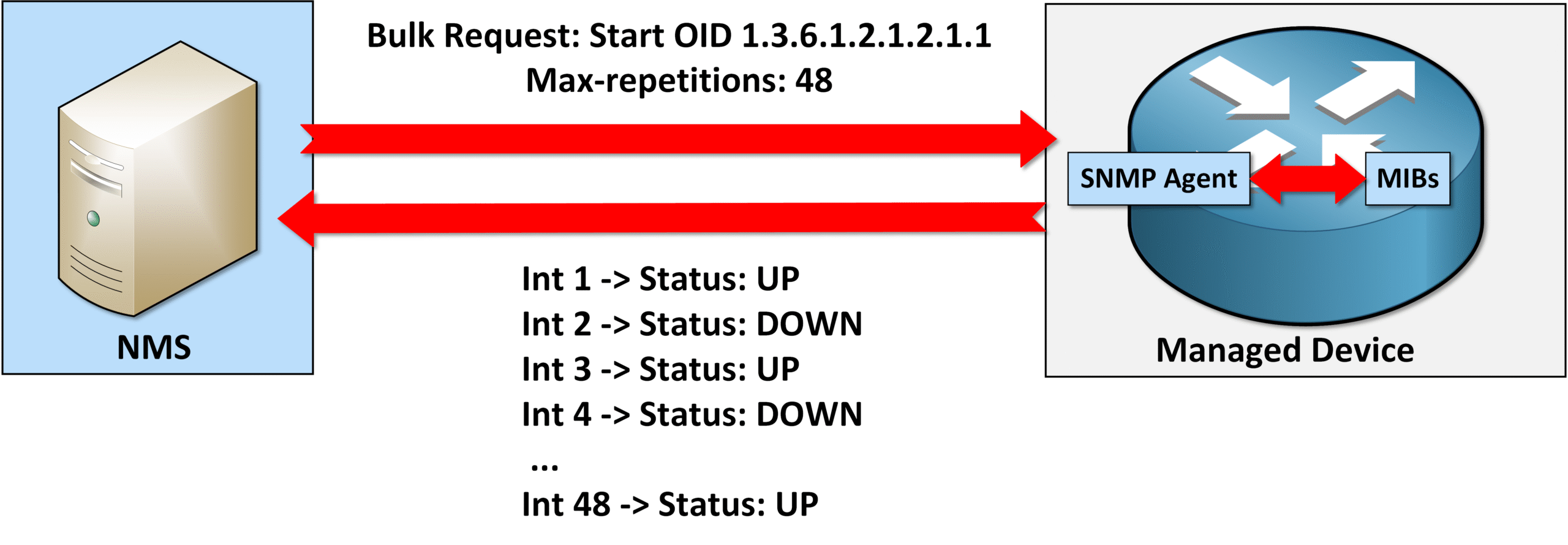
Figure 3 – SNMPv2c GetBulk Efficiency
As you can see, SNMP version 2 brings operational efficiency improvements over SNMPv1.
Answer the question below
Which SNMPv2 feature allows retrieving many values in one single request?
How to remember SNMP GetBulk ?
Think about the name of the operation, GetBulk.
The word "bulk" in English means a large quantity or mass of something.That's exactly what this operation does:
It retrieves a large amount of data
In one single request
Making SNMP much more efficient when dealing with big tables like interface lists.
Now let's look at the other major improvement in SNMPv2c: SNMP Informs
SNMP Informs
In SNMPv2c, the Inform operation significantly improves how alerts are handled between a managed device and the SNMP manager.
Unlike SNMP Traps, which are sent without expecting any response, as you can see below:
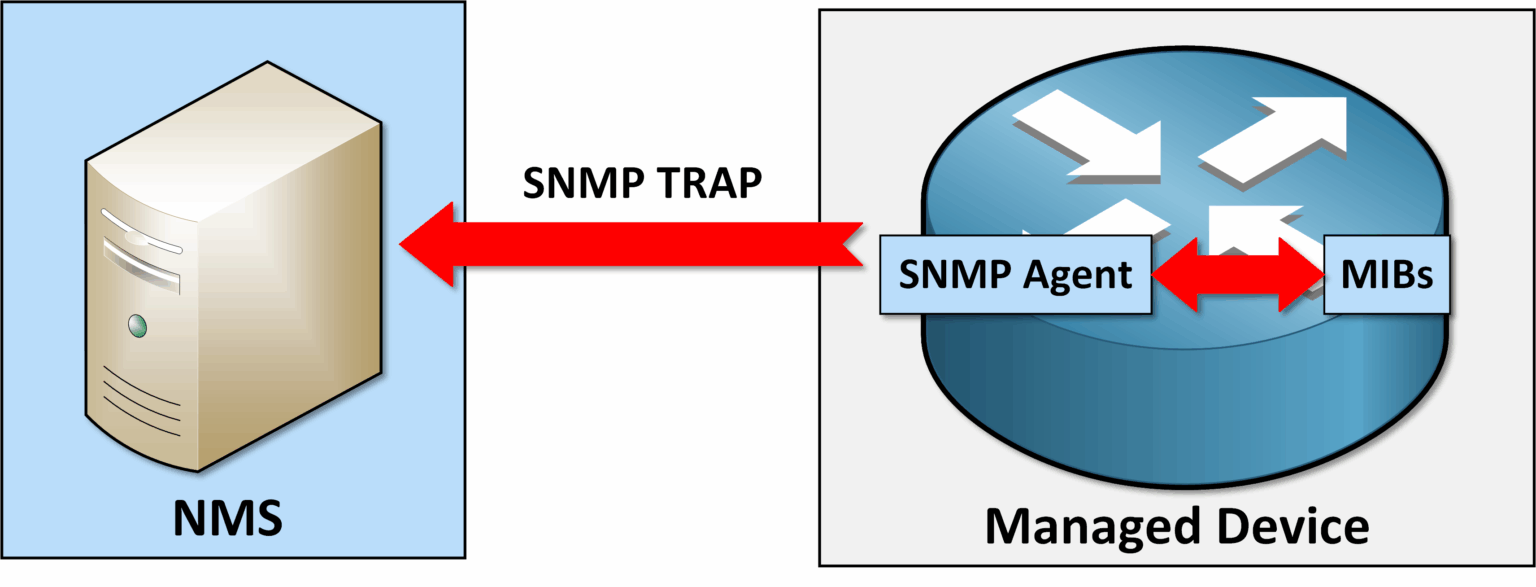
Figure 4 – SNMP Traps
SNMP Informs require an acknowledgment. This adds a crucial layer of reliability to network monitoring.
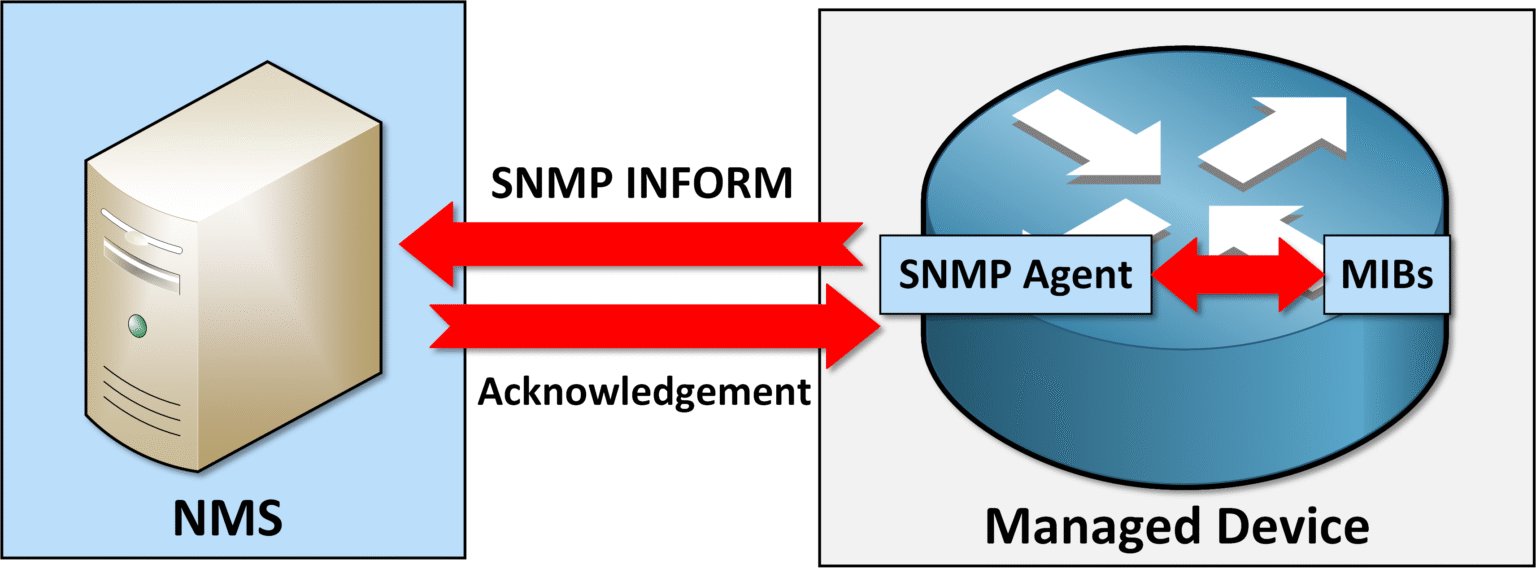
Figure 5 – SNMP Inform with Acknowledgment
Aspect
SNMP Trap
SNMP Inform
Reliability
No acknowledgment
Requires acknowledgment
Use Case
Not guaranteed
Guaranteed (or retried)
Best Use Case
Low overhead
Slightly higher overhead due to acknowledgment
Performance Impact
Very low overhead
Slightly higher (due to confirmation step)
Table 1 – Comparison Between SNMP Trap and SNMP Inform
Let's now dive into the configuration part.
Answer the question below
Which SNMPv2 operation requires an acknowledgment from the manager?
Now that you understand the key features of SNMPv2, let's configure it on the topology below:
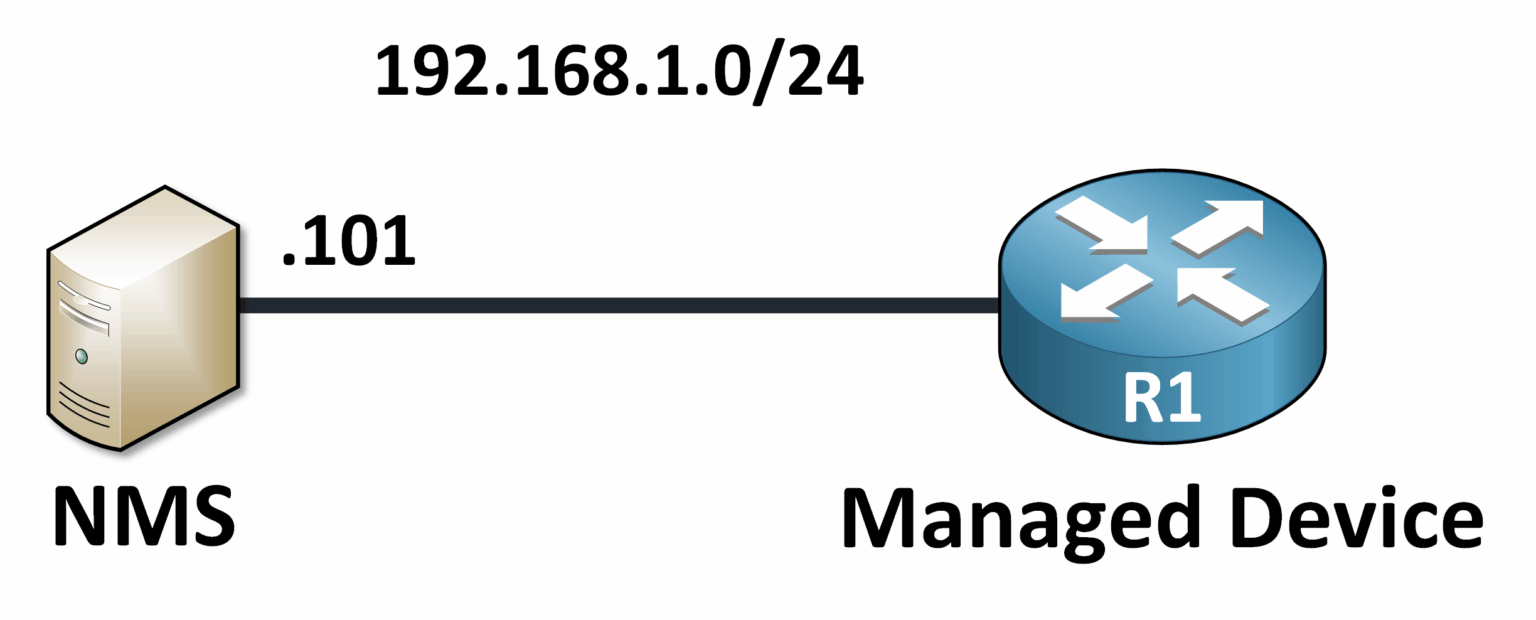
Figure 6 – SNMPv2c Configuration Topology
You'll learn how to:
Define community strings
Configure SNMP Inform
Restrict SNMP access with ACLs
Let's break down each step.
What Are Community Strings?
Community strings are plain-text passwords that control access to the SNMP agent on a device.
They're sent with every SNMP request and determine whether the SNMP manager is authorized to retrieve or modify information.
You typically define two levels:Read-Only (RO):
Grants the SNMP manager permission to view and monitor MIB data, but not make changes.
Read-Write (RW):
Grants permission to both view and modify MIB data, allowing configuration changes via SNMP.
Configuring SNMPv2c on Cisco Devices
Let's now configure SNMPv2c on Router R1.
Step 1: Define Community Strings
For this example, I will show you how to define Read-Only and also Read-Write community strings.
R1# conf t
Enter configuration commands, one per line.  End with CNTL/Z.
R1(config)# snmp-server community SecureRO RO
R1(config)# snmp-server community SecureRW RW
As you can see, based on our configuration:
The SecureRO community string allows monitoring only.
The SecureRW community string allows monitoring and configuration (use with caution)!
In the next step, we will enable the SNMP Traps and SNMP Informs features.
Step 2: Enable SNMP Traps and Informs
Enable traps on the device:
R1(config)# snmp-server enable trapsDefine a destination for informs:
R1(config)# snmp-server host 192.168.1.101 traps version 2c SecureRO
R1(config)# snmp-server host 192.168.1.101 informs version 2c SecureRO
The SNMP Manager at
192.168.1.101receives traps.The SNMP Manager at
192.168.1.101receives informs for reliable notification.
Step 3: Restrict Access with ACLs
Limit SNMP access to trusted networks using an Access Control List (ACL):
Create an ACL to permit access only from the trusted subnet
192.168.1.0/24:
R1(config)# access-list 10 permit 192.168.1.0 0.0.0.255Apply the ACL to the SNMP community strings:
R1(config)# snmp-server community SecureRO RO 10
R1(config)# snmp-server community SecureRW RW 10
This ensures that only devices in the trusted subnet can access SNMP data.
Step 4: Verify SNMPv2c Configuration
After configuring SNMPv2c, verify the setup to ensure that community strings, traps, and ACLs are correctly defined:
Check defined community strings:
R1# show snmp community
Community name: SecureRO
Community Index: SecureRO
Community SecurityName: SecureRO
storage-type: nonvolatile active  access-list: 10
Community name: SecureRW
Community Index: SecureRW
Community SecurityName: SecureRW
storage-type: nonvolatile active  access-list: 10
Verify SNMP traps and informs:
R1# show snmp host
Notification host: 192.168.1.101    udp-port: 162    type: trap
user: SecureRO    security model: v2c

Notification host: 192.168.1.101    udp-port: 162    type: inform
user: SecureRO    security model: v2c
Answer the question below
What is the plain-text password used by SNMPv2c to control access?
SNMPv2c improved performance and scalability over SNMPv1, but it suffers from a critical drawback: no security!
This exposes networks to significant vulnerabilities that administrators must be aware of.
⚠️ SNMPv2c does not include encryption or authentication mechanisms, which introduces serious risks:
Clear Text Communication: All SNMPv2c data, including community strings (passwords), is transmitted in plain text, making it easy for attackers to intercept sensitive information.
No Data Integrity: SNMPv2c cannot verify if the data exchanged between the manager and the agent has been modified during transit.
Top Vulnerabilities in SNMPv2c
Interception (Eavesdropping): Attackers can capture SNMP traffic to extract sensitive details, such as community strings or device configurations.
Data Modification: Malicious actors can intercept and alter SNMP messages, leading to false information or unauthorized configuration changes.
Spoofing Attacks: Hackers can impersonate a legitimate SNMP Manager or agent to gain unauthorized control over devices or send false notifications.
Example of Vulnerability in Action: Below is an example of a captured SNMP packet using the MySecureString community string configured on the device. Notice how the community string is visible in plain text, allowing attackers to intercept and exploit it.
Captured SNMP Packet
Internet Protocol Version 4, Src: 192.168.1.101, Dst: 192.168.1.1
    Source Port: 49679
    Destination Port: 161 (SNMP)
    Length: 57

Simple Network Management Protocol
    Version: version-2c (1)
    Community: MySecureString  <-- (Community String Defined in Configuration)
    PDU Type: Get-Request
        Request ID: 2098996137
        Error-Status: noError (0)
        Error-Index: 0
    Variable-bindings: 1 item
        1.3.6.1.2.1.2.2.1.8.1 (ifOperStatus.1): Value (1 - Up)
            Object Name: 1.3.6.1.2.1.2.2.1.8.1 (Interface Status)
            Value: Up (1)
In this example:
The community string (MySecureString) is fully visible in the packet.
The SNMP Manager at 192.168.1.101 sends a request to the SNMP Agent on R1 (192.168.1.1).
An attacker could capture this traffic using tools like Wireshark, gaining unauthorized access to the device.
Why Addressing This Matters
Networks increasingly handle sensitive data. Without encryption and authentication, SNMPv2c cannot protect against:
Unauthorized access
Data breaches
Network disruptions
This makes it unsuitable for any environment requiring secure communication.
Next Step: SNMPv3
In the next lesson, we'll explore SNMPv3, the improved protocol version that resolves these vulnerabilities. By introducing encryption, authentication, and integrity checks, SNMPv3 provides a robust and secure solution for modern network management.
Answer the question below
In SNMPv2c, in what format is the community string transmitted on the wire?