RADIUS stands for Remote Authentication Dial-In User Service. It is an AAA protocol (Authentication, Authorization, and Accounting) developed by the Internet Engineering Task Force (IETF). RADIUS is widely used to manage secure access to network devices across different platforms and vendors.
Purpose of RADIUS
The main purpose of RADIUS is to verify the identity of users trying to log in. Instead of managing user accounts on each device, RADIUS centralizes access control, which simplifies administration across the network.
Client-Server Model
RADIUS works on a client-server architecture:
RADIUS Client → the device (such as a router or switch) where the user logs in. It forwards credentials to the server.

Figure 1 – RADIUS client-server model
RADIUS Server → the system that verifies those credentials and decides whether to accept or reject the connection.
RADIUS communicates using UDP as its transport protocol, with:
Authentication → Port 1812
Accounting → Port 1813
Older systems may still rely on legacy ports 1645/1646, but modern implementations use 1812/1813.
⚠️ One important limitation: RADIUS only encrypts passwords during transmission. Other data, such as usernames or session details, are sent in plain text. For highly secure networks, TACACS+ is often preferred because it encrypts all communication.
Answer the question below
Which transport protocol does RADIUS use for communication?
Now that we understand the basics, let's see how RADIUS handles authentication and authorization.
Combined Authentication and Authorization
With RADIUS, these two steps happen at the same time. When a user attempts to log in, the RADIUS server verifies their credentials and immediately sends back the access permissions.
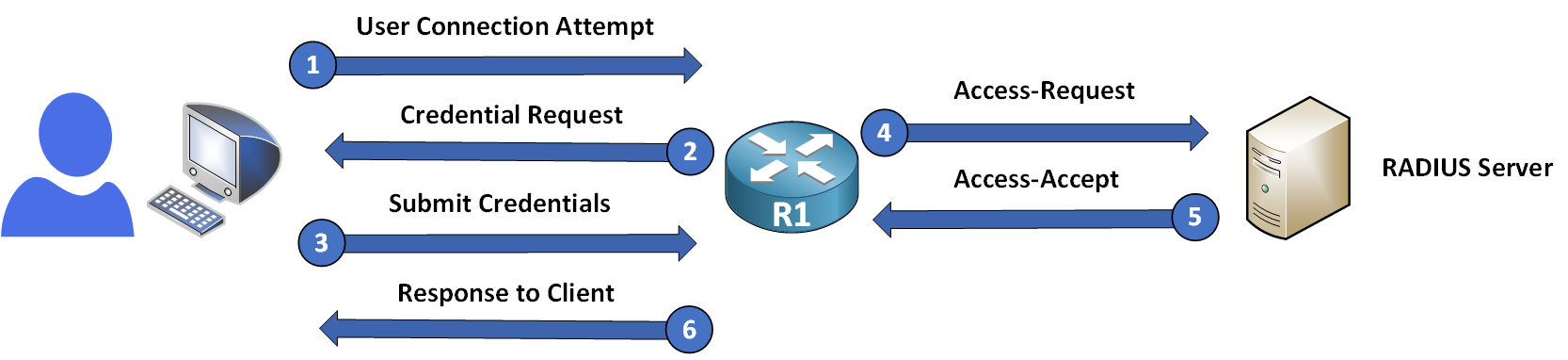
Figure 2 – RADIUS authentication and authorization workflow
Authentication Workflow
The typical workflow is as follows:
Access-Request → The RADIUS client forwards the credentials to the server.
Access-Accept / Access-Reject → The server approves or denies access depending on the credentials.
Access-Challenge → In some cases, the server may require extra verification (such as a one-time password).
Answer the question below
When a user's credentials are correct, what message does the RADIUS server return?
RADIUS also plays a role in authorization and accounting, but with some limitations.
Authorization
The server grants access permissions at the moment of authentication. However, RADIUS does not allow fine-grained control over individual commands: only user-level permissions are supported.
Accounting
RADIUS keeps track of user sessions through accounting logs. It can record:
When users log in and log out
How long they remain connected
How much data they use
But unlike TACACS+, it does not log specific commands, making it less useful for detailed auditing.
Answer the question below
What does RADIUS track to record how long a user remains connected?
Setting up RADIUS with AAA involves enabling the AAA framework, defining the RADIUS server, and applying authentication settings. Below are the steps to configure RADIUS on a device with the server 192.168.1.100 and the shared key secretkey.

Figure 3 – RADIUS configuration topology
Step 1 – Enable AAA
Activate the AAA framework on the device with the following command:
R1# conf t
Enter configuration commands, one per line.  End with CNTL/Z.
R1(config)# aaa new-model
This enables centralized AAA control for authentication, authorization, and accounting.
Step 2 – Configure the RADIUS Server
Create a named RADIUS server configuration, then specify its IP address, ports, and the shared key for secure communication:
R1(config)# radius server PMN_RADIUS
R1(config-radius-server)# address ipv4 192.168.1.100 auth-port 1812 acct-port 1813
R1(config-radius-server)# key secretkey
R1(config-radius-server)# exit
radius server PMN_RADIUS→ creates a named RADIUS server configuration and enters its sub-mode.address ipv4→ defines the RADIUS server's IP address, with the authentication and accounting ports.key→ sets the shared password between the device and the server.
By default:
Authentication → Port 1812
Accounting → Port 1813
These are the standard ports used by modern RADIUS implementations.
💡 Note: On older IOS versions, you will often come across the legacy one-line syntax
radius-server host <IP> key <KEY>(here:radius-server host 192.168.1.100 auth-port 1812 acct-port 1813 key secretkey). Although deprecated, it is still very common in enterprise networks, so recognize it when you see it. The named-server syntax shown above is the standard Cisco recommends since IOS 15.2(4)M and on IOS-XE.Step 3 – Define the Authentication Method
Set up the authentication method so that RADIUS is the primary method, and the local database is used as a backup if the RADIUS server is unavailable:
R1(config)# aaa authentication login default group radius localExplanation of the command
aaa authentication login→ Configures authentication for login sessions.default→ Applies the configuration to all login methods (e.g., console, VTY lines).group radius local→ Uses RADIUS first. If the server doesn't respond, the local user database acts as a fallback.
Step 4 – Create Local User Accounts
For fallback authentication, create a local user account with an encrypted password:
R1(config)# username Admin secret pingmynetw0rk!This ensures that if the RADIUS server is unreachable, the local user Admin can still log in.
Step 5 – Apply Authentication to Specific Lines
To apply the AAA authentication to specific lines, such as VTY (used for Telnet or SSH), use the following commands:
R1(config)# line vty 0 4
R1(config-line)# login authentication default
This ensures that all login attempts on VTY lines follow the authentication method defined in Step 3.
Summary of Configuration
Here's a complete example of the configuration:
R1(config)# username Admin secret pingmynetw0rk!
R1(config)# aaa new-model
R1(config)# radius server PMN_RADIUS
R1(config-radius-server)# address ipv4 192.168.1.100 auth-port 1812 acct-port 1813
R1(config-radius-server)# key secretkey
R1(config-radius-server)# exit
R1(config)# aaa authentication login default group radius local
R1(config)# line vty 0 4
R1(config-line)# login authentication default
Key Notes
Always include the local database as a backup method in case the RADIUS server becomes unreachable.
Use secret passwords instead of plain text for better security.
If you need different rules (console vs. VTY), configure custom method lists instead of using the default.
Answer the question below
Which command enables AAA before configuring RADIUS?
Benefits
Widely supported across vendors → great for mixed environments.
Lightweight and efficient → ideal for small to medium-sized networks.
Limitations
Limited security → only passwords are encrypted; other data is in plain text.
No command tracking → cannot log detailed user actions.
Single privilege level → does not allow granular command control.
For more detailed information, see RFC 2865.
Answer the question below
Does RADIUS encrypt the entire packet? (yes/no)