This lesson continues from the multi-area topology built in OSPFv3 Configuration: R1 and R2 in Area 0, R2 and R3 in Area 1, all adjacencies FULL.
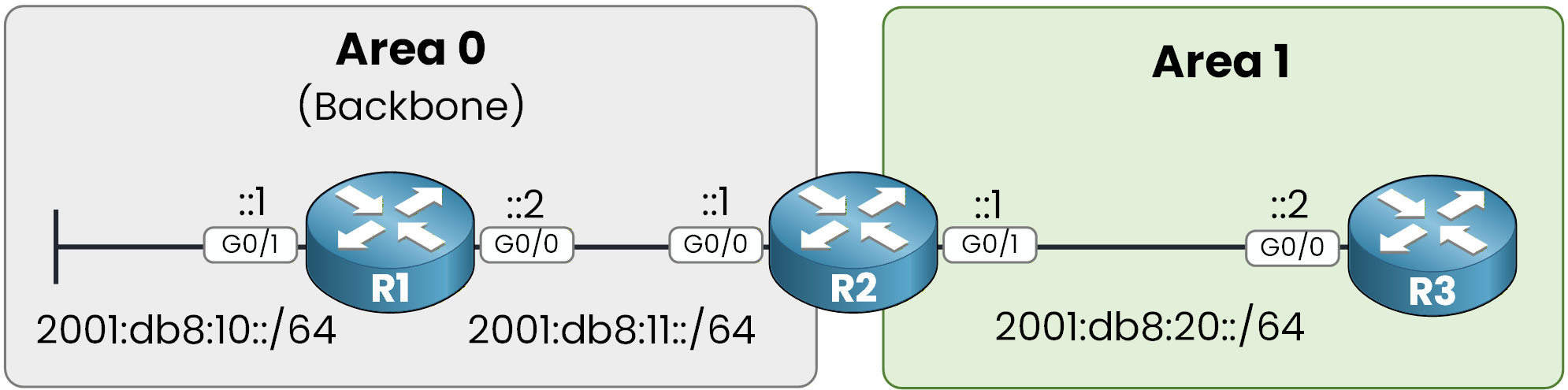
Figure 1 - OSPFv3 multi-area topology
The last feature you need to understand is IPv6 route summarization in OSPFv3.
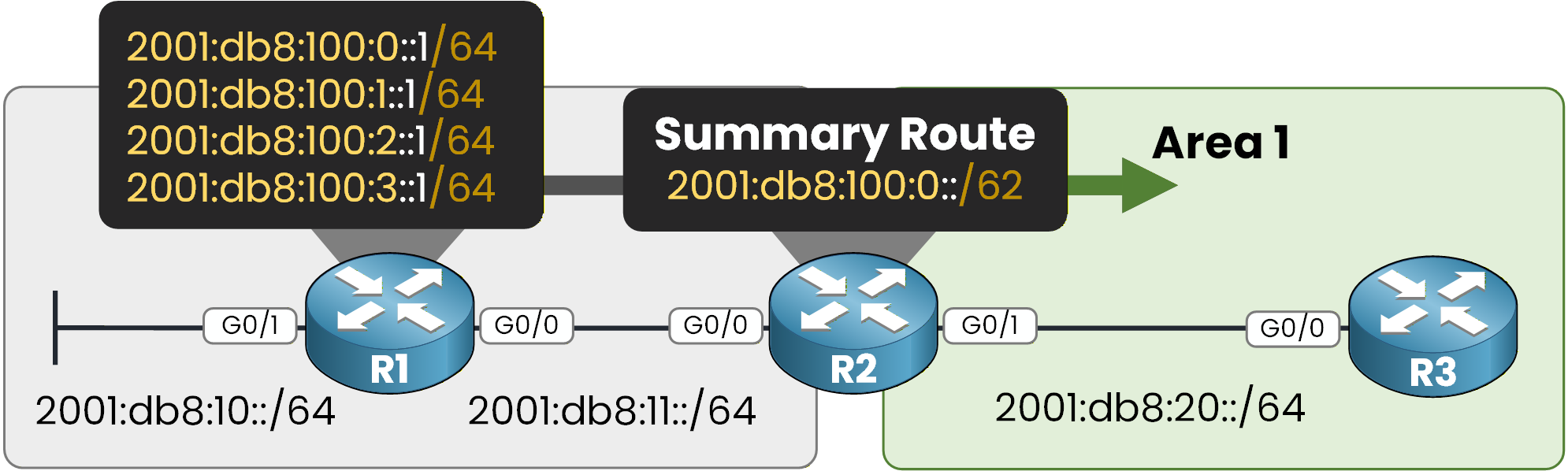
Figure 2 - OSPFv3 IPv6 Summarization
In this example, you will summarize four networks into a single summary route using the ABR.
Step 1 – Create Loopback Prefixes
First, create four loopback interfaces on R1.
Each loopback represents a different IPv6 network inside Area 0.On R1:
R1# conf t
Enter configuration commands, one per line.  End with CNTL/Z.
R1(config)# int lo0
R1(config-if)# ipv6 address 2001:db8:100:0::1/64
R1(config-if)# ospfv3 1 ipv6 area 0
R1(config-if)# exit

R1(config)# int lo1
R1(config-if)# ipv6 address 2001:db8:100:1::1/64
R1(config-if)# ospfv3 1 ipv6 area 0
R1(config-if)# exit

R1(config)# int lo2
R1(config-if)# ipv6 address 2001:db8:100:2::1/64
R1(config-if)# ospfv3 1 ipv6 area 0
R1(config-if)# exit

R1(config)# int lo3
R1(config-if)# ipv6 address 2001:db8:100:3::1/64
R1(config-if)# ospfv3 1 ipv6 area 0
R1(config-if)# end
You now have four distinct /64 networks in Area 0:
2001:db8:100:0::/64
2001:db8:100:1::/64
2001:db8:100:2::/64
2001:db8:100:3::/64
Step 2 – Configure Summarization on the ABR
Summarization in OSPF must be configured on the ABR.
R2 is the ABR between Area 0 and Area 1.
Using subnetting logic, you can summarize the four /64 networks into:
2001:db8:100:0::/62
Now configure it on R2:R2# conf t Enter configuration commands, one per line. End with CNTL/Z. R2(config)# router ospfv3 1 R2(config-router)# address-family ipv6 unicast R2(config-router-af)# area 0 range 2001:db8:100:0::/62This command tells the ABR:
Summarize the networks in Area 0 that match this prefix.
Advertise them as a single /62 prefix into other areas.
Step 3 – Verify Summarization
Now verify the result on R3 (Area 1):
R3# show ipv6 route ospf
IPv6 Routing Table - default - 6 entries
Codes: RL - RPL, O - OSPF Intra, OI - OSPF Inter, OE1 - OSPF ext 1

OI  2001:DB8:10::/64 [110/3]
     via FE80::52F7:B4FF:FE00:1301, GigabitEthernet0/0
OI  2001:DB8:11::/64 [110/2]
     via FE80::52F7:B4FF:FE00:1301, GigabitEthernet0/0
OI  2001:DB8:100::/62 [110/2]
     via FE80::52F7:B4FF:FE00:1301, GigabitEthernet0/0
Instead of seeing four separate /64 routes, you now see:
A single summarized route
Marked as OI (Inter-Area)
Learned from the ABR (R2)
Answer the question below
On which type of router is the area range command configured?