This lesson continues from the multi-area topology built in OSPFv3 Configuration: R1 and R2 in Area 0, R2 and R3 in Area 1, all adjacencies FULL.
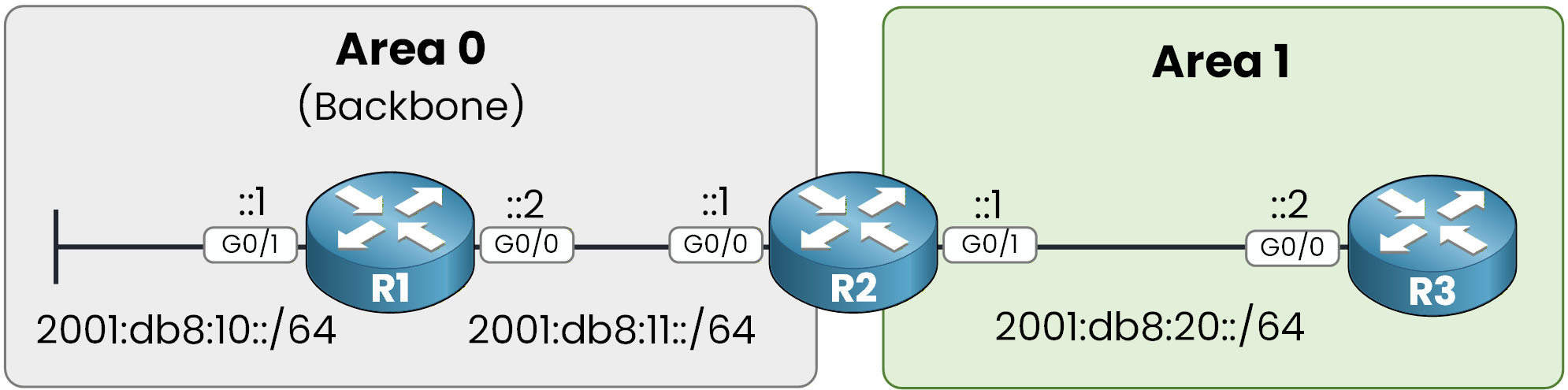
Figure 1 - OSPFv3 multi-area topology
You can also configure a passive interface in OSPFv3.
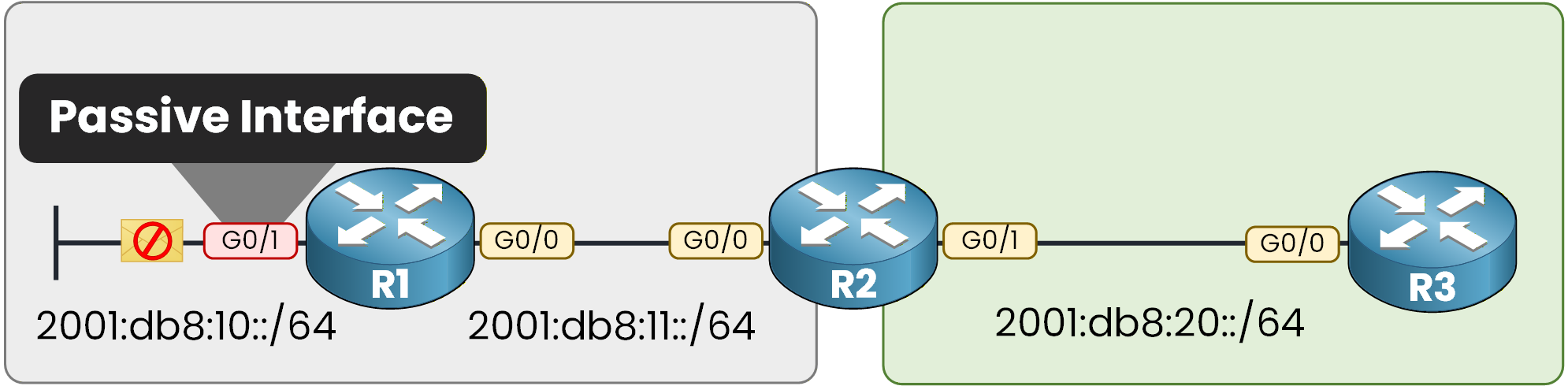
Figure 2 - OSPFv3 Passive Interface
If you remember the concept, a passive interface suppresses OSPF Hello messages on a specific interface.
This means:
The interface still advertises its network
But it does not form neighbor adjacencies
Configure a Passive Interface (Per Interface)
You can configure a passive interface directly under the OSPFv3 process.
On R1:
R1# conf t
Enter configuration commands, one per line.  End with CNTL/Z.
R1(config)# router ospfv3 1
R1(config-router)# passive-interface g0/1
Now verify:
R1# show ospfv3 interface g0/1
GigabitEthernet0/1 is up, line protocol is up
  Link Local Address FE80::52CA:C4FF:FE00:1201, Interface ID 3
  Area 0, Process ID 1, Instance ID 0, Router ID 1.1.1.1
  Network Type BROADCAST, Cost: 1
  Transmit Delay is 1 sec, State WAITING, Priority 1
  No designated router on this network
  No backup designated router on this network
  Timer intervals configured, Hello 10, Dead 40, Wait 40, Retransmit 5
    No Hellos (Passive interface)
    Wait time before Designated router selection 00:00:09
  Graceful restart helper support enabled
  Index 1/1/1, flood queue length 0
  Next 0x0(0)/0x0(0)/0x0(0)
  Last flood scan length is 0, maximum is 0
  Last flood scan time is 0 msec, maximum is 1 msec
  Neighbor Count is 0, Adjacent neighbor count is 0
  Suppress hello for 0 neighbor(s)
This confirms:
The interface is no longer sending Hello packets
No adjacency can form on this interface
The network is still advertised, but no neighbors are allowed.
Configure Passive by Default
You can also make all interfaces passive by default, then selectively enable the ones that must form adjacencies.
On R3:
R3# conf t
Enter configuration commands, one per line.  End with CNTL/Z.
R3(config)# router ospfv3 1
R3(config-router)# passive-interface default
%OSPFv3-5-ADJCHG: Process 1, IPv6, Nbr 2.2.2.2 on GigabitEthernet0/0 from FULL to DOWN, Neighbor Down: Interface down or detached
Immediately, the adjacency drops!
This happens because the interface is now passive and stops sending Hellos.
Now re-enable OSPF on the required interface:R3(config-router)# no passive-interface g0/0 %OSPFv3-5-ADJCHG: Process 1, IPv6, Nbr 2.2.2.2 on GigabitEthernet0/0 from LOADING to FULL, Loading DoneThe adjacency returns to FULL.
You should use:
Passive interfaces on LAN segments where no OSPF neighbors exist
Passive-interface default in larger designs to reduce risk of unwanted adjacencies
This is a common CCNP-level best practice for security and control.
Answer the question below
When an interface is configured as passive, what type of packets are no longer sent?
You can also modify the OSPFv3 network type.
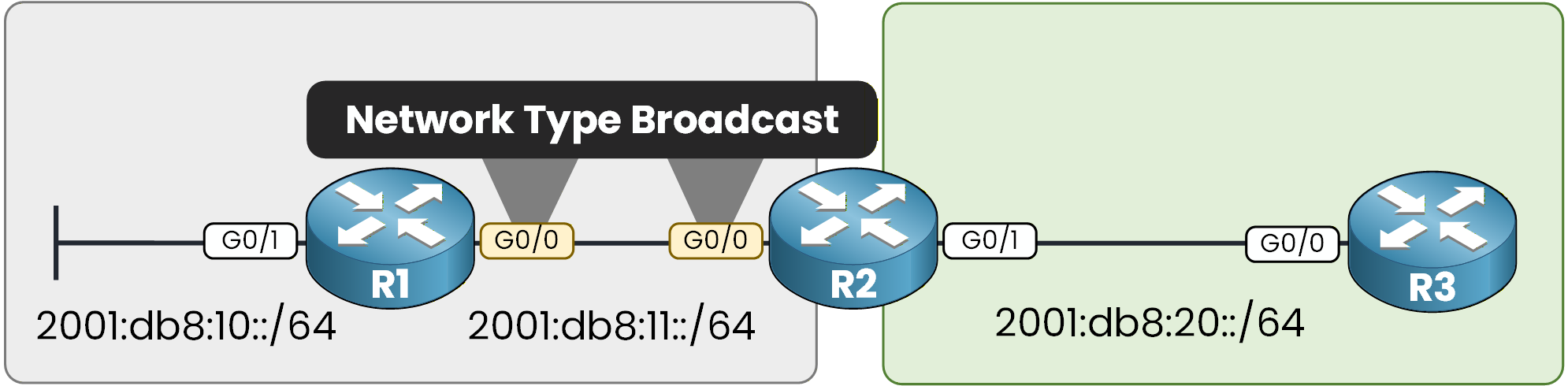
Figure 3 - OSPFv3 Network Type
In this lab, the link between R1 and R2 is using the default network type: Broadcast.
Verify the Current Network Type
You can verify the network type directly on the interface.
On R2:
R2# show ospfv3 int g0/0
GigabitEthernet0/0 is up, line protocol is up
  Link Local Address FE80::52F7:B4FF:FE00:1300, Interface ID 2
  Area 0, Process ID 1, Instance ID 0, Router ID 2.2.2.2
  Network Type BROADCAST, Cost: 1
  Transmit Delay is 1 sec, State BDR, Priority 1
  Designated Router (ID) 1.1.1.1, local address FE80::52CA:C4FF:FE00:1200
  Backup Designated router (ID) 2.2.2.2, local address FE80::52F7:B4FF:FE00:1300
  Timer intervals configured, Hello 10, Dead 40, Wait 40, Retransmit 5
    Hello due in 00:00:08
  Graceful restart helper support enabled
  Index 1/1/1, flood queue length 0
  Next 0x0(0)/0x0(0)/0x0(0)
  Last flood scan length is 1, maximum is 1
  Last flood scan time is 1 msec, maximum is 1 msec
  Neighbor Count is 1, Adjacent neighbor count is 1
    Adjacent with neighbor 1.1.1.1  (Designated Router)
  Suppress hello for 0 neighbor(s)
This tells you:
The interface is operating as a broadcast network
A DR and BDR election has occurred
R2 is the BDR on this segment
You can also verify this using:
R2# show ospfv3 interface brief
Interface    PID   Area            AF         Cost  State Nbrs F/C
Gi0/0        1     0               ipv6       1     BDR   1/1
Gi0/1        1     1               ipv6       1     DR    1/1
The BDR state confirms this is a broadcast network.
Change the Network Type to Point-to-Point
Now you will change the network type to point-to-point.
On R2:
R2# conf t
Enter configuration commands, one per line.  End with CNTL/Z.
R2(config)# int g0/0
R2(config-if)# ospfv3 network point-to-point
%OSPFv3-5-ADJCHG: Process 1, IPv6, Nbr 1.1.1.1 on GigabitEthernet0/0 from FULL to DOWN, Neighbor Down: Interface down or detached
Immediately, the adjacency drops!
This happens because both sides must use the same network type.Now configure the same setting on R1:
R1# conf t
Enter configuration commands, one per line.  End with CNTL/Z.
R1(config)# int g0/0
R1(config-if)# ospfv3 network point-to-point
%OSPFv3-5-ADJCHG: Process 1, IPv6, Nbr 2.2.2.2 on GigabitEthernet0/0 from LOADING to FULL, Loading Done
You will see the adjacency return to FULL!
Verify the New Network Type
On R2:
R2# show ospfv3 int g0/0
GigabitEthernet0/0 is up, line protocol is up
  Link Local Address FE80::52F7:B4FF:FE00:1300, Interface ID 2
  Area 0, Process ID 1, Instance ID 0, Router ID 2.2.2.2
  Network Type POINT_TO_POINT, Cost: 1
  Transmit Delay is 1 sec, State POINT_TO_POINT
  Timer intervals configured, Hello 10, Dead 40, Wait 40, Retransmit 5
    Hello due in 00:00:02
  Graceful restart helper support enabled
  Index 1/1/1, flood queue length 0
  Next 0x0(0)/0x0(0)/0x0(0)
  Last flood scan length is 1, maximum is 2
  Last flood scan time is 0 msec, maximum is 1 msec
  Neighbor Count is 1, Adjacent neighbor count is 1
    Adjacent with neighbor 1.1.1.1
  Suppress hello for 0 neighbor(s)
Here you can clearly see:
The Network Type is POINT_TO_POINT
The State is POINT_TO_POINT
There is no DR/BDR election anymore
On point-to-point links, OSPF does not elect a DR or BDR. The adjacency forms directly between the two routers.
You can also verify this using the brief command:R2# show ospfv3 int brief Interface PID Area AF Cost State Nbrs F/C Gi0/0 1 0 ipv6 1 P2P 1/1 Gi0/1 1 1 ipv6 1 DR 1/1The P2P state confirms that the interface is operating as a point-to-point network.
You should always verify:
The network type
The interface state
These two elements confirm that your OSPF network type configuration is correct.
Answer the question below
After changing the network type to point-to-point, what state replaces DR/BDR on the interface?