In plaintext authentication, routers pass the password directly inside Hello packets.
Anyone opening Wireshark on that link sees the cleartext password immediately.How MD5 Protects the Password
MD5 fixes this vulnerability by keeping the secret key strictly on the router.
Instead of sending the password over the wire, routers process it through MD5 and transmit a cryptographic hash instead.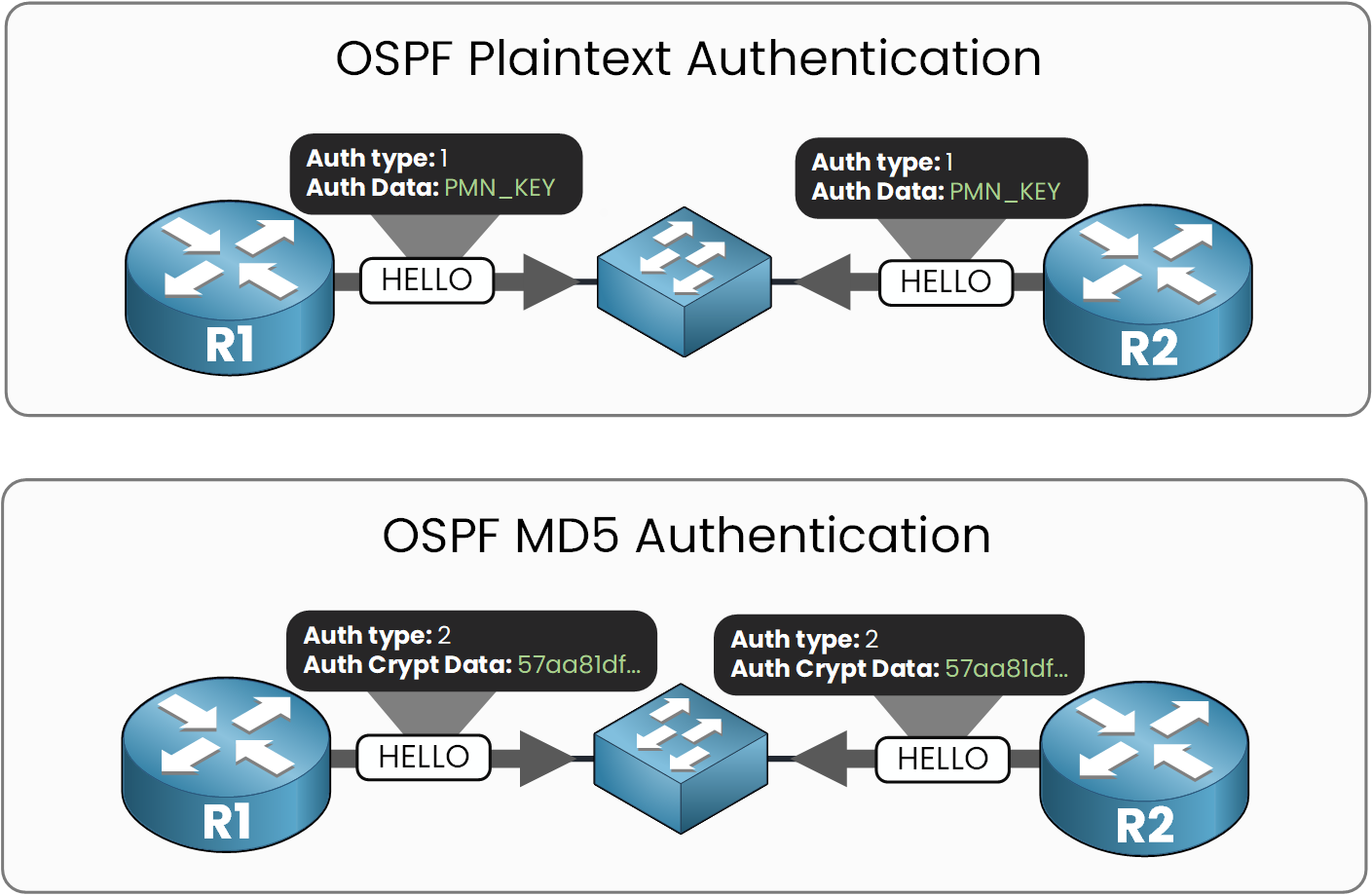
Figure 1 - Plaintext shows the key, MD5 shows a hash
Compare the two captures: plaintext gives away the exact string you typed, while MD5 shows a 32-character hexadecimal hash and nothing else.
How MD5 Authentication Works
R1 combines its secret key (
PMN_KEY) with the OSPF Hello packet payload.It hashes the combination using the MD5 algorithm.
R1 attaches the resulting hash inside the OSPF packet header.
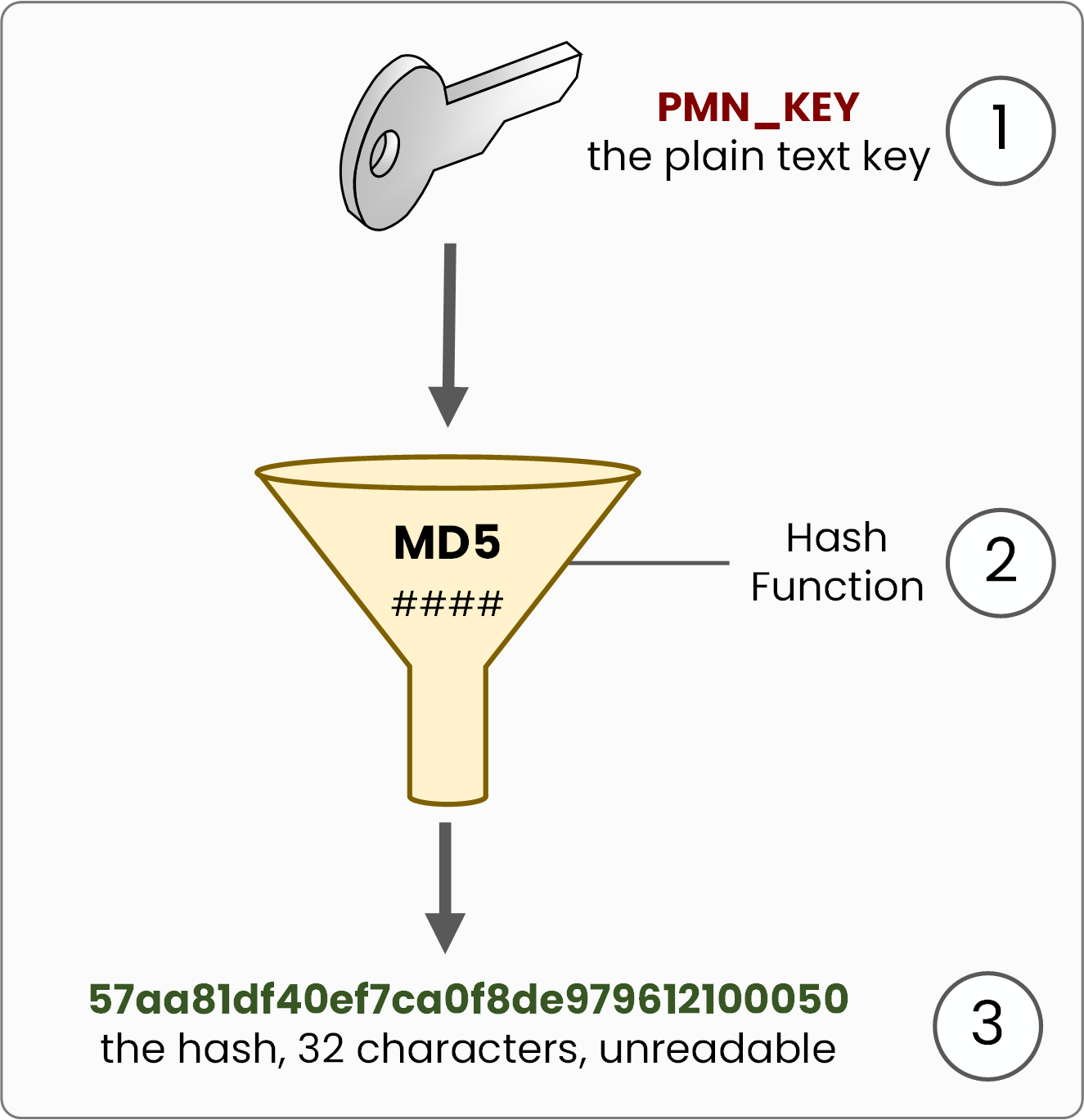
Figure 2 - The key goes in, the hash comes out
Simplified view: MD5 hashes the key together with the Hello packet, not the key alone, so the digest is different in every packet.
When R2 receives the packet, it runs the exact same calculation using its locally stored key:
Match? The packet is accepted.
Mismatch? The packet is dropped immediately.
Even if an attacker captures the frame, an MD5 hash is a one-way function and cannot be reversed to reveal the original key.
Answer the question below
What travels in an MD5-authenticated packet instead of the key?
Enabling MD5 alters how authentication data is carried within the OSPF frame:
Auth Type: Set to
Type 2(Cryptographic).Auth Crypt Data: The 32-character MD5 hash is appended to the end of the OSPF packet.
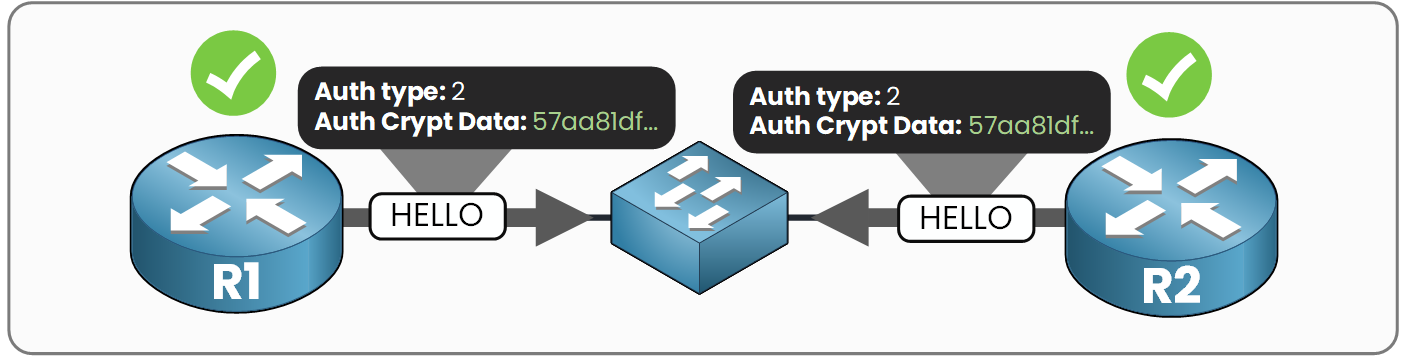
Figure 3 - Both sides match, the adjacency forms
Under the hood, MD5 introduces two extra fields inside the authentication header:
Key ID: Identifies which key is being used. Any value from 1 to 255 works, but it must match on both sides.
Cryptographic Sequence Number: A counter that increments with every packet to prevent replay attacks.
When both routers use matching Auth Types, secret keys, and Key IDs, the hashes match and the adjacency forms smoothly.
Answer the question below
Besides the type and the key, which value must also match on both routers?
What the Attacker Sees
If an attacker tries to inject Hellos with
Auth Type 0, both R1 and R2 drop those packets immediately due to the type mismatch.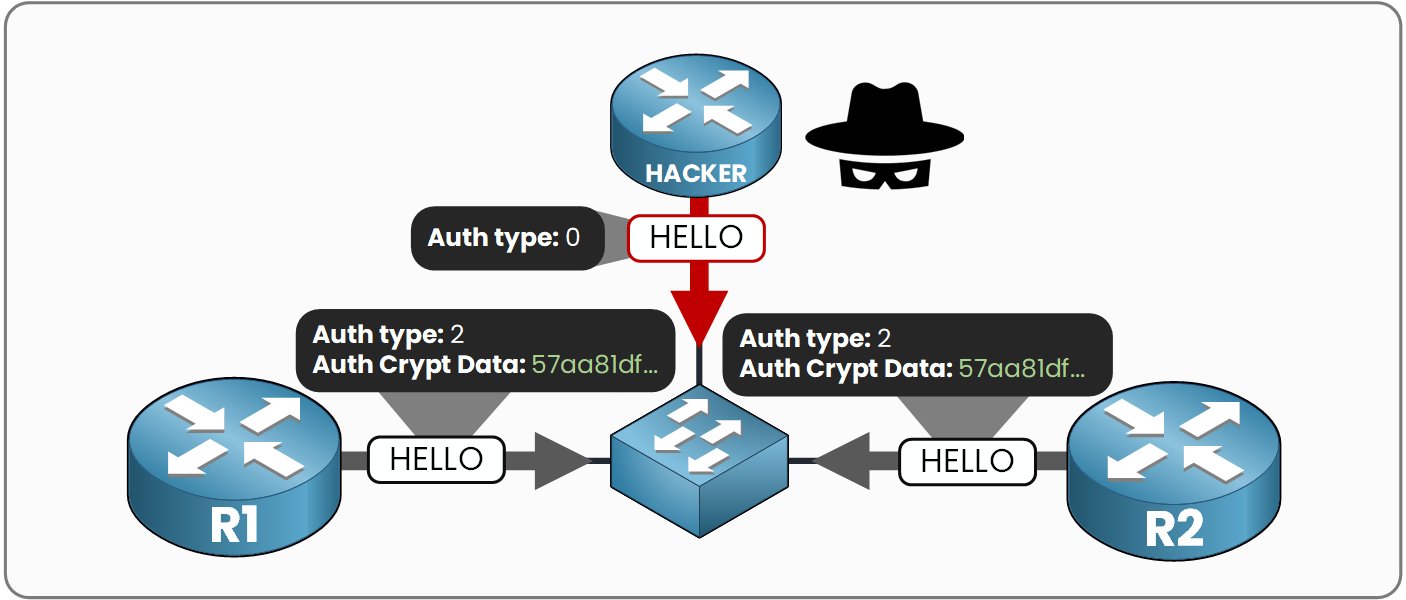
Figure 4 - The rogue Hello is still ignored
Opening Wireshark on an MD5-secured link still displays the raw OSPF packets, but the plaintext key is completely gone, replaced by the
Auth Crypt Datahash.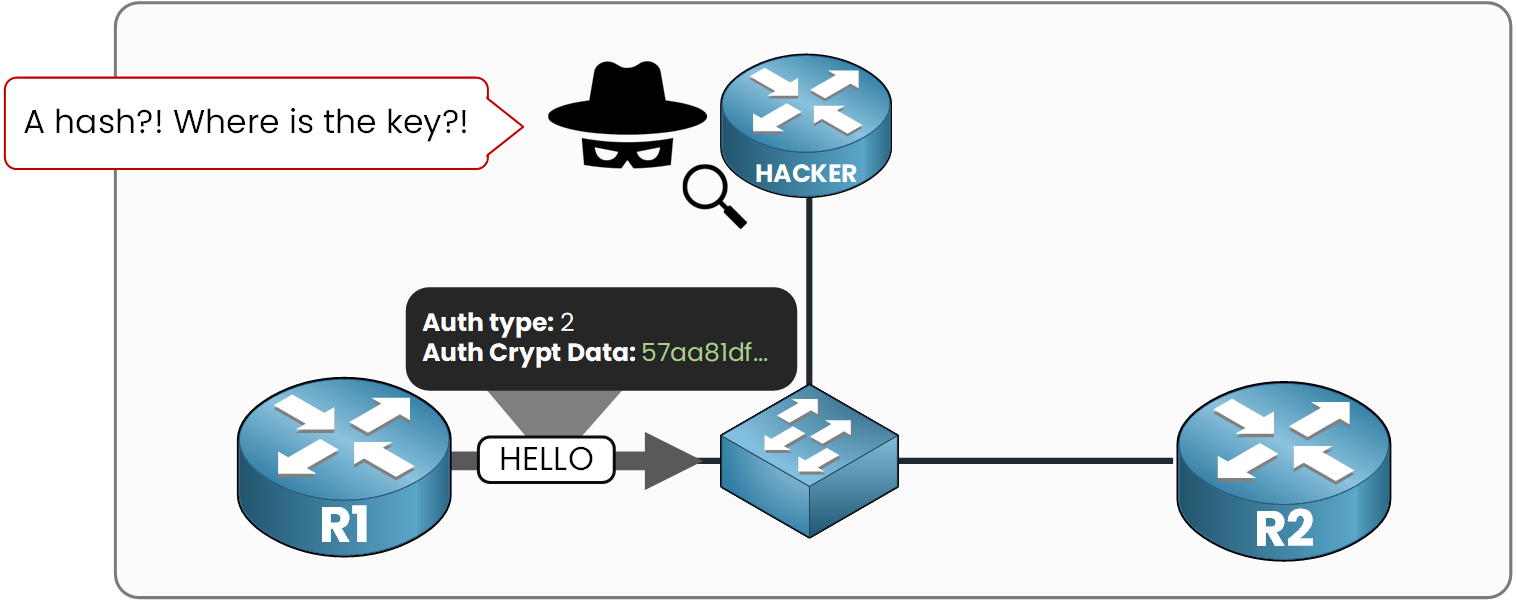
Figure 5 - The attacker captures a hash, not a key
Because MD5 is a one-way function, an attacker cannot reverse this string back to the original password. They can still try to guess it offline, which is why the key you choose matters, but the key itself never appears on the wire.
Key Takeaway: For an OSPF MD5 adjacency to form, three parameters must match on both routers:
Auth Type (
Type 2)Key ID
Key / Password
Answer the question below
Which field carries the hash the attacker captures?
Just like plaintext, you can enable MD5 per interface or across an entire area.
Let's start with the interface approach using the same topology: R1 and R2 in Area 0 over the10.0.12.0/30link.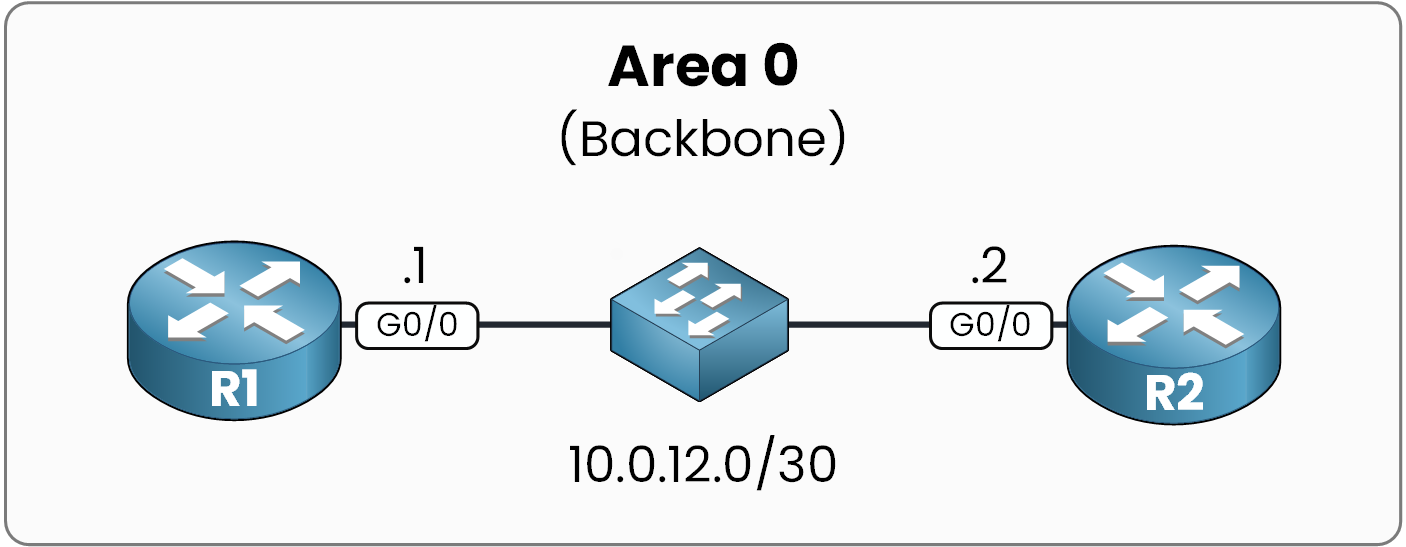
Figure 6 - Lab topology
Applying the Interface Commands
Configuring MD5 requires two interface commands: one to enable MD5 authentication, and one to set the Key ID and secret key.
Start on R1:
R1# configure terminal
R1(config)# interface g0/0
R1(config-if)# ip ospf authentication message-digest
R1(config-if)# ip ospf message-digest-key 1 md5 PMN_KEY
R1(config-if)# end
The
message-digestkeyword enables MD5. Unlike plaintext, the key command requires a Key ID (in this case,1).As soon as you apply this on R1, it stops accepting unauthenticated Hellos from R2. The Dead timer expires 40 seconds later, and the adjacency drops:
%OSPF-5-ADJCHG: Process 1, Nbr 2.2.2.2 on GigabitEthernet0/0 from FULL to DOWN, Neighbor Down: Dead timer expiredNow bring R2 up using the exact same Key ID and password:
R2# configure terminal R2(config)# interface g0/0 R2(config-if)# ip ospf authentication message-digest R2(config-if)# ip ospf message-digest-key 1 md5 PMN_KEY %OSPF-5-ADJCHG: Process 1, Nbr 1.1.1.1 on GigabitEthernet0/0 from LOADING to FULL, Loading Done R2(config-if)# endWarning: MD5 keys are capped at 16 characters. Cisco IOS silently truncates keys longer than 16 characters without throwing an error message.
Answer the question below
How many characters maximum in an MD5 key?
Verifying the MD5 Setup
Let's verify the configuration using three different commands before breaking it intentionally.
Check the OSPF Interface Status
R1# show ip ospf interface g0/0

GigabitEthernet0/0 is up, line protocol is up
  Internet Address 10.0.12.1/30, Area 0
  Process ID 1, Router ID 1.1.1.1, Network Type BROADCAST, Cost: 1
  Transmit Delay is 1 sec, State BDR, Priority 1
  Designated Router (ID) 2.2.2.2, Interface address 10.0.12.2
  Backup Designated router (ID) 1.1.1.1, Interface address 10.0.12.1
  Timer intervals configured, Hello 10, Dead 40, Wait 40, Retransmit 5
    oob-resync timeout 40
    Hello due in 00:00:05
  Supports Link-local Signaling (LLS)
  Index 1/1, flood queue length 0
  Next 0x0(0)/0x0(0)
  Last flood scan length is 1, maximum is 1
  Last flood scan time is 0 msec, maximum is 0 msec
  Neighbor Count is 1, Adjacent neighbor count is 1
    Adjacent with neighbor 2.2.2.2  (Designated Router)
  Suppress hello for 0 neighbor(s)
  Message digest authentication enabled
    Youngest key id is 1
The bottom two lines confirm that MD5 is active using Key ID 1.
Inspect OSPF Packets in Real Time
R1# debug ip ospf packet
OSPF packet debugging is on

OSPF: rcv. v:2 t:1 l:48 rid:2.2.2.2
      aid:0.0.0.0 chk:0 aut:2 keyid:1 seq:0x3C7EC653 from GigabitEthernet0/0

R1# undebug all
All possible debugging has been turned off
Notice
aut:2(MD5 authentication), followed bykeyid:1and the sequence number fields extracted directly from the packet header.Confirm the Configured Key
The key itself is never displayed in
showcommands or debugs.
Check your running configuration to view the raw key string:R1# show running-config interface g0/0 Building configuration... Current configuration : 187 bytes ! interface GigabitEthernet0/0 ip address 10.0.12.1 255.255.255.252 ip ospf authentication message-digest ip ospf message-digest-key 1 md5 PMN_KEY endAnswer the question below
Which command displays the MD5 key configured on an interface?
Troubleshooting a Key Mismatch
Recognizing authentication errors in logs is a critical production skill.
Break the key on R2 to see what happens:R2# configure terminal R2(config)# interface g0/0 R2(config-if)# no ip ospf message-digest-key 1 md5 PMN_KEY R2(config-if)# ip ospf message-digest-key 1 md5 WRONG_KEY R2(config-if)# endEnable adjacency debugging on R1 and reset the process:
R1# debug ip ospf adj
OSPF adjacency events debugging is on
R1# clear ip ospf process
Reset ALL OSPF processes? [no]: yes

OSPF: Rcv pkt from 10.0.12.2, GigabitEthernet0/0 : Mismatch Authentication Key - Message Digest Key 1
OSPF: Rcv pkt from 10.0.12.2, GigabitEthernet0/0 : Mismatch Authentication Key - Message Digest Key 1

R1# undebug all
All possible debugging has been turned off
This error message indicates that both routers agree on Key ID 1, but the computed hashes do not match because the secret key string differs. This is the exact line you will look for when troubleshooting OSPF authentication issues in production.
Now put the correct key back on R2 to restore the adjacency:
R2# configure terminal
R2(config)# interface g0/0
R2(config-if)# no ip ospf message-digest-key 1 md5 WRONG_KEY
R2(config-if)# ip ospf message-digest-key 1 md5 PMN_KEY
%OSPF-5-ADJCHG: Process 1, Nbr 1.1.1.1 on GigabitEthernet0/0 from LOADING to FULL, Loading Done
R2(config-if)# end
Both routers share the same key and the same Key ID again, restoring the adjacency to
FULL.Answer the question below
Which debug command reveals the authentication mismatch message?
Verifying with Wireshark
With the adjacency up and MD5 running on both sides, capture a Hello on the link.
Open the OSPF packet in Wireshark: instead of the cleartext password, you will see a 32-character hexadecimal hash. The key stays on the router and never hits the wire.
It is not out of reach though: holding the packet and its digest, an attacker can test millions of candidate keys per second offline until one produces the same digest, so a short or guessable key still falls. That is the gap HMAC-SHA closes, right after the lab.
Answer the question below
Enter the Flag
Enabling MD5 on every interface gets tedious when a router has five or ten interfaces in Area 0.
You can enable MD5 area-wide under the OSPF process instead:R1# configure terminal R1(config)# router ospf 1 R1(config-router)# area 0 authentication message-digest R1(config-router)# exitJust like with plaintext, this command only sets the Authentication Type.
The actual secret key must still be defined on the individual interfaces (or via an interface range):R1(config)# interface range g0/0 - 4 R1(config-if-range)# ip ospf message-digest-key 1 md5 PMN_KEY R1(config-if-range)# endYou can confirm the area-wide setting using
show ip ospf:R1# show ip ospf Routing Process "ospf 1" with ID 1.1.1.1 Start time: 00:00:02.892, Time elapsed: 01:12:47.031 Supports only single TOS(TOS0) routes Supports opaque LSA Supports Link-local Signaling (LLS) Supports area transit capability Supports NSSA (compatible with RFC 3101) Maximum number of non self-generated LSA allowed 50000 Current number of non self-generated LSA 2 Threshold for warning message 75% Initial SPF schedule delay 50 msecs Minimum hold time between two consecutive SPFs 200 msecs Maximum wait time between two consecutive SPFs 5000 msecs Reference bandwidth unit is 100 mbps Area BACKBONE(0) Number of interfaces in this area is 1 Area has message digest authentication SPF algorithm last executed 00:01:13.031 ago SPF algorithm executed 14 times Area ranges are Number of LSA 3. Checksum Sum 0x02794C Flood list length 0Precedence Rule
The hierarchy remains unchanged:
Interface Config > Area Config > Type 0 (Default)
An explicit interface-level setting always overrides an area-wide configuration.
What's Next?
MD5 protects your passwords from simple packet captures, but the algorithm itself is legacy and cryptographically vulnerable to collision attacks. In modern enterprise networks, the industry standard has shifted to HMAC-SHA authentication, which is exactly what we will cover right after the lab!
Answer the question below
MD5 is broken. Which authentication method replaces it?