The previous lesson ended on a question: who chose labels 58, 31, and 67, and how did the routers agree on them?
The answer is a dedicated protocol: the Label Distribution Protocol (LDP).Automatic Label Selection
LDP starts with a simple rule, shown below:
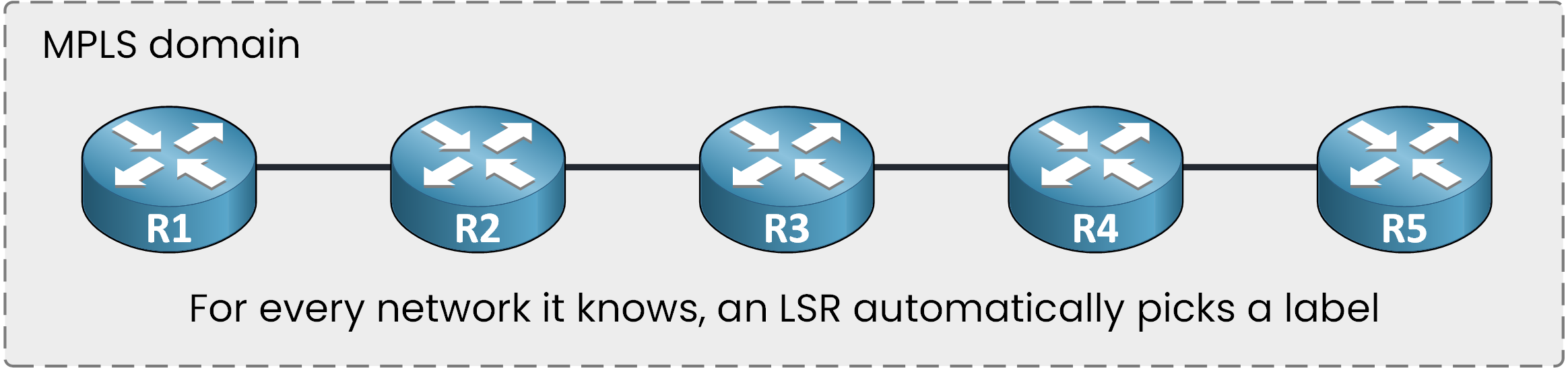
Figure 1 – Automatic local label selection by LSRs
For every network in its routing table, an LSR automatically picks a label.
This happens only on routers running MPLS.Answer the question below
Where does an LSR find the networks it assigns labels to?
Label Assignment per Router
Follow one network: 192.168.2.0/24, connected to R5.
All five routers have it in their routing table. The first four pick a label for it, and R5 answers differently: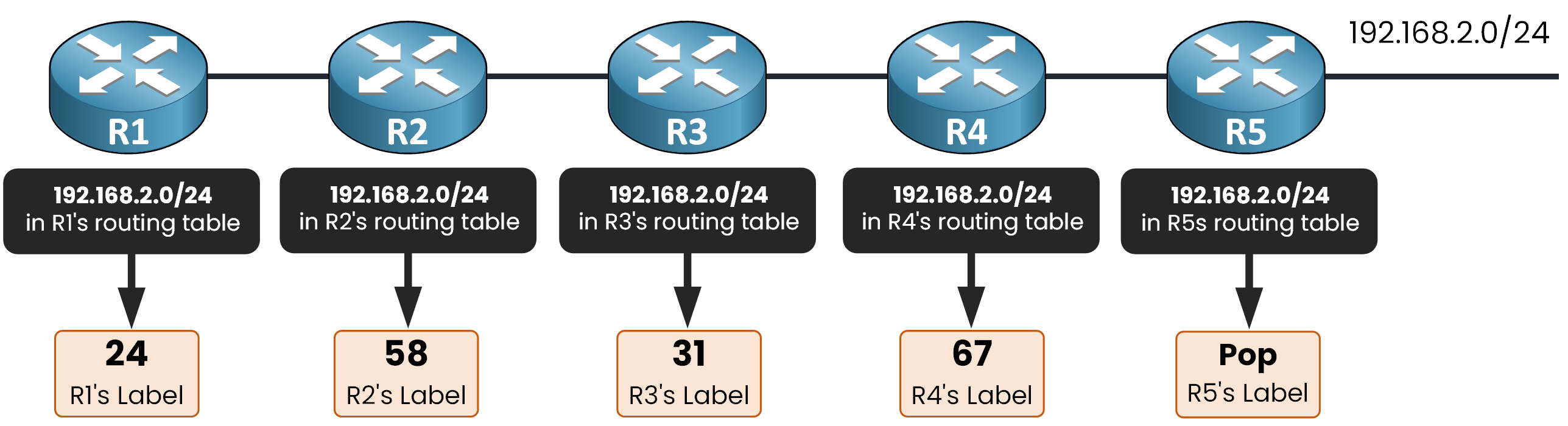
Figure 2 – Local label assignment per router
R1 picked 24,
R2 picked 58,
R3 picked 31,
R4 picked 67,
R5 did not pick a number: it advertises Pop
This pairing of a network and a label is a label binding.
The choice is completely local: each router picks its labels independently.Check it on R1:
R1# show mpls ldp bindings 192.168.2.0 255.255.255.0
  lib entry: 192.168.2.0/24, rev 12
        local binding:  label: 24
        remote binding: lsr: 2.2.2.2:0, label: 58
The output starts with lib entry. Bindings are stored in the LIB (Label Information Base): the label this router picked, and the labels its neighbors sent it.
The local binding line is R1's own choice: label 24, the same value as in the figure.
The second line holds a label R1 did not pick. Where it comes from is the rest of this lesson.Answer the question below
Which router picked label 31 for 192.168.2.0/24?
Answer the question below
192.168.1.0/24 is directly connected to R1. Which value does R1 advertise for it?
Every router picked its labels.
The next step is to share them with the MPLS neighbors.Labels Remain Local
Each label is known only by the router that chose it.
R2 has no idea that R3 picked 31, and R3 has no idea that R4 picked 67.
Figure 3 – Isolated local labels prior to exchange
Before any packet can flow, the routers must exchange these values.
Answer the question below
Before any exchange, how many routers know R3's label?
The LDP Session
Two neighbors first discover each other with LDP Hello messages, sent as multicast on their MPLS-enabled interfaces.
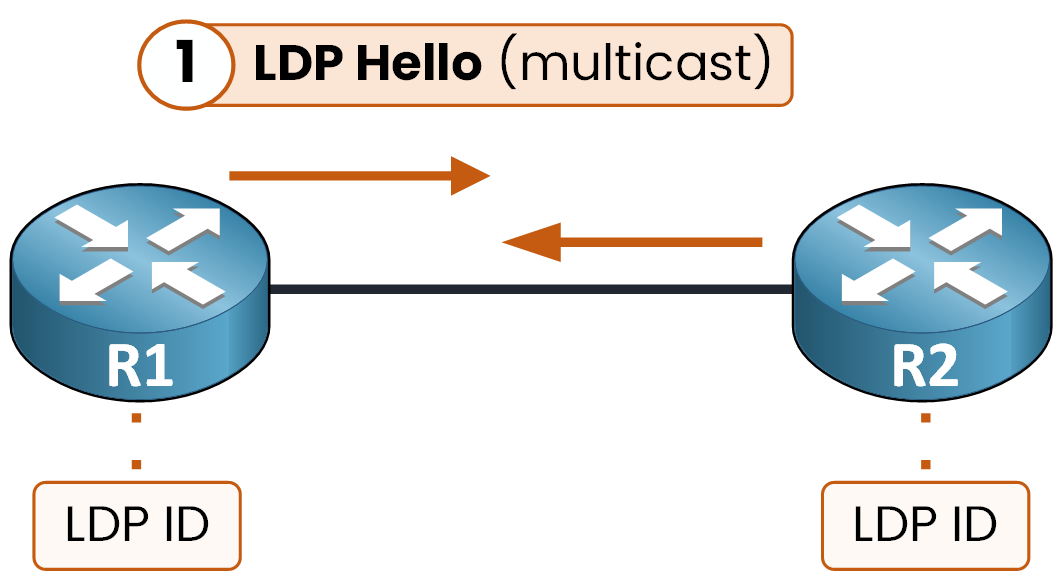
Figure 4 – LDP Hello neighbor discovery (multicast)
Each Hello also carries the router's LDP ID, the identity it presents to its neighbors.
Once discovered, the two neighbors open a TCP session on port 646, as you can see below.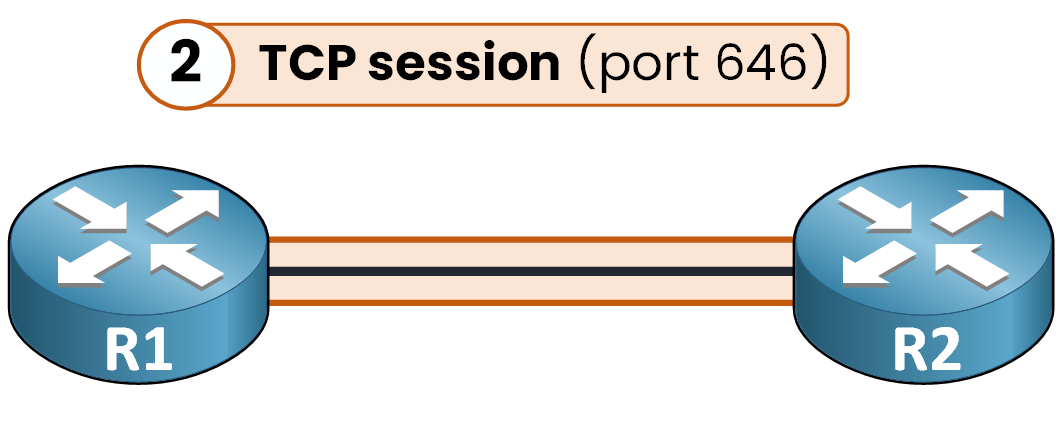
Figure 5 – LDP TCP session on port 646
The LDP ID also announces the router's label space: one label table for the whole router, or one per interface.
Verify the session on R1:
R1# show mpls ldp neighbor
    Peer LDP Ident: 2.2.2.2:0; Local LDP Ident 1.1.1.1:0
        TCP connection: 2.2.2.2.646 - 1.1.1.1.28914
        State: Oper; Msgs sent/rcvd: 34/34; Downstream
        Up time: 00:12:47
        LDP discovery sources:
          GigabitEthernet0/1, Src IP addr: 10.0.12.2
        Addresses bound to peer LDP Ident:
          10.0.12.2       2.2.2.2
Read the TCP connection line: R2 answers on port 646, R1 uses a random high port. The State is Oper, so the session is up.
Every label announcement travels inside the TCP session: no session, no label exchange.
Answer the question below
LDP neighbors discover each other with which message?
Answer the question below
Label announcements travel inside a session on which TCP port?
Label Binding Advertisement
Once the session is up, each LSR shares its bindings.
Each LSR advertises its bindings out all MPLS-enabled interfaces.

Figure 6 – LDP label binding advertisement
Look at R3: it announces the same message, 31 = 192.168.2.0/24, to both R2 and R4.
You can see the result from R2's side:
R2# show mpls ldp bindings 192.168.2.0 255.255.255.0
  lib entry: 192.168.2.0/24, rev 14
        local binding:  label: 58
        remote binding: lsr: 3.3.3.3:0, label: 31
        remote binding: lsr: 1.1.1.1:0, label: 24
The lsr 3.3.3.3:0 line is R3's announcement, stored by R2: label 31 for 192.168.2.0/24.
R2 also holds label 24, sent by R1 the same way.Only R2 will actually use it: for R2, the next hop toward 192.168.2.0/24 is R3.
Answer the question below
An LSR advertises its bindings to all its LDP ___.
Every router now knows its own label and the labels of its neighbors.
With this information, each router builds the FIB and LFIB entries you used in the previous lesson.The Ingress FIB (R1)
Start with R1. Its routing table says the next hop for 192.168.2.0/24 is 10.0.12.2, one of the addresses bound to R2's LDP ID 2.2.2.2:0 in the
show mpls ldp neighboroutput. So the next hop is R2.
And R2 announced that its label for this network is 58.
R1 combines the two into its FIB entry below: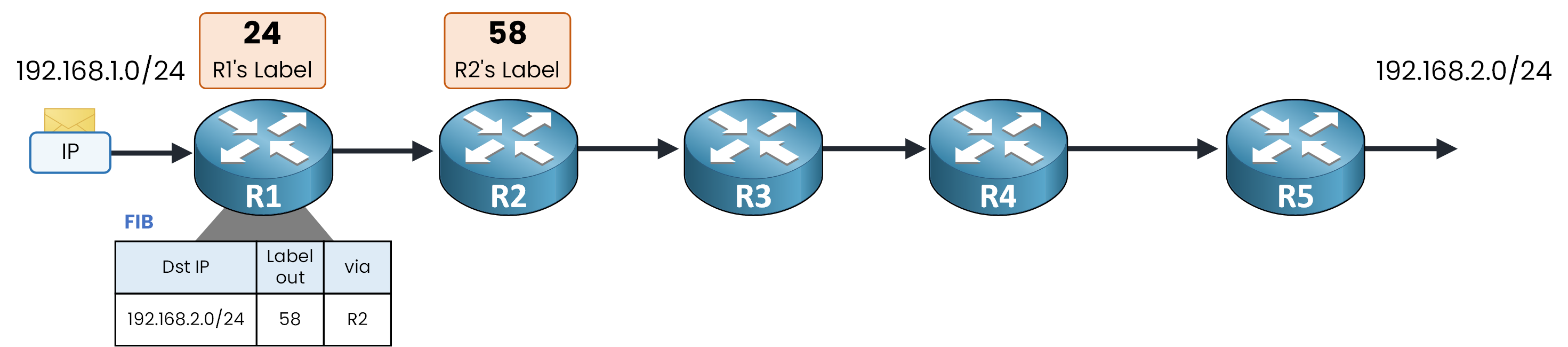
Figure 7 – Ingress FIB table entry on R1
Label out 58 comes from R2's announcement, and via R2 comes from the routing table.
What about R1's own label, 24? Nobody sits upstream of R1, so nothing ever arrives labeled with 24.It stays unused in this topology.
Answer the question below
In R1's FIB, which router announced the value 58?
Answer the question below
Which label stays unused because nobody sits upstream of R1?
The Transit LFIB Entries (R2, R3, R4)
R2 builds its entry with two labels, as you can see below.
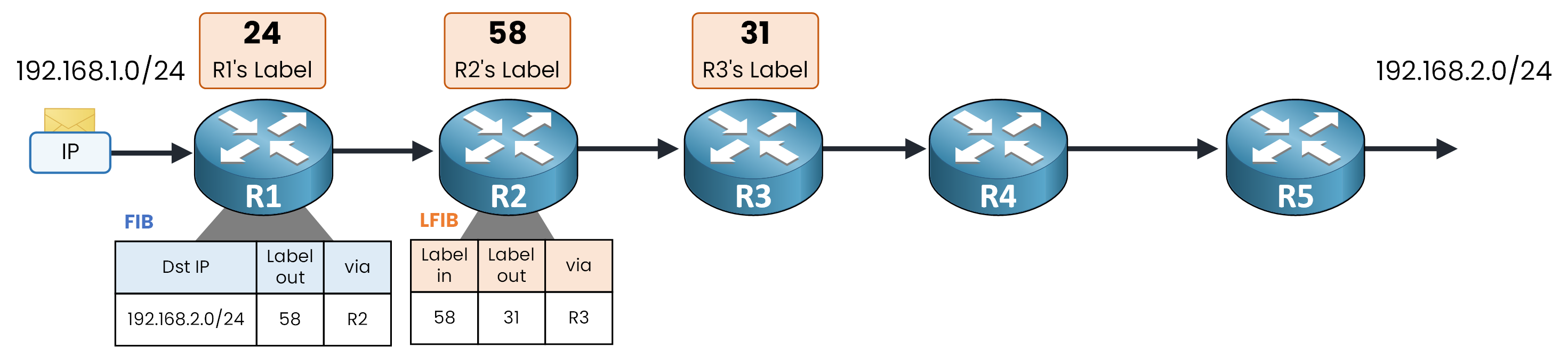
Figure 8 – Transit LFIB table entry on R2
Label in: 58, its own label
Label out: 31, the label announced by R3
Via: R3, the next hop
R3 repeats the pattern, as shown below.
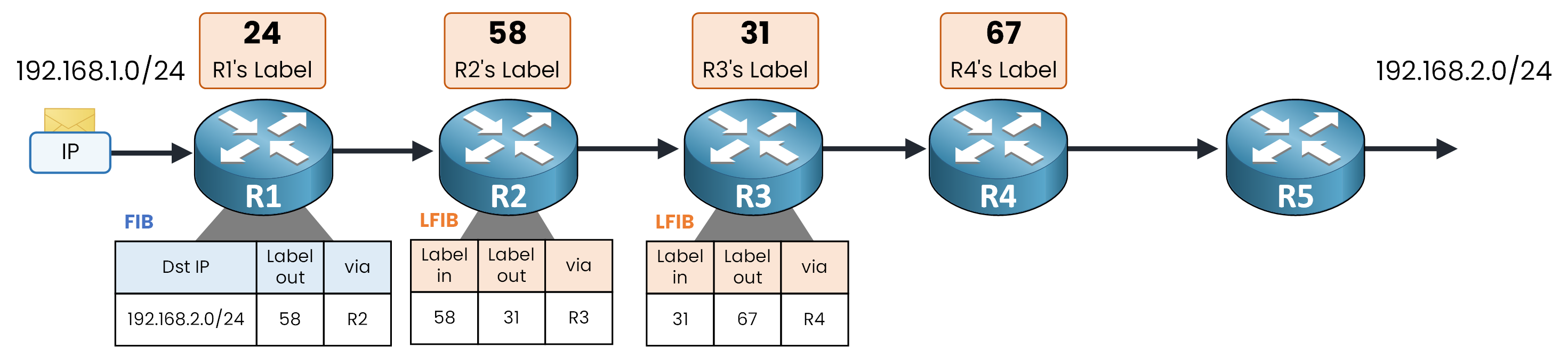
Figure 9 – Transit LFIB table entry on R3
Label in: 31, its own label
Label out: 67, the label announced by R4
Now look at R4: its entry ends differently.
Its Label out comes from R5, as you can see below.
Figure 10 – R5 advertises Pop to its upstream neighbor
R5 is directly connected to 192.168.2.0/24. It has no next hop, so it has no label to give.
R5 never announced a number for this network: it announced Pop, the implicit-null label from the previous lesson.By advertising Pop, R5 asks R4 to remove the label before forwarding.
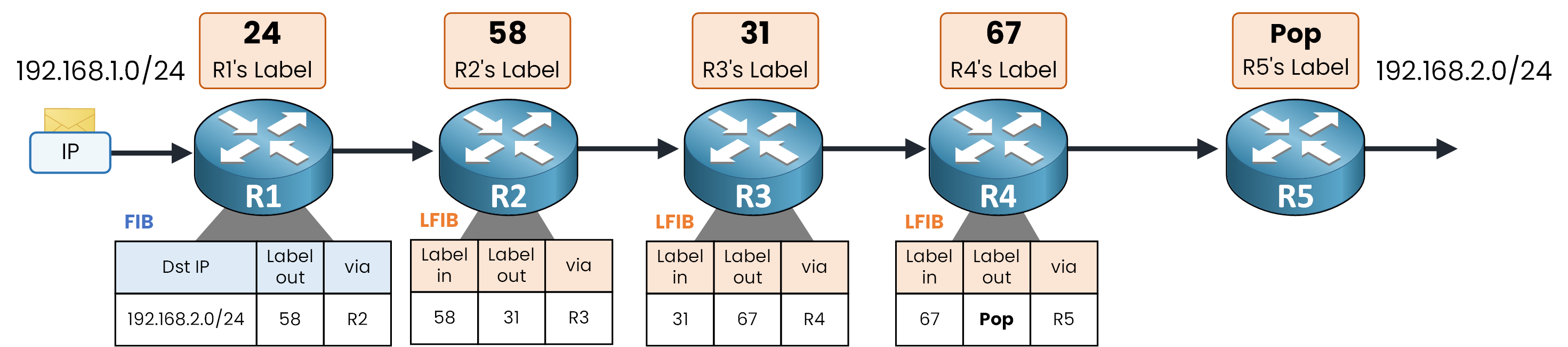
Figure 11 – Penultimate LFIB table entry on R4
Label in: 67, its own label
Label out: Pop, as requested by R5
Via: R5
The core is ready.
Answer the question below
In R2's LFIB, which value is Label in?
The Complete Data Plane
Add R5's own FIB, and every table from the previous lesson is in place:
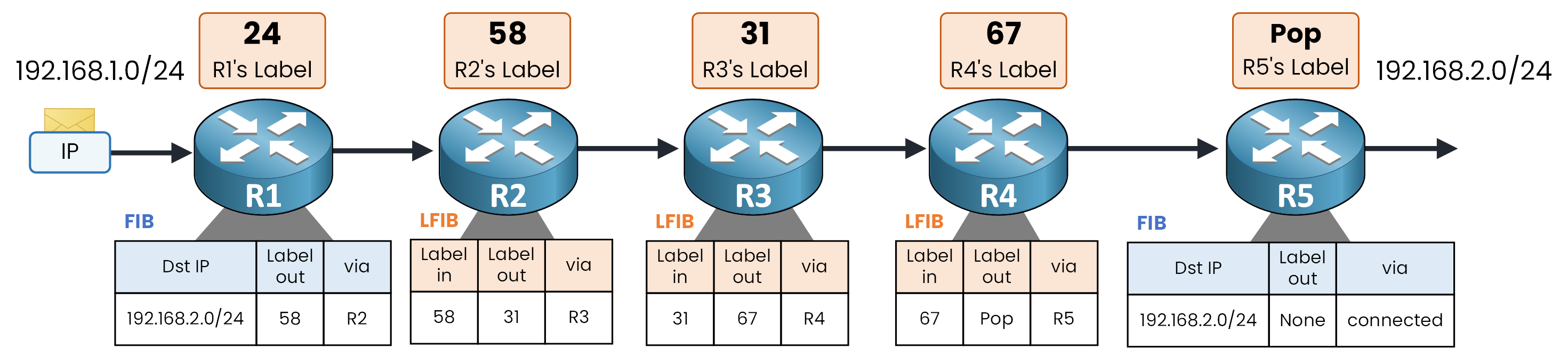
Figure 12 – Complete FIB and LFIB forwarding tables
Read the tables from left to right and notice where each value comes from:
R1's Label out, 58, was announced by R2
R2's Label out, 31, was announced by R3
R3's Label out, 67, was announced by R4
R4's Label out, Pop, was requested by R5
Follow one final packet below to confirm it.
R1# traceroute 192.168.2.10 source GigabitEthernet0/0
Type escape sequence to abort.
Tracing the route to 192.168.2.10

  1 10.0.12.2 [MPLS: Label 58 Exp 0] 24 msec 20 msec 20 msec
  2 10.0.23.3 [MPLS: Label 31 Exp 0] 20 msec 16 msec 16 msec
  3 10.0.34.4 [MPLS: Label 67 Exp 0] 16 msec 12 msec 12 msec
  4 10.0.45.5 12 msec 8 msec 8 msec
  5 192.168.2.10 8 msec 4 msec 4 msec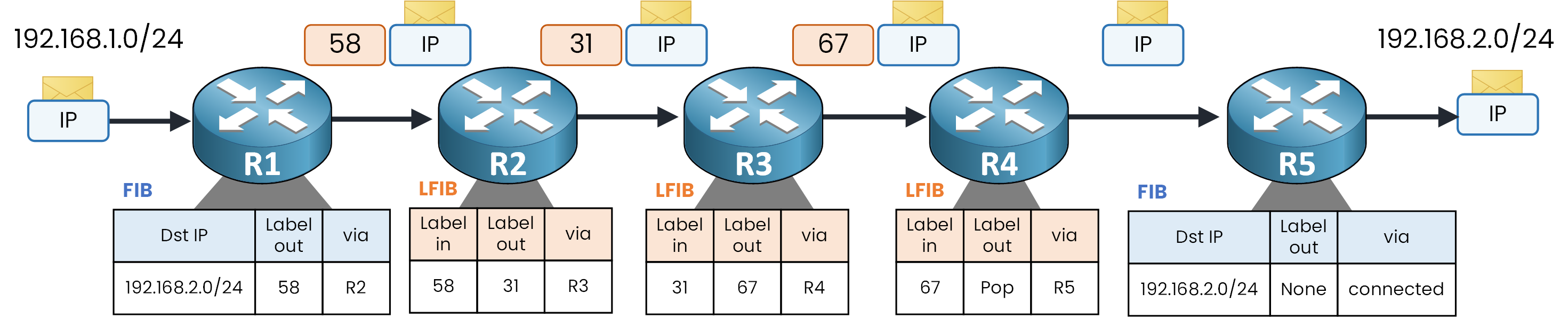
Figure 13 – End-to-end labeled packet forwarding
Push 58, swap to 31, swap to 67, pop, deliver: the exact trip from the previous lesson.
This time, you know where every value comes from.The label mechanics are now complete.
The next lesson uses them to build the service this module is about: the MPLS Layer 3 VPN.Answer the question below
R4's Label out for 192.168.2.0/24 is Pop. Which router asked for it?