IPv6 Source Guard does one thing: it checks that a packet's source address matches the port it arrived on.
To see why you need it, look at an attack.The Hacker Steals PC1's Identity
The Hacker builds an ordinary data packet: a simple ping toward the gateway R1.
Nothing special, except one detail.In the IPv6 source field, it puts PC1's global IPv6 address instead of its own.
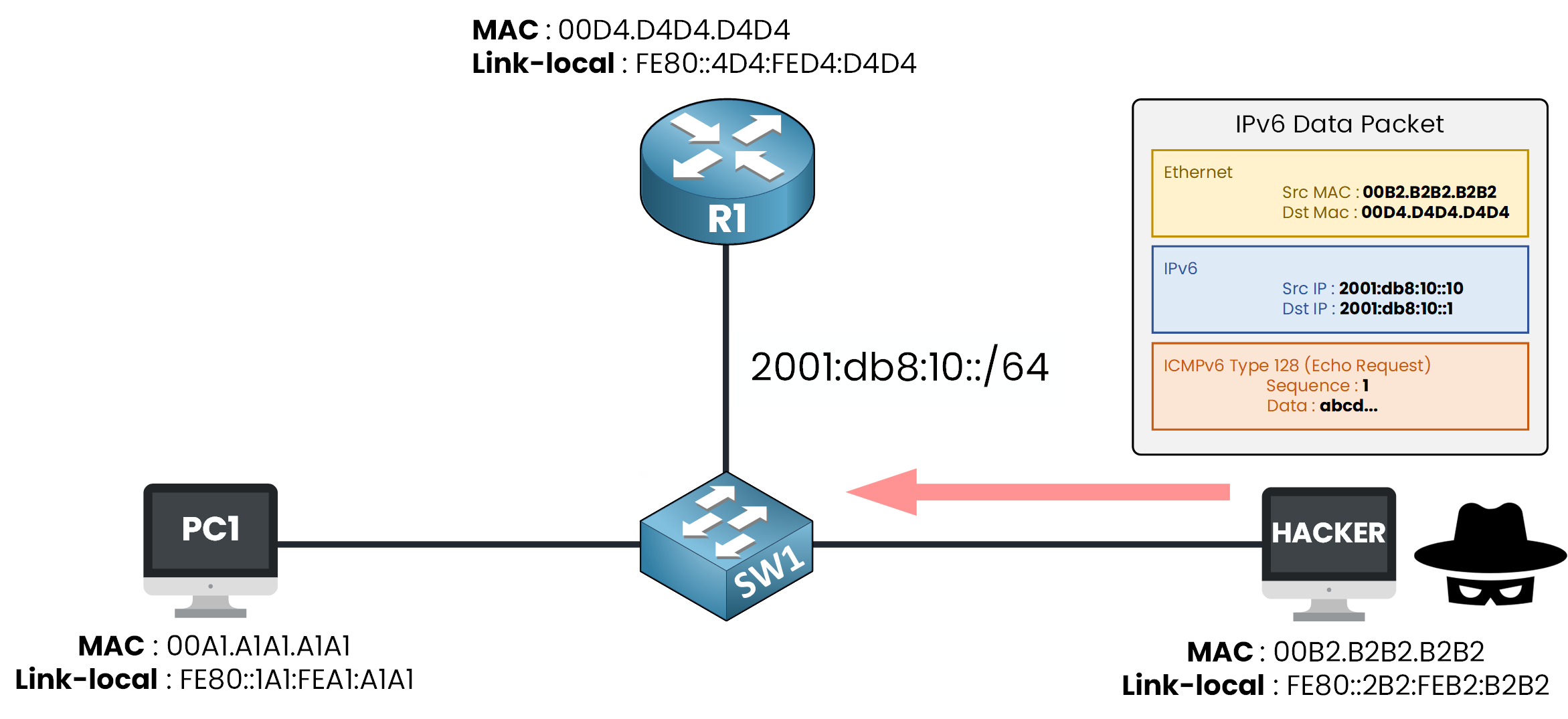
Figure 1 – The Hacker spoofs PC1's address in a plain data packet
The packet leaves, and when it reaches R1, it appears to have come from PC1.
The Hacker just impersonated another host.Everything else in the packet is honest. It even carries the Hacker's own MAC address.
Only the source IPv6 address is a lie, and that is all it takes.Answer the question below
Which address does the Hacker spoof this time: link-local or global?
IPv6 Source Guard
You have already built three IPv6 First Hop Security features.
Each one watches a single kind of control message:RA Guard → Router Advertisements
DHCPv6 Guard → DHCPv6 replies
ND inspection → Neighbor Solicitations and Advertisements
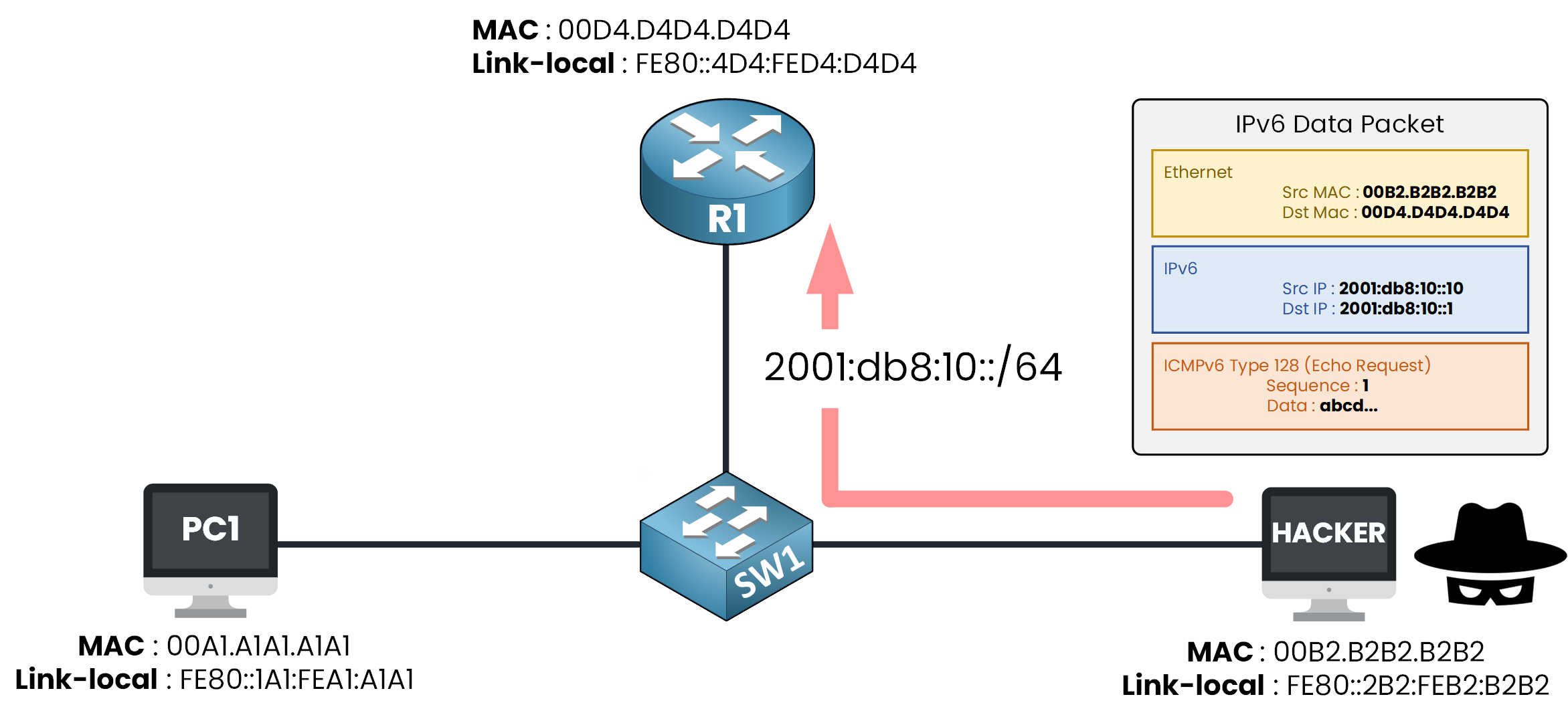
Figure 2 – SW1 forwards it: ND inspection never checks data packets
A ping is none of these, It is plain data traffic, so it slips straight through.
SW1 forwards the spoofed ping, and R1 accepts it as PC1.
The switch knows PC1's real address sits on another port, but nothing checks a data packet against that knowledge.
That is exactly the gap IPv6 Source Guard closes. Let's see how.Answer the question below
The other guards read ND messages. Why does the spoofed ping slip through?
Source Guard uses the binding table you already know from the last lesson.
Each entry records several fields: the IPv6 address, its MAC, the interface, the VLAN, and how it was learned. The part Source Guard cares about is the address tied to its interface, which tells the switch where each source is allowed to come from.Binding Table
On a guarded port, every packet gets one check: its source address must be bound to that same port in the table.
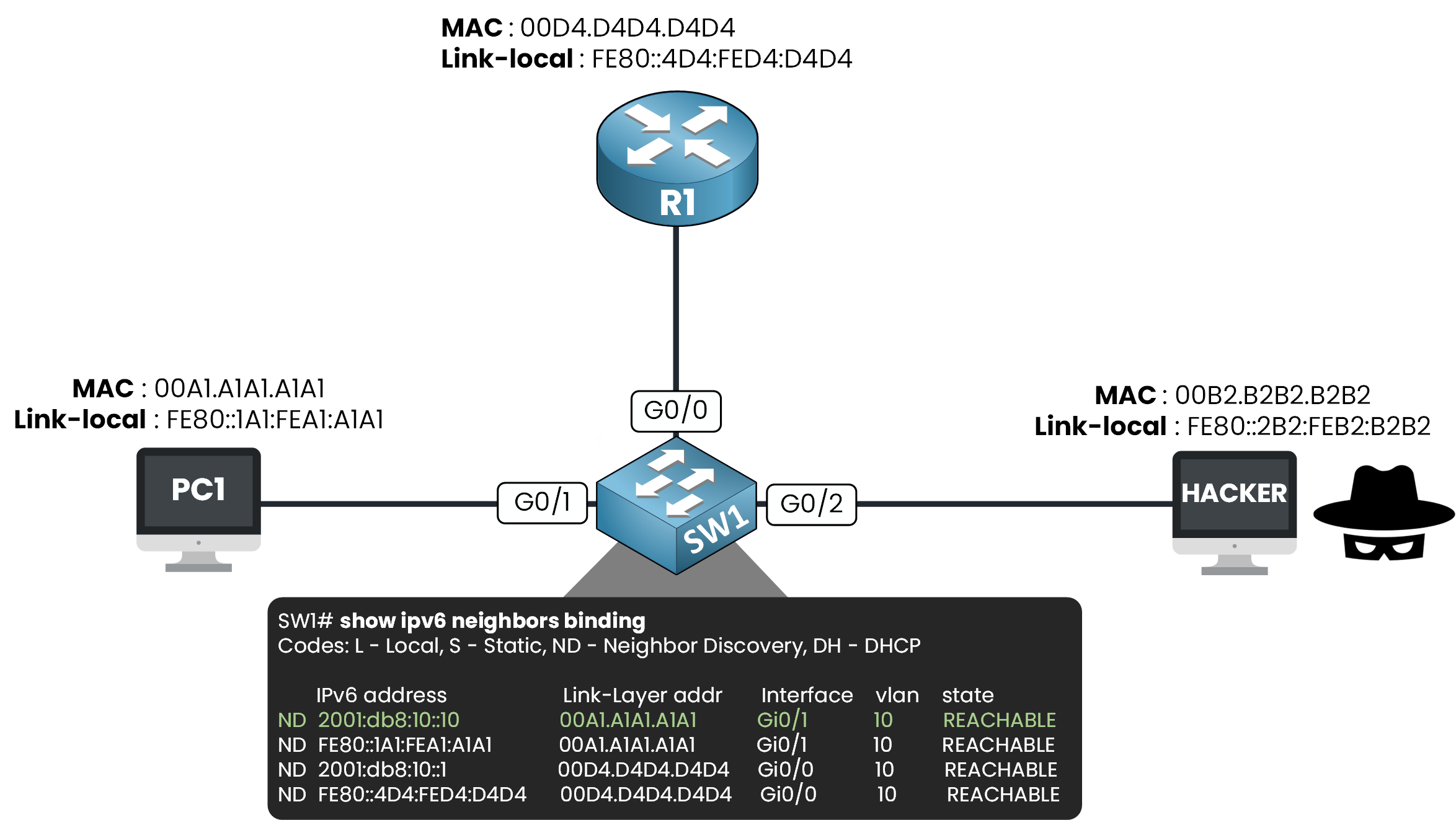
Figure 3 – Source Guard reads the same binding table: each source must match its port
Look at the green entry: 2001:db8:10::10 lives on Gi0/1.
A packet with that source arriving on Gi0/1 is what the table expects, so it is forwarded untouched.Answer the question below
Source Guard checks the source address against the table and against the ____ it arrived on.
The Hacker Tries Again
Now Source Guard is active, and the Hacker sends the same spoofed ping from Gi0/2.
Its source still claims 2001:db8:10::10, but the binding table binds that address to Gi0/1.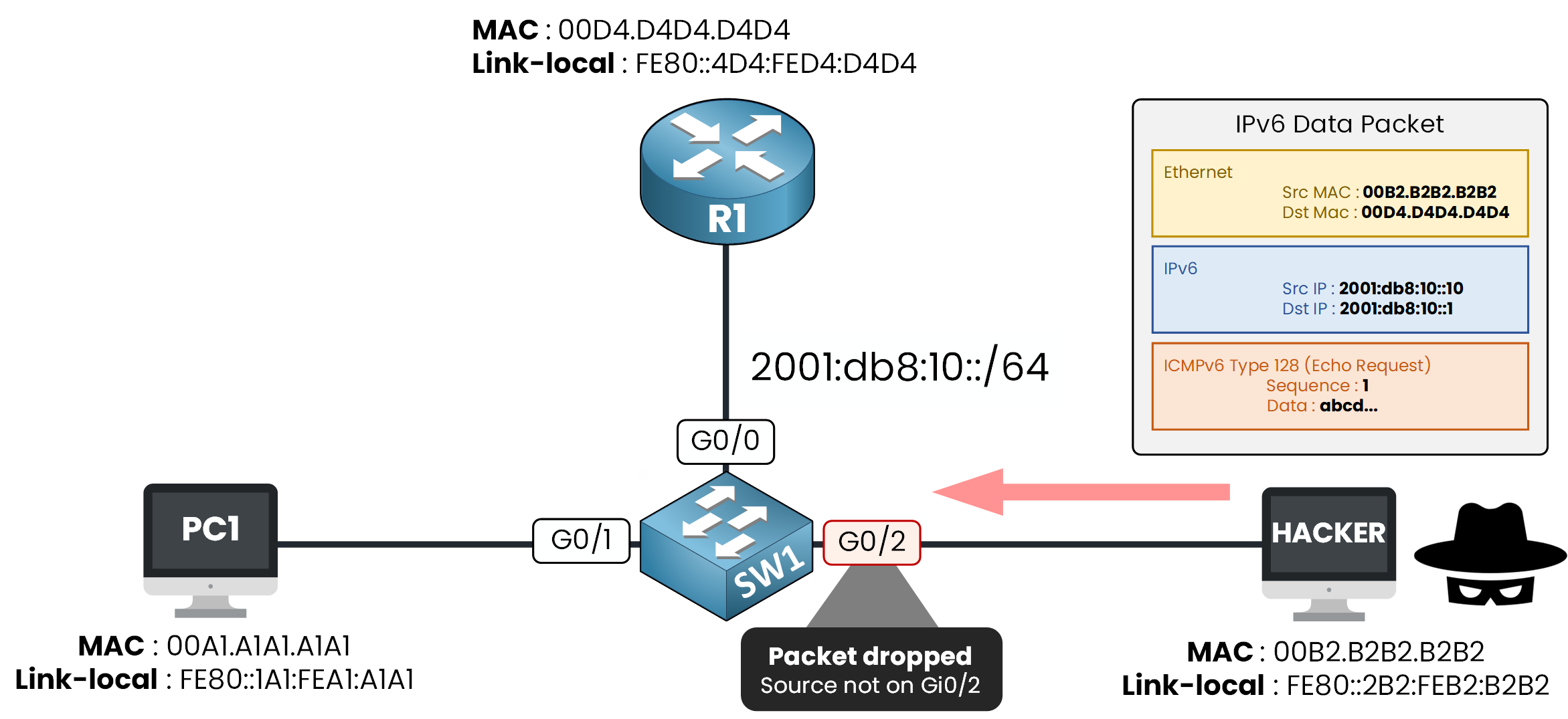
Figure 4 – The source is bound to Gi0/1, the packet arrives on Gi0/2: dropped at the port
Wrong port!
The switch knows this source belongs on Gi0/1, so the packet is dropped before it enters the switch.Answer the question below
What does the Hacker receive back when its spoofed packet is dropped?
The Empty Table Trap
One trap to know before you configure anything.
Source Guard trusts the binding table completely, so what happens if the table is empty?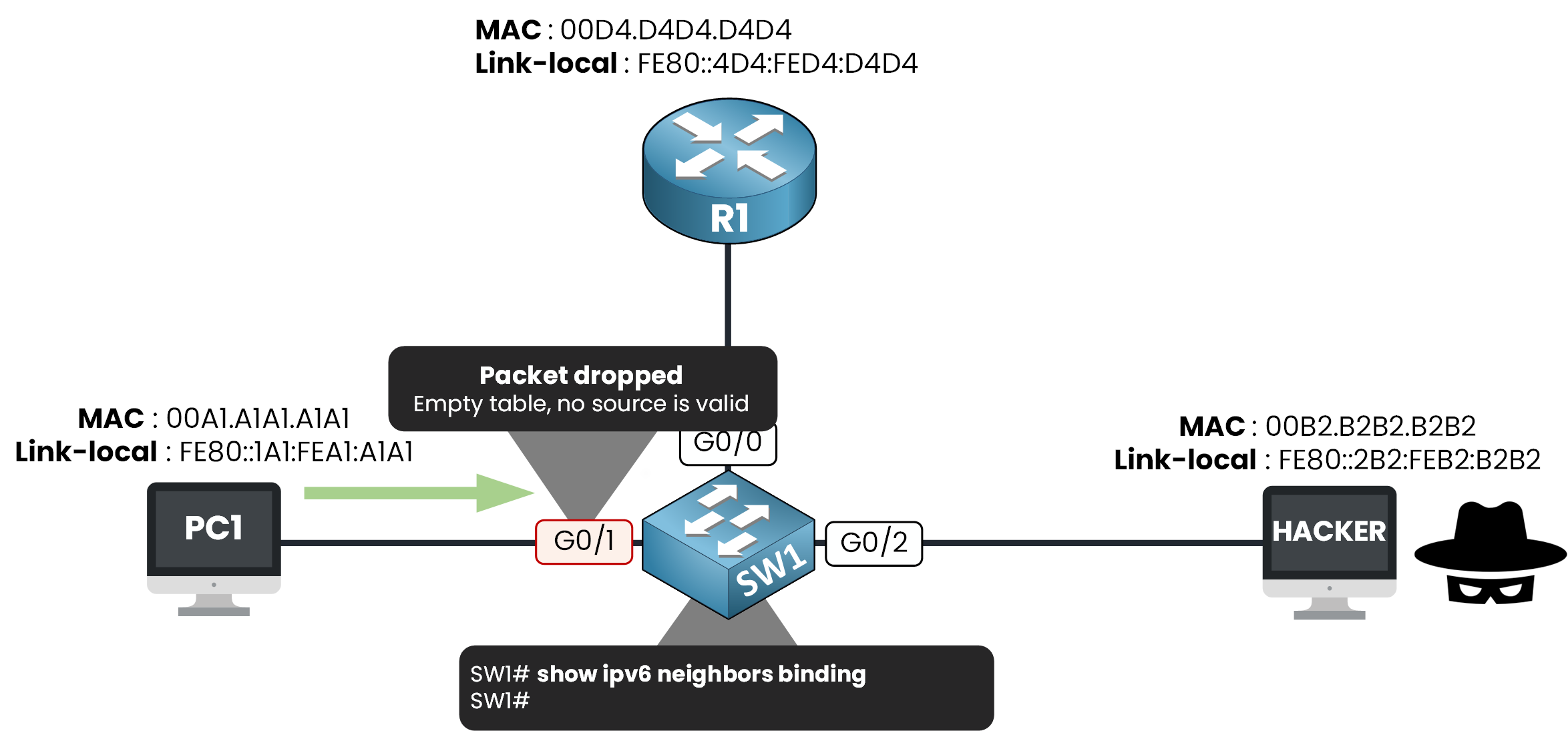
Figure 5 – Source Guard with an empty table drops honest traffic too
There are no entries, so there are no valid sources. Even PC1's ping is dropped on Gi0/1.
So the rule is simple: enable Source Guard only once the binding table is complete.
Now let's head over to the configuration.
Answer the question below
Source Guard is active but the binding table is empty. Does PC1's traffic pass?
To configure Source Guard, we will use the same methodology: create, attach, verify.
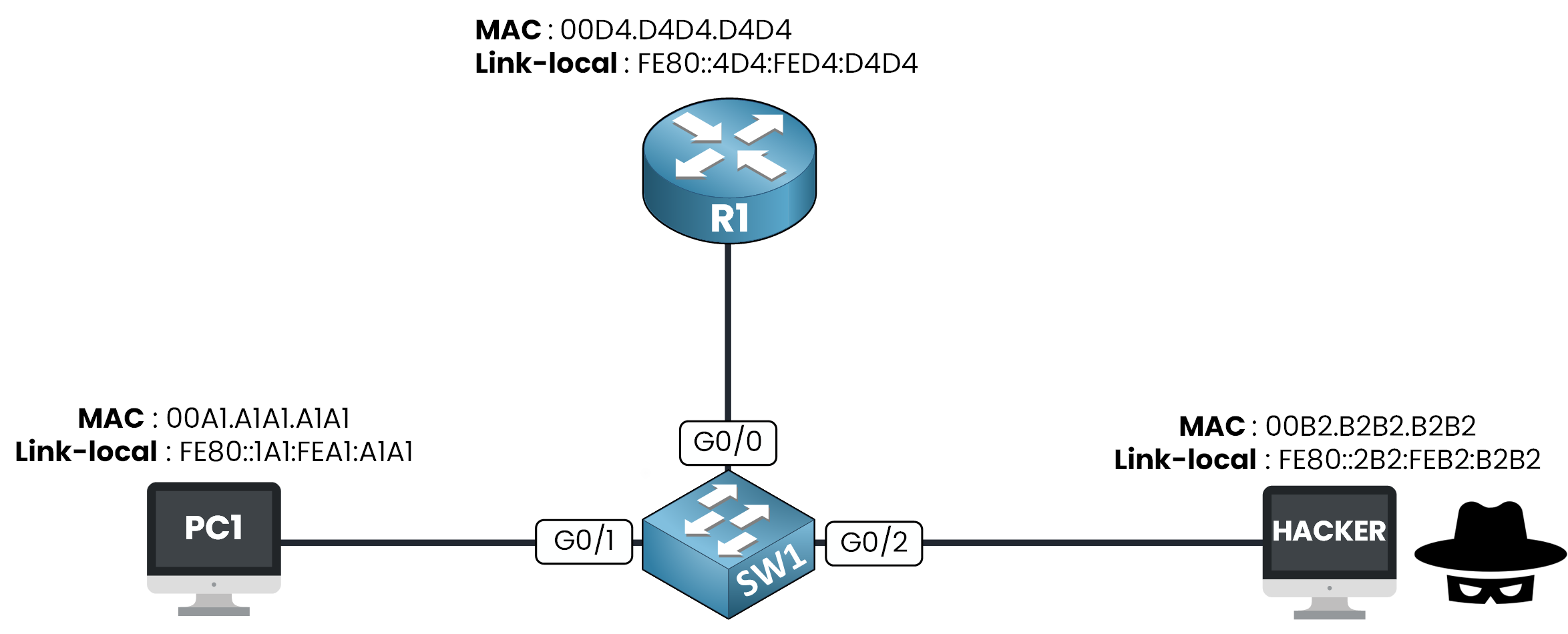
Figure 6 – The lab topology
Step 1 — Create the policy
Let's start by creating your policy, and call it SOURCE_GUARD.
SW1# conf t
Enter configuration commands, one per line. End with CNTL/Z.
SW1(config)# ipv6 source-guard policy SOURCE_GUARD
SW1(config-sisf-sourceguard)# end
You don't have to configure anything inside the policy.
By default it validates the source address of every packet against the binding table, which is exactly what you want.
But like every policy in this module, it does nothing until you attach it to a port.Step 2 — Attach it to the host ports
You attach SOURCE_GUARD to G0/1 and G0/2, your two host ports.
SW1# conf t
Enter configuration commands, one per line. End with CNTL/Z.
SW1(config)# interface range gigabitEthernet 0/1 - 2
SW1(config-if-range)# ipv6 source-guard attach-policy SOURCE_GUARD
SW1(config-if-range)# end
Only host ports get Source Guard, never G0/0.
G0/0 faces R1, so every reply from another subnet or the internet enters through it.
Those sources live nowhere in your binding table, so Source Guard would drop them and cut you off from the whole network.Confirm it landed on the right ports:
SW1# show ipv6 source-guard policy SOURCE_GUARD
Policy SOURCE_GUARD configuration:
  validate address
Policy SOURCE_GUARD is applied on the following targets:
Target               Type  Policy               Feature        Target range
Gi0/1                PORT  SOURCE_GUARD         Source guard   vlan all
Gi0/2                PORT  SOURCE_GUARD         Source guard   vlan all
Both host ports are listed.
Source Guard is now watching them.Answer the question below
Which port must NOT get Source Guard in this topology?
Step 3 — Verify the filter
Let's check that table one last time:
SW1# show ipv6 neighbors binding
Codes: L - Local, S - Static, ND - Neighbor Discovery, DH - DHCP

    IPv6 address          Link-Layer addr  Interface  vlan  state
ND  2001:db8:10::10       00A1.A1A1.A1A1   Gi0/1      10    REACHABLE
ND  FE80::1A1:FEA1:A1A1   00A1.A1A1.A1A1   Gi0/1      10    REACHABLE
ND  2001:db8:10::1        00D4.D4D4.D4D4   Gi0/0      10    REACHABLE
ND  FE80::4D4:FED4:D4D4   00D4.D4D4.D4D4   Gi0/0      10    REACHABLE
Four entries, the same table as last lesson, untouched.
Answer the question below
Which existing structure does Source Guard rely on, without building anything new?
Everything is in place.
Time to play the Hacker and attack your own switch.Launch the Attack
Send the same spoofed ping with Source Guard off, then on, and watch what changes.
Run the scenario below and grab the flag.Enter your flag below to continue.
Answer the question below
Enter the Flag
First Hop Security Recap
With Source Guard, you just closed the last door on the Hacker.
Look back at the whole module: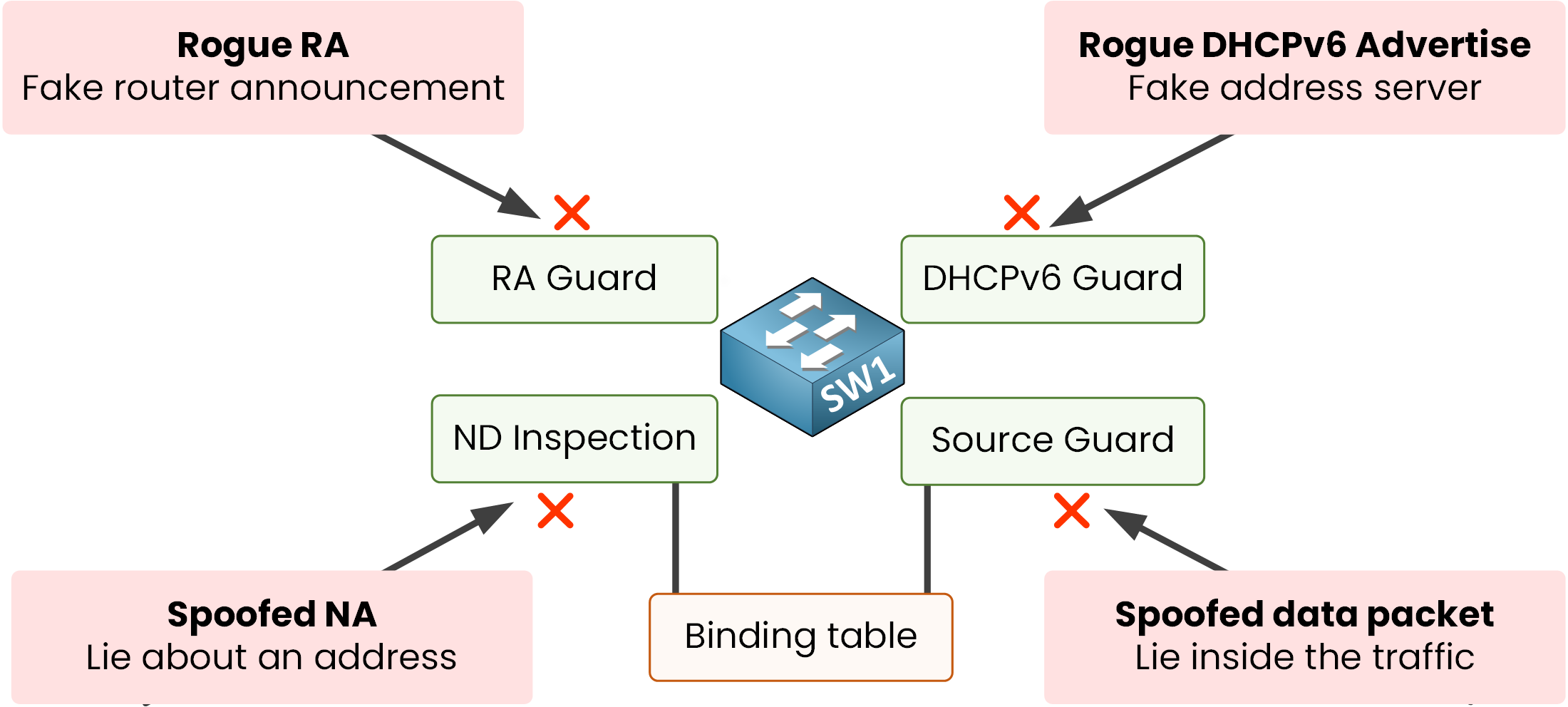
Figure 7 – Four attacks, four guards, one switch
RA Guard stops rogue Router Advertisements.
DHCPv6 Guard stops rogue DHCPv6 servers.
ND inspection drops spoofed neighbor messages.
Source Guard drops spoofed data packets.
Notice the last two both lean on the same binding table.
Answer the question below
Which guard drops spoofed data packets, not just control messages?