As a network engineer, it is your job to protect your network against the weaknesses inherent in IPv6.
Let's look at an example of an IPv6 weakness to help you understand the purpose of IPv6 RA Guard.Router Solicitation
In this example, PC1 has just joined the network and sends a Router Solicitation (RS) to the all-routers multicast address FF02::2.
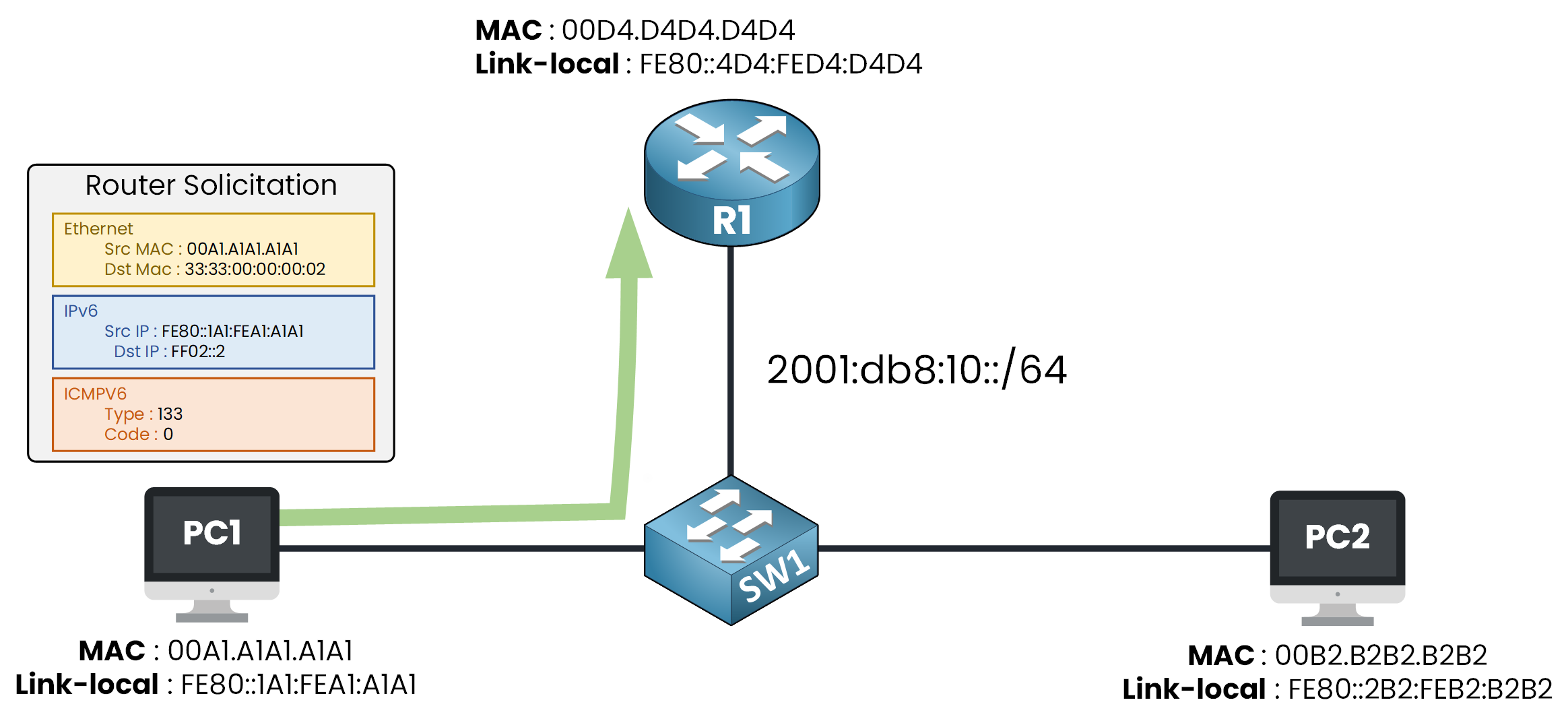
Figure 1 – A host sends a Router Solicitation to find a router
PC1 already has a link-local address, FE80::1A1:FEA1:A1A1, you can see it as the source of the RS.
But a link-local address never leaves the segment: to reach the outside, PC1 needs a global address and a default gateway.
The RS is its way of asking the routers for both.Answer the question below
Which address does a host generate by itself at boot?
Router Advertisement
R1 replies with a Router Advertisement (RA) sent to FF02::1, the all-nodes multicast.
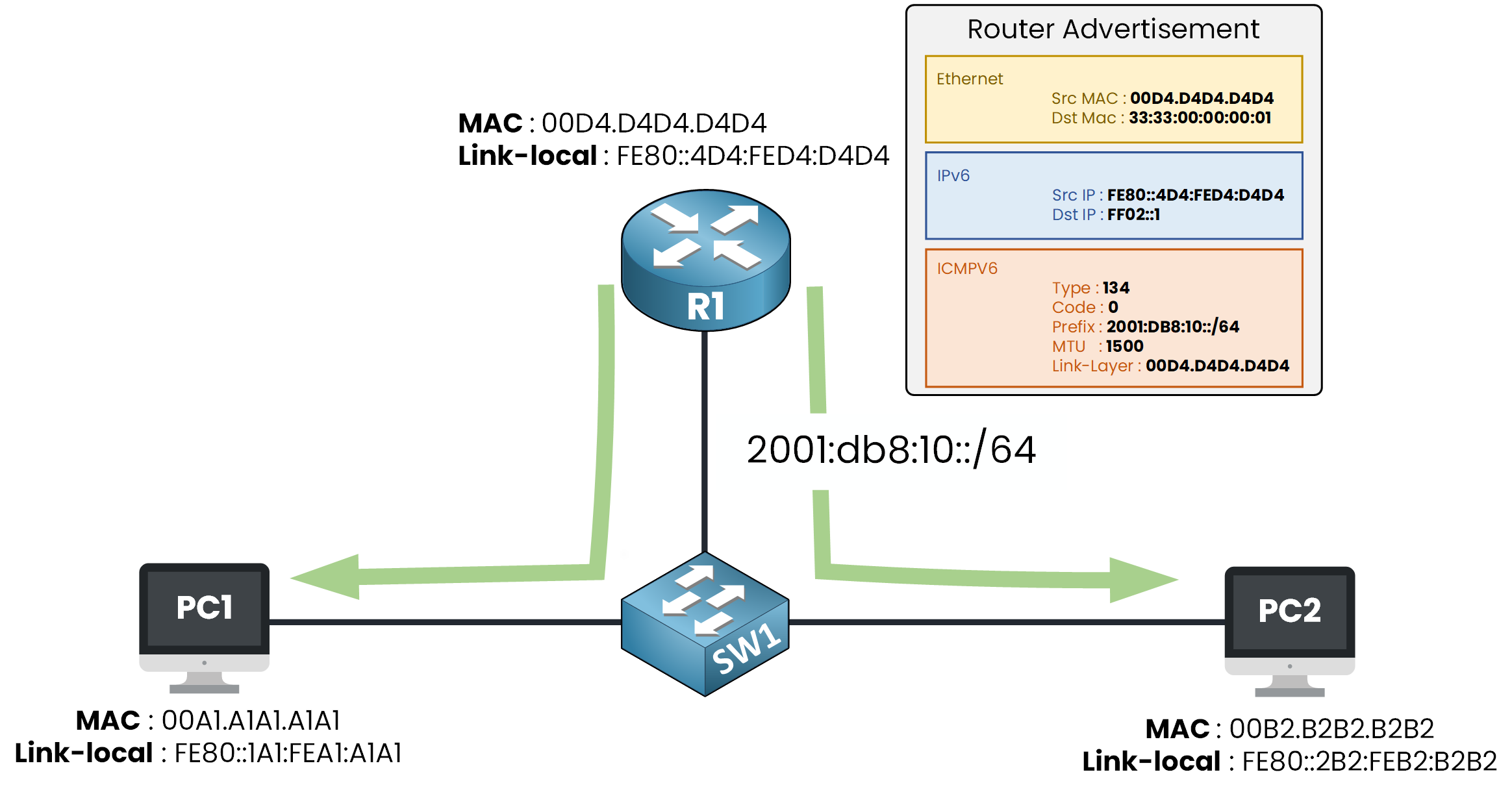
Figure 2 – The router replies with a Router Advertisement
It carries everything the host needs:
the network prefix 2001:db8:10::/64, so PC1 can build its own global IPv6 address
the MTU to use on this segment
R1's link-layer address, so PC1 knows where to send its traffic
With this prefix, PC1 builds its global address by itself, this mechanism is called SLAAC.
Both PC1 and PC2 receive the RA, this is how every device on the segment learns its gateway automatically.The problem is that this IPv6 mechanism has a vulnerability.
Nobody checks that it is indeed the default gateway announcing the RA!Answer the question below
To which address is a Router Advertisement sent?
Rogue RA
In this example, the Hacker sends the same Router Advertisement (RA) using its own address as the source.
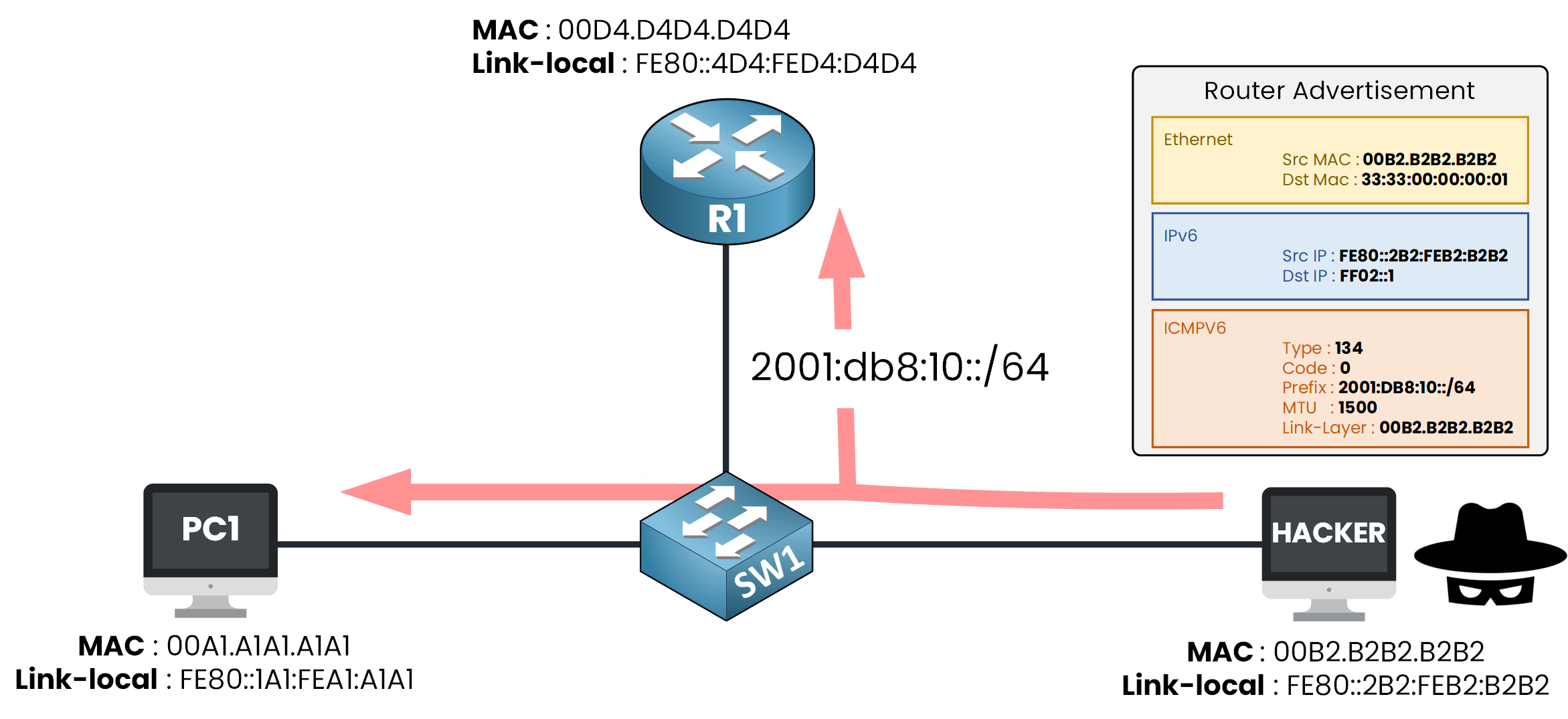
Figure 3 – A rogue RA from the Hacker
Your device believes it, exactly like it believed R1.
The RA is flooded to the whole segment, so every host now sees the Hacker as its gateway.
One packet, no authentication, and everyone now routes through the attacker!Answer the question below
Which ICMPv6 message does a router send to give hosts their prefix?
You cannot stop the Hacker from sending rogue RAs.
But you can configure your ports to only accept RAs where a router should be, and with this principle you can protect your segment.
RA Guard, defined in RFC 6105 is built on that idea.RA Guard Roles
With RA Guard, you tag each port on your switch with a role: router or host.
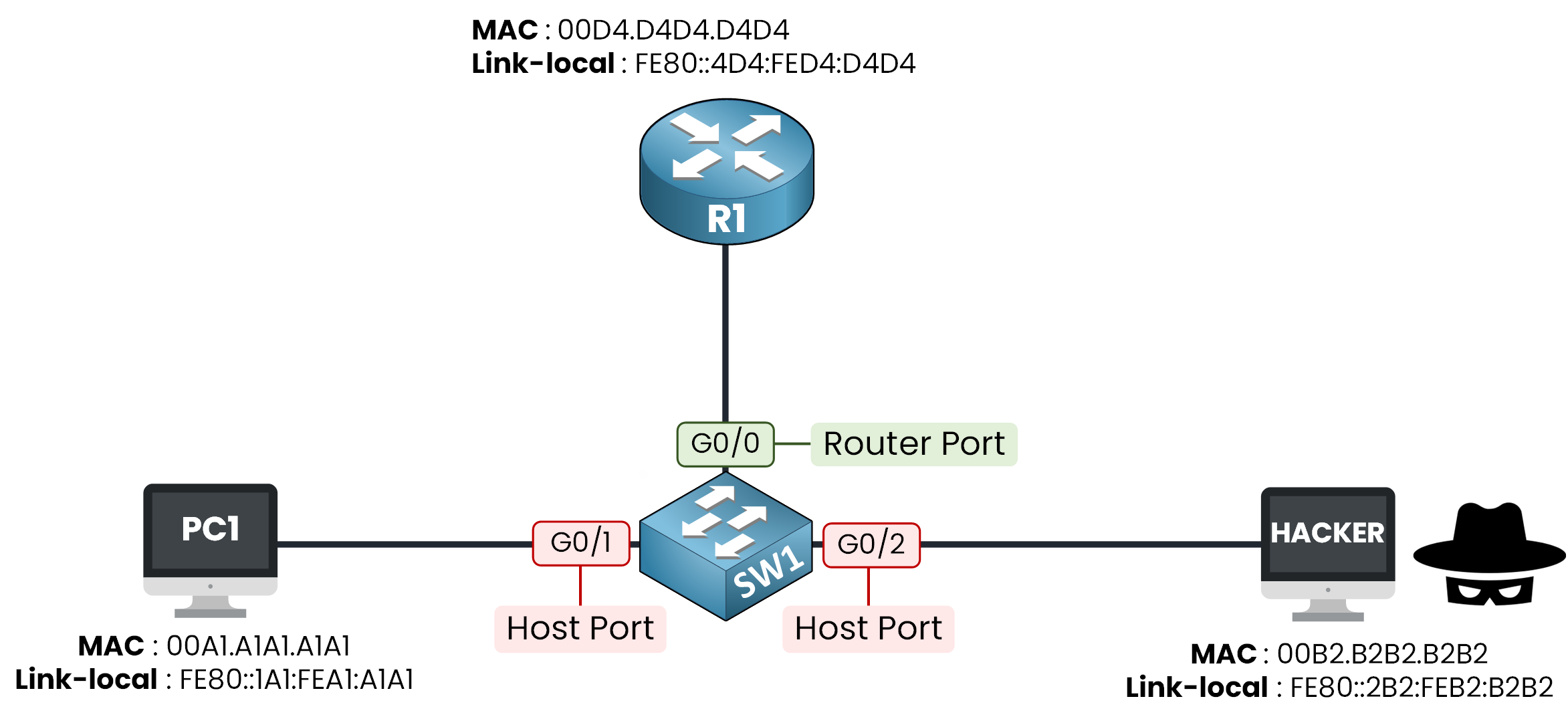
Figure 4 – Router role on G0/0, host role on G0/1 and G0/2
In this example, G0/0 faces R1 so it gets the router role.
G0/1 and G0/2 face PC1 and the Hacker so they get the host role.
Each role decides only one thing: is a Router Advertisement allowed through this port?Router Port
This is the role for the port facing your real router:
Incoming RAs are allowed through, so R1 can keep announcing the prefix
It is the only port where a router should ever sit
Host Port
This is the role for every port facing an end device:
Incoming RAs are dropped immediately, an end device has no reason to announce itself as a router
With these roles in place, the rogue RA from earlier would never leave G0/2: SW1 drops it before PC1 and PC2 even see it.
Let's move on to the next part, where we'll see how to configure everything.Answer the question below
Which device-role drops RA messages on a port?
Answer the question below
Which role is assigned to the port facing R1?
Time to practice, you start with the policy for the router port.
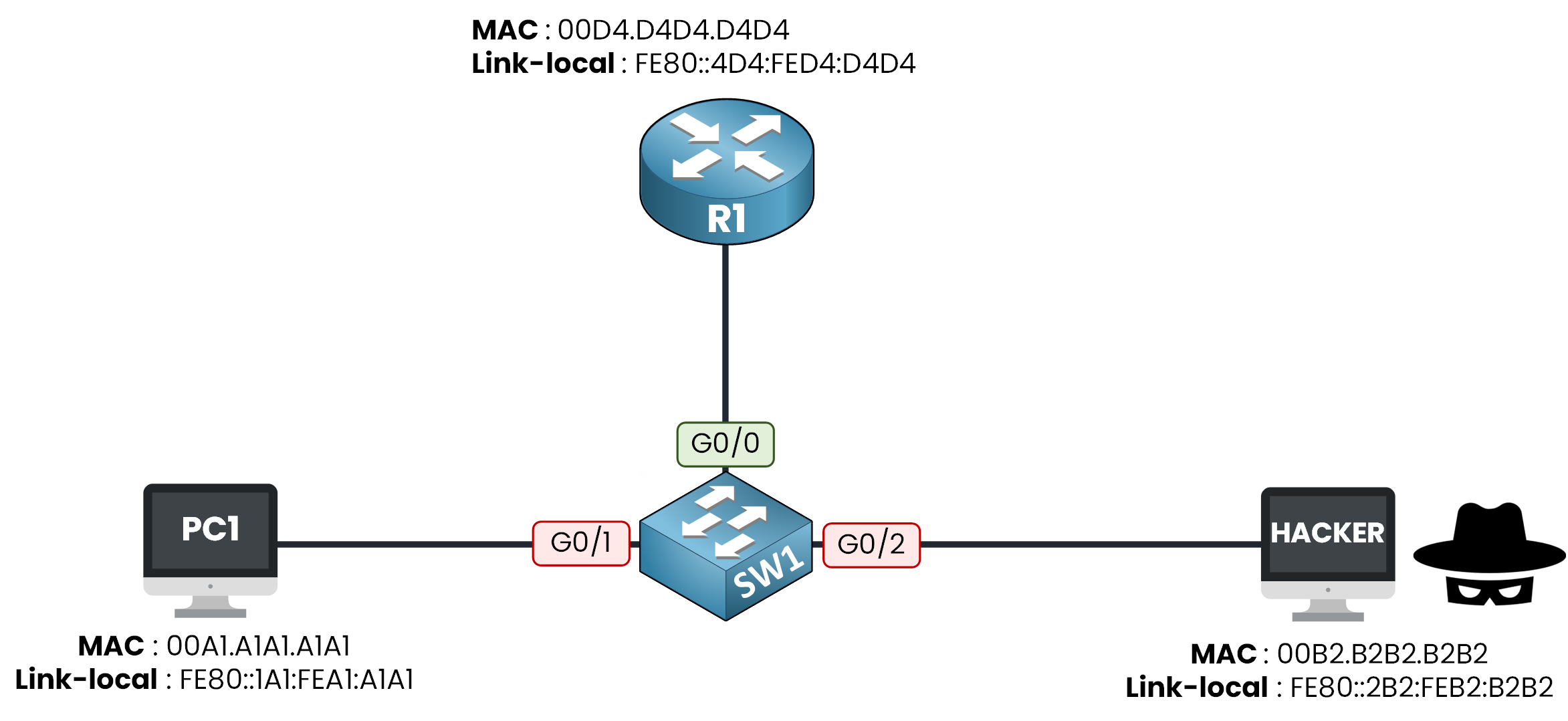
Figure 5 – The lab topology
The configuration always follows the same logic:
you create a policy that defines a role
you attach this policy to the ports you want
you verify that it is applied
These are your three steps.
Step 1 — Create the policy
You create the policy ROUTER_POLICY with the router role.
SW1# conf t
Enter configuration commands, one per line. End with CNTL/Z.
SW1(config)# ipv6 nd raguard policy ROUTER_POLICY
SW1(config-nd-raguard)# device-role router
SW1(config-nd-raguard)# end
A policy does nothing until you attach it to an interface.
Step 2 — Attach it to the router port
You attach ROUTER_POLICY to G0/0, the port facing R1.
SW1# conf t
Enter configuration commands, one per line. End with CNTL/Z.
SW1(config)# int g0/0
SW1(config-if)# ipv6 nd raguard attach-policy ROUTER_POLICY
SW1(config-if)# end
R1's RAs are now trusted on that port.
Step 3 — Verify
You verify that the policy is applied on G0/0.
SW1# show ipv6 nd raguard policy ROUTER_POLICY
Policy ROUTER_POLICY configuration:
  device-role router
Policy ROUTER_POLICY is applied on the following targets:
Target               Type  Policy               Feature        Target range
Gi0/0                PORT  ROUTER_POLICY        RA guard       vlan all
The output confirms the router role and the target port Gi0/0.
Answer the question below
Which keyword attaches a policy to an interface?
Answer the question below
What must a policy be attached to before it does anything?
Same logic for the host policy: create, attach, verify.
Step 1 — Create the policy
You create the policy HOST_POLICY with the host role.
SW1# conf t
Enter configuration commands, one per line. End with CNTL/Z.
SW1(config)# ipv6 nd raguard policy HOST_POLICY
SW1(config-nd-raguard)# device-role host
SW1(config-nd-raguard)# end
Host is actually the default role, so you don't have to configure it.
For the sake of completeness, we do it anyway.Now you attach it, but this time to two ports instead of one.
Step 2 — Attach it to the host ports
You attach HOST_POLICY to G0/1, facing PC1, and to G0/2, facing the Hacker.
SW1# conf t
Enter configuration commands, one per line. End with CNTL/Z.
SW1(config)# int g0/1
SW1(config-if)# ipv6 nd raguard attach-policy HOST_POLICY
SW1(config-if)# exit
SW1(config)# int g0/2
SW1(config-if)# ipv6 nd raguard attach-policy HOST_POLICY
SW1(config-if)# end
Every user-facing port is covered now.
Step 3 — Verify
You verify that the policy is applied on G0/1 and G0/2.
SW1# show ipv6 nd raguard policy HOST_POLICY
Policy HOST_POLICY configuration:
  device-role host
Policy HOST_POLICY is applied on the following targets:
Target               Type  Policy               Feature        Target range
Gi0/1                PORT  HOST_POLICY          RA guard       vlan all
Gi0/2                PORT  HOST_POLICY          RA guard       vlan all
Both host ports show up as targets, your segment is closed to rogue RAs.
Time to prove it actually works.Answer the question below
Under which column of the verification output do the protected ports appear?
Answer the question below
How many ports receive HOST_POLICY?
Everything is configured, now launch the attack scenario below.
You take the Hacker's place, run the attack yourself, and watch how the switch reacts.Complete every task in the scenario and enter the flag you earned below.
Answer the question below
Enter the Flag
The Rogue RA Is Dropped
The Hacker's RA never gets past SW1: it is dropped at G0/2, the port with the host role.
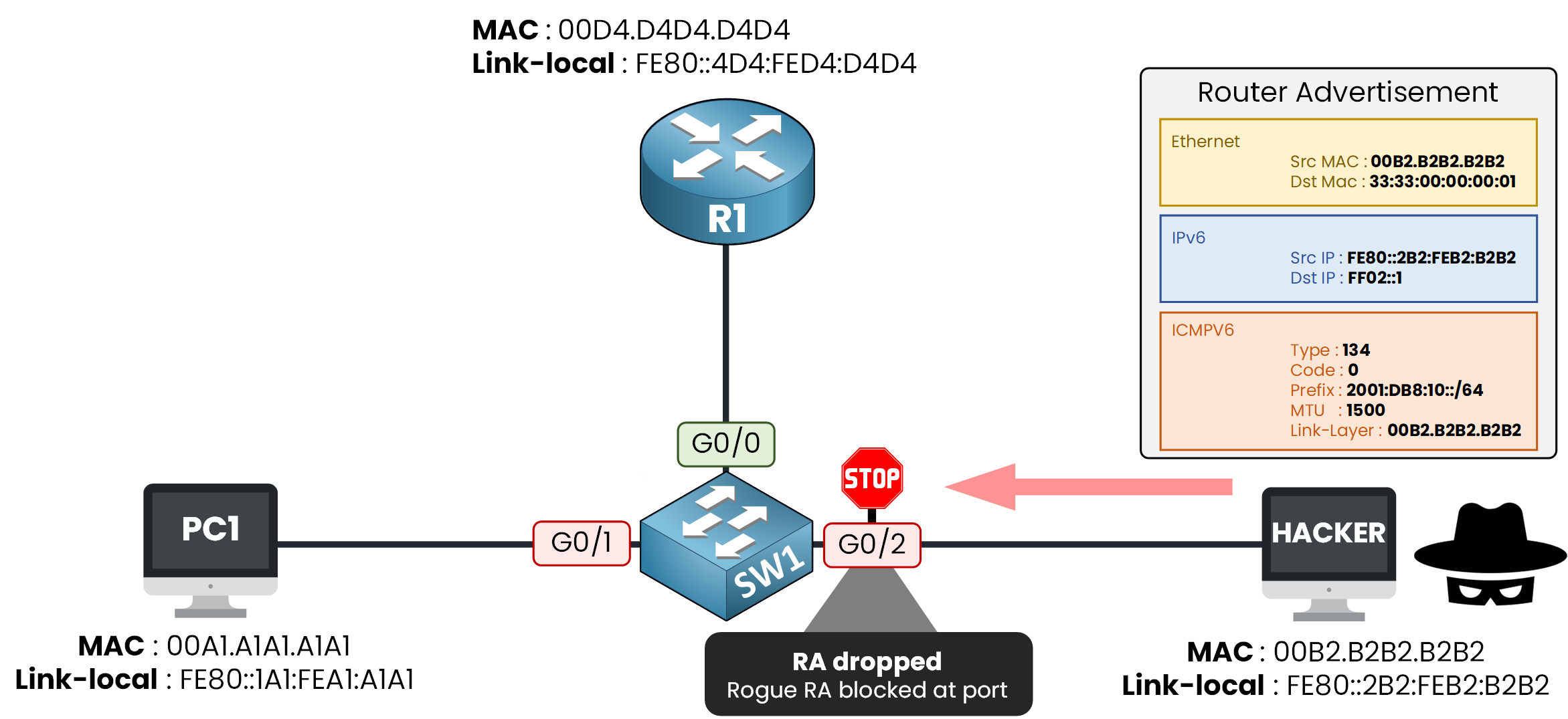
Figure 6 – The rogue RA is blocked at G0/2
PC1 and PC2 never see the rogue RA, their gateway does not change.
The Legitimate RA Still Gets Through
During the attack, R1's real Router Advertisement still reaches PC1 and PC2, because G0/0 stays open.
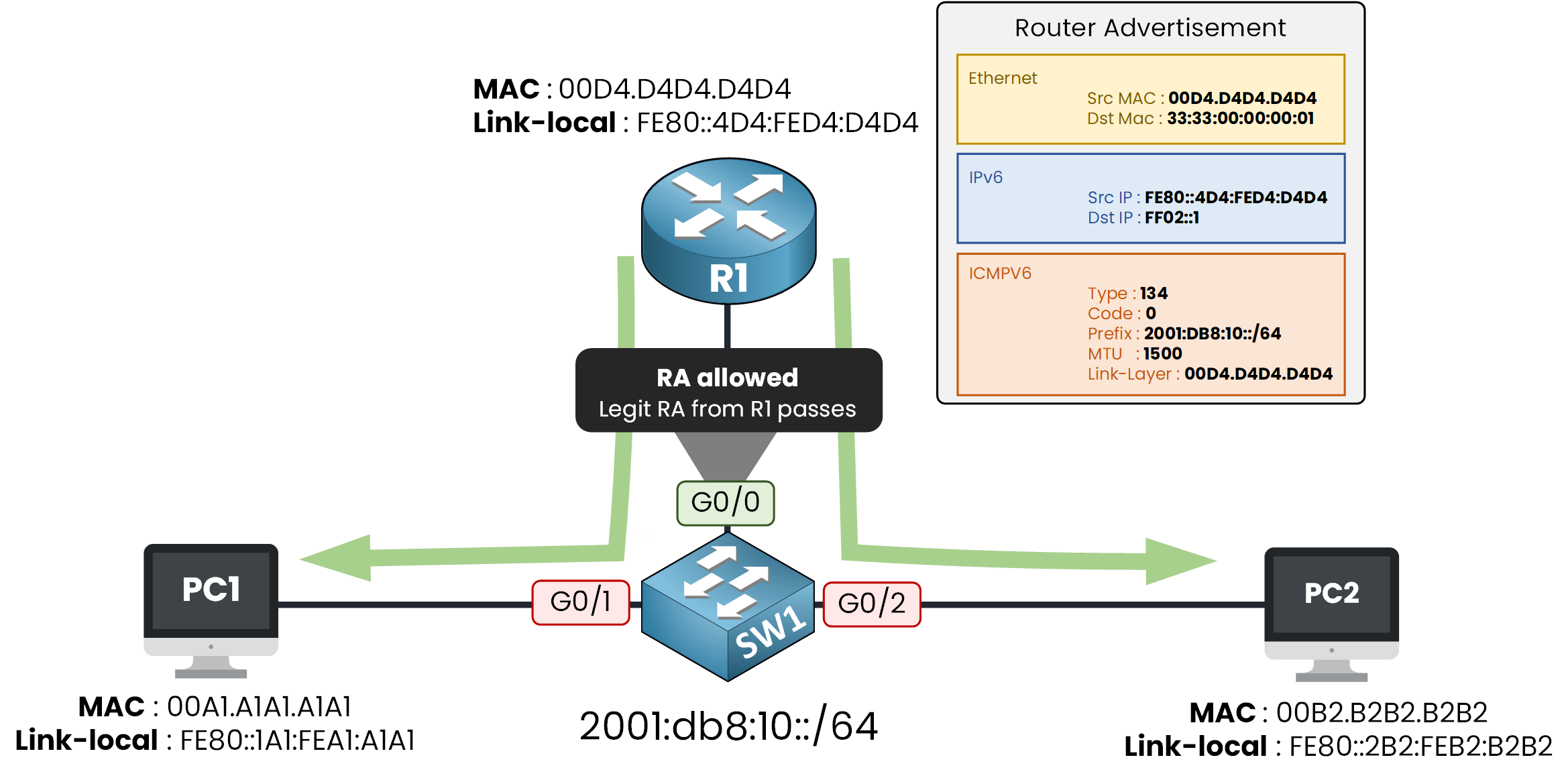
Figure 7 – The legitimate RA still gets through on the router port
RA Guard isn't blocking Router Advertisements everywhere, it's blocking them from anywhere except the one trusted port.
One last thing: RA Guard protects, it does not clean up.
If a rogue RA got through before you configured RA Guard, the hosts keep the poisoned gateway until the RA lifetime expires.
Configure it before the attack, not after.Answer the question below
Which port still forwards RAs after the configuration?