With RA Guard and DHCPv6 Guard, you closed two doors on the Hacker.
A third door is still open: the way hosts resolve an IPv6 address into a MAC address.Neighbor Solicitation
PC1 wants to send traffic to R1, your gateway.
It knows R1's IPv6 address, but not the MAC address behind it, so it cannot build the frame yet.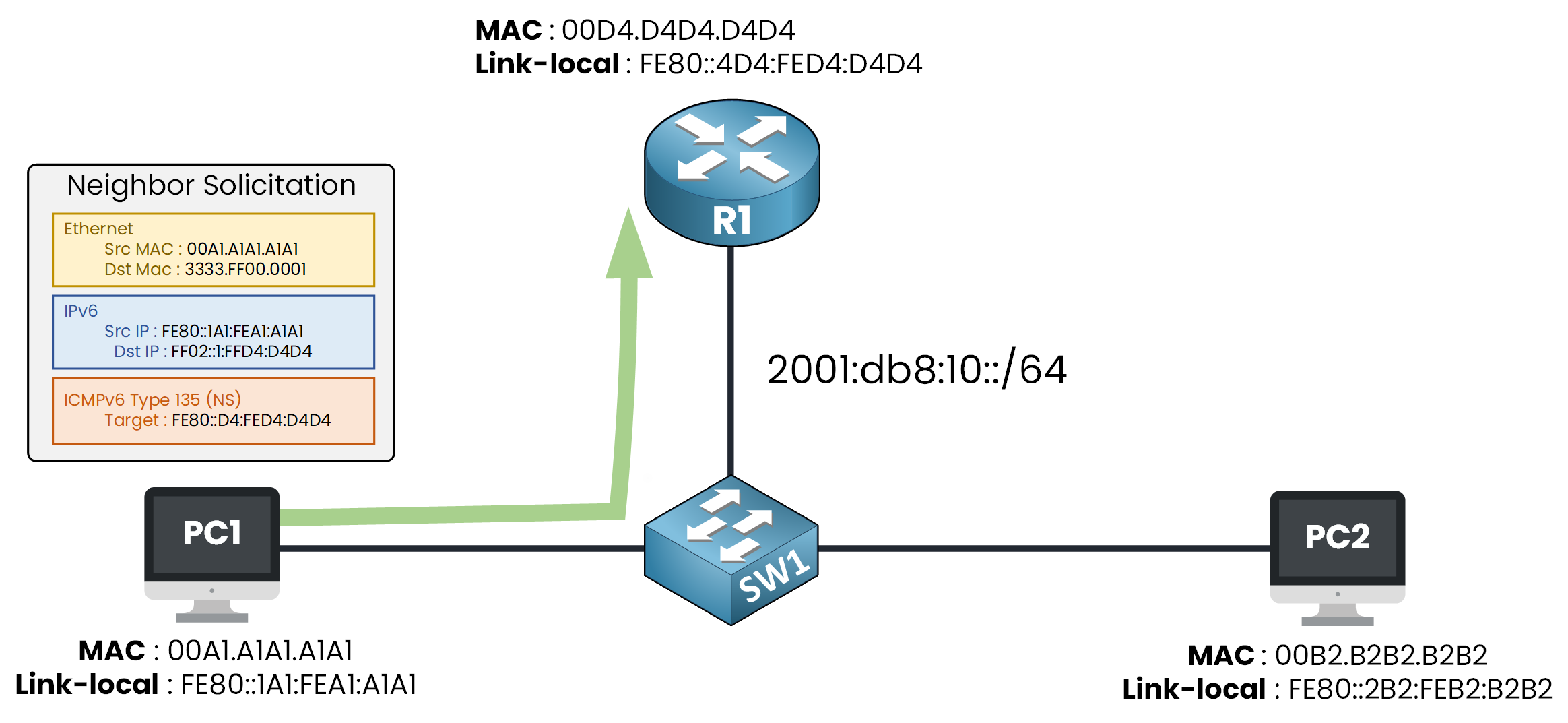
Figure 1 – PC1 sends a Neighbor Solicitation to find R1's MAC
PC1 sends a Neighbor Solicitation (NS), asking who owns that IPv6 address.
This is the IPv6 replacement for the ARP request you already know.Answer the question below
Which message does a host send to find the MAC behind an IPv6 address?
Neighbor Advertisement
R1 answers with a Neighbor Advertisement (NA), carrying its own MAC address.
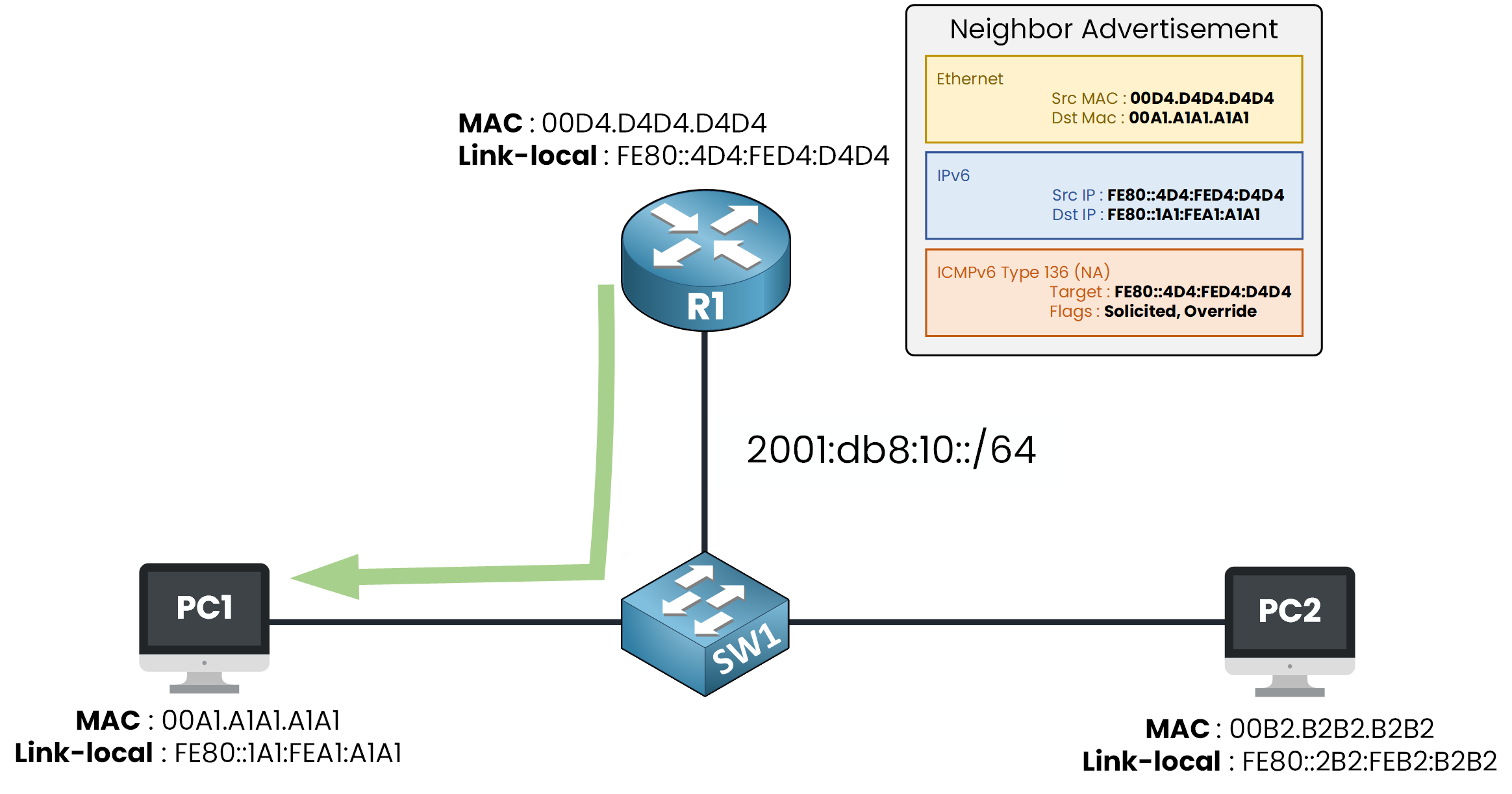
Figure 2 – PC1 stores the mapping in its neighbor cache
PC1 stores the pair in its neighbor cache, the IPv6 version of the ARP table.
From now on, PC1 sends every packet for R1 to that MAC address.Answer the question below
PC1 stores R1's MAC in its neighbor _____.
The Spoofed NA
But who checks that the NA really came from R1?
Nobody on your segment.
Imagine a hacker sends a forged NA claiming R1's IPv6 address and using its own MAC address.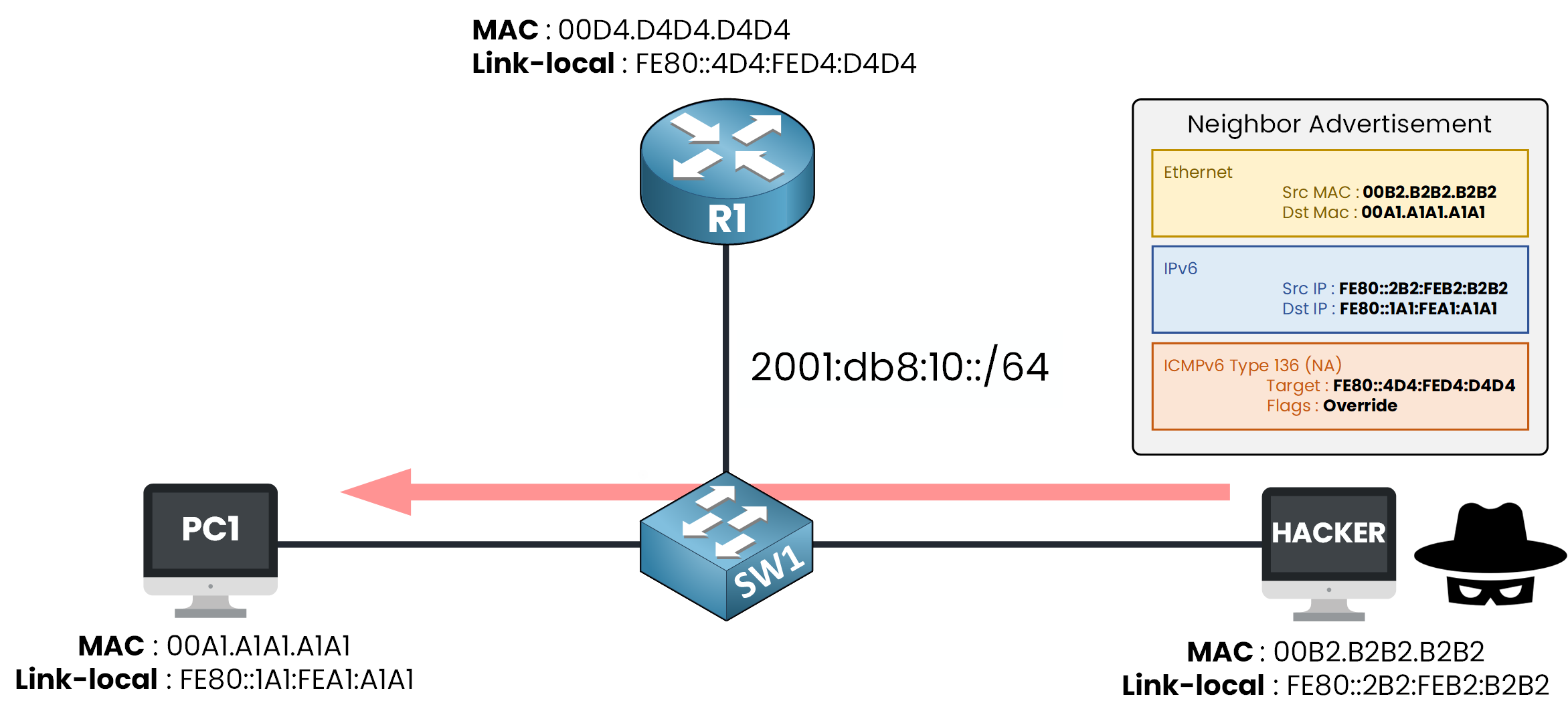
Figure 3 – A spoofed NA from the Hacker
The NA carries the Override flag, which orders PC1 to overwrite the entry it already has.
PC1 has no way to tell the difference, so it believes it.
Its neighbor cache now maps R1's address to the Hacker's MAC.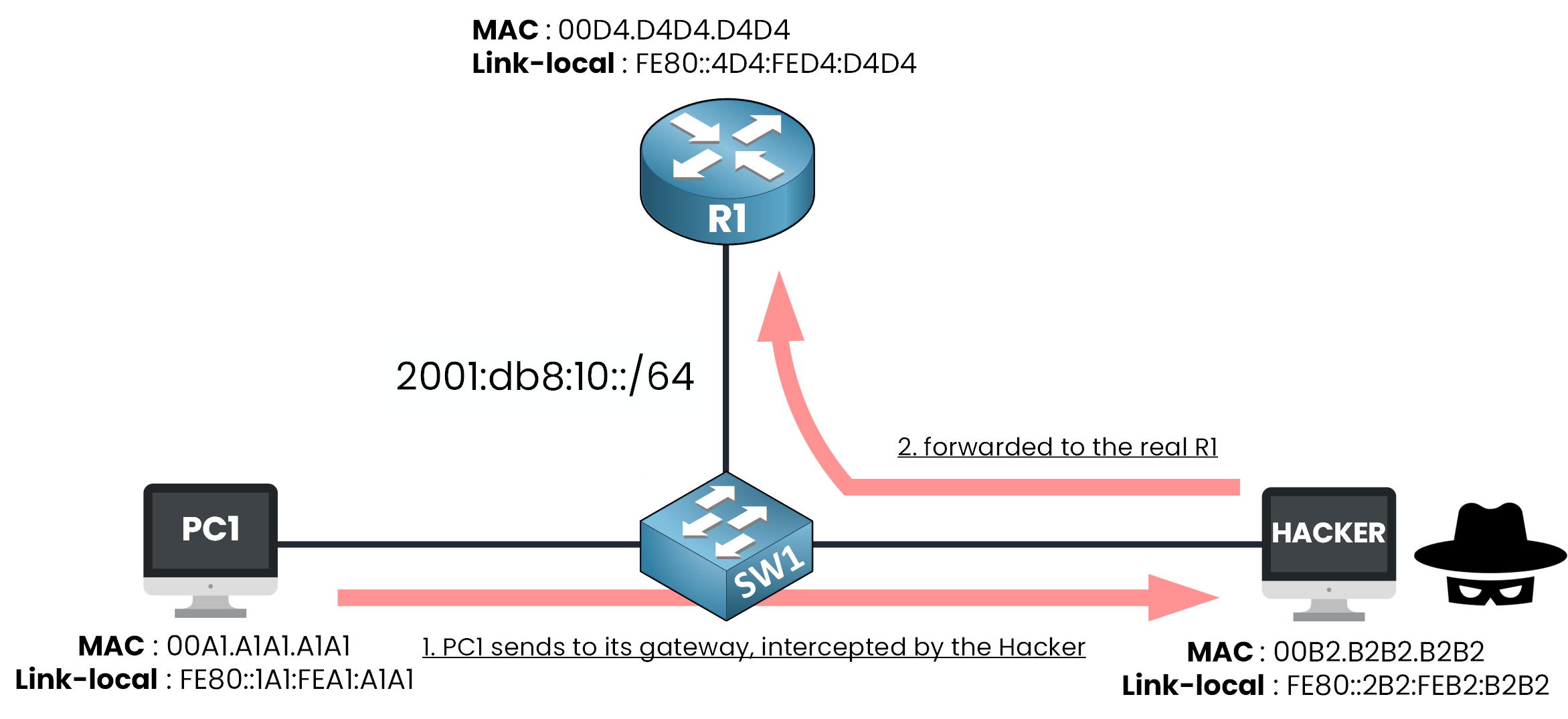
Figure 4 – PC1's traffic now flows through the Hacker
Every packet PC1 sends to your gateway now reaches the Hacker first.
Answer the question below
Which flag in the NA tells PC1 to overwrite its existing entry?
To reject a lie, your switch first needs to know the truth.
It records who really owns each address, before any attacker shows up.What the Switch Memorizes
SW1 keeps a binding table: one line per IPv6 address it sees on the segment.
PC1 alone takes two lines: its link-local and its global unicast address.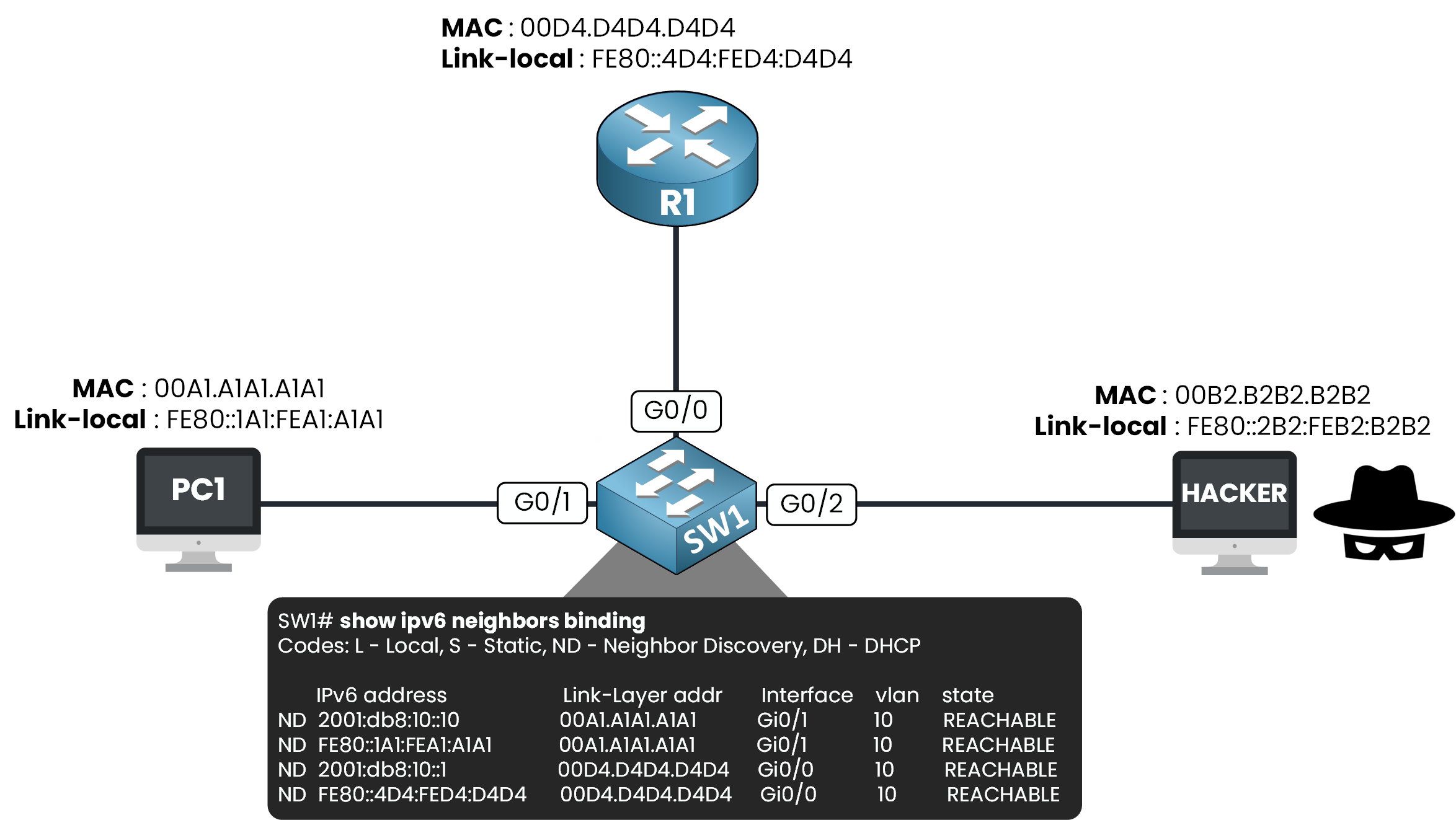
Figure 5 – The binding table: one line per IPv6 address
Each entry ties four things together:
the IPv6 address of the device
its MAC address
the switch port it lives behind
its VLAN
You already met this idea in IPv4: the DHCP snooping binding table.
Answer the question below
Besides IPv6, MAC and VLAN, what does each binding entry record?
Filling the Table
SW1 fills the table by listening to the traffic that already crosses it.
It watches three sources:
the NS and NA messages devices exchange to resolve each other
the DAD (Duplicate Address Detection) messages, a special NS a device sends when it first claims an address
the DHCPv6 exchange, when a server hands out the address
When PC1 first spoke on the segment, SW1 saw it and wrote the line down.
Your honest devices fill the table simply by being there first.Answer the question below
SW1 fills its binding table by _________ to the traffic that crosses it.
Imagine ND inspection is already configured on SW1.
Follow the story from the first honest message to the dropped lie.Step 1 — PC1 Asks
PC1 needs R1's MAC, so it sends a Neighbor Solicitation across the segment.
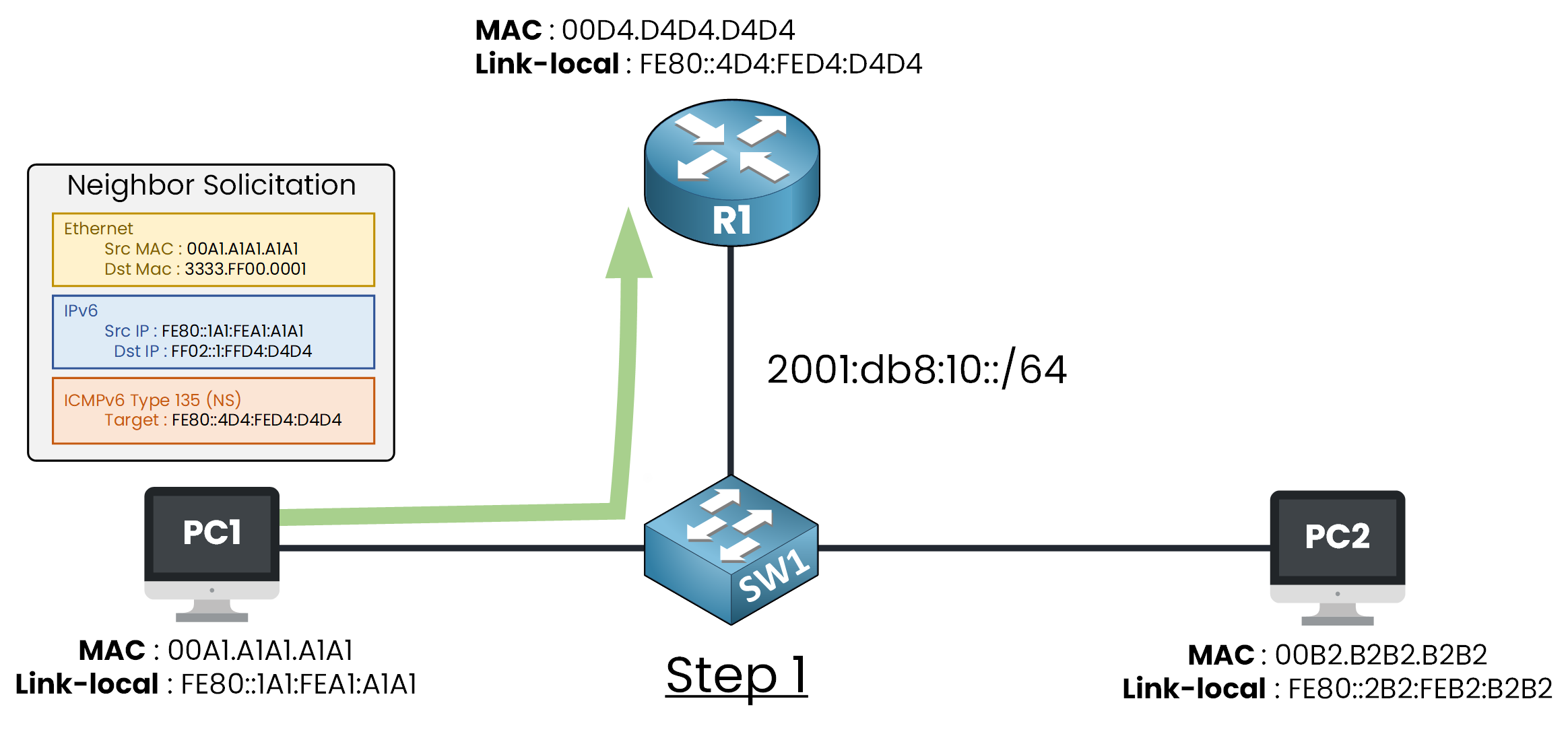
Figure 6 – SW1 snoops PC1's NS and records it in the binding table
SW1 sees this NS cross the wire and records PC1 in its binding table: address, MAC, port Gi0/1, VLAN.
Your switch now holds the truth about PC1.Step 2 — R1 Answers
R1 replies with a Neighbor Advertisement carrying its real MAC.
SW1 catches the answer on the way back, and the table now holds both PC1 and R1.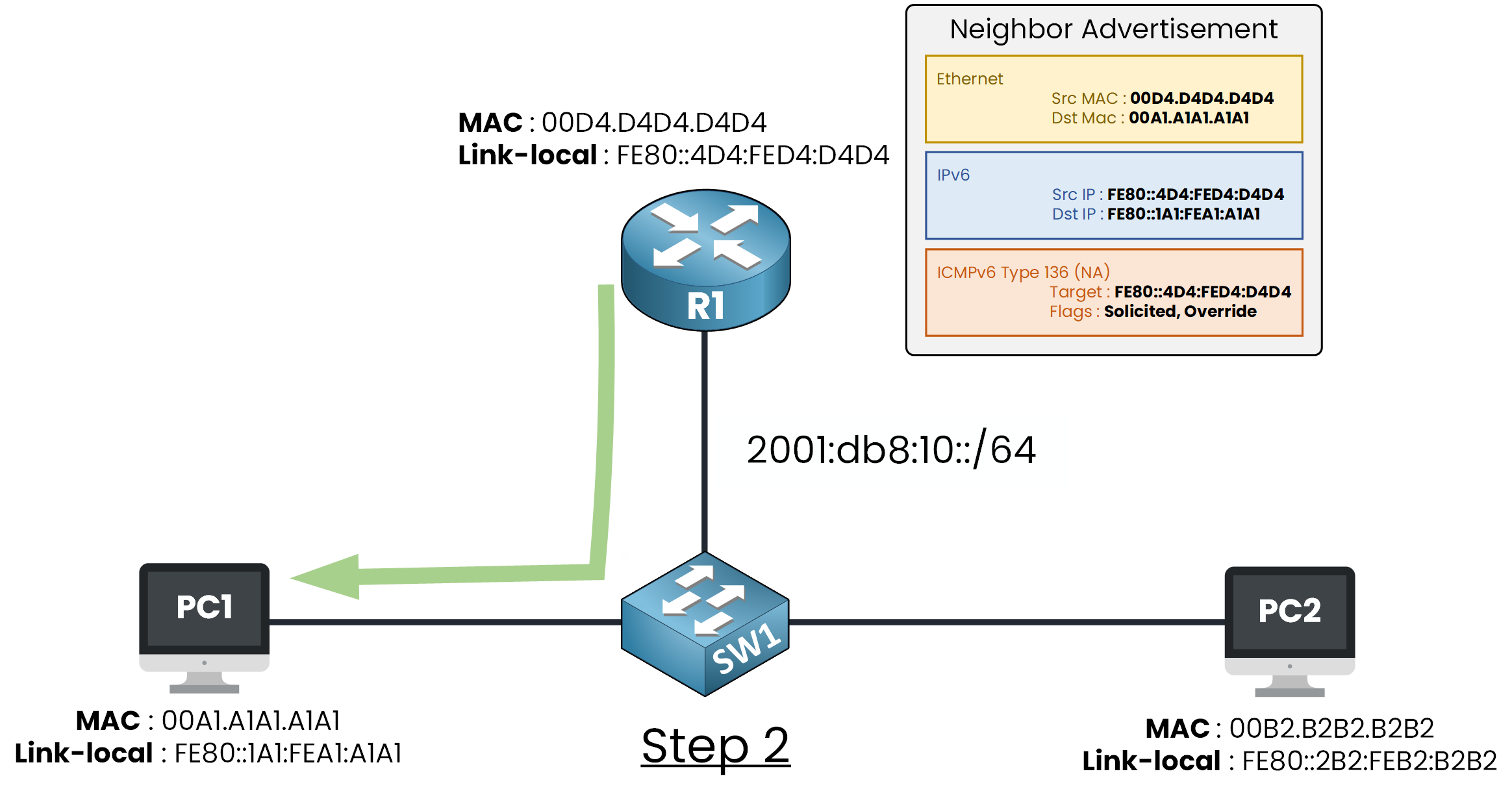
Figure 7 – R1's NA fills the second entry of the table
Both entries are locked in: first come, first served.
This is where the Hacker steps in.Step 3 — The Lie Is Dropped
The Hacker's NA claims FE80::4D4:FED4:D4D4, R1's link-local, but that address is already bound to R1 on another port.
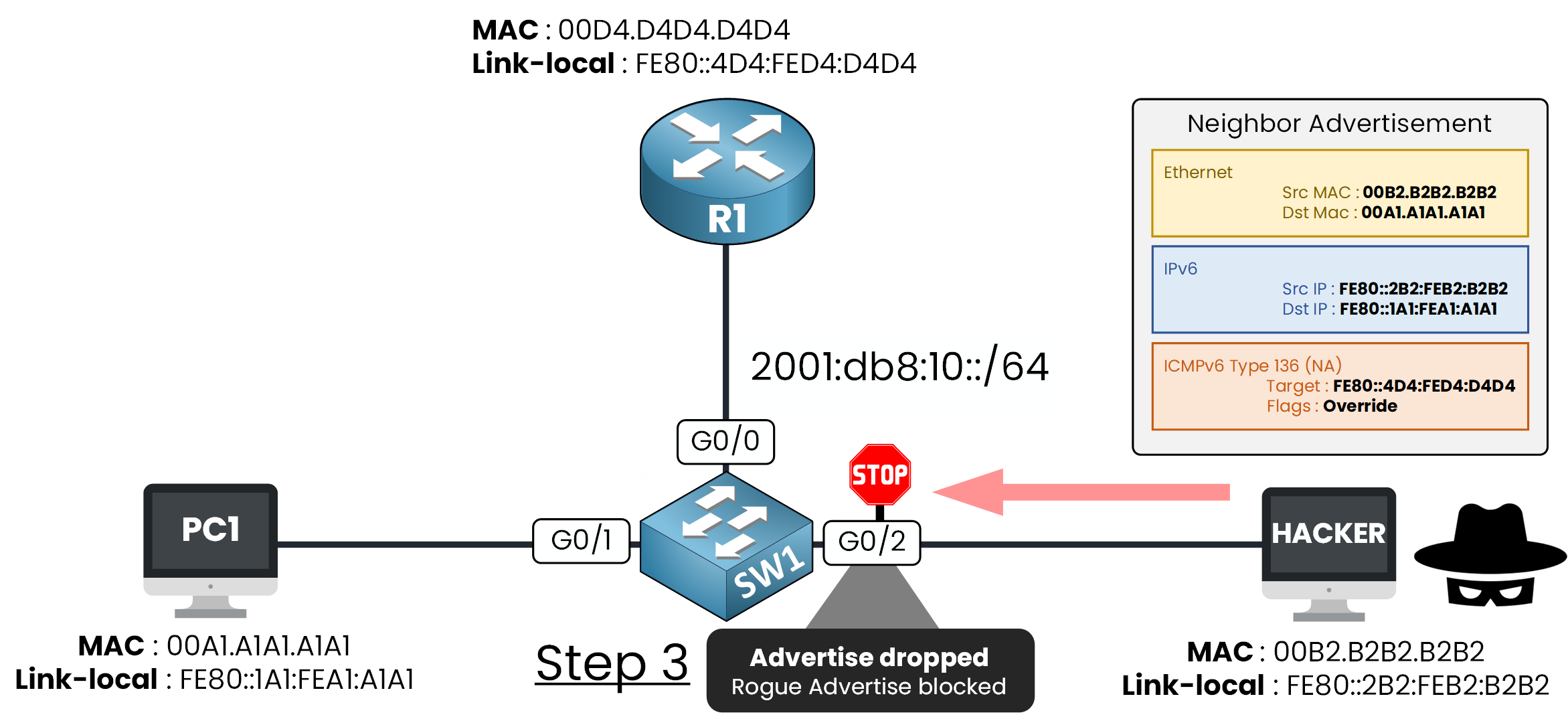
Figure 8 – The spoofed NA contradicts the table and is dropped
The claim contradicts the table, so SW1 drops it at the port.
PC1's neighbor cache is never touched, and its traffic keeps flowing to the real R1.Answer the question below
What does SW1 do with a NA that contradicts the binding table?
You have seen the table and the check.
Time to configure ND inspection on SW1, with the same three-step logic as RA Guard and DHCPv6 Guard.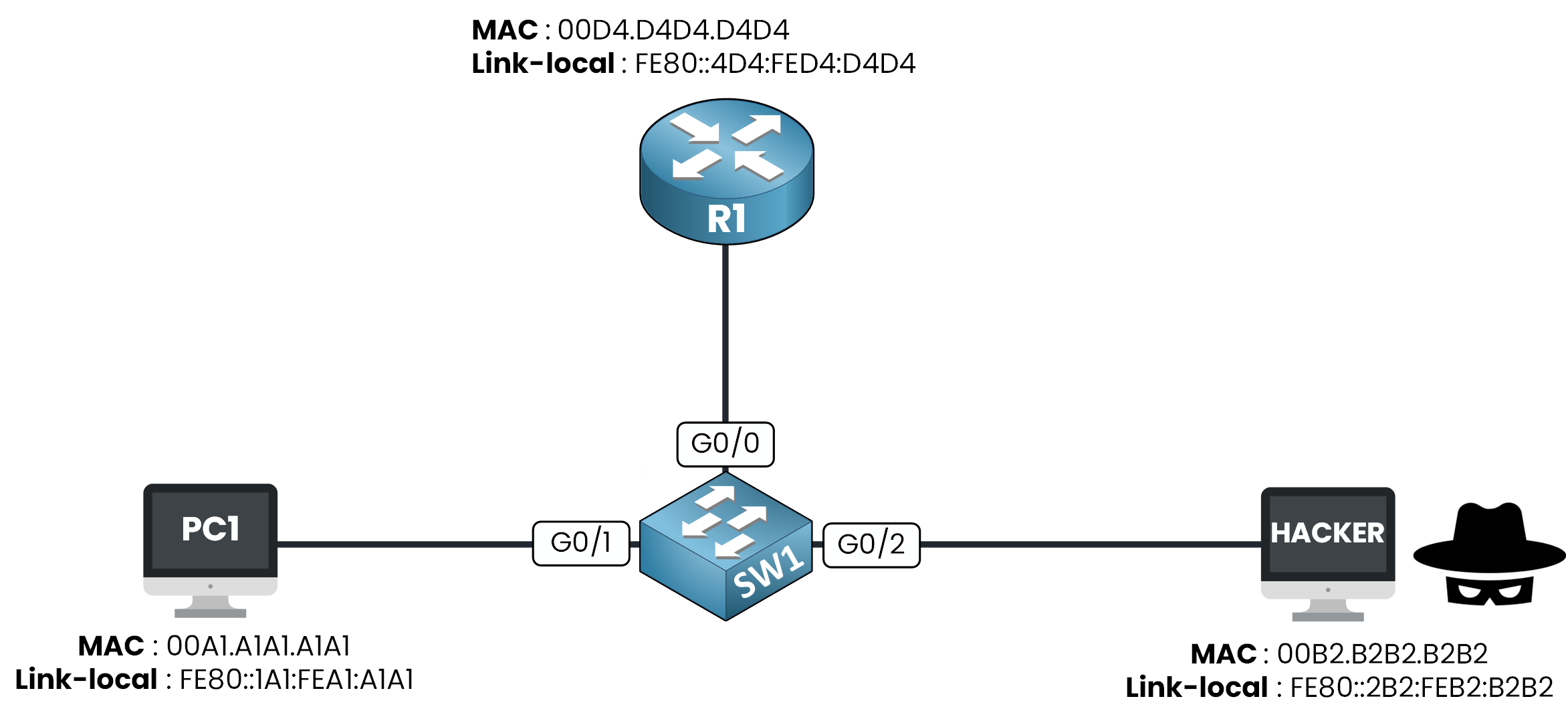
Figure 9 – The lab topology
You create an inspection policy, attach it to every port on the segment, and verify.
Step 1 — Create the policy
You create the policy INSPECTION_POLICY.
SW1# conf t
Enter configuration commands, one per line. End with CNTL/Z.
SW1(config)# ipv6 nd inspection policy INSPECTION_POLICY
SW1(config-nd-inspection)# end
The default policy already does the job: it builds the table and checks every ND message.
A policy does nothing until you attach it to an interface.Step 2 — Attach it to the ports
You attach INSPECTION_POLICY to every port on the segment, G0/0 to G0/2.
R1 must be gleaned too, or the table never holds the truth about your gateway.SW1# conf t Enter configuration commands, one per line. End with CNTL/Z. SW1(config)# interface range gigabitEthernet 0/0 - 2 SW1(config-if-range)# ipv6 nd inspection attach-policy INSPECTION_POLICY SW1(config-if-range)# endThe policy is attached.
Confirm the policy landed where you expect:SW1# show ipv6 nd inspection policy INSPECTION_POLICY Policy INSPECTION_POLICY configuration: device-role host Policy INSPECTION_POLICY is applied on the following targets: Target Type Policy Feature Target range Gi0/0 PORT INSPECTION_POLICY NDP inspection vlan all Gi0/1 PORT INSPECTION_POLICY NDP inspection vlan all Gi0/2 PORT INSPECTION_POLICY NDP inspection vlan allAll three ports show up as targets.
The switch is now inspecting ND on the whole segment.Answer the question below
Which keyword attaches an inspection policy to an interface?
Step 3 — Read the binding table
Now look at the table the switch built by itself filled for real:
SW1# show ipv6 neighbors binding
Codes: L - Local, S - Static, ND - Neighbor Discovery, DH - DHCP

    IPv6 address          Link-Layer addr  Interface  vlan  state
ND  2001:db8:10::10       00A1.A1A1.A1A1   Gi0/1      10    REACHABLE
ND  FE80::1A1:FEA1:A1A1   00A1.A1A1.A1A1   Gi0/1      10    REACHABLE
ND  2001:db8:10::1        00D4.D4D4.D4D4   Gi0/0      10    REACHABLE
ND  FE80::4D4:FED4:D4D4   00D4.D4D4.D4D4   Gi0/0      10    REACHABLE
PC1 sits on Gi0/1, R1 on Gi0/0, each with a link-local and a global address, all learned by ND (the code in the first column).
This is the truth SW1 now checks every new NA against.
R1 owns FE80::4D4:FED4:D4D4 on Gi0/0, so any NA claiming it from another port loses.Answer the question below
In the binding output, which code marks an entry learned from Neighbor Discovery?
Static Bindings
Dynamic entries depend on the switch seeing the device first.
For a device that must always be trusted, you can write the entry yourself.SW1# conf t SW1(config)# ipv6 neighbor binding vlan 10 2001:db8:10::10 interface g0/1 00A1.A1A1.A1A1 SW1(config)# endCheck the table again:
SW1# show ipv6 neighbors binding
Codes: L - Local, S - Static, ND - Neighbor Discovery, DH - DHCP

    IPv6 address          Link-Layer addr  Interface  vlan  state
S   2001:db8:10::10       00A1.A1A1.A1A1   Gi0/1      10    REACHABLE
ND  FE80::1A1:FEA1:A1A1   00A1.A1A1.A1A1   Gi0/1      10    REACHABLE
ND  2001:db8:10::1        00D4.D4D4.D4D4   Gi0/0      10    REACHABLE
ND  FE80::4D4:FED4:D4D4   00D4.D4D4.D4D4   Gi0/0      10    REACHABLE
PC1's entry now shows code S, for Static.
A static entry carries the highest trust level of the table, above anything learned dynamically.Answer the question below
Which entry type has the highest trust level in the binding table?
Everything is configured.
Time to attack your own switch.Launch the Attack
Fill the binding table with real traffic, then play the Hacker and send your spoofed NA.
Run the scenario below and grab the flag.Enter your flag below to continue.
Answer the question below
Enter the Flag
One Table, Several Guards
The binding table you just built is not only for ND inspection.
It is shared infrastructure on the switch.ND inspection reads it to drop spoofed ND messages.
The next feature, IPv6 Source Guard, reads the same table to drop spoofed data packets, not just ND.Fill the table once, and several guards defend your segment with it.
Answer the question below
Which next feature reads the same binding table to check data packets?