You already know how to filter IPv4 traffic with Standard and Extended ACLs.
IPv6 ACLs serve the same purpose, but the syntax and behavior have changed.To understand how IPv6 ACLs work, let's dive into a practical example.
The scenario
You are the network administrator of a company with two departments connected to router R1.
The Engineering department (2001:DB8:1::/64) needs access to the application server (2001:DB8:3::1).
The Marketing department (2001:DB8:2::/64) must be denied access to that same server.
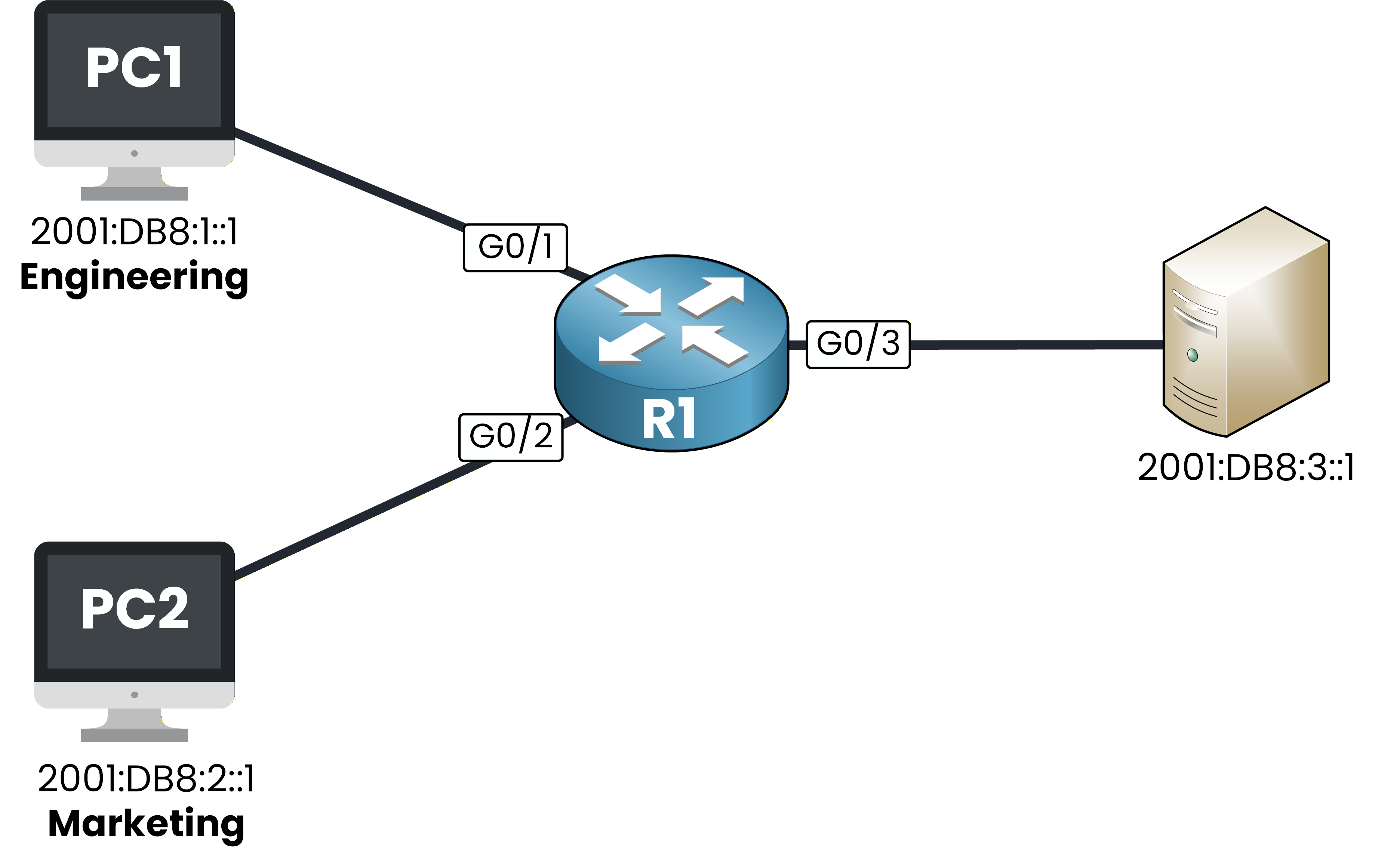
Figure 1 – IPv6 ACL scenario topology
Your goal is to configure an IPv6 ACL that meets these requirements.
Let's look into it together!Answer the question below
In IPv6, what type of ACL can you create?
Before configuring any IPv6 ACL, you need to make sure IPv6 routing is enabled on your router.
Without it, your router will not process IPv6 traffic at all.Enable IPv6 routing
To do this you can use the command
ipv6 unicast-routing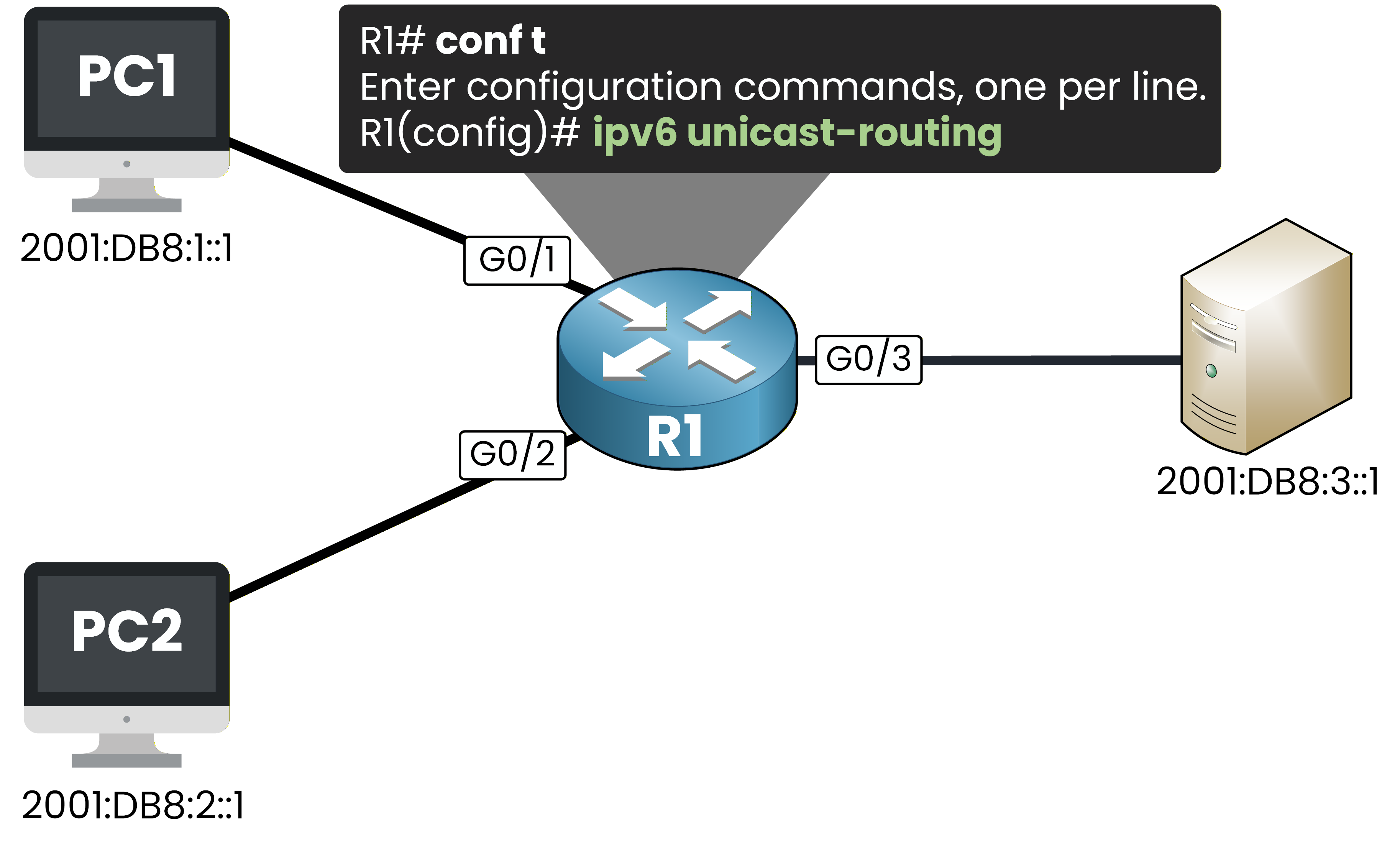
Figure 2 – Enabling IPv6 unicast routing on R1
R1# conf t
Enter configuration commands, one per line.  End with CNTL/Z.
R1(config)# ipv6 unicast-routing
This command enables IPv6 packet forwarding on your router.
It is a prerequisite for any IPv6 feature, including IPv6 ACLs.Create the IPv6 ACL
Now create the ACL called BLOCK-MKTG.
You will permit all IPv6 traffic from Engineering and deny all IPv6 traffic from Marketing.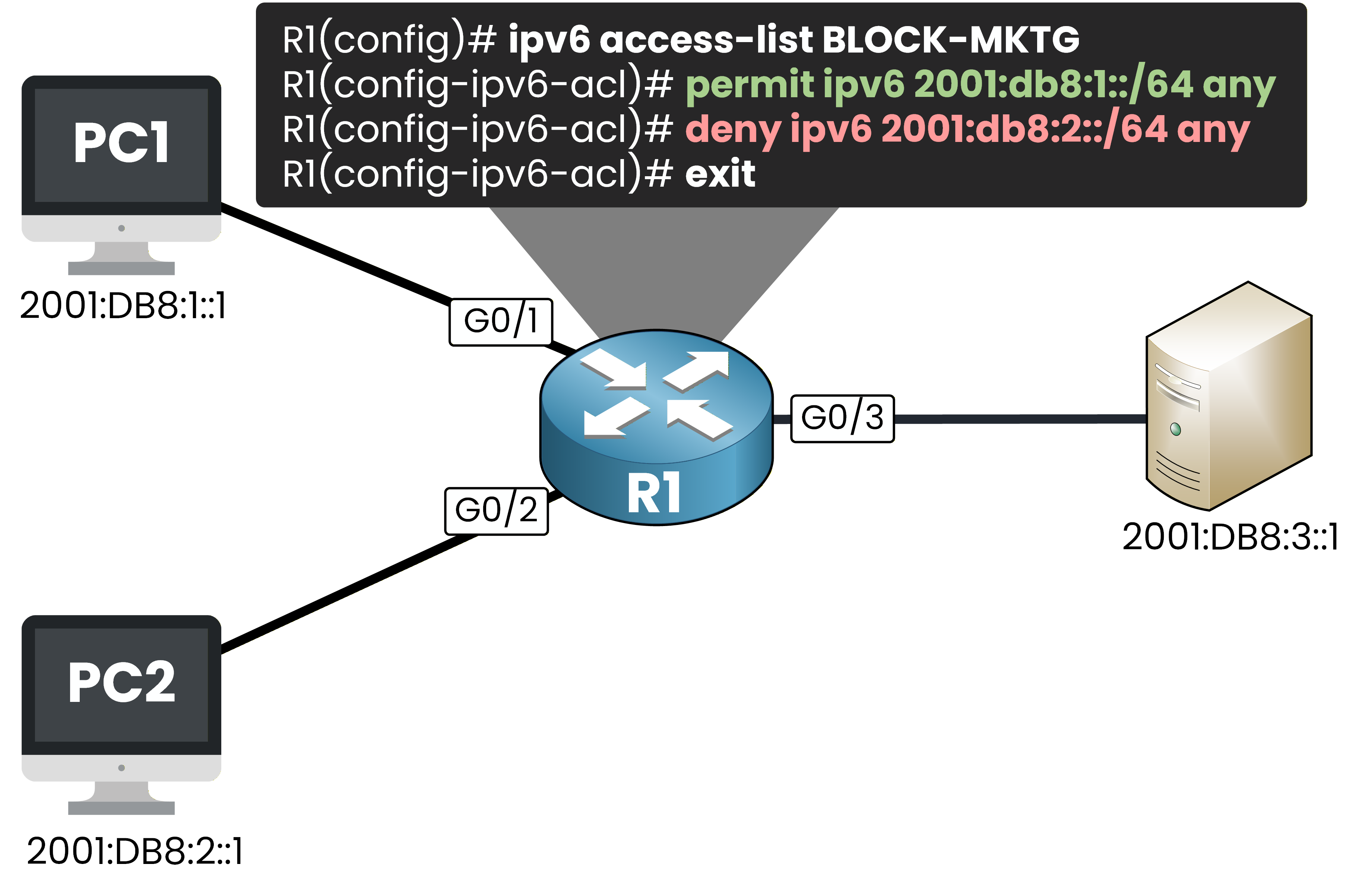
Figure 3 – Creating the BLOCK-MKTG IPv6 ACL on R1
R1(config)# ipv6 access-list BLOCK-MKTG
R1(config-ipv6-acl)# permit ipv6 2001:DB8:1::/64 any
R1(config-ipv6-acl)# deny ipv6 2001:DB8:2::/64 any
R1(config-ipv6-acl)# exit
Notice the syntax differences compared to IPv4:
The command is
ipv6 access-listfollowed by a name. No number, no standard/extended keyword.Source and destination addresses use prefix notation (2001:DB8:1::/64) instead of a wildcard mask.
The prompt changes to
R1(config-ipv6-acl)#instead ofR1(config-ext-nacl)#.
Answer the question below
What notation do IPv6 ACLs use instead of wildcard masks?
Your ACL exists but it is not active yet.
You need to apply it on an interface to start filtering traffic.Apply the ACL on G0/3 outbound
You apply the ACL on G0/3 in the outbound direction.
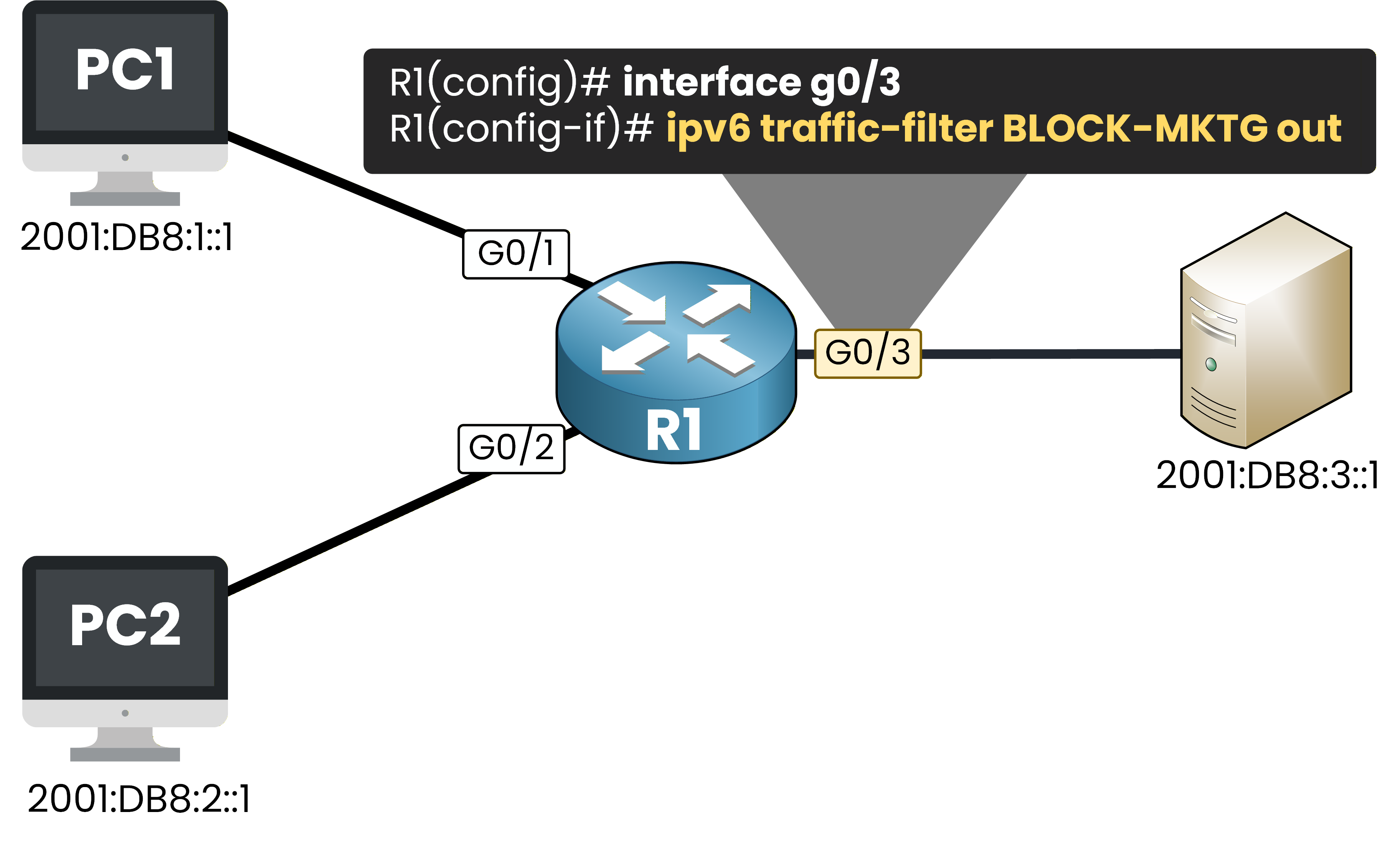
Figure 4 – Applying the IPv6 ACL outbound on G0/3
G0/3 is the exit interface toward the server.
All traffic heading to the server passes through this point, regardless of which department sent it.R1(config)# interface g0/3 R1(config-if)# ipv6 traffic-filter BLOCK-MKTG out R1(config-if)# endThe command is
ipv6 traffic-filter, notip access-group.
This is the IPv6 equivalent.Test from PC1 (Engineering)
Let's verify that your ACL works.
From PC1, ping the server at 2001:DB8:3::1.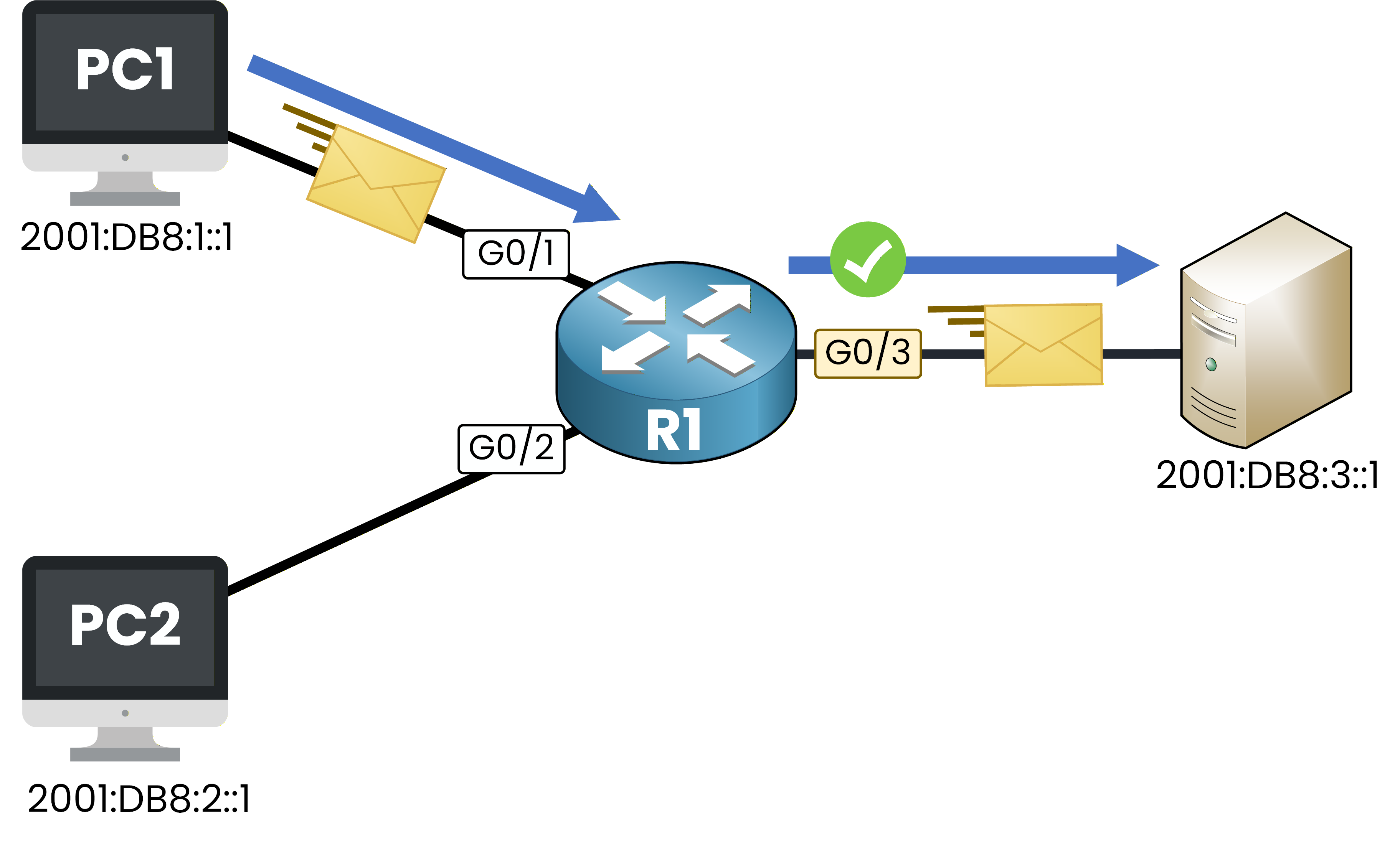
Figure 5 – Engineering traffic is permitted to the server
PC1> ping 2001:DB8:3::1
Type escape sequence to abort.
Sending 5, 100-byte ICMP Echos to 2001:DB8:3::1, timeout is 2 seconds:
!!!!!
Success rate is 100 percent (5/5), round-trip min/avg/max = 1/2/4 ms
The ping succeeds.
PC1’s source address (2001:DB8:1::1) matches the permit entry, so your router forwards the traffic through G0/3.Test from PC2 (Marketing)
Now from PC2, try the same ping.
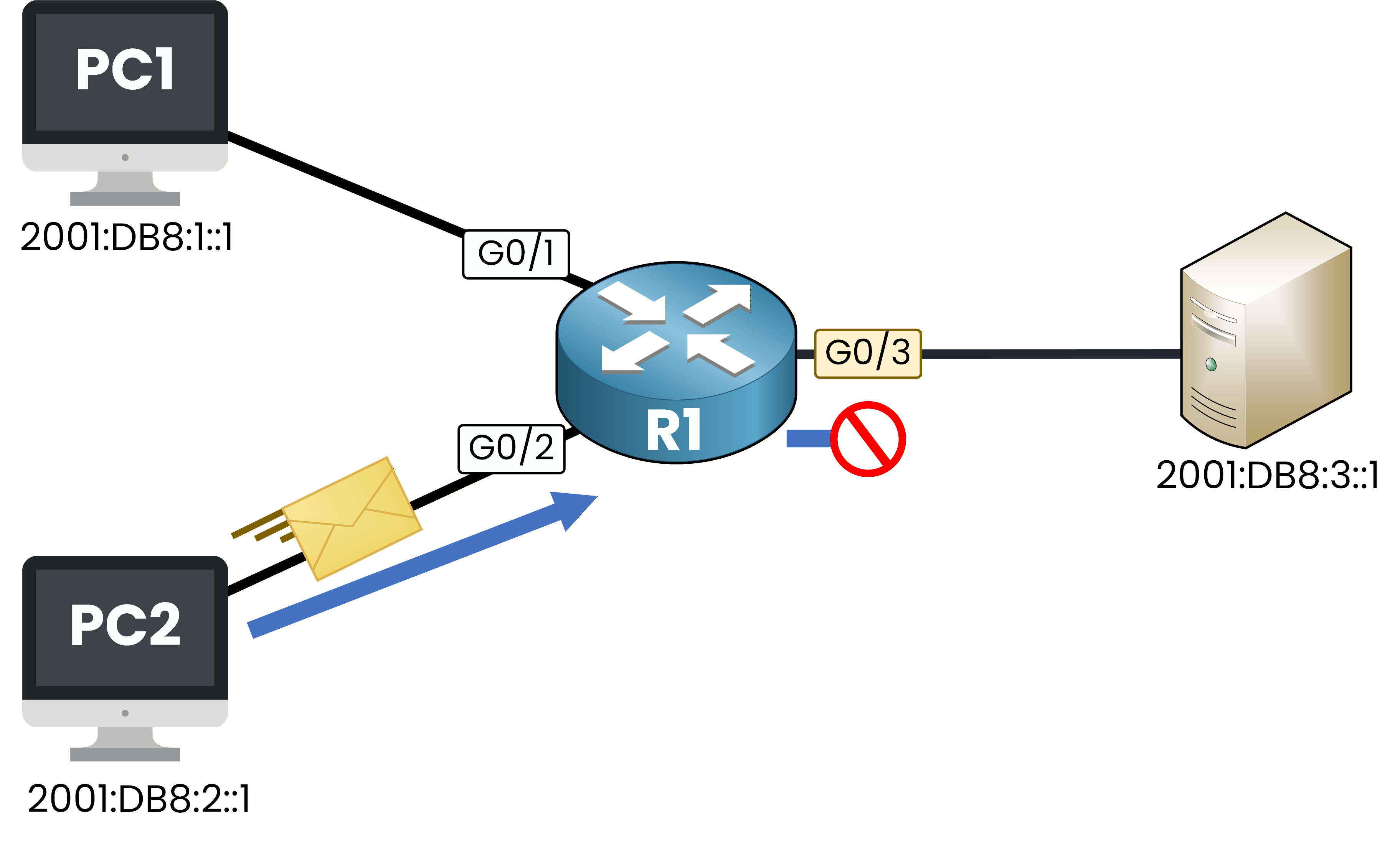
Figure 6 – Marketing traffic is denied at G0/3
PC2> ping 2001:DB8:3::1
Type escape sequence to abort.
Sending 5, 100-byte ICMP Echos to 2001:DB8:3::1, timeout is 2 seconds:
.....
Success rate is 0 percent (0/5)
The ping fails.
PC2’s source address (2001:DB8:2::1) matches the deny entry, so your router drops the traffic at G0/3.Verify the ACL content
Run
show ipv6 access-listto check your entries and see the match counters.R1# show ipv6 access-list BLOCK-MKTG IPv6 access list BLOCK-MKTG permit ipv6 2001:DB8:1::/64 any (5 matches) sequence 10 deny ipv6 2001:DB8:2::/64 any (5 matches) sequence 205 packets from Engineering were permitted.
5 packets from Marketing were denied.
Your ACL is working exactly as expected.
Verify the ACL on the interface
Use
show ipv6 interfaceto confirm the ACL is active on G0/3.R1# show ipv6 interface g0/3 GigabitEthernet0/3 is up, line protocol is up IPv6 is enabled, link-local address is FE80::52DD:A5FF:FE00:3503 No Virtual link-local address(es): Global unicast address(es): 2001:DB8:3::10, subnet is 2001:DB8:3::/64 Joined group address(es): FF02::1 FF02::2 FF02::1:FF00:10 FF02::1:FF00:3503 MTU is 1500 bytes ICMP error messages limited to one every 100 milliseconds ICMP redirects are enabled ICMP unreachables are sent Output features: Access List Outgoing access list BLOCK-MKTGBLOCK-MKTG is applied in the outgoing direction on G0/3.
Answer the question below
What command is used to apply an IPv6 ACL on an interface?
Implicit rules in IPv6 ACLs
Look at the
show ipv6 access-listoutput above.
You only see the two entries you configured.But there is more going on behind the scenes.
Every IPv6 ACL has three hidden rules at the end that the CLI never shows you:permit icmp any any nd-napermit icmp any any nd-nsdeny ipv6 any any
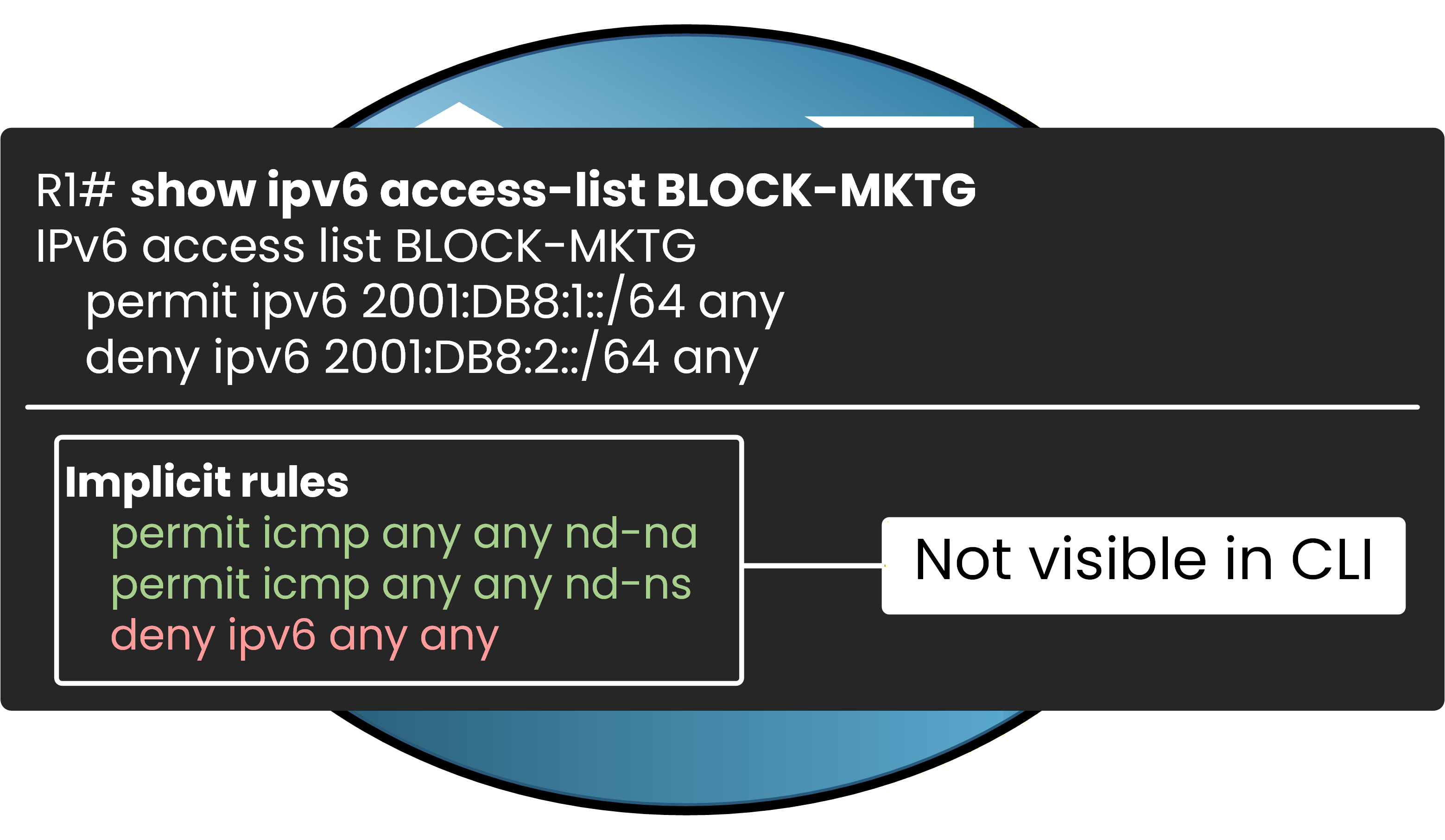
Figure 7 – Implicit rules hidden at the end of every IPv6 ACL
The first two rules allow NDP (Neighbor Discovery Protocol) messages.
The third is the classic implicit deny, just like in IPv4.Why does IPv6 need these extra permits?
In IPv4, your devices use ARP to resolve MAC addresses.
ARP operates at Layer 2, so your ACLs never touch it.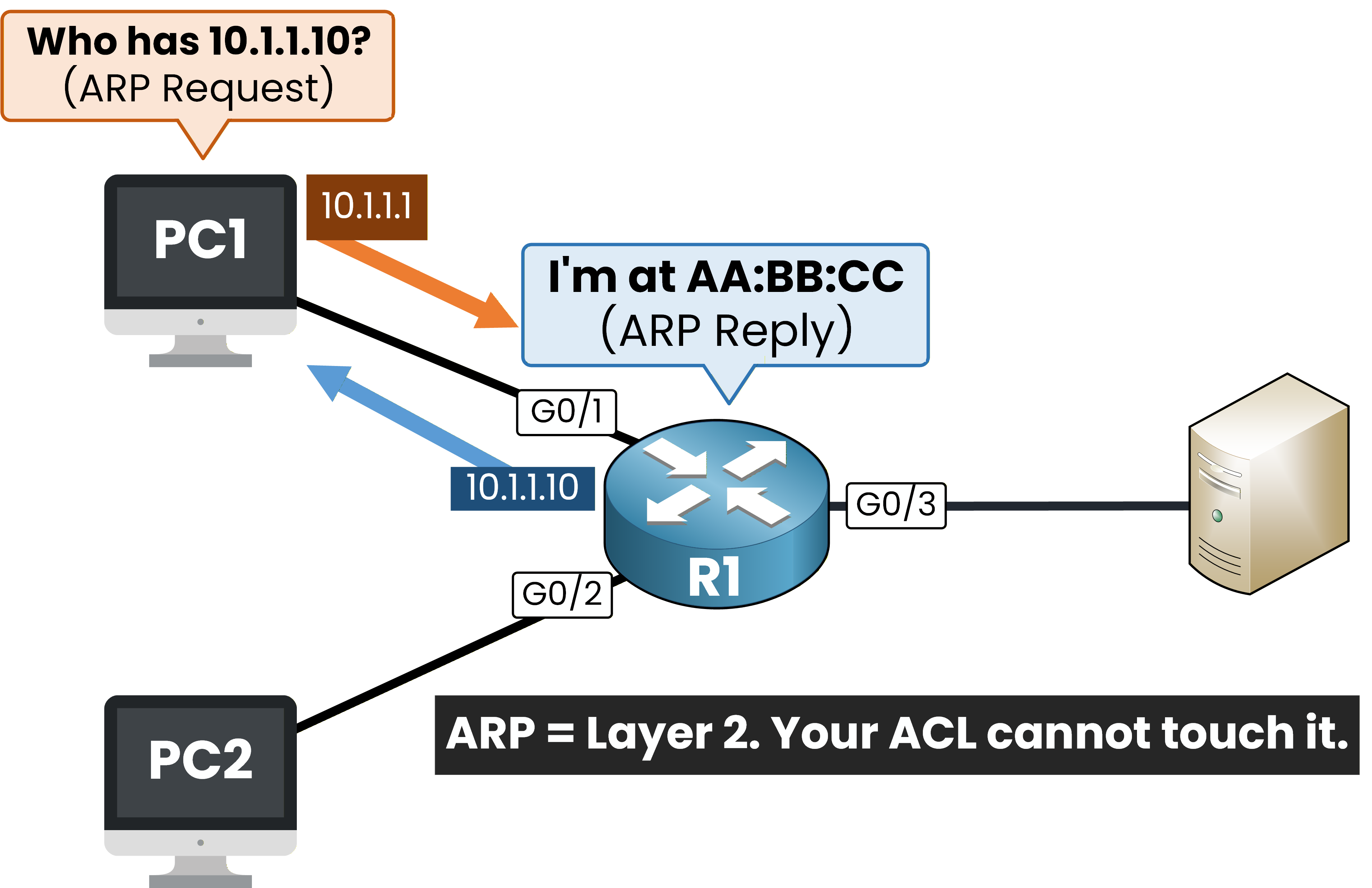
Figure 8 – In IPv4, ARP operates at Layer 2. Your ACL cannot touch it.
In IPv6, ARP does not exist.
Instead, your devices use NDP, which runs over ICMPv6 at Layer 3.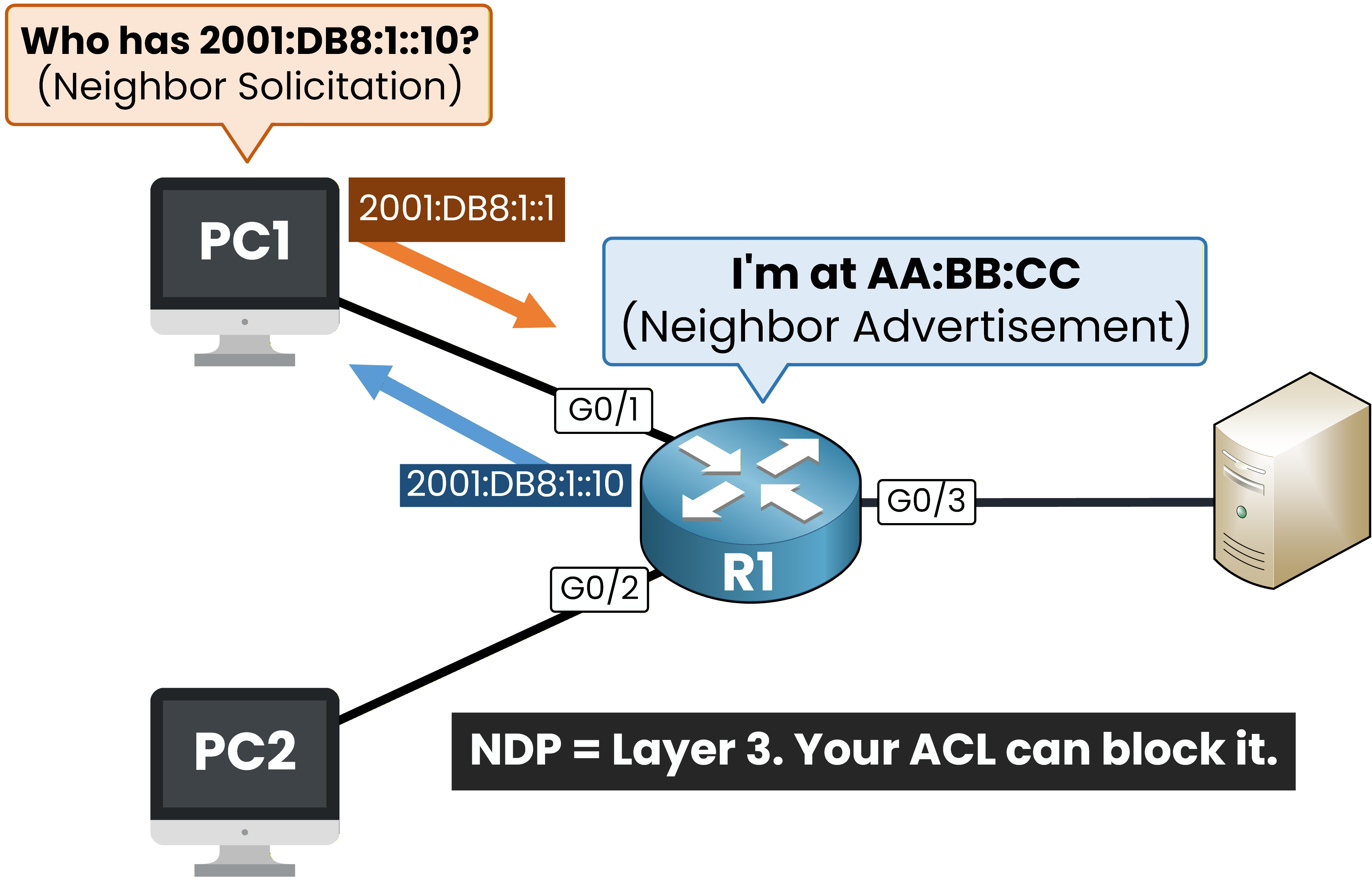
Figure 9 – In IPv6, NDP operates at Layer 3. Your ACL can block it.
This means your IPv6 ACLs can block NDP traffic.
If that happens, your router cannot resolve link-layer addresses and nothing works.
That is why Cisco adds the two implicit permits automatically.The explicit deny trap
Be careful with one thing.
If you add an explicit
deny ipv6 any anyat the end of your ACL, it is evaluated before the implicit NDP permits.
Your explicit deny matches the NDP packets first, and the implicit permits are never reached.In that case, you must manually add these two lines before your deny:
permit icmp any any nd-ns
permit icmp any any nd-na
deny ipv6 any any
Without them, NDP breaks and your network stops working.
Answer the question below
If you add an explicit deny ipv6 any any to your ACL, what must you add before it?
Here is a quick comparison of the key differences.
Feature
IPv4 ACL
IPv6 ACL
Types
Standard + Extended
Named extended only
Identification
Numbered or named
Named only
Address matching
Wildcard mask
Prefix length (/64)
Create command
ip access-listipv6 access-listApply command
ip access-groupipv6 traffic-filterVerify command
show ip access-listsshow ipv6 access-listImplicit rules
deny any
permit nd-na + permit nd-ns + deny any
Table 1 - IPv4 ACL vs IPv6 ACL
The concepts are the same: define rules, apply them on an interface, verify with show commands.
The key difference is the implicit NDP permits, which protect IPv6 neighbor discovery from being blocked by your ACL.Answer the question below
What implicit permits does an IPv6 ACL have that IPv4 does not?